
Tomee 16MB Memory Card
4.7Editor score
251 blocks storage capacity
Plug and play compatibility
Lightweight and durable design
This guide compares the top 10 GameCube Memory Card options for Wii and GameCube consoles, evaluating storage capacity, compatibility, reliability, and design
Preserving your progress in classic titles requires a reliable storage solution. A good GameCube Memory Card ensures your saves remain safe from corruption or accidental loss. Compatibility with specific console models is essential for seamless performance across your collection.
We evaluated ten highly rated options based on user feedback and technical specifications. Each product was assessed for storage capacity, build quality, and ease of use with the RVL-001 Wii model. Our goal is to highlight the most dependable choices available today.
Every pick in this list highlights key strengths and potential limitations for buyers. You will find detailed breakdowns of block counts, transfer speeds, and warranty terms for each item. Prices and availability may vary, so check the latest listings before purchasing.
4.7Editor score

4.7Editor score

4.8Editor score
The following table presents a side-by-side view of the top ten GameCube Memory Card options. We highlight key specifications like block counts, compatibility notes, and unique features to simplify your decision process.
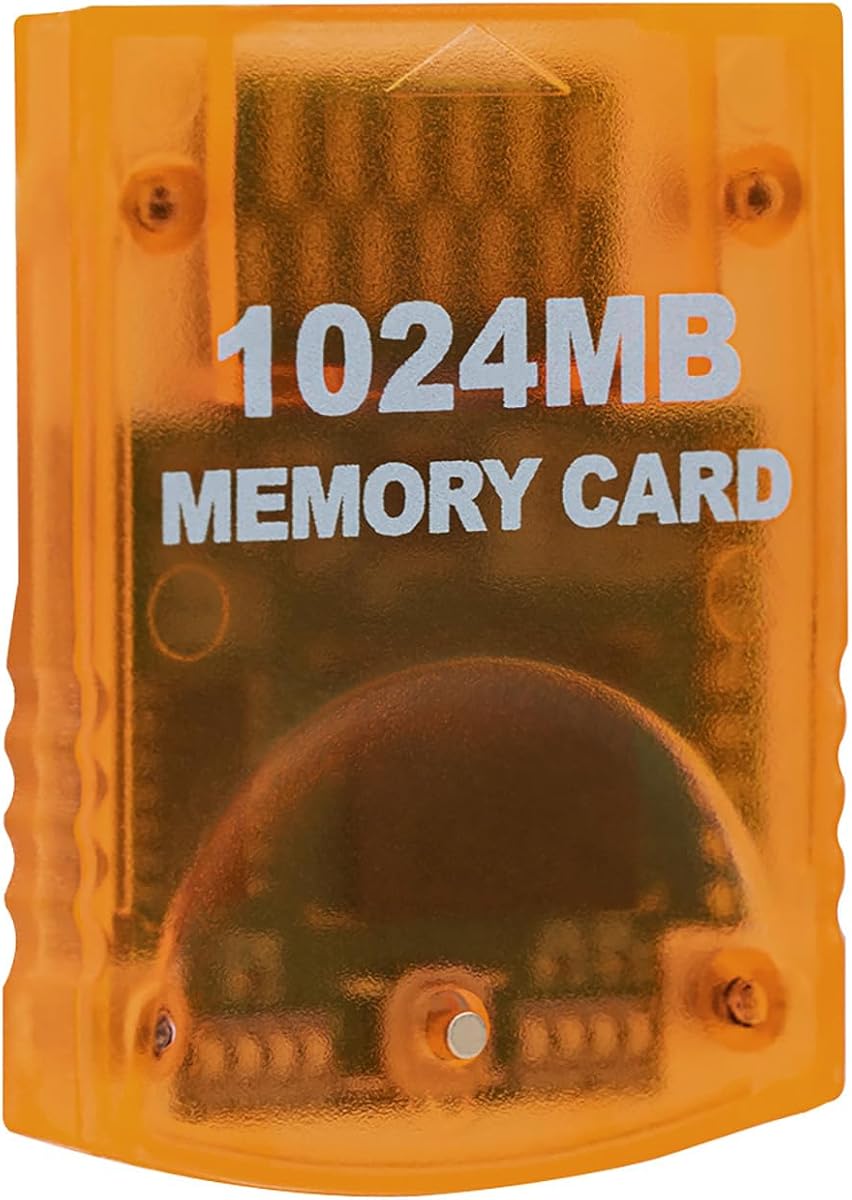


The Tolesum 1024MB Card stands out as a top choice for serious collectors. With 16344 real uncompressed blocks, it offers ample space for dozens of game saves. Its rating of 4.7 reflects strong user satisfaction regarding reliability and ease of use.
We may earn a commission when you buy through this link, at no additional cost to you.
This card divides storage into eight independent 128MB areas, allowing you to organize saves by game or project. The physical button on the front lets you switch between zones instantly, while indicator lights confirm the active section. This design prevents confusion when managing large libraries.
One trade-off is that it is a third-party product, which means it lacks official branding. However, the non-compressed block count ensures it works with titles that reject compressed cards. The translucent orange case also fits well with original GameCube aesthetics.
Collectors and retro gamers who need extensive storage should buy this card. It is ideal for those who play multiple titles requiring significant save data. Always power off your console before inserting or removing the card to maintain file integrity.
Dividing storage into eight distinct zones helps you keep saves tidy without constant deletion.
Real uncompressed blocks ensure compatibility with games that struggle with virtualized storage.
We may earn a commission when you buy through this link, at no additional cost to you.
The MAYFLASH 512MB Card earns a premium badge due to its exceptional build quality and performance. With a 4.8 rating, it consistently impresses users with fast data transfers and reliable storage. The blue translucent design adds a sleek touch to your console setup.
We may earn a commission when you buy through this link, at no additional cost to you.
This card features four storage areas, each with 2043 blocks, giving you flexibility to separate different game saves. The button mechanism to switch areas is smooth and responsive, making navigation intuitive. High-speed performance ensures no lag during save operations.
While it is a third-party item, the high user rating suggests it performs on par with official cards. The only limitation is compatibility with the launch edition Wii console. Users should verify their model number before purchasing to avoid issues.
Gamers looking for a high-quality card with a stylish look should choose this option. It suits those who want reliability and speed without spending a fortune. Remember to handle the card gently to extend its lifespan.
The upgraded chip ensures quick saves and loads without interrupting your gaming flow.
The translucent blue casing complements modern Wii setups and original GameCube decks.
We may earn a commission when you buy through this link, at no additional cost to you.
The Tomee 16MB Memory Card is an excellent budget-friendly choice for casual players. With 251 blocks, it covers most single-player games without breaking the bank. Its 4.7 rating confirms that it delivers consistent performance for everyday use.
We may earn a commission when you buy through this link, at no additional cost to you.
This card focuses on simplicity, offering a compact design that fits snugly in any console slot. You can load, save, copy, and delete files with ease, making it practical for quick sessions. The 16MB capacity is standard for original Nintendo cards.
The main drawback is limited space compared to 512MB or 1024MB alternatives. If you only play a few titles, this is perfect. However, heavy gamers might need to delete saves frequently to free up room.
Casual gamers or those needing a backup card should consider this option. It is ideal for saving progress in essential titles like Mario or Zelda. Always power down the system before inserting or removing the card.
251 blocks are sufficient for most classic titles that require minimal save data.
The slim profile ensures it does not obstruct controller ports or create wobble.
We may earn a commission when you buy through this link, at no additional cost to you.
The Mcbazel 1024MB Card offers a massive storage solution with 16344 blocks. Users rate it 4.7 for its efficiency and ability to handle large data loads. It is designed specifically for the RVL-001 Wii and GameCube consoles.
We may earn a commission when you buy through this link, at no additional cost to you.
Dividing storage into eight 128MB parts allows you to isolate saves effectively. Pressing the button on the card switches between these parts instantly. This feature helps manage multiple game saves without deleting older ones.
While it lacks official status, the non-compress nature ensures compatibility with titles that demand real blocks. The plastic casing is durable enough for daily use. Just ensure you power off the console before handling the card.
Power users who need extensive space should choose this card. It fits those who play RPGs or strategy games with large save files. Always check your console model to ensure compatibility before buying.
Dividing space into parts helps keep saves organized and reduces risk of accidental deletion.
The card processes data quickly to prevent lag during save operations in active games.
We may earn a commission when you buy through this link, at no additional cost to you.
The Tolesum 512MB Card provides a balanced option for users needing moderate storage. It holds 8192 blocks across four data areas, allowing reasonable organization. Users rate it 4.5 for consistent performance and ease of use.
We may earn a commission when you buy through this link, at no additional cost to you.
Pressing the button switches between the four 128MB parts instantly. This helps separate different game saves without needing to delete anything. The blue color gives it a distinct look compared to standard cards.
It works with the RVL-001 Wii model and standard GameCube consoles. However, it may not work on newer mini or family editions that lack the slot. Always verify your console type before purchasing.
Mid-range collectors or casual gamers who play several titles will find this useful. It avoids the cost of 1024MB cards while offering more space than 16MB ones. Power off your console before inserting it.
Dividing storage into four zones helps manage saves without complex navigation steps.
Real blocks ensure games recognize the storage correctly without compatibility errors.
We may earn a commission when you buy through this link, at no additional cost to you.
The 16MB Gamecube Memory Card is a reliable choice for basic storage needs. With 251 blocks, it covers most games without issues. Users rate it 4.6 for its durable shock-resistant design and universal compatibility.
We may earn a commission when you buy through this link, at no additional cost to you.
This card is engineered to fit snugly in any console slot without wobbling. The shock-resistant build protects your files from accidental drops or power outages. It offers a budget-friendly alternative to larger capacity cards.
It works with both GameCube and Wii consoles, specifically the RVL-001 model. While it lacks extra storage areas, it is simple and effective. Just ensure you handle it with care to avoid physical damage.
Casual gamers or those looking for a spare card should choose this option. It is ideal for simple saves in platformers or action games. Always power down before inserting to protect data integrity.
The durable casing protects internal components from accidental drops during gameplay.
Designed for both GameCube and RVL-001 Wii models for broad usage options.
We may earn a commission when you buy through this link, at no additional cost to you.
The Mcbazel 256MB Card brings a stylish pink option with solid performance. It offers 256MB split into two banks, giving you flexibility to organize saves. Users rate it 4.7 for high speed reliability and ease of use.
We may earn a commission when you buy through this link, at no additional cost to you.
The dual bank design allows you to switch between sections with a simple button press. LED indicators show which bank is active, reducing confusion during use. It is designed for plug-and-play convenience.
While it is a third-party item, the high rating suggests robust build quality. It works with GameCube and Wii consoles but explicitly excludes the Wii U. Always power off the system before inserting the card.
Gamers who like a pop of color and need moderate storage should consider this. It suits casual players who want something distinct from standard cards. Ensure you read the console compatibility list carefully.
Splitting memory into two banks helps manage saves without needing a massive card.
The upgraded chip ensures saves happen quickly without interrupting your session.
We may earn a commission when you buy through this link, at no additional cost to you.
The Gamecube Memory Card 251 offers a classic design for basic save needs. With 251 blocks and 16MB flash memory, it stores your progress reliably. Users rate it 4.7 for consistent performance and compatibility with standard consoles.
We may earn a commission when you buy through this link, at no additional cost to you.
It features a simple design that fits the original GameCube and Wii consoles. The card holds settings and game saves securely. It is a straightforward option for those who do not need extra storage zones.
The main limitation is the fixed capacity of 16MB. If you play multiple large games, you might need to delete saves to make room. However, for single titles, it works perfectly.
Gamers seeking a reliable and simple card should choose this option. It is ideal for standard save management without complex features. Always handle the card with care to avoid physical damage.
16MB flash memory provides reliable non-volatile storage for game progress.
The classic shape ensures it fits comfortably in console memory slots.
We may earn a commission when you buy through this link, at no additional cost to you.
The Suncala 1024MB Card stands out with a 60-month warranty. It offers 16344 blocks across eight improved sections. Users rate it 4.7 for its upgraded chip that processes data faster than older cards.
We may earn a commission when you buy through this link, at no additional cost to you.
This card features eight storage sections that can be switched easily. The upgraded chip ensures smooth gameplay without interruptions. The sleek design allows for easy insertion and removal from the console slot.
While it is a third-party item, the long warranty period offers peace of mind. It works with GameCube and RVL-001 Wii consoles. Ensure you power down before inserting to avoid data loss.
Buyers looking for warranty protection and high capacity should choose this card. It suits those who need long-term support. Always check your console model before purchasing to confirm compatibility.
The new chip saves game data 20 percent faster than previous generations.
A five year warranty provides extended protection for your investment.
We may earn a commission when you buy through this link, at no additional cost to you.
The AreMe GC2SD Adapter offers an alternative to traditional memory cards. It lets you use Micro SD cards up to 512GB. Users rate it 4.4 for supporting homebrew loaders like Swiss or GCloader Lite.
We may earn a commission when you buy through this link, at no additional cost to you.
This adapter requires specific software to load game lists. It is transparent and fits well on any GC version. It is ideal for storing games rather than standard saves. Always install the loader first.
The main drawback is the need for technical setup. It is not plug-and-play for standard saves. However, for gamers looking to expand storage significantly, it is unique.
Tech-savvy gamers who want massive storage should consider this option. It is best for homebrew enthusiasts. Always follow instructions carefully to avoid console damage or data loss.
Supports cards up to 512GB which is far more than standard cards.
Requires software like Swiss to function properly for game loading.
We may earn a commission when you buy through this link, at no additional cost to you.
Choosing the right GameCube Memory Card depends on storage needs and console compatibility. This guide breaks down key factors to help you make an informed decision.
Storage capacity is measured in blocks, with standard cards offering 251 blocks or 16MB. High-capacity cards provide 1024MB or more, which is essential for gamers who play multiple titles. Larger block counts allow you to save progress without deleting old files.
Look for cards that offer real uncompressed blocks to ensure compatibility with all games.
Most cards only work with the Wii Model RVL-001 or original GameCube. Newer Wii models like the Family Edition or Mini lack the memory card slot entirely. Always verify your console model before purchasing to avoid return hassles.
Check the product description for specific model numbers to confirm your system is supported.
Build quality varies by manufacturer, with third-party cards often using durable plastics. Translucent designs add style, while opaque options focus on function. Shock-resistant materials protect your saves from accidental drops or mishandling.
Choose a card that fits snugly in the slot to prevent connection issues during play.
High-capacity cards often feature multiple storage areas that can be switched via a button. This helps organize saves by game or project without mixing files. Indicator lights or labels show which section is currently active.
Features like switch buttons make managing large save libraries much easier for collectors.
Faster data transfer speeds prevent lag when saving progress in fast-paced games. Upgraded chips process data quicker than older generic cards. This is vital for games that save frequently during gameplay.
Look for keywords like high speed or upgraded chip to ensure smooth performance.
Official Nintendo cards are reliable but scarce and expensive. Third-party brands vary in quality, so check user ratings carefully. Some offer warranties for added peace of mind against defects.
A longer warranty period suggests confidence in the product's build quality and durability.
Some users prefer adapters that allow Micro SD cards instead of traditional memory cards. These work with homebrew loaders to store games or custom save data. They require technical setup but offer massive storage capacity.
Consider adapters only if you are comfortable with custom console software and setup.
Prices vary based on capacity, brand, and design features. Budget options suffice for single games, while premium cards support extensive libraries. Balance your needs with what you are willing to spend.
Always check for bundle offers or discounts to maximize the value of your purchase.
Always power off your console before inserting or removing the memory card. This prevents data corruption and ensures the system recognizes the card correctly upon restart. Handle the card gently to avoid damaging the metal connectors.
Use the button on high-capacity cards to switch between storage areas. Check indicator lights to see which section is active. Organize your saves by game to avoid confusion when managing files.
Keep your cards in a dry, cool place when not in use. Avoid exposing them to extreme heat or moisture which could damage internal components. Clean the connectors occasionally with a soft cloth to ensure smooth reading.
Only the Wii Model RVL-001 has a memory card slot. Newer Wii models like the Family Edition or Mini do not. Check your console's model number on the back to confirm compatibility before buying.
Most third-party cards are safe but vary in build quality. Choose brands with high user ratings to ensure reliability. Always power off your console before inserting or removing the card to prevent data loss.
Compressed blocks use virtualization to show higher capacity but fail with some games. Uncompressed blocks use real memory ensuring full compatibility. Look for 'non-compress' in the product description to be safe.
Press the physical button on the front of the card to cycle through areas. Indicator lights will show which area is currently active. This lets you organize saves by game easily.
Using a third-party memory card typically does not void hardware warranties. However, any physical damage to the console caused by improper use may not be covered. Handle all components with care.
Nintendo stopped producing official GameCube memory cards years ago. Most available stock is old or third-party. This scarcity drives up prices for official items on the secondhand market.
Yes, using the Wii GameCube mode you can copy saves between cards. This is useful for backing up progress before using a new card. Ensure both cards are properly inserted and recognized.
Most modern emulators use virtual memory cards on your PC. Physical memory cards can be used via adapters for real consoles. Emulators do not require physical hardware for save management.
The Tolesum 1024MB Card and MAYFLASH 512MB Card lead our list with robust storage and performance. These options suit gamers who need space and speed without sacrificing reliability. The Tomee 16MB Card remains a great value for casual players.
Prioritize uncompressed blocks and console compatibility to avoid future issues. Look for third-party brands with strong ratings and warranties for peace of mind. Organizing saves across multiple areas helps keep your library tidy.
Prices and availability change often, so check the current listings before purchasing. Always verify your console model to ensure a perfect fit for your needs.