
AJAZZ AK029 Magnetic Switch One Handed Gaming Keyboard
4.5Editor score
Hall Effect Magnetic Switches
8KHz Polling Rate
29 Key Mini Layout
Discover the top left handed gaming keyboards for 2026. We compare ergonomic layouts, magnetic switches, and programmable keypads to find your ideal setup.
Finding the right left handed gaming keyboard can transform your setup. Whether you need a full ergonomic layout or a compact keypad, the right choice improves comfort and performance significantly.
We analyzed ten top models based on build quality, switch technology, and user ratings. This guide covers everything from budget-friendly options to premium Hall Effect devices designed for competitive play.
Each pick highlights key strengths and trade-offs to help you decide. Prices fluctuate frequently, so check current listings before purchasing to ensure you get the best value available today.
4.5Editor score

4.6Editor score

4.6Editor score
This side-by-side comparison highlights the core specifications of all ten selected models. Use this table to quickly identify which device matches your specific gaming needs and budget constraints.



The RK ROYAL KLUDGE L98 stands out as the premier choice for left-handed gamers seeking a full mechanical experience. With a 4.6 rating, it balances ergonomic design and wireless freedom effectively.
We may earn a commission when you buy through this link, at no additional cost to you.
Its unique Southpaw Numpad layout frees up space for mouse movement while maintaining full numeric functionality. The gasket structure and PBT keycaps ensure a comfortable typing feel that reduces fatigue during long sessions.
While the battery life is impressive at 8000 mAh, the physical size might be too large for compact desks. However, the tri-mode connectivity and hot-swap capability make it a versatile tool for any setup.
If you need a full-size solution that prioritizes comfort and wireless reliability, this keyboard is the top recommendation. It offers the best blend of features for serious users who demand quality.
Relocating the numpad to the left side optimizes desk space for mouse usage while keeping numeric keys accessible.
Switch seamlessly between 2.4GHz wireless, Bluetooth, and USB-C connections to support multiple devices effortlessly.
We may earn a commission when you buy through this link, at no additional cost to you.
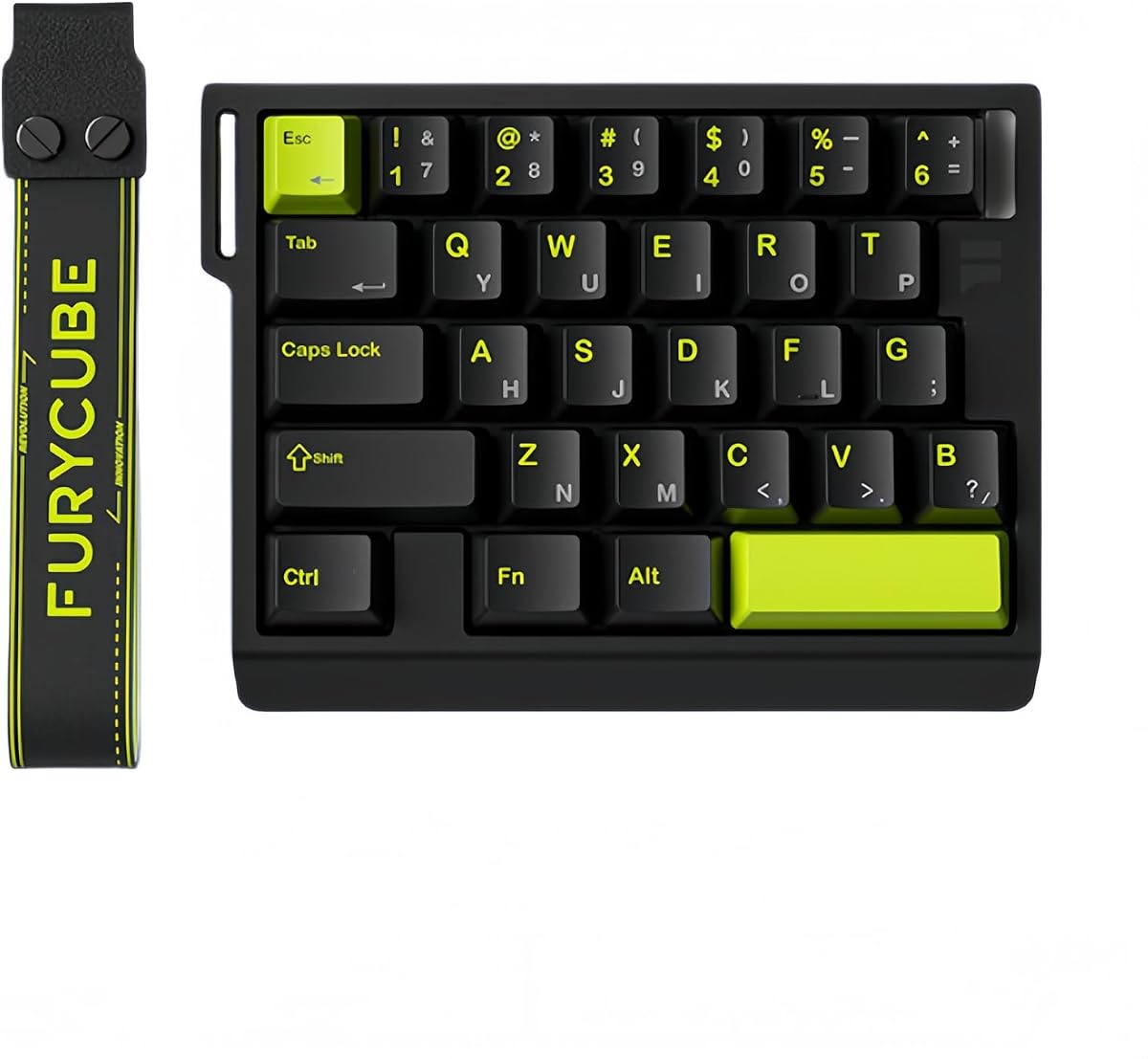
The AJAZZ AK029 delivers high-end magnetic switch technology at an accessible price point. It scores a 4.5 rating by offering pro-level performance features like rapid trigger and SOCD logic.
We may earn a commission when you buy through this link, at no additional cost to you.
Designed for FPS gamers, this mini layout saves significant desk space while providing critical controls. The Hall Effect switches ensure precise actuation, allowing for faster movements without unintended key presses.
The lack of wireless connectivity and fewer keys compared to full keyboards may limit versatility. However, for pure gaming performance, the low latency and durable aluminum build make it a strong contender.
Gamers on a budget who want magnetic switch performance will find this keypad invaluable. It proves that you do not need to spend a fortune to get competitive-grade tools.
Instant key resets enable smoother strafing and faster double-taps essential for competitive shooter games.
The premium aluminum alloy plate provides stability and enhances the acoustic quality of keystrokes.
We may earn a commission when you buy through this link, at no additional cost to you.
The AZERON Keyzen represents the pinnacle of one-handed gaming hardware with its Hall-Effect joystick and Cherry MX switches. It earns a 4.6 rating for its unmatched customization and build quality.
We may earn a commission when you buy through this link, at no additional cost to you.
This device replaces the traditional keyboard entirely for the left hand, offering analog movement and precise key inputs. The adjustable design ensures it fits various hand sizes comfortably, reducing strain over time.
The high cost and complexity of setup might deter casual users. Yet, for enthusiasts seeking total control and a unique ergonomic solution, the investment pays off in comfort and performance.
If you want the best possible one-handed experience and are willing to pay for premium features, the Keyzen is unrivaled. It transforms how you interact with games entirely.
Drift-free magnetic sensors provide smooth analog control for movement without physical stick wear.
3D-printed construction allows for future upgrades and replaceable components to extend lifespan.
We may earn a commission when you buy through this link, at no additional cost to you.
The RedThunder One Handed Gaming Keyboard is a solid entry-level option for casual users. With a 4.4 rating, it offers essential macro functionality and RGB lighting without breaking the bank.
We may earn a commission when you buy through this link, at no additional cost to you.
Its portable design saves desk space while providing 35 anti-ghosting keys suitable for most games. The macro recording feature allows users to customize commands easily without needing complex software.
While it lacks advanced technologies like magnetic switches or ergonomic adjustments, it serves well for beginners. The plastic build feels less premium compared to higher-end models but remains functional for basic use.
New gamers or those needing a secondary keypad for specific tasks will find this device sufficient. It is a reliable tool for simple automation and gaming entry.
Dedicated FN keys allow quick recording and playback of complex key sequences for gameplay efficiency.
Seven color options and multiple lighting modes help match the keyboard to your existing gaming setup.
We may earn a commission when you buy through this link, at no additional cost to you.
The AZERON Gaming Keypad offers unique analog control through its Hall Effect thumbstick. Rated 4.3, it is designed to replace the keyboard for left-hand use while keeping the mouse on the right.
We may earn a commission when you buy through this link, at no additional cost to you.
The thumbstick supports 360-degree analog movement and can function as a mouse cursor. This makes it ideal for genres requiring fluid movement, such as flight simulators or specific RPG titles.
The medium size accommodates various hand types but might feel small for larger hands. Additionally, the price point places it in a competitive space with more traditional keyboard options.
Users seeking a specialized analog input device will appreciate its versatility and customization. It bridges the gap between game controllers and traditional keyboards effectively.
The Hall Effect thumbstick allows for smooth 360-degree movement without physical contact wear.
Exclusive software enables deep customization of lighting, sensitivity, and key mapping profiles.
We may earn a commission when you buy through this link, at no additional cost to you.
This Ergonomic Left Handed Keyboard is designed primarily for office work and accounting tasks. With a 4.4 rating, it emphasizes reducing strain through patented natural key shapes and hotkeys.
We may earn a commission when you buy through this link, at no additional cost to you.
The layout helps eliminate repetitive strain injuries by positioning keys to reduce shoulder strain. It includes multimedia controls for easy access to volume and playback functions during productivity sessions.
While it lacks RGB lighting and mechanical switches, its comfort features are invaluable for office workers. The dual connectivity options ensure compatibility with older and newer systems alike.
Professionals looking for a specialized left-handed typing experience will find this device beneficial. It prioritizes long-term health over gaming aesthetics.
Patented natural_A key structure reduces strain on fingers and wrists during extensive typing.
Eight dedicated multimedia keys streamline common tasks without requiring complex shortcut combinations.
We may earn a commission when you buy through this link, at no additional cost to you.
The Keychron C0 HE offers a powerful magnetic switch experience suitable for both gaming and productivity. Rated 4.2, it supports Windows and macOS with a web-based configurator that avoids driver installations.
We may earn a commission when you buy through this link, at no additional cost to you.
Its 8K polling rate ensures minimal latency during high-speed gameplay. The rapid trigger function allows for precise control in titles that demand quick key resets.
The browser-based configuration is convenient but requires an internet connection for initial setup. While effective, some users might prefer native software for offline management.
Multi-system users who value ease of configuration will appreciate this keypad's flexibility. It is a strong option for creators and gamers using different operating systems.
Configure key mappings and RGB effects directly in the browser without installing extra software.
Streamers can manage scenes and OBS controls seamlessly using programmable macros.
We may earn a commission when you buy through this link, at no additional cost to you.
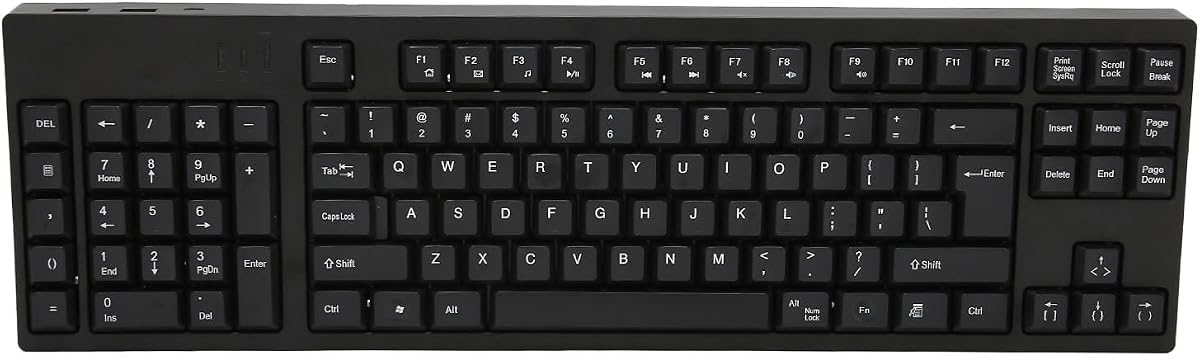
This Left Handed Keyboard provides a complete 109-key layout for those needing full functionality. With a perfect 5.0 rating, it offers excellent ergonomics and convenient additional USB ports.
We may earn a commission when you buy through this link, at no additional cost to you.
The left numpad design ensures the right hand remains free for mouse control. This setup supports accounting tasks and efficient navigation without requiring constant mouse switching.
The use of Micro USB is less modern than USB-C, limiting future-proofing. However, its reliable performance and plug-and-play nature make it a straightforward choice for daily use.
Users needing a full-sized keyboard with specific ergonomic benefits will find this product reliable. It simplifies daily workflows effectively.
Retains standard functionality while moving the numpad to the left for ergonomic balance.
Two additional USB interfaces allow you to connect peripherals directly to the keyboard.
We may earn a commission when you buy through this link, at no additional cost to you.
The FKZ M30HE combines rapid trigger technology with hot-swap capabilities for customization. Rated 4.0, it allows users to adjust actuation points for precise movement control.
We may earn a commission when you buy through this link, at no additional cost to you.
Hot-swappable switches mean you can change the feel without soldering. This feature is rare in budget-friendly one-handed keyboards and offers flexibility for enthusiasts.
Some users report a steeper learning curve with the web driver. However, the ability to bind multiple operations to a single key adds significant value for power users.
Gamers who want to tweak switch behavior without replacing the whole device should consider this model. It balances customization with performance well.
Set precise actuation points from 0.1 to 3.4 mm to suit different gaming styles.
Change switches easily to alter sound and tactile feedback without technical skills.
We may earn a commission when you buy through this link, at no additional cost to you.
The A4tech Ergonomic Left Handed Keyboard focuses on reducing strain through traditional design. With a 4.3 rating, it remains a practical choice for accounting and business environments.
We may earn a commission when you buy through this link, at no additional cost to you.
Its layout supports long typing sessions by minimizing shoulder and back strain. The eight multimedia hotkeys provide quick access to essential functions without interrupting workflow.
The design is utilitarian and lacks modern gaming aesthetics. However, for users prioritizing comfort and reliability over style, it serves its purpose effectively.
Professionals seeking a proven ergonomic solution will appreciate its straightforward functionality. It is a dependable tool for daily office tasks.
Ergonomic layout reduces physical strain and improves posture during long work days.
Built-in hotkeys streamline media control and system shortcuts efficiently.
We may earn a commission when you buy through this link, at no additional cost to you.
Selecting the right keyboard requires balancing ergonomics with performance features. This section outlines the most critical factors to consider before making a purchase.
Decide between full-sized layouts and compact keypads based on your desk space. Full keyboards offer numerical input, while compact models save room for large mouse movements.
Choose a layout that aligns with your primary tasks to ensure efficiency during gameplay.
Mechanical switches provide tactile feedback, while magnetic switches offer faster actuation for competitive gaming. Consider how much travel you prefer per keystroke.
Magnetic switches are ideal for rapid movement, whereas mechanical ones offer classic feedback.
Wireless keyboards provide cable freedom but may introduce latency. Wired options ensure consistent performance for competitive titles.
Verify available connection types like Bluetooth, USB-C, or 2.4GHz before buying.
Look for wrist rests or angled designs to reduce fatigue during long sessions. Ergonomic layouts can prevent long-term strain injuries.
Prioritize devices that support your natural hand position for extended comfort.
Software support allows you to remap keys and record macros for complex actions. Robust drivers make setup easier for power users.
Ensure the accompanying software is user-friendly and cross-platform compatible.
Materials like aluminum alloys offer better stability than plastic frames. High-quality construction extends the lifespan of the device.
Invest in a durable unit if you plan to use it daily for years.
Prices vary widely from budget keypads to premium ergonomic systems. Determine your spending limit while ensuring essential features are met.
Balance cost with the specific features you need for your use case.
Check if the keyboard supports your operating system, whether Windows, macOS, or Linux. Some devices require specific software that may not be available for all platforms.
Verify compatibility to avoid installation issues or feature limitations.
Connect the device using the recommended cable or wireless receiver. Ensure drivers are installed if required for macros or custom lighting configurations.
Clean the surface regularly with a soft cloth to remove dust and debris. Avoid liquid cleaners directly on the keys to prevent electrical damage.
Store the keyboard in a dry environment to protect internal components. When not in use, turn off wireless models to conserve battery life.
One-handed keyboards focus on compact layouts for gaming, often sacrificing standard keys. Full keyboards provide complete layouts including numpads and function rows for productivity tasks.
Magnetic switches allow adjustable actuation and rapid trigger, reducing response time. This makes them highly effective for fast-paced games requiring precise movements.
Yes, these keyboards are designed to leave space for the mouse on the right. This setup allows simultaneous operation without hand interference.
Some models offer plug-and-play functionality, while others need software for macros. Check product details to ensure software compatibility with your system.
Use compressed air to remove debris and a damp cloth for surface cleaning. Remove keycaps if possible to clean underneath carefully.
Modern 2.4GHz wireless connections offer near-lag-free performance. Bluetooth may have slightly higher latency but remains suitable for general use.
Look for adjustable angles and wrist supports. Ergonomic layouts should reduce strain on your wrists and shoulders during extended sessions.
Many gaming keypads include macro recording features. Software tools allow you to bind complex command sequences to single keys.
Our top recommendations like the RK ROYAL KLUDGE L98 and AJAZZ AK029 offer excellent balance for different needs. Whether you want a full mechanical feel or a magnetic switch, there is a model for everyone.
Prioritize features that directly impact your gaming experience, such as latency and ergonomics. Investing in the right layout can improve performance and reduce physical strain over time.
Prices change frequently, so check current listings for the best deals. These tools are a significant upgrade for anyone looking to optimize their left-handed setup.