
Thermalright Assassin X120 Refined SE
4.7Editor score
Four heat pipes with AGHP tech
Quiet TL-C12C PWM fan included
Compatible with AM4 AM5 and Intel sockets
This expert guide compares the top CPU Air Cooler Fan Heatsink models for performance noise and compatibility to help you choose the right cooling solution.
Choosing the right CPU air cooler fan heatsink is essential for maintaining optimal performance and longevity of your computer system. A good cooler ensures your processor stays within safe temperature ranges even under heavy workloads or gaming sessions. It prevents thermal throttling and extends the life of your hardware components significantly over time.
We compared ten leading models based on cooling efficiency noise levels compatibility with modern sockets and overall build quality. Our analysis focuses on real world performance data and user feedback to ensure accuracy. This list covers single and dual tower designs suitable for various case sizes and budgets.
Each pick highlights specific strengths such as budget value premium performance or unique features like digital displays. We included detailed breakdowns of specs and mounting options to aid your decision process. Keep in mind that prices and availability can change frequently so check current listings before purchasing.
4.7Editor score

4.8Editor score
4.7Editor score
This table provides a side-by-side comparison of all ten selected air coolers. It highlights key specifications such as heat pipe count fan size and supported sockets to help you quickly identify the best fit for your build requirements.


The Thermalright Assassin X120 Refined SE is a standout budget cooler that delivers impressive performance for its class. With a rating of 4.7 stars users praise its ability to handle modern CPUs without breaking the bank. Its compact single tower design fits easily into most mid tower cases.
We may earn a commission when you buy through this link, at no additional cost to you.
It features four 6mm heat pipes utilizing AGHP technology to ensure efficient heat transfer regardless of case orientation. The included TL-C12C PWM fan provides sufficient airflow while keeping noise levels low during idle and moderate loads. The aluminum heatsink cover adds a clean aesthetic touch.
While it may not match the raw cooling power of dual tower units it is more than adequate for non overclocked systems. The trade-off is primarily in maximum TDP handling which caps around standard daily usage scenarios. Installation remains straightforward with provided brackets for both platforms.
This cooler is ideal for builders seeking reliable performance without spending heavily on premium solutions. Whether you are upgrading an older system or building a budget gaming PC it offers peace of mind. We recommend it for anyone prioritizing value over extreme thermal headroom.
The AGHP technology ensures heat pipes work effectively even in non vertical orientations improving reliability.
Compatibility with Intel and AMD sockets ensures this cooler will work with future CPU upgrades easily.
We may earn a commission when you buy through this link, at no additional cost to you.
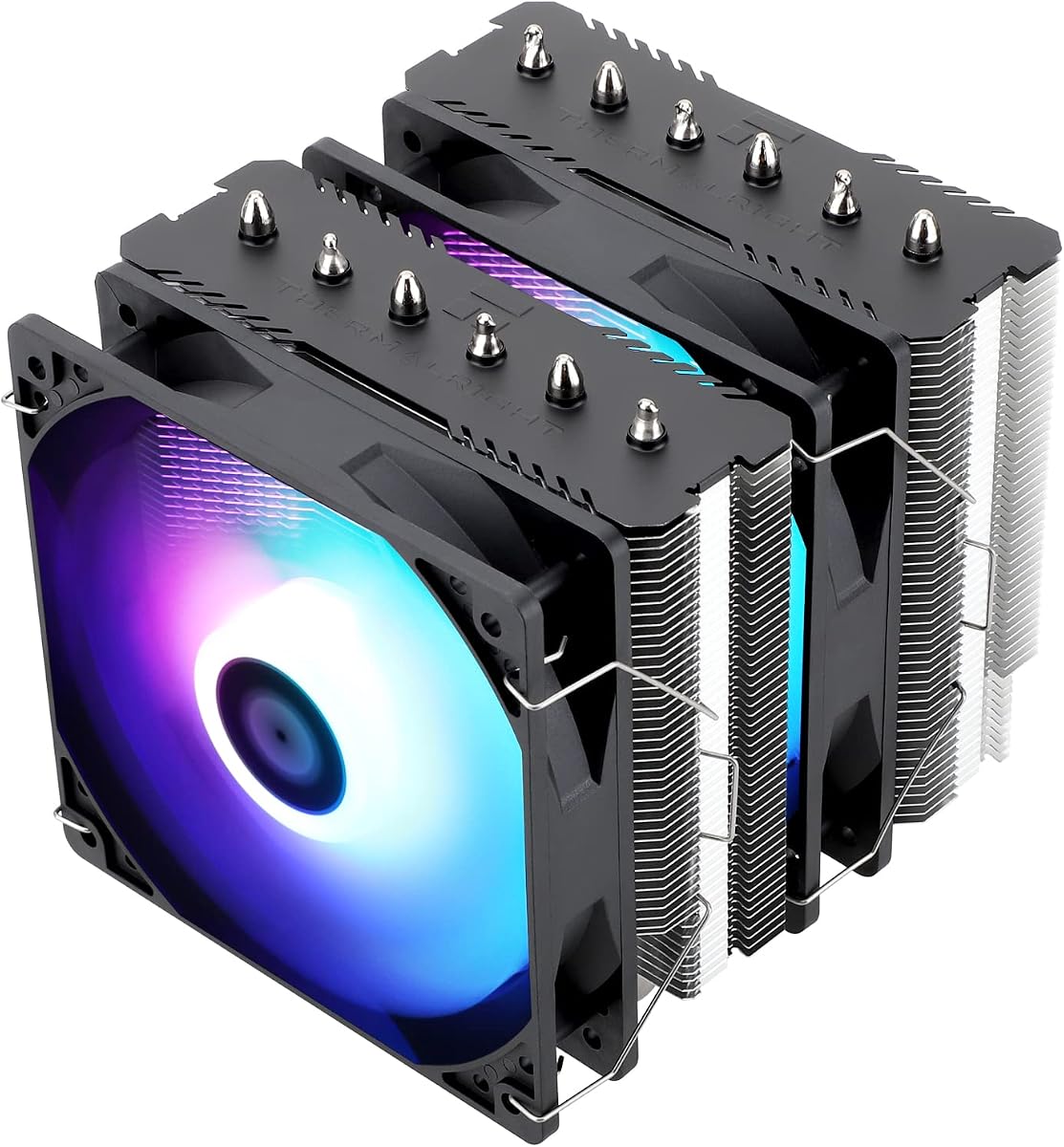
The Thermalright Peerless Assassin 120 SE ARGB brings dual tower cooling to the budget segment with impressive results. Its 4.7 rating reflects strong satisfaction among users who need more cooling headroom than single tower units provide. The all-black design with ARGB fans suits modern aesthetic preferences.
We may earn a commission when you buy through this link, at no additional cost to you.
Six heat pipes and a soldered copper base work together to pull heat away from the CPU quickly. The dual TL-C12C-S fans offer high airflow while maintaining low noise levels thanks to their bearing design. AGHP technology solves gravity issues for varied mounting orientations.
Installation might require checking RAM clearance due to the dual tower width but the benefits are clear. The ARGB sync allows for customization which adds visual flair to your build. It handles higher TDP CPUs well making it a solid choice for demanding workloads.
If you want premium cooling performance without the premium price tag this model is a top contender. It bridges the gap between budget and high-end options effectively. We suggest it for gamers or creators needing robust thermal management on a budget.
Soldered joints between pipes and base improve heat conduction efficiency significantly over standard pressed fits.
The ARGB fan sync feature lets you match cooler lighting with the rest of your PC setup easily.
We may earn a commission when you buy through this link, at no additional cost to you.
The Noctua NH-D15 chromax.Black is widely recognized as the gold standard for high performance air cooling. With a 4.8 rating it consistently outperforms many competitors in thermal tests and noise metrics. The all black chromax design fits seamlessly into dark themed builds.
We may earn a commission when you buy through this link, at no additional cost to you.
Its dual 140mm NF-A15 fans are renowned for their balanced airflow and whisper quiet operation. Six heat pipes combined with an optimized fin structure ensure efficient heat dissipation even under extreme overclocking loads. The included NT-H1 thermal paste simplifies installation.
While the height may limit compatibility with certain large cases it remains a versatile choice for most setups. The trade-off of size is justified by the incredible thermal performance and reliability it offers. Users appreciate the durability and long term support from Noctua.
This cooler is perfect for enthusiasts who refuse to compromise on performance or acoustics. It handles high end Intel and AMD CPUs with ease. We highly recommend it for those seeking a set it and forget it cooling solution.
The NF-A15 fans use advanced blade geometry to move air quietly reducing noise during gaming sessions.
Noctua products are known for longevity ensuring your cooler lasts as long as your PC hardware.
We may earn a commission when you buy through this link, at no additional cost to you.
The Noctua NH-U12A chromax.Black delivers exceptional performance in a 120mm form factor. With a 4.8 rating it proves that small coolers can still offer top tier thermal results. The dual fan design ensures balanced airflow across the heatsink fins.
We may earn a commission when you buy through this link, at no additional cost to you.
It fits most tower cases without overhanging RAM slots making it ideal for tight builds. The NF-A12x25 fans are engineered for high pressure and low noise ensuring efficient cooling under load. Its 158mm height provides flexibility for case selection.
While it lacks the raw pipe count of larger units the optimized design compensates effectively. The trade-off is primarily for users with very high TDP requirements seeking extreme overclocking. It remains a reliable choice for standard high performance processors.
Choose this cooler if you need strong cooling but have limited case clearance or RAM clearance. Its compatibility and performance make it a standout option. We suggest it for builders who prioritize fit without sacrificing too much thermal efficiency.
The narrow profile ensures your high speed memory modules are accessible and not obstructed by the fan.
Two fans working in tandem increase airflow pressure improving heat exchange across the fin array.
We may earn a commission when you buy through this link, at no additional cost to you.
The Thermalright Assassin X 120R Digital ARGB introduces a digital screen to the cooling space. With a 4.7 rating it appeals to users who want monitoring data visible directly on the cooler. The design stands out with a modern tech inspired look.
We may earn a commission when you buy through this link, at no additional cost to you.
Four heat pipes and a high speed fan ensure adequate cooling for standard CPUs. The screen displays key metrics like CPU temperature and usage using TRCC software. This adds functionality beyond traditional heatsinks making it unique in the market.
The fan speed is higher than average which might generate slightly more noise but ensures efficiency. The trade-off is the need for software integration to customize the display fully. It fits well in cases with 151mm height clearance.
This model suits gamers or enthusiasts who enjoy system monitoring at a glance. It combines performance with a visual feature not found on other budget units. We recommend it for those wanting style and utility in one package.
The LCD panel updates instantly showing you system stats without opening monitoring software.
ARGB fan lighting syncs with motherboard headers for a cohesive look across your build.
We may earn a commission when you buy through this link, at no additional cost to you.
The Noctua NH-D15 is a legendary cooler known for consistent high performance across generations. With a 4.8 rating it remains a favorite among enthusiasts and professionals alike. The classic beige design is iconic though some may prefer a different aesthetic.
We may earn a commission when you buy through this link, at no additional cost to you.
Its dual 140mm fans and six heat pipes provide class leading cooling without excessive noise. The SecuFirm2 mounting system ensures easy and secure installation on various sockets. Included thermal paste helps get started immediately upon unboxing.
While the size requires careful case planning the thermal headroom is unmatched for air cooling. The trade-off is the visual style which might not match all build themes. It remains a practical choice for functionality over form.
Select this model if you prioritize raw performance and proven reliability above all else. It handles demanding workloads effectively making it suitable for heavy use. We suggest it for users who want a no compromise cooling solution.
The SecuFirm2 system simplifies installation ensuring consistent pressure across the CPU surface.
High quality components ensure the fan and heatsink remain reliable over many years of use.
We may earn a commission when you buy through this link, at no additional cost to you.
The Noctua NH-D15S chromax.Black offers a refined version of the D15 with a single fan focus. With a 4.8 rating it balances performance and compatibility effectively for many users. The asymmetric design avoids obstruction of critical motherboard components.
We may earn a commission when you buy through this link, at no additional cost to you.
It includes a single NF-A15 fan designed for high performance and low noise. The 65mm RAM clearance allows for tall heat spreader memory without interference. This makes it ideal for cases with limited width clearance.
Removing one fan reduces noise but slightly impacts peak cooling potential compared to the dual fan version. The trade-off is acceptable for users needing specific clearance. It maintains the high build quality associated with Noctua.
Choose this if you need dual tower cooling but require better motherboard component access. It suits builders with tall RAM or specific case constraints. We recommend it for those valuing fit and finish equally.
The offset tower design ensures your high profile RAM sticks remain accessible for adjustments.
Running a single optimized fan keeps acoustic levels lower than dual fan setups under load.
We may earn a commission when you buy through this link, at no additional cost to you.
The Noctua NH-D9L is designed for small form factor builds without compromising too much on cooling. With a 4.7 rating it stands out as a reliable choice for compact systems. Its 110mm height fits well in ITX or HTPC cases.
We may earn a commission when you buy through this link, at no additional cost to you.
The dual tower design maximizes surface area within the tight height constraints. The 92mm NF-A9 fan provides balanced airflow and maintains quiet operation. It ensures your system stays cool even in restricted air volume environments.
While it may not handle extreme overclocking it suffices for standard CPUs in small boxes. The trade-off is lower airflow capacity compared to 120mm or 140mm models. It remains highly efficient for its size.
This cooler is perfect for HTPCs or tiny gaming rigs requiring discreet cooling. It proves small does not mean ineffective in thermal design. We suggest it for builders prioritizing case flexibility.
Its compact size allows for a sleek build in cases that reject standard tower coolers.
The optimized fins ensure maximum heat transfer even with a smaller fan diameter.
We may earn a commission when you buy through this link, at no additional cost to you.
The Noctua NH-U12S offers a slim single tower solution for those needing a balance of size and performance. With a 4.8 rating it is a favorite for users wanting simplicity. Its classic design remains a staple in many builds.
We may earn a commission when you buy through this link, at no additional cost to you.
The NF-F12 focused flow fan ensures efficient air movement across the fins. The narrow profile prevents overhang on RAM and PCIe slots ensuring compatibility with most boards. It works well for standard thermal requirements.
While it lacks the mass of larger units it delivers solid results for everyday tasks. The trade-off is primarily in handling high heat generation workloads. It remains a robust choice for general use cases.
Select this model for a reliable single tower cooler that fits almost anywhere. It provides peace of mind with minimal fuss. We recommend it for users seeking a no hassle setup.
The NF-F12 fan blade design pushes air efficiently through the heatsink for better cooling.
Its slim shape ensures compatibility with almost all modern motherboards without clearance issues.
We may earn a commission when you buy through this link, at no additional cost to you.
The Thermalright Peerless Assassin 120 SE is a well rounded dual tower cooler delivering high value. With a 4.8 rating users appreciate its balanced approach to cooling and cost. The nickel plated pipes add durability and visual appeal.
We may earn a commission when you buy through this link, at no additional cost to you.
Six heat pipes and dual PWM fans ensure rapid heat dissipation for demanding CPUs. The soldered copper base improves contact for better thermal transfer overall. AGHP technology enhances orientation flexibility in varied cases.
While it lacks ARGB features it focuses on raw thermal performance efficiently. The trade-off is the visual customization some might want in a build. It fits comfortably within most mid tower cases easily.
This model is ideal for performance focused users who need reliable cooling without extra bells. It offers high efficiency and long term reliability. We recommend it for builds prioritizing function over flashy visuals.
The soldered base ensures minimal thermal resistance between the CPU and the heat pipes.
Dual fans push air effectively through the fin stack to maintain low CPU temps.
We may earn a commission when you buy through this link, at no additional cost to you.
Selecting the right air cooler involves evaluating several key factors beyond just looks. We break down what matters most to ensure you pick a solution that fits your case and CPU needs.
Thermal Design Power (TDP) indicates how much heat a cooler can handle. Look for a unit rated higher than your CPUs TDP to ensure safe operation under load.
Always choose a cooler with a TDP rating exceeding your processor needs for a safety margin.
Check the internal height of your case against the cooler's total height. Many dual tower units exceed 160mm requiring specific clearance.
Verify your case support for the cooler's height before purchasing to avoid fit issues.
Large coolers may overlap RAM slots or block expansion cards. Asymmetric designs often offer better compatibility in this regard.
Ensure the cooler does not obstruct your memory or graphics card slots.
Noise is measured in decibels (dB). Look for lower dB ratings if you want a quiet PC environment especially at idle.
Prioritize models with high quality fans if silence is a priority for your workspace.
Confirm the cooler supports your motherboard socket type like LGA1700 or AM5. Most modern units cover these but checking is essential.
Check the manufacturer listing for compatibility with your specific CPU socket.
Some coolers require backplates or complex mounting hardware. Look for kits that include all necessary brackets for your platform.
Choose models with clear instructions and pre-installed brackets for easier setup.
Prices vary widely from budget to premium. Determine how much cooling power you need to avoid overspending.
Balance your budget with the thermal requirements of your specific use case.
Consider if you prefer RGB lighting or a clean all black look. Chromax units offer a sleek alternative to standard designs.
Choose an appearance that matches your PC build theme.
When installing the cooler, apply thermal paste in a small pea sized amount to the CPU center. Mount the cooler firmly to ensure even pressure for optimal heat transfer.
Keep the fan blades clean using compressed air periodically to prevent dust buildup. Dust can restrict airflow and raise CPU temperatures over time.
Check that fan cables are securely plugged into the CPU_FAN header on your motherboard. Proper connection ensures speed control and prevents overheating.
Yes many high performance air coolers handle moderate overclocking well. Dual tower models offer enough thermal headroom for most enthusiasts. For extreme overclocking liquid cooling might be preferred.
Quality units use PWM fans that adjust speed based on load. They remain quiet at idle but may ramp up under heavy workloads. Look for models with low dB ratings for better acoustics.
Most models include thermal paste in the box. Check the product details to confirm. If not included a small tube usually costs little and is easy to find.
Not all coolers fit ITX cases due to height constraints. Look for models under 160mm or specific low profile coolers. The NH-D9L is designed for such builds.
Air coolers rarely need replacement unless fans fail. They have no fluids to leak and last as long as the bearings do. Replace if you notice unusual noise or reduced cooling.
Dual fans provide more airflow and lower speeds for better cooling. However they take more space. Single fan models are easier to fit but may run louder to achieve same cooling.
We have reviewed ten top air coolers ranging from budget singles to premium dual towers. Each offers unique benefits tailored to specific build needs and performance goals.
Prioritize case clearance and socket compatibility before focusing on extra features like RGB. Ensuring the unit fits your motherboard is key to a successful install.
Prices and availability shift frequently so check current listings on Amazon for the best deals. Choose a cooler that balances your budget with your thermal requirements.