
ASUS RT-AX82U AX5400 Dual-Band WiFi 6 Gaming Router
4.4Editor score
Mobile Game Mode included
Aura RGB lighting effects
Lifetime free AiProtection Pro
Discover the top gaming router for Gta 6 online to ensure low latency and stable connections. We compare speed, range, and gaming features for 2026.
Finding the right gaming router for Gta 6 online is essential for smooth gameplay. You need low latency, high throughput, and reliable connections to avoid lag during intense multiplayer sessions.
We analyzed ten top routers based on performance, features, and user reviews. Each device offers unique strengths for gaming, ensuring you find the perfect match for your setup and budget.
Every pick includes detailed specs, pros, and cons to help you decide. Prices fluctuate frequently, so check current listings before purchasing to secure the best deal available today.
4.4Editor score

4.3Editor score

4.3Editor score
This side-by-side comparison highlights key specifications across all ten routers. Evaluate speed, bands, and special gaming features to determine which model fits your network needs best.

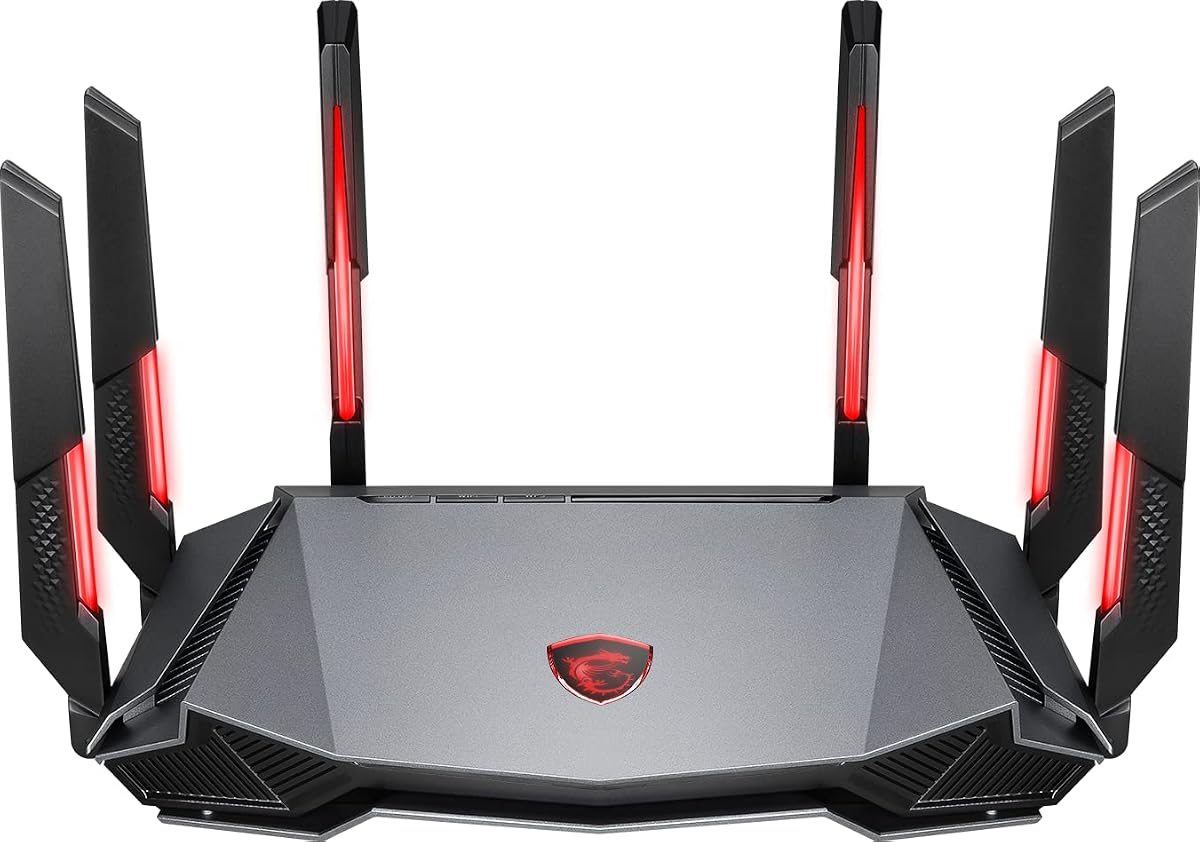


This router stands out for its tri-band 6E capabilities, ensuring low latency for Gta 6 online sessions. With a 4.3 rating, users praise its speed and reliability during peak hours.
We may earn a commission when you buy through this link, at no additional cost to you.
The 6 GHz band provides ample bandwidth for gaming traffic, minimizing congestion. Its dual-core CPU and RAM handle multiple devices simultaneously without performance drops.
While it lacks multi-gig ports, its EasyMesh compatibility helps expand coverage effectively. The VPN server feature adds flexibility for secure remote connections.
Gamers needing solid performance without premium pricing should consider this model. It delivers consistent speeds and reliable connections ideal for competitive online play.
The dedicated 6GHz band offers interference-free channels, ensuring smoother gameplay with minimal ping spikes.
Extend your network effortlessly by adding EasyMesh-compatible extenders, eliminating dead zones across your home.
We may earn a commission when you buy through this link, at no additional cost to you.
The GL.iNet Flint 2 earns a 4.6 rating for its robust dual 2.5G ports and high-speed gaming capabilities. It excels in customization for tech-savvy users.
We may earn a commission when you buy through this link, at no additional cost to you.
Its support for OpenVPN and Wireguard provides fast secure connections, essential for privacy-conscious gamers. AdGuard Home integration blocks ads and trackers seamlessly.
The router handles over a hundred devices effortlessly, making it suitable for smart homes. However, initial setup requires careful firmware updates for optimal performance.
Ideal for users needing advanced networking control and high throughput. Its strong connectivity features ensure stable performance during intense multiplayer sessions.
High-speed OpenVPN and Wireguard support ensures secure and fast connections for gaming and streaming.
High storage and memory allow seamless handling of over a hundred connected devices simultaneously.
We may earn a commission when you buy through this link, at no additional cost to you.
The ASUS ROG GT-BE98 Pro leads with WiFi 7 technology, offering speeds up to 30Gbps. Its 4.3 rating reflects strong performance despite the premium price.
We may earn a commission when you buy through this link, at no additional cost to you.
Multi-link Operation ensures stable connections by using multiple bands simultaneously. Dual 10G ports provide unmatched wired connectivity for gaming PCs and consoles.
Triple-Level Game Acceleration optimizes traffic from your device to the server. External antennas boost coverage, ensuring strong signal strength throughout your home.
For enthusiasts demanding cutting-edge performance, this router is ideal. Its advanced features justify the cost for those needing ultimate speed and reliability.
New 320MHz channels and 4096-QAM significantly increase capacity and throughput for next-gen gaming.
Dual 10G and quad 2.5G ports offer flexibility for multiple high-speed wired devices.
We may earn a commission when you buy through this link, at no additional cost to you.
The ASUS RT-AX82U offers great value with a 4.4 rating, balancing performance and affordability. It provides robust gaming features at an accessible price point.
We may earn a commission when you buy through this link, at no additional cost to you.
Mobile Game Mode minimizes latency for phone gamers, while AiProtection Pro secures your network. Aura RGB adds customization, allowing lighting effects to match your setup.
Although dual-band, its 160MHz channels deliver fast speeds. The renewed option provides significant savings without compromising essential features for gaming.
Perfect for budget-conscious gamers needing reliable WiFi 6 performance. Its lifetime security and game acceleration make it a strong contender for casual to mid-level gaming.
Mobile Game Mode prioritizes traffic to reduce lag during mobile gaming sessions.
Lifetime free AiProtection Pro ensures continuous network security against evolving cyber threats.
We may earn a commission when you buy through this link, at no additional cost to you.
The MSI Radix AXE6600 features a powerful 1.8GHz quad-core processor, earning a 4.3 rating for performance. AI QoS ensures gaming traffic gets priority automatically.
We may earn a commission when you buy through this link, at no additional cost to you.
Tri-Band WiFi 6E supports up to 6.6Gbps speed, handling multiple streams smoothly. Mystic Light RGB synchronization enhances the gaming aesthetic of your setup.
The dedicated game accelerator provides uninterrupted WiFi, reducing jitter. While the interface might need some learning, its features deliver solid connectivity for gamers.
Ideal for users wanting high-speed processing and automatic traffic management. Its strong hardware ensures reliable performance even during heavy network usage.
AI QoS automatically prioritizes gaming data packets to minimize lag and maximize throughput.
The 1.8GHz quad-core processor handles complex network tasks efficiently without slowing down.
We may earn a commission when you buy through this link, at no additional cost to you.
The TP-Link Archer GXE75 offers a balanced feature set with a 4.4 rating. Its Tri-Band AXE5400 speed ensures smooth performance for all connected devices.
We may earn a commission when you buy through this link, at no additional cost to you.
A dedicated 2.5G WAN port unlocks full potential for multi-gig internet plans. The intuitive game panel provides real-time insights into network performance and status.
Game Acceleration optimizes connections to reduce jitter and ping. EasyMesh compatibility allows expansion, while HomeShield security protects against online threats.
Excellent for households needing both speed and security. Its comprehensive features make it suitable for diverse gaming and streaming needs.
A 2.5G WAN port enables ultra-fast connectivity for future-proof multi-gig internet speeds.
Game Acceleration optimizes traffic for platforms like Steam and Origin to reduce lag.
We may earn a commission when you buy through this link, at no additional cost to you.
The TP-Link AX73 earns a 4.5 rating for reliability and coverage. Its WiFi 6 AX5400 speed provides fast connectivity suitable for general gaming needs.
We may earn a commission when you buy through this link, at no additional cost to you.
Featuring 4T4R technology, it ensures stable connections with reduced congestion. Vented areas help dissipate heat, ensuring long-term performance during heavy usage.
While it lacks dedicated gaming ports, its performance remains strong for casual and mid-tier gamers. USB 3.0 sharing adds utility for media storage.
Ideal for users needing solid coverage and reliability without premium costs. Its high user rating reflects consistent performance and ease of use.
Covers up to 2000 sq ft, ensuring strong signal throughout large homes and offices.
4T4R technology enhances speed and reliability by reducing network congestion effectively.
We may earn a commission when you buy through this link, at no additional cost to you.
The TP-Link BE550 introduces WiFi 7 at a competitive price. Though rated 4.0, its advanced features like Multi-Link Operation ensure stable connections for modern devices.
We may earn a commission when you buy through this link, at no additional cost to you.
Five 2.5G ports provide extensive connectivity for multiple high-speed devices. HomeShield offers comprehensive security, while the private IoT network enhances safety.
Ideal for tech enthusiasts wanting next-gen WiFi without a premium price. Its future-proofing capabilities make it a solid choice for evolving home networks.
For those needing raw speed and connectivity options, this router delivers. While not strictly gaming-focused, it supports demanding network needs effectively.
Links multiple bands simultaneously for stable internet connections and efficient data transfers.
Five 2.5G ports ensure peak performance for multi-gig internet connections and devices.
We may earn a commission when you buy through this link, at no additional cost to you.
The ASUS ROG GT-AXE16000 earns a 4.4 rating for its massive speed and unique quad-band design. It supports 16000 Mbps total throughput, ensuring exceptional performance.
We may earn a commission when you buy through this link, at no additional cost to you.
New 6GHz frequency band reduces interference for smoother gameplay. Dual 10G ports and RangeBoost Plus ensure strong signal and fast data transfer.
Lifetime internet security and Instant Guard add protection against threats. Its advanced hardware justifies the premium for users needing top-tier reliability.
Best for large homes and heavy users needing extreme bandwidth. Its combination of speed and coverage makes it a standout choice for ambitious gaming setups.
Quad-band WiFi 6E boosts speeds to 16000 Mbps with reduced interference.
Exclusive ASUS RangeBoost Plus improves signal range and overall coverage for large spaces.
We may earn a commission when you buy through this link, at no additional cost to you.
The ASUS ROG GT-AX11000 maintains a 4.5 rating for proven gaming performance. Its tri-band design and 10 Gigabit wireless provide strong connectivity.
We may earn a commission when you buy through this link, at no additional cost to you.
Triple-Level Game Acceleration prioritizes traffic effectively for reduced lag. WTFast technology optimizes connections globally, ensuring better performance across servers.
Lifetime security protects your network against threats, while Aura RGB adds style. Its quad-core CPU ensures stability even under heavy load conditions.
Ideal for users seeking reliable performance and dedicated gaming tools. While lacking newest standards, its features continue to deliver excellent gaming experiences.
Prioritizes traffic with device, game packet, and server optimization for reduced latency.
WTFast optimizes connections globally to minimize lag for online multiplayer gaming.
We may earn a commission when you buy through this link, at no additional cost to you.
Choosing the right router involves evaluating speed, bands, and specific gaming features. This guide outlines the critical factors to ensure optimal performance for Gta 6 online.
Modern routers support WiFi 6E or WiFi 7, offering faster speeds and reduced latency. Higher speeds ensure smooth gameplay even when multiple devices are connected simultaneously.
Look for routers with at least WiFi 6E to access the dedicated 6GHz band for better performance.
Tri-band routers provide separate bands for gaming, streaming, and other devices, reducing congestion. This separation ensures gaming traffic remains prioritized during heavy network usage.
Select a tri-band model to ensure consistent performance across all connected devices.
Some routers offer dedicated game acceleration, optimizing traffic to reduce lag and ping. These features prioritize your gaming packets for smoother online experiences.
Check for built-in game acceleration tools specifically designed for online gaming optimization.
Gigabit Ethernet ports are standard, but 2.5G or 10G ports provide future-proof connectivity. These ports allow for faster wired connections if your internet plan exceeds 1Gbps.
Prioritize routers with multi-gig ports if you have high-speed internet plans.
Robust security protects your devices from threats. Look for routers with built-in security suites and support for WPA3 encryption.
Ensure your router includes lifetime or long-term security updates to stay safe online.
Coverage area depends on antenna design and power. Routers with beamforming and high-power FEMs offer better signal strength and range.
Select a router that covers your home's square footage to avoid dead zones.
Mesh compatibility allows you to expand your network seamlessly. This feature is essential for large homes where a single router cannot cover everything.
Choose a model with EasyMesh or AiMesh support for future network expansion.
A powerful CPU and sufficient RAM ensure the router handles multiple devices without slowing down. This hardware is crucial for maintaining stability during peak usage.
Look for multi-core processors and at least 512MB RAM for reliable performance.
Set up your router in a central location to maximize coverage. Ensure it is elevated and away from obstructions like walls and metal objects.
Keep firmware updated to access the latest security patches and performance improvements. Regular updates help maintain optimal functionality and protection.
Periodically reboot your router to clear memory and resolve minor issues. This simple step ensures consistent performance and connectivity stability.
Routers with WiFi 6E or 7 support are ideal for Gta 6 online due to low latency. Models like the ASUS ROG GT-BE98 Pro offer excellent performance.
Use a wired connection for gaming devices and prioritize gaming traffic using QoS settings. Ensure your router supports gaming acceleration features.
WiFi 6E provides a dedicated 6GHz band reducing interference. While not mandatory, it significantly improves performance for competitive gaming.
Yes, mesh systems with dedicated gaming bands ensure whole-home coverage. They prevent dead zones, keeping your connection stable everywhere.
Gta 6 online requires stable bandwidth and low latency. A router supporting gigabit speeds ensures smooth gameplay even with other devices online.
Check for firmware updates monthly to ensure optimal performance and security. Regular updates prevent vulnerabilities and improve stability over time.
Brand matters due to software features and build quality. ASUS and TP-Link offer strong gaming-focused features and reliable customer support.
If your home is large, a mesh system is better. For smaller spaces, a single high-performance router suffices to cover all rooms.
Choosing the right gaming router for Gta 6 online involves balancing speed, reliability, and features. Our top picks like the TP-Link AXE5400 and ASUS GT-BE98 Pro deliver exceptional performance.
Prioritize routers with dedicated gaming features and robust security to ensure smooth, uninterrupted gameplay. Consider your home size and internet plan when making a final decision.
Prices and availability change frequently, so verify current offers before purchasing. Investing in the right hardware today will enhance your online gaming experience for years to come.