
ARZOPA 16.1'' 144Hz Portable Gaming Monitor
4.4Editor score
Affordable price point value
144Hz smooth gaming visuals
Lightweight portable design build
Modern gamers often seek flexibility and mobility without sacrificing visual quality. A gaming monitor without PC needed allows you to connect directly to consoles, handhelds, or mobile devices for immersive play anywhere.
We evaluated ten top-rated models based on refresh rate, portability, color accuracy, and connectivity options. Our analysis focuses on performance metrics that matter most to serious gamers and content creators alike.
Each pick highlights key strengths and trade-offs to help you find the perfect screen. Keep in mind that prices fluctuate frequently, so check current listings before making your final purchase decision.
4.4Editor score

4.4Editor score

4.4Editor score
As an Amazon Associate we earn from qualifying purchases.
This side-by-side comparison highlights the key specifications and strengths of each model to help you quickly identify the right fit for your gaming setup and budget requirements.



This portable gaming monitor stands out with its 2K resolution and 180Hz refresh rate, delivering crisp images and fluid motion perfect for competitive gaming or detailed creative work.
We may earn a commission when you buy through this link, at no additional cost to you.
The 100% sRGB coverage ensures accurate colors, while FreeSync technology eliminates tearing. Its adjustable stand and wide connectivity options make it versatile for laptops, consoles, and mobile devices alike.
While it weighs more than ultra-thin models, the CNC metal body adds durability. The included speakers offer decent audio, reducing the need for external peripherals during quick gaming sessions.
For gamers needing a high-performance secondary screen without a dedicated PC, this model balances size and quality exceptionally well. It remains a top choice for portability without compromising visual fidelity.
The 180Hz refresh rate provides ultra-smooth gameplay essential for fast-paced titles where split-second reactions determine success.
Dual USB-C and HDMI ports ensure seamless connection to a wide range of modern devices including smartphones and game consoles.
We may earn a commission when you buy through this link, at no additional cost to you.
The EVICIV monitor offers solid performance at an accessible price point. Its 120Hz refresh rate and 1ms response time make it suitable for casual and competitive gaming without breaking the bank.
We may earn a commission when you buy through this link, at no additional cost to you.
With 125% sRGB coverage, colors appear vibrant and accurate. The included travel sleeve adds value, protecting the screen during commutes or trips. VESA mounting allows flexible positioning on desks or arms.
While the resolution is Full HD rather than 2K, the bezel design maximizes screen space effectively. It is an ideal choice for users prioritizing cost-efficiency alongside decent visual performance.
If you need a reliable portable screen for work and play without premium costs, this model delivers consistent results. Its compact form factor fits easily into backpacks for true mobility.
The dedicated sleeve case ensures your screen stays safe from scratches and impacts during daily transport or storage.
VESA compatibility gives you the freedom to mount the display vertically or horizontally based on your specific workflow needs.
We may earn a commission when you buy through this link, at no additional cost to you.
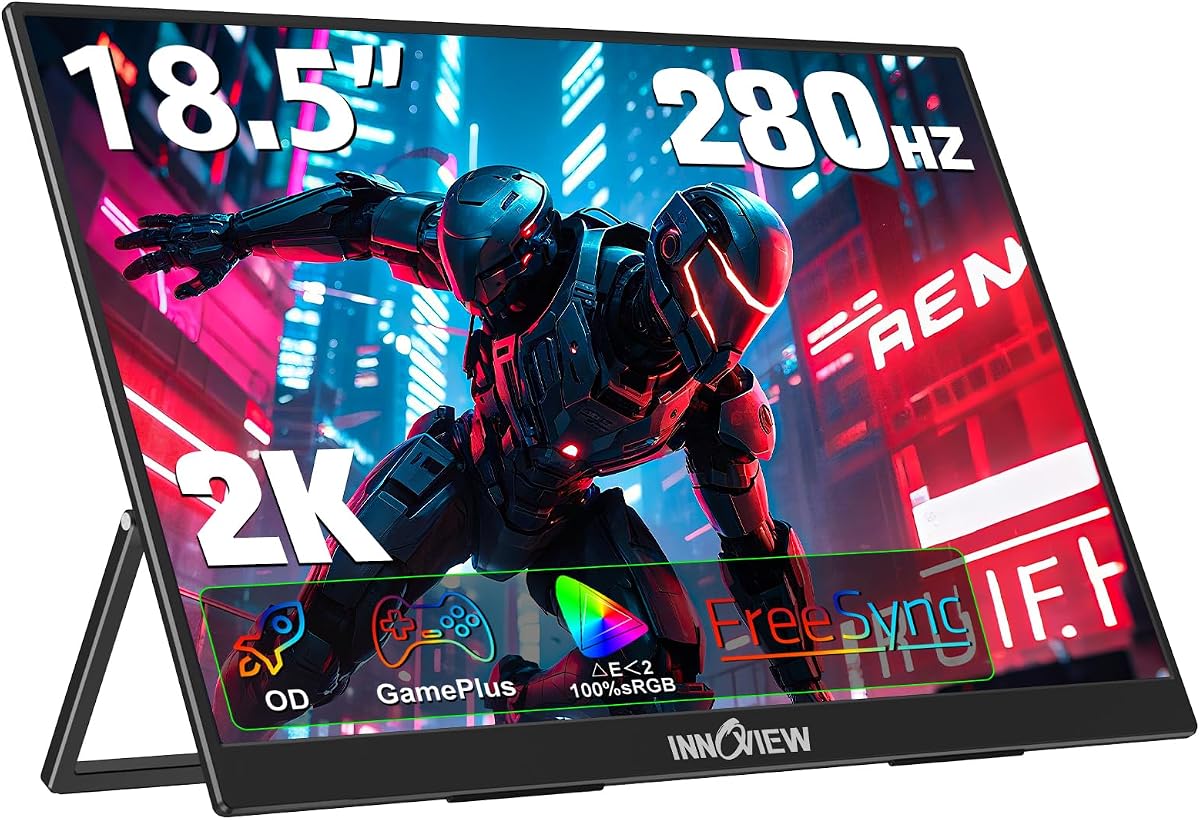
InnoView's 280Hz refresh rate is a standout feature for competitive players seeking the smoothest possible motion. Combined with 2K resolution, it offers exceptional detail and fluidity in fast-paced games.
We may earn a commission when you buy through this link, at no additional cost to you.
GamePlus features like customizable crosshairs add utility for FPS players. The stand is sturdy and allows multiple viewing angles. HDR support enhances contrast and brightness for more immersive visual experiences.
Keep in mind that achieving the full 280Hz requires a capable host device with enough power output. It may need external power for consistent performance under heavy load conditions.
For enthusiasts chasing maximum frame rates on a portable screen, this model is unmatched. It delivers professional-level performance in a form factor that fits on any desk or travel bag.
Custom crosshairs and FPS modes give serious gamers tactical advantages without needing external overlays or software modifications.
HDR technology deepens contrast and brightness, making dark scenes more detailed and colors pop in modern titles.
We may earn a commission when you buy through this link, at no additional cost to you.
The ViewSonic VX1654 is designed for maximum portability. Weighing only 1.5 lbs and measuring just 0.7 inches thick, it slips easily into any backpack without adding significant weight or bulk.
We may earn a commission when you buy through this link, at no additional cost to you.
Its single-cable USB-C connection simplifies setup by handling both video and power. The IPS panel ensures consistent colors across wide viewing angles, while the 144Hz refresh rate keeps motion smooth and clear.
The included cover protects the display during travel. For users needing a lightweight second screen for presentations or on-the-go gaming, this model fits perfectly into a minimalist workflow setup.
Though the screen is smaller than others, the quality remains high. If you prioritize portability above all else, this monitor delivers reliable performance in a truly pocketable form factor.
One cable does it all, reducing clutter and making plug-and-play functionality seamless for busy professionals and travelers alike.
The included cover shields the screen from scratches and dust, ensuring longevity during frequent travel or daily commutes.
We may earn a commission when you buy through this link, at no additional cost to you.
The ARZOPA Z1FC offers excellent value with its 144Hz refresh rate and 106% sRGB coverage at a budget-friendly price. It is ideal for casual gamers who want smooth visuals without spending much money upfront.
We may earn a commission when you buy through this link, at no additional cost to you.
Its built-in kickstand makes it easy to use without extra mounts or stands. The 16.1-inch screen provides enough workspace for most tasks while remaining small enough to carry easily in a bag.
While it lacks adaptive sync technologies, the standard performance remains impressive for the price. It serves well as a secondary display for streaming or gaming on handhelds and laptops daily.
If you need an affordable portable screen that performs well above its price tag, this model is a smart pick. It delivers essential gaming features without unnecessary premium costs or complex requirements.
Accessing 144Hz at a low price makes smooth gaming accessible to a wider audience without needing high-end hardware investments.
The built-in stand removes the need for extra accessories, allowing immediate use out of the box anywhere you need it.
We may earn a commission when you buy through this link, at no additional cost to you.
This 32-inch curved monitor brings desktop-level immersion to a gaming setup. The 240Hz refresh rate ensures ultra-smooth action, while the 1500R curve wraps visuals around your field of view naturally.
We may earn a commission when you buy through this link, at no additional cost to you.
With HDR support and 300 Nits brightness, images look vibrant even in brighter environments. FreeSync reduces tearing for fluid gameplay. It is best suited for stationary use rather than frequent travel.
While it is not truly portable in the traditional sense, its connectivity options allow console use without a PC. The included DP cable makes setup quick for high-refresh gaming sessions at home.
If you want a large, immersive screen for console or handheld gaming, this monitor delivers cinematic quality. It stands out for those prioritizing screen size and curve over compactness.
The 1500R curve fills peripheral vision naturally, drawing you into games with a sense of presence rare on flat panels.
Support for high refresh rates via HDMI makes it ideal for next-gen consoles that can output fast frame rates.
We may earn a commission when you buy through this link, at no additional cost to you.
The SANSUI 24-inch monitor offers a balanced compromise between screen size and immersion. Its 1500R curve and 160Hz refresh rate provide a smooth gaming experience suitable for consoles and PCs.
We may earn a commission when you buy through this link, at no additional cost to you.
Game modes like FPS and RTS tailor visuals to specific genres. HDR support and high contrast ratios deliver rich visuals. It is an excellent choice for a dedicated console station at home.
While not designed for frequent travel, its HDMI and DP ports support high refresh rates. It provides a cost-effective upgrade over standard 60Hz displays for those who prefer curved screens.
If you want an affordable curved screen for console gaming, this model delivers strong performance. It is ideal for users who value immersion and budget over extreme portability.
Built-in game modes adjust contrast and brightness automatically, giving you the best view for any genre instantly.
High contrast ratios ensure deep blacks and bright highlights, making dark game scenes look detailed and vibrant.
We may earn a commission when you buy through this link, at no additional cost to you.
The UPERFECT 18-inch monitor stands out with its QLED technology and wide color gamut. It delivers deep blacks and vibrant colors that rival larger desktop monitors in a slim portable form factor.
We may earn a commission when you buy through this link, at no additional cost to you.
With 400 Nits brightness, images stay clear in well-lit rooms. The 144Hz refresh rate keeps motion fluid. It is perfect for creators and gamers who prioritize color accuracy alongside portability in their workflow.
Note that optimal performance requires a strong USB-C power adapter to drive the panel fully. This ensures the display runs smoothly without flickering or dimming during intense sessions.
If you seek the highest visual quality in a portable package, this model is worth the investment. It bridges the gap between professional-grade displays and mobile-friendly designs beautifully.
The 100% DCI-P3 coverage ensures colors match professional standards, making it ideal for editing work and media consumption.
At just 2.3 lbs, the thin body makes it easy to slip into any bag for business trips or daily commutes.
We may earn a commission when you buy through this link, at no additional cost to you.
Samsung's Odyssey G5 offers a deeply curved 1000R screen that wraps visuals around your field of view for maximum immersion. The QHD resolution ensures sharp details in every corner of the display.
We may earn a commission when you buy through this link, at no additional cost to you.
Eye Saver Mode reduces blue light to comfort during long sessions. FreeSync keeps gameplay tear-free. This monitor is best suited for stationary gaming setups where immersion is the top priority.
Though it is not portable in the traditional sense, its versatility with consoles makes it a great alternative to traditional TVs. It offers desktop-level immersion without sacrificing connection flexibility.
If you want a curved screen that pulls you into games, this model excels. It is ideal for users seeking a large, immersive display for console or handheld gaming without extra adapters.
The 1000R curve matches the human eye arc, reducing strain and making games feel more natural to look at for hours.
Eye Saver Mode minimizes blue light, helping you stay comfortable during extended play sessions without eye fatigue.
We may earn a commission when you buy through this link, at no additional cost to you.
The Dell SE2426H is a reliable choice for users seeking a standard high-refresh monitor. Its TÜV certified eye comfort technology reduces strain, making it suitable for work and gaming sessions alike.
We may earn a commission when you buy through this link, at no additional cost to you.
With a 144Hz refresh rate and 1ms response time, motion looks crisp and clear. IPS technology ensures consistent colors from any angle. It is an excellent option for a secondary screen or home office gaming setup.
The thin bezels maximize viewing space. While it lacks portable features like USB-C power, its HDMI inputs connect easily to consoles. It offers solid performance with a reputation for durability and support.
If you want a dependable monitor that balances work and play features, this model delivers. It is ideal for users prioritizing comfort and reliability over advanced gaming-specific features or portability.
The TÜV 3-star certification ensures reduced blue light, helping you stay focused without eye strain during long sessions.
IPS technology keeps colors consistent across wide angles, ensuring the display looks great regardless of your seating position.
We may earn a commission when you buy through this link, at no additional cost to you.
Selecting the right monitor involves balancing several technical factors. Consider these key elements to match your needs with the right product.
A higher refresh rate like 144Hz or 240Hz ensures smoother motion which is vital for competitive gaming. Look for a response time of 1ms or lower to minimize motion blur during fast action.
Prioritize refresh rate over resolution if you play fast-paced shooters or racing games.
Resolution impacts visual clarity with 2K offering more detail than Full HD. Panel types like IPS provide better color accuracy compared to VA or TN panels.
Choose IPS for color accuracy and wider viewing angles for any use case.
Ensure the monitor has ports compatible with your devices. USB-C allows single-cable video and power while HDMI supports most consoles.
Check that your console or device supports the required refresh rate through the chosen port.
Portable monitors vary significantly in weight and thickness. A lighter build helps travel but may feel less sturdy than desktop models.
Look for protective cases or sturdy stands if you plan to move the monitor frequently.
High color gamut coverage like 100% sRGB or DCI-P3 makes images vibrant. HDR support improves contrast and brightness for richer visuals.
Opt for models with wide color coverage if you consume media or create content alongside gaming.
Adaptive Sync like FreeSync reduces screen tearing by syncing the refresh rate with your GPU output. It is crucial for smooth gameplay without stuttering or artifacts.
Always verify if your device supports the adaptive sync standard the monitor uses.
Portable monitors often require external power or high-wattage USB-C connections. Some may flicker if the host device cannot supply enough energy.
Ensure your device can power the monitor or carry an additional power source for stability.
Ergonomic stands allow tilt and swivel adjustments for comfortable viewing. VESA compatibility lets you mount the monitor on arms or walls if needed.
Prioritize flexible stands to reduce neck strain during extended gaming or work sessions.
Connect your console or device using the appropriate HDMI or USB-C cable. Ensure the power supply is sufficient to avoid flickering or display instability.
Calibrate your display settings to match your lighting environment. Adjust brightness and contrast levels to reduce eye strain during long sessions.
Clean the screen with a microfiber cloth to avoid scratches. Store the monitor in a protective sleeve when not in use to maintain durability and performance over time.
Yes, most of these monitors feature HDMI inputs that support consoles like PlayStation and Xbox. Check the refresh rate capabilities of the HDMI port to ensure it matches your console's output.
No, they are designed to work with a variety of devices including laptops, phones, and game consoles. You only need the appropriate cable and power source to display content.
Some monitors require higher wattage USB-C adapters to reach full performance. If you experience flickering, use an external power source or a higher wattage charger.
A higher refresh rate makes motion appear smoother and more fluid. This reduces motion blur and makes fast-paced games easier to track and play competitively.
Yes, many models offer high color accuracy and wide gamuts suitable for editing and design work. Ensure the monitor covers 100% sRGB or DCI-P3 for accurate colors.
Use a protective sleeve or case designed for screens. Avoid placing heavy items on top of the monitor during transport to prevent damage to the panel.
We have highlighted top performers like the 2K 180Hz Portable Gaming Monitor and the ARZOPA Z1FC for budget shoppers. These models offer exceptional performance and portability for various gaming needs.
Prioritize features like refresh rate and port connectivity based on your primary devices. A well-chosen monitor enhances both your gaming experience and productivity.
Prices and availability change often so review current listings before buying. This guide remains updated with the latest models to help you find the perfect fit today.