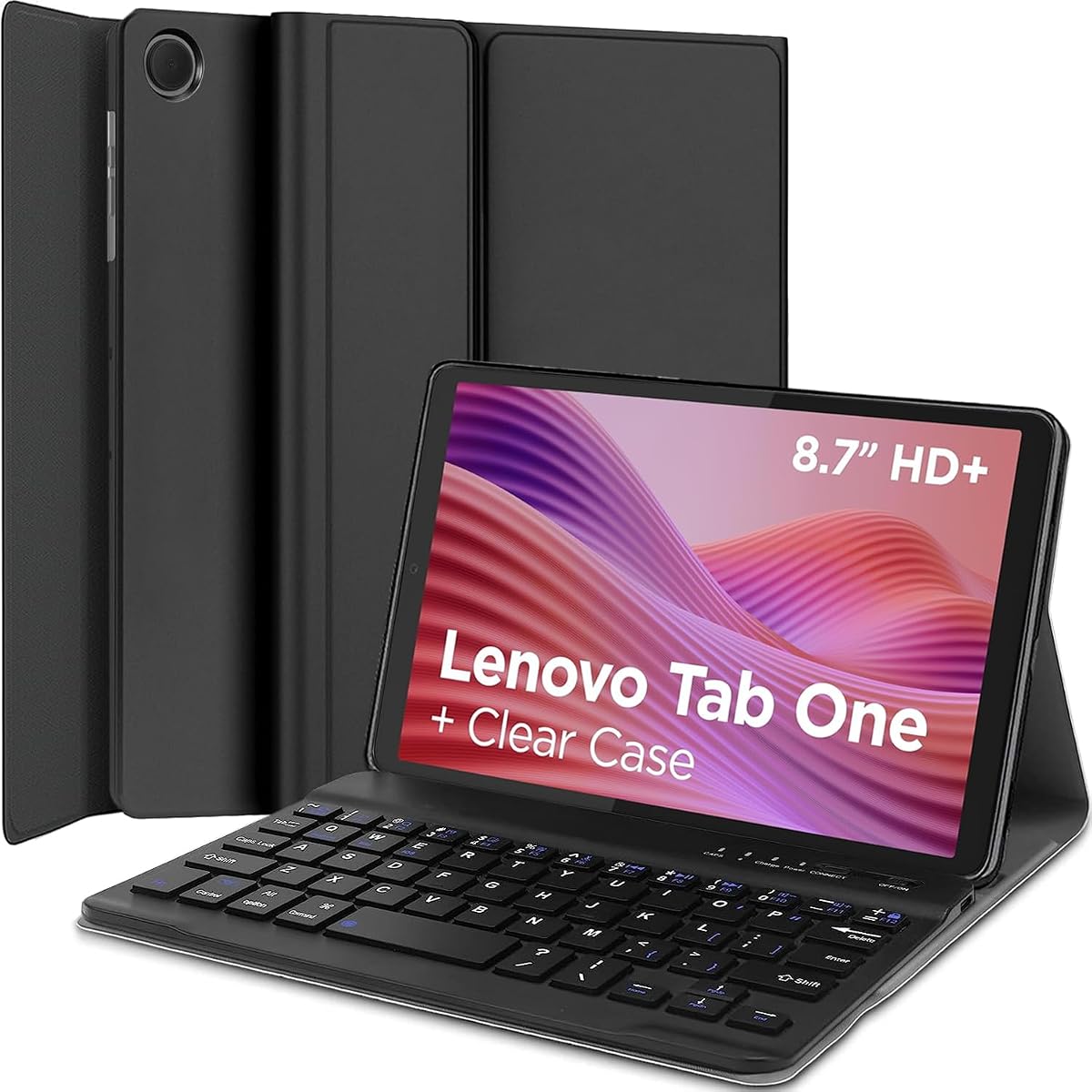
Case with Keyboard for Lenovo Tab One
5.0Editor score
Premium TPU leather cover
Spring mechanism key response
Up to 100 hours battery
Transforming your Lenovo Tab One into a portable workstation requires the right keyboard accessory. These accessories combine protection with typing functionality, letting you work efficiently anywhere. Whether you need a simple typing surface or a full laptop replacement, choosing the right model matters for daily use.
We evaluated ten top-rated keyboard solutions designed specifically for the Lenovo Tab One and compatible tablets. Our comparison focuses on build quality, typing experience, battery life, and connectivity options. Each product was assessed based on user feedback, technical specifications, and real-world performance scenarios.
Every pick in this guide highlights unique strengths, from budget-friendly cases to premium trackpad models. Note that prices and availability change frequently, so verify current deals before purchasing. This curated list helps you find the ideal keyboard that matches your workflow and budget requirements perfectly.
5.0Editor score

4.8Editor score

4.3Editor score
As an Amazon Associate we earn from qualifying purchases.
This side-by-side comparison highlights key differences across all ten reviewed models. We examine compatibility, connectivity methods, battery duration, and unique features like backlights or trackpads to help you decide quickly.


This keyboard case stands out as a top choice for Lenovo Tab One users seeking a versatile typing solution. It holds a high rating of 4.8 stars, reflecting strong user satisfaction with its build quality and functionality. The combination of protection and typing capability makes it ideal for daily use.
We may earn a commission when you buy through this link, at no additional cost to you.
The standout feature is the seven-color backlight system, allowing you to personalize your typing environment. The detachable magnetic design lets you adjust viewing angles easily. The PU leather cover protects against drops and dust while providing a premium feel. Battery life is impressive, lasting up to ninety hours without backlight usage.
While the specific model compatibility ensures a perfect fit, it limits flexibility if you switch devices later. Using the backlight reduces battery life significantly, which is a trade-off to consider for extended sessions without charging access. However, for most users, these limitations are minor compared to the benefits.
Ideal for students and professionals who need a reliable, all-in-one solution for their tablet. This case transforms your device into a workstation quickly. We recommend it as the top pick for those prioritizing balance between protection, aesthetics, and typing performance.
Choose from seven backlight colors to match your mood or workspace lighting. Adjustable brightness levels help reduce eye strain during night work sessions.
The detachable keyboard allows you to use the tablet standalone or attached. This versatility supports both media consumption and heavy typing tasks effortlessly.
We may earn a commission when you buy through this link, at no additional cost to you.
This keyboard case offers exceptional value with a perfect 5.0 rating, proving its reliability and user appeal. It is designed specifically for the Lenovo Tab One 8.7 inch models released in 2025. The focus here is on core functionality and durability without unnecessary extra costs.
We may earn a commission when you buy through this link, at no additional cost to you.
The spring mechanism under each key ensures a tactile response similar to a laptop, improving typing speed and accuracy. Battery life is outstanding at 100 hours under normal use, meaning you rarely need to recharge. The PU leather case provides strong protection against scratches and collisions while adding a stylish wood grain texture.
Lack of backlighting means this might not suit dark environments. However, for well-lit spaces, the typing experience is excellent. The limitation to specific models requires checking compatibility carefully before purchase. For budget-conscious buyers, this delivers premium features at a lower cost.
Best for users who prioritize long battery life and typing comfort over aesthetic lighting. It works well for office tasks and travel. We recommend this model for those seeking a reliable, high-performance keyboard case without breaking the bank.
Enjoy up to 100 hours of continuous typing on a single charge. Sleep mode activation helps save power during idle times efficiently.
High-end ABS material with spring mechanisms gives every key a satisfying click. This reduces finger fatigue during long writing sessions.
We may earn a commission when you buy through this link, at no additional cost to you.
This premium pack delivers a laptop-like experience with an integrated trackpad and ergonomic keys. Although rated for Idea Tab Pro, it showcases advanced typing tech relevant for power users. The pogo pin connection ensures instant power and data transfer without Bluetooth pairing hassles.
We may earn a commission when you buy through this link, at no additional cost to you.
The one-piece trackpad supports intuitive gestures for navigation, making it ideal for cursor control. Ergonomic key design with 1.5mm travel reduces strain during long sessions. Sixteen built-in shortcut keys allow quick access to common functions like screenshots or screen splits. The kickstand is adjustable from flat to full upright.
Compatibility is restricted to Idea Tab Pro models, so verify device fit before buying. The price is higher than basic cases, but the trackpad and convenience features justify the cost for productivity-focused users. It requires no charging since it draws power from the tablet.
Best for professionals who need a full PC replacement experience on a tablet. It excels at document editing and presentations. We recommend this for those wanting maximum typing and navigation efficiency without Bluetooth setup delays.
Three-point pogo pin connectors link power and data instantly. This eliminates the need for charging cycles or Bluetooth pairing steps.
Large responsive trackpad supports multi-touch gestures for smooth scrolling. Precise cursor movement enhances multitasking on screen.
We may earn a commission when you buy through this link, at no additional cost to you.
This wireless keyboard excels for users managing multiple devices like Android, iOS, and Windows. It features seamless switching between up to three devices, enhancing productivity across platforms. The design is slim and lightweight, making it easy to carry alongside your tablet.
We may earn a commission when you buy through this link, at no additional cost to you.
Typing is comfortable with low travel distance keys, quiet enough for shared spaces. Connectivity options include both Bluetooth and USB-C, offering flexibility. Battery life supports sixty hours of use per charge. Twelve customizable shortcut keys help streamline tasks efficiently.
Since it is a standalone keyboard, it does not offer tablet protection. You will need a separate case for safety. The price is higher than basic cases but justified by multi-device support. Ideal for professionals working across different ecosystems.
Best for power users who switch between laptops and tablets regularly. It prioritizes connectivity and portability over all-in-one protection. We recommend this for those needing a versatile input tool for multi-device workflows.
Effortlessly move between devices with simple key commands. No need to disconnect and reconnect Bluetooth manually during sessions.
Choose between Bluetooth or USB-C for secure connections. This ensures compatibility with various setups and hardware limitations.
We may earn a commission when you buy through this link, at no additional cost to you.
This case is ideal for 11-inch Idea Tab users, combining keyboard utility with screen protection. It includes a 9H hardness tempered glass protector to prevent scratches. The PU leather case protects against drops while the backlighting adds style and function in low light.
We may earn a commission when you buy through this link, at no additional cost to you.
The detachable magnetic keyboard offers flexibility for viewing angles. Seven colors help personalize your setup. The optical clarity of the glass maintains screen quality. Battery life is solid for extended use sessions without frequent recharges needed.
Compatibility is specific to the 11-inch model, so check your device carefully. The added screen protector might alter touch sensitivity slightly. For protection-focused users, this provides excellent value. It is a robust choice for travelers needing total device coverage.
Best for those who want screen protection alongside typing capability. It offers peace of mind against scratches. We recommend this for Idea Tab 11-inch users needing comprehensive protection and typing features.
9H hardness tempered glass prevents daily wear and scratches. Maintains optimal visual clarity for your display.
Seven backlight colors help match your mood or lighting conditions. Adjustable brightness supports comfortable night typing.
We may earn a commission when you buy through this link, at no additional cost to you.
This case offers trackpad functionality integrated into the keyboard case design. It is built for the Tab One 8.7-inch models. The multi-touch trackpad supports gestures like scrolling and swiping, enhancing navigation without touching the screen.
We may earn a commission when you buy through this link, at no additional cost to you.
The three-zone backlight system personalizes the typing area. Battery life reaches up to ninety hours when backlight is off. The detachable design allows flexible viewing angles. However, user ratings suggest variability in performance or comfort.
Trackpad sensitivity might vary between users. Some reports indicate potential connectivity or durability concerns. For those needing a trackpad without a premium cost, this is an option. Verify compatibility and reviews before purchasing.
Best for users wanting a budget trackpad solution. It is decent for casual browsing but check feedback carefully. We recommend considering other options if high reliability is critical for daily work.
Multi-touch trackpad adapts to Android gestures. Allows effortless scrolling and clicking without extra mice.
Three-zone backlight lets you highlight typing areas. Matches specific working conditions and personal style.
We may earn a commission when you buy through this link, at no additional cost to you.
This compact case provides essential protection and typing capability in a slim form. It uses Type-C charging, which is convenient for modern devices. The detachable magnetic keyboard ensures stable typing without complex pairing steps.
We may earn a commission when you buy through this link, at no additional cost to you.
The premium PU leather offers waterproof protection and easy cleaning. Strong magnets ensure the keyboard stays secure during use. It supports all buttons and ports without removing the cover. Ideal for daily use and travel.
Lack of user ratings makes reliability harder to judge. Ensure you check recent reviews before buying. The design is practical but basic. For casual users wanting a simple setup, this fits well.
Best for those prioritizing compactness and modern charging. It offers solid protection with minimal bulk. We recommend this for travelers needing a portable keyboard case solution.
Type-C charging matches modern device standards. Reduces need for separate charging cables.
Strong built-in magnets hold keys securely. Ensures smooth typing experience without slipping.
We may earn a commission when you buy through this link, at no additional cost to you.
This case is unique for including a wireless mouse, improving cursor control on 11-inch Idea Tab. The pink design adds style while the backlight ensures visibility in dark. A pen slot keeps your S Pen secure.
We may earn a commission when you buy through this link, at no additional cost to you.
Adjustable viewing angles support work and media. The ultra-thin cover protects against drops. Mouse navigation is precise for detailed tasks. It transforms the tablet into a full workstation experience.
Compatibility is strict, so verify your model number. Mouse handling might add to the bulk. Still, for precise tasks like design, the mouse helps. It offers a rare all-in-one package.
Best for creative work needing mouse and pen tools. It adds versatility without extra devices. We recommend this for Idea Tab 11-inch users seeking complete control.
Included wireless mouse improves cursor accuracy. Perfect for detailed editing tasks.
Built-in pen slot keeps stylus safe. Ensures quick access when needed.
We may earn a commission when you buy through this link, at no additional cost to you.
This portable keyboard offers backlit keys without a case. It uses Bluetooth 3.0 for reliable connection. The slim design fits easily in bags. Seven LED colors match your style.
We may earn a commission when you buy through this link, at no additional cost to you.
Power-saving switch helps extend battery life. It is ideal for travelers needing typing without bulk. Setup is quick via standard pairing. However, you must carry it separately from the tablet.
Battery life is good but requires periodic charging. Without a case, your device needs separate protection. For portability, this is a strong contender. Good for occasional heavy typing on the go.
Best for those prioritizing travel readiness. It delivers full typing functionality in a small package. We recommend this for users needing a lightweight backup keyboard.
Bluetooth 3.0 ensures fast stable connection. No lag during typing sessions.
Seven vibrant colors enhance typing visibility. Matches personal preferences and styles.
We may earn a commission when you buy through this link, at no additional cost to you.
This keyboard is the thinnest option here at 3/16 inch thick. Chiclet keys provide tactile feedback for long typing. Bluetooth 3.0 ensures quick pairing. It fits easily in small bags.
We may earn a commission when you buy through this link, at no additional cost to you.
Power-efficient design reduces drain. The lightweight build makes it portable. For short work sessions on planes, this is excellent. However, it lacks backlighting for dark environments.
You will need a separate case for protection. Still, for pure portability, it is hard to beat. Ideal for travelers who prioritize weight. It transforms any device into a netbook.
Best for frequent travelers seeking minimal bulk. It prioritizes portability over features. We recommend this for those needing a compact keyboard for remote work.
Measuring 3/16 inch, it slips into bags easily. Reduces travel weight significantly.
Responsive keys provide tactile feel for long use. Ideal for notes and messages.
We may earn a commission when you buy through this link, at no additional cost to you.
Selecting the right keyboard for your Lenovo Tab One involves considering compatibility, features, and durability. This guide breaks down the key factors to ensure you choose a model that meets your needs.
Ensure the keyboard supports your specific device model, such as TB305FU or TB-336ZU. Mismatched cases may not fit ports or buttons correctly.
Always check the device model in settings before purchasing to avoid returns or poor fit.
Look for keys with good travel depth and tactile feedback. Options with spring mechanisms or ergonomic designs reduce finger fatigue.
Prioritize keyboards that mimic laptop typing for comfort during extended work.
Battery duration varies significantly. Models with long life like 90 to 100 hours reduce charging frequency.
Choose a battery life that matches your usage patterns for reliability.
Backlit keys are essential for low-light typing. Look for multi-color options for customization.
Ensure brightness levels are adjustable for optimal visibility.
Bluetooth allows wireless freedom but needs pairing. Pogo pin or USB-C options may offer instant connection.
Choose connectivity that matches your setup needs.
A quality case protects against drops and dust. Look for PU leather covers with anti-slip interiors.
Prioritize full coverage for device safety during travel.
Trackpads enhance navigation without touching the screen. Mouse options add precision for creative tasks.
Consider these for advanced workflow requirements.
Prices range from basic cases to premium packs. Balance features with your spending limit.
Invest in quality for long-term durability.
First, verify your tablet model matches the keyboard case before installing. Align the case gently to ensure all ports remain accessible.
Pair the keyboard via Bluetooth or attach it magnetically. Press power buttons to wake it up if it enters sleep mode.
Regularly wipe the keys and case with a damp cloth. Keep it away from extreme temperatures to preserve battery life.
No, compatibility varies. Always check the product description for your specific model number to ensure a perfect fit. Some cases are for specific 2025 models only.
Battery life ranges from 60 to 100 hours depending on usage. Turn off backlighting to maximize runtime during travel or daily use.
Yes, many models feature backlit keys with adjustable brightness. Look for models with LED options if you type in low-light conditions regularly.
Most wireless models need initial Bluetooth pairing, but pogo pin options connect instantly without pairing. Check the specs for your preferred connection method.
Some models like the Idea Tab 11 option include tempered glass protectors. Most others require you to buy a separate protector.
Yes, most cases feature detachable keyboards. You can use the keyboard independently for different setups or storage.
We recommend the Backlit Keyboard Case for Lenovo Tab One as the top overall pick for its balance of features and protection.
For budget users, the Case with Keyboard for Lenovo Tab One offers excellent battery life and typing comfort at a great value.
Always verify current prices and availability before purchasing to ensure you get the best deal available today.