
YBING Keyboard Case
4.5Editor score
360 Rotatable Design
Rainbow Backlight Mode
Strong Magnetic Adsorption
Discover the top keyboards for Samsung A11 Tablet in October 2026. We compare features, battery life, and comfort to help you choose the perfect typing
Finding the right keyboard for your Samsung A11 Tablet can transform your device into a productive workstation. Whether you need to type documents or browse the web, a quality accessory provides comfort and efficiency for daily tasks.
We evaluated ten top-rated keyboard cases specifically designed for the Samsung Galaxy Tab A11 Plus and A9 Plus models. Our comparison focuses on build quality, typing experience, battery life, and additional features like trackpads and backlights.
Each pick below highlights unique strengths to match different user needs and budgets. Please note that prices and availability can change frequently, so verify current details on the product pages before making your final purchase decision.
4.5Editor score

4.6Editor score

4.3Editor score
This side-by-side comparison highlights the key specifications of each keyboard case to help you quickly identify the best match for your specific usage needs and device model requirements.




The Soke Keyboard Case stands out as a top choice for Samsung Galaxy Tab A11 Plus users seeking a reliable typing solution. With a high customer rating of 4.6 stars, it offers a blend of functionality and design that appeals to both work and leisure users.
We may earn a commission when you buy through this link, at no additional cost to you.
Its detachable wireless keyboard connects via Bluetooth with a generous ten-meter range, allowing flexibility in placement. The seven-color backlight provides a comfortable typing experience in low-light conditions, and the system compatibility with iOS, Android, and Windows ensures versatility across devices.
While the charging cable is not included in the package, the battery performance is impressive, lasting for hours on a single charge. The auto sleep and wake function helps extend tablet battery life by detecting usage status automatically without manual input.
This case is ideal for students and professionals who need a portable workstation setup. The built-in pen holder ensures your stylus is always accessible, and the secure magnetic attachment keeps everything stable during typing sessions.
The ability to switch between operating systems using function keys allows seamless transitions when sharing devices or working across platforms.
Full coverage and anti-slip grooves protect the tablet from drops and scratches while maintaining a sleek profile for travel.
We may earn a commission when you buy through this link, at no additional cost to you.
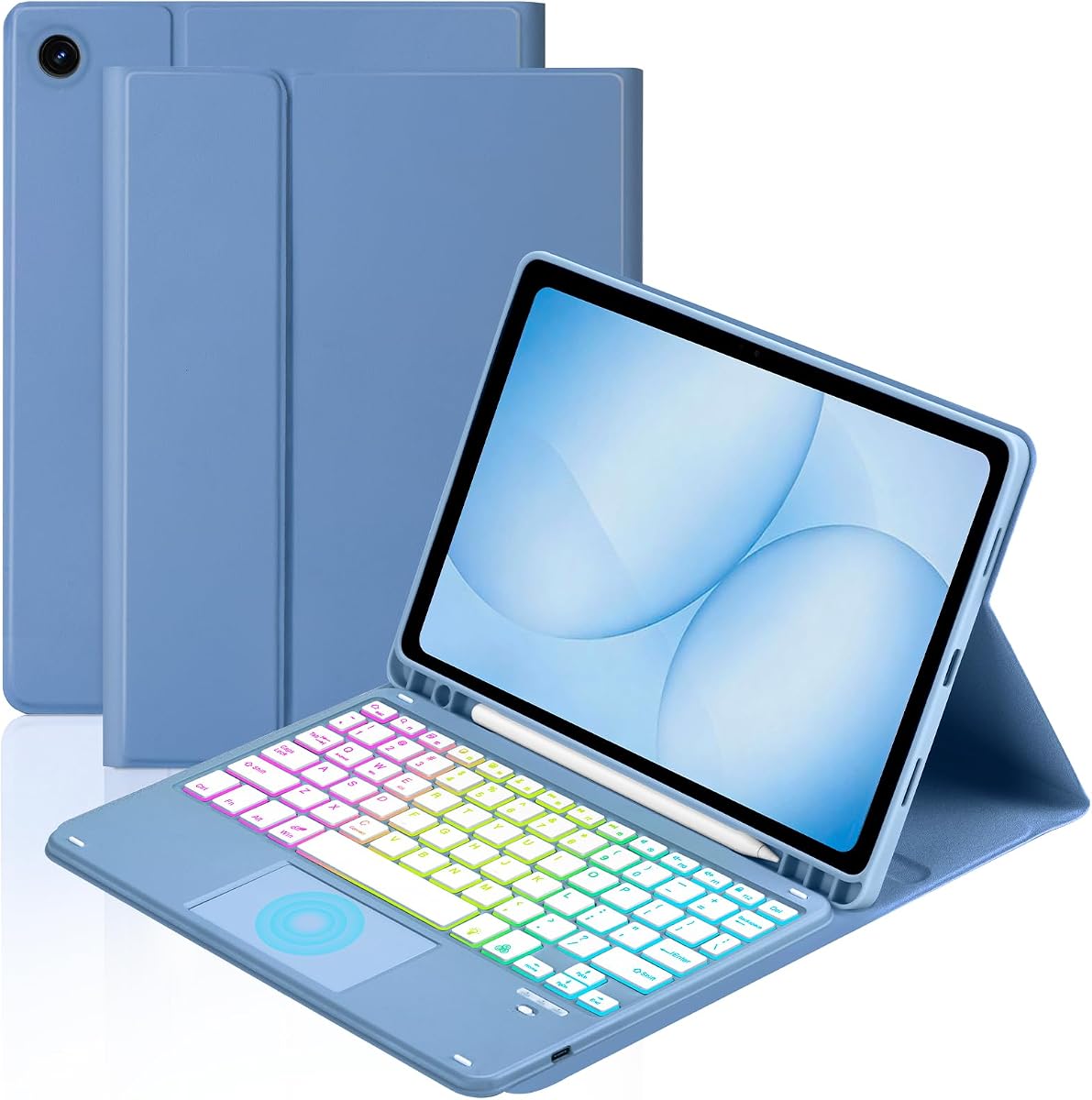
The YBING Keyboard Case is an excellent budget-friendly option for those looking to enhance their Samsung Galaxy Tab A11 Plus experience. Priced affordably, it delivers essential features like a rechargeable keyboard and robust protection without a high cost.
We may earn a commission when you buy through this link, at no additional cost to you.
Its 360-degree rotatable cover allows you to use the tablet in both portrait and landscape modes comfortably. The built-in shortcut keys facilitate quick actions like copy and paste, which streamlines workflows for students and casual users alike.
While the backlight offers a stylish rainbow effect, it does consume more power than standard keys, resulting in shorter usage time when active. However, the strong magnetic adsorption ensures the keyboard stays in place during typing, preventing accidental slips.
This case is best suited for users on a tight budget who still want a full typing experience. The included pencil holder and anti-slip grooves provide practical benefits that add value to the overall package.
The rotation feature allows for easy sharing of content or comfortable reading positions without needing external stands.
Protects against scratches and drops effectively, extending the life of your device at a fraction of the cost of premium brands.
We may earn a commission when you buy through this link, at no additional cost to you.
The Dexnor Keyboard Case is designed for users who want a laptop-like experience with their Samsung Galaxy Tab A11 Plus. It features a multi-touch trackpad that enables precise navigation without touching the screen, making document editing more efficient.
We may earn a commission when you buy through this link, at no additional cost to you.
Its ultra-light design weighs only 1.36 pounds, making it easy to carry for on-the-go productivity. The scissor-switch keys provide a responsive typing feel, and the adjustable backlight ensures visibility in various lighting conditions during evening work sessions.
The trackpad supports multi-finger gestures, allowing for quick scrolling and multitasking. However, the keyboard cannot fold around to the back, and it does not elevate the screen with a floating cantilever design, which may limit ergonomic options.
This premium case is ideal for professionals needing serious computing capabilities in a portable form. The smart power management helps preserve energy, and the all-around protection ensures your tablet remains safe during daily use.
Multi-touch gestures allow for intuitive control similar to a laptop, reducing reliance on the touchscreen interface.
The key layout and spacing are designed to minimize fatigue during long typing sessions, improving overall efficiency.
We may earn a commission when you buy through this link, at no additional cost to you.
The TUNKARMOR Case Keyboard transforms your tablet into a versatile workstation with its detachable magnetic keyboard. This flexibility allows you to adjust the keyboard position easily, catering to different viewing preferences and usage scenarios.
We may earn a commission when you buy through this link, at no additional cost to you.
The case features anti-slip slots that support three distinct viewing angles, making it suitable for writing or reading. The honeycomb grid pattern on the inner layer provides cushioning that protects the device from overheating and minor impacts.
While it offers full edge coverage and 360-degree protection, the pen holder does not include a stylus, which users may need to source separately. The auto sleep wake function ensures your tablet conserves power when not in use.
This option is great for users who prioritize flexibility and protection. The magnetic attachment keeps the keyboard stable, and the slim design ensures easy portability without adding excessive bulk to your daily carry.
Detaching the keyboard allows for a cleaner look when watching videos or reading without losing the typing option entirely.
The inner honeycomb layer helps dissipate heat, ensuring the device stays cool during extended usage sessions.
We may earn a commission when you buy through this link, at no additional cost to you.
The Tablet Case Keyboard stands out by including a rechargeable Bluetooth mouse and a built-in smart trackpad. This combination provides a complete control setup, allowing you to navigate your tablet screen precisely without direct touch interaction.
We may earn a commission when you buy through this link, at no additional cost to you.
The keyboard features a seven-color rainbow backlight that can switch between constant and breathing modes. This adds a fun visual element to your setup while ensuring visibility in dim environments during late-night work sessions.
Although the mouse adds utility, it requires separate pairing which might be an extra step for some users. The Type-C charging cable is included, ensuring you have what you need to power the devices without buying extra accessories.
This case is perfect for power users who need a full computer setup on the go. The multi-touch gestures on the trackpad enhance productivity, and the non-slip grooves keep the tablet secure at various angles.
The inclusion of both mouse and trackpad offers redundant and flexible ways to navigate complex applications efficiently.
Breathing and constant modes allow users to choose between subtle aesthetics and bright visibility as needed.
We may earn a commission when you buy through this link, at no additional cost to you.
The Harvopu Keyboard Case focuses on durability and endurance. It includes a wireless mouse with adjustable DPI, allowing for precise control during graphic editing or smooth browsing. The keyboard boasts an impressive battery life that supports months of typical work on a single charge.
We may earn a commission when you buy through this link, at no additional cost to you.
The protective case is designed to be stain-resistant and easy to clean, which is ideal for messy environments or shared devices. The detachable keyboard offers flexibility, allowing you to remove it when not needed for a cleaner look.
While the single-color mode limits variety compared to multi-color options, the brightness levels are sufficient for most tasks. The sleep mode activation helps preserve power effectively, ensuring the keyboard is ready when you return to your device.
This case is recommended for users who need a sturdy solution for heavy daily use. The included mouse and high battery capacity provide the reliability needed for professional and academic tasks alike.
Adjustable DPI settings ensure that the cursor moves smoothly and accurately across the screen for detailed tasks.
The stain-resistant surface repels spills and dirt, making maintenance quick and effortless for busy professionals.
We may earn a commission when you buy through this link, at no additional cost to you.
The TiMOVO Keyboard Case is designed for efficiency and convenience. It features a detachable keyboard that is easy to store away when not needed, making the tablet easier to carry. The battery offers a substantial 90-day standby time, ensuring it is ready when you need it.
We may earn a commission when you buy through this link, at no additional cost to you.
The seven-color backlight provides fun and practical visibility options in dark environments. The anti-slide design and multiple viewing angles allow you to work comfortably, whether you are typing or watching content in different positions.
One drawback is the auto-sleep time, which is set to 10 minutes. While this saves power, it might disconnect the keyboard from the tablet during short breaks, requiring a key press to wake it up again.
This case is ideal for users who prioritize portability and long-term battery life. The lightweight build reduces fatigue during travel, and the full protection ensures your device remains safe from minor drops and scratches.
The extended standby time means you do not need to worry about recharging the keyboard every few days during normal use.
The design prevents the tablet from moving on smooth surfaces, maintaining a stable typing environment.
We may earn a commission when you buy through this link, at no additional cost to you.
The MePadKey Touchpad Keyboard Case offers advanced navigation with its smart touchpad that supports up to four-finger gestures. This allows for complex actions like switching applications or taking screenshots with simple swipes, enhancing your tablet experience.
We may earn a commission when you buy through this link, at no additional cost to you.
The keyboard features a breathing light mode that offers a unique aesthetic compared to standard backlights. The anti-slip grooves and magnetic adsorption ensure that your device and keyboard remain stable during intense typing sessions.
While the battery life depends on whether the backlight is used, the detachable design allows for easy carrying when you do not need to type. The included shortcut keys improve efficiency, giving quick access to common tablet functions.
This option is best for users who rely heavily on touchpad gestures for navigation. The strong magnetic hold ensures durability, and the multi-touch support makes managing multiple apps a seamless experience.
Four-finger gestures provide shortcuts that mimic desktop computer actions, streamlining the tablet workflow significantly.
Breathing mode offers a subtle visual effect that can be less distracting than constant backlighting.
We may earn a commission when you buy through this link, at no additional cost to you.
The MePadKey Touchpad Keyboard Case features a protective cover that rotates 360 degrees, offering versatile positioning for any activity. The thickened convex edges provide robust protection against scratches and bumps, ensuring your device stays safe during travel.
We may earn a commission when you buy through this link, at no additional cost to you.
The keyboard includes multi-finger gesture support for navigating the screen easily. You can switch between systems using function keys, which is a unique feature that adds flexibility if you use multiple devices or share your tablet.
While the case is protective, its thickness might be slightly bulkier than slim alternatives. The pen holder is designed to keep your stylus secure, preventing loss during daily use and ensuring it is always accessible when needed.
This case is perfect for users who value rotation and protection. The system switching capability makes it a versatile choice for diverse tasks, and the strong magnetic hold keeps the keyboard aligned properly.
Switching systems via keyboard function keys removes the need to go through tablet settings menus repeatedly.
Thickened edges absorb impacts better than standard cases, reducing the risk of damage to screen corners.
We may earn a commission when you buy through this link, at no additional cost to you.
The Supveco Keyboard Case offers premium protection with its flexible silicone back and TPU cover. The honeycomb grid pattern on the inner layer protects the tablet from overheating and shocks, extending the device lifespan significantly over time.
We may earn a commission when you buy through this link, at no additional cost to you.
The backlit keys feature an automatic color change effect, adding a dynamic visual appeal to your typing experience. The built-in pencil holder ensures your stylus is protected and accessible, making note-taking tasks more efficient.
While the charger is not included, the keyboard is designed for energy efficiency with auto color change. The magnetic detachable design ensures easy access to the tablet screen without removing the entire case structure.
This case is best for users prioritizing long-term device health and aesthetics. The premium materials provide durability, and the auto sleep function helps manage power consumption effectively when the device is idle.
The honeycomb grid enhances airflow and cushioning, keeping the tablet cooler during intensive apps.
Automatic color changing allows the keyboard to look fresh and stylish without manual adjustments.
We may earn a commission when you buy through this link, at no additional cost to you.
Choosing the right keyboard for your Samsung A11 Tablet involves considering several key factors. This guide breaks down the essential elements to ensure you select a case that meets your typing needs and device compatibility requirements.
Ensure the keyboard case matches your specific tablet model, such as A11 Plus or A9 Plus. Checking model numbers like SM-X230 or SM-X210 before buying prevents incompatibility issues that render the case useless.
Verify that the cutouts for ports and buttons align correctly. A poor fit can restrict charging or button access, leading to frustration during daily use.
Look for features like backlights, trackpads, and multi-touch support. Backlights are essential for typing in dim environments, while trackpads improve navigation precision without touching the screen.
Decide if you need a detachable keyboard or a fixed one. Detachable options offer flexibility, allowing you to use the tablet as a standard device when typing is not needed.
Check the battery capacity and expected usage time. Some keyboards offer hundreds of hours of standby, while others may last only a few hours when backlight is on. Charging speed and port type also matter for convenience.
Consider whether the charger is included in the package. Some models require you to buy a Type-C cable separately, which adds to the total cost.
A good case should offer protection against drops, scratches, and dust. Look for materials like PU leather or silicone that provide shock absorption and a comfortable grip on your device.
Anti-slip grooves and magnetic stability are important to keep the tablet steady. This ensures that the screen does not slide around while you are typing or viewing content.
Adjustable viewing angles help reduce neck strain during long work sessions. Cases with multiple grooves allow you to position the tablet for reading, typing, or watching videos comfortably.
The keyboard layout should feel natural and ergonomic. Scissor-switch keys or similar mechanisms often provide a better typing experience than flat membrane keys.
Some keyboards are designed to work across iOS, Windows, and Android systems. This flexibility is useful if you share the device or use it with multiple computers for file management.
Check if there are function keys for system switching. This allows you to toggle between modes without navigating through complex tablet settings menus.
Extras like stylus holders or included mice add value to the purchase. A secure holder keeps your pen safe, while a wireless mouse enhances control for detailed tasks.
Consider the overall weight of the case. Lightweight options are better for travel, while heavier ones might offer more robust protection but are harder to carry around.
Compare the price against the features offered. Budget options may lack advanced features like trackpads but still provide basic typing and protection needs effectively for students.
Premium cases often include higher build quality and longer warranty support. Investing in a durable case can save money in the long run by protecting your expensive tablet better.
Start by ensuring your tablet model matches the case specifications before attaching the keyboard. Align the magnetic points carefully to avoid scratching the screen during the initial connection process.
Charge the keyboard fully before first use to maximize battery performance. Use the included Type-C cable if provided, and avoid using high-voltage chargers that might damage the internal battery over time.
Clean the keyboard and case regularly with a soft, dry cloth to remove dust and fingerprints. Avoid using harsh chemicals that could degrade the protective coating on the case material.
Most keyboards are designed for specific models like A11 Plus or A9 Plus with specific model numbers. Always check the product description for SM-X codes to ensure compatibility with your device before buying.
All the keyboards listed in this guide are rechargeable via USB-C cables. You do not need to replace batteries, but you will need to charge them periodically using a standard charging cable.
Many cases allow the tablet to be rotated, but typing in portrait mode is often limited. Some models include slots to adjust the angle, but landscape mode is generally recommended for comfortable typing.
Backlights consume more power than standard keys, especially multi-color modes. Turning off the backlight when in bright environments can extend the keyboard's battery life significantly.
Most cases include a holder for your stylus but do not include the pen itself. You will need to use your existing S Pen or purchase one separately if you need writing functionality.
Strong magnets ensure the keyboard stays secure but might make it hard to detach. Using the designated magnetic points carefully will prevent accidental slipping or damage to the tablet surface.
Some keyboards have function keys that allow you to toggle between iOS, Windows, and Android. Press the specific key combination indicated in the manual to switch modes seamlessly.
The cases provide protection against dust and minor spills, but they are not fully waterproof. Wipe them dry immediately if they get wet to avoid potential damage to the keyboard internals.
The Soke, YBING, and Dexnor cases lead our list with distinct strengths ranging from system switching to budget-friendly durability. Each option provides a unique way to enhance your Samsung Galaxy Tab A11 Plus productivity.
Prioritize features like battery life and trackpads based on your workflow. If you need precision control, a trackpad model is worth the investment, but a simple detachable keyboard may suffice for basic writing.
Always check current prices and availability before purchasing. Features and stock levels can change, so verifying the product details on the official links ensures you get the best deal available today.