
Corded Landline Phones for Seniors
4.2Editor score
Nine big picture buttons
110dB loud ringer
No battery required
This guide compares the top captioned telephone models for seniors and hard of hearing users, featuring real time captions, amplified sound, and accessibility
Finding the right captioned telephone can transform how you stay connected with loved ones. These devices combine traditional phone calling with text captions to ensure you never miss a word during important conversations.
We evaluated ten leading models based on ease of use, caption accuracy, sound amplification, and accessibility features. Our analysis covers options for various needs, from simple landlines to advanced internet based systems.
Each selection highlights unique strengths like large buttons, voice control, or photo dialing. Please note that product availability and specifications may change over time, so verify details before purchasing.
4.2Editor score

4.3Editor score

5.0Editor score
The following table provides a side by side overview of all ten products reviewed. Use this to quickly compare key specifications like audio power, connectivity, and special features.




The Hamilton CapTel 2400iSPNBT stands out as the top choice for users needing reliable real time captioning. It features a large touchscreen that displays text as you speak and listen, ensuring conversations are clear and confident.
We may earn a commission when you buy through this link, at no additional cost to you.
This device offers up to 40dB of amplified gain with tone control for comfort. You can choose between fully automated captions or assisted options with live operators. The voicemail feature displays text messages directly on the screen for easy review.
While it requires high speed internet and registration for the service, the free nationwide captioning service makes it worth the setup. The system is designed specifically for US residents with hearing loss to ensure compliance and clarity.
Anyone needing accurate text feedback during calls will find this model invaluable. It transforms standard phone calls into accessible interactions, making it an excellent investment for seniors and those with hearing impairments.
The large easy to read touchscreen ensures you never miss words during important conversations.
Choose between auto or assisted captions to match your comfort and communication style.
We may earn a commission when you buy through this link, at no additional cost to you.
This landline phone is designed for seniors who struggle with memory or vision. It features nine customizable photo speed-dial buttons that eliminate the need to memorize numbers, making calling effortless for those with dementia or low vision.
We may earn a commission when you buy through this link, at no additional cost to you.
The device includes an adjustable 110dB ringer with a flashing visual indicator to ensure no calls are missed. It works directly from the phone line without batteries or Wi-Fi, providing reliability during power outages and storms.
Although it lacks captioning, its loud speaker and hands-free mode make it a strong budget option for users prioritizing accessibility over text feedback. The large buttons are sized to prevent misdials and ease pressing for those with arthritis.
It is ideal for households needing a reliable, easy-to-use connection tool. The simplicity and cost effectiveness make it a solid choice for users who need basic communication support without complexity.
Photo buttons help users connect with loved ones instantly without searching for numbers.
The battery-free design ensures the phone works even during power outages or storms.
We may earn a commission when you buy through this link, at no additional cost to you.
The VTech SN5147 offers a flexible hybrid system with a reliable corded base and a cordless handset for mobility. It is designed for seniors and hard of hearing users who need both convenience and power.
We may earn a commission when you buy through this link, at no additional cost to you.
With a 90dB extra-loud ringer and flashing visual indicator, you never miss a call. The smart call blocker helps reduce unwanted calls while the photo dial feature allows one-touch access to loved ones.
The device includes a 22-minute answering machine with remote access and slow playback. While it does not offer captions, the amplified audio and visual alerts make it suitable for many hearing impaired users.
This phone is best for those who need mobility around the home while staying connected. The combination of corded reliability and cordless convenience makes it a versatile choice for daily use.
Use the cordless handset for calls in any room while keeping a corded base for emergencies.
Block up to 1,000 unwanted numbers to keep your phone lines open and clear.
We may earn a commission when you buy through this link, at no additional cost to you.
This home telephone allows users to answer, dial, and hang up using only their voice. It is a practical solution for individuals with mobility or vision difficulties who cannot manipulate small buttons easily.
We may earn a commission when you buy through this link, at no additional cost to you.
The device stays active and ready to listen for commands at all times. It uses your home phone line to place calls without needing additional infrastructure or internet connectivity.
While it lacks captioning, the hands-free nature reduces physical strain during calls. It is especially helpful for users with arthritis or tremors who find traditional phones challenging to operate.
Ideal for users who need independence but struggle with physical interfaces, this phone offers a unique voice-first approach to communication that supports daily interaction.
Never touch the phone again as voice commands handle all dialing and call management.
The device stays active to ensure you can initiate calls whenever needed.
We may earn a commission when you buy through this link, at no additional cost to you.
This model features large buttons and picture assist options to help seniors with low vision or memory challenges. It provides up to 40dB of amplified volume to ensure conversations are heard clearly.
We may earn a commission when you buy through this link, at no additional cost to you.
Three replaceable picture buttons allow you to store favorite contacts for quick access. The design is simple and prevents memory loss even if the phone line is unplugged during use.
Mounting options include desktop or wall placement to suit different home layouts. The nonskid pieces keep the phone stable on tables while the large keys prevent accidental presses.
It is best suited for users who need physical ease of use without complex settings. The balance of volume amplification and visual clarity makes it a supportive tool for aging in place.
Wall mounting or nonskid feet ensure the phone stays secure and accessible.
Stored numbers are protected so contacts remain available even during power or line issues.
We may earn a commission when you buy through this link, at no additional cost to you.
The FLYINGVOICE FIP12WP is a specialized VoIP phone that allows seniors to stay connected through internet-based calling. It features customizable image keys that let users insert photos for easy dialing.
We may earn a commission when you buy through this link, at no additional cost to you.
Volume exceeds 110dB on the speakerphone to ensure clarity in noisy environments. A dedicated HELP key offers instant access to emergency contacts, making it suitable for nursing homes or assisted living.
The red light alert warns users of incoming calls or messages visually. It includes wall-mountable design to prevent accidental knock-overs and ensure stability in busy environments.
Users with active internet phone service will find this device offers premium features at an accessible price. It combines safety, simplicity, and robust audio for a reliable communication solution.
Insert family photos into keys so users can dial loved ones with one touch.
The HELP key and red light alerts provide quick access to emergency and call updates.
We may earn a commission when you buy through this link, at no additional cost to you.
Serene Innovations is known for designing high quality phones for seniors and hard of hearing users. This model focuses on delivering clear and amplified audio for better conversation quality.
We may earn a commission when you buy through this link, at no additional cost to you.
It features a high definition sound system that reduces background noise and distortion. The design is tailored for elderly users with intuitive controls and easy access to volume settings.
While details on specific features vary, the emphasis on performance ensures a stable calling experience. It is built to maintain consistent sound levels throughout the call duration.
This phone is recommended for users prioritizing audio quality over extra digital features. It offers a dependable solution for those who need consistent and clear voice transmission.
High definition audio enhances voice clarity for easier listening.
Serene Innovations is a trusted name in assistive communication devices.
We may earn a commission when you buy through this link, at no additional cost to you.
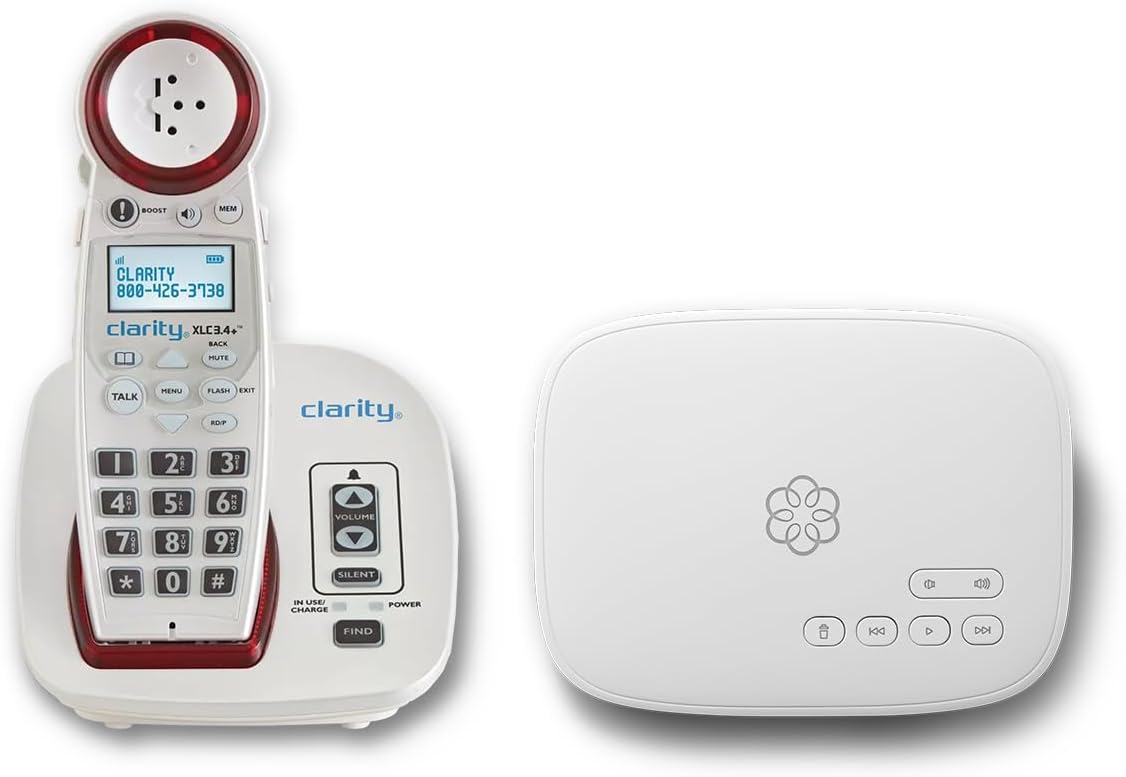
The Ooma Telo bundle includes a Clarity XLC3.4+ phone that offers amplified sound and a talking keypad. It is designed to provide safe and clear communication with premium support services.
We may earn a commission when you buy through this link, at no additional cost to you.
Safety features include text alerts when 911 is called and address-based dispatching. Robocall blocking helps keep lines open for important calls while maintaining privacy.
Setup assistance and 24/7 concierge support ensure you can use the system without stress. The service allows for unlimited domestic calling to Canada and Mexico with low international rates.
This option is ideal for those who want phone service and hardware in one package. It offers peace of mind through safety alerts and dedicated customer support.
Text alerts and precise address registration improve emergency response accuracy.
Round the clock concierge assistance makes setup and usage stress free.
We may earn a commission when you buy through this link, at no additional cost to you.
This phone allows users to make and end calls using voice commands like dial, end, and answer. It includes 17 programmable voice-activated memories for contacts and features a talking caller ID.
We may earn a commission when you buy through this link, at no additional cost to you.
It provides up to 40dB of volume control and a visual ring indicator for hearing impaired users. The system includes hands-free control and a programmable 911 button for emergency access.
Although it offers unique voice features, user feedback suggests it may be complex to set up. The LCD display shows caller names but requires proper voice training to work effectively.
It is best for tech-savvy users who prefer voice-first control over touch input. The combination of voice dialing and audio alerts provides a distinct alternative to traditional phones.
Program voice memories so the phone recognizes your commands reliably.
Use the LED ring indicator to catch calls without relying on sound.
We may earn a commission when you buy through this link, at no additional cost to you.
This corded landline phone features nine photo memory keys for instant one-touch dialing. It is designed for seniors with memory loss or cognitive impairments to maintain easy contact with family.
We may earn a commission when you buy through this link, at no additional cost to you.
The ringer reaches over 110dB with an LED flash alert to ensure no calls are missed. It supports hands-free calling for users with limited mobility or arthritis who struggle with holding a handset.
Setup is simple and requires no batteries or power sources beyond the phone line. It is a reliable tool that prioritizes connection and safety over advanced digital features.
Ideal for households needing a straightforward communication bridge, this phone keeps lines open without complexity. Its focus on photo dialing ensures ease of use for vulnerable seniors.
Program photos so users can reach family instantly without typing numbers.
LED flashes and loud rings make sure every call is noticed.
We may earn a commission when you buy through this link, at no additional cost to you.
Selecting the right captioned telephone involves evaluating several key factors beyond basic functionality.
Captioned telephones use speech-to-text services to display conversations in real time. Ensure the device supports your preferred method such as live operators or automated captions.
Verify that the system is compatible with your internet or phone line requirements before purchasing.
Look for models offering at least 40dB of volume gain if you have moderate hearing loss. Higher dB ratings ensure you can hear clearly even in noisy environments.
Check for adjustable tone controls so you can customize the sound to your comfort.
Flash light indicators or visual ringers help you notice incoming calls without relying on sound. These are critical if your hearing impairment makes ringer tones hard to detect.
Ensure the brightness is strong enough to be seen from across the room.
Large buttons or photo dialing features reduce the effort needed to connect with others. This is vital for seniors with arthritis or memory challenges.
Choose a layout that matches your physical and cognitive needs to prevent frustration.
A built-in speakerphone allows you to communicate without holding the receiver. This is useful for users with weak grip strength or mobility issues.
Ensure the speaker volume is adjustable to avoid feedback or excessive noise.
Built-in answering machines with text captions help you review messages at your own pace. This ensures you do not miss important information left by callers.
Look for remote access options so you can retrieve messages from another device.
Some devices need high-speed internet or VoIP services while others work on standard lines. Confirm what your home setup supports to avoid compatibility issues.
Consider how reliable your internet connection is if you choose a smart captioning model.
While the hardware cost varies, some captioning services may require subscription fees. Check whether the service is free or included with the device before buying.
Factor in long-term costs to ensure the solution is sustainable for your household.
Start by connecting the phone to your power source and phone or internet line as instructed. For captioned models, register with the service provider using your ID and hearing loss documentation.
Customize the settings to suit your needs such as adjusting volume levels or changing caption size. Test a call to ensure the text appears correctly and the audio is clear.
Keep the device clean and free of dust to maintain button responsiveness. Avoid exposing the phone to moisture or extreme temperatures to extend its lifespan.
Most modern captioned telephones require high-speed internet to deliver real-time text captions. Some models work on standard landlines but rely on online services for transcription.
Many services are free for US residents with verified hearing loss. Registration is usually required to qualify for the federally funded captioning support.
Many captioned phones are hearing aid compatible via T-coil or Bluetooth. Check the manual to confirm compatibility with your specific device model.
Traditional landline phones may still work without electricity. Internet-based captioned phones will fail unless you have a backup power system in place.
Automated captions are generally accurate for clear speech but may struggle with accents. Live operators can provide higher accuracy if available in your region.
Most captioned telephones are designed for landlines. Some mobile apps exist for smartphones but physical devices typically do not support cellular networks.
Only advanced captioned phones display voicemail as text. Standard models require traditional audio messages unless paired with a transcription service.
Some health insurance plans cover assistive devices like captioned phones. Contact your provider to check eligibility and reimbursement options.
Our top picks include the Hamilton CapTel 2400iSPNBT for overall performance and the FLYINGVOICE FIP12WP for premium features. Budget users may prefer the corded landline options for reliability.
Focus on what matters most to you such as caption accuracy, volume control, or ease of dialing. These factors determine how well the phone will support your daily communication.
Always check current availability and service details before finalizing your purchase. Prices and specs may vary so ensure the model fits your specific needs.