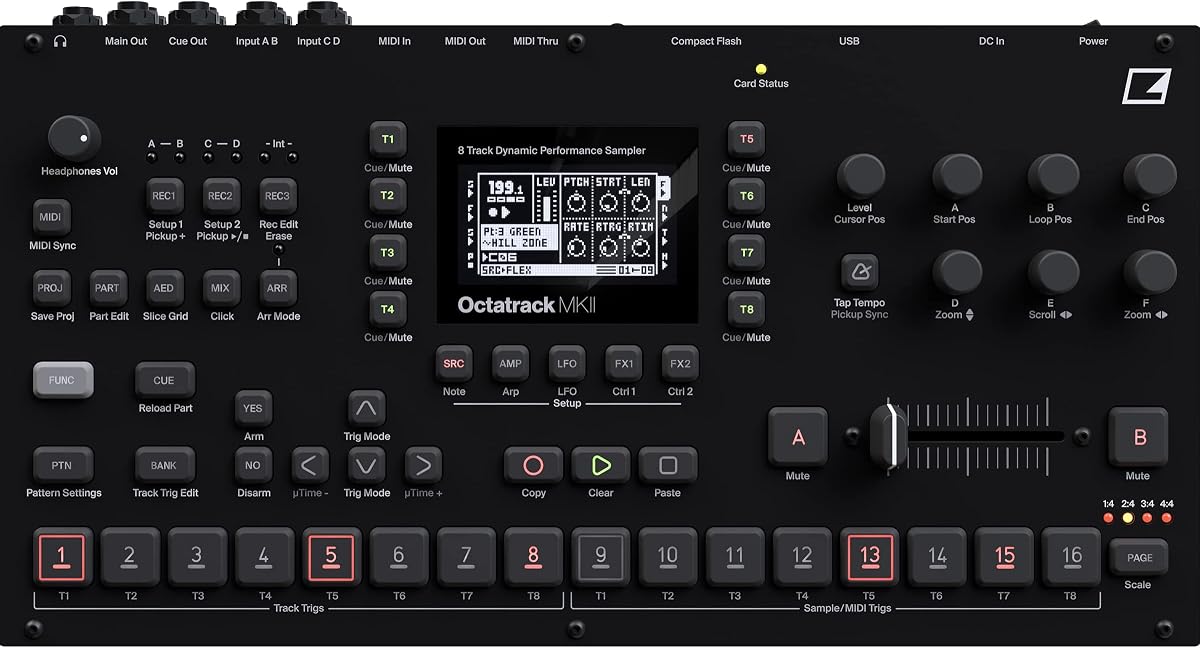
Elektron Octatrack MKII 8-track Performance Sampling Workstation/Sequencer – Black
4.5Editor score
Eight stereo audio tracks
Real time time stretching
Rugged backlit buttons
This comprehensive guide compares the top 10 groovebox for live performance to help you choose the best standalone instrument for portable music creation.
Finding the right groovebox for live performance can transform your musical setup into a self-contained powerhouse. These devices combine synthesis, sampling, and sequencing into one portable unit, allowing you to create and perform without a computer. Whether you are a beatmaker or a live act, selecting the right tool is crucial.
We evaluated ten leading models based on their standalone capabilities, sound engines, sequencing features, and live performance tools. Our analysis covers everything from entry-level units to professional workstations. Each product was assessed for its ability to handle complex arrangements and deliver reliable performance on stage.
This list details the strengths and weaknesses of each option to guide your decision. You will find notes on workflow, connectivity, and specific use cases. Prices and availability may change, so please verify the latest details before purchasing any hardware featured in this guide.
4.5Editor score

4.8Editor score
4.7Editor score
This side-by-side comparison highlights the key specifications and capabilities of each groovebox to help you identify the best fit for your specific performance needs and workflow preferences.




The Ableton Move stands out as a powerful standalone instrument designed for musicians who want to create and perform without a computer. With a 4.8 rating from users, it delivers a high-quality experience that bridges the gap between sketching ideas and full live performance. Its compact design hides a robust engine capable of handling complex musical arrangements.
We may earn a commission when you buy through this link, at no additional cost to you.
One of its strongest features is the integration of 32 velocity-sensitive pads with polyphonic aftertouch, allowing for expressive playing of chords and melodies. The device includes a built-in microphone and audio input for immediate sampling, while the internal resampling feature lets you remix tracks on the fly. This makes it ideal for improvisation and capturing spontaneous creative moments.
While the Move offers four flexible tracks, some users might find this limiting for larger projects without a computer interface. However, the included Ableton Live 12 Intro software provides a natural extension for those needing more capacity. The lack of physical knobs for effects might be a hurdle for analog purists, but the software-based control remains efficient.
This groovebox is best suited for electronic producers and live performers already familiar with the Ableton ecosystem. Its wireless integration and ability to act as a control surface for Live make it a unique choice. If you prioritize a seamless transition from hardware to software, the Move is a top-tier recommendation for 2026.
The polyphonic aftertouch on the pads allows you to add pressure modulation to chords and synths, giving you dynamic control during live sets without needing a computer.
With a built-in rechargeable battery and speaker, you can sketch ideas or perform anywhere without worrying about power sources or external monitoring equipment.
We may earn a commission when you buy through this link, at no additional cost to you.
The Elektron Octatrack MKII is a flagship performance sampling workstation that offers unparalleled control for serious live performers. Its 4.5 rating reflects the high praise it receives for its sound quality and flexibility. This device is built for musicians who need to manipulate samples in real-time with precision and depth during a set.
We may earn a commission when you buy through this link, at no additional cost to you.
Its eight stereo audio tracks and eight dedicated MIDI tracks allow for complex arrangements where you can mix and manipulate multiple sound sources simultaneously. The real-time pitch shifting and time stretching capabilities are industry standards for live sampling. Additionally, the ultra-smooth contactless crossfader provides excellent control for transition effects.
Despite its power, the Octatrack has a reputation for a steep learning curve that might intimidate beginners. The menu system requires practice to master, which can be a drawback if you need a device that is immediately plug-and-play. However, the rugged build and clear OLED screen ensure reliability during intense live environments.
This groovebox is ideal for professional electronic artists and live sets that require heavy sample-based production. If you need deep control over your audio and MIDI sources without a computer, this machine delivers. Its durability and feature set make it a premium choice for those willing to invest time in learning its full potential.
Real-time time stretching and pitch shifting allow you to adjust the tempo and tone of samples on the fly, keeping your live set dynamic and responsive to the moment.
The buttons are rated for 50 million presses and feature backlighting, ensuring that the hardware can withstand years of heavy touring and live use without failure.
We may earn a commission when you buy through this link, at no additional cost to you.
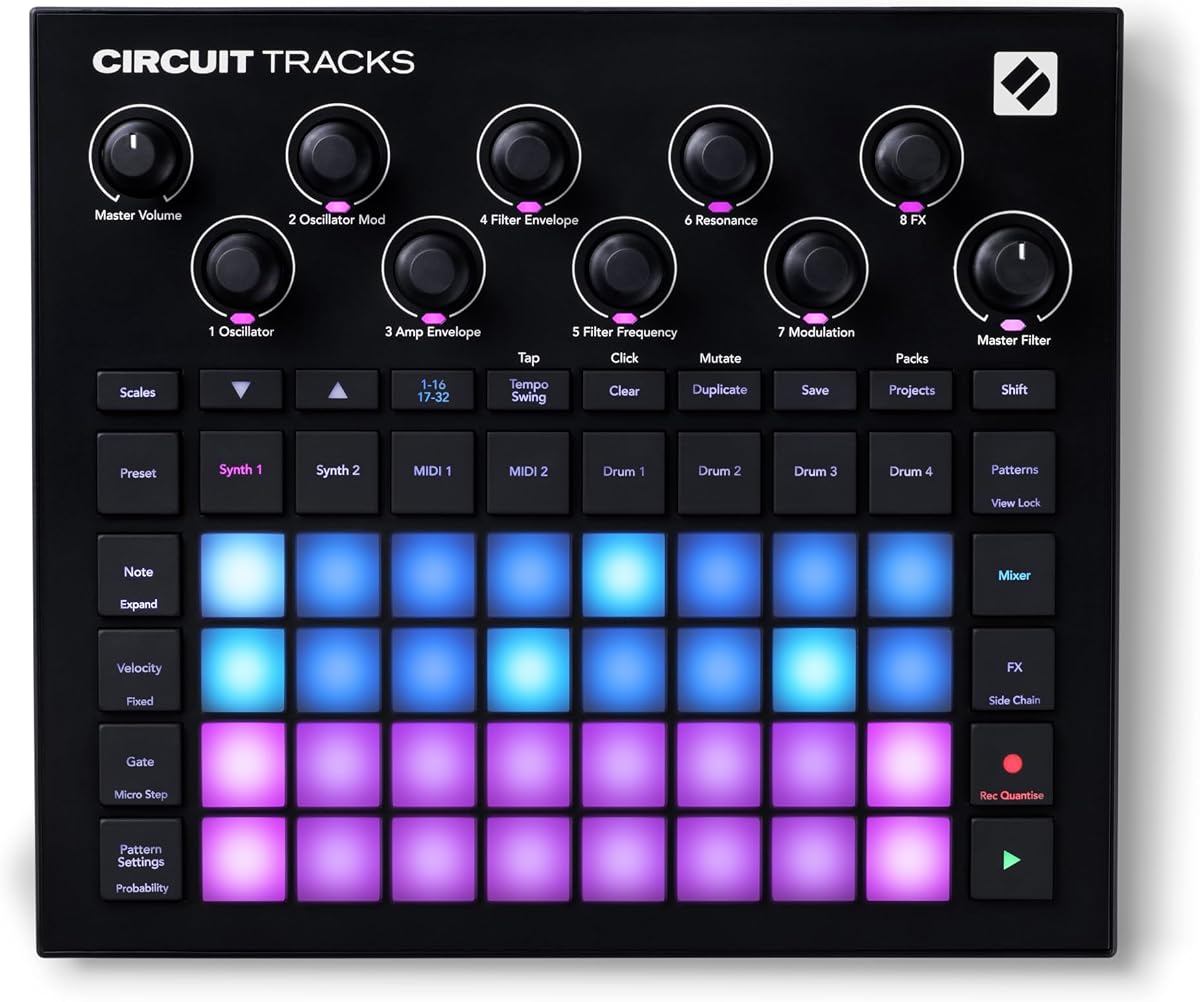
The Novation Circuit Tracks offers a compelling blend of synthesis and sequencing that encourages creativity through its hands-on workflow. With a 4.7 rating, it is praised for its accessibility and powerful sound engine. This device is designed to help musicians create complete tracks quickly without getting bogged down by complex menus.
We may earn a commission when you buy through this link, at no additional cost to you.
It features two refined polyphonic digital synth tracks alongside four drum tracks, giving you a solid foundation for building songs. The 32-step patterns can be chained to create up to 256 steps, allowing for long and evolving arrangements. Velocity-sensitive pads and tactile controls make it easy to perform and tweak sounds on the fly.
One limitation is that it relies on external storage or Components software for sample expansion, and it does not have an internal battery for true standalone operation. However, for studio work or connected live setups, these drawbacks are minor. The dedicated MIDI tracks allow you to control external gear effectively without needing a computer.
This groovebox is perfect for beginners and intermediate producers who want a simple yet capable device for songwriting and performance. If you value a straightforward workflow and high-quality synth sounds, the Circuit Tracks is an excellent value. It balances features and price to offer one of the best entry points into hardware production.
You can use premade artist samples or load your own to customize your sound, while the two synth tracks provide rich digital synthesis for melodies and basslines.
Dedicated MIDI tracks allow you to send notes and CC automation to external hardware, extending the power of this unit to your entire studio setup.
We may earn a commission when you buy through this link, at no additional cost to you.
The Akai Professional MPC Sample brings the legendary MPC workflow to a portable, battery-powered device. With a high 4.8 rating, it is ideal for beatmakers and finger drummers who want to create anywhere. The built-in speaker and microphone make it easy to record and audition ideas without any extra gear.
We may earn a commission when you buy through this link, at no additional cost to you.
It features 16 responsive MPC pads and a fast-chopping workflow that lets you turn raw sounds into finished grooves quickly. The four internal FX processors offer deep sound design capabilities with dedicated knobs for control. This device is designed to be a standalone hub for sampling and sequencer tasks without requiring a computer.
The small 2.4-inch display might be a limitation for navigating complex menus, but the hands-on controls make up for it. While it is not a full multi-track mixer, it serves as an excellent sketchpad and portable sampler. The microSD card storage ensures you can carry your library with you wherever you go.
This device is best for producers who want to capture inspiration on the go or use the MPC workflow in a mobile setup. Its battery power and intuitive interface make it a standout choice for mobile creativity. If you value the MPC legacy in a compact format, this is a top contender.
The Instant Sample Chop Mode and real-time timestretch/repitch features allow you to transform raw audio into playable rhythmic material immediately after recording.
Battery power and built-in storage enable you to record, edit, and playback anywhere, making it a perfect solution for traveling musicians and producers.
We may earn a commission when you buy through this link, at no additional cost to you.
The Roland MC-707 is a professional music production workstation designed for comprehensive song creation and live performance. With a 4.3 rating, it offers a wide range of tools for producers who need a standalone solution that covers all aspects of music making. It features a robust sound engine with access to extensive sound libraries.
We may earn a commission when you buy through this link, at no additional cost to you.
Its track types include Tone, Drum Kit, and Looper options, allowing you to build songs with varied textures. The 128-step sequencer provides precise control for complex arrangements, while the extensive effects suite ensures your sound is polished. The ability to record 8 tracks with 128 clips makes it suitable for detailed production.
While powerful, the device can feel bulky compared to smaller grooveboxes, and navigating its menus can take time. However, these features are necessary for its comprehensive capabilities. The SD card slot allows for easy expansion of your sound library, and the connectivity options let you integrate it with other studio gear effortlessly.
This groovebox is best for producers who need a full studio in a box without a computer. If you value sound quality and deep control over your arrangements, it is a reliable choice. It is particularly useful for those who want to record multi-track ideas on the go with professional quality.
You can use Tone tracks for synths, Drum tracks for beats, and Looper tracks for audio loops, giving you a full palette of tools to build songs.
With 90 track multi-effects and master effects, you can process your sounds with high-quality tools to achieve a professional mix directly on the device.
We may earn a commission when you buy through this link, at no additional cost to you.
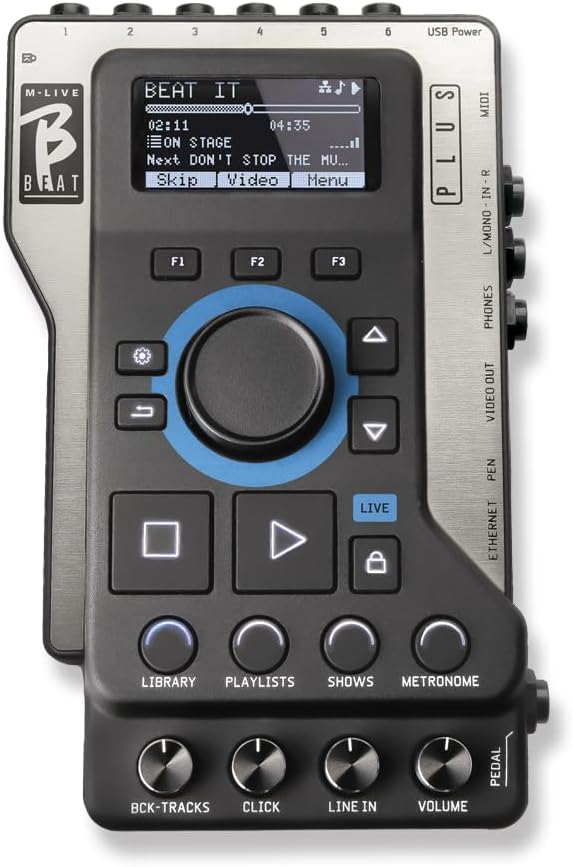
The M-Live B.Beat Plus is a specialized backing track player designed to replace laptops for live musicians and bands. With a 4.7 rating, it is known for its reliability and advanced features that simplify live shows. It provides a compact solution for delivering pristine multitrack audio and video sync.
We may earn a commission when you buy through this link, at no additional cost to you.
You can manage up to 16 mono tracks or 8 stereo tracks, giving you immense flexibility for backing arrangements. The HDMI video sync allows you to play video alongside your audio, which is perfect for visual live performances. Additionally, features like stem removal and EQ give you control to adapt your setlists on the fly.
While it is not a full music production tool, its focus on playback and management makes it a powerful tool for touring. The high storage capacity ensures you can keep your entire show library on the device. However, the specialized nature means it may not be for users who need to create original music from scratch.
This device is ideal for bands and solo artists who need to play backing tracks reliably without a laptop. If you want to simplify your stage setup and have control over your audio and video, this is a strong choice. It is a professional solution for those prioritizing performance stability.
You can define song sections using markers and create loops to repeat parts, allowing you to adapt your set to the audience moment without stopping.
By replacing your computer and mixer with one compact unit, you can focus entirely on the music and reduce the complexity of your live rig.
We may earn a commission when you buy through this link, at no additional cost to you.
The Elektron Digitakt II is a powerful drum computer and sampler that focuses on precise sequencing and sound manipulation. With a 4.4 rating, it is a favorite for producers who want detailed control over their drums. The 16 tracks allow you to layer complex beats and MIDI sounds with ease.
We may earn a commission when you buy through this link, at no additional cost to you.
Its 128-step sequencer gives you the precision needed for intricate rhythms, while the swappable filters let you shape the tone of your samples. Effects like delay, reverb, and bit reduction are available per track to help you create unique textures. The Song Mode allows you to arrange full compositions directly on the device.
The device is compact but has a learning curve typical of Elektron products. While it may not offer the deep storage of larger units, its focus on sound shaping and sequencing makes it versatile. For live use, the dedicated buttons and knobs provide quick access to your performance parameters.
This device is best for drummers and electronic producers who want a high-end beat machine. If you prioritize sequencing power and sound design flexibility, it is a top choice. It serves as a strong foundation for any live rig focused on rhythm and texture.
The 128-step Elektron sequencer allows you to program complex rhythmic patterns with ease, offering deep control over timing and parameter locks for variation.
Swappable filters and dedicated effects per track let you mold your drum sounds and samples to fit your specific musical style without external gear.
We may earn a commission when you buy through this link, at no additional cost to you.
The myTRACKS Groovebox is designed to make music creation feel like play, making it perfect for beginners and younger musicians. With a 4.6 rating, it offers a simple workflow that allows you to create real songs without needing prior experience. The interface is intuitive and focuses on discovery.
We may earn a commission when you buy through this link, at no additional cost to you.
You can build tracks with drums, instruments, and recordings using built-in tools that automatically align notes to ensure they sound good together. The hands-on controls let you add filters, echoes, and pitch effects to shape your sound. It is a great way to explore creativity without getting bogged down by technical details.
While it lacks advanced features found in professional units, this simplicity is its greatest strength. It is not intended for complex production but is excellent for learning the basics of sequencing and sampling. The built-in sampler lets you capture and transform everyday sounds into music.
This device is ideal for those starting their musical journey or children looking to experiment. If you want a fun and simple way to make music without complex steps, it is a great option. It provides a friendly introduction to the concepts of groovebox production and performance.
Musical notes automatically work with each set, making it easy to create music that sounds good right away without needing music theory knowledge.
You can capture voices and everyday sounds with the built-in sampler and transform them into music, encouraging unique and personal sound creation.
We may earn a commission when you buy through this link, at no additional cost to you.
The Roland MC-101 Groovebox is a compact production tool that shares the powerful ZEN-Core Synthesis System with larger Roland units. This bundle includes essential cables to get you started immediately. It is designed for portability and ease of use, making it suitable for creating musical phrases anywhere.
We may earn a commission when you buy through this link, at no additional cost to you.
You can use the four tracks to design sounds and create drum patterns. The sample player allows you to import custom sounds to customize your audio. The ZEN-Core engine delivers the classic Roland sounds that have defined electronic music for decades. The bundle includes MIDI and instrument cables for quick integration.
While limited to four tracks, this makes it an efficient tool for sketching ideas. It runs on batteries for true mobile operation. The lack of a microphone limits direct sampling but you can import sounds. This compact unit is perfect for travel or as a second device for your production setup.
This groovebox is best for travelers and producers who want a lightweight yet powerful instrument. If you need classic sounds in a portable form, it is a strong choice. The inclusion of cables in the bundle adds value and ensures you can start creating without waiting for accessories.
The ZEN-Core Synthesis System delivers the iconic Roland sounds that have defined electronic and dance genres, providing a rich palette for your productions.
Each track contains a powerful sample player so you can import your own custom sounds and process them with the built-in effects.
We may earn a commission when you buy through this link, at no additional cost to you.
The Akai Professional APC40 MKII is a versatile MIDI controller designed specifically to provide hands-on control for Ableton Live. With a 4.8 rating, it is a staple for users who want to trigger clips and mix without reaching for the mouse. It offers complete command over clip launching and mixer parameters.
We may earn a commission when you buy through this link, at no additional cost to you.
The 5×8 clip-launch matrix with RGB feedback allows you to launch clips and loops easily during performance. The assignable crossfader enables dynamic mixing, while the faders and knobs let you control effects and virtual instruments. It comes with software packs to help you get started with production immediately.
While it is not a standalone device, its integration with Ableton makes it powerful for live sets that rely on a laptop. The USB-powered design makes it easy to set up without extra power cables. However, if you want a computer-free experience, this is not the right choice for you.
This device is best for Ableton users who want to enhance their live performance with physical controls. If you value clip launching and mixer control, it is a top contender. It transforms any performance space by providing intuitive tools for dynamic lighting and audio adjustments.
You can take command of DAW parameters and effects with 9 channel faders and control knobs that seamlessly map with Ableton Live for dynamic mixing.
The robust faders and buttons allow you to dynamically adjust lighting cues and effects, transforming your performance space into a captivating visual experience.
We may earn a commission when you buy through this link, at no additional cost to you.
Selecting the right groovebox depends on your specific workflow and performance needs. This guide outlines key factors to consider before making your purchase.
Determine if you need a device that works without a computer. Standalone units are ideal for mobile performances, while computer-dependent controllers offer more depth but require a laptop.
Choose standalone for portability or a controller for maximum DAW integration and complexity.
Consider how many tracks you need for your arrangements. Some units offer 4 tracks, while others provide 16 or more. This affects the complexity of your live set.
Ensure the track count matches the complexity of your music to avoid running out of space during performance.
Evaluate the synthesis and sampling capabilities of the device. Look for engines that match your preferred genres, such as analog-style synthesis or digital sampling.
Prioritize sound engines that offer high-quality samples and flexible synthesis options for your creative style.
For live performance, battery power and physical weight are crucial. Check if the unit has a built-in battery and how long it lasts on a single charge.
Select a device with good battery life to ensure you can perform anywhere without needing power outlets.
Check the inputs and outputs available. You may need MIDI, USB-C, or audio jacks to connect external gear or audio systems.
Ensure the unit has the necessary ports to integrate seamlessly with your existing hardware setup.
Look for sequencers that allow for complex patterns and real-time editing. Features like step sequencing and macro controls enhance live manipulation.
Choose a sequencer that supports your workflow and allows for dynamic changes during a performance.
Consider the learning curve of the interface. Some grooveboxes are intuitive for beginners, while others require time to master menus and controls.
Pick a device that fits your technical comfort level to maximize your creativity on stage.
If you use specific DAWs, ensure the groovebox integrates well with them. Some units include software licenses or cloud syncing features.
Verify that any included software or sync features align with your digital production workflow.
Start by loading your sample library and presets to ensure your sounds are ready. Most grooveboxes allow you to import audio via SD cards or USB connections.
Set up your MIDI connections and audio outputs before the show. Ensure your unit is connected to your mixer or speakers correctly to avoid technical issues.
Practice your set regularly to familiarize yourself with the performance controls. Proper storage in a padded case will protect your device from physical damage during travel.
Yes, many modern grooveboxes operate fully standalone. Devices like the Ableton Move and Roland MC-707 allow you to perform without a computer.
Most grooveboxes feature MIDI in and out ports. This allows you to control external synthesizers or drum machines directly from your unit.
Many portable grooveboxes offer battery power. Always check the battery life to ensure it covers your entire set without interruption.
Storage varies by model but often includes internal memory plus SD card support. This allows you to expand your sample library as needed.
Many grooveboxes include built-in microphones or audio inputs. This enables you to record and manipulate sounds live on the device.
A groovebox combines sequencing, synthesis, and sampling in one unit. A sampler focuses primarily on recording and playing back audio samples.
Yes, there are beginner-friendly grooveboxes with simplified interfaces. However, advanced units may require more time to learn and master.
Most manufacturers provide desktop software to update firmware. Check the official website for the latest updates and installation instructions.
Choosing the right groovebox involves balancing features with your performance needs. Our top picks like the Ableton Move and Elektron Octatrack MKII offer distinct advantages for different users.
Prioritize standalone capability and sound quality if you want to perform without a laptop. For those who value DAW integration, a controller like the APC40 MKII is an excellent companion.
Always check current availability and pricing before buying to ensure you get the best deal. With these top options, you are well-equipped to find a device that matches your artistic vision.