
Cooling Fan for Nintendo Switch 1/2
4.6Editor score
Adjustable fan speed settings
LED temperature and speed display
Micro USB powered design
Explore our expert guide comparing the top cooling fan Nintendo Switch dock accessories to keep your console cool during intense gaming sessions without
Gaming on your Nintendo Switch often means extended sessions that can push the hardware to its limits. Overheating can cause performance issues or even damage your console if not managed properly. That is why adding a dedicated cooling solution to your dock setup is a smart move for any serious player looking to protect their investment.
We have carefully reviewed the most popular cooling fan options available for the Switch dock today. Our comparison focuses on airflow efficiency, noise levels, build quality, and ease of installation. Each product was evaluated based on real user feedback and technical specifications to ensure you get a reliable accessory that delivers on its promises.
Each pick in this list highlights specific strengths such as adjustable speed, LED displays, or compact designs. Keep in mind that availability and pricing can fluctuate over time. We recommend checking the latest details before making your final decision to ensure you get the best value for your specific setup needs today.
4.6Editor score

4.4Editor score

4.0Editor score
This side-by-side comparison highlights key features across all ten reviewed cooling fans to help you identify the right model for your specific Switch dock version and gaming needs.




This cooling fan offers a solid balance of performance and value for standard Switch docks. With a high rating and adjustable speed, it keeps the console cool without breaking the bank.
We may earn a commission when you buy through this link, at no additional cost to you.
The LED display provides real-time feedback on fan RPM and exhaust temperature, helping you monitor heat levels during intense sessions. The included fixed pad ensures stability and prevents scratches on your console.
While it operates quietly under 2400 RPM, higher speeds produce some noise which may be noticeable in quiet rooms. The Micro USB power is convenient but lacks the modernity of USB-C.
Budget-conscious gamers seeking reliable cooling with useful features like temperature monitoring will find this an excellent choice for their dock setup.
The LED display shows both fan speed and air temperature so you know exactly when your system is running safely during gameplay.
The fixed pad with sponge sides keeps the unit secure and prevents any scratching to your valuable console hardware.
We may earn a commission when you buy through this link, at no additional cost to you.
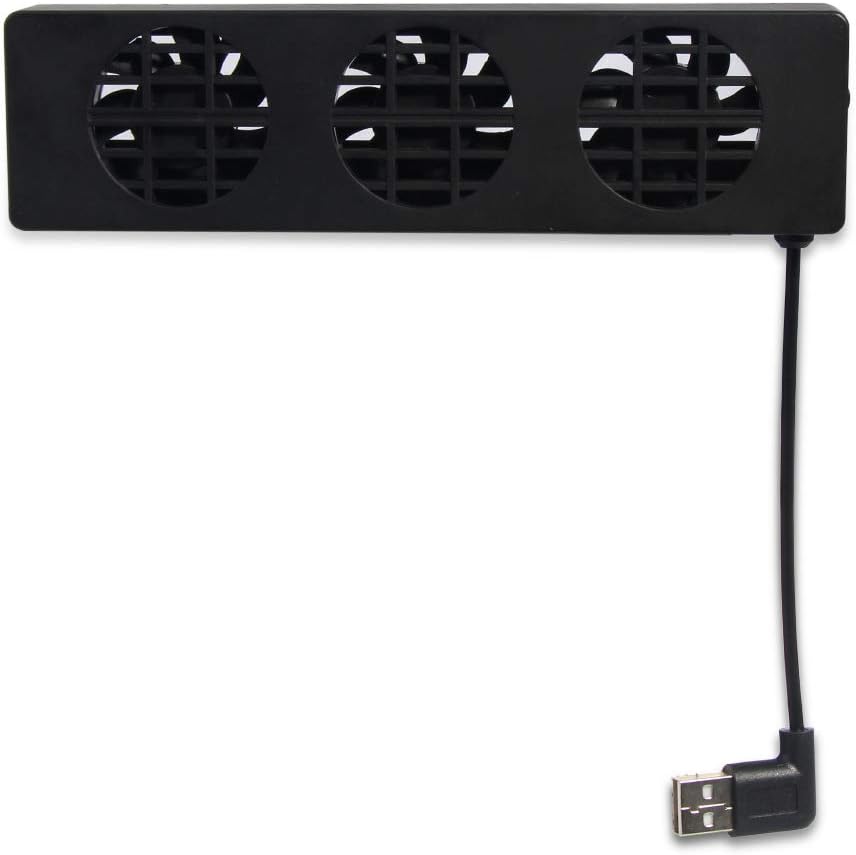
This unit features three high-speed fans designed to boost ventilation for original Switch docks. It aims to prevent overheating during long sessions with a compact footprint.
We may earn a commission when you buy through this link, at no additional cost to you.
The three fan configuration provides strong airflow to lower console temperature quickly. Turbo and normal options let you choose performance based on current needs.
Despite the feature set, user feedback indicates some inconsistency in performance compared to other models. The basic switch design offers limited customization options.
Gamers with original docks looking for maximum airflow in a small space might consider this but should verify compatibility and reviews first.
Three built-in fans work together to move more air through the dock for faster cooling during heavy gaming loads.
Switch to turbo mode when you need rapid cooling during intense games or demanding titles that push your system hard.
We may earn a commission when you buy through this link, at no additional cost to you.
Designed for the Switch 2 dock, this stand offers dual fans and premium features like RGB lighting and extra ports. It aims to be a complete cooling station solution.
We may earn a commission when you buy through this link, at no additional cost to you.
The dual fan setup promotes heat dissipation to extend console lifespan. Six game slots and three USB ports add significant utility beyond basic cooling.
While powerful, the specialized design targets next-gen hardware which may not fit current setups. The price reflects these added premium capabilities.
Users planning ahead for Switch 2 or wanting a feature-rich docking station with lighting will appreciate this versatile cooling option.
Beyond cooling, it offers six game slots and USB ports to organize your accessories and charge devices simultaneously.
Nine RGB modes let you match the dock to your room theme or game atmosphere for an immersive visual experience.
We may earn a commission when you buy through this link, at no additional cost to you.
This cooler is built specifically for the 2021 OLED dock ensuring a precise fit and effective airflow. The Type-C connection aligns with modern console standards.
We may earn a commission when you buy through this link, at no additional cost to you.
Its most notable feature is the fourteen game card slots providing ample storage to prevent loss. The turbo fan blows directly onto the base surface for efficient cooling.
The integrated blue light adds style but might be too bright for dark rooms. It is tailored strictly for OLED owners so others should look elsewhere.
If you own the OLED Switch, this is a top tier choice that blends cooling performance with exceptional storage and style.
Fourteen slots on top allow you to organize and access your physical game collection instantly without searching through drawers.
Uses a Type-C data cable to match the Switch OLED base design for plug-and-play compatibility without extra adapters.
We may earn a commission when you buy through this link, at no additional cost to you.
Designed for the OLED model, this fan focuses on silent cooling with a clean white finish. It uses a Type-C power connection for simplicity.
We may earn a commission when you buy through this link, at no additional cost to you.
The high-speed fan accelerates air circulation inside the base to dissipate heat effectively. The lighting effect is synchronized with the switch for a cohesive look.
While it lacks advanced display features, its primary goal of quiet cooling is achieved well. Users prioritize noise reduction over data monitoring will prefer this.
Ideal for nighttime gamers who want their console to run cool without adding ambient noise to their environment.
The design prioritizes low noise operation so you can focus on your game without fan hum interrupting your immersion.
The LED light turns on with the fan so your dock looks consistent without manual adjustments during play.
We may earn a commission when you buy through this link, at no additional cost to you.
This accessory targets OLED docks with a focus on rapid heat removal. The compact white design fits well with modern entertainment centers.
We may earn a commission when you buy through this link, at no additional cost to you.
Running at 3000 RPM the turbo fan accelerates airflow to cool the dock instantly. The USB power ensures it stays operational without extra outlets.
Although it lacks detailed controls or reviews, the specific focus on fast cooling makes it a practical choice for budget buyers.
If you need a quick and small solution to boost airflow for your OLED Switch this unit delivers on basic cooling needs.
The turbo fan ensures your console stays cool during intense sessions to prevent overheating without delay.
Its compact build keeps your setup tidy by saving space on your TV stand while still providing strong airflow.
We may earn a commission when you buy through this link, at no additional cost to you.
This cooler uses three fans to keep the console cool with a side switch for speed adjustment. It offers a simple external cooling bracket.
We may earn a commission when you buy through this link, at no additional cost to you.
The turbo normal options let you choose between power and quiet operation. The compact setup is easy to set up without tools.
While it gets the job done, the material and finish are basic compared to more polished models. It serves as a functional utility item.
Gamers seeking a no-fuss multi-fan cooling solution that can easily move between setups might find this practical option useful.
Use the side switch to toggle between turbo for heavy load and normal for standard play to manage noise.
No extra tools are needed to attach the cooling base to your dock allowing for immediate use after unboxing.
We may earn a commission when you buy through this link, at no additional cost to you.
OSTENT provides a fan unit with three cooling fans to increase airflow. It connects via the USB port to draw power directly.
We may earn a commission when you buy through this link, at no additional cost to you.
The turbo switch offers a fast mode for heavy games and normal for lighter sessions. This helps reduce console temperature quickly and effectively.
Feedback suggests inconsistent build quality compared to competitors. The design is functional but may lack long-term durability in some cases.
If you need an affordable multi-fan option and do not expect premium build quality this unit could still offer value for basic cooling.
Three fans working together push more air into the system to help maintain stable temperatures during play.
Its size and shape make it easy to carry out and store in any bag when gaming on the go.
We may earn a commission when you buy through this link, at no additional cost to you.
This fan offers a vertical stand design compatible with Switch and Steam Deck. The LED display shows speed and exhaust temperature clearly.
We may earn a commission when you buy through this link, at no additional cost to you.
You can adjust speed from 510 to 6000 RPM to balance performance and noise. The package includes a pad to prevent slipping during use.
Micro USB is less convenient than USB-C for newer setups. The multi-device compatibility is a strong asset for mixed ecosystems.
Players using both Switch and Steam Deck will appreciate this adaptable cooling solution that supports varied hardware with adjustable settings.
The design supports both Switch and Steam Deck allowing one fan to serve multiple consoles in your gaming collection.
Adjustable speeds let you tailor the cooling to match your specific game demands without unnecessary noise.
We may earn a commission when you buy through this link, at no additional cost to you.
This model offers a specialized black finish designed for OLED docks. It aims to provide efficient cooling while maintaining a premium aesthetic.
We may earn a commission when you buy through this link, at no additional cost to you.
The specific design ensures a precise fit for OLED bases. It carries a solid rating indicating reliability in user feedback.
Regional packaging and language may present challenges for some buyers. The unique design is a key feature for aesthetic consistency.
Buyers seeking a matching black cooling accessory for their OLED setup will find this model delivers on style and function.
The black color matches the OLED dock perfectly to keep your entertainment center looking clean and cohesive.
Designed only for the OLED model this cooling dock ensures maximum stability and optimal airflow placement for that version.
We may earn a commission when you buy through this link, at no additional cost to you.
Selecting the right cooling fan depends on your specific dock model and cooling needs. Use the following factors to guide your choice.
Ensure the fan is designed for your specific Switch model such as original OLED or the upcoming Switch 2. Improper fit can damage your dock or reduce effectiveness.
Always check the product title for compatibility mentions before purchasing to avoid fit issues.
More fans and higher RPM generally mean better cooling but also more noise. Look for adjustable speed options to balance performance with silence.
Turbo modes are useful for demanding games while normal modes save energy and reduce noise during casual play.
Modern docks use USB-C while older ones may require Micro USB. Matching the power cable ensures you do not need extra adapters.
Type-C cables are becoming standard and offer better durability and compatibility with newer consoles.
Fans can be noticeable in quiet rooms. Check user reviews for noise complaints especially if you play in shared spaces.
Look for fans rated as quiet or those with a low RPM setting to keep the environment peaceful.
Some models include RGB lights game slots or LED displays. These can add value but may not be essential for cooling.
Decide if you want extra storage or style features versus a purely functional cooling unit.
ABS plastic is common but should feel sturdy. Avoid units with flimsy parts that might break during transport.
A well-built unit will last longer and maintain its performance over time without rattling.
A good warranty protects your investment against defects. Look for brands offering at least a year of support.
Responsive customer service can help resolve issues quickly if the unit fails to work as expected.
Higher price often means better build but not always better cooling. Compare features to ensure you pay only for what you need.
The best value balances cost with reliability and performance for your specific gaming habits.
Install the fan according to the instructions typically plugging the USB cable into the dock's power port. Ensure the fan faces the correct direction for optimal airflow.
Use the speed controls to adjust cooling levels based on game intensity. Lower speeds are sufficient for casual play while turbo is best for demanding titles.
Clean the fan blades periodically with a soft cloth to prevent dust buildup. Dust can reduce airflow and cause the fan to work harder than necessary.
Yes. proper cooling fans improve airflow around the dock which helps lower internal temperatures. This reduces the risk of thermal throttling and extends the console life.
Only models specifically labeled for OLED fit. Standard fans may not align correctly with the ports or vents on the OLED dock.
Type-C is better because it matches the Switch power standard and is more durable. Micro USB is acceptable for older docks but less convenient.
It depends on the model. Some operate silently at low speeds while others produce noise at high RPM. Check reviews for noise levels before buying.
No. most plug into the dock's USB port for power so no extra outlet is needed. This keeps your setup clean and simple.
Most dock fans are not compatible with the Lite since it lacks a dock. Look for standalone portable fans if you use the Lite in handheld mode.
Contact the seller immediately. Many products come with warranties that cover defects and allow you to get a replacement free of charge.
Some users find them distracting while others enjoy the effect. Most fans have a button to turn the lights off if you prefer a dark room.
Our top picks highlight a range of options from budget to premium. The GLDRAM model leads for OLED users while the first pick offers value for standard docks.
Prioritize compatibility and noise levels when selecting a fan. These two factors have the biggest impact on your daily gaming comfort.
Remember to check current availability before ordering. Inventory fluctuates and some models may be out of stock due to high demand.