
ARCTIC Liquid Freezer III Pro 420 A-RGB
4.6Editor score
Contact frame for Intel LGA1851
P14 PRO fans for quiet power
Integrated VRM fan included
Finding the right cooling solution is critical for high-performance computing. A 420mm AIO liquid cooler offers exceptional thermal dissipation for demanding workloads and gaming. These systems move heat away from the CPU efficiently using a large radiator and water block.
We evaluated ten top models based on cooling efficiency, noise levels, and build quality. Our analysis focuses on real-world performance metrics and user feedback. Each product was assessed for compatibility with modern CPU sockets and ease of installation.
Each pick highlights unique strengths like RGB lighting or advanced pump designs. Prices and availability can shift frequently online. Always verify current specs and stock before making your final purchase decision for your specific system needs.
4.6Editor score

4.7Editor score

4.4Editor score
As an Amazon Associate we earn from qualifying purchases.
The following table provides a side-by-side comparison of all ten models. You can quickly identify key specs and features to find the best fit for your build requirements.


The be quiet! Silent Loop 3 420mm stands out with a 4.7 rating for its exceptional noise levels and performance. This AIO cooler uses a powerful 3-chamber pump and three Silent Wings 4 fans for optimal airflow.
We may earn a commission when you buy through this link, at no additional cost to you.
Its dampened pump design significantly reduces turbulence and noise even under high loads. The engineered cooling block provides incredibly high performance with wide plate coverage that supports high-end Threadripper CPUs effectively.
While it comes at a premium price, the build quality justifies the cost. Users might find the weight slightly challenging for smaller cases, but the acoustic benefits make it a top choice for quiet builds.
If you prioritize silence without sacrificing thermal performance, this model is the ideal pick. It fits well in workstation environments or gaming setups where noise control is critical for comfort.
The 3-chamber pump design minimizes turbulence for near-silent operation.
Silent Wings 4 fans balance high airflow with minimal acoustic disturbance.
We may earn a commission when you buy through this link, at no additional cost to you.
The ARCTIC Liquid Freezer III Pro 420 A-RGB offers strong cooling at a budget-friendly price. It features a contact frame optimized for Intel LGA1851 and LGA1700 sockets for better heat dissipation.
We may earn a commission when you buy through this link, at no additional cost to you.
P14 PRO fans deliver more power at any speed compared to standard fans. The integrated VRM fan lowers voltage converter temperatures ensuring stable performance during intense workloads and overclocking sessions.
Integrated cable management hides PWM cables within the sheathing to reduce clutter. Users may note the additional weight from the VRM fan but the thermal benefits usually outweigh this minor inconvenience.
For those seeking maximum performance without breaking the bank, this model excels. It provides a professional-grade cooling solution suitable for both gaming rigs and productivity workstations.
Native offset mounting shifts the cold plate toward the CPU hotspot.
PWM-controlled fan lowers temperatures of voltage converters for stability.
We may earn a commission when you buy through this link, at no additional cost to you.
The NZXT Kraken Elite 420 RGB features a massive 2.72-inch IPS LCD for stunning visuals. With a resolution of 640 x 640 and vibrant colors it allows full customization with GIFs and images.
We may earn a commission when you buy through this link, at no additional cost to you.
Its custom-designed Turbine pump ensures high flow rates and head pressure for superior cooling. This model supports the latest sockets and includes pre-applied thermal paste for quick installation.
The price is higher than most competitors but the display capability is unique. The weight might require sturdy case mounting but the aesthetic appeal and performance make it a premium choice.
Ideal for users who want to showcase system metrics or media on the pump block. This cooler combines top-tier cooling performance with unmatched visual appeal for showpiece builds.
Display favorite GIFs or images with a crisp high-resolution screen.
Custom Turbine pump efficiently cools heat-prone CPUs with high pressure.
We may earn a commission when you buy through this link, at no additional cost to you.
This version of the ARCTIC Liquid Freezer III Pro 420 focuses on raw cooling efficiency. It shares the same robust features as the A-RGB variant but offers a different aesthetic for clean builds.
We may earn a commission when you buy through this link, at no additional cost to you.
P14 PRO fans provide high airflow while maintaining low noise levels. The native offset mounting ensures efficient heat transfer by shifting the cold plate center towards the CPU hotspot.
Users appreciate the integrated VRM fan that lowers temperature of voltage converters. While it can be heavy due to the thick radiator it handles high loads with ease.
A reliable choice for those who prioritize thermal performance over lighting. It suits professional workstations and enthusiast gaming rigs needing consistent cooling under pressure.
Shifting the cold plate ensures more efficient heat transfer.
P14 PRO fans offer more power at any speed than predecessors.
We may earn a commission when you buy through this link, at no additional cost to you.
The Geometric Future Eskimo Pro brings a fresh look with its K6 liquid pump and large copper base. It supports latest Intel and AMD sockets including AM5 and LGA 1700 for compatibility.
We may earn a commission when you buy through this link, at no additional cost to you.
Vibrant ARGB diffused CPU block adds a modern aesthetic to your rig. Pre-installed high-static pressure Squama fans ensure effective airflow across the 420mm radiator surface.
While the brand is newer compared to established names the build quality appears solid. Users should check cable routing carefully during installation to maximize the visual appeal.
A great choice for those wanting a unique cooler with high performance. It balances modern design features with effective thermal management for demanding system builds.
Advanced pump design ensures efficient fluid circulation and cooling.
Squama fans provide high pressure for effective radiator performance.
We may earn a commission when you buy through this link, at no additional cost to you.
The ASUS ProArt LC 420mm is designed for professionals needing reliable cooling. It features Noctua NF-A14 industrialPPC-2000 PWM fans that deliver high airflow with minimal noise.
We may earn a commission when you buy through this link, at no additional cost to you.
Its performance three-phase motor offers excellent cooling capability and quieter operation. An illuminated meter indicates live system load temperatures and fan speeds for easy monitoring.
The thicker radiator stores more coolant for enhanced cooling performance. While it lacks extensive RGB it complements ProArt components perfectly with a clean minimalist look.
Ideal for content creators and professionals who value stability and quiet. It fits best in workstations where visual distractions should be minimized during tasks.
Illuminated meter shows live temperatures and fan speeds clearly.
Noctua fans ensure quiet operation with high airflow performance.
We may earn a commission when you buy through this link, at no additional cost to you.
This ARCTIC Liquid Freezer III model offers robust cooling with a P14 PRO fan setup. It optimizes contact pressure for Intel LGA1851 and LGA1700 for better CPU life.
We may earn a commission when you buy through this link, at no additional cost to you.
The integrated VRM fan lowers the temperature of voltage converters ensuring reliability. Users benefit from integrated cable management that reduces visible clutter inside the case.
While it requires more space due to the thick radiator it handles high loads well. Some may find the weight challenging but the cooling results justify the hardware.
A solid option for enthusiasts needing dependable performance without premium costs. It fits well in standard mid-tower cases with enough clearance for the radiator.
Optimized contact pressure ensures longer CPU life and dissipation.
Cables integrated in sheathing reduce visible wires significantly.
We may earn a commission when you buy through this link, at no additional cost to you.
The Thermaltake TH420 V2 Ultra features a 2.1-inch LCD for showing off videos and photos. It includes a high-performance copper base plate that accelerates heat conductivity effectively.
We may earn a commission when you buy through this link, at no additional cost to you.
Users can sync RGB lighting with major motherboard software like ASUS Aura Sync. The pump enables maximum water circulation keeping the plate continuously cool during operation.
Software is required for full RGB control which may limit users without compatible boards. While ratings are solid the experience depends on setting up the TT RGB Plus software correctly.
Good for those wanting a small display and standard RGB at mid-range pricing. It suits general gaming builds needing decent thermal performance with basic visual customization.
High resolution display supports videos and photos for customization.
High-performance copper plate accelerates heat conductivity for cooling.
We may earn a commission when you buy through this link, at no additional cost to you.
The MAGFloe 420 Ultra stands out with a massive 3.95-inch square LCD on the pump block. It supports Intel and AMD sockets including latest 1851 and AM5 for broad use.
We may earn a commission when you buy through this link, at no additional cost to you.
MAGForce 2.0 uses magnetic connections to link fans easily and prevent signal drop out. Included reverse blades allow airflow direction change while keeping the LED side visible.
While the display is impressive the lower rating suggests potential software or quality issues. Users may experience setup challenges but the visual options are unique in this class.
Best for builders prioritizing display size and airflow over traditional reliability. It fits enthusiast cases wanting extensive customization options for media and system stats.
Magnetic connections make linking multiple fans together very easy.
Included reverse blades change airflow direction to keep LEDs visible.
We may earn a commission when you buy through this link, at no additional cost to you.
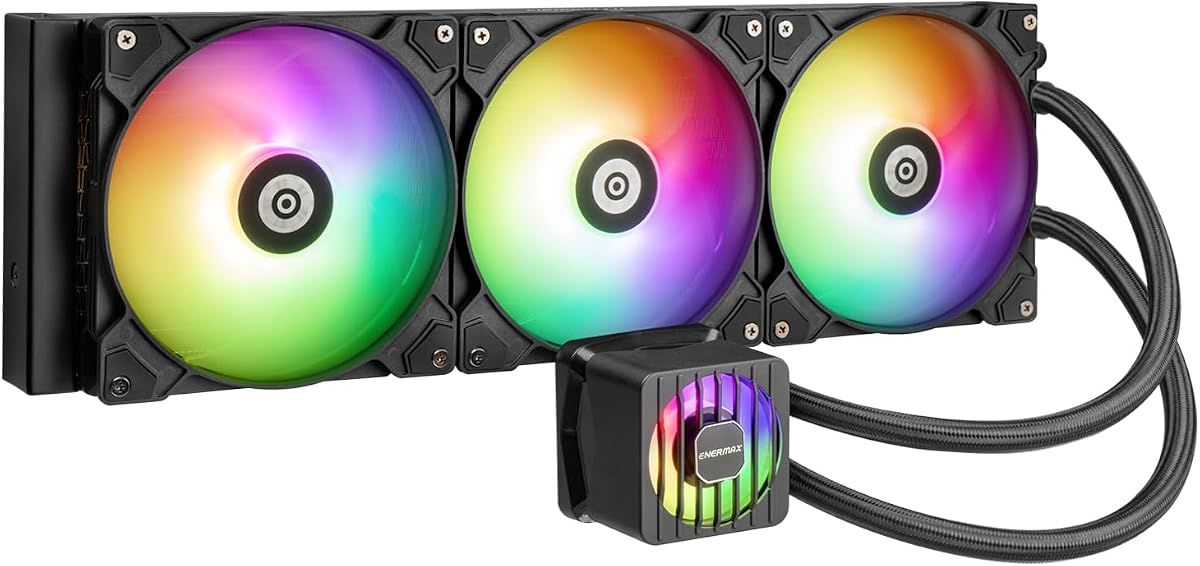
The ENERMAX LIQMAXFLO 420mm offers a high-performance pump reaching up to 3000 RPM. It features a thick 38mm radiator for enhanced cooling performance and airflow capacity.
We may earn a commission when you buy through this link, at no additional cost to you.
Pressure-optimized silent FDB PWM fans reduce noise while maintaining effective cooling. An integrated VRM fan helps lower voltage converter temperatures for stable system performance.
Pre-applied thermal grease makes installation straightforward for most users. While high speeds may generate more noise the cooling potential makes it ideal for overclocking.
Recommended for users needing strong performance and VRM protection at fair pricing. It suits demanding setups where thermal headroom is necessary for stability.
Pump reaching 3000 RPM delivers high fluid circulation for cooling.
Integrated VRM fan lowers temperatures for reliable performance.
We may earn a commission when you buy through this link, at no additional cost to you.
Selecting the best AIO cooler requires understanding key factors like pump performance and fan quality. This guide breaks down what matters most for your specific build needs.
The primary goal of any cooler is to maintain safe CPU temperatures under load. Look for models with efficient water blocks and radiators that dissipate heat effectively.
Prioritize coolers with proven thermal performance and high static pressure fans for best results.
Fans play a crucial role in moving air through the radiator to release heat. Models with high-quality PWM fans allow precise control over speed and noise levels.
Choose units with reputable fan bearings for longevity and low acoustic output.
A reliable pump ensures consistent fluid circulation through the cooling loop. Designs with multiple chambers or advanced motors reduce turbulence and improve cooling efficiency.
Select pumps with proven reliability to prevent failures that could damage your CPU.
Durable materials and construction ensure your cooler lasts years without leaks. Check for reinforced tubing and robust fittings that withstand movement or vibration.
Invest in well-built models to ensure safety and longevity for your hardware.
Ensure the cooler supports your specific CPU socket and case dimensions. Some models offer better coverage for high-end CPUs like Threadripper or Intel i9 series.
Verify socket support and case clearance before purchasing to avoid fit issues.
RGB features add visual appeal but check for software compatibility with your system. Many coolers sync with motherboard lighting to create a unified aesthetic effect.
Balance lighting features with performance needs to avoid unnecessary complications.
Higher cost often correlates with better materials and performance but not always. Compare features to find the best balance between price and what you need.
Focus on performance and build quality rather than just the price tag alone.
Install the cooler according to the manufacturer's manual to ensure proper sealing and mounting. Secure all connections tightly to prevent leaks during initial operation and stress tests.
Monitor system temperatures regularly to detect any changes that might indicate air pockets or pump issues. Use monitoring software to track fan speeds and pump operation over time.
Clean dust from the radiator fins regularly to maintain optimal airflow. Keeping the case dust-free helps the cooler perform efficiently and extends its lifespan.
Yes for users with high-end CPUs that generate significant heat. The large radiator provides better heat dissipation than smaller models helping to keep temperatures low.
Modern models are designed to be quiet even under load. Quality fans can operate at low speeds while still moving enough air to cool effectively.
AIOs are generally maintenance-free but dusting fans and radiators helps performance. Check for pump noise periodically to ensure it is running correctly.
Yes these coolers are built to handle the extra heat from overclocking. They provide ample headroom for pushing CPUs beyond stock speeds safely.
Ensure your case supports a 420mm radiator usually requiring a full tower or large mid-tower. Check the manual for exact clearance requirements.
Not all but many high-end models offer ARGB lighting. Check specifications to confirm RGB support and compatibility with your motherboard.
We highlighted top picks like the be quiet! Silent Loop 3 and ARCTIC Liquid Freezer III for performance and value. Each model offers unique strengths suited to different user needs.
Prioritize build quality and thermal performance when choosing a cooler for your system. Noise levels and aesthetics are secondary but still important for a pleasant user experience.
Always check current pricing and availability before making your purchase. Deals change frequently so monitor listings to get the best value for your build.