
ASUS ROG Raikiri II Pro
4.0Editor score
8K Sampling Rate Speed
Hot-swappable TMR Joysticks
Full Color Display Panel
This guide compares the top ASUS ROG Ally Controller options for PC and handheld gaming, featuring detailed reviews of the Raikiri II, Tessen, and more to help
Finding the right controller for your gaming setup can significantly enhance your experience. Whether you are playing on a PC or a handheld device, the right input device ensures precision and comfort. We have gathered the top options available to help you find the perfect match for your needs.
Our team analyzed performance, connectivity, and build quality to compile this list. We looked at features like polling rates, battery life, and additional buttons to ensure every pick offers real value. This comparison covers the most relevant models from ASUS and compatible alternatives for diverse gaming scenarios.
Each pick highlights unique strengths such as OLED displays, wireless modes, or ergonomic designs. Keep in mind that prices and availability can change frequently across different retailers. We recommend checking the current links for the latest offers before making your final purchase decision today.
4.0Editor score

3.9Editor score

4.1Editor score
This side-by-side comparison details the key specifications and unique features of every controller on our list. You will see differences in connectivity, battery life, and special features like OLED screens or hall effect sensors to make an informed choice.


The ASUS ROG Raikiri II stands out as a top choice for gamers seeking versatility. With a solid rating of 3.9 stars, it balances performance and usability effectively for PC and handheld play. Its standout qualities include the anti-drift joysticks and multiple connection modes that adapt to your setup.
We may earn a commission when you buy through this link, at no additional cost to you.
Key strengths lie in its ultra-response control system. The 1000Hz polling rate ensures minimal lag in wired or 2.4GHz wireless modes. Additionally, the dual-mode triggers allow you to switch between short travel micro-switches and full travel TMR sensors for varied game genres.
While the controller is robust, some users might find the wireless latency slightly higher than wired options in competitive scenarios. However, the convenience of Bluetooth and 2.4GHz RF usually outweighs these minor trade-offs for most players who value flexibility.
This controller is ideal for gamers who want a single device for both PC and Xbox environments. If you prioritize long battery life and customizable rear buttons, the Raikiri II comes highly recommended for your next upgrade.
You can switch between USB-C, 2.4GHz RF, and Bluetooth effortlessly to match your gaming environment.
The TMR joysticks reduce wear and tear over time, maintaining accuracy even after extended use.
We may earn a commission when you buy through this link, at no additional cost to you.
The ASUS ROG Raikiri II Pro elevates the standard Raikiri experience with premium features aimed at serious gamers. Rated 4.0 stars, it offers an 8K sampling rate that delivers incredibly fast response times. This makes it a favorite for competitive play where every millisecond counts.
We may earn a commission when you buy through this link, at no additional cost to you.
Its full color display allows for deep customization including profile changes and button reassignment right from the controller. The hot-swappable TMR joysticks are a significant plus for longevity and maintenance. The battery life is also impressive, lasting up to 79 hours on a single charge.
The high price tag might be a barrier for casual users. Additionally, some features like the 8K rate are optimized primarily for PC setups. However, for those demanding the best performance and customization, this model justifies the investment.
Buy this controller if you need top-tier speed and customization. It suits enthusiasts who want to fine-tune their inputs and maximize comfort during long gaming sessions on PC.
The 8K sampling rate ensures your inputs are registered faster than standard controllers for a competitive edge.
With nearly three days of continuous use on a single charge, you can game for weeks without recharging.
We may earn a commission when you buy through this link, at no additional cost to you.
The ASUS ROG Tessen is a budget-friendly mobile controller designed specifically for Android gamers. With a high rating of 4.1 stars, it excels in portability and ease of use. Its foldable design makes it perfect for on-the-go gaming without sacrificing console-grade control.
We may earn a commission when you buy through this link, at no additional cost to you.
It features console-grade sticks and analog triggers that provide precise input for complex games. The programmable paddles add a layer of strategy to mobile gameplay. Additionally, pass-through charging means you never have to worry about the controller dying mid-game.
The primary limitation is that it only works with Android phones and requires a wired connection. While this reduces wireless flexibility, it ensures zero latency. The price point makes it an accessible upgrade for mobile gamers looking for better controls.
This is the best pick for Android users seeking affordability and portability. If you play frequently on your phone and want better ergonomics than touchscreens, the Tessen is a smart choice.
Its foldable structure fits easily into a pocket while keeping the phone secure during intense gaming sessions.
Wired USB-C connection ensures your commands are executed instantly without wireless interference or lag.
We may earn a commission when you buy through this link, at no additional cost to you.
The ASUS ROG Raikiri Pro OLED brings a visual element to controller customization. Rated 3.9 stars, it features a built-in OLED display that shows status indicators and animations. It is a strong choice for those who want their controller to match their personal style.
We may earn a commission when you buy through this link, at no additional cost to you.
It offers tri-mode connectivity for broad device support including PC and Xbox. The adjustable joystick sensitivity and step triggers allow for fine-tuning. The ESS DAC enhances audio quality, making it great for games where sound cues are critical.
The OLED screen might raise concerns about burn-in over time. Additionally, using all the features requires learning the Armoury Crate software. Despite this, the customization options are superior to many standard controllers on the market.
This controller is ideal for users who value visual feedback and audio quality. If you want a unique look and the ability to adjust sensitivity on the fly, consider this model.
Create unique animations and see battery status directly on the controller face for a personalized experience.
The built-in ESS DAC ensures clear sound when using headphones, enhancing your gaming immersion significantly.
We may earn a commission when you buy through this link, at no additional cost to you.
This version of the Raikiri Pro maintains the OLED display appeal with a slightly different feature set. It holds a rating of 3.4 stars, indicating some users may have experienced minor issues. However, it still offers solid battery life and robust connectivity options for daily use.
We may earn a commission when you buy through this link, at no additional cost to you.
It supports tri-mode connectivity and allows for easy profile switching. The step triggers provide versatility for racing and action games. The ergonomic design ensures comfort during long sessions, making it a reliable companion for various platforms.
Some reports suggest firmware updates might be needed for optimal performance. While not perfect, the core features like the OLED screen and customizable buttons remain very useful. It is a good option if you can find it at a reduced price.
Consider this controller if you want OLED features without the latest Pro II upgrades. It suits users who prioritize battery life and comfort over cutting-edge speed features.
Enjoy up to 48 hours of continuous play, which is excellent for long road trips or weekend gaming marathons.
Works with both PC and Xbox via USB-C, ensuring you can use one controller for multiple systems easily.
We may earn a commission when you buy through this link, at no additional cost to you.
This renewed option allows you to access the premium features of the Raikiri Pro at a lower cost. While it lacks specific user ratings due to its status, it comes with a 90-day warranty and is tested to work like new. It is a practical choice for budget-conscious gamers.
We may earn a commission when you buy through this link, at no additional cost to you.
The OLED display and tri-mode connectivity remain intact, offering the same customization benefits. The step triggers and rear buttons provide the same tactical advantages. You save money without compromising on the core controller functionality.
Since it is a renewed product, there might be minor cosmetic signs of wear. Ensure you check the warranty terms carefully when purchasing. However, the price difference often makes it worth the slight risk for those seeking value.
This is the best pick if you want high-end specs on a budget. It suits gamers who want the OLED experience without paying the full retail price for a new unit.
Each unit undergoes strict testing to ensure it meets functional standards before being packaged for sale.
Access high-end controller features at a fraction of the cost while keeping your gaming setup stylish.
We may earn a commission when you buy through this link, at no additional cost to you.
The ASUS ROG Xbox Ally is technically a handheld system but fits here as a complete controller experience. Rated 4.3 stars, it offers a seamless Xbox and PC gaming experience in one device. Its ergonomic design is inspired by Xbox controllers for comfortable play.
We may earn a commission when you buy through this link, at no additional cost to you.
You get a stunning 120Hz touchscreen and fast internal processing. The built-in controls are top-notch with good button spacing. It includes three months of Game Pass and supports major PC platforms out of the box.
While it is not an external controller, it offers an all-in-one solution for gaming on the go. Some users might prefer a separate controller for TV use, but the built-in ones are excellent. The price reflects its high-end hardware.
This is ideal if you want a complete gaming handheld with great controls. It suits fans of Xbox and PC who want a portable device that handles both ecosystems effectively.
Enjoy native Xbox integration and PC gaming with a device that feels like a premium console controller.
The Ryzen Z2 A processor ensures games run smoothly without lag even during intense action scenes.
We may earn a commission when you buy through this link, at no additional cost to you.
This renewed Raikiri II offers the same versatility as the new model at a lower cost. It is rated N/A but includes a 90-day warranty. You get a travel case which is great for protection. The battery life is robust enough for many hours of play.
We may earn a commission when you buy through this link, at no additional cost to you.
It supports 2.4GHz wireless and Bluetooth for flexible connection options. The web-based configuration simplifies setup without needing heavy software downloads. The TMR joysticks ensure anti-drift performance like the standard version.
As a renewed item, it might have minor cosmetic marks. However, the functionality is tested to work like new. If you want the Raikiri features without the high price, this is a smart compromise.
This model suits budget gamers looking for wireless convenience. It works well for anyone needing an affordable controller with good battery life and protective accessories included.
Web-based configuration allows you to customize the controller quickly without installing complex drivers on your PC.
The included case keeps your controller safe in your bag, making it perfect for gaming sessions outside the home.
We may earn a commission when you buy through this link, at no additional cost to you.
The CRKD NEO S offers an alternative to direct ROG controllers with a focus on collectibility and versatility. It holds a strong 4.3-star rating from users. It works with many platforms including ROG Ally making it a great companion device.
We may earn a commission when you buy through this link, at no additional cost to you.
Its Hall Effect sticks ensure no stick drift over time which is a major plus. The re-mappable buttons allow for custom layouts. The retro design adds a unique aesthetic that appeals to collectors who want something different.
Since it is a third-party brand, some features depend on a mobile app. While this is manageable, it adds a step to setup. However, the price and design make it a fun and functional option for many users.
This is the best pick for collectors who also need a reliable controller. If you value Hall effect tech and unique styling, this fits the bill nicely for various gaming sessions.
Seamlessly switch between PC, Switch, and handheld devices without needing different controllers for each system.
Hall effect sensors mean your sticks will not drift over time, ensuring longevity and consistent performance.
We may earn a commission when you buy through this link, at no additional cost to you.
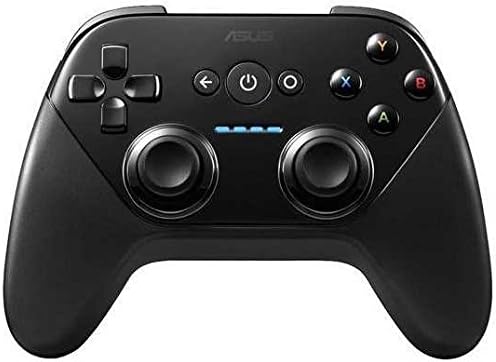
The ASUS TV500BG is a classic option for Android and Windows TV gaming. Rated 4.2 stars, it is simple yet effective. It supports basic gamepad functions and is compatible with Google Play Games. This makes it a reliable choice for living room setups.
We may earn a commission when you buy through this link, at no additional cost to you.
It ensures accurate control which is vital for sports and puzzle games. The price is very accessible for those on a tight budget. It also tracks progress across devices so your achievements are saved everywhere you play.
Its design is basic compared to modern options like the Raikiri series. It may lack features like remapping or advanced triggers. However, for casual gaming on a TV screen, it performs its core duties well and reliably.
This is the best pick for simple home TV gaming. If you need a cheap controller that just works with your Android TV, this model delivers value without complexity.
Designed for both Android and Windows, it lets you connect to your TV or PC with minimal setup steps.
Track your progress across devices easily so you never lose your achievements regardless of where you play.
We may earn a commission when you buy through this link, at no additional cost to you.
Choosing the right controller requires looking beyond just the brand name. Here are key factors to help you pick a device that matches your gaming style and budget.
Most modern controllers offer tri-mode connectivity including USB-C, Bluetooth, and 2.4GHz RF. Wired connections provide the lowest latency but require a cable. Bluetooth is convenient but may have higher latency. 2.4GHz RF offers a balance of wireless freedom and stability which is crucial for competitive games.
Ensure the controller supports the connection mode you prefer for your setup before buying.
Stick drift is a common issue in gaming controllers. Look for Hall Effect or TMR joysticks which use magnetic sensors instead of physical contacts. This prevents drift and extends the lifespan of the controller. It is especially important if you play for many hours daily.
Prioritize controllers with Hall Effect or TMR sticks to avoid drift issues over time.
A controller with good battery life saves you from frequent interruptions. Some models offer up to 80 hours while others may only last 20. Consider how often you play without a power source. If you game on the go, a higher capacity battery is essential for uninterrupted sessions.
Check the rated battery life to ensure it matches your typical gaming session duration.
Rear paddles or programmable buttons allow you to map complex actions to simple presses. This can improve reaction times in competitive shooters. Look for controllers with at least two rear buttons for basic customization. Advanced models let you remap triggers and sticks as well.
Select a controller with enough programmable buttons to suit your preferred control scheme.
Triggers can be linear or step. Linear triggers allow variable pressure for acceleration in racing games. Step triggers act as clicks for shooters. Some controllers offer both via a switch. Decide which trigger type fits your primary game genres before purchasing.
Choose trigger types that match the primary games you play for the best control feel.
Comfort is key during long gaming sessions. A controller with textured grips and contoured handles reduces fatigue. Check if the build feels solid in the hand. A lightweight design is good for portability but should not sacrifice stability during play.
Physical comfort and grip quality are vital for preventing fatigue during extended play periods.
Ensure the controller works with your specific console or PC setup. Some are optimized for Xbox and PC while others are mobile specific. Check if it supports your handheld device like the ROG Ally. Compatibility issues can render a controller useless for your primary setup.
Verify that the controller supports your specific gaming platform before making a purchase.
Budget is always a factor in any purchase. Premium models cost more but offer features like OLED screens or higher sampling rates. Balance your needs against your budget. Also check the warranty terms to ensure protection against defects after buying.
Compare the features against the price to ensure you get good value for your money.
Start by pairing the controller via the preferred mode such as 2.4GHz RF or Bluetooth. Install the Armoury Crate software on PC to unlock full customization features like button remapping and profile switching. This setup ensures you get the most out of your controller's capabilities.
Keep your controller clean by wiping it with a soft dry cloth after use. Avoid exposing it to extreme heat or humidity which can damage internal electronics. Store it in a protective case when not in use to prevent accidental drops or dust accumulation.
Regularly update the firmware through the official app to fix bugs and improve performance. Charge the battery fully before long gaming sessions to avoid unexpected power loss. Proper care will extend the life of your controller and keep it performing at its best.
Yes, the ASUS ROG Raikiri II is certified for Xbox via USB-C and 2.4GHz RF. It supports both PC and Xbox consoles seamlessly. This means you can use it across multiple platforms without compatibility issues.
Both Hall Effect and TMR joysticks prevent drift effectively. TMR is often more power efficient while Hall Effect is highly accurate. The choice depends on specific use cases and personal preference for battery life versus performance.
Some models like the Tessen are specifically designed for Android phones. Others like the Raikiri series can connect via Bluetooth to mobile devices. Always check the compatibility list before buying to ensure it supports your phone.
You update the firmware using the Armoury Crate software on PC. Connect the controller via USB and follow the prompts in the app. Keeping firmware current ensures optimal performance and bug fixes are applied.
Many models feature dual-mode triggers that switch between short travel and full travel. This allows you to adjust the feel based on your game. Check the product specs for step or linear trigger options.
An OLED display allows you to customize animations and view status indicators like battery level. It adds a personal touch and helps you monitor the controller without checking your device. It is primarily a visual enhancement feature.
Charging times vary by model but generally take a few hours for a full charge. Some models support pass-through charging so you can play while charging. Always refer to the specific manual for exact charging durations.
Renewed controllers are tested and certified to work like new. They often come with warranties which provide protection. They can be a great option for saving money while getting similar functionality.
We have covered the top 10 options ranging from premium OLED models to budget-friendly mobile choices. The Raikiri II and Tessen stand out as the top recommendations for different user needs. Each offers unique features to match various gaming styles and preferences.
Prioritize what matters most to you such as battery life, wireless connectivity, or display options. Ensure the controller supports your specific platform and offers the customization you need. A good fit enhances your gaming experience significantly over time.
Remember that prices and stock levels change regularly across online stores. Always verify the current offer before making your final purchase. We hope this guide helps you select the perfect controller for your next gaming adventure today.