
Redragon S101-3 PRO Gaming Keyboard and Mouse
4.5Editor score
RGB Backlit Programmable
Independent Macro Keys
Ergonomic Wrist Rest
Discover the top 10 keyboard and mouse combos for Baldurs Gate 3. We compare features, ergonomics, and performance to help you choose the perfect gear.
Finding the right input devices is crucial for immersive gaming experiences like Baldurs Gate 3. A responsive keyboard and precise mouse allow you to execute complex spell combos and navigate intricate maps with ease. Without proper hardware, even the most skilled players may struggle to keep up with fast-paced combat scenarios.
We evaluated ten distinct keyboard and mouse combinations based on their build quality, lighting options, and ergonomic design. Our analysis focuses on how well these peripherals handle extended gaming sessions and support the specific demands of role-playing games. Each product offers unique advantages tailored to different user needs and budget constraints.
This guide presents detailed reviews of each option to help you make an informed decision. You will see how each device performs in real-world scenarios and what specific features stand out. Please note that availability and pricing may fluctuate, so always check the latest details before purchasing.
4.5Editor score
4.4Editor score
3.9Editor score
This table provides a side-by-side overview of the ten selected products to help you compare key specifications quickly.


The Redragon S101-3 PRO is a comprehensive gaming combo that delivers essential features without breaking the bank. Rated highly for its value, it includes a full-size keyboard with RGB backlighting and a high-precision mouse. This set is ideal for users seeking a durable upgrade from basic office peripherals.
We may earn a commission when you buy through this link, at no additional cost to you.
Its standout feature is the ability to customize lighting and record macros through intuitive software. The keyboard features six vibrant backlight modes, while the mouse offers ten lighting effects. You can record complex command sequences on the five dedicated macro keys, giving you a competitive edge during gameplay.
While the membrane keys provide quiet and comfortable typing, they may lack the tactile feedback of mechanical switches. However, the anti-ghosting technology ensures every key press is registered instantly. The ergonomic wrist rest significantly reduces fatigue during long gaming sessions or extended office work.
This product is perfect for first-time gamers or students on a budget who need a reliable setup. It supports Windows 10 and 11 natively and saves settings directly to hardware. We recommend this kit for anyone wanting premium features at an accessible price.
The software allows deep customization of lighting colors and brightness patterns to match your personal style.
An included wrist rest ensures your hands stay comfortable even during marathon gaming or typing sessions.
We may earn a commission when you buy through this link, at no additional cost to you.
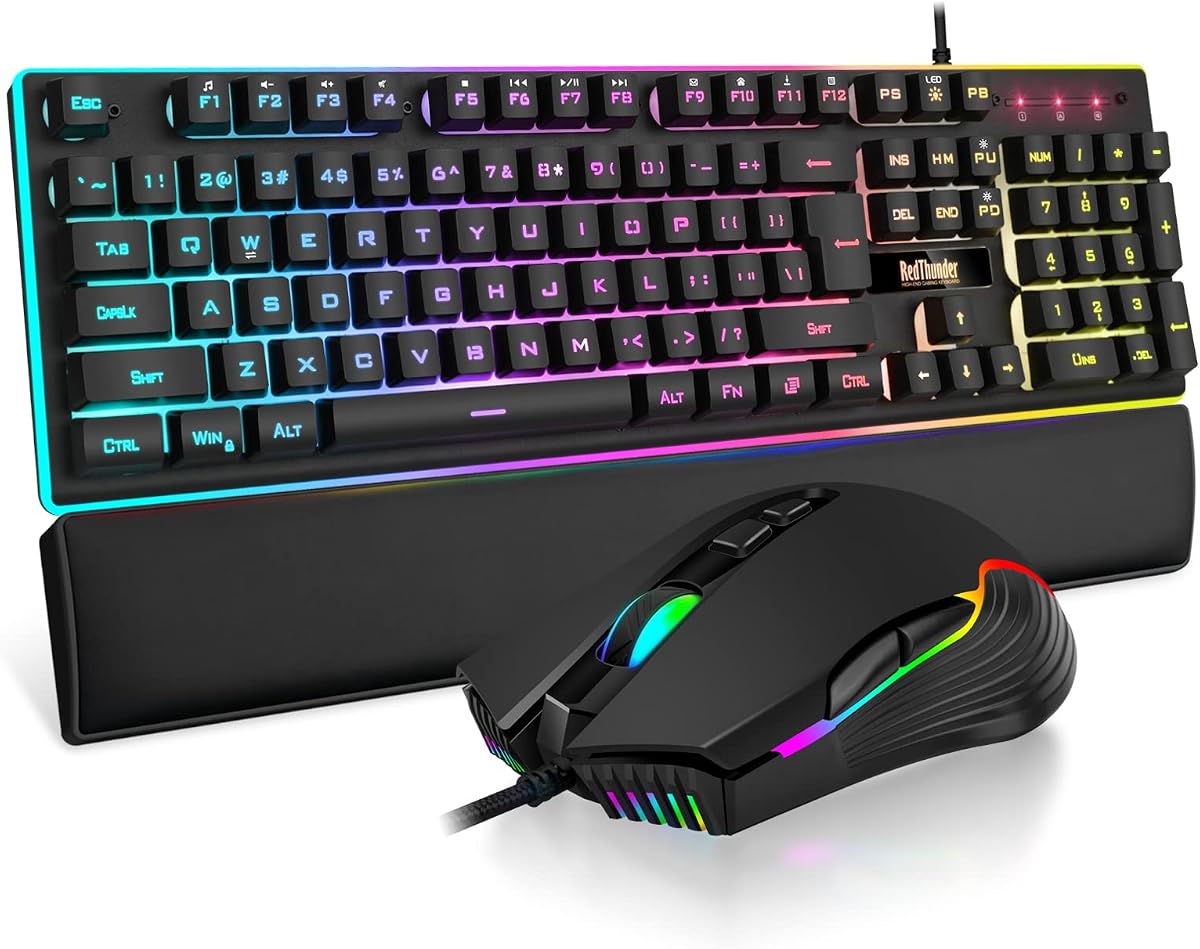
The RedThunder K10 Wired Gaming Keyboard and Mouse Combo stands out as a robust choice for gamers seeking mechanical-like performance. Its 104-key full-size layout includes a numeric keypad and standard function keys, ensuring compatibility with a wide range of applications. The build quality is reinforced by a strong steel plate base.
We may earn a commission when you buy through this link, at no additional cost to you.
Gaming enthusiasts will appreciate the high-precision optical sensor capable of up to 7200 DPI and a 12000fps scan rate. This ensures rapid tracking and precise cursor movement essential for fast-paced games. The keyboard features upgraded RGB lighting not just on keys but also on the bottom side and mouse sides.
Ergonomics are prioritized with an adjustable tripod keyboard design and a soft leather wrist rest filled with memory foam. This combination reduces hand fatigue significantly during extended play sessions. The anti-slip mouse design further enhances control and stability on any desk surface.
We recommend this combo for users who want a sturdy, reliable setup without investing in separate components. The curved ABS keycaps are durable and resistant to fading. It is an excellent all-in-one solution for PC gamers looking to enhance their desk setup effectively.
The mouse handles fast movements with ease thanks to its high scan rate and acceleration tolerance.
Rainbow-like RGB lighting creates a cool game state atmosphere that enhances the overall gaming experience.
We may earn a commission when you buy through this link, at no additional cost to you.
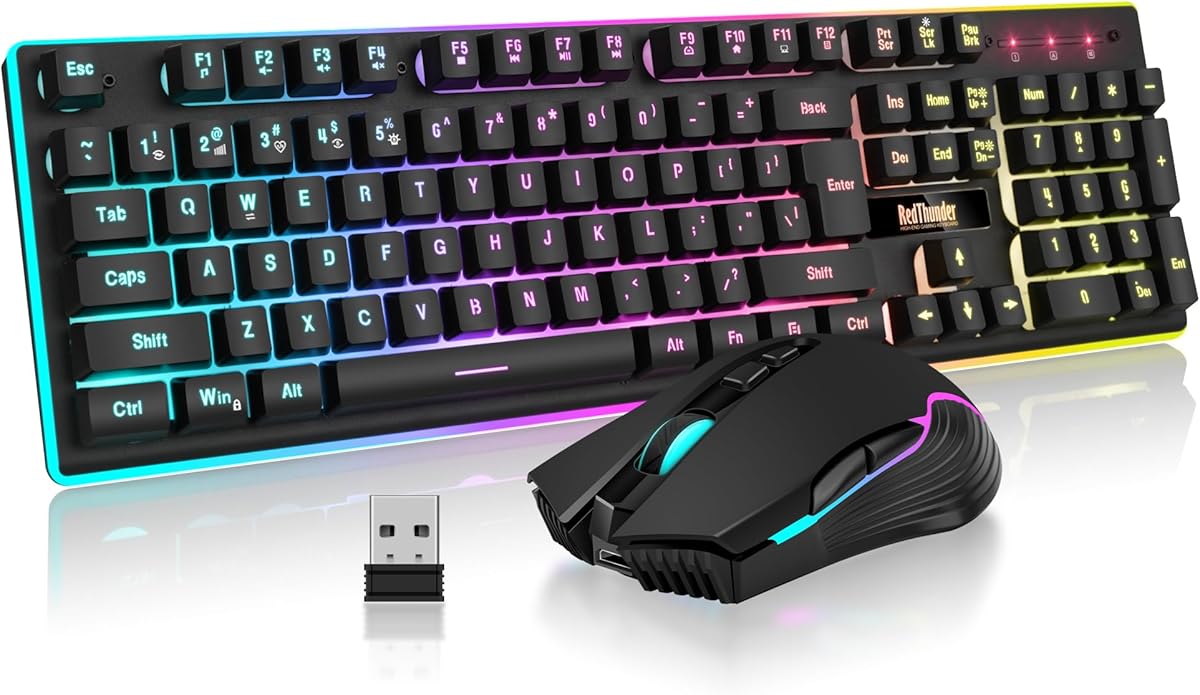
The RedThunder K10 Wireless Gaming Keyboard and Mouse Combo offers the freedom of wireless connectivity while maintaining gaming-grade performance. It is designed to balance work and play effectively, featuring a stable 2.4G transmission that handles intense battles smoothly. The USB receiver is conveniently stored inside the mouse base.
We may earn a commission when you buy through this link, at no additional cost to you.
One of its strongest features is the rechargeable battery system, with a 3000mAh keyboard battery and an 800mAh mouse battery. This allows for up to eight hours of continuous use with lights on. Smart energy-saving functions automatically put the devices to sleep after inactivity to extend battery life.
The keyboard features three groups of rainbow backlight effects with breathing and static modes. The mouse includes a seven-color cyclic gradual lighting effect for a personalized look. Built for longevity, the keys have a ten million keystroke lifetime and two-color injection molded characters that never fade.
This wireless solution is ideal for gamers who want a clean desk setup without cables. It works seamlessly with Windows systems and comes with a shared receiver. While it requires charging, the convenience of wireless use makes it a top choice for modern desktop environments.
The 2.4G wireless ensures stable transmission even during high-speed gaming activities without lag.
Frosted metal cover and injection molded keys ensure the device lasts for years of heavy use.
We may earn a commission when you buy through this link, at no additional cost to you.
The Rii Gaming Keyboard and Mouse Set is a reliable peripheral designed for both gaming and professional use. It features an ergonomic design that helps reduce hand fatigue during extended typing or gaming sessions. The mechanical feel of the keys provides a cool usage experience that many users appreciate for its responsiveness.
We may earn a commission when you buy through this link, at no additional cost to you.
Durability is a key strength here with keys rated for 5 million clicks and mouse keys for 3 million clicks. The laser carved characters ensure visibility in low light conditions alongside the 3-LED backlighting for the keyboard and 7-color breath light for the mouse. Four DPI settings allow you to adjust speed according to your needs.
Installation is effortless as the set requires no drivers and works with a wide range of operating systems including Windows, Mac, Android TV, and Raspberry Pi. This versatility makes it suitable for various setups beyond just standard PC gaming. The design is straightforward and focuses on functionality.
We suggest this set for users who value reliability and broad compatibility. It is a solid choice for students or office workers who occasionally game. The simple plug-and-play setup ensures you can start using it immediately without complex configuration.
Works well with PCs, laptops, and even smart TV boxes for versatile usage across devices.
The combination of keyboard backlight and mouse breathing light adds a practical cool aesthetic.
We may earn a commission when you buy through this link, at no additional cost to you.
The K1 RGB LED Backlit Wired Keyboard offers a full-size 104-key layout that fits standard desktop setups perfectly. It features floating keycaps that are removable and provide a good feel in the hand. The ergonomic layout includes high and low keycaps designed to fit hands naturally, reducing fatigue over time.
We may earn a commission when you buy through this link, at no additional cost to you.
Visual customization is handled through an RGB backlight system with eight light colors and five light modes. You can adjust brightness and light speed easily via function keys without needing external software. The double-shot injection molding process ensures letters remain visible and never fade even in dark environments.
The included high-resolution mouse supports six speed levels up to 3200 DPI for accurate movement. It features a 7-color breathing LED backlight and can lock specific colors using side buttons. The waterproof USB cable and anti-interference magnet ring ensure stable data transmission without disruptions.
This combo is recommended for users who want a standard keyboard layout with stylish lighting options. It works across Windows, Mac, and Linux systems. The non-slip pads at the bottom enhance stability during intense gaming moments making it a practical choice for daily use.
Control lighting effects directly from the keyboard without needing extra software installations.
Scientific key height design helps reduce wrist strain during long typing or gaming sessions.
We may earn a commission when you buy through this link, at no additional cost to you.
This wired keyboard and mouse combo is specifically designed to help users who have trouble seeing standard keyboards. The keys feature letter characters larger than usual and command keys in bold fonts to improve visibility. This makes it ideal for elderly users or those with visual impairments needing clear feedback.
We may earn a commission when you buy through this link, at no additional cost to you.
The keyboard includes an adjustable 7-color backlight system allowing you to choose from blue, green, red, and more. There are three brightness levels to customize according to your lighting needs. The ergonomic design unfolds at the back to reduce hand fatigue during long hours of use.
Setup is simple with a USB plug and play connection that requires no drivers or charging. It is compatible with a wide range of Windows versions and devices including laptops and desktops. The silent nature of the keys ensures that typing remains quiet and non-disruptive in shared spaces.
We recommend this product for home offices or libraries where clarity and comfort are priorities. It provides superior comfort without requiring users to relearn typing. The integrated wrist rest further enhances stability and position for extended working periods.
High-contrast large keys make finding the right key easy even in dim lighting conditions.
No drivers needed means you can start typing immediately after plugging in the USB.
We may earn a commission when you buy through this link, at no additional cost to you.
The BlueFinger RGB Gaming Keyboard and Backlit Mouse Combo is a comprehensive kit for desktop users. The keyboard features a rainbow backlit design that illuminates letters through the keys for easy typing in dark rooms. It includes a built-in steel plate for durability and anti-fall protection.
We may earn a commission when you buy through this link, at no additional cost to you.
Gaming performance is supported by 19 non-conflict keys allowing you to press multiple keys simultaneously. The mouse offers adjustable DPI settings and four different LED breathing lights that change automatically. A durable 59-inch USB braided wire ensures connectivity remains stable during active use.
This set comes with a free mouse pad sized 11.8 x 9.8 inches to provide ample space for mouse movement. The cloth surface offers comfort while the rubber bottom ensures it does not slip. The system works well with PCs laptops and consoles via standard USB connection.
We suggest this combo for students or home users wanting an all-in-one solution. It supports Windows and Mac OS natively. The included accessories and durable construction make it a practical choice for daily tasks and gaming.
Non-conflict keys allow simultaneous presses so no actions are missed during intense gameplay.
A large mouse pad is included to provide a smooth surface for precise cursor control.
We may earn a commission when you buy through this link, at no additional cost to you.
This USB wired keyboard and mouse combo features oversized keys printed 3 times larger than standard for better visibility. It is ideal for seniors or office workers who need effortless typing without straining their eyes. The integrated wrist rest supports extended use and relieves fatigue during the day.
We may earn a commission when you buy through this link, at no additional cost to you.
The keyboard includes 12 multimedia hotkeys for quick audio volume and email adjustments making it efficient for work. It has three switchable backlight colors for low light conditions. The mouse features a 4-level adjustable DPI and dynamic RGB lighting for precision and style.
Built for durability the keys last up to 10 million keystrokes and the design is spill-resistant. It works well with Windows and other systems though some multimedia keys may not be supported on Mac. The slim compact design fits easily on any workspace.
We recommend this set for office environments or homes where clarity and efficiency are key. The quiet low-profile keys reduce noise distraction in shared workspaces. It offers reliable performance for both professional tasks and light gaming.
Multimedia hotkeys let you control volume and mail quickly without leaving your application.
Larger keys ensure easy identification even for those with reduced visual acuity.
We may earn a commission when you buy through this link, at no additional cost to you.
The SABLUTE Wired Large Print Backlit Keyboard and Mouse Combo focuses on comfort and clarity for everyday use. The keys are printed 4 times larger to make typing easier and more accurate for seniors and students. The backlit design supports comfortable typing in dim or low-light conditions.
We may earn a commission when you buy through this link, at no additional cost to you.
A standout feature is the integrated palm rest and foldable stand which provide a comfortable 7-degree typing angle. This helps reduce wrist fatigue during long work or study sessions. The mouse includes ergonomic grip and anti-slip base to reduce misclicks and hand fatigue.
You can choose from 7 colors and 4 lighting modes to customize your desk setup. The combo connects via a 5.2ft USB cable and works with Windows and macOS without drivers. It is a practical gift for students and families needing reliable peripherals.
We recommend this set for those prioritizing comfort and accessibility. It is designed for daily use in home offices or schools. The thoughtful design ensures users can work or browse the web comfortably throughout the day.
The adjustable palm rest ensures your hands stay aligned and reduce strain during typing.
Larger characters help users identify keys quickly without needing to read small text closely.
We may earn a commission when you buy through this link, at no additional cost to you.
The VEILZOR Wireless Keyboard and Mouse Combo offers a modern tangle-free experience with rechargeable power. It features a 2.4G wireless connection that supports up to 10 meters of range allowing you to type from a distance. The keyboard includes a handy phone holder for multitasking convenience.
We may earn a commission when you buy through this link, at no additional cost to you.
Silent typing is a major highlight as the keys are designed to reduce noise significantly. This makes it ideal for shared workspaces or quiet environments. The ergonomic wrist rest and tilt legs keep your hands cramp-free after a long day of use.
Customization is provided through 9 RGB backlight effects that can be switched via buttons on the device. The mouse is also contoured to reduce fatigue and offers three DPI settings for precision. Charging is done via USB-C for easy maintenance without disposable batteries.
We recommend this combo for users seeking a clean workspace with quiet operation. It suits office workers and home users who value comfort and style. The wireless convenience combined with silent keys makes it a top contender for daily productivity.
Silent keys ensure your typing does not disturb others around you during work or study.
USB-C charging eliminates the need for frequent battery replacements saving cost and waste.
We may earn a commission when you buy through this link, at no additional cost to you.
Selecting the right input devices requires understanding your specific needs and preferences for gaming and daily use.
Decide between wired and wireless based on your preference for stability versus clutter-free setups. Wireless options offer convenience but may introduce minor latency while wired sets ensure consistent performance.
For competitive gaming wired connections are generally preferred for zero lag.
Choose between membrane and mechanical feel switches based on tactile feedback and sound. Membrane switches are quieter and softer while mechanical ones provide a satisfying click and durability.
Mechanical feel switches offer better longevity for frequent typists.
Look for wrist rests or adjustable stands to support your hands during long sessions. Comfort is crucial to avoid strain and fatigue during extended play or work periods.
An ergonomic design helps maintain proper posture and comfort.
Assess the lighting options available if visual appeal matters to you. Some sets offer extensive color changes and brightness controls while others have basic modes.
Rich RGB features enhance the gaming atmosphere significantly.
Ensure the devices work with your operating system without needing extra drivers. Most modern sets support Windows Mac and Linux seamlessly.
Always check system requirements before purchasing to avoid issues.
Check key lifespan ratings and build materials like steel plates or ABS caps. Strong construction ensures your equipment lasts through years of use.
Durable materials protect against wear and tear.
Consider the DPI range of the mouse to find the right sensitivity for your style. Higher DPI allows for faster cursor movement suitable for various games.
Adjustable DPI helps adapt to different tasks easily.
Set a price range that fits your financial situation while balancing necessary features. There are excellent options available for various spending levels.
Higher cost does not always guarantee better performance.
Always plug in the devices securely before starting your computer to ensure detection. If using wireless models insert the USB receiver first and connect the keyboard and mouse simultaneously.
Clean the keys and mouse surface regularly with a soft dry cloth to remove dust and debris. Avoid using liquid cleaners directly on the electronics to prevent damage to internal components.
Store devices in a dry cool place when not in use to maintain battery life and plastic integrity. Protect them from direct sunlight and extreme temperatures to extend their operational lifespan.
Most of the featured keyboards support Mac OS but some multimedia keys may not function fully on Mac. Always verify compatibility in the product details before purchasing for Mac users. The standard typing functions will work across all platforms without issues.
Some models require software to customize complex lighting or macros but many have built-in function keys for basic control. Check the product description to see if external software is needed for your preferred settings. Plug-and-play options allow immediate use without installation.
Wireless models typically offer several hours of use on a single charge depending on backlight usage. Some have smart sleep modes to conserve power when inactive. Always check the manufacturer specifications for exact battery durations.
Yes these sets are suitable for office work due to their comfortable keys and ergonomic designs. Quiet models are especially good for shared workspaces. Their durability ensures they handle daily typing tasks efficiently.
Many of these keyboards have spill-resistant features to protect against accidental liquid damage. However it is best to avoid spilling liquids on any electronic device. Check specific product details for confirmed spill protection ratings.
Standard desk space is sufficient as these mice work on most surfaces but a larger pad helps with precision. Some kits include a mouse pad to save you extra cost. Ensure your surface provides enough room for smooth movement.
We hope this guide helps you find the perfect keyboard and mouse combination for your gaming and daily needs. The top picks offer a mix of value performance and comfort suitable for various users.
Prioritize ergonomics and durability when selecting your setup to ensure long-term satisfaction. Features like RGB lighting and wireless connectivity can enhance your experience depending on your preferences.
Remember to check current availability and details before buying as specifications may change. Happy gaming and productive working with your new peripherals.