
Cooler Master Q300L V1
4.5Editor score
Transparent side panel
Modular I/O panel
Open thermal design
This guide compares the top compact E ATX cases for 2026, evaluating airflow, motherboard support, and portability to help you find the perfect small form
Finding a compact E ATX case means balancing space savings with high-end component support. These chassis must fit large motherboards and powerful GPUs while keeping thermal performance strong. We explore the best options available for builders who demand efficiency without sacrificing capability.
Our team analyzed ten leading models based on airflow design, material quality, and compatibility standards. We prioritized cases that support E ATX boards and offer robust cooling solutions. Each entry in this list delivers unique strengths for different building styles and spatial needs.
Every pick highlights specific advantages like portability or modular layouts. Prices and stock levels change frequently, so always verify current availability before purchasing. This guide helps you navigate the complexities of small form factor building with confidence and clarity.
4.5Editor score

4.7Editor score

3.9Editor score
This side-by-side comparison highlights key specifications for every case reviewed. Focus on dimensions, motherboard support, and cooling options to choose the right fit.



The Cooler Master QUBE 540 stands out as a versatile option for builders seeking E ATX support in a compact footprint. Its rating of 4.4 reflects strong user satisfaction with its airflow and build quality. The standout feature is its flexible orientation design, allowing users to switch between vertical and horizontal setups easily.
We may earn a commission when you buy through this link, at no additional cost to you.
This case supports motherboards up to 11 inches wide, which includes standard and large E ATX boards. The GPU clearance reaches 415mm without the front fan, accommodating high-end graphics cards like the RTX 5090. The pre-installed SickleFlow fan helps push air through the full mesh front panel, keeping components cool under load.
While it offers excellent compatibility, the design does have trade-offs. The glass side panel, while stylish, may show fingerprints more than matte finishes. Additionally, for extreme thermal loads, you might need to add more fans to the top or rear. These are minor issues given the overall flexibility.
This case is ideal for builders who need E ATX support without moving to a full tower. Its reversible I/O panel and movable handles make cable management and layout customization simple. If you want a balance of space efficiency and high-end hardware support, this is a top choice.
The movable handles and reversible I/O let you adapt the case to your desk setup quickly.
With 415mm clearance, this case fits the latest flagship graphics cards without modification.
We may earn a commission when you buy through this link, at no additional cost to you.
The Lian Li O11D Mini V2 earns its badge for exceptional value and smart engineering. With a 4.7 rating, users praise its ability to house full ATX components in a small space. The slanted bottom design is a key innovation, directing cool air straight to the GPU for better thermal performance.
We may earn a commission when you buy through this link, at no additional cost to you.
This chassis supports ATX back-connect motherboards, which simplifies cable routing and improves airflow. The pillar-less glass front and side panels offer a clear view of your build. It also includes robust anti-sag brackets for heavy GPUs, reducing stress on the motherboard during transport or use.
While it delivers great performance, it does not come with fans. You will need to buy them separately to maximize cooling. Cable management is possible but requires planning due to the compact size. These factors are manageable for most builders looking for style and efficiency.
If you want a clean build with modern features at a reasonable price, this case is a strong contender. The attention to detail in its airflow and support brackets shows Lian Li's commitment to quality. It is a smart choice for budget-conscious builders who refuse to compromise on style.
The 10-degree slant at the bottom enhances cold air intake directly where it is needed.
Optimization for ATX back-connect boards future-proofs your build for upcoming hardware trends.
We may earn a commission when you buy through this link, at no additional cost to you.
The Mechanic Master C34Pro is designed for enthusiasts who need portability without sacrificing power. Its rating of 3.9 suggests some learning curve but high satisfaction for its build. The integrated carry handle and durable aluminum shell make it ideal for LAN parties or frequent moves.
We may earn a commission when you buy through this link, at no additional cost to you.
This case supports ATX and E-ATX motherboards with room for flagship components like 420mm GPUs. The thermal design includes multi-zone fan mounts to ensure stable cooling under heavy loads. The construction uses a 2mm aluminum shell over a steel frame for robustness and weight balance.
While premium, the assembly process can be intricate. The modular flexibility requires attention to detail when configuring PSU placement and fan zones. The higher price reflects its unique portability and material quality. These trade-offs are acceptable for users who move their PC regularly.
If you need a high-performance case that you can carry easily, this is a top pick. It balances strength, cooling, and mobility in a way few others do. It is a premium choice for those who value function and durability over standard desktop setups.
The built-in handle and lightweight design allow you to transport your PC safely and easily.
A 2mm aluminum shell combined with a steel frame ensures durability during transport.
We may earn a commission when you buy through this link, at no additional cost to you.
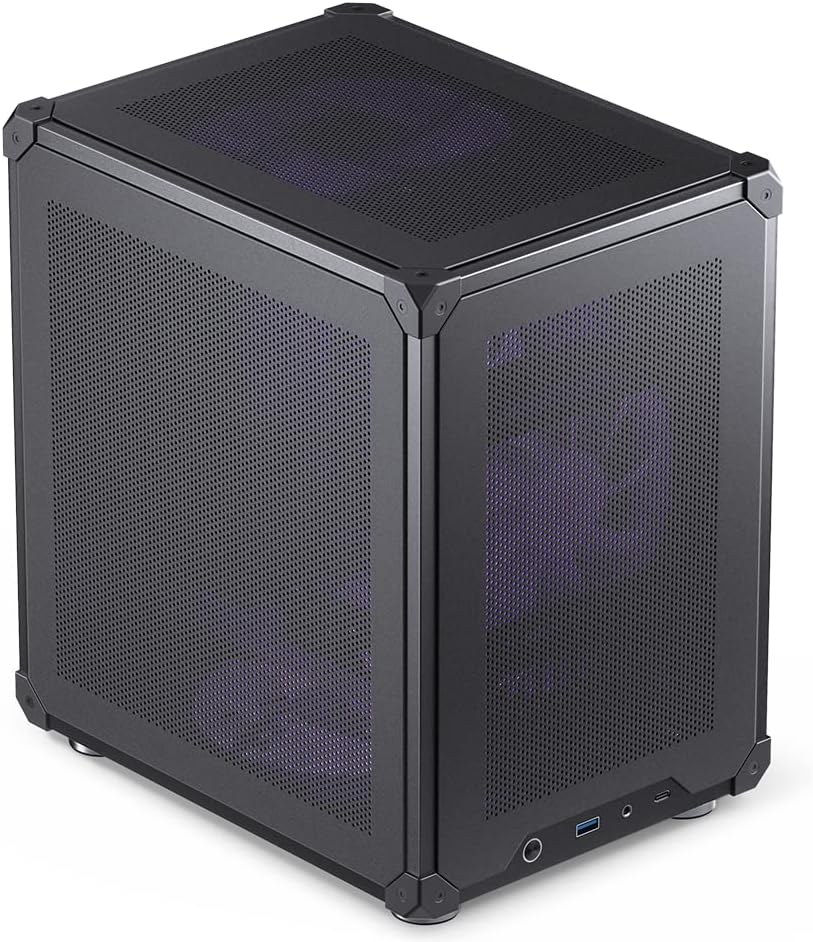
The Cooler Master Q300L V1 is a solid entry for those prioritizing airflow and visibility. Its 4.5 rating indicates reliable performance for the price. The transparent side panel allows you to showcase your components, while the perforated design ensures heat dissipation is not compromised.
We may earn a commission when you buy through this link, at no additional cost to you.
This case supports Micro-ATX motherboards with space for a 360mm GPU and 160mm PSU. The I/O panel can move to different positions, offering flexibility for desk layouts. Magnetic dust filters make cleaning easy and add a distinctive look to the exterior.
It does not support E-ATX or full ATX boards, limiting expansion. For high-load gaming, adding more fans may be necessary to reach peak thermal performance. These limits are minor for casual builders seeking a clean and cost-effective chassis.
If you want an affordable case that looks good and keeps things cool, this is a great option. The modular design and transparent panel make it easy to build and maintain. It is perfect for budget-friendly builds without sacrificing modern features.
The edge-to-edge transparent panel lets you display your custom cable management and lighting.
Perforations on all sides promote natural air movement to reduce internal heat.
We may earn a commission when you buy through this link, at no additional cost to you.
The Mechanic Master C34 Ultra offers a small footprint without losing core ATX features. Its 4.6 rating reflects strong user confidence in its build and cooling. The integrated handle makes moving the case easy, which is rare for desktop chassis of this type.
We may earn a commission when you buy through this link, at no additional cost to you.
This case fits standard ATX motherboards and up to 335mm GPUs. It supports 240mm liquid cooling and includes modern I/O like USB Type-C. The interior layout is optimized for easy building, though SFX/L power supplies are recommended for cleaner cable management.
While compact, routing cables can be tricky. Using an SFX power supply is advised to save space. The size may limit larger air coolers or complex fan setups. These are reasonable compromises for a case that prioritizes portability.
If you need a portable ATX case for LAN events or tight spaces, this is a top pick. It balances performance with convenience, offering modern connectivity in a small frame. It is a smart choice for those who value mobility and efficiency.
The small form factor saves space but still supports full ATX motherboards and GPUs.
USB Type-C and 3.0 ports on the metal I/O panel provide fast data transfer.
We may earn a commission when you buy through this link, at no additional cost to you.
The ASUS Prime AP201 delivers high thermal efficiency in a compact Micro-ATX frame. With a 4.7 rating, users value its cooling capacity and thoughtful design. The quasi-filter mesh panels use over 57,000 holes to increase airflow without dust buildup.
We may earn a commission when you buy through this link, at no additional cost to you.
This case supports 360mm radiators and up to six fans, making it ideal for custom loops. The 33L footprint is small but supports long GPUs and PSUs. Tool-free side panels and a 32mm cable gap make assembly and cable management straightforward.
It is limited to Micro-ATX boards, which may restrict future upgrades. The cable gap is generous but may need careful planning to avoid clutter. These factors are minor for a case focused on pure cooling and build efficiency.
If you want maximum cooling in a small case, this model excels. Its precision mesh and tool-free design make it a joy to use. It is a great pick for builders prioritizing performance over raw motherboard size.
Over 57,000 machined holes create a compelling view while maximizing cooling intake.
Tool-free clip mechanisms allow quick removal of panels for maintenance and upgrades.
We may earn a commission when you buy through this link, at no additional cost to you.
The Cooler Master Q300L V3 improves on previous models with better airflow and support. Its 4.6 rating shows strong satisfaction among builders looking for performance. The ability to fit 366mm GPUs makes it a future-proof choice for gaming builds.
We may earn a commission when you buy through this link, at no additional cost to you.
This case supports up to six fans or 240mm radiators for flexible cooling. The I/O panel can move to the front, top, or bottom to suit your setup. Magnetic dust filters and tempered glass combine style with practical protection.
Cable management is easy with the clean design, but the case is limited to Micro-ATX boards. Glass panels need care during cleaning or transport. These trade-offs are acceptable given the flexibility and cooling performance offered.
If you want a high-airflow case for gaming in a small package, this is ideal. It balances hardware support and cooling capacity effectively. It is a great pick for gamers who need modern GPU support in a compact chassis.
Up to six fan mounts allow you to tailor airflow to your exact build needs.
The I/O panel can adjust to the front, top, or bottom for easier access.
We may earn a commission when you buy through this link, at no additional cost to you.
The Zalman CUBIX M-ATX offers a truly compact solution for small spaces. With a 4.5 rating, users appreciate its build quality despite the small size. Its 17.1-liter volume makes it ideal for minimal desk setups where space is critical.
We may earn a commission when you buy through this link, at no additional cost to you.
The perforated front panel and included 80mm fan provide basic cooling for standard components. It supports 260mm GPUs and standard ATX PSUs within its small frame. The 0.8T steel construction ensures the case remains durable despite its size.
Managing cables can be challenging due to limited depth. Component size is restricted compared to larger cases. These limits are expected for this class of chassis but require careful planning.
If you need a tiny PC for office or light gaming, this case fits well. Its low cost and small footprint make it accessible for tight budgets. It is a solid pick for entry-level compact builds.
At 17.1 liters, this case saves significant desk space without losing essential ports.
The included 80mm fan reduces initial setup cost and ensures immediate airflow.
We may earn a commission when you buy through this link, at no additional cost to you.
The JONSBO C6 Black focuses on airflow and simplicity in a tiny chassis. Its 4.6 rating indicates strong performance for daily use. All sides use mesh for heat dissipation, keeping internal temps stable without massive fans.
We may earn a commission when you buy through this link, at no additional cost to you.
Tool-free design makes opening the case easy for maintenance. It supports ITX and M-ATX boards with modern ports like USB Type-C. Dimensions are compact, making it a perfect fit for small desks or shelves.
GPU and CPU cooler size are limited compared to larger cases. This restricts high-end component choices. These are acceptable trade-offs for a compact build focused on simplicity.
If you want a simple, open case for a small desk, this is great. It balances airflow with tool-free convenience perfectly. It is a solid choice for builders who value easy access and compact design.
All sides use mesh to ensure heat free operation in a small form factor.
Tool-free upper cover and side panels make maintenance fast and simple.
We may earn a commission when you buy through this link, at no additional cost to you.
The NZXT H5 Flow delivers sleek performance with excellent thermal management. With a 4.6 rating, users like its clean look and solid airflow. The perforated PSU shroud lets the bottom fans provide direct intake for power and GPU cooling.
We may earn a commission when you buy through this link, at no additional cost to you.
It supports up to a 360mm radiator in the front and has pre-installed quiet fans. The ultra-fine mesh filters dust while maximizing airflow. Cable management channels and hooks make the interior tidy and organized.
Customization is more limited than open chassis, which may not suit all builders. Pre-installed fans are good for starting but may need upgrade later. These are minor constraints for a polished and reliable product.
If you want a stylish and reliable case with built-in airflow, this fits well. It balances aesthetics and function for modern ATX builds. It is a great pick for those seeking clean performance without extra effort.
The perforated shroud allows bottom fans to pull air directly for GPU cooling.
Pre-installed 120mm fans provide solid performance straight out of the box.
We may earn a commission when you buy through this link, at no additional cost to you.
Selecting the right E ATX case requires attention to motherboard size, airflow, and portability. These factors ensure your build performs well and fits your space.
Check if the case supports E ATX boards up to 11 inches. Some models only fit ATX or Micro-ATX. Always verify dimensions before purchasing.
Ensure the case supports the motherboard standard you plan to use for future upgrades.
Large graphics cards need up to 420mm of clearance. Compact cases may limit GPU length or require removing fans. Check maximum GPU length specs carefully.
Choose a case that fits your current GPU and allows for future upgrades.
Mesh panels and perforations improve cooling for high-load builds. Look for cases with front, top, and bottom fan mounts. Good airflow prevents thermal throttling.
Prioritize cases with mesh front panels for the best passive cooling performance.
Integrated handles or lightweight builds help if you move your PC. Portable cases are essential for LAN events or multi-workstation setups. Check for built-in carrying handles.
If you need to move the case, look for handles and durable materials.
Consider liquid cooling support like 360mm radiators if running high-end components. Air cooling limits depend on height clearance. Ensure you have enough space for your preferred cooling method.
Look for multiple fan mounts or radiator support to match your thermal needs.
Steel and aluminum offer durability and weight balance. Thicker panels reduce vibration and improve longevity. Check the gauge of steel used in the chassis.
Choose robust materials to protect components during transport or daily use.
USB Type-C and modern ports make connectivity easier. Look for movable I/O panels to suit your desk setup. Front access should be convenient.
Ensure the I/O panel matches your device needs and desk position.
Wide gaps and hooks help hide cables for a clean look. Limited space in compact cases may require careful routing. Check cable management space in specs.
Prioritize cases with ample cable management space for cleaner builds.
Always ensure proper airflow alignment with your desk space to prevent overheating. Keep dust filters clean to maintain thermal performance over time.
Use the provided cable management features to route wires neatly. This improves cooling and makes future upgrades easier without mess.
Handle portable cases by the integrated handles to avoid stress on components. Regularly check for screws or panels that may need tightening after transport.
Many compact E ATX cases support GPUs up to 415mm or more. Some may require removing front fans to fit larger cards. Always check the clearance specs before buying.
Most high-end compact cases support 240mm or 360mm radiators. Check specific mounting points for top or front radiator fit. This ensures your liquid system will work.
Cases with mesh panels and multiple fan mounts deliver strong airflow. Look for full front mesh designs for the best cooling. These designs prevent heat buildup inside.
E ATX cases support larger motherboards up to 11 inches wide. ATX cases typically fit boards up to 12 inches but vary in depth. Ensure the case matches your board.
Most filters are magnetic or slide out for easy cleaning. Use a soft brush or vacuum to remove dust regularly. This keeps airflow clear and performance high.
Cases with integrated handles and lightweight builds are designed for mobility. Use proper handling to avoid stressing internal components. Portable models are ideal for LAN parties.
Our top picks like the Lian Li O11D Mini V2 and Mechanic Master C34Pro offer strong performance and portability. Each model brings unique advantages for different building needs and sizes.
Prioritize airflow, motherboard size, and GPU clearance when selecting a case. These factors ensure your build stays cool and expands smoothly over time.
Prices and stock change often, so check current availability before ordering. Verify exact specs to match your hardware requirements for a successful build.