
Computer Speakers for Desktop PC
4.1Editor score
USB plug and play
In-line volume control
Compact column design
This guide compares the top 10 budget computer speakers for PC and laptop, evaluating sound quality, connectivity, and design to help you find the perfect
Finding affordable audio solutions does not mean sacrificing sound quality. Whether you work from home or game late into the night, a solid pair of cheap PC speakers can transform your digital experience without breaking the bank.
We analyzed ten top-rated models based on user feedback, technical specifications, and real-world performance. This list covers USB-powered units, compact designs, and feature-rich options suitable for various desk setups and audio needs.
Each pick highlights unique strengths like bass response or connectivity options. Remember that availability and pricing fluctuate frequently, so always check the latest details before making your final purchase decision today.
4.1Editor score

4.6Editor score

4.2Editor score
This side-by-side comparison evaluates all ten selected models on key performance metrics. Use this table to quickly identify which speaker best matches your specific desktop or laptop requirements.




The Amazon Basics Stereo 2.0 offers a straightforward solution for users needing basic audio enhancement. With a solid rating and essential features, it serves as a dependable entry point for PC audio setups.
We may earn a commission when you buy through this link, at no additional cost to you.
Its USB power means no extra wall outlet is needed, keeping your desk tidy. The metal finish adds a touch of durability, while the bottom radiator helps generate a springy bass response that exceeds expectations for this price point.
While the sound lacks deep sub-bass punch, it is clear enough for calls and media. The padded base protects your desk surface, and the scratch-free finish ensures the speakers maintain a clean look over time.
This model is ideal for office work or casual listening where high fidelity is secondary to reliability. It delivers consistent performance without complicated drivers or software, making it a safe choice for most users.
Powering via USB simplifies setup significantly by eliminating the need for separate power adapters near your workstation.
The metal finish and scratch-free padded base ensure these speakers withstand daily use while protecting your desk.
We may earn a commission when you buy through this link, at no additional cost to you.
These computer speakers deliver impressive value for those seeking loud, distortion-free audio on a tight budget. Their small size makes them perfect for cluttered desks where space is at a premium.
We may earn a commission when you buy through this link, at no additional cost to you.
The unique column shape allows them to stand upright without taking up much room. Equipped with a 31.5-inch cable length between the two units, you have the flexibility to position them optimally for stereo separation.
While the build relies on high-quality plastics, the matte metal panel adds a modern aesthetic. The in-line volume control lets you adjust sound levels instantly without digging into system settings.
Perfect for students or home office workers, these speakers meet basic audio needs effectively. The 30-day money-back guarantee and 18-month warranty provide peace of mind for your purchase.
No drivers are needed to get started; simply plug the USB into your PC and play your media immediately.
The column shape minimizes desk footprint, making them ideal for smaller workspaces or shared office environments.
We may earn a commission when you buy through this link, at no additional cost to you.
The FUNLOGY Speaker packs surprising power into a palm-sized chassis, delivering 14W of total output. Its 30-degree tilt design ensures sound is directed straight to your ears, creating a more immersive experience.
We may earn a commission when you buy through this link, at no additional cost to you.
Dual 48mm full-range drivers and passive radiators work together to produce clear mids, crisp highs, and punchy bass. The noise-reducing audio design minimizes static during system startup or shutdown, ensuring clean listening.
Designed by a Japanese brand recognized with the VGP 2024 award, the build quality is reliable with a stylish matte finish. It works flawlessly with gaming consoles, monitors, and laptops without needing any complex pairing.
This model stands out for those prioritizing sound quality in a small footprint. While it lacks wireless options, the wired connection ensures stability and consistent performance during intense gaming or multimedia sessions.
The 30-degree upward-facing layout optimizes sound delivery, reducing audio loss and improving clarity at your ears.
The VGP 2024 award recognition highlights the superior build and audio performance designed by trusted Japanese engineers.
We may earn a commission when you buy through this link, at no additional cost to you.
This soundbar-style speaker clamps directly to your monitor, freeing up valuable desk space. Its adaptive-channel-switching ensures left and right channels stay correct regardless of where you clip it on the screen.
We may earn a commission when you buy through this link, at no additional cost to you.
Equipped with dual ultra-magnetic drivers, it delivers loud sound with deep bass. The inclusion of a USB-C adapter makes it compatible with newer devices like the latest MacBook or iPad, expanding its reach significantly.
Touch control buttons on the front allow for intuitive muting and volume adjustment. While it can sit on the desk, its primary design maximizes vertical space efficiency for those with tight desktops.
Ideal for gamers or professionals who need audio close to their line of sight. Ensure your computer audio settings are configured correctly to fully utilize its adaptive channel features.
A built-in G-sensor keeps audio channels correct even if you mount the speaker on top or bottom of the monitor.
The included USB-C adapter ensures seamless connection with modern laptops and tablets that lack traditional USB ports.
We may earn a commission when you buy through this link, at no additional cost to you.
Designed for portability, these speakers plug directly into a USB port for simple convenience. They feature a single front control for power and volume, making operation straightforward for any user.
We may earn a commission when you buy through this link, at no additional cost to you.
With a frequency range of 103 Hz to 20 KHz, they cover most vocal and mid-range audio clearly. The 3.5mm jack allows you to connect headphones directly to the speakers if needed.
Their compact size makes them easy to pack in a bag for travel between offices or home setups. The On/Standby function helps manage power usage when the PC is idle for periods.
Great for users who need reliable audio without cluttering their desk. While they lack deep bass, they provide clear sound sufficient for video calls, podcasts, and light music listening.
The lightweight and compact form factor allows you to easily move your audio setup between different locations.
The built-in headphone jack lets you switch to private listening without unplugging the speakers from your computer.
We may earn a commission when you buy through this link, at no additional cost to you.
This upgraded model focuses on delivering louder sound with enhanced bass using dual high-excursion drivers. The passive radiator helps deepen low-frequency response, making it suitable for movies and music.
We may earn a commission when you buy through this link, at no additional cost to you.
One single USB cable handles both audio and power, reducing cable clutter on your desk. It works across Windows, macOS, Linux, and ChromeOS, making it versatile for mixed environments.
Setup is as simple as selecting the USB device in your system playback menu. The soundbar design ensures a sleek profile that sits cleanly under monitors or alongside keyboards.
Ideal for users who prioritize a clean connection and strong bass response. Avoiding the need for an extra AUX jack simplifies the setup process for modern laptops that rely heavily on USB ports.
A single USB connection manages both power and audio, eliminating the need for multiple cables on your workspace.
This speaker works with Windows, macOS, Linux, and ChromeOS, offering flexibility across different operating systems.
We may earn a commission when you buy through this link, at no additional cost to you.
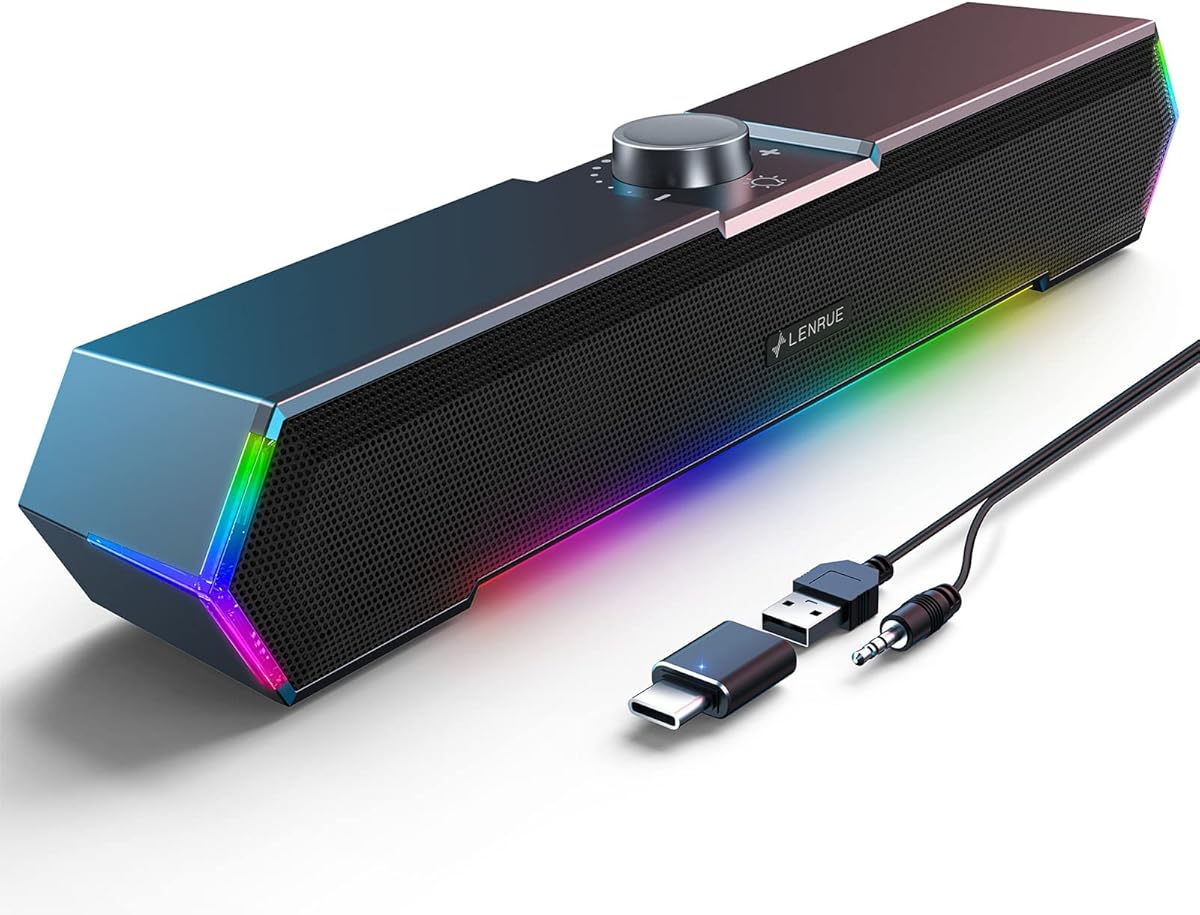
The LENRUE G11 features dynamic angular game lights that add a unique visual touch to your desk. Its surge stereo sound technology minimizes distortion, providing a cinema-like effect for media consumption.
We may earn a commission when you buy through this link, at no additional cost to you.
Designed to fit under the monitor without taking extra space, the unit includes a USB C adapter for modern compatibility. Cables are glued together to prevent tangling and reduce desktop clutter effectively.
Volume adjustment is easily accessible via the top knob, allowing quick changes while gaming or working. The touch lights can be toggled with a single button, avoiding the need for complex controls.
This model suits gamers who appreciate visual and audio immersion on a budget. While it lacks a microphone, the clear sound reproduction and stylish design make it a strong contender for desktop entertainment.
Touch-sensitive lights offer a stylish gaming atmosphere without needing complex software or remote controls to operate.
Glued-together cables help keep your desk tidy by preventing separate wires from spreading across your workspace.
We may earn a commission when you buy through this link, at no additional cost to you.
Enhance your setup with vibrant 7-color LED lighting that cycles through mesmerizing patterns. This speaker delivers crisp and balanced sound with deep bass, making it ideal for gaming and movies.
We may earn a commission when you buy through this link, at no additional cost to you.
The ultra-compact design fits seamlessly on any desk without sacrificing audio quality. An inline rotary knob allows for precise volume adjustments without needing to navigate system menus constantly.
If playback volume seems low, remember to check system settings and max media player volume to ensure full output. The universal plug-and-play setup works flawlessly with PCs, laptops, and monitors.
Perfect for users who want a splash of color alongside their audio experience. It offers a stylish solution for small setups while maintaining a solid balance of visual flair and sound performance.
Seven mesmerizing LED colors add a dynamic visual element to your desk that can sync with your mood.
The inline rotary knob provides quick and precise volume adjustments right at your fingertips without cluttering.
We may earn a commission when you buy through this link, at no additional cost to you.
The Uakinat Computer Desktop Speaker uses upgraded 2x3W technology to deliver loud, distortion-free Hi-Fi sound. It is a perfect fit for modern homes and offices where clear audio is essential.
We may earn a commission when you buy through this link, at no additional cost to you.
Mini desktop dimensions ensure it fits anywhere without taking extra space. Anti-slip foot pads keep the speakers stable on your desk, while glued cables prevent desktop clutter and tangles effectively.
A 60-day money-back guarantee and 18-month warranty show confidence in product quality. The included user manual ensures setup is easy for those unfamiliar with external audio connections.
Great for professionals needing reliable audio for video calls and meetings. The combination of strong sound output and practical design makes it a solid choice for daily work use.
The upgraded 2x3W technology ensures louder output with distortion-free Hi-Fi sound for better entertainment.
Foot pads keep the speakers firmly in place on smooth surfaces during normal usage.
We may earn a commission when you buy through this link, at no additional cost to you.
The Creative Pebble 2.0 features far-field drivers with rear-facing passive radiators for excellent audio reproduction. Its 45-degree elevated design projects sound directly to your ears for an immersive experience.
We may earn a commission when you buy through this link, at no additional cost to you.
With a single USB cable for power and audio, setup is hassle-free without needing a separate power adapter. The frequency response of 100 Hz to 17 kHz covers most music and movie needs effectively.
Front-facing volume controls allow for instant adjustments without reaching behind the PC. The modern and stylish aesthetics complement any contemporary workspace or gaming setup seamlessly.
This model is a top choice for those prioritizing design and audio projection. Its high rating reflects its reliability, making it a safe bet for users seeking quality sound in a sleek package.
Custom-tuned drivers ensure excellent audio projection with rear passive radiators enhancing bass reproduction significantly.
The 45-degree tilt directs sound precisely to your ears, creating a more immersive personal listening experience.
We may earn a commission when you buy through this link, at no additional cost to you.
Choosing the right speakers involves balancing sound quality, features, and your specific usage needs. This guide breaks down key factors to help you make an informed decision.
Most budget PC speakers rely on USB power for simplicity. This eliminates the need for extra wall outlets, keeping your desk tidy. Some models also support standard AC adapters for stronger output, but USB is preferred for portability and ease of setup.
While USB audio is convenient, some users prefer a 3.5mm AUX input for compatibility with older devices. Check if the speaker supports both to ensure it works with your current computer and future devices without extra adapters.
Look for speakers with passive radiators to enhance bass response. Drivers size matters too; larger drivers usually provide fuller sound. Reading reviews on distortion levels helps ensure the audio remains clear at high volumes during media consumption.
Compact designs save desk space, while soundbars integrate well under monitors. Consider whether you prefer standalone units or those that clip to your monitor. The material build quality also affects durability and how well the speakers resist scratches over time.
Hardware volume knobs or touch controls allow for quick adjustments without leaving your application. This is especially useful for gaming or watching movies where frequent volume changes happen. Ensure the control is easily accessible on the speaker body itself.
Most USB speakers work with Windows and Mac out of the box. However, check if specific models support ChromeOS or Linux if you use those systems. USB-C compatibility is increasingly important for newer laptops that lack traditional ports.
Anti-slip feet and sturdy bases prevent speakers from sliding off desks. Metal finishes often resist scratches better than plastic. If you travel with your speakers, look for lightweight and rugged designs that withstand movement without internal damage.
Prices vary even within budget categories. Look for products with at least a one-year warranty to protect your investment. Money-back guarantees provide extra security, allowing you to test the audio quality risk-free before finalizing your decision.
Connect the speaker to a USB port for power and audio signal. If your model uses a separate AUX cable, plug it into your computer's headphone jack. Ensure your system playback device is set to the USB audio option in settings.
Most USB-powered speakers are plug-and-play and do not need specific drivers. They work immediately as audio devices recognized by Windows or macOS. However, ensuring your system audio drivers are up to date can improve overall performance.
Yes, all models listed are compatible with laptops via USB or AUX connections. USB power simplifies usage by drawing energy directly from the device. This makes them ideal for users who frequently move between home and work.
No, these budget options are 2.0 systems without a separate subwoofer. They use passive radiators to simulate bass. While good for general use, deep sub-bass frequencies will be limited compared to larger 2.1 systems.
Check system volume settings and the speaker's inline control. Ensure all playback device volumes are at maximum levels. If distortion occurs at high volume, lower the speaker setting to maintain sound clarity without clipping.
Most models listed support macOS, but you may need to select the USB device in Sound settings. Compatibility with older Macs might require checking USB versions. Newer Macs may need a USB-C adapter for connection.
Some models feature clip-on designs specifically for monitors. Others can sit under the monitor for audio convenience. Ensure your monitor supports USB pass-through if you want to power speakers directly from the screen interface.
We reviewed ten affordable options ranging from basic units to feature-rich designs. The Creative Pebble 2.0 stands out for its sound quality, while the Uakinat offers great value for loud audio. Each model has unique features tailored to different needs.
Prioritize sound clarity, connectivity, and form factor based on your workspace. If you value audio fidelity, choose models with passive radiators. For small desks, consider clip-on or compact column designs to save valuable space effectively.