
QUI Presentation Clicker
4.3Editor score
Volume control buttons included
328-foot wireless range
Compact portable design
This guide compares the top laser pointer for presentations devices for 2026, evaluating brightness, range, battery life, and connectivity to help you choose
Finding the right laser pointer for presentations can transform how you engage with your audience during meetings or classes. A reliable device ensures your key points are visible even in brightly lit rooms without technical distractions.
We evaluated ten top-rated models based on laser visibility, wireless range, battery efficiency, and compatibility with major presentation software. Our analysis focuses on real-world performance in classrooms, boardrooms, and lecture halls.
Each pick highlights unique strengths like rechargeable batteries or green laser options. Remember that availability and stock levels change frequently, so verify current details before purchasing your next presentation tool.
4.3Editor score

4.6Editor score

4.6Editor score
This table compares all ten featured models across key specifications like laser type, battery method, and wireless range to help you find the best fit for your specific presentation needs.




This Green Light Presentation Clicker offers a powerful green laser that stands out clearly against screens and whiteboards. Its USB-C rechargeable design eliminates the need for constant battery replacements, making it ideal for daily classroom use.
We may earn a commission when you buy through this link, at no additional cost to you.
The remote includes dedicated buttons for hyperlinks, volume control, and window switching, giving you full command over your slide deck. The magnetic receiver storage ensures you never lose the small USB dongle between sessions.
While it requires a USB-C charger, the single hour charge lasts for weeks of daily presentations. The ergonomic layout makes it easy to operate without looking down at the device during your talk.
Educators and professionals alike will appreciate the reliability and brightness. If you need a clicker that works reliably in bright rooms without technical setup, this is a top recommendation.
The 532nm green light cuts through ambient light better than traditional red pointers ensuring your audience sees exactly where you are pointing.
A built-in 1-hour USB-C charge provides weeks of usage reducing waste and saving money on disposable AAA batteries over time.
We may earn a commission when you buy through this link, at no additional cost to you.
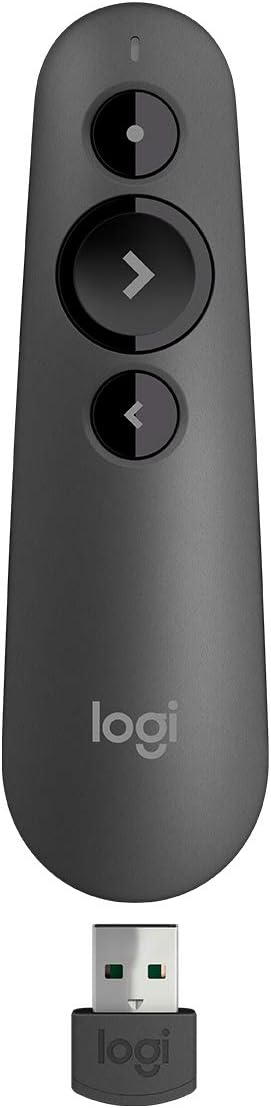
The Logitech Wireless Presenter R400 is a classic choice known for its durability and simple interface. It features a bright red laser that works well for standard presentations in moderately lit rooms.
We may earn a commission when you buy through this link, at no additional cost to you.
Its intuitive touch-keys allow easy slide navigation while the receiver stores inside the device to keep your desk organized. The 50-foot wireless range is sufficient for most conference room setups.
Unlike rechargeable models this unit requires AAA batteries which may need replacing depending on usage frequency. However the straightforward design ensures minimal learning curve for new users.
Ideal for professionals who prioritize simplicity and brand trust over advanced features. It remains a solid option for occasional presenters who need reliable performance without complexity.
The touch-keys are designed for easy operation allowing you to advance slides smoothly without fumbling during critical moments.
The built-in docking bay lets you store the USB receiver securely inside the presenter for easy portability and to prevent loss.
We may earn a commission when you buy through this link, at no additional cost to you.
This Hyperlink Volume Control Clicker provides extended range and extra functionality like volume control and hyperlink navigation. It is designed for larger rooms where you need to move freely while presenting.
We may earn a commission when you buy through this link, at no additional cost to you.
The bright red laser is effective on standard projectors though not recommended for LED screens. The magnetic USB storage keeps the receiver secure when not in use.
It runs on a single AAA battery which offers decent longevity with auto-sleep features. The ergonomic bump buttons make it easy to control slides without looking.
Best suited for users who need more than basic slide advancing. The combination of range and control options makes it a versatile tool for interactive sessions.
With up to 100 feet of wireless range you can roam around the room freely without losing connection to your computer.
Dedicated buttons allow you to navigate directly to specific sections or links within your presentation for smoother flow.
We may earn a commission when you buy through this link, at no additional cost to you.
The Logitech R800 stands out with its built-in LCD timer that helps you manage presentation time effectively. Vibrating alerts ensure you stay on schedule without distracting your audience with noise.
We may earn a commission when you buy through this link, at no additional cost to you.
Its green laser pointer offers superior visibility compared to red options making it ideal for bright conference rooms. The intuitive button layout ensures you can navigate slides confidently.
While it uses AAA batteries and costs more than basic models the time management features justify the investment for frequent speakers. The range of 100 feet gives significant freedom to move.
Choose this if timekeeping is a major concern for your presentations. It blends premium features with reliable brand performance to enhance your delivery quality.
The LCD display allows you to monitor your presentation time with silent vibrating alerts to keep you within your allotted time.
Silent vibration notifications ensure you remain aware of time constraints without interrupting the flow of your talk.
We may earn a commission when you buy through this link, at no additional cost to you.
The Logitech R500s is optimized for long-term use with a battery that lasts up to 12 months on a single AAA cell. Smart battery management disables the laser when low to extend usage during critical moments.
We may earn a commission when you buy through this link, at no additional cost to you.
It supports both USB receiver and Bluetooth connectivity offering flexibility for modern devices. The universal compatibility covers most major operating systems and presentation software.
Customizing buttons requires installing the Logitech Presentation App which might be a hurdle for quick setups. However the default functions work well without software on many platforms.
Ideal for users who value long battery life and connectivity options. It is a strong choice for frequent presenters who need reliability and flexibility in their setup.
The R500s runs for up to 12 months on a single AAA battery reducing the need for frequent replacements.
Connect via USB receiver or Bluetooth low energy technology depending on your computer setup preference and convenience.
We may earn a commission when you buy through this link, at no additional cost to you.
The QUI Presentation Clicker offers exceptional value with features typically found on pricier models. It supports volume control and full screen switching making it a complete tool for various presentation scenarios.
We may earn a commission when you buy through this link, at no additional cost to you.
Its range of 328 feet is impressive allowing you to move across large auditoriums without signal issues. The bright red laser ensures visibility even in large conference rooms.
As a budget option it may lack premium build materials but it delivers reliable performance for the price. The clip included makes it easy to attach to your notebook or pocket.
Perfect for students or occasional presenters on a tight budget. It provides essential functions without extra cost making it an accessible choice for anyone needing a remote.
With a control distance of up to 328 feet you can roam the entire hall without worrying about losing connection.
The included clip allows for easy carrying attaching securely to notebooks or pockets for quick access when needed.
We may earn a commission when you buy through this link, at no additional cost to you.
The Norwii N95 combines green laser visibility with a rechargeable lithium battery for convenience. It supports both USB-A and USB-C connectivity ensuring compatibility with newer laptops and tablets.
We may earn a commission when you buy through this link, at no additional cost to you.
Buttons can be reprogrammed via the Norwii Presenter app to suit personal workflow preferences. The control range extends up to 100 meters ideal for large lecture halls or churches.
While the charging cable is not included in the package the USB-C port ensures widespread compatibility with existing chargers. The low power alert helps prevent unexpected shutdowns during use.
Great for tech-savvy users who want customizable controls. The rechargeable nature saves long-term costs and reduces environmental impact compared to disposable batteries.
The 2-in-1 USB receiver works with both USB-A and USB-C devices making it suitable for modern Macs and older PCs.
A 300mAh lithium polymer battery provides weeks of work on a single 2-3 hour charge eliminating constant battery replacements.
We may earn a commission when you buy through this link, at no additional cost to you.
This Presentation Remote Clicker focuses on comfort with an ergonomic rubber grip that fits naturally in your hand. Its compact size makes it easy to slip into a pocket for mobile presentations.
We may earn a commission when you buy through this link, at no additional cost to you.
The bright red light highlights key points effectively though the range is somewhat limited to 49 feet. It works with a wide range of operating systems including Linux and Android.
The USB receiver is stored under the battery cover ensuring it stays with the device at all times. Setup is generally straightforward but Mac users may need simple initial configuration.
Best for users who prioritize comfort and portability over extreme range. The high-quality materials and ergonomic design make it a pleasant tool to use for extended periods.
The compact size and rubber grip ensure comfortable handling which reduces hand fatigue during long presentation sessions.
USB receiver stored under the battery cover ensures you never lose the dongle and keeps the device self-contained.
We may earn a commission when you buy through this link, at no additional cost to you.
This clicker features a built-in receiver with both USB-A and USB-C connectors eliminating the need for dongles. It offers full function control including volume adjustments for a comprehensive presentation experience.
We may earn a commission when you buy through this link, at no additional cost to you.
The ergonomic body with soft-touch coating ensures comfortable handling during use. It supports major presentation software and works seamlessly across Mac and Windows systems without setup.
Powered by two AAA batteries it offers solid standby time due to low power consumption features. The magnetic slot securely holds the receiver to prevent loss between sessions.
Ideal for users with mixed device types who want plug-and-play convenience. The dual USB support makes it a versatile choice for modern and older laptops alike.
The receiver includes both USB-A and USB-C connectors built-in to work instantly with any laptop without extra adapters.
Contoured keys and soft touch oil coating ensure the body fits naturally in your hand for smooth operations.
We may earn a commission when you buy through this link, at no additional cost to you.
This Presentation Clicker for PowerPoint features a cool ergonomic design that is both light and comfortable to use. It weighs only 38 grams and is easy to carry anywhere without bulk.
We may earn a commission when you buy through this link, at no additional cost to you.
The control distance reaches up to 98 feet allowing flexibility in larger rooms. A single AAA battery can last about two months ensuring it is ready whenever you need it.
Setup involves plugging the dongle and pressing a connect button on the back. It supports a wide array of software and systems without requiring driver installation.
Perfect for educators or speakers who need a lightweight solution. The simple design ensures you can focus on your content rather than managing complex controls.
The ergonomic design makes switching between slides comfortable reducing hand fatigue during long sessions.
Weighing only 38 grams this remote fits easily in pockets or bags for truly portable presentation capabilities.
We may earn a commission when you buy through this link, at no additional cost to you.
Selecting the right presentation clicker depends on your specific environment and needs. This guide outlines the key factors to consider before making a purchase.
Green lasers typically offer better visibility on screens and in bright rooms compared to red lasers. If you present in well-lit spaces choose a model with a green pointer to ensure your audience sees clearly.
Look for a laser with sufficient power to appear crisp on large screens without looking washed out.
Wireless range determines how far you can move from your computer without losing signal. Standard models offer 30 to 50 feet while premium options may reach up to 300 feet for large auditoriums.
Choose a range that suits your typical room size to allow freedom of movement during talks.
Consider whether the device uses disposable AAA batteries or a rechargeable internal battery. Rechargeable models are more environmentally friendly and cost-effective over time but require charging access.
Disposable batteries are convenient if you forget to charge but can become expensive with frequent use.
Ensure the clicker is compatible with your operating system and presentation software. Most modern remotes support Mac and Windows along with PowerPoint and Google Slides out of the box.
Check if Bluetooth connectivity is available for devices lacking USB ports.
An ergonomic design ensures the device feels comfortable in your hand during long sessions. Look for rubber grips or contoured shapes that reduce fatigue.
A compact size makes it easier to carry and store in your bag or pocket.
Some remotes offer volume control hyperlink navigation or built-in timers. These features can enhance your presentation flow by allowing more control over media and slides.
Assess if these extras are necessary for your workflow or if basic slide control is sufficient.
Ideally the clicker should work immediately upon inserting the USB receiver without requiring software installation. This saves time and reduces technical issues before your presentation starts.
Some models may require specific drivers for advanced features so check system requirements.
Prices vary based on features like laser type and connectivity options. Determine your budget and balance it against the features you genuinely need for your typical use cases.
Higher-priced models often offer better build quality and specialized features for professionals.
To begin using your wireless presenter simply insert the USB receiver into a free port on your computer. Ensure the device is switched on and wait for the connection to establish before starting your slides.
Keep the lens of the laser clean by gently wiping it with a soft cloth if it becomes dusty. This ensures the pointer remains sharp and visible throughout your entire presentation.
Store the device in a dry place when not in use to protect the battery contacts and internal components. If it uses disposable batteries remove them during long periods of inactivity to prevent leakage.
Most laser pointers work best on projection screens and whiteboards. Red lasers may struggle on bright LCD or LED screens so green lasers are often recommended for modern displays to ensure visibility.
Most wireless presenters work plug and play without additional software. However some models with advanced features like timers or custom buttons may require specific drivers on Windows or Mac.
Wireless ranges vary from 50 feet to over 300 feet depending on the model. Check the specifications to ensure the device suits your room size and movement needs.
Rechargeable clickers are more convenient and cost-effective over time. They eliminate the need for buying batteries but require occasional charging which might be a hassle if you forget.
Most clickers support major presentation apps like PowerPoint Keynote and Google Slides. They may also work with PDF readers and video players depending on the specific model features.
Some models support iPad or tablets via Bluetooth or USB adapters. Verify compatibility with your specific tablet OS before purchasing to ensure it functions correctly.
Choosing the best laser pointer for presentations involves balancing visibility range and battery life. Top picks like the Green Light Presentation Clicker and Logitech R800 offer distinct advantages for different needs.
Prioritize features that match your environment such as green lasers for bright rooms or long-range models for large halls. The right tool helps you stay connected with your audience smoothly.
Keep in mind that availability changes so always verify current details before buying. With the right clicker you can deliver confident and effective presentations every time.