
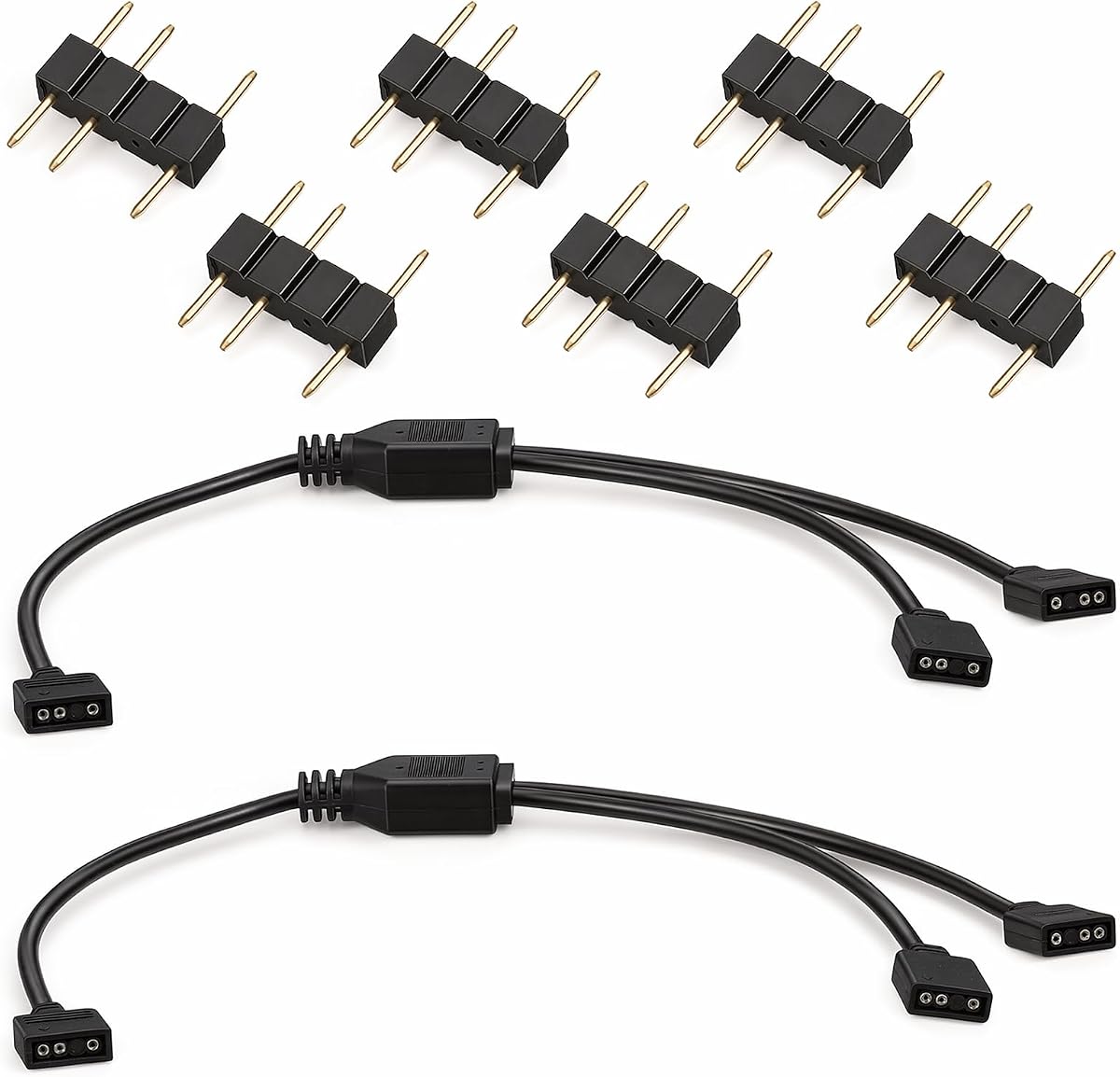
1-to-3 ARGB Splitter Cable
4.6Editor score
Affordable two pack value
Standard 11.8 inch length
Includes extra connectors
Compare the top 10 ARGB Splitter Cables for PC builds. This guide reviews features, compatibility, and quality to help you choose the best splitter for your
Choosing the right ARGB splitter cable is essential for PC builders who want synchronized lighting across multiple fans and LED strips. A good splitter ensures stable signal transmission and reliable connectivity without risking damage to your motherboard headers or components.
We compared ten highly rated ARGB splitter cables based on build quality, compatibility, length, and user feedback. Our analysis focuses on 5V 3-pin addressable RGB standards to ensure safe and effective expansion for your custom PC lighting configurations.
Each pick below highlights specific strengths like durable connectors, flexible cables, or versatile splitting options. Keep in mind that prices and availability change frequently, so verify current details before making your final purchase decision for your build.
4.6Editor score

5.0Editor score

4.9Editor score
This table provides a side-by-side comparison of the top ten ARGB splitter cables available today. Review the key specifications and features to find the exact match for your lighting needs.




This top-rated splitter offers a perfect balance of quality and functionality for PC lighting expansion. With a full five-star rating from verified buyers, it stands out as the most reliable choice for connecting multiple 5V 3-pin addressable RGB devices.
We may earn a commission when you buy through this link, at no additional cost to you.
The 1-to-3 splitting capability allows you to connect three fans or LED strips to a single motherboard header. This ensures synchronized lighting effects across your entire case without the need for additional controller hardware or complex wiring setups.
While the cable length is standard at 11.8 inches, it provides enough reach for most standard chassis layouts. The main trade-off is the fixed length, which might require careful planning if your motherboard header is far from your intended fan positions.
Anyone building a custom PC with multiple ARGB components should consider this splitter. It offers exceptional performance at a budget-friendly price point, making it a top recommendation for enthusiasts and casual builders alike.
Connect up to three ARGB devices to one header for unified lighting effects across your build.
Arrow markers ensure correct polarity alignment to prevent short circuits during installation.
We may earn a commission when you buy through this link, at no additional cost to you.
This splitter is an excellent entry-level option for those on a budget who still want quality lighting expansion. It provides a reliable way to expand your 5V 3-pin ARGB setup without spending a lot of money on premium cabling solutions.
We may earn a commission when you buy through this link, at no additional cost to you.
The package includes two cables plus additional connectors, giving you flexibility for multiple connection points. This value proposition makes it a favorite among budget builders who need to connect several fans across different zones of their case.
The construction is straightforward with basic plastic connectors that work well for standard use. While it lacks premium braided sleeves, the copper core ensures sufficient signal integrity for typical RGB LED strips and fans within reasonable distances.
Choose this if you want a cost-effective solution for expanding your lighting setup quickly. It is perfect for first-time builders or anyone needing to extend existing RGB devices without worrying about complex compatibility issues.
Get two cables and extra connectors in one package for versatile lighting expansion at a low cost.
No soldering or tools required; simply align arrows and plug into your motherboard header.
We may earn a commission when you buy through this link, at no additional cost to you.
This premium option delivers high-end features for serious PC builders who prioritize durability and signal stability. With gold-plated contacts and braided sleeves, it offers superior longevity and performance compared to standard plastic splitter cables on the market.
We may earn a commission when you buy through this link, at no additional cost to you.
The signal integrity engineering ensures consistent color accuracy and animation effects across all daisy-chained devices. This is crucial for complex custom builds where long cable runs or multiple devices might otherwise cause flickering or color shifts over time.
While it costs more than basic splitters, the four-pack provides great value for large cases requiring extensive cable management. The heavier braided construction adds weight to the build, so proper routing and support are recommended during assembly.
Ideal for enthusiasts demanding top-tier reliability and aesthetic appeal in their lighting setup. This is the go-to choice for professionals or hobbyists building showpiece PCs where every detail matters.
Oxygen-free copper and gold contacts prevent signal loss across multiple devices.
Braided sleeves provide a clean look while protecting against electromagnetic interference.
We may earn a commission when you buy through this link, at no additional cost to you.
These white splitter cables provide a clean visual match for white-themed PC builds. The 1-to-2 design is sufficient for most standard setups where you need to connect two fans or LED strips to a single header.
We may earn a commission when you buy through this link, at no additional cost to you.
The soft PVC material is flexible and durable, wrapping firmly with new copper to avoid dust damage. This construction choice balances cost and quality while providing reliable electrical connections for addressable RGB components.
The 1-to-2 limitation might be restrictive if you plan to chain more devices in one zone. However, for simple dual-fan configurations or specific CPU cooler connections, this offers a neat and functional solution without clutter.
Select this for white builds where color matching matters. It is a reliable choice for users who prioritize aesthetics alongside standard performance requirements in their RGB lighting setup.
White cabling blends seamlessly with light-colored cases and components.
Soft PVC protects copper cores while allowing easy routing inside tight cases.
We may earn a commission when you buy through this link, at no additional cost to you.
This cable features unique insulating protective caps that shield unused pins from accidental contact. This safety feature is particularly useful for preventing short circuits when needles are exposed inside the chassis during installation.
We may earn a commission when you buy through this link, at no additional cost to you.
At 33.5cm, it is slightly longer than the standard 11.8 inch options but remains compact for focused expansions. The 1-to-2 split function suits CPU cooler connections or small fan groups where extensive chaining is not required.
The compact design might require more planning if you need longer reach to distant headers. However, the safety benefits of the protective caps make it a smart choice for builders concerned about electrical safety.
Recommend this for safety-conscious builders or those with specific short-distance needs. It provides peace of mind with reliable performance for connecting CPU coolers or specific LED strips.
Insulating caps protect unused pins from touching the chassis and causing damage.
Moderate size balances reach with neatness inside the computer case.
We may earn a commission when you buy through this link, at no additional cost to you.
This splitter allows connection of up to five devices to a single header, making it ideal for extensive case lighting setups. The 50cm length provides significant reach for large chassis that require more cabling distance to connect distant components.
We may earn a commission when you buy through this link, at no additional cost to you.
With genuine new copper cores and durable plastic, it ensures reliable signal transmission even across extended lengths. This makes it a robust option for builds requiring long cable runs without losing signal quality or color consistency.
Care must be taken not to exceed total power limits when connecting five devices to one header. It is recommended to check motherboard specifications to ensure safe operation when utilizing the full 1-to-5 capacity.
Choose this if you have a large case with many RGB components. It offers maximum flexibility for complex lighting zones where extensive reach and high device counts are needed.
Connect up to five fans or strips to one header for extensive lighting coverage.
50cm length ensures you can reach distant motherboard headers or fan locations.
We may earn a commission when you buy through this link, at no additional cost to you.
This option is designed as an extension rather than a splitter, perfect for extending existing connections to reach headers. It maintains the integrity of your signal over slightly longer distances without adding extra devices to the same port.
We may earn a commission when you buy through this link, at no additional cost to you.
The female to female connectors allow you to insert this cable inline between your existing cables and motherboard headers. This is useful when existing cables are too short for your specific case layout.
While it does not split signals, it offers a reliable way to extend your reach where needed. For users who already have splitters but need longer cables, this is a practical and affordable accessory.
Buy this to solve reach issues in tight builds. It complements other splitters by ensuring your existing cables connect securely to available motherboard ports without modification.
Extend existing cable lengths to reach headers that are difficult to access.
Designed to minimize signal degradation when extending connection distances.
We may earn a commission when you buy through this link, at no additional cost to you.
This splitter emphasizes efficient power and data transmission with pure copper cores. Reliable conductivity is crucial for maintaining consistent color and lighting effects across chained devices, especially in larger setups.
We may earn a commission when you buy through this link, at no additional cost to you.
The 1-to-2 function is ideal for moderate builds where you need to split two fans or a fan and a strip. The standard length provides enough reach for most standard case configurations without excessive slack.
While it lacks advanced features, the focus on copper quality ensures stable performance. Users have reported reliable signal transmission without flickering or color drift, which is essential for addressable RGB functionality.
Pick this for reliable mid-range performance in standard builds. It is a solid choice for builders who prioritize electrical stability and standard functionality without extra cost.
Pure copper ensures consistent voltage delivery to all connected RGB devices.
High-quality conductors prevent flickering in LED strips or fans over time.
We may earn a commission when you buy through this link, at no additional cost to you.
With three cables included, this pack offers great flexibility for multiple lighting zones in larger cases. Each cable supports a 1-to-3 split, allowing you to distribute connections across different areas of your chassis.
We may earn a commission when you buy through this link, at no additional cost to you.
The standard 11.8 inch length works well for typical motherboard header distances. This ensures that most users can reach their fans or strips without requiring additional extension cables beyond the pack contents.
If your build requires more than two splitters, this pack provides value by reducing the need to buy individually. However, if you only need one splitter, it might be more than required for simple setups.
Ideal for larger cases needing multiple distribution points. It offers a cost-effective way to manage complex RGB configurations with reliable performance for multiple zones.
Use separate cables for fans, CPU coolers, and strips for organized zones.
Get three units in one purchase to save on individual unit pricing.
We may earn a commission when you buy through this link, at no additional cost to you.
This reliable splitter uses pure copper core wires for stable signal transmission. The soft PVC sheath ensures anti-interference protection, which is important for maintaining color accuracy across multiple connected devices.
We may earn a commission when you buy through this link, at no additional cost to you.
The 1-to-3 split allows for versatile expansion of fans or LED strips. It is rated 5.0 by users who value durability and straightforward functionality without complex installation requirements.
The durable outer layer resists aging, ensuring long-term performance in the case. This makes it a solid choice for builders planning to keep their system for several years without cable degradation.
Select this for a balanced option between quality and functionality. It is perfect for standard builds needing reliable splitting for multiple devices with proven durability.
Soft PVC sheath prevents electromagnetic interference during signal transmission.
Wear-resistant outer layer ensures reliability over years of use.
We may earn a commission when you buy through this link, at no additional cost to you.
Selecting the right splitter requires understanding voltage, pin count, and cable quality. This guide covers the essential factors to ensure safe and effective expansion.
Ensure your splitter matches your motherboard header. Most modern boards use 5V 3-pin addressable RGB, while older ones use 12V 4-pin. Mixing these can damage components.
Always check your motherboard manual to confirm 5V 3-pin support before purchasing any splitter cable.
Determine how many devices you need to connect to one header. Options range from 1-to-2 to 1-to-5 splits. Choose the count that matches your specific setup requirements.
Select a splitter with enough ports for your fans and strips to avoid needing multiple splitters for one zone.
Measure the distance between your motherboard header and your target fans or LED strips. Standard lengths are around 11.8 inches. Ensure it is enough for your case size without stretching.
Consider longer extension cables if your motherboard header is far from your components or case layout.
Look for pure copper cores for reliable signal transmission. Plastic connectors are standard but check for durability. Higher-end options include braided sleeves for better protection.
Invest in quality materials to prevent signal loss or connector bending over time.
Check for protective caps on unused pins or clear arrow markers. These features help prevent short circuits and ensure correct polarity alignment during installation.
Safety features like insulated caps are especially useful for preventing accidental damage inside the chassis.
Decide whether you need a single unit or a multi-pack. Two or three packs offer better value if you plan multiple zones or need replacements.
Buying multi-packs often reduces cost per unit and provides spare cables for future upgrades.
Some splitters come in white to match white builds, while others are standard black. Choose a color that blends well with your existing case components.
Aesthetics matter if your case is open or shows cables directly. Match the splitter color to your case interior.
Read verified buyer reviews to gauge real-world reliability. High ratings often correlate with stable signal transmission and durable connectors.
Stick to brands with consistent positive feedback to avoid compatibility issues or frequent failures.
Install the splitter by connecting the male connector to your motherboard header. Ensure the arrow on the connector aligns with the arrow on the header to maintain correct polarity. This step is crucial for preventing electrical issues.
Connect your RGB devices to the female ends of the splitter cables. If you have multiple fans, plug each into a separate port. This ensures all devices receive the same lighting signal for synchronized effects.
Maintain your cables by avoiding sharp bends or crimping during routing. Check connectors periodically for dust or debris. Clean gently with a soft brush to ensure long-term reliability and signal integrity.
No, you cannot. 5V 3-pin ARGB splitters are not compatible with 12V 4-pin RGB headers. Using them on the wrong header may damage your motherboard or LEDs. Always check your motherboard manual to confirm voltage and pin type before purchasing.
It depends on your motherboard's power limits. Most can handle up to three or four devices safely. If you connect too many, the signal may fade or flicker. Check your motherboard manual for the maximum current rating.
No, they are designed specifically for addressable RGB devices like LED strips or fans. Non-addressable RGB uses a different connector and voltage. Mixing them will not work and could cause electrical failure.
Flickering often indicates insufficient power or signal loss. Ensure your splitter supports the total wattage of all connected devices. Also check that your motherboard header provides enough current for the entire setup.
Yes, it is safe as long as you match the 5V 3-pin header correctly. Always align the arrows on the connector and header. This prevents short circuits and ensures stable operation.
Yes, but be cautious about total power draw. Daisychaining splitters increases the load on the header. Ensure your motherboard can support the combined current of all devices before adding multiple layers of splitters.
We reviewed ten top-rated options ranging from budget two-packs to premium four-packs with braided sleeves. Each splitter offers unique strengths for different build sizes and aesthetic needs. The Editor's Choice delivers perfect 5V compatibility and reliable signal transmission.
When choosing, prioritize cable quality and connector safety features. Ensure you have enough ports for all your fans and LED strips. Look for durable copper cores and clear polarity markers to avoid installation mistakes.
Prices and stock levels fluctuate regularly across retailers. Always verify current details before purchase to ensure compatibility with your specific motherboard. Choosing the right splitter helps you achieve seamless synchronized lighting throughout your system.