
Cooler Master Q300L V1
4.5Editor score
Modular I/O panel
Transparent side panel
High airflow design
This guide compares the top Matx Case options for performance, airflow, and design to help you find the perfect Micro ATX enclosure for your build needs.
Choosing the right Matx Case is crucial for balancing performance and aesthetics. A good case ensures proper airflow, protects components from dust, and fits your hardware perfectly. With so many options available, finding one that meets your specific needs can be challenging for any builder.
We evaluated ten top-rated Matx Case models based on airflow design, component compatibility, build quality, and aesthetic appeal. Our analysis focuses on real-world usability, cooling potential, and value to ensure you get a reliable enclosure that supports your system's longevity and performance.
Each pick highlights specific strengths like unique wood panels, panoramic glass, or compact footprints. Note that availability and pricing fluctuate frequently, so verify current stock and costs before making your final decision to secure the best deal for your next computer build.
4.5Editor score

4.8Editor score

4.7Editor score
This side-by-side comparison outlines key specifications for each Matx Case model to help you quickly identify which enclosure aligns with your hardware requirements and aesthetic preferences without sifting through lengthy descriptions.




The Lian Li A3-mATX stands out as the Editor's Choice for builders seeking high-end aesthetics without sacrificing cooling performance. Its unique walnut wood front panel combined with high-airflow steel mesh creates a sophisticated look that fits modern minimalist setups perfectly.
We may earn a commission when you buy through this link, at no additional cost to you.
This case supports GPUs up to 415mm and allows for 360mm radiators, which is impressive for a compact 26.3L footprint. The flexible PSU installation options enhance clearance significantly, making cable management much easier than in standard enclosures. The mesh design ensures excellent cooling for high-TDP components.
While the price is higher than budget options, the build quality justifies the investment. The wood panel adds a distinct touch but requires careful handling to avoid scratches. The modular design allows for customization that few other cases in this category offer.
This Matx Case is ideal for creators and gamers who value aesthetics and thermal performance equally. If you want a standout build that blends wood and metal with powerful hardware compatibility, this is the top recommendation for 2026.
The walnut wood front panel provides a unique warmth rarely seen in PC cases, complementing home office or living room setups beautifully.
With full mesh panels and extensive radiator support, this case maintains low temperatures even during intensive gaming or rendering sessions.
We may earn a commission when you buy through this link, at no additional cost to you.
The Cooler Master Q300L V1 is the Best Budget Matx Case, offering incredible value for entry-level builders or those on a tight budget. Despite its low price, it delivers robust features like a modular I/O panel and transparent side panel that elevate the build experience.
We may earn a commission when you buy through this link, at no additional cost to you.
Its perforated design on all sides promotes optimal airflow, ensuring heat dissipation without requiring extra aftermarket cooling solutions immediately. The magnetic dust filters are a thoughtful inclusion that simplifies maintenance. It accommodates standard hardware sizes comfortably, including GPUs up to 360mm.
The main trade-off is the simpler material finish compared to premium cases, but this is expected at this price point. It lacks extensive pre-installed fans, requiring you to add them for optimal cooling, which may slightly increase total cost but still remains affordable.
For anyone building their first Micro-ATX system or upgrading on a budget, this case is a reliable choice. It proves you do not need to spend a fortune to get a functional and good-looking enclosure for your components.
The I/O panel can be adjusted to front, top, or bottom positions, allowing for easier cable routing based on desk placement.
Magnetic dust filters on key intake points make routine cleaning quick and prevent dust buildup from compromising system longevity.
We may earn a commission when you buy through this link, at no additional cost to you.
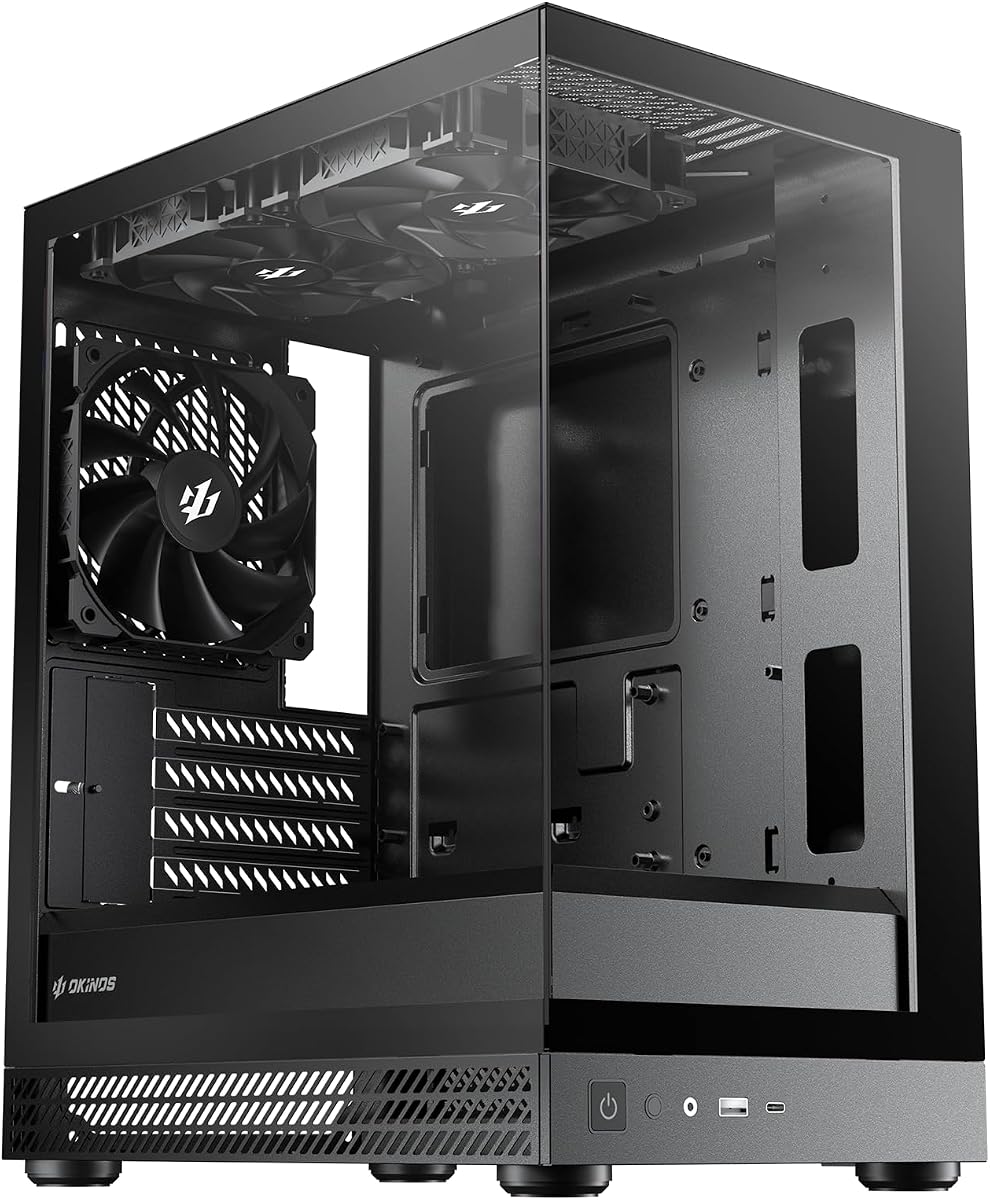
The Okinos Aqua 3 delivers a Best Premium Matx Case experience with its panoramic glass design that showcases hardware beautifully. It comes pre-installed with ARGB fans and includes a controller, saving you money on separate lighting components. The 270-degree view creates a unique visual effect for any room.
We may earn a commission when you buy through this link, at no additional cost to you.
Vertical airflow engineering ensures heat rises efficiently, keeping CPU and GPU temperatures in check during demanding tasks. The Type-C 3.2 Gen 2 port offers fast data transfer for peripherals. Quick-release panels make it easy to access internals without tools or risking glass damage.
The weight and glass construction mean careful assembly is required, which might challenge inexperienced builders. However, the aesthetic payoff and included lighting features make it a strong contender for those prioritizing look and modern connectivity.
Choose this case if you want a showpiece PC that combines sleek glass, vibrant lighting, and fast connectivity. It elevates the standard Micro-ATX form factor into a premium desktop centerpiece for 2026.
The seamless glass front and side provide an uninterrupted view of components, maximizing RGB lighting impact inside the case.
A front Type-C port ensures modern devices connect at high speeds without needing rear port adapters.
We may earn a commission when you buy through this link, at no additional cost to you.
The Okinos Cypress 3 Wood brings a distinct elegance to the Micro-ATX category with its genuine walnut wood front. This design choice allows users to match their PC to home decor effortlessly. It also features a Type-C port and multiple pre-installed fans for immediate use.
We may earn a commission when you buy through this link, at no additional cost to you.
Its triangular mesh design optimizes airflow, maintaining internal temperatures effectively without needing extra parts. The tempered glass side panel highlights your components clearly. Cable management is supported with included standoffs and a splitter cable for cleaner builds.
While the wood cannot be removed or replaced, it adds a lasting touch that stands out. The fans are non-PWM, limiting speed control flexibility. However, for the price and visual impact, it remains a compelling choice for style-focused builders.
This case is perfect for those who want a warm, natural look without custom painting. It blends functionality with a premium appearance at a reasonable cost, making it a favorite for home office setups.
Walnut wood on the front panel complements wooden furniture, making the PC blend seamlessly into living spaces.
Mesh panels combined with pre-installed fans ensure components stay cool even without additional aftermarket cooling solutions.
We may earn a commission when you buy through this link, at no additional cost to you.
The Zalman CUBIX Compact is an Ultra Compact Matx Case designed for space-saving builds. At just 17.1 liters, it fits easily on desks or under monitors. Despite its small size, it supports standard ATX PSUs, which is rare for mini-ITX cases.
We may earn a commission when you buy through this link, at no additional cost to you.
Its perforated front panel and included 80mm fan provide necessary airflow for components. The 0.8T steel construction ensures durability without adding too much weight. This simplicity makes it a practical choice for media centers or office PCs where space is premium.
The limited expansion slots restrict large GPU upgrades, so check your hardware dimensions first. It lacks fancy RGB or glass panels, focusing purely on utility. This functional approach keeps costs low and reliability high for basic needs.
Ideal for users needing a hidden PC or one that sits on a shelf, this case delivers on durability and compactness. It proves that small does not always mean compromised on power supply flexibility.
Minimal dimensions allow placement in tight spots where larger towers would not fit comfortably.
Supports standard ATX power supplies, simplifying component choices compared to SFX-only mini cases.
We may earn a commission when you buy through this link, at no additional cost to you.
The TGDGAMER MATX Slim prioritizes airflow with a perforated front panel to cool components effectively. It is a Budget Design that supports ATX power supplies, which adds versatility. The slim profile helps keep desk space clear while maintaining functional airflow paths.
We may earn a commission when you buy through this link, at no additional cost to you.
It fits GPUs up to 250mm and supports mini ITX boards well. The inclusion of an 80mm fan ensures immediate airflow upon setup. While ratings are lower, the functionality serves well for basic needs and older hardware configurations.
The limitation on GPU length means newer high-end cards may not fit. It lacks advanced features like USB-C or extra glass. However, its simplicity and low price point make it accessible for casual users prioritizing budget over flash.
Select this if you need a functional, basic case for a secondary PC. It keeps temperatures manageable through direct airflow without costing much, fitting tight budgets effectively.
Perforated front allows direct air intake to cool internal components, enhancing performance efficiency.
Minimal cost helps those building multiple systems or needing a basic enclosure without breaking the bank.
We may earn a commission when you buy through this link, at no additional cost to you.
The Okinos Aqua UNO is a Glass Front Matx Case focused on visual appeal without liquid cooling options. It features quick-release panels that allow easy access without tools. Full-coverage dust filters help maintain a clean interior for long-term maintenance.
We may earn a commission when you buy through this link, at no additional cost to you.
Support for GPUs up to 309mm covers most mainstream cards. The Type-C 5Gbps port adds modern connectivity. Air cooling compatibility ensures simplicity, avoiding complex liquid setups which may be too advanced for some users.
The lack of radiator support limits enthusiasts seeking extreme cooling performance. The fans run at fixed speeds, reducing noise customization. Yet, the visual impact and ease of access are strong selling points for general users.
Buy this if you want a sleek look with easy maintenance and do not plan on water cooling. It balances aesthetics with air cooling reliability in a compact package.
Tool-free studs allow you to remove glass panels quickly, reducing risk of accidental breakage during cleaning.
Full-coverage filters on top and side keep dust out, ensuring components stay clean longer between checks.
We may earn a commission when you buy through this link, at no additional cost to you.
The LIAN LI Vector V100 MINI is a Premium Compact Matx Case offering high-end design in a smaller footprint. It includes four ARGB fans and a rear exhaust, providing immediate cooling and lighting. The panoramic glass provides a seamless view of your build.
We may earn a commission when you buy through this link, at no additional cost to you.
It supports GPUs up to 415mm and ATX power supplies, which is rare for a compact unit. The anti-sag bracket ensures GPU stability during use. The build quality feels premium with sturdy panels and good cable routing space.
It does not support full ATX motherboards, so verify your board size before purchase. This restriction ensures a tighter fit but may limit some setups. Still, the value from included fans and lighting is significant.
This case suits users wanting premium looks and performance without a full tower. The included lighting and sturdy build make it a strong contender for high-end Micro-ATX systems.
Four ARGB PWM fans included save buyers from buying separate lighting, improving value and setup speed.
Supports graphics cards up to 415mm, allowing for high-end cards even within this compact chassis.
We may earn a commission when you buy through this link, at no additional cost to you.
The Okinos Mirage 4 Black supports a 240mm top radiator, making it ideal for hybrid cooling setups. Its 5 PCIe slot layout improves GPU cooling space. A panoramic glass panel and Type-C port add style and utility. An ARGB controller helps manage lighting easily.
We may earn a commission when you buy through this link, at no additional cost to you.
Vertical airflow optimizes thermal management, keeping heat moving efficiently through the system. The magnetic dust filters simplify maintenance. Cable management space is generous with grommets for a tidy look. It balances cooling features with visual appeal.
The fans are non-PWM, limiting speed control, but the controller handles colors. It is not designed for extreme overclocking but works well for gaming and general use. The radiator support adds flexibility often missing in this category.
Choose this if you need room for a small radiator and a clean layout. It offers versatile cooling and modern features that suit mid-range to high-performance builds.
Top 240mm radiator support allows adding liquid cooling for better thermal control in compact form factors.
Vertical airflow system moves heat upward efficiently, reducing hot spots inside the chassis.
We may earn a commission when you buy through this link, at no additional cost to you.
The Lian Li B4-mATX offers a Premium Real Wood Finish in black walnut or white beech. It can be used horizontally or vertically to suit any desk. It supports 360mm AIOs and comes with two slim fans. This case emphasizes style and build quality.
We may earn a commission when you buy through this link, at no additional cost to you.
Dual positioning allows flexibility in placement; horizontal for desktop use or vertical for tower savings. The high-quality finish resists wear and looks sophisticated. It handles GPUs up to 358mm and cooling needs effectively for most setups.
Slim fans may require additional intake for peak performance, but initial setup works well. The price reflects its premium materials and design. It is for users prioritizing a unique look and sturdy construction over budget savings.
Select this for a build that looks like a piece of furniture. It blends high-end cooling compatibility with a natural finish for a standout system in any room.
Dual positioning means you can choose a flat desktop style or save vertical space as needed.
Real wood finish provides warmth and elegance, elevating the visual experience beyond standard metal.
We may earn a commission when you buy through this link, at no additional cost to you.
Selecting the ideal Matx Case involves weighing several key factors. This section details the most critical elements to consider before making your purchase.
Airflow determines how well heat escapes your system. Look for cases with mesh panels or perforated designs that allow air to enter freely. Good cooling extends the lifespan of your components and prevents throttling during heavy loads. Cases with fan support options or pre-installed fans reduce the need for aftermarket additions.
Prioritize cases with open intake designs for performance builds.
Ensure the case supports your specific GPU length and CPU cooler height. Many Micro-ATX cases have limits like 360mm for GPUs. Check power supply clearance too. Incompatible hardware can cause build failures or require expensive returns. Verify specs before buying to save time.
Always measure your parts against case dimensions before purchasing.
Steel thickness and material type affect durability and noise reduction. Thicker steel minimizes vibration but adds weight. Plastic parts should feel sturdy and snap-fit well. A solid structure protects your hardware from accidental drops or bumps. High-quality materials also look better over time.
Choose materials that match your usage environment and handling habits.
The exterior design should match your personal style or room decor. Wood panels or glass offers a premium look compared to standard steel. Some cases allow customization, like changing front panels. Aesthetic choices impact how you feel when using your PC daily.
Select a design that makes you excited to turn on your computer.
Clean cable routing improves airflow and appearance. Look for ample clearance behind the motherboard tray and tie-down points. Grommets and rubberized holes prevent wire damage. Good cable management makes upgrades and maintenance much easier without clutter.
Effective cable routing helps maintain airflow and a tidy interior.
Modern ports like USB-C are increasingly important for peripherals. Ensure the case has enough USB ports for your devices. Audio jacks and reset buttons add convenience. Future-proofing your case with better ports prevents needing adapters later.
Check that the front panel supports your essential connection needs.
Dust filters trap particles that can overheat your system. Magnetic filters are easier to remove for cleaning than screw-on ones. Full coverage filters on intake areas keep internal components cleaner. Regular cleaning becomes simpler with well-designed filters.
Filters reduce maintenance frequency and keep internal airflow clear.
Balance features with your total budget. Some cases include fans or controllers that add value. Avoid overpaying for aesthetics you do not need. A mid-range case often offers the best blend of cooling and cost. Compare what is included against the total price.
Focus on value by considering included accessories and essential specs.
First, place your Matx Case on a stable surface away from carpet to avoid dust intake. Ensure there is enough space around it for airflow to circulate freely. Keeping the intake areas clear helps maintain consistent internal temperatures.
Second, clean dust filters regularly to maintain optimal cooling performance. Depending on your environment, check them every few weeks. Removing accumulated dust prevents overheating and extends fan life. Use compressed air or a soft cloth for gentle cleaning.
Third, avoid moving the case while components are running to prevent vibration damage. Secure cables before transport to prevent disconnection. Proper handling ensures your hardware stays safe and the case remains undamaged over years of use.
A Matx Case is typically smaller and lighter, saving desk space while still supporting standard Micro-ATX hardware. This compact design often improves airflow focus and portability. It is ideal for users needing a balance between size and performance without going full mini-ITX.
Most Matx Cases are designed specifically for Micro-ATX and Mini-ITX boards, so they often do not support full ATX boards. Check the product specs for motherboard compatibility before buying. Some models like the LIAN LI Vector exclude ATX boards intentionally to save space.
Compare your GPU length to the case's maximum support specification listed in the product details. Some cases allow 400mm+ GPUs while others limit to 250mm. Measure your card precisely to avoid fitting issues. Clearance for VRM coolers may also affect fit.
Many Matx Cases come with at least one or two fans, which may suffice for basic builds. However, for high-performance CPUs or GPUs, adding more fans usually improves cooling. Check airflow intake needs before assuming pre-installed fans are enough.
Some Matx Cases support 240mm or 360mm radiators, allowing liquid cooling. However, many compact models only support air cooling. Verify radiator support height and width before purchasing a liquid cooler. Cases like the Okinos Mirage 4 support this feature.
Wooden front panels provide a unique warm aesthetic that fits modern home decor well. They stand out from typical metal cases and add elegance. However, they require careful handling to avoid scratches. Some models allow swapping panels for different looks.
Tempered glass side panels enhance visibility of RGB lighting and components but add weight and fragility. Steel panels are more durable but hide internals. Choose based on whether you prioritize aesthetics or durability and weight in your setup.
Yes, magnetic filters simplify cleaning by allowing quick removal without tools. They ensure you clean them regularly because removal is easy. This maintains airflow efficiency and extends hardware life. Filters are a cost-effective addition to any build.
The top picks including the Lian Li A3-mATX, Cooler Master Q300L V1, and Okinos Aqua 3 cover various needs from budget to premium. Each option offers unique strengths like wood panels, panoramic glass, or exceptional cooling support for different builders.
Prioritize airflow and component compatibility over aesthetics if performance is your main goal. However, if style matters for your home office, cases with wood or glass designs provide significant visual appeal without sacrificing function.
Remember to check current pricing and stock before ordering as availability changes often. Verifying exact specs against your components ensures a smooth build experience. These Matx Case options provide excellent choices for 2026 to suit any setup.