
TP-Link ER605
4.4Editor score
Five Gigabit Ports for flexibility
Supports up to 20 VPNs
Advanced firewall and DoS defense
Discover the top load balancing router models for 2026. This guide compares features, performance, and security to help you choose the ideal networking
Finding the right load balancing router is crucial for maintaining reliable internet access in modern networks. These devices distribute traffic across multiple connections to prevent bottlenecks and ensure consistent performance for all users.
We evaluated ten top-rated models based on port configurations, security features, and management capabilities. Our analysis focuses on real-world performance metrics and enterprise-grade reliability standards for diverse environments.
Each selection highlights specific strengths for different use cases ranging from small offices to large enterprises. Please note that product availability and pricing may fluctuate over time on major retail platforms.
4.4Editor score

4.7Editor score

4.0Editor score
This comparison table outlines the core specifications of every selected model to help you quickly identify the right fit for your network infrastructure needs.


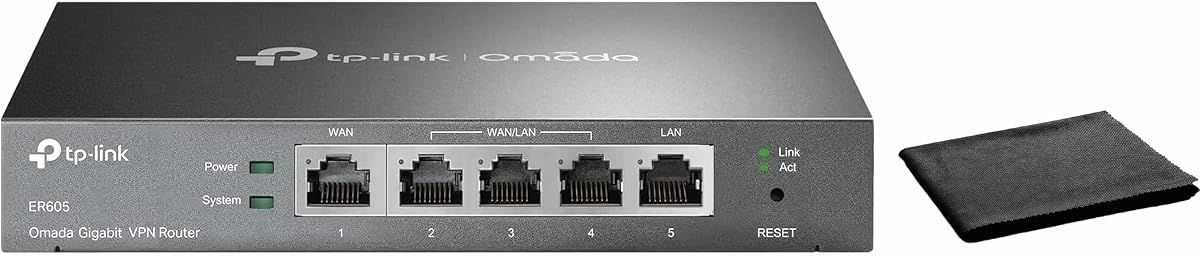

The TP-Link ER605 stands out as a highly capable budget option for small businesses needing reliable load balancing. With a 4.4 rating, it offers solid performance for basic multi-WAN setups without breaking the bank.
We may earn a commission when you buy through this link, at no additional cost to you.
Its five gigabit ports allow flexible configuration including three WAN connections to optimize bandwidth usage across different ISPs. Security is robust with SPI firewall, DoS defense, and IP/MAC filtering protecting your network perimeter effectively.
While it supports up to 20 VPN connections which is generous for the price, users needing more advanced SDN features might find it limiting. The USB WAN port adds valuable backup capability for mobile broadband modems.
Small offices or home labs seeking an affordable entry into load balancing will find this router delivers excellent value. It balances cost with essential features like bandwidth management and failover capabilities seamlessly.
The router supports one Gigabit WAN plus two WAN/LAN ports allowing up to three WAN connections for optimized bandwidth usage.
Advanced firewall policies and DoS defense protect your network while speed testing helps monitor connection health in real time.
We may earn a commission when you buy through this link, at no additional cost to you.
The TP-Link ER7206 is designed for professional environments requiring greater network capacity and management flexibility. It holds a 4.5 rating and supports up to 700 client devices making it suitable for medium-sized offices.
We may earn a commission when you buy through this link, at no additional cost to you.
It features up to four WAN ports including an SFP option for fiber connectivity enhancing versatility for diverse ISP setups. Integration with Omada SDN allows centralized control through hardware software or cloud-based controllers for streamlined management.
Security is enhanced with support for up to 100 VPN connections exceeding the previous model significantly. The remote cloud access capability enables administrators to manage networks from anywhere using the Omada app efficiently.
Networks needing robust client handling and centralized management will benefit from this router scalability. While pricier it offers future-proof features like SDN compatibility that justify the investment for growing businesses.
The device supports up to 700 clients and 150,000 associated devices making it ideal for larger networks with many endpoints.
Omada Software Defined Networking integrates gateways APs and switches allowing multiple control options for unified network management.
We may earn a commission when you buy through this link, at no additional cost to you.
The Cudy R700 appeals to advanced users wanting control over their network stack through OpenWRT support. With a 4.4 rating it provides five gigabit ports and load balancing across up to five ISPs for maximum continuity.
We may earn a commission when you buy through this link, at no additional cost to you.
Its complete VPN gateway suite includes WireGuard OpenVPN and IPsec making it versatile for remote access and site-to-site tunnels. The SPI firewall and DoS prevention ensure security while VLAN segmentation allows for network isolation.
Users benefit from web GUI or app-based cloud management with TR-069 support for remote configuration. Built-in diagnostic tools like Ping and Traceroute facilitate rapid troubleshooting without external software tools.
Tech-savvy individuals or small offices needing custom firewall rules will appreciate this routers flexibility. It offers enterprise-grade control at a budget price though some familiarity with OpenWRT is recommended for full utilization.
Full OpenWRT support unlocks VLAN segmentation advanced firewall rules and custom QoS policies for professional network management.
Built-in support for WireGuard OpenVPN and IPsec allows creating site-to-site tunnels and hosting remote access securely.
We may earn a commission when you buy through this link, at no additional cost to you.
The Alta Labs Route10 delivers high-performance wired routing for advanced users needing gigabit speeds without bottlenecks. With a 4.0 rating it features two 10Gbps SFP+ ports and four 2.5Gbps ports supporting heavy network workloads effortlessly.
We may earn a commission when you buy through this link, at no additional cost to you.
Powered by a Qualcomm quad-core processor it provides hardware-accelerated networking ensuring low latency and consistent throughput. Integrated PoE+ outputs allow powering compatible access points directly reducing the need for extra power injectors in your setup.
Real-time monitoring tools give administrators live visibility into bandwidth usage and connected devices for quick issue identification. Multi-WAN support includes failover capabilities ensuring uptime even if primary internet connections experience interruptions during business hours.
Enterprise environments or power users requiring maximum wired speed will find this router unmatched in capability. While expensive and requiring separate Wi-Fi access points it excels in high-bandwidth scenarios where stability and speed are paramount.
Quad-Core Qualcomm Network Accelerator ensures fast packet processing and low latency for multi-gigabit network workloads without bottlenecks.
Live network statistics show bandwidth usage connected devices and WAN traffic enabling administrators to optimize flow efficiently.
We may earn a commission when you buy through this link, at no additional cost to you.
The Omada ER7412-M2 offers extensive port options including two 2.5G RJ45 ports and multiple Gigabit ports for diverse connectivity. With a 4.5 rating it supports load balancing on up to 11 WAN ports maximizing utilization of multi-line broadband connections.
We may earn a commission when you buy through this link, at no additional cost to you.
Security is enhanced with IPS/IDS and DPI capabilities protecting against advanced threats while maintaining high throughput. It supports various VPN protocols including WireGuard SSL and GRE ensuring secure remote access across different device types.
DoS/DDoS protection along with IP/MAC/URL filtering provides a robust defense layer for network perimeter. The router is designed for high utilization rates in environments where multiple ISPs are used to ensure maximum bandwidth availability.
Medium to large businesses needing high port counts and advanced security features will appreciate this model. It integrates well with Omada ecosystem devices providing a scalable solution for growing network infrastructures.
Load balancing on up to 11 WAN ports increases the utilization rate of multi-line broadband ensuring optimal bandwidth usage.
High-security SSL IPSec WireGuard and OpenVPN support combined with IPS/IDS provides robust protection for sensitive data.
We may earn a commission when you buy through this link, at no additional cost to you.
The TP-Link TL-R470T+ is designed for small offices or internet cafes requiring basic load balancing without high speeds. It carries a 4.2 rating and features up to four WAN ports to ensure maximum bandwidth and backup capabilities effectively.
We may earn a commission when you buy through this link, at no additional cost to you.
It provides extensive client account management and bandwidth marshaling based on specific application environments. Portal authentication adds a layer of access control useful for public networks like cafes or guest areas where managed access is needed.
DDNS supports remote management easily while strong DoS attack protection safeguards the network perimeter against common threats. The smaller case design saves space in compact installations without sacrificing essential routing capabilities for basic connectivity needs.
Internet cafes or small offices needing basic failover functionality will find this router sufficient. While limited to 10/100M speeds it offers essential load balancing features at an entry-level price point.
Marshals bandwidth resources to specific clients based on their unique application environments ensuring fair and efficient network usage.
Powerful DoS attack protection and IP/MAC binding effectively prevent ARP virus attacks and secure the network perimeter.
We may earn a commission when you buy through this link, at no additional cost to you.
The TP-Link TL-R480T+ serves as a straightforward solution for users needing basic load balancing functionality. With a 4.2 rating it features 5 ports allowing 3 configurable WAN/LAN connections to provide flexible bandwidth distribution across connections.
We may earn a commission when you buy through this link, at no additional cost to you.
It is optimized for small business environments where simplicity and reliability are prioritized over advanced features. The compact form factor makes it easy to install in office spaces or server rooms without consuming excessive rack space.
While it lacks modern gigabit speeds and cloud features it fulfills the core requirement of load balancing effectively. Users seeking a no-fuss device to combine two or three internet lines for backup will find it adequate.
Home labs or small businesses needing simple multi-WAN failover without complexity may consider this model. Its value lies in basic performance and ease of use rather than high-end capabilities.
The router offers 3 configurable WAN/LAN ports allowing flexible connection configurations for various network topology needs.
The 5-port compact design makes it suitable for small offices where space is limited but load balancing is required.
We may earn a commission when you buy through this link, at no additional cost to you.
The TP-Link ER-605 Gigabit VPN Router offers a user-friendly approach to load balancing for small businesses. With a 4.3 rating it features dual WAN ports for seamless load balancing and enhanced network performance across connections.
We may earn a commission when you buy through this link, at no additional cost to you.
Its intuitive web interface and Omada app compatibility simplify management for non-technical users. Cloud monitoring provides real-time status checks allowing administrators to track network health remotely without physical access to the device.
Bandwidth optimization features with intelligent QoS settings ensure critical applications receive priority during peak usage times. The compact design suits various environments including offices and remote work setups providing reliable wired connectivity.
Small businesses prioritizing ease of use and cloud visibility will appreciate this model. It balances essential security features with simplicity making it accessible for teams with limited IT resources.
Cloud monitoring and Omada app compatibility simplify management providing real-time status and configuration checks for networks.
Intelligent bandwidth management and QoS settings ensure optimal performance for critical applications during peak network usage.
We may earn a commission when you buy through this link, at no additional cost to you.
The Ubiquiti EdgeRouter 4 is a robust enterprise-class router known for reliability and versatility. With a 4.6 rating it features three 10/100/1000 Mbps Ethernet ports and an SFP port for fiber connectivity in diverse environments.
We may earn a commission when you buy through this link, at no additional cost to you.
Its fanless operation makes it ideal for quiet environments where noise is a concern. The internal PSU allows for desk wall or rack mount options giving flexibility in installation choices across different physical spaces.
Despite having fewer ports than some competitors it offers advanced enterprise routing capabilities that suit demanding professional networks. The build quality ensures stable performance over long periods without overheating under consistent load conditions.
System integrators or IT admins needing a stable and quiet router will find this device excellent. Its fanless design and mounting options make it adaptable for various installations from server rooms to office desktops.
The internal PSU and fanless design allow silent operation making it suitable for quiet environments without active cooling.
Desk wall and rack mount options provide flexible installation choices adapting to different physical office requirements easily.
We may earn a commission when you buy through this link, at no additional cost to you.
The Omada Fusion 2.5G earns top marks with its blend of high speed and modern management features. Holding a 4.7 rating it delivers outstanding speed with five 2.5G ports supporting up to 4-WAN load balancing for reliability.
We may earn a commission when you buy through this link, at no additional cost to you.
A 2.51 touchscreen provides instant on-site insights including health scores speed tests and real-time traffic data. This simplifies troubleshooting without needing a laptop making maintenance faster and more efficient for field technicians.
License-free cloud access allows remote management from the Omada Cloud portal while Bluetooth setup speeds deployment significantly. The built-in controller means all features are available day one without extra subscriptions or hardware controllers needed.
Modern businesses needing future-proof speeds and simplified management will find this router unmatched. It combines high performance with user-friendly features making it the top choice for advanced wired networking setups.
A 2.51 touchscreen provides instant on-site insights including health scores speed tests and real-time traffic for quick troubleshooting.
License-free cloud access and Bluetooth setup simplify deployment saving time for IT teams managing remote networks.
We may earn a commission when you buy through this link, at no additional cost to you.
Selecting the right load balancing router requires evaluating several technical factors to match your specific network demands and budget constraints.
The number and type of WAN ports determine how many internet connections you can use simultaneously. Look for routers with multiple Gigabit WAN ports or SFP options if you plan to use fiber connections or have multiple ISPs for redundancy.
Ensure the router supports enough ports for your current needs and future expansion without requiring additional hardware.
Different routers use various algorithms to distribute traffic such as round-robin least connections or bandwidth-based methods. Choose a router that allows configuring these policies to match your traffic patterns effectively.
Advanced users may prefer routers offering custom scripts or rule-based balancing for granular control.
Automatic failover ensures network continuity if a primary connection drops. Check how quickly the router detects failure and redirects traffic to secondary links to avoid downtime.
Robust failover logic is essential for businesses where constant connectivity is critical for operations.
Modern routers should include SPI firewalls DoS protection and support for secure VPN protocols like IPsec or WireGuard. These features protect your network perimeter while enabling secure remote access.
Prioritize routers with regularly updated firmware to maintain protection against emerging threats.
An intuitive web interface or mobile app simplifies configuration and monitoring. Cloud-based management allows remote control which is convenient for distributed networks or limited IT staff.
Touchscreen support on-device is a bonus for quick troubleshooting without extra tools.
The processor speed and hardware acceleration affect throughput and latency especially when using security features or VPNs. Higher-end models often include dedicated network accelerators to handle heavy loads.
Ensure the CPU can handle your expected traffic volume to avoid bottlenecks under peak usage.
Consider whether the router integrates with other network devices like access points or switches from the same vendor. Ecosystem compatibility streamlines management and firmware updates.
Future-proofing your network with SDN support allows easier expansion and centralized control.
Prices vary widely based on features so balance cost with necessity. Entry-level models suffice for small setups while enterprise options offer advanced capabilities for larger deployments.
Always evaluate long-term value including warranty and support rather than just initial purchase price.
Begin by connecting your primary internet source to the designated WAN port and verifying the link status in the admin panel. Configure failover settings to ensure secondary links activate automatically if the primary connection fails unexpectedly.
Regularly update the firmware to patch security vulnerabilities and maintain optimal performance over time. Most modern routers allow automatic updates or offer alerts for new versions available in the settings menu.
Monitor bandwidth usage via the dashboard to identify heavy consumers and adjust QoS rules accordingly. This ensures critical applications like VoIP or video conferencing receive priority during high traffic periods.
A load balancing router distributes network traffic across multiple internet connections to maximize throughput and minimize latency. If one connection fails it automatically reroutes traffic to ensure continuous internet access for all users on the network.
Most standard home routers do not support multi-WAN connections or load balancing features. You need a business-grade router designed to handle multiple ISP lines simultaneously for effective load distribution.
The number of connections depends on the router model ranging from two up to ten or more. Choose a router with enough physical ports and supported WAN configurations for your specific ISP setup.
Load balancing can aggregate bandwidth from multiple connections increasing total available throughput. However single sessions may not exceed the speed of a single ISP line unless using specialized bonding technologies.
When one connection fails the router detects the outage and automatically reroutes all traffic through remaining active links. This failover capability minimizes downtime and maintains network availability for users.
Standard Ethernet cables work for most connections but ensure you use Cat5e or Cat6 cables to support Gigabit speeds. Fiber connections require specific SFP modules and fiber optic cabling.
Yes as long as the router supports the connection types and you have the necessary adapters. Most modern routers accept different WAN types simultaneously for flexible internet sourcing.
Cloud management is optional but convenient for remote monitoring and configuration without physical access. It simplifies managing multiple sites from a single dashboard for distributed businesses.
We have reviewed ten top-rated load balancing routers ranging from budget-friendly options to premium enterprise models. Each offers unique strengths tailored to different network sizes and technical requirements.
Prioritize port count processing power and security features based on your specific usage needs. Advanced users may prefer OpenWRT support while small offices might value easy cloud management tools.
Always check current availability and pricing before purchasing as these values fluctuate frequently. Select the model that balances performance and cost for your environment.