
TK Node Mini PC – Zorin OS Core Linux
4.5Editor score
AMD Ryzen R2314 Processor
Zorin OS Core Included
Dual NVMe Storage Support
This guide compares the best Linux Mini Pcs for 2026, evaluating performance, compatibility, and value for developers, home servers, and office workloads.
Finding the right Linux Mini PC requires balancing compact design with robust performance for your specific workflow. These small form factor systems offer efficient computing power while consuming minimal desk space and energy.
We analyzed ten top models based on processor architecture, memory expansion, storage options, and pre-installed distributions. Our comparison highlights units optimized for development, virtualization, and general productivity tasks.
Each pick details hardware specs, connectivity features, and real-world suitability. Prices and availability fluctuate often, so verify current listings before making your final selection decision for your setup.
4.5Editor score

4.8Editor score

4.0Editor score
This side-by-side comparison evaluates all ten featured models across key performance metrics and connectivity options to help you identify the ideal Linux Mini PC for your needs.


The ASUS NUC 14 Pro stands out as a powerhouse for professionals needing robust Linux support in a compact chassis. Its Intel Ultra 7 155H processor delivers impressive speed for virtualization and AI workloads.
We may earn a commission when you buy through this link, at no additional cost to you.
Running Linux Mint out of the box ensures a familiar and secure environment for developers. The inclusion of Thunderbolt 4 and WiFi 6E makes it versatile for high-speed networking and external display setups.
While the cost is significant, the scalability and build quality justify the investment for enterprise or serious home lab users. It handles sustained workloads without thermal throttling thanks to advanced cooling.
Choose this unit if you need top-tier processing power and official Linux support in a premium mini PC form factor. It sets a high standard for business-grade Linux computing.
Linux Mint provides a clean interface optimized for programming tools and cloud-native development without unnecessary bloat.
Support for up to 96GB DDR5 RAM allows for running multiple virtual machines simultaneously without slowdown.
We may earn a commission when you buy through this link, at no additional cost to you.
The TK Node Mini PC offers an affordable entry point into Linux computing with a pre-installed Zorin OS Core system. This makes it ideal for users transitioning from Windows who value ease of use.
We may earn a commission when you buy through this link, at no additional cost to you.
Performance is handled by an AMD Ryzen R2314 processor which handles daily tasks and development work smoothly. The ability to expand storage to 4TB via dual NVMe slots adds significant flexibility for media and backups.
While it lacks high-end graphics capabilities, its efficiency and compact design suit office environments and light server roles well. The US-based assembly adds a layer of quality assurance for buyers.
Select this model if you want a reliable, budget-friendly Linux desktop that supports virtualization and automation workloads effectively. It balances cost and utility better than most competitors.
Zorin OS Core mimics Windows layouts to smooth the transition for users moving to open-source operating systems.
Dual NVMe slots allow you to install separate drives for OS and data, improving performance and organization.
We may earn a commission when you buy through this link, at no additional cost to you.
The CyberGeek Mini PC brings high-end Intel i9 performance to the Linux mini PC category. It is engineered for users who need substantial computing power in a small form factor for gaming or development.
We may earn a commission when you buy through this link, at no additional cost to you.
Pre-loaded with Ubuntu Linux it offers a robust platform for software development and server applications. The triple 4K display capability allows for expansive multitasking setups without needing external docks.
While it consumes more power than budget chips the performance gains are worth it for intensive workloads. The dual LAN feature is particularly useful for creating isolated network environments or advanced routing.
Invest in this unit if you require top-tier CPU power and extensive connectivity in a Linux-ready package. It bridges the gap between gaming rigs and professional workstations effectively.
The 8-core i9 processor handles complex compilations and data processing tasks significantly faster than standard office chips.
Dual LAN ports enable advanced networking configurations for firewall or routing tasks directly from the mini PC.
We may earn a commission when you buy through this link, at no additional cost to you.
The Beelink SER3 balances performance and affordability with a generous 16GB of RAM standard. This makes it suitable for web development and light multitasking tasks on Linux distributions.
We may earn a commission when you buy through this link, at no additional cost to you.
The AMD Ryzen 3 3200U provides decent power for everyday productivity. Integrated Radeon Vega 3 graphics support basic video editing and multimedia playback which is rare at this price point.
Connectivity is robust with multiple USB 3.2 ports and dual HDMI outputs. The lifetime technical support adds value for users who might need help with hardware configuration.
Choose this model for a cost-effective Linux setup that handles general office work and media consumption well. It offers solid reliability for home or small office use.
16GB DDR4 RAM ensures smooth application switching and handles modern web browsers efficiently without lag.
Integrated graphics allow for 4K video playback and light design work without needing external GPU support.
We may earn a commission when you buy through this link, at no additional cost to you.
The Beelink Mini S12 Pro excels in energy efficiency making it ideal for 24/7 server or NAS roles. The Intel N100 processor delivers sufficient power for general computing while keeping power usage low.
We may earn a commission when you buy through this link, at no additional cost to you.
Its cooling system is designed to run silently which suits bedroom or office environments. The support for AV1 decoding ensures it can handle modern streaming formats smoothly on Linux systems.
Expandability is good with slots for both M.2 and SATA drives. This flexibility allows you to customize storage capacity without needing external hard drive enclosures.
Opt for this unit if you need a quiet, reliable mini PC for media centers or lightweight home servers. It offers excellent performance per watt compared to older models.
Optimized airflow and copper heat sink keep the unit cool and quiet even during continuous operation.
AV1 hardware decoding ensures efficient streaming of high-resolution video content without CPU strain.
We may earn a commission when you buy through this link, at no additional cost to you.
The KAMRUI Pinova P2 leverages AMD Zen3 architecture for fast and responsive performance. It is excellent for users who need to run multiple applications simultaneously with smooth multitasking.
We may earn a commission when you buy through this link, at no additional cost to you.
The ability to drive three 4K displays makes it a strong contender for trading or coding setups. The high clock speed ensures that command-line operations and web browsing feel snappy.
While storage is modest out of the box it supports expansion slots for adding more capacity later. The portable size makes it easy to carry between workspaces or use in mobile offices.
Select this model for a portable yet powerful Linux experience with superior multi-display capabilities. It fits well for professionals needing visual real estate in a small device.
Zen3 architecture delivers improved instruction per cycle performance leading to faster application launches.
Triple output ports allow for extensive multi-monitor workflows without needing additional display adapters.
We may earn a commission when you buy through this link, at no additional cost to you.
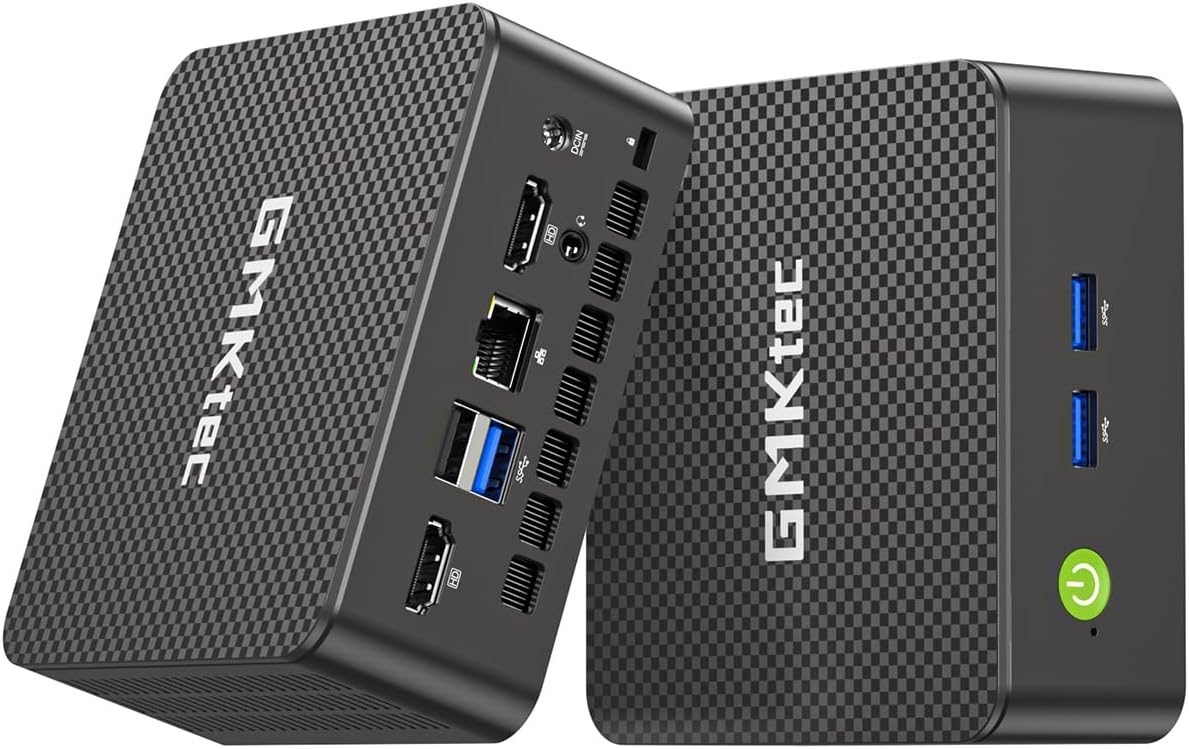
The GMKtec G11 focuses on networking capabilities with dual 2.5GbE Ethernet ports. This makes it exceptionally useful for firewalls, routers, or home lab networking experiments on Linux.
We may earn a commission when you buy through this link, at no additional cost to you.
Its embedded processor ensures stability during continuous operation which is critical for server applications. The GPU performance also supports three 4K displays which helps with visual monitoring or control setups.
Dual channel RAM improves bandwidth significantly compared to single channel competitors. This ensures smooth data flow when running multiple network services or virtualized applications simultaneously.
Choose this unit if you need a Linux PC specifically for networking tasks or industrial environments. It offers specialized hardware features not found in standard consumer mini PCs.
Dual 2.5GbE ports allow for high throughput network traffic management and secure firewall setups.
Embedded CPU architecture ensures the system can run reliably without overheating during long uptimes.
We may earn a commission when you buy through this link, at no additional cost to you.
The BOSGAME E5 combines strong networking features with multi-display support for a versatile Linux solution. The 5300U processor handles daily productivity tasks and moderate virtualization needs well.
We may earn a commission when you buy through this link, at no additional cost to you.
Dual LAN ports provide an edge for users building secure home labs or NAS systems. The USB-C port offers full functionality including video output and power delivery which increases its adaptability.
Quiet cooling ensures that it does not disrupt work environments. Triple 4K output allows for efficient document and code management across multiple screens.
This model is recommended for IT enthusiasts who need a compact Linux box with robust network and display options. It balances performance and connectivity features effectively.
Dual 2.5GbE LAN allows for advanced routing and firewall configurations suitable for network engineers.
Triple 4K support via HDMI DP and USB-C simplifies complex multi-screen desk setups.
We may earn a commission when you buy through this link, at no additional cost to you.
The BOSGAME E4 Air offers an accessible price point for those starting with Linux on a mini PC. The Ryzen 5 3500U provides enough power for standard web browsing and document editing.
We may earn a commission when you buy through this link, at no additional cost to you.
It includes triple 4K display support which is rare at this price. This allows for budget-conscious users to still benefit from a multi-monitor productivity setup.
While storage is SATA based it still provides faster boot times than traditional hard drives. The compact design makes it easy to hide behind monitors or in travel bags.
Choose this unit if you need a cheap and functional Linux mini PC for light tasks. It serves well for secondary displays or basic home office needs.
Affordable pricing makes this device accessible for students or those testing Linux environments.
Triple display support allows for extended workspace even on lower-end hardware configurations.
We may earn a commission when you buy through this link, at no additional cost to you.
The GMKtec G3S is designed for basic tasks and media consumption on Linux. The Intel N95 processor is efficient for web browsing and running lightweight applications like web servers.
We may earn a commission when you buy through this link, at no additional cost to you.
It supports dual 4K displays allowing for dual monitor productivity. The AV1 decode capability ensures smooth playback of new streaming standards without extra software codecs.
Its small size makes it easy to mount or carry. The lack of expandable storage is a limitation but sufficient for system files and light data storage.
Select this if you need a compact and cheap Linux terminal for kiosks or general browsing. It provides reliable basic performance in a small package.
AV1 hardware decoding ensures smooth playback of high-resolution video content from modern streaming platforms.
Dual HDMI outputs enable a two-monitor setup for efficient multitasking on a budget.
We may earn a commission when you buy through this link, at no additional cost to you.
Selecting a Linux Mini PC requires attention to hardware compatibility and specific workload needs to ensure smooth operation.
Choose between AMD and Intel based on your software requirements. AMD often offers better integrated graphics while Intel provides broader driver support for enterprise Linux.
Look for modern architectures like Zen3 or 12th/13th Gen for best performance per watt.
Ensure at least 16GB of RAM for comfortable multitasking and development environments. Soldered RAM limits future upgrades so verify expandability.
NVMe storage is preferred for speed. Check for M.2 and SATA slots to expand capacity over time.
Some models come with Ubuntu, Linux Mint, or Zorin OS which simplifies setup. Others offer Windows requiring you to install Linux manually.
Pre-installed Linux options save time and ensure driver compatibility out of the box.
Check for USB 3.2, HDMI, and DisplayPort counts. Thunderbolt 4 is a premium feature for high-speed peripherals.
Dual LAN ports are essential for networking enthusiasts building firewalls or NAS servers.
Linux systems often run 24/7. Look for robust cooling solutions to prevent thermal throttling during long sessions.
Aluminum chassis designs often dissipate heat better than plastic ones.
Verify warranty length and location. US or EU based support ensures easier communication if issues arise.
Some vendors offer lifetime technical support which is valuable for non-standard OS configurations.
Efficient processors reduce electricity costs. Low TDP units are ideal for always-on home servers or IoT hubs.
Check energy efficiency ratings to match your usage patterns.
Verify the number of 4K ports needed for your workstation. Triple 4K support is useful for financial trading or coding setups.
USB-C with DisplayPort Alt Mode adds flexibility for docking stations.
Begin by updating the system package manager immediately after installing Linux. This ensures all security patches are applied for a safer environment.
Keep the device in a well-ventilated area to prevent dust accumulation on fans. Regularly clean vents with compressed air to maintain cooling efficiency.
Back up critical data to external drives or cloud services. Using tools like rsync or borgbackup helps protect against hardware failure.
Yes you can use compatibility layers like Wine or CrossOver to run many Windows apps. Additionally virtualization tools allow you to run a Windows VM for full compatibility with legacy software.
Absolutely modern Linux Mini PCs provide powerful CPUs and sufficient RAM for coding. They often come with open-source tools pre-installed making them ideal for software engineering and web development.
Many models like the TK Node and GMKtec G11 are designed for continuous operation. Always check thermal management and cooling specifications to ensure stability under constant load.
Yes most units allow you to wipe the pre-installed OS and install your preferred distribution. Ensure that hardware drivers for network and graphics are supported by your chosen distro.
NVMe SSDs connect directly to the PCIe bus offering much faster read and write speeds compared to SATA. For system responsiveness NVMe is highly recommended for Linux installations.
Most reviewed models support at least dual displays and many offer triple 4K output. Always verify the total resolution limits before purchasing to ensure they meet your display needs.
It depends on the model some units allow RAM upgrades via SODIMM slots while others have soldered memory. Storage is typically more flexible with M.2 or SATA slots for expansion.
Models like the GMKtec G11 with dual LAN ports are best suited for routing and firewall tasks. These provide the necessary network segmentation and bandwidth for server applications.
The ASUS NUC 14 Pro stands out for power users while the TK Node offers a budget-friendly Linux-ready entry. For networking enthusiasts the GMKtec G11 provides specialized hardware advantages.
Prioritize your specific needs such as memory scalability or display output count before deciding. Ensure the model you choose matches your workload whether it is coding virtualization or media streaming.
Prices and availability change frequently so always verify current listings on Amazon before finalizing your purchase. Selecting the right unit ensures a smooth and efficient Linux computing experience.