
X99 PR9-H White
3.9Editor score
Supports Xeon E5 V3 V4 CPUs
M.2 NVME slot up to 3600M S
Pre-assembled I O shield included
Compare the top ten Lga 3 X99 Motherboard models for performance and value in October 2026. Find the right board for your Xeon or Core i7 build today.
Choosing the right Lga 3 X99 Motherboard is essential for building a powerful workstation or gaming rig. These boards support high core count CPUs and offer extensive connectivity for demanding tasks.
We compared ten leading models based on socket compatibility, memory support, expansion slots, and build quality. Our analysis highlights key features to help you match the board to your specific workflow needs.
Each pick below shows detailed specifications and real-world performance insights. Keep in mind that prices fluctuate frequently, so verify current offers before making your final purchasing decision online.
3.9Editor score

4.1Editor score

3.9Editor score
This side-by-side comparison outlines the core specifications of every reviewed board. Use this table to quickly identify differences in memory slots, PCIe lanes, and storage options before you buy.



This ASUS model is a robust EATX board designed for professional workstations. It carries a 4.1 rating and stands out for its ability to handle multiple graphics cards simultaneously without bottlenecks.
We may earn a commission when you buy through this link, at no additional cost to you.
The board features Quad Strength Graphic Power allowing 4-Way PCI-E Gen3 x16 links. This is ideal for rendering farms or heavy video editing. The USB 3.1 provides twice the speed of USB 3.0 for external storage.
However, this board is older and might not offer the latest connectivity standards found on newer chipsets. The power solution is strong but could run hot without adequate case airflow.
Buyers needing multi-GPU setups and reliable workstation features should consider this board. It remains a solid choice for those prioritizing stability over the newest consumer specs.
The board supports Nvidia GeForce SLI and AMD CrossFireX setups allowing for extreme visual processing power.
Onboard M.2 x4 slots and support for Thunderbolt II cards provide extensive flexibility for high speed data storage.
We may earn a commission when you buy through this link, at no additional cost to you.
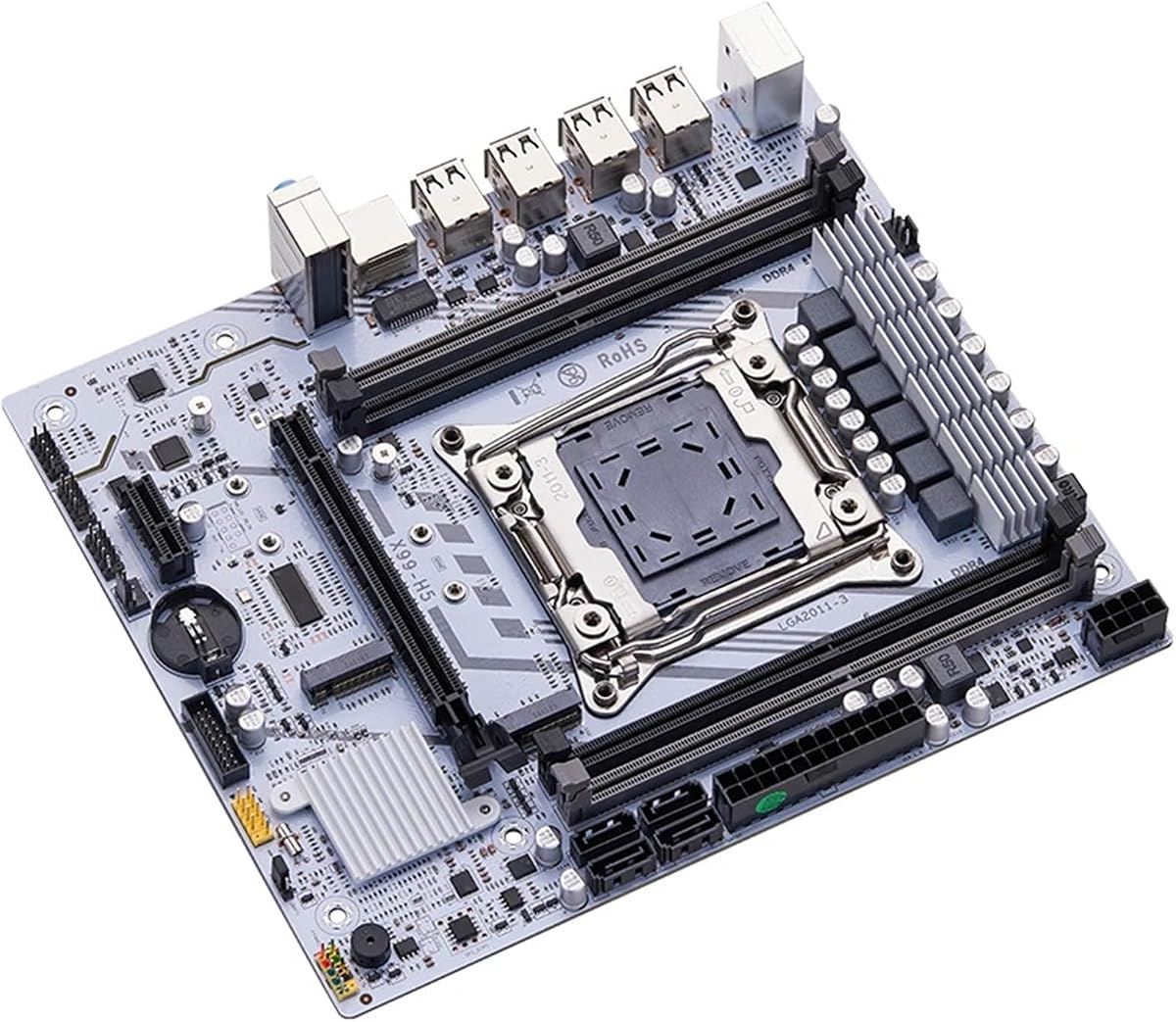
The X99 PR9-H White offers an accessible entry into the Xeon ecosystem. It holds a 3.9 rating and is priced lower than many competitors while maintaining essential server grade features for budget builds.
We may earn a commission when you buy through this link, at no additional cost to you.
It supports a wide range of processors including E5 1620 and 2696 V3 and V4 series. The M.2 slot delivers speeds up to 3600M S which is excellent for OS drives. The 6 layer PCB ensures stable power delivery.
The lack of a physical user manual might require downloading files online which can be inconvenient for some users. Additionally the white aesthetic is unique but limits case compatibility to Micro ATX enclosures.
This board is perfect for budget conscious builders needing high core counts. It delivers solid performance for the price and fits well into small form factor server projects.
The NGFF NVME M.2 slot offers the fastest speed of NVME M.2 slot PCIe 3.0 x4 up to 3600M S for quick boot times.
The 24 plus 8 pin DC power supply interface with solid capacitors enables stable power supply to the CPU under load.
We may earn a commission when you buy through this link, at no additional cost to you.
The ASUS X99-A ATX brings premium tuning tools to the LGA 2011-3 platform. It carries a 3.9 rating and is designed for users who want to push their Core i7 or Xeon CPUs to the limit.
We may earn a commission when you buy through this link, at no additional cost to you.
The OC Socket allows drive 8-core CPU and DDR4 performance beyond all expectations. Dual Intelligent Processors 5 with 5-Way Optimization automate overclocking and cooling. This simplifies system tuning significantly.
While it offers great tools, it is a standard ATX board so it lacks the extreme expansion of EATX workstations. The price reflects the ASUS brand but might be steep for budget builds.
Buyers wanting a balance of performance and user friendly controls will appreciate this board. It is a strong choice for enthusiast desktop builds using high end consumer processors.
The ASUS OC Socket is designed to drive 8-core CPU and DDR4 performance beyond all expectations for enthusiasts.
Dual Intelligent Processors 5 with 5-Way Optimization allows for one click overclock and cooling done instantly.
We may earn a commission when you buy through this link, at no additional cost to you.
The MACHINIST X99 V9S is built for stability and expansion in smaller cases. It holds a 3.7 rating and offers three NVME slots which is rare at this price point. It supports a wide range of CPUs like the E5 2670 V3.
We may earn a commission when you buy through this link, at no additional cost to you.
Its 6-phase power supply ensures stable bus communication even under load. The VRM cooling fan and heat dissipation armor protection help maintain low temperatures. This makes it suitable for long rendering sessions.
Users must buy a CR2032 battery separately and there is no user manual in the package. These omissions add small inconveniences to the build process that DIYers should expect.
This board is ideal for gamers needing multiple storage drives and GPU power. The thermal solutions ensure reliability making it a strong contender for mid-range workstations.
This Intel LGA2011-V3 motherboard is equipped with 3 NVME M.2 slots providing massive storage bandwidth.
The placa madre includes a VRM cooling fan and heat dissipation armor protection for strong heat dissipation.
We may earn a commission when you buy through this link, at no additional cost to you.
The Tangxi X99 Gaming board emphasizes build quality for stability. It holds a 2.9 rating but stands out with an 8 layer PCB and full solid capacitors. This ensures the board lasts longer than many budget competitors.
We may earn a commission when you buy through this link, at no additional cost to you.
The 6 phase power supply provides stable power to the CPU. It supports up to 128GB of DDR4 memory in a 4 channel architecture. The M.2 interface allows for high-speed storage options easily.
However the lower rating suggests users may face occasional compatibility or BIOS issues. The I/O layout is standard but lacks advanced audio or connectivity tweaks found on higher end boards.
Those prioritizing component durability over extra features will find this board suitable. It provides a solid foundation for building a reliable server or workstation machine.
The gaming motherboard adopts 8 layer PCB solid material with full solid capacitor design for long term stability.
Equipped with 24 plus 8 pin power connector which ensures the stable operating of each circuit improves service life.
We may earn a commission when you buy through this link, at no additional cost to you.
This board is unique for supporting two Xeon E5 processors at once. It offers extensive memory capacity with 8 DDR4 slots allowing up to 256GB of RAM. This is critical for virtualization or heavy database work.
We may earn a commission when you buy through this link, at no additional cost to you.
It includes 2 PCI-E X16 slots for dual GPU or accelerator cards. The 6 SATA3.0 interfaces allow for direct connections to multiple hard drives without need for adapters. Integrated networking simplifies setup.
Without a rating score it is hard to gauge community satisfaction compared to other models. Cooling dual CPUs requires significant case airflow and a robust power supply unit.
Power users needing extreme parallel processing power should look at this board. It is a niche solution for those requiring maximum thread counts in a single system.
The board supports DDR4 3000MHz up to 8x DDR4 DIMM slots providing massive memory capacity for workloads.
The CPU slot supports 2 Xeon E5 Series processors allowing for dual socket computing configurations easily.
We may earn a commission when you buy through this link, at no additional cost to you.
Similar to the previous entry this board focuses on dual socket capabilities. It carries a 2.4 rating which suggests caution when buying. It provides 8 DDR4 slots which is excellent for high capacity RAM needs.
We may earn a commission when you buy through this link, at no additional cost to you.
It allows for 2 CPUs which doubles the available cores. The 6 SATA3.0 interfaces and 2 PCI-E X16 slots provide ample expansion. Integrated gigabit nics are included for network connectivity.
The low rating indicates potential reliability issues or compatibility quirks in the market. Users should verify firmware updates and return policies carefully before purchasing.
This board is best for experienced builders managing virtualization servers. It offers high capacity but requires careful planning for thermal and power management.
The board features 6x SATA3.0 interfaces which allow for direct connection of multiple hard drives without adapters.
Integrated RTL8111H gigabit nics provide reliable network connectivity for server and office environments.
We may earn a commission when you buy through this link, at no additional cost to you.
This board stands out by supporting both DDR3 and DDR4 memory types. It carries no rating data yet offers advanced features like Dual M.2 NVME slots. This allows flexibility in using existing RAM or upgrading.
We may earn a commission when you buy through this link, at no additional cost to you.
The power design is optimized to support more cores and provide better performance. Passive chipset heatsinks and aluminum heatsinks help manage thermal output. High quality materials aim for durability.
Compatibility with both RAM types can lead to confusion during setup if not verified. Users must ensure their CPU supports the memory type they choose.
Buyers wanting flexibility to use old memory or modern standards will find this useful. It is a unique solution for mixed inventory builders.
The board supports both DDR3 and DDR4 memory types allowing reuse of existing memory or upgrade to newer standards.
Adopting the latest chip technology provides faster data transmission channels for high-speed solid-state drives.
We may earn a commission when you buy through this link, at no additional cost to you.
This board is designed for compact builds with a M-ATX form factor. It supports Xeon E5 V3 V4 CPUs and provides essential connectivity like NVME M.2. It is ideal for small form factor home labs.
We may earn a commission when you buy through this link, at no additional cost to you.
It includes a PCIe 3.0 16X slot which allows for one high-end graphics card. SATA connectors provide standard storage options for hard drives. The layout is simple and focused on core functions.
Due to its size there are limited expansion slots for add-in cards. Users must plan their storage and GPU needs carefully to fit within the board limits.
Small footprint builders will appreciate this model. It delivers the necessary Xeon performance in a size that fits standard PC cases easily.
The M-ATX form factor allows for easy installation in small cases while maintaining full LGA 2011-3 support.
Includes a PCI3.0 16X slot providing a strong link for discrete graphics cards or high bandwidth adapters.
We may earn a commission when you buy through this link, at no additional cost to you.
The E5 MR9A V1.0 X99 is a solid general purpose ATX board. It supports NVME M.2 SSDs and offers stable low temperatures under full load. It is a safe choice for office environments.
We may earn a commission when you buy through this link, at no additional cost to you.
High-frequency memory support ensures smooth multitasking. Complete external interfaces are widely compatible with peripherals. Multiple safety protections protect the hardware from electrical issues.
It lacks the standout features of higher rated boards but provides reliable operation. Users should verify BIOS updates for best CPU compatibility.
Office users and general builders will find this board adequate. It offers stability and essential features for daily computing tasks without complexity.
Solid power supply and cooling ensure stable low temperatures under full load for office and building use.
Multiple safety protections make the board suitable for building office and gaming environments reliably.
We may earn a commission when you buy through this link, at no additional cost to you.
Selecting the right motherboard requires balancing CPU compatibility memory needs and expansion options. This guide outlines the critical factors to consider for your build.
Ensure the board explicitly supports your chosen processor. Most X99 boards support E5 V3 V4 and Core i7 5-6th Gen. Check specific CPU models like E5-2680 or i7-6900K before buying.
Always verify the socket matches your CPU exactly to avoid installation failure.
Check if the board supports DDR4 ECC RECC or non-ECC memory. Server boards often prefer ECC while desktop boards support non-ECC. Match your RAM type to avoid boot issues.
Verify the maximum capacity supported to ensure future upgrade options remain open.
Select a form factor that fits your case. ATX offers more slots while M-ATX saves space. Ensure the chassis supports the board size to avoid fitting issues.
Smaller boards may limit expansion but are better for compact builds.
Count the PCIe slots needed for GPUs or cards. High end boards offer more x16 lanes. Ensure you have enough space for dual or triple graphics cards if needed.
Adequate expansion prevents bottlenecks in heavy workloads.
Look for NVME M.2 slots for fast boot drives. SATA ports are needed for hard drives. Some boards offer SATA Express for extra speed.
Prioritize M.2 for OS drives to improve overall system responsiveness.
Check the number of power phases. More phases provide stable power for CPU overclocking. Solid capacitors ensure long term reliability.
Good VRM cooling prevents thermal throttling under heavy loads.
Verify USB ports and LAN speed. Gigabit LAN is standard but USB 3.1 is rare. Audio codecs vary so check if you need studio-grade sound.
Complete I/O sets reduce the need for external adapters.
Review BIOS update history. Newer CPU models may require updates. Download latest firmware before installing CPU to ensure boot success.
Manufacturer support varies so check availability before purchase.
Install the board first in the case using standoffs to prevent short circuits. Mount the CPU and heatsink carefully applying thermal paste correctly.
Connect power cables securely. Ensure CPU power and main board power are seated. Check for any bent pins during insertion.
Install the OS on a NVME drive. Update BIOS and drivers immediately for best performance. Monitor temperatures to ensure cooling systems are effective.
Most X99 boards support both server and desktop CPUs. Check your CPU model against the board list. Some desktop i7s are supported but server E5s often work too.
You need DDR4 RAM. Some boards support ECC server RAM while others support non-ECC. Check your board manual to confirm type compatibility to avoid boot issues.
Yes most boards support NVME M.2. Check if you have a M.2 slot. Some boards have multiple slots for RAID setup or dual boot systems.
Check all power connections first. Ensure RAM is seated correctly. Try clearing CMOS by removing the battery. Verify CPU compatibility with the BIOS version.
Yes thermal throttling can reduce performance. Ensure case airflow is good. Use a heatsink designed for high wattage CPUs. Monitor temps under load.
Some models include M.2 slots for Wi-Fi cards. Others do not have built-in Wi-Fi. Check specs for wireless options if you need internet without cables.
Our top picks highlight reliable options for both budget and premium needs. The ASUS X99-E WS offers workstation stability while X99 PR9-H provides great value.
Focus on compatibility with your CPU and RAM. Ensure the form factor matches your case. Prioritize power delivery for system longevity.
Prices change often so verify current offers before buying. Check user reviews for latest BIOS notes. A good board ensures your system runs smoothly for years.