
darkFlash V92 9.2" PC Case Screen
4.1Editor score
9.2 inch ultra-wide panel
Station Space software included
Flexible case mounting options
Adding an LCD screen to your PC case transforms how you monitor hardware stats and customize aesthetics. These displays show real-time temperatures, usage, and custom visuals directly on your build.
We compared ten leading models based on resolution, connectivity options, software compatibility, and mounting flexibility. Our analysis focuses on usability, display clarity, and integration with common PC components.
Each pick highlights unique strengths like touch support, specific case compatibility, or advanced software themes. Note that prices and availability change frequently, so check current listings before purchasing.
4.1Editor score

4.4Editor score

4.2Editor score
As an Amazon Associate we earn from qualifying purchases.
The following table compares all ten selected models side by side. It highlights key specifications including screen size, resolution, connection type, and special features to help you choose the right fit.




The Lian Li SM088X is an 8.8 inch universal LCD screen designed to fit seamlessly into any PC case. With a 4.4 rating, it stands out for its versatility and clear display quality. The built-in ARGB lighting adds aesthetic value while the screen functions as a secondary monitor via USB.
We may earn a commission when you buy through this link, at no additional cost to you.
Its standout feature is the dual connection method allowing either a 9-pin port or Type-A USB. This means you can display hardware stats without using GPU ports. The L-Connect 3 software lets you upload custom videos and photos for a personalized look. The mounting bracket supports height and tilt adjustments for optimal viewing.
Trade-offs include needing to ensure you use the correct screws for the stand to avoid damage. The software dependency might be a minor hurdle for some users but it enables deep customization. These are acceptable given the flexibility it provides for system monitoring.
This screen is ideal for users wanting a universal display that integrates well with various case types. Whether you need real-time temps or custom visuals, this model delivers. We recommend it for its balance of size, clarity, and mounting flexibility.
The versatile bracket supports fan frames, case panels, or adhesive pads for flat surfaces ensuring optimal visibility.
Enjoy plug-and-play connection allowing the screen to function independently without using valuable GPU ports.
We may earn a commission when you buy through this link, at no additional cost to you.
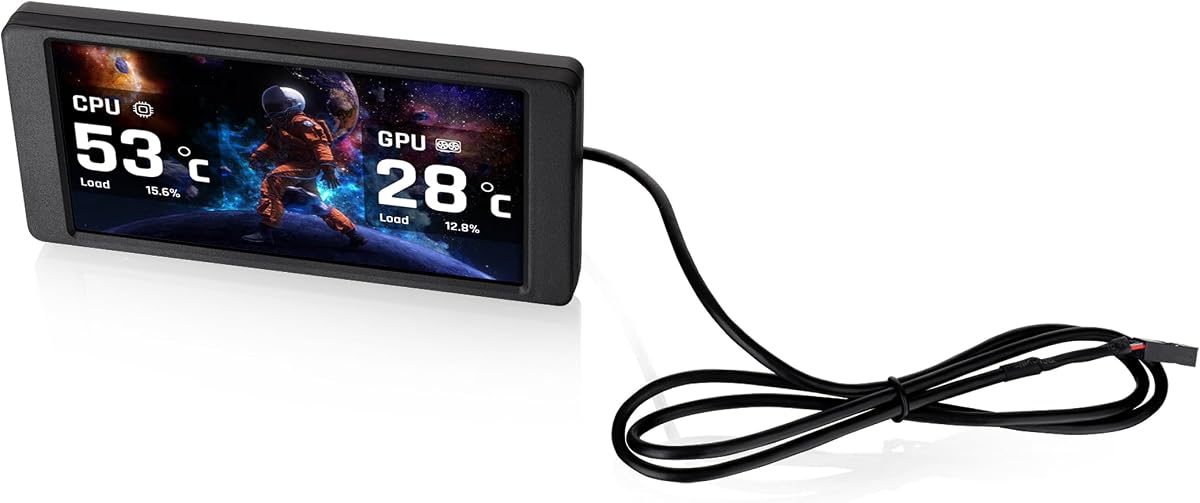
The darkFlash V92 offers a 9.2 inch ultra-wide display at a competitive price. With a 4.1 rating, it provides a dedicated panel for showing CPU GPU temperatures and usage. It connects via USB-C or internal 9-pin header keeping GPU ports free.
We may earn a commission when you buy through this link, at no additional cost to you.
Its free Station Space software allows monitoring with themes and widgets without needing AIDA64. The slim aluminum body fits well inside cases. The wide viewing angles ensure readability through tempered glass. This makes it a cost-effective solution for enthusiasts.
Trade-offs include Windows-only compatibility and the requirement for Station Space to remain running. These limits reduce cross-platform flexibility but are manageable for most users. Given the price, these compromises are reasonable for basic monitoring needs.
This screen suits budget builders needing essential stats without complex setups. It works well for standard ATX or micro-ATX cases. We recommend it for those prioritizing value and straightforward hardware display.
Monitor system data and use free themes, plugins, and widgets with Station Space without needing additional apps.
The slim aluminum body measures 242.4 x 63.1 x 12 mm fitting neatly inside most PC cases.
We may earn a commission when you buy through this link, at no additional cost to you.
The wisecoco 12.6 inch screen is designed for large displays with built-in audio. With a 4.2 rating, it fits the Hyte Y60 panel perfectly. It uses Mini HDMI and DC power offering versatility beyond standard PC cases.
We may earn a commission when you buy through this link, at no additional cost to you.
Its main strength is the 12.6 inch panel providing ample space for detailed visuals. Built-in speakers remove the need for external audio devices. The 1920×515 resolution ensures sharp images. This makes it a premium choice for immersive setups.
Trade-offs include needing 5V 2A power which might complicate internal routing. The case-specific fit limits broader application but simplifies installation for Y60 owners. These are acceptable for users targeting this specific chassis.
This model is best for those wanting a large integrated display with audio. It enhances gaming rooms with its visual and auditory capabilities. We recommend it for Hyte Y60 builds seeking a standout feature.
Dual built-in speakers provide audio output without needing external speakers for a cleaner setup.
The 12.6 inch screen offers significant space for hardware stats or media playback.
We may earn a commission when you buy through this link, at no additional cost to you.
The WOWNOVA 8 inch screen boasts a 4.5 rating for its ease of use and software features. It adds a desktop mode making it a versatile second monitor. The aluminum housing ensures durability while the IPS panel provides clear viewing angles.
We may earn a commission when you buy through this link, at no additional cost to you.
Key strengths include the dynamic video theme support allowing custom animated visuals. The single USB-C or 9-pin connection simplifies wiring. The software allows auto-start and brightness adjustment for comfort. These features enhance both function and form.
Trade-offs include reliance on software updates for themes which may change. Some users may find the custom video support resource-intensive. These are minor issues given the overall high satisfaction rating.
This screen is great for those wanting custom dynamic content easily. It works well as a dedicated stats monitor or secondary display. We recommend it for its user-friendly setup and visual customization.
Supports customizing your own dynamic video theme for unique visual effects.
Switch to desktop mode to use the screen as an extended display.
We may earn a commission when you buy through this link, at no additional cost to you.
The Hosyond 8.8 inch screen offers touch input with a 4.0 rating. It connects via HDMI allowing use with various devices. The low power consumption makes it efficient for always-on monitoring. Multi-system support includes Windows and Linux variants.
We may earn a commission when you buy through this link, at no additional cost to you.
Its touch capability adds interactivity beyond passive displays. The HDMI input simplifies setup without needing 9-pin headers. Brightness and clarity suit coding or streaming. This broadens its utility beyond standard PC builds.
Trade-offs include needing to download AIDA64 separately for monitoring which adds setup time. Touch sensitivity may vary by surface material. These are manageable but require attention during installation.
This screen fits users wanting interactive control or flexible device compatibility. It suits those who value touch and wide system support. We recommend it for tech enthusiasts seeking added functionality.
Works with Raspbian, Ubuntu, Kali Linux, and Windows for flexible installation.
Capacitive touchscreen allows smooth control for interactive displays.
We may earn a commission when you buy through this link, at no additional cost to you.
The Thermalright Trofeo Vision offers a 9.16 inch display with strong software support. With a 4.3 rating it emphasizes simplicity and tracking. USB-C connection ensures quick setup. The TRCC app allows DIY themes for unique visuals.
We may earn a commission when you buy through this link, at no additional cost to you.
Its compact build fits seamlessly inside or outside cases. Real-time monitoring tracks temps and fan speed. The plug and play nature reduces driver hassles. This makes it ideal for modders.
Trade-offs include a slim profile that may limit mounting options. Users must rely on USB-C headers. These are minor given the ease of use. The design prioritizes efficiency over complex mounting.
This model is best for straightforward monitoring needs. It suits users who value simplicity. We recommend it for its clean integration and responsive software.
Simple Type-C interface ensures quick setup with no drivers.
TRCC software lets you design your own unique interface themes.
We may earn a commission when you buy through this link, at no additional cost to you.
The Thermaltake 6.0 inch screen is optimized for specific chassis. With a 3.8 rating it focuses on integration. It supports TT RGB Plus 3.0 for advanced control. Background customization allows extensive personalization.
We may earn a commission when you buy through this link, at no additional cost to you.
Its main strength is direct compatibility with View 370 and 390 series. The display supports multiple formats for graphics. This ensures sharp visuals. It simplifies the process for owners of these cases.
Trade-offs include limited compatibility outside specified models. The rating suggests mixed experiences with software stability. These are acceptable for targeted users needing exact fits.
This screen is best for Thermaltake case owners. It simplifies customization. We recommend it if your build matches supported models.
Compatible with Thermaltake View 370 and View 390 series.
Upload up to 20 custom graphics with various supported formats.
We may earn a commission when you buy through this link, at no additional cost to you.
The GeeekPi 12.6 inch screen is built for the Hyte Y60 case. With a 4.0 rating it emphasizes touch and audio. The 10-point multi-touch enables advanced interactions. Built-in speakers enhance the experience.
We may earn a commission when you buy through this link, at no additional cost to you.
Key strengths include the high resolution and plug-and-play nature. The IPS panel ensures consistent colors. This setup removes audio clutter. It integrates well for users needing touch control.
Trade-offs include removing protective film before use. Some may find the thickness challenging. These are minor installation steps. The added features justify the extra effort.
This screen is ideal for Hyte Y60 users wanting audio. We recommend it for its responsiveness and ease.
Equipped with a touchscreen with up to 10-points of multi-touch accuracy.
Two built-in speakers provide audio output without needing external speakers.
We may earn a commission when you buy through this link, at no additional cost to you.
The Thermalright TV 9.16 features a magnetic design for easy install. With a 4.3 rating it prioritizes convenience. The screen supports static and dynamic images. TRCC software manages all functions.
We may earn a commission when you buy through this link, at no additional cost to you.
Its main benefit is screwless mounting for flexibility. The IPS panel ensures true colors. This simplifies repositioning. It suits users wanting dynamic themes.
Trade-offs include needing proper magnet strength and 9-pin power. These are manageable given the ease. The design focuses on usability.
This screen is best for quick setups. We recommend it for its removal flexibility.
The magnetic screen does not require screws, making it easy to install and remove.
Supports multiple static and dynamic image switching plus video playback.
We may earn a commission when you buy through this link, at no additional cost to you.
The Thermalright Trofeo 6.86 is a compact magnetic screen. With a 3.4 rating it focuses on DIY themes. The display fits specific setups. USB-C connectivity simplifies power.
We may earn a commission when you buy through this link, at no additional cost to you.
Its main benefit is the magnetic panel for easy placement. Supports dynamic and static images. This allows personalization on a budget. It is ideal for small coolers.
Trade-offs include lower resolution compared to wider panels. The magnetic strength must be verified. These are acceptable for small builds.
This screen is best for cooling radiator customization. We recommend it for small space needs.
Supports DIY personalized themes and dynamic/static image switching.
Magnetic attraction allows the screen to move freely in various positions.
We may earn a commission when you buy through this link, at no additional cost to you.
Selecting the right LCD screen involves evaluating size, connection type, and software compatibility. This guide covers key factors to ensure your monitor fits your case and meets your needs.
Screen size ranges from 6 to 12 inches with varying resolutions. Larger screens offer better visibility but require more case space. Aim for at least 1920×480 for sharp text and clear hardware stats.
Prioritize resolution based on available space. Small cases benefit from compact displays while large chassis accommodate wider panels for detailed visuals.
Most screens use USB-C or 9-pin motherboard headers to avoid HDMI usage. These allow connection without GPU ports. Some models support HDMI for external versatility.
Choose the type that matches your motherboard or case wiring. 9-pin is standard for internal monitoring while USB-C offers plug-and-play simplicity.
Software like L-Connect 3 or Station Space enables theme uploads and data monitoring. Free apps reduce costs but require system resources. Paid or bundled software may offer advanced editing.
Ensure the software supports your OS. Windows 10/11 is standard while macOS or Linux support varies. Check for auto-start and background processes.
Mounting brackets vary between fan frame attachments, adhesive pads, or specific case panels. Magnetic designs simplify installation but may lack permanence. Screws ensure stability for internal use.
Select mounts compatible with your case type. Universal options provide flexibility while dedicated brackets ensure a precise fit for models like the Hyte Y60.
Touchscreens add control for navigating menus or adjusting settings directly. Capacitive panels offer responsiveness but require power. Non-touch models are simpler and often cheaper.
Only opt for touch if you need direct interaction. Most monitoring needs are passively satisfied by a standard display.
Some units draw power via USB or 9-pin headers while others need external DC adapters. Internal routing should account for available cables. High power screens may complicate cable management.
Verify power needs before purchase. USB-C powered models reduce clutter but require adequate supply capacity.
A few displays include built-in speakers for audio playback. This eliminates external speakers but may limit quality. Standard monitors focus on visual performance only.
Consider audio if you want an integrated solution. Most users prefer separate audio systems for better sound.
Prices vary based on features like touch, size, and software. Budget models offer core stats while premium ones add themes and audio. Evaluate needs against cost.
Focus on value for your specific use case. High-end screens justify cost with flexibility.
First, install the screen using the provided bracket or adhesive pads. Ensure secure mounting to prevent movement during system operation.
Connect the cable to your motherboard 9-pin header or USB port. If needed, power on the monitor via the included adapter.
Install the required software to configure themes and data. Adjust brightness and layout for comfort. Clean the screen gently with a microfiber cloth.
Most models require proprietary software to display stats and customize themes. Some like L-Connect 3 or Station Space are free. Ensure compatibility with your OS before purchasing.
Yes, some models support desktop mode allowing the screen to function as a secondary display via USB. Check product specs for extended display support.
Resolutions range from 1280×480 to 1920×515. Most screens use ultra-wide panels optimized for horizontal viewing angles.
No, the screen powers down with the PC unless configured otherwise. Some software allows auto-start on boot.
Most require Windows 10/11. Some models may work on Linux but macOS support is rare. Verify compatibility before purchase.
Use a soft microfiber cloth to avoid scratches. Avoid liquid cleaners directly on the screen to prevent internal damage.
We highlighted top models including the Lian Li SM088X, darkFlash V92, and wisecoco 12.6 inch. Each offers unique strengths for monitoring and aesthetics.
Prioritize connection type and software compatibility. Size matters depending on your case. Balance needs against your budget for the best fit.
Prices and availability fluctuate. Always check current listings before purchasing to ensure you get the best deal.