
VSDISPLAY H/D VGA DVI LVDs Controller Board 40Pin
4.4Editor score
Supports 15.6 inch 1366×768 panels
VGA and DVI video inputs included
Compatible with multiple LVDS screen models
Finding the right LCD Controller Board for Laptop Screen can transform a broken display into a functional monitor. These boards act as the brain, translating signals from your computer to the panel. Choosing the correct match ensures stability and crisp visuals for your DIY projects or repairs.
We evaluated ten top-rated controllers based on compatibility, signal quality, and ease of installation. Our analysis covers various interfaces like eDP, LVDS, and resolutions including HD and Full HD. Each product was assessed for its ability to drive specific panel models reliably without flickering or errors.
Each pick below highlights key features, supported screen models, and unique capabilities. While prices may fluctuate over time, the specifications remain consistent for informed decisions. Read on to discover which board aligns with your specific screen dimensions and connection requirements.
4.4Editor score

4.4Editor score

4.0Editor score
As an Amazon Associate we earn from qualifying purchases.
The following table provides a side-by-side comparison of all ten controllers. It details key specifications like interface types, supported resolutions, and compatible screen models to help you quickly identify the right fit for your project.


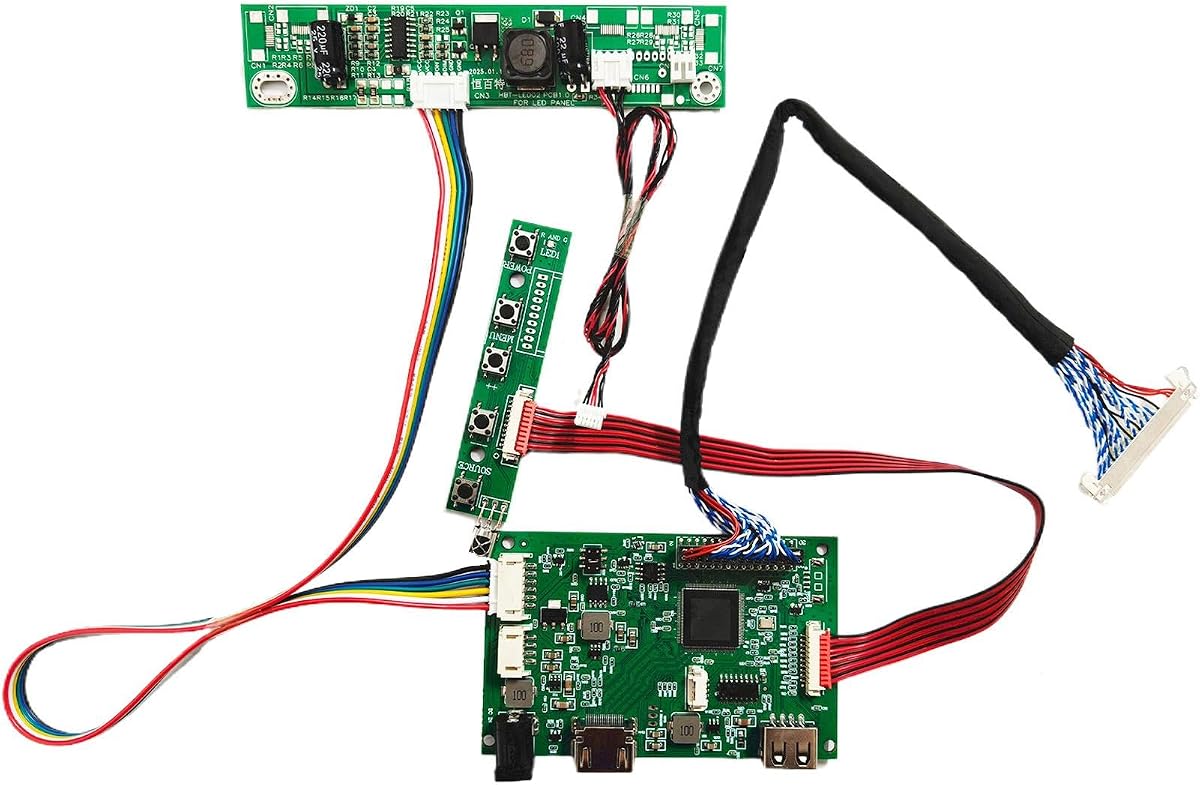


This controller board stands out as a top choice for users needing a reliable solution for 1366×768 resolution screens. With a rating of 4.4, it delivers stable high-definition signals essential for DIY monitor projects or screen repairs. The board is optimized strictly for specific HD panels ensuring no confusion with incompatible resolutions.
We may earn a commission when you buy through this link, at no additional cost to you.
Its precision design includes a pre-connected signal cable simplifying the installation process significantly. The red circle marking for Pin 1 ensures accurate alignment reducing the risk of connection errors. Additionally, the low standby consumption of less than 0.3W makes it an energy-efficient choice for permanent setups.
While it offers robust performance, users must verify their screen resolution before purchasing. This board does not support 1920×1080 panels which limits its versatility for higher-resolution displays. However, for the intended HD models, the signal stability and support make these trade-offs acceptable.
Anyone restoring a laptop screen or building a custom monitor with compatible panels should consider this option. The technical team readiness to verify compatibility adds peace of mind. Overall it remains a solid investment for precise HD display conversion projects.
Designed exclusively for 1366×768 panels to prevent display errors and ensure optimal image quality.
Pre-connected cables and clear Pin 1 markings streamline the setup process for users of all skill levels.
We may earn a commission when you buy through this link, at no additional cost to you.
This VSDISPLAY board offers an excellent budget-friendly option for converting 15.6 inch 1366×768 screens into functional monitors. Its compatibility with numerous specific model numbers like LP156WH2 and B156XW02 ensures a fit for many common laptop panels. The inclusion of VGA and DVI inputs adds flexibility for connecting various older devices.
We may earn a commission when you buy through this link, at no additional cost to you.
Users can benefit from the plug-and-play nature allowing quick testing once connected. The speaker connector supports audio output enhancing the multimedia experience when paired with an external speaker. The LED indicators help diagnose issues quickly ensuring troubleshooting is straightforward during setup.
Despite its strengths, the lack of HDMI might be a limitation for modern users preferring high-speed digital connections. Additionally ensuring a suitable 12V power adapter is crucial for stable operation. These minor drawbacks are outweighed by the cost effectiveness and broad model support.
It is ideal for DIY enthusiasts looking to repurpose old laptop screens economically. The ability to connect via VGA or DVI makes it versatile for legacy systems. If you need a reliable controller without breaking the budget this board is a top contender.
Specifically optimized for popular 15.6 inch panels to ensure seamless integration and reliable performance.
Supports both VGA and DVI inputs allowing connection to a variety of computers and media players.
We may earn a commission when you buy through this link, at no additional cost to you.
The Taidacent Universal LVDS Controller Board is a premium choice offering unmatched versatility for screen sizes ranging from 10 to 65 inches. It supports HDMI DVI and VGA inputs making it suitable for modern and legacy devices alike. This broad compatibility makes it a favorite among advanced DIY enthusiasts working on diverse display projects.
We may earn a commission when you buy through this link, at no additional cost to you.
Its chipset supports multiple OSD languages including English German and French enhancing usability for international users. The ability to adjust settings via a physical keyboard provides precise control over brightness and contrast. This level of customization is rarely found in standard boards at this price point.
However the universal nature means users must carefully verify their specific LVDS timing and pinout requirements. Incorrect matching can lead to display issues requiring troubleshooting skills. Despite this the range of supported sizes and inputs justifies the effort for complex builds.
Choose this board if you need a single solution for multiple projects or larger screens. The HDMI support and language options add significant value for professional or semi-professional setups. It represents a high-end option for those prioritizing flexibility and feature richness.
Compatible with screens from 10 to 65 inches allowing flexible project choices without hardware changes.
Offers OSD in multiple languages ensuring ease of use for users worldwide without language barriers.
We may earn a commission when you buy through this link, at no additional cost to you.
This controller board is specifically designed to handle 1920×1080 Full HD resolution on 30-pin eDP interfaces. It supports a wide array of popular screen models from 11.6 to 17.3 inches. The straightforward plug-and-play setup ensures users can get their displays running without installing additional software drivers.
We may earn a commission when you buy through this link, at no additional cost to you.
The LED indicator provides immediate feedback on board status simplifying diagnostics during setup. Compatible with models like B156HAN01.1 and NV156FHM it offers robust versatility for modern laptop panels. This makes it an excellent choice for upgrading older systems with high-definition visual clarity.
Power requirements are standard at 12V but ensuring sufficient current is vital to avoid restart cycles. Users must also verify cable orientation to prevent white screen issues caused by reverse connections. While these steps require attention they are manageable with clear instructions.
Ideal for anyone needing a Full HD solution without complex configuration. The support for larger 17.3 inch panels adds extra value for larger projects. Its reliability and direct compatibility make it a strong contender for 1080p conversions.
Delivers crisp 1920×1080 visuals ensuring detailed image quality for compatible 30-pin eDP panels.
Operates directly upon connection eliminating the need for software installation or configuration steps.
We may earn a commission when you buy through this link, at no additional cost to you.
This board boasts a high 4.6 rating due to its reliable performance with 17 and 19-inch screens at 1280×1024 resolution. It supports a broad list of models including M170EG01 and HSD190ME13 making it versatile for older desktop or laptop monitors. The inclusion of VGA DVI and audio output makes it a complete solution for multimedia projects.
We may earn a commission when you buy through this link, at no additional cost to you.
Users appreciate the simple self-check feature where LED colors confirm board status. This reduces guesswork during troubleshooting. The audio connector allows direct speaker integration enhancing the monitor experience without needing extra hardware. These features contribute significantly to its high user satisfaction.
However it requires a stronger power supply of 12V 3A which is higher than standard 2A units. Ensuring this power match is critical to prevent instability. Additionally it is limited to 1280×1024 so it is not suitable for Full HD projects.
It is perfect for gamers or hobbyists repurposing 17 or 19-inch screens. The strong audio and video support creates a robust entertainment setup. High reliability and specific model support make it a trusted choice for these resolutions.
Earns high ratings for stable signal processing and reliable operation across supported 17 and 19 inch screens.
Includes speaker connector for seamless audio output integration without needing external adapters.
We may earn a commission when you buy through this link, at no additional cost to you.
This board is tailored for larger 21.5 and 23.8 inch screens maintaining Full HD 1920×1080 resolution. It supports specific models like T215HVN01.0 and LM238WF1 making it highly targeted for larger display conversions. The package includes an inverter board and USB cable adding convenience for complete builds.
We may earn a commission when you buy through this link, at no additional cost to you.
With both VGA and DVI inputs it offers flexibility in connecting various source devices. The audio output connector ensures you can attach speakers easily for a richer multimedia experience. These features cater to users building larger desktop monitors from laptop panels.
Note that the power adapter is not included requiring you to procure a separate 12V 3A unit. Also verify your model number as certain variations may not be supported. Despite these minor limitations the included accessories provide excellent value for a complete setup.
Select this if you are working on larger monitors and need Full HD clarity. The inclusion of extra components simplifies the purchasing process. It is a well-rounded option for specific large-screen projects.
Designed specifically for 21.5 and 23.8 inch panels ensuring proper signal handling for larger displays.
Includes inverter board and USB cable providing a comprehensive solution for DIY monitor assembly.
We may earn a commission when you buy through this link, at no additional cost to you.
This controller board is designed for high-definition 1920×1080 resolution with a focus on extensive model compatibility up to 17.3 inches. It supports popular models like B156HAN01.1 and NV156FHM ensuring a reliable fit for modern laptop screens. The signal cable is pre-connected to simplify initial installation steps significantly.
We may earn a commission when you buy through this link, at no additional cost to you.
The board features a universal 30-pin eDP connector allowing seamless integration with various internal screens. Pin 1 alignment is clearly marked with a red circle reducing connection errors. Technical support is available to verify compatibility which adds confidence for less experienced users.
It requires a stable 12V 2A power supply to prevent flickering or restart issues. While it does not support 1366×768 resolution its focus on Full HD makes it ideal for high-quality builds. The clear instructions and support make it a safe choice.
Choose this board for large Full HD projects needing a pre-wired solution. The broad model support ensures flexibility without needing extra drivers. It offers a balanced mix of performance and ease of use for any DIY monitor build.
Signal cable is pre-connected to the board reducing setup time and minimizing initial connection errors.
Support team helps verify compatibility ensuring you select the right board for your exact screen panel model.
We may earn a commission when you buy through this link, at no additional cost to you.
This board stands out with its USB video playback capability allowing media viewing without a computer. It is designed for 21.5 and 23.8 inch Full HD screens supporting touch panel models like LM238WF5-SSA1. The perfect 5.0 rating reflects user satisfaction with its versatility and performance for diverse media tasks.
We may earn a commission when you buy through this link, at no additional cost to you.
Features like 180-degree image rotation add significant value for creative display orientations. The HDMI and USB inputs offer flexible connectivity options for modern media players. Audio support ensures you enjoy sound directly through connected speakers enhancing the viewing experience.
You will need to prepare a 12V power adapter separately as it is not included in the package. This extra step is minor compared to the advanced features offered. The touch screen support also makes it ideal for interactive projects requiring input.
Ideal for users needing portable or standalone display options with direct media playback. The rotation feature supports flexible mounting needs in kiosks or digital frames. Its high rating and unique USB features make it a top recommendation for versatile use cases.
USB port supports video playback directly allowing standalone operation without connecting a PC.
180-degree image rotation feature supports various mounting needs like portrait or landscape layouts easily.
We may earn a commission when you buy through this link, at no additional cost to you.
This controller board emphasizes optimized image quality with adjustable brightness contrast and color parameters. It supports 15.6 inch HD panels using a 40-pin LVDS interface and offers both HDMI and VGA inputs for versatile connectivity. The stable operation monitoring prevents hardware overload ensuring long-term reliability for continuous use.
We may earn a commission when you buy through this link, at no additional cost to you.
Precise signal transmission reduces lag and distortion ensuring smooth viewing experiences. Rapid response to remote control commands improves usability during navigation. Compatible with external devices like gaming consoles it expands the screen utility significantly for various entertainment scenarios.
The higher price point reflects the advanced control features and stability monitoring included. While user rating data is N/A the functional descriptions suggest robust engineering. This makes it a premium option for users needing granular control over display settings.
It is a great choice for advanced users who want precise color and brightness adjustments. The HDMI support and external device compatibility make it suitable for multimedia centers. Consider it if you value image quality and operational stability over basic functionality.
Engineered to reduce signal loss preventing lagging and ensuring accurate image display on connected panels.
Adjustable parameters allow users to customize brightness and contrast for vivid and clear visual details.
We may earn a commission when you buy through this link, at no additional cost to you.
This controller board is a precision kit designed specifically for 17.3 inch Full HD matrices like B173HW01 and B173HW02. It features high interface matching requirements ensuring communication works only when parameters are consistent. This strict adaptability ensures reliable performance without signal conflicts common in universal boards.
We may earn a commission when you buy through this link, at no additional cost to you.
Support for HDMI and VGA inputs provides modern connectivity while maintaining low power mode options for efficiency. Its small size relies on notebook motherboard power reducing bulk significantly. This makes it ideal for internal integration or tight spaces where external drivers are not feasible.
Users must ensure exact model and panel type match to avoid abnormal display issues. This rigidity is a trade-off for stability and precision. The 5.0 rating suggests users appreciate this targeted approach for compatible models.
Perfect for specific 17.3 inch laptop matrix restoration or integration. The focus on strict compatibility ensures no guesswork. Choose this if you need a reliable solution for these specific high-resolution panels.
Must correspond to exact screen model resolution and panel type to prevent display errors and ensure stability.
Small design relies on motherboard power supply making it suitable for tight internal laptop housing requirements.
We may earn a commission when you buy through this link, at no additional cost to you.
Choosing the right controller board requires attention to detail. This guide outlines key factors to consider for a successful conversion.
Resolution is the most critical factor. Ensure the board supports your panel's exact resolution like 1366×768 or 1920×1080. A mismatch here will prevent any display output regardless of other settings.
Always check the board title or description for specific resolution support before buying.
The connector type must match your screen's port. Common interfaces include 30-pin or 40-pin eDP and LVDS. Pin counts and layouts vary and using the wrong one can damage components.
Inspect your screen's connector carefully and compare it to the board's supported interface.
Select a board with inputs compatible with your source devices. VGA and DVI are standard for older PCs while HDMI is essential for modern consoles and laptops. USB inputs add versatility for media playback.
Prioritize HDMI if you plan to use the monitor for gaming or streaming.
Most boards require a 12V DC adapter with specific amperage usually 2A or 3A. Insufficient power leads to flickering or rebooting. Ensure you source a supply matching these specs.
Remember that adapters are often not included so factor this into your budget.
Manufacturers list specific panel models compatible with the board. Always verify your panel number matches one of these lists to avoid returns.
When in doubt contact technical support to confirm compatibility before shipping.
Some boards include a speaker connector for audio output. This adds value if you want a standalone monitor with sound without extra hardware.
Check if the board includes this feature if audio is a priority for your setup.
Features like pre-connected cables and clear Pin 1 markings simplify setup. Look for boards that reduce manual wiring to avoid errors during installation.
A plug-and-play experience saves time and reduces frustration for DIY projects.
Consider boards with available technical support. Reliable vendors offer assistance with compatibility checks and troubleshooting.
Check seller ratings and review comments to gauge the quality of customer service provided.
Begin by confirming your screen panel model number and interface type match the board specifications. Connect the signal cable carefully ensuring the cable aligns with Pin 1 marked by a red circle. Incorrect alignment can cause no signal or reverse display issues.
Attach the power adapter ensuring it meets the required voltage and current specs before powering on. Watch for the LED indicator to turn green which signals normal board function. If it fails connect check the cable connections and voltage levels.
To maintain longevity keep the board in a well-ventilated area to prevent overheating. Avoid exposing it to humidity or dust which can degrade electrical contacts over time. Periodic inspection of connectors ensures consistent signal transmission.
Not every board works with every screen. You must match the resolution interface connector type and model number exactly. Using a mismatched board will result in no display or potential damage.
Most boards require a 12V DC adapter with at least 2A or 3A depending on size. Always check the product description for the exact rating to prevent instability or restart issues.
Many models include HDMI inputs especially those designed for modern setups. Always verify the product details as some budget options may only have VGA or DVI connections.
Pin 1 is typically marked by a small triangle or red dot on the connector. Align this mark with the corresponding indicator on the board cable to ensure correct data transmission.
A white screen often means the cable is reversed or resolution settings are wrong. Check cable alignment and verify the board supports your exact resolution to fix the issue.
Many vendors offer technical support via Amazon messages or product listings. Reach out if you need help verifying compatibility or troubleshooting installation errors.
We explored ten controllers designed to revive laptop screens into functional monitors. The top picks offer specific strengths like budget-friendly options precision Full HD support and versatile HDMI capabilities.
Prioritize matching your exact screen model and resolution to avoid compatibility issues. Investing time in verification ensures you get stable performance and clear visuals.
Remember that prices and stock levels change frequently. Always check current listings before making a decision to secure the best value for your specific project needs.