
Light Gaming Laptop
4.6Editor score
AMD Ryzen 7 Processor
16GB RAM Capacity
Integrated Radeon Graphics
Choosing the right laptop for Enscape requires balancing processing power, graphics capabilities, and screen quality. Enscape is a real-time rendering plugin that demands significant resources to deliver smooth visualizations and accurate lighting effects in architectural projects.
We evaluated ten laptops based on their processor speed, memory capacity, and graphics performance to ensure they can handle complex 3D models. Each device was selected for its ability to maintain stability during long rendering sessions and its portability for field work.
Every pick in this list includes detailed specifications and performance insights to help you make an informed decision. Keep in mind that availability and pricing can shift frequently, so verify the current details before finalizing your purchase for your workflow needs.
4.6Editor score

4.3Editor score

4.2Editor score
As an Amazon Associate we earn from qualifying purchases.
The following table provides a side-by-side comparison of all ten selected laptops. This overview highlights key specifications such as processor type, memory amount, and storage options to help you quickly identify the device that best fits your rendering requirements.




This HP laptop stands out as a strong contender for Enscape users needing a balance of screen real estate and processing power. Its 17.3 inch display offers ample space for viewing complex architectural models while maintaining a relatively compact footprint for a machine of this size.
We may earn a commission when you buy through this link, at no additional cost to you.
The AMD Ryzen 5 processor paired with 16GB of RAM provides the necessary resources to run Enscape alongside other design software without significant lag. Users can expect smooth navigation through 3D scenes and the ability to handle multitasking during client presentations or detailed editing sessions.
While the integrated graphics card may not match dedicated workstation GPUs, it is sufficient for most standard rendering tasks and lightweight visualization work. The trade-off is a more affordable price point and better battery life, making it ideal for students or professionals who work in varied environments.
This laptop is best suited for those who need a reliable daily driver for architectural visualization without breaking the bank. It delivers a solid foundation for Enscape work and is highly recommended for users prioritizing screen size and memory capacity over extreme graphical fidelity.
The Full HD anti-glare display ensures that colors and details remain visible even in bright office environments or under direct lighting conditions.
With 16GB of RAM, you can keep multiple browser tabs, CAD tools, and communication apps open simultaneously without slowing down your workflow.
We may earn a commission when you buy through this link, at no additional cost to you.
This light gaming laptop offers an impressive combination of processor speed and memory at a budget-friendly price, making it accessible for students and freelancers. The AMD Ryzen 7 processor delivers robust performance that can handle the computational demands of real-time rendering engines like Enscape.
We may earn a commission when you buy through this link, at no additional cost to you.
The inclusion of 16GB of RAM ensures that the system can manage heavy workloads efficiently, allowing you to switch between Enscape and other design tools seamlessly. The 512GB SSD provides quick boot times and rapid file access, which is crucial when working with large project files and textures.
While the integrated graphics may struggle with highly complex scenes or high-resolution outputs, it performs admirably for standard architectural visualization tasks. This makes it a practical choice for those who need a capable machine for learning or routine work without investing in a high-end workstation.
This laptop is highly recommended for budget-conscious users who need a reliable machine for Enscape and other creative applications. It strikes a good balance between performance and cost, offering enough power to get the job done while remaining portable and easy to carry around.
The high-frequency processor ensures that calculations for lighting and shadows are handled quickly, reducing wait times during your design process.
The NVMe SSD technology allows for fast data transfer speeds, meaning your projects load faster and your system remains responsive during use.
We may earn a commission when you buy through this link, at no additional cost to you.
This compact 14-inch laptop is designed for basic tasks and portability, making it suitable for light use of Enscape on smaller projects. Its small size makes it easy to carry in a bag, which is convenient for students or professionals who need to work from different locations.
We may earn a commission when you buy through this link, at no additional cost to you.
However, the 4GB of RAM and limited storage space may present challenges when running resource-intensive applications like Enscape. You may find that the system slows down when handling complex models or when switching between multiple applications during a work session.
The Intel N150 processor provides adequate performance for everyday computing but may struggle with the demands of real-time rendering. This makes it better suited for viewing rendered images or light editing rather than full-scale 3D modeling and rendering tasks.
This laptop is best suited for those who need a secondary device for basic documentation or viewing projects rather than primary rendering work. While it has limitations for heavy Enscape usage, its portability and affordability make it a viable option for specific, lighter use cases.
The lightweight design allows you to easily carry the laptop to meetings or classes without adding significant bulk to your bag.
With multiple USB ports and HDMI output, you can connect to external displays or peripherals to expand your workspace when needed.
We may earn a commission when you buy through this link, at no additional cost to you.
This HP OmniBook features a stunning 2K OLED display that brings rich colors and deep blacks, ideal for visualizing design projects with high fidelity. The Snapdragon processor offers efficient power usage, resulting in extended battery life that supports long work sessions away from a power outlet.
We may earn a commission when you buy through this link, at no additional cost to you.
While the display is exceptional for viewing work, the ARM-based architecture may limit compatibility with some traditional x86 software and plugins. This could affect how smoothly Enscape runs, as it may not be optimized for this specific processor type in all scenarios.
The 16GB of RAM helps mitigate some performance concerns, allowing for smoother multitasking and application switching. However, users should be aware that certain specialized design tools might not function as intended compared to on standard Intel or AMD-based systems.
This laptop is best suited for users who prioritize display quality and battery life and are willing to check software compatibility first. It offers a unique blend of modern AI features and premium visuals, making it a compelling option for those who need a versatile and portable device.
The OLED panel ensures that every detail of your design is rendered with clarity, making it easier to spot flaws or color issues.
With up to 41 hours of battery life, you can work uninterrupted throughout the day without constantly searching for a power outlet.
We may earn a commission when you buy through this link, at no additional cost to you.
The Lenovo V15 Gen 4 is designed with business professionals in mind, offering a robust processor and reliable memory configuration for demanding tasks. The Intel Core i5 processor provides strong performance that can handle Enscape rendering tasks efficiently, ensuring smooth workflow during active design sessions.
We may earn a commission when you buy through this link, at no additional cost to you.
With 16GB of RAM and a 512GB SSD, this laptop offers ample space for multiple projects and quick access to large files. The business-oriented features, such as enhanced security and connectivity options, make it a practical choice for enterprise environments or frequent travel.
While the integrated graphics are capable, they may not match the performance of dedicated GPUs for high-end rendering. However, for most architectural visualization needs, the system provides a stable and responsive experience that allows you to focus on your creative work without technical interruptions.
This laptop is best suited for professionals who need a reliable and secure machine for daily architectural visualization work. It balances performance and business utility well, making it a strong recommendation for those who prioritize stability and connectivity in their computing setup.
The combination of a modern processor and efficient memory management ensures that your work remains stable even during intensive rendering processes.
With HDMI and RJ45 ports, you can easily connect to projectors or wired networks, which is useful for presentations and secure data transfers.
We may earn a commission when you buy through this link, at no additional cost to you.
This HP laptop stands out with its massive 32GB of RAM and generous storage bundle, providing a premium experience for users with extensive project files. The AMD Ryzen 5 processor ensures that rendering tasks are handled efficiently, while the large 17.3 inch screen offers a detailed view of your architectural models.
We may earn a commission when you buy through this link, at no additional cost to you.
The inclusion of a portable SSD in the bundle adds significant value, allowing you to expand storage easily for large texture libraries or archived projects. This combination of memory and storage is ideal for professionals who work on complex scenes that require substantial resources to render smoothly.
While the integrated graphics may still be a limitation for high-fidelity rendering, the overall system performance is robust enough for most standard tasks. The larger form factor means it is less portable, but the trade-off is a more immersive workspace that supports detailed design work.
This laptop is best suited for users who need high memory and storage capacity for demanding workflow. It is a strong recommendation for professionals who prioritize workspace and data management over portability and want a machine that can handle heavy loads without slowing down.
The 32GB of RAM allows you to run multiple heavy applications simultaneously without performance degradation, ensuring a smooth workflow.
The bundle includes a portable SSD, giving you the flexibility to store and transport large project files without worrying about internal space.
We may earn a commission when you buy through this link, at no additional cost to you.
This HP OmniBook offers a unique touch experience with a 2K resolution display, making it easy to interact with design elements directly. The AMD Ryzen 3 processor provides sufficient power for everyday tasks, while the touchscreen adds an intuitive layer to navigating and manipulating models in your workspace.
We may earn a commission when you buy through this link, at no additional cost to you.
While the 8GB of RAM may limit heavy multitasking, the system performs well for moderate use of Enscape and standard productivity applications. The fast charging capability ensures that you can quickly top up your battery during short breaks, keeping you productive throughout the day.
The integrated graphics are capable of handling basic rendering tasks, but complex scenes may require optimizations. This machine is best suited for users who value screen interactivity and resolution over raw processing power, making it ideal for lighter design work or presentations.
This laptop is best suited for those who want a modern, interactive device for visualizing and presenting designs. It offers a compelling combination of screen quality and touch functionality, making it a great choice for users who prioritize ease of use and visual clarity.
The touchscreen allows you to zoom and pan through models directly, offering a more natural way to interact with your design work.
The 2K display ensures that fine details are visible, helping you to review your work with greater precision and clarity.
We may earn a commission when you buy through this link, at no additional cost to you.
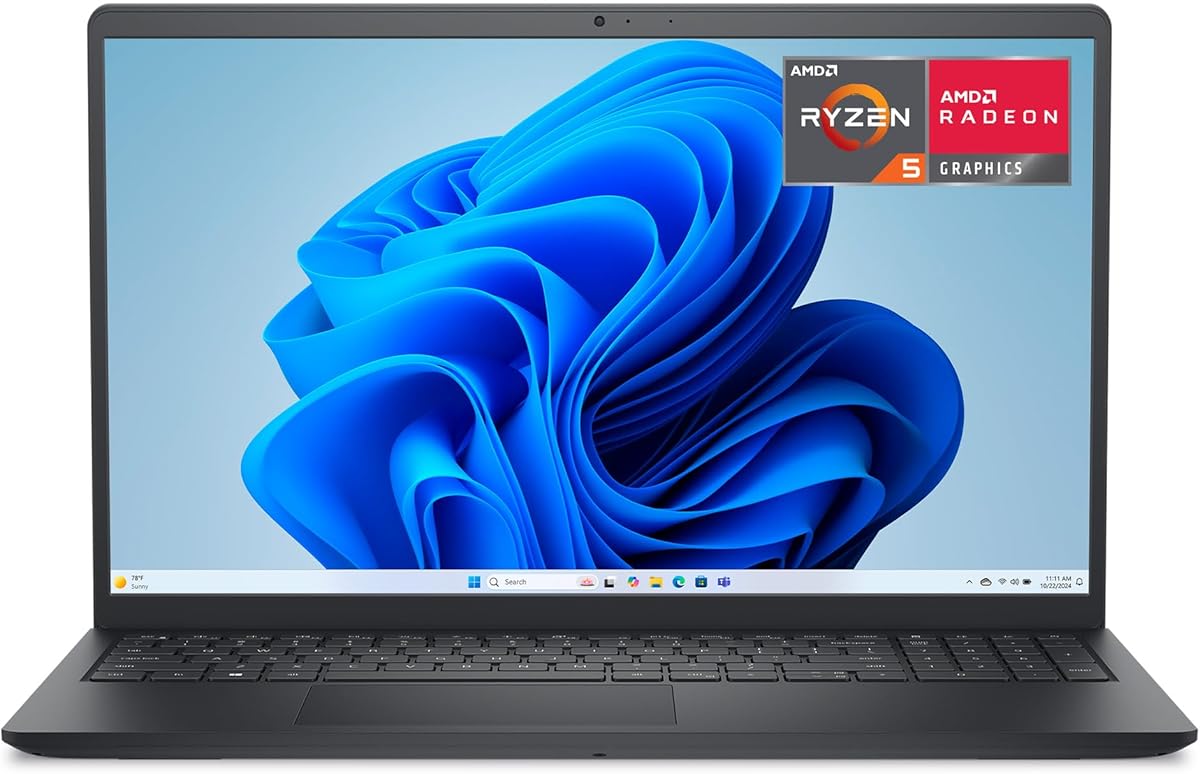
This Dell laptop is built for everyday computing with a focus on ergonomics and thermal management. The AMD Ryzen 5 processor ensures that the system runs efficiently, while the adaptive thermal technology helps maintain performance even during extended use or warmer environments.
We may earn a commission when you buy through this link, at no additional cost to you.
The standard configuration provides a balanced setup that is suitable for moderate Enscape work and daily productivity tasks. It is a reliable choice for users who need a consistent machine without specific high-end requirements, offering good value for general professional use.
While it may not have standout features compared to specialized workstations, it delivers solid performance for its price point. The inclusion of on-site service adds peace of mind, ensuring that support is readily available if any hardware issues arise during your work.
This laptop is best suited for users who need a dependable machine for general architectural visualization and office work. It offers a practical balance of performance and support, making it a good recommendation for those who prioritize reliability and standard functionality.
The ergonomic design with lifted hinges helps maintain a comfortable typing angle, reducing strain during long work sessions.
Adaptive thermals ensure that the laptop adjusts its power usage based on the environment, keeping performance stable and efficient.
We may earn a commission when you buy through this link, at no additional cost to you.
This Dell laptop features a modern 16-inch display that provides a wider viewing area for detailed work. The Intel Core 7 processor offers strong performance capabilities, ensuring that the system can handle the demands of running Enscape and other design tools efficiently.
We may earn a commission when you buy through this link, at no additional cost to you.
With 16GB of RAM, you get enough memory for smooth multitasking and running multiple applications without slowdowns. The display technology includes ComfortView Plus, which reduces blue light and maintains color accuracy, making it easier on the eyes during long periods of design work.
While the storage may be standard, the overall system performance is robust for most architectural visualization needs. The adaptive thermal technology ensures that the laptop remains cool and responsive, which is important for maintaining consistent performance during rendering tasks.
This laptop is best suited for professionals who want a modern machine with a large screen and reliable performance. It offers a good balance of features for daily use, making it a strong recommendation for those who need a dependable device for design and productivity.
ComfortView Plus helps reduce harmful blue light without sacrificing color quality, allowing you to work longer without eye strain.
The 16-inch display with an FHD+ resolution provides more horizontal space for toolbars and model views simultaneously.
We may earn a commission when you buy through this link, at no additional cost to you.
This HP OmniBook offers a large 17.3 inch display at a competitive price, making it an attractive option for users who want more screen real estate. The AMD Ryzen 3 processor provides sufficient power for lighter tasks, while the 512GB SSD ensures quick access to your files and applications.
We may earn a commission when you buy through this link, at no additional cost to you.
The 8GB of RAM may limit heavy multitasking, but it is adequate for basic architectural visualization and standard productivity work. The clear FHD display makes it easy to see details in your models, and the fast charging capability helps keep you going throughout the day.
While the graphics are integrated and the processor is modest, this machine is a good value for those who need a large screen without spending a premium. It is best suited for users who prioritize visual space and portability over high-end rendering performance.
This laptop is best suited for students or casual users who need a large screen for design viewing on a budget. It offers a practical balance of size and cost, making it a solid recommendation for those who want a spacious workspace without breaking the bank.
You get the benefit of a large screen typically found on more expensive machines, providing a better view of your work.
The SSD ensures that your system boots quickly and your files are ready when you need them, saving time on daily tasks.
We may earn a commission when you buy through this link, at no additional cost to you.
Selecting the right laptop for Enscape requires understanding the specific hardware needs of rendering software. This guide breaks down the key factors to consider to ensure you get a machine that supports your workflow efficiently.
The central processing unit is the brain of your computer and plays a critical role in how fast your designs render. Enscape relies heavily on CPU power for real-time calculations, so a processor with higher clock speeds and multiple cores will provide a smoother experience.
Look for a processor with at least four cores and high base frequency to ensure consistent performance during complex design sessions.
Random access memory allows your computer to handle multiple tasks at once without slowing down. Since Enscape often runs alongside other design tools, having ample RAM is essential to prevent lag and ensure smooth switching between applications.
Aim for at least 16GB of RAM to comfortably handle moderate to heavy workloads without bottlenecks.
Graphics processing is key for rendering visuals and displaying 3D models accurately. While integrated graphics can work for basic tasks, dedicated GPUs offer better performance for high-fidelity rendering and complex scenes.
If your budget allows, choose a model with dedicated graphics to ensure optimal visual performance and faster render times.
A good display helps you see details clearly and reduces eye strain during long work sessions. Color accuracy and resolution are important for ensuring that your designs look as intended when presented to clients.
Prioritize a screen with at least 1080p resolution and consider a larger size for better visibility of your workspace.
Solid state drives provide faster boot times and quicker access to files compared to traditional hard drives. This speed is crucial for large project files and helps keep your system responsive when loading heavy applications.
Choose a laptop with at least 512GB of SSD storage to accommodate your projects and software without needing external drives.
If you need to work on the go, the physical weight and size of the laptop matter. A lighter machine makes it easier to carry to meetings or client sites without adding unnecessary bulk to your bag.
Consider your travel needs and choose a size that balances screen real estate with ease of transport.
Long battery life ensures that you can work away from a power outlet for extended periods. This is particularly important for professionals who often work in locations where power sources may be scarce or unavailable.
Look for models that offer at least 8 hours of battery life to support a full day of work without interruption.
A sturdy build protects your investment from wear and tear over time. High-quality materials and a solid hinge design contribute to the longevity of the device, ensuring it remains reliable throughout its lifespan.
Choose a laptop from a reputable brand known for durability to ensure it can withstand daily professional use.
To get the most out of your laptop for Enscape, start by optimizing your system settings. Ensure that your graphics drivers are up to date and that your power settings are configured for high performance during rendering tasks.
Regular maintenance is crucial for longevity. Keep your device clean from dust and debris, especially around the vents, to prevent overheating. Using a cooling pad during intensive work can also help maintain optimal operating temperatures.
Backup your work frequently to avoid data loss. Utilize cloud storage or external drives to keep copies of your projects secure. This practice ensures that you can recover your work quickly in case of hardware failure or accidental deletion.
Enscape requires a decent processor and graphics card to run smoothly. Typically, a multi-core CPU and at least 8GB of RAM are recommended for basic tasks. Higher requirements apply for complex scenes or larger projects.
Yes, you can use integrated graphics for basic Enscape tasks. However, dedicated graphics cards offer better performance for rendering and handling complex 3D models without lag.
For architectural visualization, 16GB of RAM is ideal. This capacity allows you to run multiple applications and handle large design files efficiently without slowdowns.
Yes, a larger screen provides more workspace and better visibility for detailed design work. It helps in viewing complex models and toolbars simultaneously, improving productivity.
A fast SSD is highly recommended for Enscape. It ensures quicker boot times and faster access to large project files, keeping your workflow smooth and responsive.
To extend battery life, lower the screen brightness and close unnecessary background applications. Using power-saving modes during non-rendering tasks also helps conserve energy.
Investing in a premium laptop is worth it if you work on complex projects regularly. Better hardware ensures faster render times and more stability during intensive design sessions.
Consider the weight and dimensions when choosing a portable laptop. A lighter device is easier to carry to client meetings or co-working spaces without adding bulk.
Choosing the right laptop for Enscape depends on your specific needs and budget. The top picks offer a range of options from budget-friendly models to high-performance machines suitable for professional work.
Prioritize memory and processor speed to ensure smooth rendering and multitasking. A good display and adequate storage are also key factors for a productive and efficient workflow.
Remember to check current prices and availability before making a final decision. Prices can fluctuate, so verifying the latest deals ensures you get the best value for your investment.