
Redragon K512 RGB Membrane Gaming Keyboard
4.5Editor score
Six onboard macro keys without software
Detachable wrist rest for comfort
True RGB lighting with thirteen modes
This guide compares the top ten keyboards with macro keys for gaming and productivity, evaluating features, build quality, and customization options to help
Keyboards with macro keys offer a powerful way to streamline complex tasks in gaming and professional workflows. They allow users to assign multiple actions to single keystrokes, saving time and reducing physical strain during long sessions. Selecting the right model depends on your specific needs, whether you prioritize tactile feedback, customization depth, or budget considerations.
We evaluated ten distinct models based on their macro functionality, build quality, and user experience. Each product was analyzed for its ability to handle complex command sequences, the ease of programming, and overall durability. Our comparison covers a wide range of options from entry-level membrane boards to high-end mechanical switches tailored for enthusiasts.
Each pick in this list highlights unique strengths and potential limitations to help you make an informed decision. We focus on real-world usability, software support, and hardware reliability. Please note that product availability and pricing can change frequently, so verify current details before making a purchase.
4.5Editor score

4.1Editor score
4.3Editor score
This side-by-side comparison outlines the key specifications and capabilities of the ten selected models. It highlights differences in switch types, macro capabilities, and additional features like media controls or connectivity options to simplify your selection process.


The VSD K1 Pro stands out as a versatile hybrid between a mechanical keyboard and a streaming deck. With its full-key programmable on-board capabilities, it supports extensive macro recording and assignment directly through a web-based interface or dedicated software.
We may earn a commission when you buy through this link, at no additional cost to you.
Its integrated streaming deck function allows users to create switchable pages with LCD keys and knobs, offering unprecedented flexibility for workflow management. The gasket mount structure combined with a 5-layer dampening design ensures a comfortable, quiet typing experience suitable for long gaming or work sessions.
While the device offers significant customization, relying on software for certain features like GIF displays requires installation and a wired connection. The learning curve for the VSD Craf software may be steep for users seeking immediate plug-and-play macro functionality without setup.
This keyboard is ideal for power users who want deep control over their inputs and visual feedback during tasks. It suits both gamers needing complex combos and professionals managing media or application launches efficiently with customizable interfaces.
Users can record complex multi-step operation flows and assign them freely to any key, significantly boosting efficiency for repetitive tasks.
The TFT color display and LCD keys allow personalization with images and animations, making macro identification and execution faster and more intuitive.
We may earn a commission when you buy through this link, at no additional cost to you.
The Redragon K512 offers an accessible entry point for users seeking macro functionality without complexity. It features six onboard macro keys that allow recording and reassigning G1-G6 instantly without needing driver installation.
We may earn a commission when you buy through this link, at no additional cost to you.
With 26 anti-ghosting keys, it handles multiple simultaneous inputs effectively, ensuring smooth gameplay during intense sessions. The dedicated media wheel provides convenient control over music playback without interrupting your game or application.
While the membrane switches lack the tactile feedback of mechanical boards, they provide a quiet and reliable typing experience suitable for office or casual gaming environments. The fade-resistant keycaps and detachable wrist rest add to its longevity and comfort.
This model is perfect for budget-conscious users who want immediate macro capabilities. It delivers essential features like media control and lighting customization without overwhelming software requirements or high costs.
Macros can be recorded on the fly directly on the keyboard, allowing instant setup without software installation or configuration time.
The easy media wheel allows intuitive adjustment of volume and playback, keeping your hands on the keyboard while managing audio.
We may earn a commission when you buy through this link, at no additional cost to you.
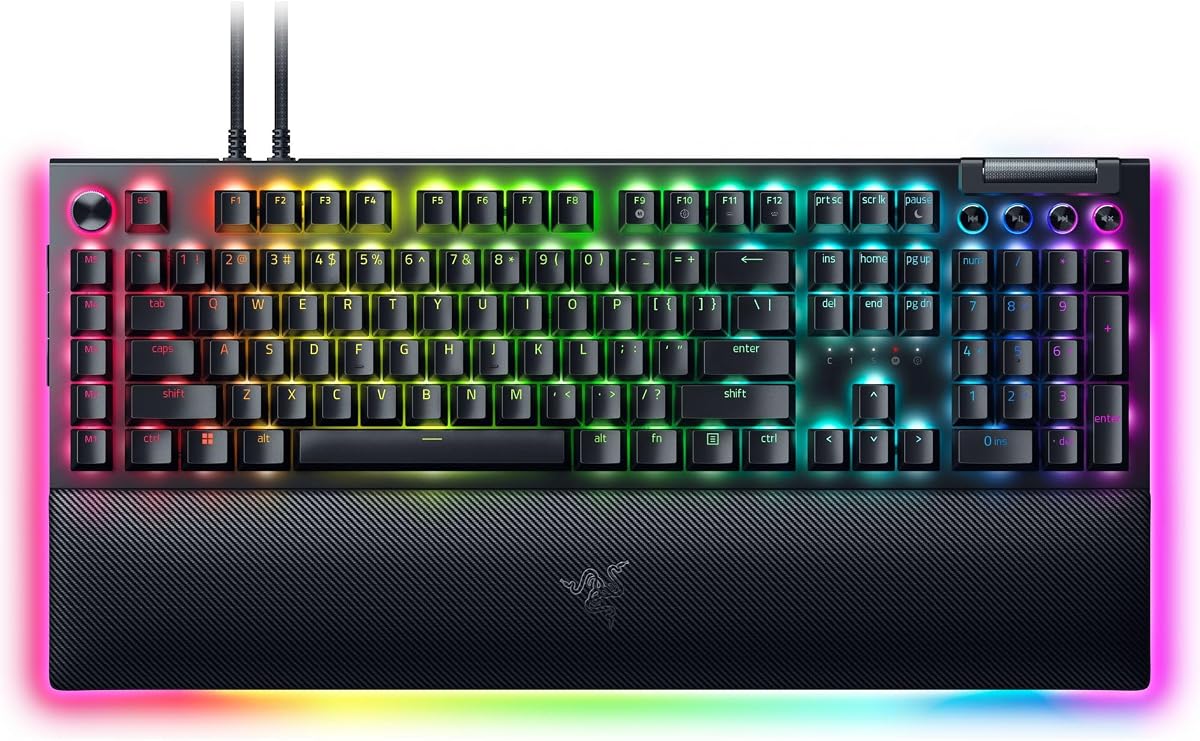
The Razer BlackWidow V4 Pro delivers premium performance with eight dedicated macro keys and a programmable command dial for extensive control. Its green mechanical switches provide precise tactile feedback suitable for gamers demanding accuracy and speed.
We may earn a commission when you buy through this link, at no additional cost to you.
The keyboard features immersive underglow and per-key lighting that syncs with Razer Chroma, enhancing visual appeal and gameplay immersion. A magnetic plush leatherette wrist rest with underglow ensures comfort during extended use.
Despite its advanced features, the device relies on Razer Synapse software for full macro programming and lighting customization. Users must connect via wired connection for the command dial to function fully, limiting wireless flexibility.
This model is ideal for enthusiasts seeking top-tier customization and build quality. It caters to those who want an all-in-one solution for complex gaming setups with high-end aesthetics and reliable macro execution.
The programmable dial allows quick access to brightness, volume, or custom functions, adding a layer of control beyond standard keys.
The magnetic wrist rest provides secure support and ergonomic alignment, reducing strain during long gaming marathons.
We may earn a commission when you buy through this link, at no additional cost to you.
The Redragon K580 offers a robust mechanical experience with five dedicated macro keys and a media wheel for intuitive control. It features a hot-swappable socket that allows users to change switches without soldering for personalized typing feel.
We may earn a commission when you buy through this link, at no additional cost to you.
Built to withstand daily gaming, it is rated for 50 million keystrokes with fade-resistant keycaps. Full anti-ghosting ensures accurate input registration even during rapid multi-key combinations common in competitive gaming.
While the board supports optional software for deeper customization, basic macro functions work without installation. However, the lack of wireless connectivity may limit users seeking flexibility in desk setup.
This keyboard suits gamers who value tactile feedback and durability. It provides a balanced mix of macro utility and build quality at a reasonable price point for mechanical enthusiasts.
The hot-swappable design enables easy experimentation with different switch types without permanent modifications to the keyboard.
The stock Brown switches deliver a gentle tactile bump with reduced noise, making it suitable for shared environments.
We may earn a commission when you buy through this link, at no additional cost to you.
The Redragon K550 provides extensive macro functionality with 12 onboard keys that function without additional software for basic setups. Its solid aluminum top plate ensures stability and a premium look on any desk.
We may earn a commission when you buy through this link, at no additional cost to you.
An extra USB pass-through port allows connecting mice or wireless receivers directly to the keyboard, reducing cable clutter. Custom purple switches offer a clear tactile feel with strong feedback suitable for typists and gamers.
While the keyboard offers excellent macro capacity, advanced programming requires pro software support to fully utilize bindings. The device is heavier than lightweight alternatives, which may limit portability.
This model fits users needing maximum macro availability in a sturdy build. It serves well for those who require multiple simultaneous command shortcuts and prefer a traditional mechanical layout.
With 12 programmable macro keys, users can store a wide variety of game-specific commands or productivity shortcuts for quick access.
The USB pass-through simplifies device connections, keeping the setup organized and reducing dependency on available computer ports.
We may earn a commission when you buy through this link, at no additional cost to you.
The Razer BlackWidow V4 X combines performance with stealth using yellow mechanical linear switches that offer instant inputs with minimal noise. Its six dedicated macro keys provide expandable command options for various playstyles.
We may earn a commission when you buy through this link, at no additional cost to you.
Chroma RGB per-key lighting allows detailed customization, syncing with hundreds of integrated games for immersive visuals. The double-shot ABS keycaps ensure durability and clear labeling that withstands intense gaming wear.
While it lacks the command dial of the V4 Pro, it remains a streamlined option for users prioritizing quiet operation. The internal sound dampeners maintain a satisfying typing experience without disruptive clicks.
This keyboard is suitable for those seeking high-performance mechanics in a quieter profile. It delivers essential macro functionality and superior aesthetics without the complexity of higher-end models.
Built-in sound dampeners reduce internal noise, providing a quieter experience ideal for shared spaces or late-night gaming.
Per-key RGB lighting allows precise color effects, enhancing gameplay immersion through visual synchronization.
We may earn a commission when you buy through this link, at no additional cost to you.
The Redragon K618 PRO delivers exceptional wireless flexibility with tri-mode connectivity supporting USB-C, Bluetooth, and 2.4GHz connections. It features 20 on-the-fly macro keys in a dedicated zone, allowing quick command execution without software setup.
We may earn a commission when you buy through this link, at no additional cost to you.
Its low-profile design shortens travel distance for faster actuation and lighter typing feel on the wrists. The one-touch switch lets users toggle between Windows and Mac instantly, adding cross-platform convenience.
While the slim design improves portability, it may sacrifice some tactile depth compared to standard mechanical keyboards. Wireless performance is reliable, but users must monitor battery levels during extended gaming or work sessions.
This model is perfect for users needing a versatile portable solution with macro power. It balances performance and convenience effectively for travelers and multi-device users.
Tri-mode connectivity allows seamless switching between PC, tablet, and laptop without requiring re-pairing or dongle swaps.
With 20 macros accessible on-the-fly, the keyboard supports extensive customization for gaming combos and productivity workflows.
We may earn a commission when you buy through this link, at no additional cost to you.
The Logitech G213 Prodigy offers a full-sized layout with five customizable lighting zones that sync with other G devices. It features dedicated media controls for instant playback adjustment, enhancing multimedia experiences.
We may earn a commission when you buy through this link, at no additional cost to you.
Anti-ghosting gaming matrix ensures responsive feedback during intense use. The spill-resistant design protects against accidents, while the integrated palm rest provides ergonomic comfort for extended sessions.
Macro programming is available via Logitech G HUB software, allowing customization of lighting and game modes. However, the membrane switches may lack the tactile precision desired by mechanical switch enthusiasts.
This model is ideal for casual gamers and multimedia users prioritizing comfort and durability. It offers reliable macro support and visual customization at a practical entry price.
Dedicated media keys allow immediate control over music and video playback, ensuring uninterrupted workflow or gaming.
Spill-resistant design helps maintain functionality even after minor liquid spills, extending the keyboard's usable lifespan.
We may earn a commission when you buy through this link, at no additional cost to you.
The Corsair K55 RGB PRO features six dedicated macro keys that activate functions in one stroke using CORSAIR iCUE software. Its IP42-rated protection guards against dust and spills, ensuring consistent performance during daily use.
We may earn a commission when you buy through this link, at no additional cost to you.
Dynamic RGB backlighting allows users to assign colors to lighting zones or create vibrant effects. The detachable palm rest reduces hand stress, offering comfort during extended gaming or work tasks.
While the membrane construction provides a quieter typing experience, some users may find it less responsive than mechanical alternatives. The software requirement for full macro setup adds a minor initial step.
This model suits users seeking reliable macro capability with spill resistance. It balances affordability with essential features like media controls and customizable lighting.
IP42-rated protection ensures the keyboard can withstand accidental spills and dust, maintaining performance in varied environments.
Six dedicated macro keys streamline task execution when programmed through CORSAIR iCUE software for optimal workflow.
We may earn a commission when you buy through this link, at no additional cost to you.
The Razer BlackWidow V4 integrates six dedicated macro keys with yellow mechanical linear switches for rapid, silent inputs. Its magnetic plush leatherette wrist rest ensures secure attachment and long-lasting comfort during gaming marathons.
We may earn a commission when you buy through this link, at no additional cost to you.
Per-key Chroma RGB lighting syncs with the battlestation for immersive visuals. The doubleshot ABS keycaps ensure labeling durability, maintaining aesthetics despite repeated use in intense gaming conditions.
The keyboard offers a balanced mix of performance and ergonomics, though full customization relies on Razer software. This model fills the mid-range gap with high-end features accessible to serious gamers.
This device is ideal for those wanting premium feel without the command dial complexity. It delivers essential macro tools and ergonomic design for daily use.
The magnetic plush wrist rest provides cushioned support, reducing hand fatigue during extended gameplay.
Yellow linear switches offer rapid-fire inputs with minimal resistance, optimizing performance for fast-paced gaming.
We may earn a commission when you buy through this link, at no additional cost to you.
Selecting the right keyboard with macro keys involves balancing functionality, build quality, and personal workflow needs. This section details key factors to consider.
Evaluate how easily macros can be recorded and assigned. Onboard solutions allow instant setup without drivers, while software-dependent models offer deeper customization but require installation.
Prioritize models with intuitive programming interfaces to save time during setup.
Mechanical switches provide tactile feedback and durability, whereas membrane switches offer quieter operation at a lower cost. Choose based on your sensitivity to sound and tactile response.
Select switches that match your preferred typing sound and gaming comfort levels.
Determine if you need wired stability or wireless flexibility. Tri-mode connectivity supports Bluetooth and 2.4GHz for multi-device setups, ensuring seamless transitions across platforms.
Choose connectivity that fits your workspace layout and device ecosystem.
Look for keyboards rated for high keystroke counts with durable materials like aluminum plates or reinforced frames. Spill-resistant designs protect against accidental damage during intense use.
Invest in robust construction to ensure long-term reliability and consistent performance.
Consider additional features like LCD screens, command dials, or extra USB ports. These tools enhance macro utility by adding visual feedback or convenient device connections.
Ensure extra features align with your workflow goals for maximum benefit.
Comfort during extended use depends on wrist rests and adjustable stands. Ergonomic design reduces strain, supporting productivity and enjoyment over long sessions.
Choose models with integrated rests and adjustable stands to prevent fatigue.
Check if software is required for basic macro functions or just for advanced customization. User-friendly applications allow easier configuration and future updates for enhanced performance.
Ensure software compatibility with your operating system for smooth operation.
Balance cost with essential features. Budget models often lack advanced customization but deliver core functionality effectively for casual users.
Set a price range that matches your feature requirements for value.
Begin by installing any necessary software to unlock full macro capabilities. Follow on-screen instructions to assign actions to specific macro keys for seamless operation.
Regularly clean the keyboard surface with compressed air to remove dust that may interfere with mechanical switches or sensors. Use a soft cloth for keycaps to maintain appearance.
Update firmware and software periodically to ensure stability and access new features. Check manufacturer support pages for patches that improve macro reliability or add functionality.
Macro keys allow you to assign complex sequences of commands to a single keystroke. They streamline gaming combos or productivity workflows by automating repetitive tasks efficiently.
Not all require software. Some models support onboard macro recording without drivers, offering instant usability. Others need software for advanced customization and deeper macro programming.
Many keyboards offer macOS compatibility through dedicated software or onboard settings. Always verify system requirements to ensure full functionality across different operating systems.
Resetting usually involves using a reset tool or software function to restore default keybindings. Consult the user manual for specific reset procedures for your model.
Mechanical keyboards offer superior durability and tactile feedback, making them ideal for precise macro execution. However, membrane models provide cost-effective alternatives with adequate macro functionality.
Yes, most macro systems allow you to assign application launch commands. This capability enhances productivity by allowing quick access to essential software instantly.
Our top picks highlight diverse options from the VSD K1 Pro for advanced customization to the Redragon K512 for budget-friendly essentials. Each model delivers unique strengths catering to different user needs.
When choosing, prioritize macro ease, switch feel, and ergonomics. Consider how deeply you need to customize your workflow and whether wireless connectivity is essential for your setup.
Always verify current availability and features before purchasing. Prices and specs may vary, so checking the latest details ensures you get the best value and performance for your specific requirements.