
KPXOS OSU3X Custom
3.4Editor score
Independent key calibration
Adjustable trigger distance
RGB backlight included
Find the perfect keyboard for Geometry Dash with our expert guide comparing rapid trigger magnetic switches, custom layouts, and high polling rate gaming
Selecting the right keyboard for Geometry Dash requires understanding the unique demands of rhythm gaming where timing and precision are paramount. Players need devices that respond instantly to inputs without lag to ensure every jump and obstacle is navigated perfectly during intense gameplay sessions.
We have carefully compared ten distinct keyboards specifically marketed or optimized for rhythm games and competitive play. Our analysis focuses on switch technology, polling rates, customization options, and build quality to help you find the device that matches your playing style and budget constraints.
Each pick in this list highlights specific strengths like rapid trigger technology, magnetic switches, or customizable layouts. Please note that product availability and pricing can fluctuate frequently so checking the official product pages is recommended before making your final purchase decision for your setup.
3.4Editor score
4.7Editor score

4.5Editor score
This side by side comparison breaks down the key specifications and features of every keyboard on our list. Use this table to quickly identify which model offers the best switch technology, polling rates, and customization options for your specific needs in rhythm gaming.





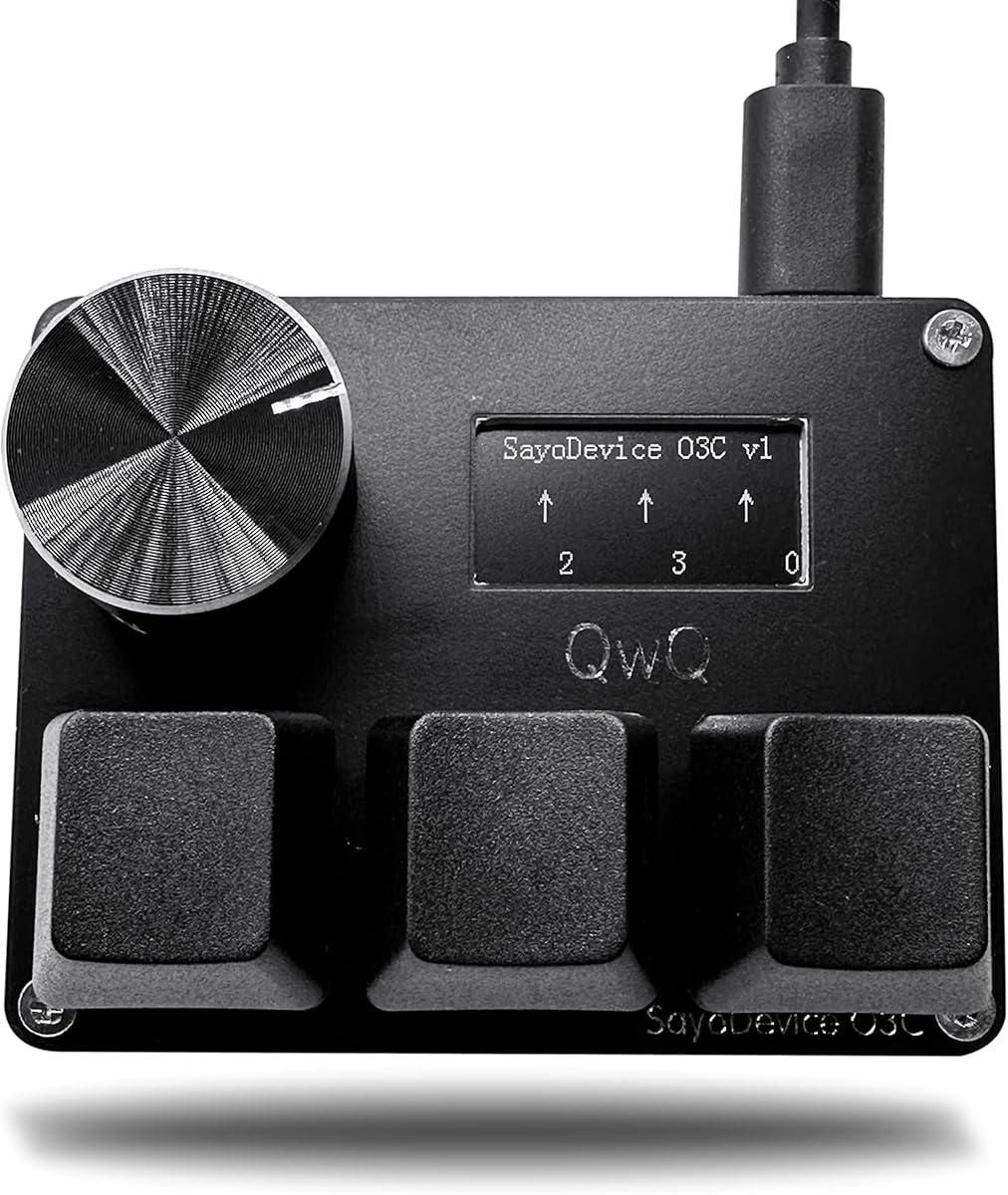
This keyboard stands out as the top choice for Geometry Dash players due to its rapid trigger Hall switches and high polling rate. It offers a compact design that integrates a screen and knob for enhanced workflow control during gameplay or music selection.
We may earn a commission when you buy through this link, at no additional cost to you.
The 3 Hall magnetic linear switches provide consistent actuation without physical contact wear which is crucial for repetitive gaming inputs. The IPS color screen displays key range and button counts giving you immediate visual feedback on your device status.
Calibration is required before first use or after firmware upgrades which might be a minor hurdle for new users. The mini keypad format limits full typing functionality but maximizes desk space for gaming setups focused on rhythm performance.
Competitive players who need precise timing and reliable input should strongly consider this model. It balances performance features with customization options effectively making it a standout in the current market for specialized gaming peripherals.
The magnetic switches allow for adjustable trigger distances ensuring inputs register exactly when you intend without accidental double taps.
The custom screen lets you write your own ID or see key counts helping you track performance during intense practice sessions.
We may earn a commission when you buy through this link, at no additional cost to you.
Affordability makes this keyboard an attractive option for players wanting magnetic switch benefits without a high cost. It supports independent calibration for every key which is a feature often reserved for much more expensive devices.
We may earn a commission when you buy through this link, at no additional cost to you.
The adjustable trigger distance down to 0.05mm allows you to fine tune sensitivity based on your playing style. The RGB backlight adds visual flair to your setup while the minimalist design keeps things streamlined and functional.
User feedback suggests some variability in build quality or software stability which impacts the overall rating. While it offers essential features for rhythm gaming it may lack the polish or long term durability of premium models.
This is an excellent entry point for those exploring magnetic switch technology or on a tight budget. It provides the core functionality needed for Geometry Dash at a price that minimizes financial risk for new setups.
You get essential rapid trigger capabilities without paying a premium making it accessible for students or casual competitive players.
The ability to calibrate each key independently helps you adapt the board to your specific finger strengths and reach preferences.
We may earn a commission when you buy through this link, at no additional cost to you.
This model offers high performance with a compact layout that fits easily on smaller desks or gaming stations. The inclusion of a knob and screen provides extra control layers that can be mapped to essential functions like scrolling.
We may earn a commission when you buy through this link, at no additional cost to you.
Users appreciate the speed and reliability of the Hall linear switches which maintain consistent performance over time. The ability to swap switches easily means you can tailor the feel without needing to replace the entire unit.
The small form factor means fewer physical keys which requires memorizing macros for common commands. While efficient for gaming it might be less suitable for users who need extensive keyboard capabilities for other tasks.
It is highly recommended for players prioritizing precision and desk space efficiency. The combination of speed and customizability makes it a strong contender for anyone serious about optimizing their rhythm gaming input.
Hotswap support allows you to experiment with different Hall switches to find the exact tactile preference you enjoy.
Copy paste and macro functions streamline workflow reducing the need for complex key combinations during intense sessions.
We may earn a commission when you buy through this link, at no additional cost to you.
The rapid trigger functionality here is designed to give players an edge in timing sensitive games. It supports custom animations on the screen which can be used to track progress or add visual flair during use.
We may earn a commission when you buy through this link, at no additional cost to you.
With professional game magnetic switches you get smooth actuation that reduces friction during rapid key presses. The hot-swappable nature means you can upgrade components easily if you want a different feel later on.
Users should note that specific software might be required to unlock full customization potential. This could be a barrier for those who prefer plug and play simplicity without installing additional drivers or programs.
This keyboard suits gamers who want to personalize their hardware visually and functionally. It delivers the high performance metrics needed for competitive play while offering unique visual customization through its display.
Custom animations on the screen make it easy to see status updates or track performance metrics visually.
The magnetic switches ensure that every press counts without the mechanical wear that degrades traditional keys over time.
We may earn a commission when you buy through this link, at no additional cost to you.
This keyboard offers a premium experience through its web-based driver which eliminates the need for bulky software installations. It supports rapid trigger modes and adjustable actuation making it versatile for various game genres.
We may earn a commission when you buy through this link, at no additional cost to you.
The 60% layout saves significant desk space while keeping essential function keys accessible via shortcuts. Dynamic RGB lighting allows for deep customization with millions of colors to match your existing setup theme.
Some users may find the compact layout restrictive if they rely heavily on dedicated arrow keys or number pads. Additionally the web driver is primarily Windows focused which might limit cross-platform utility for Mac users.
Ideal for gamers who value speed and a clutter-free desktop this model excels in performance metrics. The combination of magnetic switches and web-based tools makes it a top-tier choice for modern gaming setups.
Access settings directly through a browser so you can customize keys and macros without installing heavy software on your PC.
The lighting system creates immersive effects that react to your gameplay adding a layer of visual excitement to your sessions.
We may earn a commission when you buy through this link, at no additional cost to you.
This keyboard stands out with its wireless capabilities and triple mode connection options that offer freedom from cables. The TFT screen and knob add utility beyond standard typing allowing you to control volume and time easily.
We may earn a commission when you buy through this link, at no additional cost to you.
The gasket mount design provides a softer typing feel that reduces fatigue during long sessions. With a battery lasting up to 48 hours with backlight it supports extended use without constant charging interruptions.
Side printed PBT keycaps look stylish but might be harder to read for new users or those who type heavily. The higher price point reflects the premium features but requires careful consideration of budget needs.
Players who value a clean wireless setup and premium features will find this keyboard rewarding. It bridges the gap between aesthetic design and functional performance effectively for mixed use environments.
Seamlessly switch between wired and wireless modes to optimize speed during gaming and comfort during typing tasks.
The gasket structure absorbs shock providing a cushioned experience that feels more refined than standard mechanical boards.
We may earn a commission when you buy through this link, at no additional cost to you.
This keyboard is packed with advanced gaming features like DKS and SOCD which are rare in this price range. The 0.01mm adjustable actuation gives you fine control over how deeply you must press keys to register inputs.
We may earn a commission when you buy through this link, at no additional cost to you.
The gasket structure cushions every keystroke reducing harsh vibrations and creating a quieter typing experience. With an 8000Hz polling rate it ensures that your commands are transmitted instantly for maximum responsiveness.
The software required to access all features is comprehensive but might be overwhelming for casual users. Also the limited color options mean it might not match every aesthetic preference out of the box.
Enthusiasts who want deep customization and competitive advantages should appreciate this keyboard. It delivers professional-grade tools in a compact design suitable for both gaming and productivity tasks.
Features like SOCD help resolve conflicting key presses ensuring smooth movement in competitive scenarios.
Premium PBT keycaps resist shine and wear keeping your keyboard looking new even after heavy daily use.
We may earn a commission when you buy through this link, at no additional cost to you.
This model focuses on speed offering a fast trigger mode that ensures commands take effect instantly. The adjustable actuation point allows you to tailor sensitivity to your personal gaming style for better precision.
We may earn a commission when you buy through this link, at no additional cost to you.
RGB lighting effects are vibrant with millions of colors available to customize your setup. The web driver simplifies customization by allowing you to change settings directly without downloading extra software.
Mac users may be limited since the driver is currently Windows only. This restricts accessibility for those using Apple computers who want to utilize the full feature set of this keyboard.
Gamers looking for a streamlined and responsive keyboard will find this model appealing. It balances performance with aesthetic appeal making it a versatile choice for various gaming environments.
Adjust each key to match your habits ensuring you don't accidentally trigger actions during complex moves.
Set the mood with preset lighting effects that bring your setup to life and match your style.
We may earn a commission when you buy through this link, at no additional cost to you.
The white variant offers a distinctive look that suits clean gaming setups. It features visual feedback displays that help you track your key presses and status in real time during sessions.
We may earn a commission when you buy through this link, at no additional cost to you.
Precise magnetic calibration ensures that each key responds consistently which is essential for rhythm games. The minimalist design keeps the focus on functionality without unnecessary bulk or complexity.
User reviews indicate some inconsistency in performance compared to other models in this category. It serves as a basic but functional option for those prioritizing aesthetics over advanced features.
If you want a keyboard that stands out visually and handles basic rhythm needs this is a solid choice. It provides a straightforward way to upgrade your input without a huge investment.
See your key travel and counts live on the display so you can adjust your timing mid-game.
The white finish matches well with modern setups providing a fresh contrast to typical black peripherals.
We may earn a commission when you buy through this link, at no additional cost to you.
This keyboard is designed for simplicity offering a plug-and-play experience that gets you started quickly. The high efficiency interface supports 8000Hz polling ensuring that your inputs are transmitted without lag.
We may earn a commission when you buy through this link, at no additional cost to you.
Customizable boot interface allows you to set device names or text on the screen for personalization. It includes a knob and screen for basic navigation tasks like scrolling song lists or adjusting settings.
The build quality is functional but lacks the premium feel of more expensive boards. It serves well for casual use but might not withstand heavy daily abuse as well as higher tier models.
For those who want a straightforward keyboard with essential features this is a good fit. It provides enough capability for rhythm games without the complexity of advanced driver software.
Connect and play immediately without needing to install drivers or configure complex settings first.
The interface supports high-speed polling to ensure your game responses are timely and accurate.
We may earn a commission when you buy through this link, at no additional cost to you.
Choosing the right keyboard involves balancing technical specs with your personal play style. We break down the essential factors that impact performance and longevity for rhythm games.
Magnetic Hall switches are preferred for their ability to provide rapid trigger capabilities which reduce latency and allow for adjustable actuation points. Unlike traditional mechanical switches these do not rely on physical contacts to register inputs which eliminates debounce delay.
Look for switches that support customizable actuation distances to tailor sensitivity to your specific finger strength.
A high polling rate such as 8000Hz ensures that the computer receives input data more frequently reducing the delay between keystrokes and game response. This is critical for fast-paced gameplay where milliseconds matter.
Prioritize models that advertise high polling rates for competitive precision.
Compact layouts like 60% or mini keypads save desk space allowing more room for mouse movement. However ensure the layout includes essential arrow keys or programmable keys for game navigation.
Choose a layout that fits your desk and provides necessary access without excessive bulk.
Quality software allows for deep customization of macros key mapping and lighting. Web-based drivers are increasingly popular as they remove the need for bulky installation packages.
Select a keyboard with a driver that supports your operating system and offers user-friendly settings.
Materials like PBT keycaps offer durability and resistance to shine over time compared to ABS plastics. A gasket mount design can improve the typing feel by reducing harsh vibrations.
Invest in a model with robust construction to ensure longevity.
Wired connections provide the most stable latency which is ideal for competitive gaming. Wireless options offer convenience but ensure they support a wired mode or have reliable low latency performance.
Opt for reliable connectivity that minimizes lag during intense sessions.
Some keyboards include screens or LED indicators to show key presses or device status. This can help players track performance and adjust inputs in real time.
Consider if visual aids like screens are useful for your practice routine.
Balancing cost with features is key. While premium models offer advanced tech basic models can still provide adequate performance for casual play.
Determine your budget early to narrow down options that offer the best value.
To get the most out of your keyboard start by calibrating the switches according to the manufacturer instructions. This ensures that every key registers accurately and that the trigger points are optimized for your play style.
Regularly update the firmware to access the latest features and improve stability. Most manufacturers provide web-based drivers or tools that make updating easy without requiring technical expertise.
Keep the surface clean by using compressed air to remove dust from under the keys. Avoid spills and store the keyboard in a dry environment to prevent internal damage.
Magnetic switches use Hall effect technology to detect key presses which provides faster and more consistent inputs. They often support rapid trigger technology which allows keys to reset instantly as soon as they are released. This reduces latency and helps players execute precise moves without delay.
Rapid trigger technology resets a key instantly when it is lifted off rather than waiting for a fixed reset point. This allows for faster repeated presses and more responsive control which is essential for rhythm games. It helps players execute complex combos smoothly.
A 60% keyboard is excellent for rhythm games because it offers a compact layout that saves desk space. You can program essential keys to access arrow keys and function keys without needing a full-size board. This setup helps maintain focus on the game.
Calibration usually involves running a software tool that detects the exact position where your keys trigger. Follow the on-screen instructions provided by the manufacturer to set the activation points. This ensures consistent performance across all keys.
Many modern keyboards come with web-based drivers that do not require installation. These allow you to customize settings directly through a browser. Some models might need specific software for advanced macros but basic functionality often works out of the box.
Most keyboards support Mac for basic typing but some advanced software features may be limited to Windows. Always check compatibility before purchasing if you use a Mac. Wired connections usually work without issues regardless of the operating system.
Hot-swappable switches allow you to change the keys without soldering. This means you can experiment with different switches to find the perfect feel without replacing the entire keyboard. It is a cost-effective way to customize your device.
Clean your keyboard at least once a month to prevent dust buildup. Use compressed air to blow out debris and a soft cloth for the surface. Regular maintenance extends the life of your device and ensures consistent performance.
The keyboards highlighted in this guide offer a range of options from budget-friendly to premium choices. Each model provides unique advantages tailored to different needs such as rapid trigger tech or compact designs.
Focus on factors like switch type and polling rate when making your decision. These elements have the most significant impact on your performance during gameplay sessions.
Always check the current availability and specifications before buying. Product details can change and verifying the latest info ensures you get the best device for your setup.