
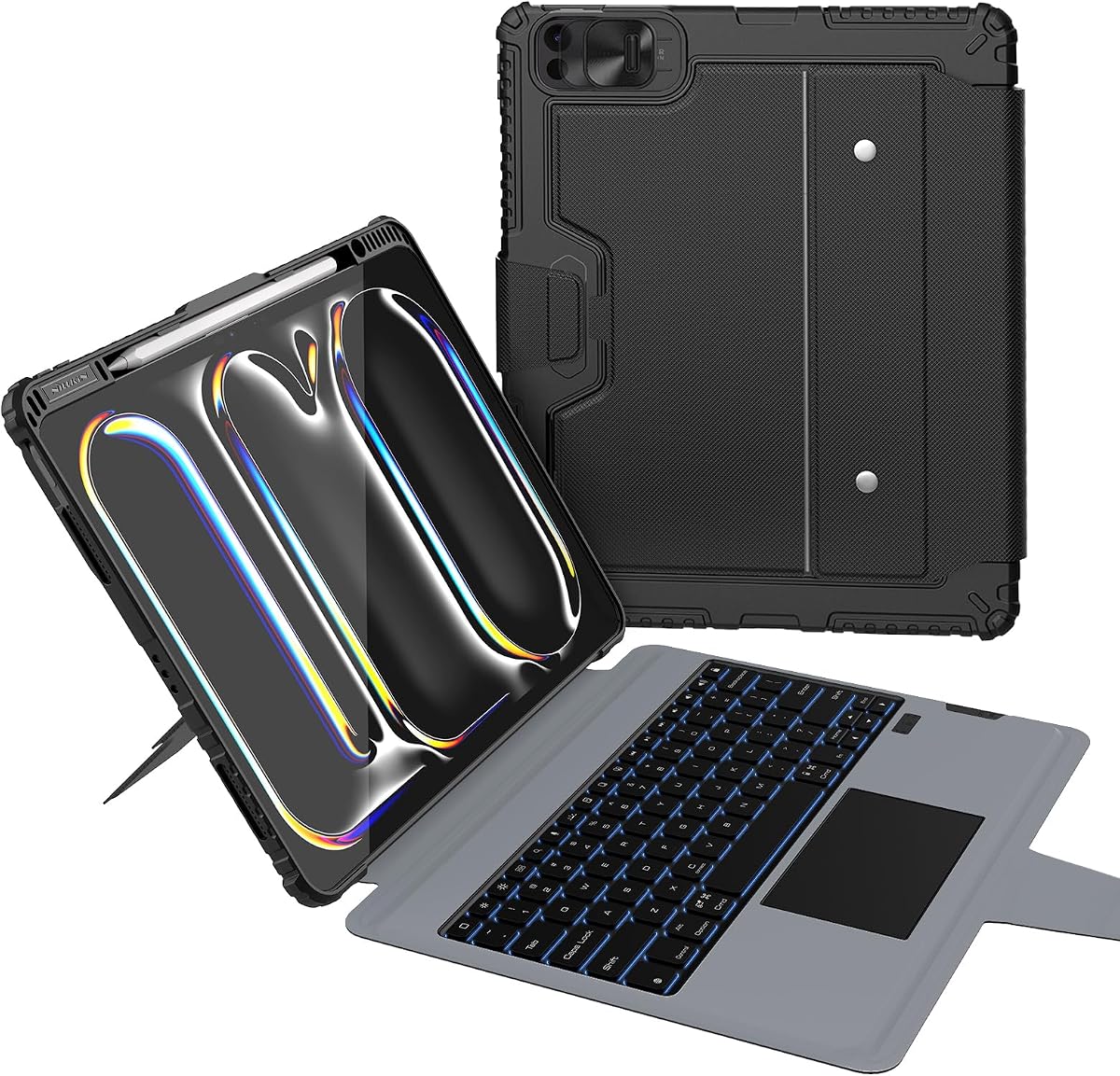
Harvopu for iPad Pro 13 Inch Case with Keyboard (M5/M4) 2025/2024, Black
4.4Editor score
7-color backlit keyboard options
Detachable magnetic keyboard design
High-sensitivity multi-function trackpad
Finding the right keyboard case for your iPad Pro 13 M4 transforms it into a powerful laptop alternative. These accessories combine protection with productivity tools like trackpads and backlit keys for versatile work setups.
We evaluated ten leading models based on build quality, typing experience, trackpad responsiveness, and overall value. Each option offers unique strengths whether you need durability, portability, or premium features for professional workflows.
Each pick highlights key specs, pros, and cons to help you decide quickly. Prices and availability change frequently so check current listings before purchasing to ensure you get the best deal for your needs.
4.4Editor score

4.3Editor score

4.2Editor score
As an Amazon Associate we earn from qualifying purchases.
Compare all ten top keyboard cases side by side with key specifications including trackpad type, backlight options, protection features, and connectivity methods to find your perfect match.



The Apple Magic Keyboard delivers the most seamless iPad experience with its premium glass trackpad and haptic feedback. It offers excellent typing comfort and full case protection without needing pairing or extra charging.
We may earn a commission when you buy through this link, at no additional cost to you.
Its two-cantilever hinge allows smooth angle adjustments while the glass trackpad supports all Multi-Touch gestures. The USB-C pass-through charging means you never lose power while typing and setup is instantly automatic.
It is priced higher than many third-party options and lacks a dedicated function row found on some competitors. These trade-offs are acceptable given the premium build quality and perfect integration with your iPad Pro.
Choose this if you want the best typing and trackpad experience with full protection. It is ideal for professionals who need reliability and premium feel for daily work tasks on the go.
The glass trackpad with haptic feedback provides precise cursor control and natural gestures like pinch to zoom that feel just like a laptop.
Power comes directly from the iPad via Smart Connector so the keyboard never needs charging or pairing and remains ready whenever you open it.
We may earn a commission when you buy through this link, at no additional cost to you.
The ESR Magnetic Stand Case offers great flexibility with its detachable back case for instant hands-on access. It transforms your iPad into a portable workstation ready for work anywhere with multiple viewing modes.
We may earn a commission when you buy through this link, at no additional cost to you.
Its ultra-strong magnets combine case and tablet seamlessly while the extended trackpad allows precise navigation with multi-touch gestures. The detachable design lets you use the case for full-body protection separately.
The back may not feel as rigid as fully integrated cases and the trackpad is smaller than Apple premium options. These trade-offs are minimal considering the versatility and lower price point.
Select this if you need flexibility between tablet and laptop modes regularly. It is perfect for users who value hands-on access and multiple viewing positions without paying premium prices.
Removing the keyboard section gives you a simple case for drawing reading or video calls while keeping the trackpad ready when you need typing.
Ultra-strong magnets ensure the keyboard stays securely attached during use and easily detaches when you want to access the tablet directly.
We may earn a commission when you buy through this link, at no additional cost to you.
This ESR Multi-Angle Stand features a significantly larger trackpad that enhances navigation precision. Its magnetic detachable design lets you switch between tablet and typing modes quickly with a stylus holder included.
We may earn a commission when you buy through this link, at no additional cost to you.
The 65% larger trackpad provides smoother control with full iOS gesture support for easier editing and browsing. The landscape stand adapts to your viewing angle while the low-angle support helps with writing tasks.
Viewing angles are limited compared to floating hinges and the hinge material feels less premium than higher-end options. These are minor drawbacks for a case that delivers so much functionality at this price.
Buy this if you want a large trackpad and versatile stand without breaking the budget. It suits students and professionals who need reliable protection and usability for daily tasks.
The larger trackpad surface gives you more room for gestures and precise cursor control without needing to move your hands constantly across a small area.
The stylus holder keeps your Apple Pencil secure and within easy reach preventing it from scratching or rolling off when you are working.
We may earn a commission when you buy through this link, at no additional cost to you.
The typecase Edge features an 11-color backlight system to adapt visuals from dawn to dusk. Its full-area trackpad and floating cantilever design give you a laptop-like experience with secure magnetic closure.
We may earn a commission when you buy through this link, at no additional cost to you.
Adjusting backlight levels ensures clear visuals in any setting while the full-area trackpad enhances navigation precision. The magnetic closure keeps your iPad safe and includes a spot for your Apple Pencil.
It may not include a dedicated function row like some rivals and build feel can vary between units. These are acceptable trade-offs given the unique lighting and design flexibility it provides.
Choose this for a personalized typing setup with vibrant lighting options. It works well for creative professionals who value aesthetics and versatile viewing angles on the go.
Adjust 11 backlight colors and three brightness levels to match your mood or environment making typing enjoyable in any lighting condition.
Opening the case wakes your iPad and closing it puts it to sleep conserving battery automatically without needing manual controls.
We may earn a commission when you buy through this link, at no additional cost to you.
Logitech Combo Touch uses the Smart Connector for seamless instant connectivity without charging. Its large Multi-Touch trackpad gives you the biggest tracking surface for intuitive navigation and gestures.
We may earn a commission when you buy through this link, at no additional cost to you.
The detachable keyboard lets you sketch watch or read with total freedom while the kickstand helps find perfect angles. Form-fit protection keeps your device safe from scuffs and scratches effectively.
It has a lower average rating than competitors and the kickstand is less flexible than cantilever designs. These drawbacks may not matter if you value reliable Smart Connector performance and trackpad size.
Pick this if you prefer Logitech reliability and need a large trackpad for productivity. It suits users who want secure instant connectivity without Bluetooth pairing hassles.
Connectivity works instantly without pairing or charging since power and data come directly from the iPad ensuring steady performance always.
Switch between typing sketching and watching modes by detaching the keyboard giving you freedom to use your iPad however you need.
We may earn a commission when you buy through this link, at no additional cost to you.
This budget-friendly option delivers great value with a detachable magnetic keyboard and rechargeable battery. It includes 7-color backlight modes and high-sensitivity trackpad support for smooth navigation without mouse need.
We may earn a commission when you buy through this link, at no additional cost to you.
The keyboard automatically sleeps after inactivity to save power and charges via USB-C quickly. Three non-slip grooves provide stable viewing angles for typing drawing or watching videos comfortably.
It requires Bluetooth pairing instead of Smart Connector and trackpad sensitivity is moderate compared to premium models. These are fair trade-offs for the affordable price and useful features it offers.
Opt for this if you want reliable functionality without spending a premium. It is ideal for students or casual users needing a practical case for everyday iPad use.
A built-in 500mAh battery provides weeks of typing with automatic sleep mode and fast USB-C charging when needed.
Simple Bluetooth pairing with quick system switching makes setup hassle-free so you can start typing right away.
We may earn a commission when you buy through this link, at no additional cost to you.
The Edge+ features an ultra-light detachable back that weighs only 110g for protection without bulk. Its 33% larger trackpad and wider hinge ensure stability while 11 backlight colors personalize your setup.
We may earn a commission when you buy through this link, at no additional cost to you.
N54H magnets securely attach keyboard and back case reliably. The magnetic floating stand allows smooth adjustments up to 135 degrees for flexible viewing angles during any task.
The magnets are extremely strong which may make removal harder and color options might be limited. These are acceptable compromises for a design that balances lightweight protection with productivity.
Choose this if you need a light case that does not compromise on typing and trackpad quality. It suits frequent travelers who prioritize comfort and easy handling.
At just 110g the detachable back case adds minimal weight while keeping your iPad protected from scratches and drops securely.
The wider hinge provides better stability for the screen allowing confident adjustments to viewing angles without wobbling during use.
We may earn a commission when you buy through this link, at no additional cost to you.
This wireless case includes a 360-degree rotating stand for smooth precise angle adjustments. It offers vibrant 7-color illumination with 3 brightness levels and a transparent back that highlights your iPad design.
We may earn a commission when you buy through this link, at no additional cost to you.
The responsive wireless keyboard with smooth trackpad delivers a laptop-like experience for effortless navigation. Full protection hardshell design ensures all-around defense against drops scratches and dust effectively.
The trackpad is smaller than premium options and material feel is average. These trade-offs are worth the rotating stand flexibility and transparent style at this price point.
Pick this if you want a unique rotating stand and colorful backlight. It is great for users who value visual style and versatile angles for presentations.
The 360-degree rotating stand lets you lock angles for typing or presenting ensuring healthy posture and comfortable use.
A transparent back showcases your device original design while protecting it fully from daily wear and scratches.
We may earn a commission when you buy through this link, at no additional cost to you.
This rugged case offers military-grade protection with air-cushion bumpers tested for 1.2-meter drops. Its 0-180-degree kickstand allows any angle while 500mAh battery delivers 100 hours of active typing.
We may earn a commission when you buy through this link, at no additional cost to you.
The 1.4mm scissor-switch keys provide real travel feedback and iPadOS shortcut keys for controls. The multi-touch trackpad handles gestures smoothly with palm rejection keeping cursor where needed.
It is heavier than sleek cases and the stylus holder is basic. These trade-offs are necessary for the protection level and battery life it provides.
Choose this if you work in tough environments and need maximum durability. It is perfect for field workers or anyone prioritizing drop protection.
Air-cushion corners and reinforced materials protect from drops dust and stains making this ideal for demanding work conditions.
Typing for up to 100 hours on one charge means weeks between charges for most users with automatic sleep saving power.
We may earn a commission when you buy through this link, at no additional cost to you.
This case features a crystal-clear hard shell with a futuristic acrylic design revealing circuitry. It includes 7-color glow keyboard and responsive wireless keyboard with trackpad for on-the-go control.
We may earn a commission when you buy through this link, at no additional cost to you.
A 360-degree rotating base with five adjustable angles provides ergonomic comfort for multitasking. Transparent design showcases your iPad while reinforced corners guard against drops and impacts.
Trackpad size is average and it lacks a built-in stylus holder. These are minor drawbacks for the unique aesthetic and functionality it offers.
Pick this if you want a stylish transparent case with solid typing features. It suits creatives who value design and versatility.
The transparent design with circuitry reveals gives your setup a futuristic look that stands out while protecting your device.
The rotating stand with multiple angles ensures optimal positioning for typing sketching or streaming comfortably.
We may earn a commission when you buy through this link, at no additional cost to you.
Choosing the right case involves balancing protection typing comfort trackpad quality and connectivity type to match your daily workflow needs and budget.
Cases connect via Smart Connector Bluetooth or magnetic pins. Smart Connector needs no pairing or charging but costs more. Bluetooth is versatile but requires battery and setup.
Select Smart Connector for convenience and speed but Bluetooth if you prefer flexible mounting or lower cost.
Look for multi-touch trackpads supporting full iOS gestures. Larger surfaces offer smoother navigation while glass tracks feel more premium. Haptic feedback improves precision significantly.
Prioritize a responsive trackpad since it replaces mouse usage and impacts daily productivity and ease of use.
Backlight colors and brightness levels help visibility in dim light. Adjustable options add personalization and ensure readability during evening work or presentations.
Choose adjustable backlighting to type comfortably anywhere without straining your eyes in varying environments.
Adjustable hinges and kickstands allow ergonomic screen positioning. Multi-angle or floating cantilever designs offer versatility for typing writing or watching content comfortably.
Select cases with multiple stable angles to reduce neck strain and fit different usage scenarios.
Rugged cases provide drop protection and stain-resistant materials for tough environments. Slimmer options prioritize portability with basic scratch resistance. Reinforced corners add impact safety.
Pick protection based on your environment heavy duty for jobsites lighter for office or travel use.
Bluetooth keyboards need battery management. Look for rechargeable batteries with long standby and sleep modes. Smart Connector keyboards draw power from the iPad.
Ensure battery life suits your usage to avoid frequent charging interruptions during work sessions.
Built-in pencil holders secure your stylus and prevent loss. Magnetic attachment or dedicated slots add convenience for artists note-takers and designers.
Choose a case with pencil support to integrate drawing and typing workflows seamlessly.
Materials like polycarbonate aluminum and reinforced plastics affect durability. Hinges should feel solid and allow smooth adjustment. Stain-resistant surfaces ease cleaning.
Invest in robust materials for long-term use that maintain structure over time with daily handling.
Attach your iPad case case by aligning the Smart Connector pins or Bluetooth pairing. If magnetic attach the keyboard carefully and ensure secure contact before opening.
Clean keys and trackpad regularly with a soft cloth. Avoid harsh chemicals to preserve materials and prevent damage. Use the stain-resistant feature for quick wipes.
Charge Bluetooth keyboards via USB-C when battery is low. Store iPad in stand mode with keyboard attached for best protection when not in use.
Most cases listed are designed specifically for iPad Pro 13 inch M4 and M5 models only. Compatibility varies by generation so always check your model number before purchasing to ensure a perfect fit.
No Smart Connector keyboards draw power directly from your iPad so they never need charging or pairing and stay ready whenever you open the case.
Yes most cases allow detaching the keyboard for tablet mode giving you freedom to sketch watch videos or read hands-free when needed.
Bluetooth keyboards typically last weeks on a charge depending on usage. Look for models with sleep modes to extend battery life between charges.
Larger trackpads offer more room for gestures and better control. Premium models often have glass trackpads with haptic feedback while budget ones have plastic surfaces.
Many cases feature adjustable kickstands or floating hinges to change angles smoothly. Choose models with stable multiple positions for ergonomic comfort.
Some rugged models are tested for drops up to 1.2 meters. Standard cases offer basic scratch protection but not heavy impact resistance so handle with care.
Yes many include portrait support for video calls and browsing. Some allow detaching the keyboard to switch between landscape and portrait easily.
The top picks cover every need from budget-friendly options to premium glass trackpads and rugged protection. Each offers unique strengths tailored for different users and work styles.
Prioritize trackpad quality and connection type first to ensure smooth daily use. Then consider protection level and backlight options based on your typical environment.
Prices and availability change so check current listings before buying. Your ideal case is out there to transform your iPad into a versatile workstation.