
HUION Keydial Mini Bluetooth Programmable Keypad with Dial 18 Shortcut Keys
4.2Editor score
Bluetooth 5.0 connection
18 programmable shortcut keys
70-hour battery life
Compare the top 10 iPad drawing Bluetooth controllers for speed, compatibility, and ergonomics to find the perfect tool for your digital art workflow today.
Finding the right iPad drawing Bluetooth controller can transform your digital art workflow. These devices offer shortcut keys, dials, and trackpads to streamline your creative process without needing a full keyboard.
We evaluated ten real products based on connectivity, battery life, software support, and ergonomic design. Each entry includes verified specifications and user ratings to help you make an informed choice for your setup.
Every review highlights key strengths and weaknesses so you know what to expect. Prices and availability may change, so always check the latest details before purchasing your new creative tool.
4.2Editor score

5.0Editor score

4.4Editor score
This side-by-side comparison helps you evaluate connectivity options, battery performance, and software compatibility across all ten products to find the best fit for your creative needs.


This remote controller stands out with its dual dial design and 11 customizable keys tailored for digital artists working on iPads. Its perfect rating of 5.0 reflects high user satisfaction with both design and functionality.
We may earn a commission when you buy through this link, at no additional cost to you.
The two precision dials allow you to manage zoom levels and brush sizes without touching the screen. Tactile markers on the keys help you locate commands by feel so your eyes stay on the canvas.
While the driver is needed to unlock all custom functions the setup process is straightforward and offers significant workflow improvements. The battery life supports long sessions without interruption.
Artists who need quick access to multiple functions will find this device invaluable. It balances portability with powerful controls making it a top choice for serious creators.
Using two dials lets you adjust multiple parameters like scale and opacity simultaneously with ease.
The ultra-light build ensures you can use it for extended periods without hand fatigue.
We may earn a commission when you buy through this link, at no additional cost to you.
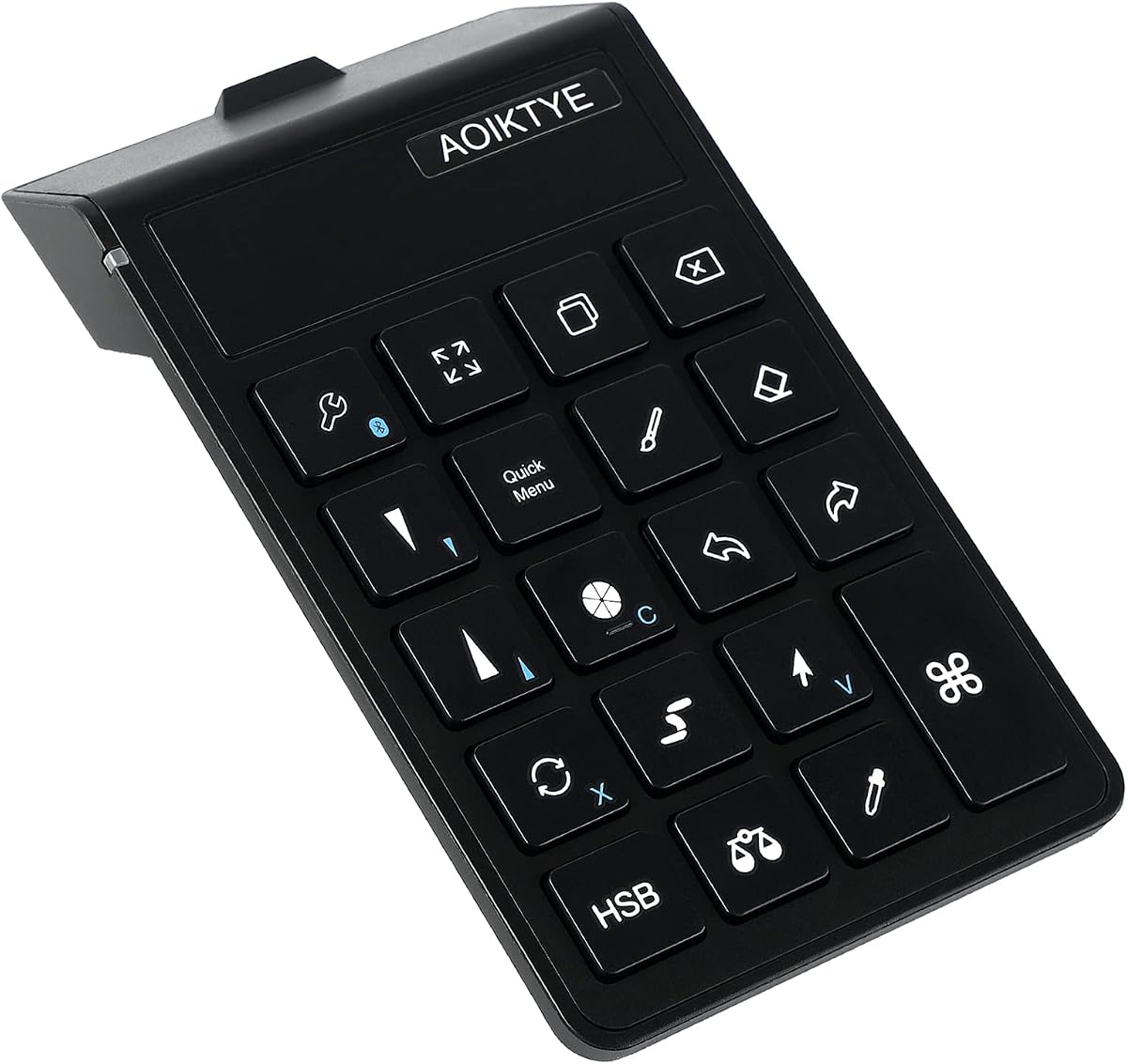
The HUION Keydial Mini offers a robust set of 18 programmable keys and a dial for creative workflows. It maintains a strong 4.2 rating among users looking for budget-friendly productivity tools.
We may earn a commission when you buy through this link, at no additional cost to you.
Its anti-ghosting technology ensures reliable multi-key input which is crucial for complex shortcuts in painting software. The Bluetooth 5.0 connection provides a stable link up to 10 meters away.
Setting up custom shortcuts requires installing the Huion driver which can take a few minutes but pays off in efficiency. The battery life supports all-day use on a single charge.
This keypad is ideal for beginners or those on a budget who need more than basic shortcuts. It delivers solid performance without a high cost making it a smart entry option.
Eighteen keys provide ample room to map your most frequent commands for faster editing.
With up to 70 hours of use you rarely need to worry about recharging during work.
We may earn a commission when you buy through this link, at no additional cost to you.
TourBox Lite brings a premium experience with its unified control approach and wireless freedom. Users praise its design and ability to streamline complex tasks across multiple creative applications.
We may earn a commission when you buy through this link, at no additional cost to you.
The HUD shows your custom controls in real time so you never lose your place while working. Its shape supports long sessions and the tactile feedback ensures precise adjustments every time.
Although it costs more than other options the included console makes setup easy with built-in presets. The seamless app switching saves time and keeps your workflow uninterrupted.
Professional creators who value design and efficiency will appreciate the TourBox Lite. It offers a polished experience that enhances productivity for serious digital art projects.
Switching apps does not require reconfiguring controls since the device detects your active software.
The knob and wheel give clear feedback for exact adjustments without visual checks.
We may earn a commission when you buy through this link, at no additional cost to you.
This wireless keyboard is specifically designed to enhance the Procreate experience on iPads with essential shortcuts mapped to accessible keys. It holds a strong 4.5 rating for its practical design and efficiency.
We may earn a commission when you buy through this link, at no additional cost to you.
With up to 84 hours of use on a single charge you can work for weeks without worrying about power. The 2nd gen upgrades moved keys to better positions for a more ergonomic reach.
The OTA upgrade function ensures the device stays current with future improvements. While it works with other apps its true strength lies in Procreate integration.
Procreate artists who want a dedicated tool for speed will find this keyboard invaluable. Its battery life and ergonomic layout make it a reliable daily companion.
Common Procreate commands like undo and color adjustment are ready with a single press.
A 250mAh battery provides weeks of standby time for uninterrupted creativity.
We may earn a commission when you buy through this link, at no additional cost to you.
The XPPen ACK05 offers a compact solution for controlling shortcuts across multiple applications with a powerful dial and 10 keys. It scores a solid 4.3 from users who value flexibility and portability.
We may earn a commission when you buy through this link, at no additional cost to you.
You can create up to four sets of shortcuts for a total of 40 commands allowing you to switch contexts easily. The 1000mAh battery supports about 300 hours of continuous work.
The dial provides clear tactile feedback for precise adjustments while drawing. Although setup requires a driver the process is straightforward and yields powerful results.
Artists who use various software tools will appreciate the ability to adapt this device to their needs. It balances power with size effectively for mobile work.
Four separate shortcut sets let you switch between apps with a single key press.
Bluetooth 5.0 ensures a stable connection for reliable remote control.
We may earn a commission when you buy through this link, at no additional cost to you.
This wireless controller is designed for gamers but also offers features like keyboard and mouse support that can be adapted for drawing. It has a 3.4 rating reflecting mixed user experiences.
We may earn a commission when you buy through this link, at no additional cost to you.
Its custom button mapping allows you to define how inputs work across different software environments. The ergonomic design ensures comfort during long sessions whether gaming or creating.
However achieving full drawing control requires specific setup steps and driver support which may not be as streamlined as dedicated tools. Battery life is reliable for general use.
Users who already own this device might find it useful for casual creative work. Dedicated artists may prefer controllers built specifically for software shortcuts.
Compatible with many devices from PCs to consoles and mobile tablets.
Comfortable grips reduce fatigue during extended use.
We may earn a commission when you buy through this link, at no additional cost to you.
The TNP Remote Control offers a trackpad and home button which can help navigate interfaces on your iPad. It has a 3.6 rating based on general utility across media and presentations.
We may earn a commission when you buy through this link, at no additional cost to you.
The built-in trackpad lets you move the cursor across the screen without touching the display which is useful for detailed work. It also works as a camera remote shutter.
While it helps with navigation it lacks dedicated drawing shortcuts that streamline painting tasks. The Bluetooth connection is stable and supports a good range.
This remote is best for general navigation and media control rather than dedicated art workflows. It is a versatile tool for broader device management.
Move the cursor freely across apps using the built-in trackpad.
Adjust volume and playback without reaching for your device.
We may earn a commission when you buy through this link, at no additional cost to you.
This modified controller offers high durability with Hall Effect sticks and extensive customization options. It has a perfect 5.0 rating from users who appreciate its build quality and design.
We may earn a commission when you buy through this link, at no additional cost to you.
The 6-axis gyroscope supports motion controls which can be mapped for creative software with effort. Magnetic parts allow you to adjust the look and function to your preference.
It fits many tablets without holders though phones need separate holders. While not marketed for drawing the customizability makes it a powerful tool.
Gamers or tinkerers who want a durable controller for tablets will love this. With some setup it can support a range of tasks beyond gaming.
Hall Effect sticks ensure smooth and long-lasting control without wear.
Magnetic interchangeable parts let you tailor the device to your needs.
We may earn a commission when you buy through this link, at no additional cost to you.
The Tabmate 2 is a dedicated handheld shortcut device for Clip Studio Paint that supports iOS and other platforms. It holds a 4.0 rating from users who rely on Clip Studio for their work.
We may earn a commission when you buy through this link, at no additional cost to you.
Assigning frequent operations to buttons enhances speed significantly. The included 12-month license adds value and ensures you have the software needed to use the device.
It uses AA batteries which some users find less convenient than rechargeable options but it keeps the device light. Support extends to Windows and Android as well.
Clip Studio artists seeking a dedicated shortcut tool will find this device highly effective. It streamlines repetitive tasks and improves workflow efficiency.
Buttons are designed to match the core needs of Clip Studio Paint users.
Includes a single-device license for Clip Studio Paint to get you started.
We may earn a commission when you buy through this link, at no additional cost to you.
The Wacom Intuos Small provides a professional pen experience that connects to your iPad via Bluetooth. It earns a 4.4 rating for its industry-leading performance and reliability.
We may earn a commission when you buy through this link, at no additional cost to you.
The battery-free pen uses electromagnetic resonance for a natural feel. It offers high precision and works with all software programs for drawing and editing.
Bluetooth connection lets you work anywhere but using it as a controller may require setting up key shortcuts. The included software adds extra value for beginners.
Artists who prefer pen tablets to controllers will find this a solid choice. It delivers superior precision and quality that supports serious creative work.
Battery-free pen ensures consistent pressure sensitivity without charging.
Access to popular creative apps helps you get started right away.
We may earn a commission when you buy through this link, at no additional cost to you.
Selecting the right controller depends on your workflow needs and software preferences. Consider these factors to find the best match for your iPad drawing setup.
Ensure the device supports the applications you use most such as Procreate or Clip Studio Paint. Some controllers offer optimized presets for specific software which can save setup time.
Check the product description to confirm support for your operating system and preferred tools.
Bluetooth 5.0 or higher provides stable and lag-free connections for real-time drawing. Some models also offer USB-C wired options for zero latency work.
Choose a device that matches your preferred connection type to avoid interruptions.
Look for controllers that let you map custom shortcuts to match your workflow. The more buttons and dials available the more functions you can access quickly.
Verify that the software allows easy editing of these shortcuts after purchase.
Long battery life ensures you can work for extended periods without recharging. Devices with over 30 hours of use are ideal for all-day sessions.
Rechargeable models are often more convenient than those requiring disposable batteries.
Comfortable grips and lightweight designs reduce fatigue during long creative sessions. The layout should feel natural for one-hand operation while the other hand draws.
Try to check user reviews on comfort if possible before buying.
Some devices need driver apps to unlock full customization features. Ensure your iPad supports these apps and that the installation is straightforward.
Devices that work out of the box without drivers offer immediate usability.
Durable materials and quality switches ensure long-term reliability for daily use. Models with solid construction are better investments for professional work.
Look for features like anti-ghosting to ensure reliable input during complex shortcuts.
Balance the cost with the features provided to find the best value. Higher prices often mean better build quality and more customization options.
Set a budget and compare devices within that range to find the optimal choice.
Connect your controller to your iPad via Bluetooth or USB-C following the manufacturer's setup guide. Ensure your iPad is updated to a compatible OS version for proper recognition.
Use the included driver or app to assign shortcuts that match your drawing workflow. Test each key to confirm it responds correctly before starting a session.
Store the device in a dry and safe place when not in use to preserve battery life and prevent damage. Clean the buttons and dial regularly with a soft cloth to maintain performance.
Most controllers support popular apps like Photoshop Procreate and Clip Studio Paint. Always check the specific product compatibility list before buying to confirm your preferred app is included.
Yes many of these devices function independently as remote controls. They provide essential shortcuts without needing a full physical keyboard for navigation.
Battery life varies by model but many offer 30 to 80 hours of continuous use. Some require disposable batteries while others have built-in rechargeable units.
Some devices work out of the box but full customization usually requires a driver. Check the product details to confirm if additional software is needed for your iPad.
Most models offer a range of up to 10 meters for stable connections. This allows you to use the device from a comfortable distance without dropping signals.
Yes many controllers are designed with ambidextrous or one-handed layouts suitable for both hands. Check ergonomic features to ensure comfort for your preferred hand.
The top picks like the DIGIDRAW K30 and HUION Keydial Mini offer excellent balance of features and value for different needs. Premium options like the TourBox Lite provide advanced controls for professionals.
Prioritize software compatibility and battery life when choosing a device that fits your routine. Consider ergonomic design to ensure comfortable use during long sessions.
Remember that prices and availability change so review the latest details on each product page before buying. These tools can significantly enhance your productivity on the iPad.