
California JOS GPU Support Bracket
4.7Editor score
Adjustable height support
All-aluminum build
Universal case fit
Explore our expert guide on the top GPU backplates for 2026. We compare cooling performance, material quality, and compatibility to help you choose the right
GPU backplates are essential components for modern graphics cards, offering protection and improved cooling. They prevent PCB flex and help dissipate heat from sensitive components on the rear side of the card.
We compared ten top-rated backplates based on material quality, thermal performance, and ease of installation. Our analysis covers passive coolers, active radiators, and support brackets for various GPU models.
Each pick highlights key features and pros to help you decide quickly. Note that prices and availability change often, so verify details on the product page before making your final purchase decision.
4.7Editor score

4.7Editor score

4.2Editor score
This table compares all ten top-rated GPU backplates side by side. Check their key specifications to find the perfect match for your graphics card and cooling needs.




This large aluminum heatsink offers robust passive cooling for GPUs and other components. With a 4.7 rating, it is praised for its high-quality materials and effective heat dissipation capabilities.
We may earn a commission when you buy through this link, at no additional cost to you.
The design includes 294 fins to maximize surface area for better heat transfer. It comes with pre-applied thermal conductive adhesive tape, making it ready for installation right out of the box.
While it is a large component, it is strictly passive so it does not add noise. The main trade-off is ensuring your case has enough clearance for the size and the mounting method.
It is ideal for builders looking for a reliable, silent cooling solution. The versatility allows use beyond GPUs, including routers and power regulators, making it a smart purchase.
The high fin count ensures air flows well across the surface to cool components efficiently without fans.
Pre-applied adhesive tape simplifies the mounting process and ensures strong contact with the target surface.
We may earn a commission when you buy through this link, at no additional cost to you.
The GOWENIC backplate provides active cooling with a built-in fan for memory and VRM areas. It carries a 4.0 rating and fits popular RTX 30-series cards like the 3090 and 3080.
We may earn a commission when you buy through this link, at no additional cost to you.
Its 4-pin fan connector connects directly to motherboard sockets for controlled operation. The anodized black CNC machining gives it a premium look that matches modern PC builds perfectly.
Vertical mounting support is a standout feature for cases with riser cables. The 15mm thickness with thermal pad ensures good contact without adding excessive bulk to your setup.
This model suits users wanting active cooling for their GPU back. The balance of build quality and functional design makes it a reliable choice for high-end graphics cards.
The fan design targets memory modules directly to keep temperatures low during intensive gaming or rendering tasks.
Anodized black finish offers a sleek professional appearance that complements any high-end PC case interior.
We may earn a commission when you buy through this link, at no additional cost to you.
This backplate is designed specifically for GIGABYTE RTX 5060 and 5050 Low Profile cards. It has a 3.6 rating and focuses on structural support rather than just cooling.
We may earn a commission when you buy through this link, at no additional cost to you.
Precision CNC-cutting ensures it matches the PCB layout exactly without blocking ports. This makes it ideal for small form factor builds where every millimeter of space matters.
It adds rigidity to prevent PCB flex and protects rear components from dust. The pre-drilled holes align with original points so you can install it easily with basic tools.
Choose this if you own a GIGABYTE Low Profile card needing extra protection. Its main value is structural integrity and fit rather than advanced thermal performance features.
Specifically designed to work perfectly with low profile brackets and compact case configurations.
Thick rigid aluminum provides physical protection for the card during transport or daily use.
We may earn a commission when you buy through this link, at no additional cost to you.
The Hilitand radiator offers active cooling for RTX 30-series graphics cards. With a 4.0 rating, it is valued for its sturdy alloy construction and efficient heat dissipation.
We may earn a commission when you buy through this link, at no additional cost to you.
It uses a 4-pin fan interface to connect to the motherboard for speed control. The 15mm thickness includes a thermal pad that ensures good contact with the memory modules.
Vertical mounting is supported, which is useful for modern PC cases with riser cables. The anodized black finish adds a professional look that complements black-themed builds.
It is a good option for those needing memory cooling. The balance of features and build quality makes it a solid choice for enhancing your card thermal management.
The active fan design helps dissipate heat quickly to maintain stable temperatures during heavy usage.
Aluminum alloy construction ensures the backplate remains sturdy and resistant to damage over time.
We may earn a commission when you buy through this link, at no additional cost to you.
This radiator provides fast heat sinking for memory on RTX 30-series cards. It holds a 4.5 rating, indicating strong user satisfaction with its cooling performance and build quality.
We may earn a commission when you buy through this link, at no additional cost to you.
The 4-pin fan interface allows connection to the motherboard for optimized performance. The 15mm thickness with thermal pad ensures efficient heat transfer to the backplate surface.
Vertical mounting support adds flexibility for your case layout. The CNC machining gives it a standard fan design that is easy to install without special tools.
It is a great pick for cooling memory effectively. The high rating reflects reliable performance and sturdy construction that stands up to daily use in PCs.
A 4.5 rating shows users appreciate the balance of cooling power and ease of use.
Sturdy aluminum alloy ensures the backplate is durable and resistant to everyday wear.
We may earn a commission when you buy through this link, at no additional cost to you.
This support bracket focuses on preventing GPU sag without adding cooling features. With a 4.7 rating, it is loved for its sturdy aluminum build and affordable price point.
We may earn a commission when you buy through this link, at no additional cost to you.
The height is adjustable to fit different GPU sizes and case types. It supports ATX, M-ATX, and ITX cases making it a versatile choice for many builders.
Tool-free setup means you can install it quickly without tools. The ESD bag packaging ensures it arrives safely and keeps the parts organized during storage.
Pick this if your main goal is structural support. Its price and effectiveness make it the best budget option for protecting your expensive graphics card investment.
Strong support protects the GPU and motherboard from sagging damage over time.
Adjustable design ensures it fits most standard PC cases and GPU weights.
We may earn a commission when you buy through this link, at no additional cost to you.
This plate offers massive surface area for cooling with 294 fins. It has a 4.6 rating and is designed for passive cooling on GPUs and other electronic components.
We may earn a commission when you buy through this link, at no additional cost to you.
The aluminum material and anodized finish provide durability and safety. It reduces risk of hardware failure due to overheating without adding any noise.
Its wide use in computers routers and regulators makes it very versatile. The size is large so ensure your case can accommodate it before purchasing.
It is best for passive cooling needs. The high rating reflects user trust in its ability to keep components cool and safe under load.
No moving parts mean zero noise and lower risk of mechanical failure.
High fin count ensures air moves effectively to dissipate heat.
We may earn a commission when you buy through this link, at no additional cost to you.
This bracket is an external cover for the GPU slot on EVGA RTX cards. It is made of zinc alloy for durability and fits the slot precisely.
We may earn a commission when you buy through this link, at no additional cost to you.
It helps safeguard the graphics card slot from dust and debris. The size is 12×3.8cm and it requires simple screws for installation.
The zinc material ensures long-lasting durability against wear. It is a practical accessory for users with specific EVGA card models needing protection.
Choose this to protect your slot rather than for cooling. The precise fit makes it an easy add-on for EVGA RTX 3060ti to 3090 cards.
Protects the sensitive card slot from external dust and damage effectively.
Sturdy zinc alloy ensures the bracket stays strong over time.
We may earn a commission when you buy through this link, at no additional cost to you.
This backplate is engineered specifically for ZOTAC RTX 5060 and 5050 Solo cards. It has a perfect 5.0 rating and offers a seamless factory-like fit for your build.
We may earn a commission when you buy through this link, at no additional cost to you.
The CNC aluminum construction provides strength and rigidity for long-term use. Ventilation cutouts help maintain airflow to avoid blocking the original cooling system.
Pre-drilled holes make installation quick without modifications. It adds structural support to prevent sag and extends the lifespan of your graphics card.
Ideal for ZOTAC Solo users wanting precision and support. The perfect fit ensures no interference with ports or components during use.
Precision engineering ensures zero interference with ports and cables.
Strong rear support prevents bending during long-term gaming sessions.
We may earn a commission when you buy through this link, at no additional cost to you.
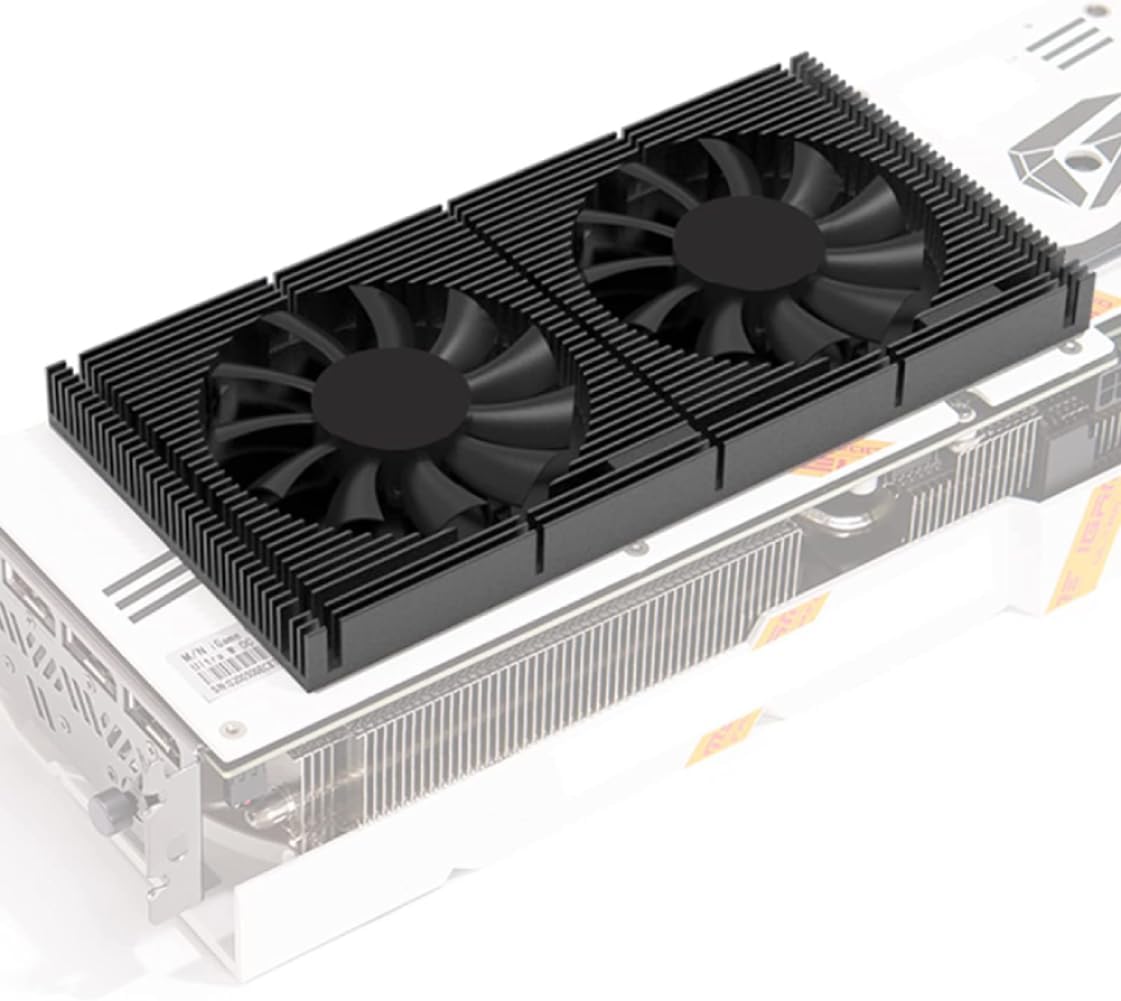
This premium backplate uses dual 70mm fans for superior memory cooling. It has a 4.2 rating and features high-quality aviation aluminum for durability.
We may earn a commission when you buy through this link, at no additional cost to you.
The PWM fans adjust speed automatically between 1500 and 2800 RPM. The 1.2mm thermal pad has high conductivity to transfer heat effectively.
It is designed for RTX 30-series cards and works well on flat surfaces. The larger fans provide better cool capacity than standard smaller options.
Choose this for top-tier memory cooling performance. The build quality and dual fan design make it a standout choice for enthusiasts.
Dual large fans offer better capacity than smaller single-fan alternatives.
Aluminum 6061 ensures a lightweight and sturdy chassis.
We may earn a commission when you buy through this link, at no additional cost to you.
Choosing the right GPU backplate depends on your cooling needs and case size. We review the key factors to help you make an informed decision.
Material quality determines how well a backplate conducts heat. Aluminum is common for its balance of weight and conductivity. Stainless steel and zinc are durable but heavier and less efficient at heat transfer.
Look for aluminum or aluminum alloy for best cooling. Avoid plastic if cooling is your main goal.
Backplates come in passive and active forms. Passive ones rely on airflow and fins to dissipate heat silently. Active ones include fans for better thermal performance but add noise.
Choose active cooling for high-performance GPUs. Passive cooling works best for quiet builds.
Compatibility is key for fit. Many backplates are model specific or designed for a series like RTX 30-series. Universal ones need careful size checks to avoid interference.
Check the exact dimensions and mounting points before buying. Measure your card and case clearance.
Good thermal interface material ensures heat moves from the GPU to the backplate. Thermal pads or adhesive tapes vary in thickness and conductivity.
Ensure the package includes high-quality thermal pads. Check the thickness matches your gap.
Included hardware simplifies installation. Some kits have screws, adhesive, or brackets. Missing parts mean extra trips to the store.
Verify that all necessary hardware is included. Check mounting holes align with your PCB.
Case clearance ensures the backplate does not block other components. Some active coolers add thickness that may hit drive bays.
Measure your case depth before purchase. Ensure enough space for fans or heatsinks.
Durability ensures long-term reliability. Look for CNC machining and anodized finishes that resist wear and corrosion.
Choose robust metal builds. Avoid thin metal that may bend or corrode.
Aesthetics matter for visible builds. Black anodized finishes or custom RGB options match modern cases.
Match the finish to your other components. Check if RGB lighting is needed.
Start by cleaning the rear of your GPU PCB to ensure good contact. Remove dust or old thermal paste with isopropyl alcohol.
Apply the thermal pad or adhesive according to the package directions. Align the backplate with the mounting holes before securing it with screws.
Check your fans spin freely and cable management is tidy after installation. Clean the backplate dust occasionally to maintain optimal cooling performance.
No, not all GPUs need a backplate but it is recommended for high-end cards. It provides protection and helps reduce PCB flex which protects your card components.
Passive backplates can be enough for mild gaming or cooling. For high loads active cooling may be better to keep memory temperatures low.
Measure your PCB and clearance. Check product dimensions to ensure it covers the area without blocking ports or mounting points.
Only if the design matches your PCB layout. Universal ones may not fit perfectly. Always check model compatibility before buying.
No, they often reduce sag by supporting the board. Some come with anti-sag brackets to help further with long cards.
Every few months depending on dust levels. Use compressed air to blow out dust to keep cooling efficient.
Some have adhesive but screws are more secure. Check the package for options and use screws for best stability.
They do add some noise but fans are usually quiet. Use motherboard fan controls to adjust speeds based on temperature.
We reviewed ten top GPU backplates offering passive and active cooling solutions. Our top picks cover different needs from budget support to premium thermal management.
Prioritize material quality and compatibility when making your choice. Ensure the backplate matches your GPU model and case clearance for a successful upgrade.
Always check current prices and availability on product pages. Deals change often so verify details before you finalize your purchase decision.