
GRAUGEAR 20Gbps Type E Key A Front Panel USB C Header Extension Cable
4.6Editor score
20Gbps transfer speeds
Includes PCIe mounting bracket
Double shielded cables
Modern computers require fast external connectivity to handle large files and high-speed peripherals. Front Panel USB C Headers allow you to bring these advanced ports to the front of your case for easy access without opening the chassis.
We evaluated ten leading options based on data transfer speeds, cable length, connector types, and build durability. Each product was reviewed for compatibility with common motherboard headers and ease of physical installation in standard desktop cases.
Each pick highlights specific strengths like maximum bandwidth, multi-port hubs, or adapter flexibility. Prices and availability change frequently so check current listings before purchasing to ensure you get the best value for your specific build needs.
4.6Editor score

4.6Editor score

4.2Editor score
As an Amazon Associate we earn from qualifying purchases.
The following table provides a quick side by side comparison of all ten products reviewed in this guide. It highlights key specifications like speed support and header requirements to help you narrow down your options quickly.


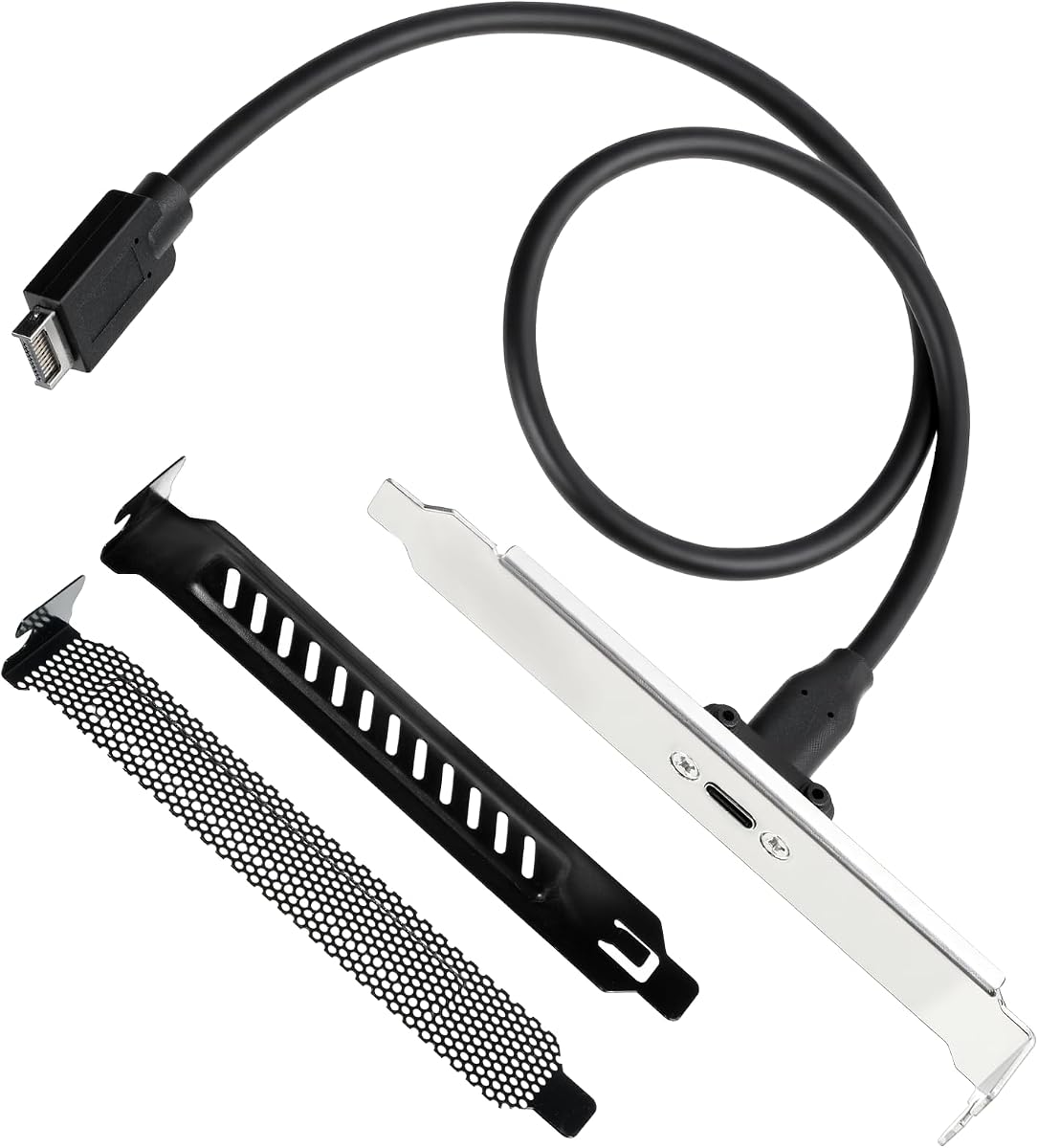


This GRAUGEAR extension cable is designed to bring high speed USB C connectivity to the front of your PC case. It supports USB 3.2 Gen 2×2 speeds up to 20Gbps which is ideal for fast external drives and peripherals.
We may earn a commission when you buy through this link, at no additional cost to you.
The cable features a sturdy metal construction with double shielded EMI and EFI wires to prevent signal interference. It includes a PCI bracket that allows you to mount the USB C port securely on the back of your case or inside.
While it offers top tier speeds it requires a motherboard with a 20-pin USB3.2 Key-A Type-E header. Older systems might need an adapter to use this cable effectively which is an important compatibility check before buying.
If you need a reliable way to access Gen 2×2 speeds at the front of your build this cable is an excellent choice. It balances speed and durability well for enthusiasts who demand the fastest data transfer rates.
The 20Gbps capability ensures that large files move quickly between your PC and external storage devices without bottlenecks.
Double shielded wires protect data integrity by reducing electromagnetic interference from other components inside your computer case.
We may earn a commission when you buy through this link, at no additional cost to you.
This adapter cable extends the reach of your motherboard USB C header to the front panel of your case. It is built to handle the latest USB 3.2 Gen 2×2 standards ensuring you get maximum performance from compatible devices.
We may earn a commission when you buy through this link, at no additional cost to you.
The construction focuses on stability with high quality wires and shielding to maintain signal integrity over the 60 centimeter length. The included PCI bracket helps secure the connection and provides a professional look for your internal setup.
Compatibility is key here as it needs a specific 20-pin Type-E key-A header on your motherboard. If your board lacks this you may need additional adapters which adds complexity to the installation process.
For users with modern motherboards this cable offers a robust solution for front panel USB C needs. It delivers high speed performance reliably which is essential for creative workloads or gaming peripherals.
The 60 centimeter length gives you flexibility to route the cable cleanly inside tight cases without stretching or stressing the connector.
The included bracket ensures the adapter stays fixed in place preventing accidental disconnections or port damage over time.
We may earn a commission when you buy through this link, at no additional cost to you.
This adapter is unique because it offers both USB C and standard USB A ports on the front panel. It connects to both Type E and USB 3.0 headers giving you more peripheral options without cluttering the back of your PC.
We may earn a commission when you buy through this link, at no additional cost to you.
It supports up to 20Gbps speeds for USB C devices which makes it great for high performance external SSDs. The dual header connection allows you to expand connectivity efficiently if your motherboard supports both types.
You must ensure your motherboard has both the 20-pin Type E and 19-pin USB 3.0 headers to use this product fully. Without both headers some functionality may be lost making verification before purchase essential.
If you want maximum versatility for your front panel this adapter is a top contender. It balances speed and compatibility well making it ideal for mixed device setups where you need both new and old ports.
Having both USB C and A ports allows you to connect a wider range of devices like legacy hard drives and modern smartphones simultaneously.
The support for Gen 2×2 ensures that modern storage devices can reach their advertised speeds without bottlenecking at the front port.
We may earn a commission when you buy through this link, at no additional cost to you.
This premium hub replaces your floppy drive bay with four high speed USB ports. It is constructed with metal to ensure heat dissipation and durability for high workloads and frequent device changes.
We may earn a commission when you buy through this link, at no additional cost to you.
It supports USB 3.2 Gen 2 speeds up to 10Gbps across all ports allowing you to connect multiple fast drives without throttling. The dedicated SATA power connector ensures stable power delivery for high draw devices.
The requirement for a SATA power source means you need an available connector in your case which may not be present in smaller systems. Additionally it is designed specifically for 3.5 inch drive bays.
If you need maximum front panel connectivity and your case supports it this hub is an excellent investment. It offers professional grade reliability and speed that surpasses typical cable extensions.
The sturdy metal housing protects internal components and helps manage heat generated by multiple active USB connections.
Built in over current and voltage protection safeguards your devices and computer from power surges during operation.
We may earn a commission when you buy through this link, at no additional cost to you.
This expansion card is ideal for systems lacking native USB headers. It uses a PCIe x1 slot to provide front panel USB C and USB A ports making it a versatile solution for older or custom motherboards.
We may earn a commission when you buy through this link, at no additional cost to you.
It supports USB 3.2 Gen 1 speeds which are sufficient for most general peripherals and storage drives. The design allows you to add connectivity without needing internal motherboard headers which can be scarce.
You need an available PCIe x1 slot to install this card which might not be present in all builds. Also it caps at 5Gbps speeds which is lower than the latest Gen 2 options available.
If you have an empty PCIe slot this card provides an easy way to add modern ports. It is a solid choice for builders who want front access without relying on motherboard header availability.
By using PCIe slots this card bypasses the need for specific motherboard headers allowing flexibility in older system builds.
The expansion card includes safety capacitors to ensure stable power supply to connected devices during operation.
We may earn a commission when you buy through this link, at no additional cost to you.
This hub provides a mix of speeds with one ultra fast USB C port and two standard USB 3.0 ports. It converts your floppy drive bay into a versatile connection point for modern and legacy devices.
We may earn a commission when you buy through this link, at no additional cost to you.
The USB C port supports Gen 2×2 speeds up to 20Gbps ensuring you get maximum performance from high end storage. The two USB 3.0 ports offer additional connectivity for lower bandwidth peripherals.
Installation requires both a Type E header and a USB 3.0 header on your motherboard. If you lack either header this unit will not function fully so checking your board specs is critical.
For users with compatible motherboards this hub offers a great balance of speed and flexibility. It maximizes front panel utility while maintaining safety features to protect your connected devices.
Having both high speed USB C and standard USB 3.0 allows you to mix and match peripherals without sacrificing performance.
Over current and voltage protection are built in to prevent damage to your devices or the hub itself during use.
We may earn a commission when you buy through this link, at no additional cost to you.
This cable is a budget friendly option that brings a USB C port to your front panel using an old 9pin USB 2.0 header. It is perfect for adding a modern looking port for charging or low speed data transfers.
We may earn a commission when you buy through this link, at no additional cost to you.
Because it relies on USB 2.0 standards the data transfer speed is capped at 480Mbps. While slow for large files this is sufficient for phones and basic peripherals that do not require high bandwidth.
The cable is quite short at 6.6 inches which limits how far it can reach inside the case. You must ensure your motherboard has an unused USB 2.0 header to use this adapter.
If you just want a USB C port for convenience and do not need high speed this is a great low cost solution. It is ideal for budget builds or older systems needing a modern touch.
This adapter allows older motherboards with only USB 2.0 headers to still utilize modern USB C connectors on the front panel.
The small footprint makes it easy to install in cases with limited internal space without obstructing other components.
We may earn a commission when you buy through this link, at no additional cost to you.
This adapter cable connects your motherboard Type E header to a front facing USB C port. It supports Gen 2×2 speeds for high performance external drives and is built with durable PVC insulated wires.
We may earn a commission when you buy through this link, at no additional cost to you.
The package includes PCI slot covers which help seal the back of your case after installing the bracket. This keeps your PC interior clean and protects the connector from dust accumulation.
User feedback suggests variability in quality so checking current reviews before purchase is recommended. It still offers a functional path to front panel USB C if your motherboard supports the necessary header.
For those needing a standard extension with decent speed support this is a viable option. The included covers add value by ensuring your case looks complete after the installation.
PVC insulated wiring ensures the cable is resistant to bending and breaking during regular use inside the case.
PCI slot covers are provided to close unused gaps on the back of your case after mounting the adapter.
We may earn a commission when you buy through this link, at no additional cost to you.
This extension cable uses a flexible TPE flat design that can bend repeatedly without damage. It converts your Type E header into a USB C port with support for 10Gbps data transfer speeds.
We may earn a commission when you buy through this link, at no additional cost to you.
The cable includes double shielding to reduce impedance and maintain signal stability during data transfers. It comes with screws to help mount the bracket securely on your case panel.
It is limited to 10Gbps Gen 2 speeds which is still fast for most SSDs and peripherals. The flexibility makes it easier to route in tight cases compared to stiff round cables.
If you prioritize cable flexibility and moderate speed this is a good choice. It offers a reliable way to extend USB C ports to the front without sacrificing signal integrity.
The flat TPE cable can bend 180 degrees thousands of times making it ideal for tight routing paths.
Double shielding layers ensure that data transmission remains stable even with high speed transfers.
We may earn a commission when you buy through this link, at no additional cost to you.
This adapter provides one high speed USB C port and two standard USB 3.0 ports in a single unit. It connects to both Type E and USB 3.0 headers allowing for broad device compatibility.
We may earn a commission when you buy through this link, at no additional cost to you.
It supports up to 20Gbps for USB C devices ensuring you get maximum performance from external drives. The inclusion of a PCIe bracket helps secure the unit and keeps your case organized.
You will need both headers on your motherboard to get full functionality from this adapter. If you are missing one you may lose some ports or need additional conversion hardware.
For users needing multiple front panel ports this adapter offers a solid combination of speed and quantity. It balances high performance with extra utility for general peripherals.
Having three front ports lets you connect more devices without needing multiple separate adapters or hubs.
The included bracket provides a stable mounting solution preventing the unit from moving during device insertion.
We may earn a commission when you buy through this link, at no additional cost to you.
Choosing the right front panel USB C header requires understanding your motherboard capabilities and case design. This section breaks down the key factors to consider before making your purchase.
Most modern high speed options require a specific 20-pin USB 3.2 Gen 2×2 Type E header. Check your motherboard manual to confirm you have this exact header available before buying an adapter or hub.
If your board lacks a Type E header look for older style 19-pin USB 3.0 headers or USB 2.0 headers which have different adapters. Using the wrong header will result in non-functioning ports or slow speeds.
Determine the speed you need based on your peripherals. For large file transfers and external SSDs look for Gen 2×2 options that support up to 20Gbps speeds.
For basic peripherals like keyboards or charging phones standard USB 2.0 or 3.0 speeds are sufficient. Choose a lower speed option to save money if you do not need high throughput.
Consider the size of your case and where the motherboard headers are located. Longer cables offer more flexibility but can create clutter inside tight spaces.
Flat cables are easier to route around components than round ones. Ensure the cable length is enough to reach the front panel without putting stress on the connectors.
Decide if you need a single USB C port or a mix of USB C and USB A ports. Multi port hubs provide more utility but take up more physical space.
Some adapters allow you to choose between Type C or Type A connections. Ensure the connector type matches the devices you plan to use on a regular basis.
High power devices may require external power via SATA connectors. Ensure the product you choose supports your power needs if you plan to run external drives.
Look for features like double shielding and over current protection to prevent signal noise and protect your hardware from voltage spikes during operation.
If you are choosing a hub instead of a cable check that your case has an available 3.5 inch drive bay. Some cases have this space filled with fans or other components.
Measure the internal space to ensure the hub will fit without obstructing cables or components. Hubs usually require more depth than simple extension cables.
Many products include a PCIe bracket to secure the USB C port to your case back panel. Ensure the bracket style matches your case design for a clean look.
If you want the port on the front panel verify that the adapter supports front mounting with screws. Some brackets are designed only for rear mounting which may limit placement options.
Metal construction is preferable to plastic for longevity and heat dissipation. Metal hubs and brackets are more resistant to physical wear over time.
Check reviews for reports of cable fraying or connector issues. A sturdy build ensures that frequent plugging and unplugging does not damage the internal wiring.
Start by shutting down your computer and unplugging the power cord from the wall. This prevents electrical shocks and accidental short circuits while you open your PC case.
Locate the relevant header on your motherboard and connect the adapter or cable carefully matching the pin alignment. Secure the bracket to your case using the included screws to keep it stable.
Once installed reconnect power and turn on your system to install any necessary drivers. Clean the ports periodically with compressed air to keep dust from interfering with connections.
Type E headers are designed specifically for USB 3.2 Gen 2×2 and support higher data speeds up to 20Gbps. Standard headers are usually 19-pin and support older USB 3.0 speeds which are slower than Gen 2×2.
Most of these products are designed for desktop motherboards with internal headers. Laptops usually do not have accessible internal headers making these adapters incompatible with laptop chassis.
Most modern operating systems support plug and play for USB C adapters without needing specific drivers. However older systems might require installing drivers from the manufacturer website.
If you lack a Type E header you can look for adapters that convert USB 3.0 headers or use a PCIe expansion card instead. These options allow you to add USB C ports without changing your motherboard.
Yes as long as the adapter provides enough power or connects to a SATA power supply. Ensure your power supply can handle the load to avoid overheating or voltage drops.
Check your motherboard manual or look for labels near the headers on the board. They are typically marked with USB version and pin count such as 20-pin or 19-pin.
We reviewed ten top options ranging from simple extension cables to multi port hubs. The best choice depends on your motherboard headers and whether you need high speed or just a modern looking port.
Prioritize compatibility with your specific motherboard first to avoid buying a product you cannot use. Speed is important but only if your system can support the high bandwidth speeds offered.
Prices and availability change regularly so please check current listings before buying to ensure you get the best deal for your specific PC upgrade needs.