
22MP Film & Slide Scanner with 5" LCD
4.3Editor score
One touch scanning
HDMI USB output
Five inch LCD
Preserving cherished memories from old film reels and slides requires reliable technology. A quality film scanner to digital converter transforms fading negatives into clear digital files you can share and store forever.
We evaluated ten leading models based on resolution, speed, ease of use, and format support. Our analysis highlights standout features and potential trade-offs to help you choose the right device for your collection.
Each pick below shows key specifications and real-world performance notes. Remember that pricing and availability change frequently so verify current details before purchasing your preferred model today.
4.3Editor score

4.3Editor score

4.3Editor score
As an Amazon Associate we earn from qualifying purchases.
This table provides a side-by-side look at key specifications and features across all ten selected scanners to help you quickly identify the best fit.


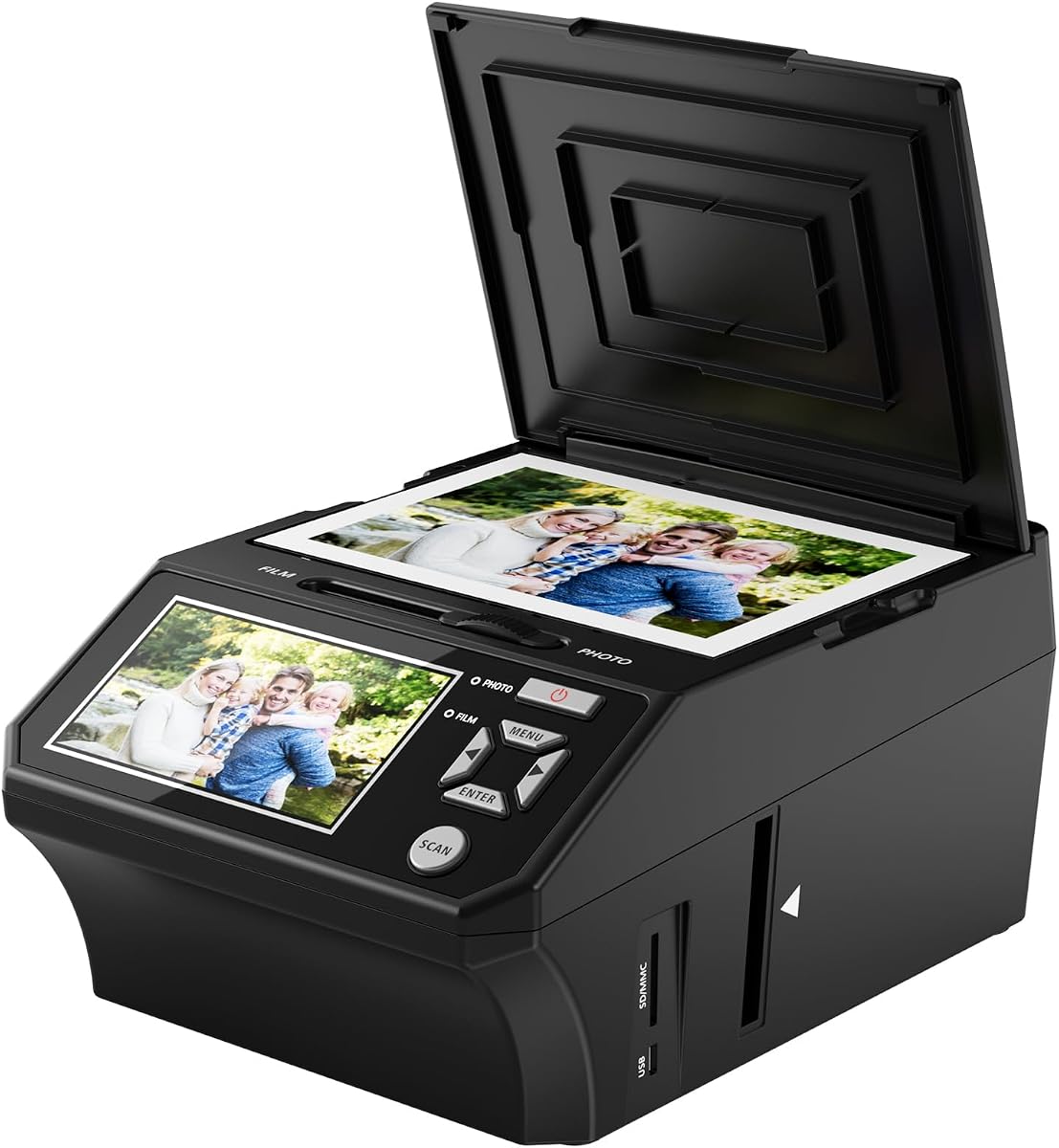


The KODAK Slide N Scan Film & Slide Scanner stands out as a reliable choice for digitizing old memories with a strong 4.3 rating. It features a 22MP sensor and a 5 inch LCD screen that makes viewing and editing straightforward without needing a PC.
We may earn a commission when you buy through this link, at no additional cost to you.
Its quick feeding tray technology allows for continuous loading which speeds up the process when dealing with large collections. The device supports 135 110 and 126mm negatives as well as 50mm slides offering versatility for most common formats.
While the editing features are simple they cover the basics like brightness and color adjustments. The lack of a included SD card is a minor inconvenience since the device supports up to 32GB for storage.
This scanner is ideal for users who want a straightforward workflow to preserve family history. Its user friendly interface ensures even those less tech savvy can convert their film to digital files quickly.
The quick feeding tray minimizes interruptions during scanning sessions allowing you to process multiple frames efficiently without repositioning each one manually.
Support for multiple film types including 135 110 and 126mm negatives plus 50mm slides ensures you can digitize a wide range of your existing collection.
We may earn a commission when you buy through this link, at no additional cost to you.
The Magnasonic All-in-One 24MP Film Scanner offers impressive resolution for capturing fine details from old negatives. With a 4.3 rating it is well regarded for its ability to convert various film types quickly and efficiently.
We may earn a commission when you buy through this link, at no additional cost to you.
Its 5 inch LCD screen provides a clear view for previewing scans directly on the device. The fast loading trays ensure each scan takes less than five seconds making it suitable for extensive archives.
Users can adjust brightness and color correction directly on the scanner which simplifies the workflow significantly. The support for SD cards up to 128GB means you can store thousands of images without needing a computer.
This model is perfect for collectors who prioritize image quality and speed. Although cables like HDMI are sold separately the core functionality remains robust for standalone digitization tasks.
The 24MP resolution ensures that even subtle details in old photos are preserved accurately during the conversion process to digital JPEG files.
No driver installation or software is required allowing you to scan save and view images entirely on the device for a hassle free experience.
We may earn a commission when you buy through this link, at no additional cost to you.
The HP Film & Slide Scanner HPFS500 brings a professional touch to home digitization with its touchscreen interface and standalone capabilities. Rated 4.3 it appeals to users seeking a polished and efficient device for archiving collections.
We may earn a commission when you buy through this link, at no additional cost to you.
The 5 inch all-angle LCD touch screen allows intuitive control over previewing and editing images directly on the scanner. This hands-on approach eliminates the need for additional equipment or complex software setups.
Its 13MP CMOS sensor with 22MP interpolation preserves exceptional clarity in old film. The quick-load tray minimizes downtime during batch scanning which enhances productivity for large scale projects.
While it comes at a higher cost the features justify the investment for serious archivists. The USB-C connectivity ensures modern compatibility making it a forward-looking choice for preserving memories.
The interactive touchscreen lets users adjust scans to their preference directly on the device without needing external tools or computers.
The 13MP CMOS sensor offers high resolution scanning that maintains fine details ensuring digital conversions remain clear and vibrant.
We may earn a commission when you buy through this link, at no additional cost to you.
The KODAK SCANZA Film & Slide Scanner is designed for compact efficiency with support for unique formats like Super 8 and 8mm. With a 4.2 rating it is a solid choice for those with vintage film reels.
We may earn a commission when you buy through this link, at no additional cost to you.
Its 3.5 inch TFT LCD provides adjustable brightness and tilt for comfortable viewing. The included HDMI and USB cables plus AC adapter make it ready to use right out of the box.
One-touch buttons allow for simple scanning and saving which reduces complexity. The included cleaning brush helps avoid marks on scanned images ensuring better quality results over time.
This scanner is great for hobbyists with diverse film formats. While the screen is smaller than others the functionality and included accessories make it a convenient option for home use.
The ability to handle Super 8 and 8mm negatives plus 35mm slides makes it unique among standard scanners for older film collections.
Including HDMI USB AC adapter and cleaning brush ensures you have everything needed to start scanning immediately without extra purchases.
We may earn a commission when you buy through this link, at no additional cost to you.
The KODAK REELS 8mm & Super 8 Film Digitizer stands out by converting motion picture film to 1080p MP4 video files. With a 4.1 rating it offers a specialized solution for users with movie reels.
We may earn a commission when you buy through this link, at no additional cost to you.
The 5 inch LCD screen with touch buttons allows you to align frames and adjust exposure easily. It works with standard reel sizes from 3 to 9 inches providing flexibility for different formats.
Output is saved directly to SD card without needing a computer. The included take-up reel and adapters streamline the loading process ensuring a smooth workflow for digitizing home movies.
This is the best option for those wanting to preserve film as video. The absence of audio means you may need to add sound later but the visual conversion is seamless and high quality.
Unlike still scanners this device converts film reels frame by frame into 1080p HD MP4 files which is ideal for preserving home movies.
The included 7 inch take-up reel and adapters ensure you have all necessary parts to handle various reel sizes without additional costs.
We may earn a commission when you buy through this link, at no additional cost to you.
The Photo Slide & Negative Scanner with 5 Large Screen offers an all-in-one solution for digitizing photos and slides. With a 4.4 rating it is praised for its ease of use and included accessories.
We may earn a commission when you buy through this link, at no additional cost to you.
Its 5 inch HD viewing screen provides vivid clarity for previewing images. The package includes an 8GB SD card plus cleaning brush and power adapter making it ready to scan immediately.
Operating entirely offline means no drivers or apps are required. This makes it perfect for parents or grandparents who want a simple way to convert slides without technical hurdles.
This scanner is ideal for casual users seeking convenience. The 3 year warranty adds peace of mind while the fast scanning speed helps reduce the effort needed to process archives.
Included accessories like the SD card and power adapter mean you can start digitizing memories immediately without extra purchases or setup steps.
Offline operation with intuitive one-touch buttons eliminates the need for computer software making it accessible for non-tech savvy users.
We may earn a commission when you buy through this link, at no additional cost to you.
The KODAK Slide N Scan Max Film Scanner features a generous 7 inch LCD screen that doubles as a digital picture frame. With a 4.2 rating it focuses on efficient workflow and ease of use.
We may earn a commission when you buy through this link, at no additional cost to you.
Its quick-feeding tray allows for continuous scanning without repositioning frames which keeps the process smooth. The one-touch editing features simplify adjustments without complex navigation.
Users can save directly to SDHC cards up to 32GB for portability. The device supports 135 110 and 126mm films offering comprehensive solutions for mixed collections.
This model is excellent for users who value a larger viewing area. The screen's dual purpose as a picture frame makes it a nice addition to any desk or shelf at home.
The quick-feeding tray ensures you do not need to stop and reposition each frame allowing for a smooth uninterrupted digitization process.
The 7 inch tiltable LCD doubles as a digital picture frame letting you share digital conversions even when not actively scanning new images.
We may earn a commission when you buy through this link, at no additional cost to you.
The 22MP Film & Slide Scanner with 5" LCD delivers strong performance at an accessible price point. With a 4.3 rating it is an excellent entry-level device for converting old memories.
We may earn a commission when you buy through this link, at no additional cost to you.
Its 5 inch LCD display offers a wide viewing angle for real-time previewing. The included HDMI and USB cables allow you to view on TV or transfer to PC easily.
One-touch scanning makes the process simple and intuitive. The full accessory kit includes adapters for various formats plus a cleaning brush ensuring you have what you need to start.
This is the top pick for budget-conscious buyers. While it lacks some premium features the core functionality and included accessories provide great value for preserving personal photo collections.
Delivering 22MP resolution and HDMI output at a lower price makes it an affordable choice for families looking to digitize slides.
Including USB HDMI power adapter and cleaning brush ensures you can start scanning right away without buying extra cables or tools.
We may earn a commission when you buy through this link, at no additional cost to you.
The Slide & Negative Film Scanner offers reliable performance with a strong 4.4 rating for its ease of use and warranty coverage. It converts negatives into high-resolution digital files efficiently.
We may earn a commission when you buy through this link, at no additional cost to you.
Its 5 inch LCD screen features an extra-wide viewing angle for clear previews. Gallery mode turns the device into a stylish digital photo frame when scanning is complete.
One-touch scanning simplifies the workflow while the included HDMI cable enables family viewing sessions. The 36 month warranty shows confidence in durability and long-term support.
This scanner is ideal for users wanting reliability and warranty coverage. Its intuitive interface ensures anyone can preserve their photos without dealing with complex settings.
Gallery mode transforms the scanner into a digital photo frame allowing you to display cherished memories continuously when not in use.
The included 36 month warranty ensures you have long-term support and peace of mind regarding the device's durability and performance.
We may earn a commission when you buy through this link, at no additional cost to you.
The HP Film & Slide Scanner features a 7-inch touch display for seamless preview and editing. With a 4.0 rating it offers a professional approach to home digitization for all skill levels.
We may earn a commission when you buy through this link, at no additional cost to you.
Its 13-megapixel CMOS sensor captures fine details from negatives and slides. The quick-feed loading tray paired with a 50mm adapter simplifies processing mixed slide collections.
On-device editing lets you crop and adjust scans directly without extra software. The gallery mode transforms the unit into a digital picture frame for showcasing converted memories.
This model suits users who want a large interactive display. While it ranks lower the features still provide a robust workflow for converting old photos efficiently at home.
The 7-inch color LCD touch display allows seamless preview editing and showcasing of photos directly on the device without technical expertise.
The quick-feed loading tray simplifies scanning of mixed formats allowing users to swiftly process collections without constant manual intervention.
We may earn a commission when you buy through this link, at no additional cost to you.
Selecting the right scanner involves considering resolution, format support, ease of use, and connectivity options to match your collection needs.
Higher resolution sensors like 22MP or 24MP capture more detail from old negatives which is crucial for enlarging or restoring photos. Look for devices that balance resolution with interpolation to avoid unnecessary file bloat.
Prioritize models with proven CMOS sensors to ensure sharp and vibrant conversions without excessive noise.
Ensure the scanner supports your specific film types such as 35mm, 110, 126, or Super 8. Some models handle slides while others focus on negatives or reels so check compatibility carefully.
A versatile unit with multiple adapters saves time and prevents the need for separate devices for different formats.
Devices with one-touch scanning and intuitive on-screen controls reduce the learning curve significantly. Standalone units that do not require a computer make the process accessible for all users.
Look for clear display interfaces that let you adjust brightness and color directly for immediate feedback.
A larger LCD screen like 5 inches or 7 inches improves the preview experience making it easier to check scans before saving. Touchscreens can further simplify navigation through menus and editing options.
Consider models with gallery mode if you want to use the scanner as a photo frame between sessions.
USB and HDMI ports provide flexibility for transferring files to computers or viewing directly on a TV. Modern USB-C connections ensure compatibility with newer devices and faster data transfer.
Verify if cables are included or if you need to purchase them separately to avoid extra costs after buying.
Check the maximum SD card capacity supported to accommodate large collections without constant offloading. Some models offer built-in memory but external cards are usually more cost-effective for expansion.
Ensure the scanner supports FAT32 or EXFAT formats to avoid compatibility issues with different storage cards.
Accessories like film holders, adapters, and cleaning brushes are essential for smooth operation and image quality. Kits that include these items reduce setup time and ensure you can start immediately.
Verify if power adapters and cables are included so you do not need to buy extra hardware separately.
A solid warranty such as one to three years indicates manufacturer confidence and protects your investment against defects. Reliable customer support helps resolve technical issues quickly if they arise.
Prioritize brands known for responsiveness and long-term service to ensure continued satisfaction with your purchase.
Begin by installing a compatible SD card and powering the device. Insert your film or slide into the provided tray, ensuring it is aligned correctly with the guides to avoid skewed images.
Press the scan button and wait for the device to process the frame. Use the on-screen controls to adjust brightness or color if needed, then save the image to the card.
After finishing, clean the scanner with a soft brush to remove dust and gently store the film in a safe dry place to prevent degradation over time.
Most modern scanners allow standalone operation with SD card slots so you can scan save and view images directly. Some models also support USB connections for transferring files to a computer later if needed.
The majority output high-quality JPEG files which are universally compatible with most devices and editing software. Some may offer additional formats but JPEG is the standard for sharing and storing memories easily.
Only specific models designed for motion picture reels can handle Super 8 or 8mm film as they convert frames into video files. Check the product specifications carefully to confirm support for these special formats.
Most units do not include SD cards by default so you will need to purchase a compatible card separately. Ensure it matches the supported capacity and file system requirements listed in the manual.
Scanning times vary by model but many can process a single frame in less than five seconds with fast loading trays. Batch scanning features can further reduce total time when processing entire collections.
Yes, most scanners include built-in editing tools to adjust brightness color and resolution directly on the screen. This allows you to improve image quality without needing external software later.
Yes, versatile models are designed to handle both color and black and white negatives as well as slides. Ensure the product description explicitly mentions support for your specific film type before buying.
Use the included cleaning brush to gently remove dust from the light box and trays to avoid speckles on scans. Store the device in a clean dry place to minimize dust accumulation between sessions.
We reviewed ten top film scanner to digital converter models ranging from budget-friendly to premium options. Each offers distinct features like high resolution, standalone use, and format versatility to suit different needs.
Prioritize resolution and format support if you have extensive or mixed collections while ease of use matters for casual users. Consider connectivity and warranty coverage to ensure long-term reliability.
Prices and availability change frequently so verify current details before purchasing. Choose the device that best matches your collection size and technical comfort for effortless digitization today.