
Brother Sublimation Printer
4.4Editor score
Fast printing speeds
Artspira app integration
Vibrant color output
Finding the right fabric printing printer can transform your creative projects into professional-quality custom apparel and home decor. Whether you are a hobbyist looking to personalize gifts or an entrepreneur launching a clothing brand, the right machine ensures vibrant colors and durable results on various textile materials.
We evaluated ten leading options based on print quality, speed, versatility, and ease of use. Our analysis covers sublimation, direct-to-film, and inkjet fabric sheet solutions. Each product was assessed for its ability to handle different fabrics, ink costs, and overall workflow efficiency to help you make an informed decision.
Each pick highlights unique strengths, from budget-friendly entry models to industrial-grade machines. Note that prices and availability can change frequently. Always check current listings before purchasing to ensure you get the best deal and the latest model specifications for your specific printing requirements.
4.4Editor score

4.9Editor score
5.0Editor score
As an Amazon Associate we earn from qualifying purchases.
This side-by-side comparison reviews all ten products to highlight key differences in print width, ink type, and included accessories for buyers planning to start a custom apparel business.




The DXZ 2026 DTF Printer Bundle stands out as the top choice for serious custom apparel businesses. With a near-perfect rating, this machine delivers professional results on every fabric type. Its standout quality is the true 14-inch print width, allowing you to print larger designs without splicing or outsourcing.
We may earn a commission when you buy through this link, at no additional cost to you.
Performance is driven by the F1080 printhead, which achieves ultra-sharp details and vibrant colors at speeds up to 500 mm/s. This efficiency translates to higher daily throughput for your business. The vacation-proof auto maintenance system ensures that your printer remains in top condition even when you are not using it for several days.
While the upfront cost is higher than entry-level models, the included two-year ink supply and comprehensive warranty offset the expense. You receive five bottles of ink and powder regularly, reducing long-term operational costs. The only trade-off is the need for a dedicated space to accommodate the machine and its accessories.
This printer is ideal for entrepreneurs looking to scale their custom T-shirt business quickly. It handles everything from kids' wear to adult plus sizes on a single machine. For those seeking reliability and minimal maintenance, the DXZ 2026 bundle is the clear recommendation.
If you need a printer that handles high volumes without constant manual maintenance, this model is unmatched. The 14-inch width removes the need to splice prints for larger garments, saving time and material. It is a robust investment for any growing apparel brand.
The support team is available within 24 hours to resolve installation or printing issues, ensuring minimal downtime. The included powder and ink are calibrated for the machine, ensuring consistent results from day one. This setup is perfect for users who want to focus on design rather than machine maintenance.
The automated maintenance and wide print width significantly reduce setup time and allow for more orders per day.
The included two-year ink supply lowers the cost per print, making it highly economical for high-volume production.
We may earn a commission when you buy through this link, at no additional cost to you.
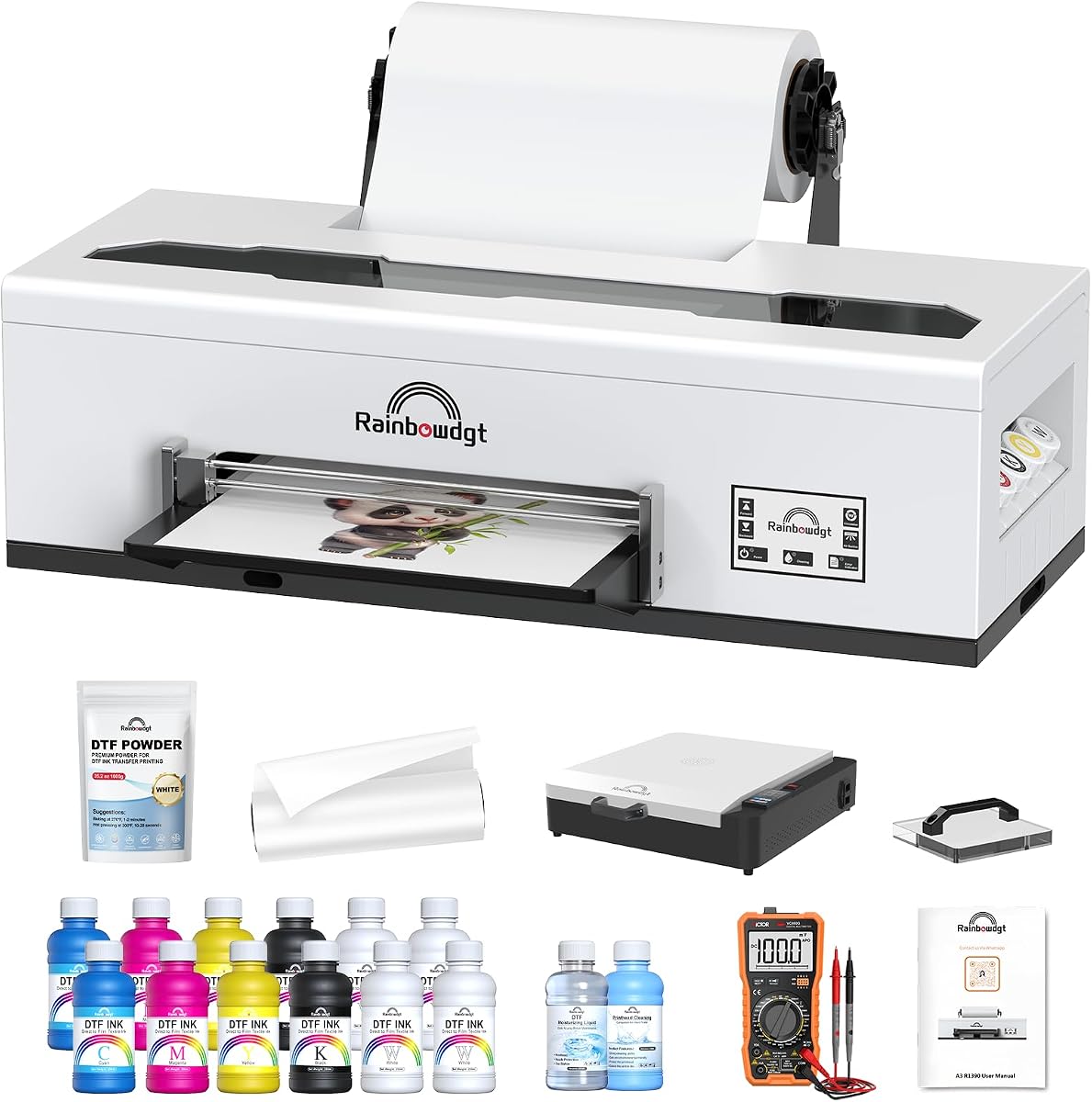
The RAINBOWDGT R1390 bundle offers a perfect 5.0 rating for its exceptional build quality and complete setup. It delivers professional-grade photorealistic printing suitable for launching a high-end custom apparel business. The integrated heating system cures ink instantly to prevent smudging.
We may earn a commission when you buy through this link, at no additional cost to you.
This bundle includes the printer, curing oven, and essential supplies like ink, film, and powder. The smart adsorption system keeps film flat, preventing wrinkles and printhead scratches during printing. The advanced nozzle protection ensures stable performance even during long idle periods.
Users may experience items shipping in multiple packages due to weight, but the comprehensive kit simplifies the startup process. The lifetime remote technical assistance provides peace of mind for new business owners. This machine is a premium choice for those wanting a turnkey solution.
If you are serious about quality and want a system that handles dark fabrics and light fabrics equally well, this is the top choice. The 100% true-to-image color reproduction ensures customer satisfaction. It is perfect for small studios or growing brands.
The vacuum adsorption system is particularly effective at handling difficult fabrics like velvet or heavy cotton. It ensures the film adheres smoothly without air bubbles. This level of detail in the printing process is what separates this machine from standard DTF printers.
The rapid heating feature reduces the time between printing and powder application, increasing workflow speed. With the 2-year ink supply included, you have a solid foundation for your first year of operations. The support team is highly responsive to technical queries.
The photorealistic quality and rapid heating ensure every print looks studio-ready and durable enough for multiple washes.
Included oven and supplies mean you can start printing and curing transfers immediately after unboxing the hardware.
We may earn a commission when you buy through this link, at no additional cost to you.
The Brother Sublimation Printer is the best budget option for those new to custom printing. With a 4.4 rating, it offers a great balance of price and performance. It works seamlessly with the Artspira app to create professional designs on the go.
We may earn a commission when you buy through this link, at no additional cost to you.
Its fast printing speeds allow you to quickly create custom projects like mugs, shirts, and tumblers. The Brother genuine sublimation ink ensures vibrant, long-lasting results that stay bright after multiple washes. However, you will need to purchase a heat press separately to complete the transfer.
This machine is restricted to polyester-coated items, which limits fabric choices compared to DTF printers. But for those focusing on accessories or polyester apparel, the workflow is streamlined and reliable. The low maintenance requirements make it ideal for side businesses.
Choose this printer if you are on a tight budget but need reliable performance for sublimation projects. The Artspira app offers over 100 designs, saving you time on graphic design. It is a solid starting point for DIY crafters.
The ink converts into bright colors upon heating, ensuring rich results on your projects. The process is simple enough for beginners yet robust enough for small commercial production. It avoids the complexity of DTF maintenance while delivering excellent color saturation.
You can save up to 20 printing images in the app for quick access. The machine is designed for US voltage, so ensure compatibility if you are outside that region. Overall, it is a practical choice for hobbyists and small sellers alike.
Access to over 100 sublimation designs in the Artspira app helps beginners create professional-looking items instantly.
Affordable upfront costs and low ink expenses make this an ideal entry point for testing the market.
We may earn a commission when you buy through this link, at no additional cost to you.
This bundle is identical to the top premium pick, offering a comprehensive solution for apparel businesses. It includes the printer, oven, ink, film, and powder for immediate startup. The 2880 DPI resolution ensures vivid details on every garment.
We may earn a commission when you buy through this link, at no additional cost to you.
The smart adsorption system prevents film wrinkles, while the rapid heating cures ink to prevent smudging. Roll-to-roll printing eliminates paper jams, making it suitable for high-volume workflows. The 6-month warranty and lifetime support provide security.
While it is a robust machine, the initial setup may take time to configure properly. You will need to learn the software and maintenance routines. But the investment pays off with consistent quality and fewer interruptions.
This printer is ideal for sellers who need to produce custom T-shirts, hoodies, and hats quickly. It handles cotton and denim without pretreatment. The complete kit ensures you have everything to start selling right away.
The maintenance system keeps white ink flowing smoothly, preventing common clogging issues. With two years of ink included, you save significantly on consumables. It is a powerful tool for online sellers and studios.
The packaging ships in multiple boxes due to the large components. Ensure you have space for the oven and printer. The remote technical assistance helps guide you through any installation challenges easily.
Advanced maintenance prevents clogs, ensuring your printer stays ready for production even during long idle periods.
Prints on cotton, polyester, and leather, making it suitable for a wide range of apparel products.
We may earn a commission when you buy through this link, at no additional cost to you.
The InkSonic A3 R1390 offers a strong combination of features and dedicated support. With a high rating, it is designed for small businesses and custom apparel makers. The 13-inch width is suitable for most standard T-shirt designs.
We may earn a commission when you buy through this link, at no additional cost to you.
Its standout feature is 24/7 technical guidance, including phone assistance and installation videos. This support helps beginners build a confident workflow. The R1390 includes premium ink and consumables for smoother printing and color consistency.
The 3-in-1 white ink protection system reduces settling, ensuring consistent white layers. Adjustable air suction keeps the film smooth, reducing daily errors. It supports cotton, denim, and leather, making it versatile for various apparel needs.
Choose this if you value ongoing assistance over independent operation. The support center is California-based, ensuring quality service. It is ideal for home studios that need reliable technical help.
The continuous ink supply system reduces mess and waste. The 2026 RIP software ensures accurate color mapping for professional results. This bundle provides a clear path to professional-quality transfers.
You will need to configure the oven separately for curing. The maintenance routines are detailed but straightforward. Overall, it is a great choice for those who want peace of mind with expert help.
24/7 one-on-one technical guidance helps you troubleshoot issues quickly and maintain high print quality.
Matched ink and film ensure consistent results, minimizing trial and error for new users.
We may earn a commission when you buy through this link, at no additional cost to you.
The Brother PrintModa Studio prints directly onto fabric rolls, eliminating transfers. It is great for home decor and custom home banners. With a 3.7 rating, it balances creative features with practical limitations.
We may earn a commission when you buy through this link, at no additional cost to you.
It features wireless connectivity to edit designs on a laptop before printing. The Artspira app provides templates like labels and quilt blocks. You can switch between rich color and eco mode depending on the design needs.
While it offers fast speeds compared to traditional stores, it requires specific fabric rolls for best results. The two paper trays allow for quick switching between paper and fabric. It is ideal for crafters who want instant results.
This printer suits those focused on small decor projects rather than mass apparel production. The templates help you create quickly without advanced design skills. It is a unique option for home-based creatives.
The vibrant color output ensures your projects stand out. It handles various fabric types for personal designs like tote bags. The setup is user-friendly for those new to fabric printing.
It avoids the heat press step required for sublimation or DTF. However, the fabric must be compatible with its ink system. This makes it a niche choice for specific craft applications.
Access to hundreds of templates allows you to create professional-looking fabric designs quickly.
Design on your laptop and print directly without connecting cables for a streamlined workspace.
We may earn a commission when you buy through this link, at no additional cost to you.
The Epson SureColor F170 bundle is a reliable choice for sublimation printing. With a 4.5 rating, it delivers outstanding clarity thanks to the PrecisionCore printhead. It includes a full set of sublimation ink for immediate use.
We may earn a commission when you buy through this link, at no additional cost to you.
It supports versatile media with a 150-sheet auto-feed tray. The closed tray keeps paper dust-free for cleaner prints. The ink bottles are high-capacity, saving money on frequent replacements.
You can print from iOS or Android devices using the Epson iPrint app. However, it does not support direct email or camera connections. This makes it ideal for mobile designers and small shops.
This bundle is perfect for those who want reliable Epson quality for custom gifts and apparel. The ink saturation is consistent, ensuring high contrast. It is a solid investment for steady production.
The Wi-Fi and USB connectivity options offer flexibility. You must ensure the ink is loaded before return to avoid leaks. The bundle includes everything needed to start printing right away.
It is designed for 120-volt US markets. The precision droplet control ensures crisp edges on all transfers. This model is great for hobbyists and small business owners.
PrecisionCore technology delivers high contrast and saturation for professional sublimation transfers.
Wi-Fi and mobile app support allow you to print designs directly from your phone or tablet.
We may earn a commission when you buy through this link, at no additional cost to you.
The Spark F13 is designed for home studios and small shops. It handles 13-inch prints for various apparel items. With a 4.0 rating, it offers a balanced approach to DTF printing for beginners.
We may earn a commission when you buy through this link, at no additional cost to you.
It creates full-color transfers without garment pretreatment. The L1800 printhead delivers fine details and smooth gradients. G7-certified color performance ensures accurate reproduction for custom artwork.
The vacuum platen keeps film flat to prevent head strikes. Replacement parts are provided during coverage to lower costs. The automatic cleaning helps limit clogs during downtime.
This model is ideal for those transitioning from hobbyist to small business. It avoids the high costs of larger commercial machines. The guidance through the first print helps new users start confidently.
It supports white ink circulation to maintain color brightness. You will need to manage routine maintenance to keep it running smoothly. The lifetime technical assistance provides added security.
The setup videos and manuals simplify the process. It is a versatile machine for gifts and personalized orders. The vacuum helps maintain stable prints even on thicker fabrics.
Designed to reduce long-term ownership costs through automatic cleaning and low-cost replacement parts.
G7 certification ensures your prints match the original design with high fidelity and vibrancy.
We may earn a commission when you buy through this link, at no additional cost to you.
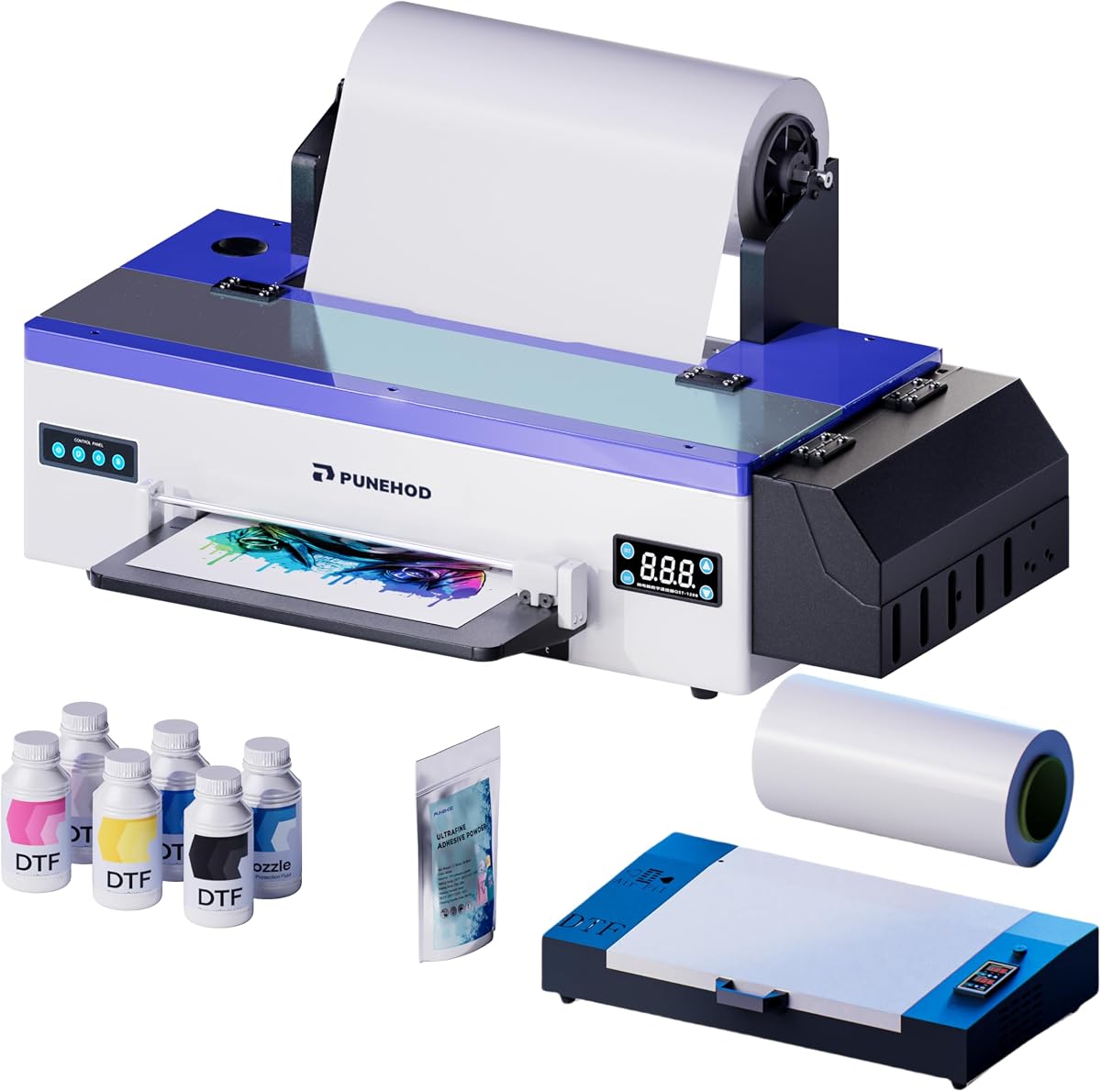
The PUNEHOD A3 L1800 features an upgraded roll feeder system. With a 4.6 rating, it is excellent for mass printing orders. The roll design cuts film waste by 30 percent compared to flat sheets.
We may earn a commission when you buy through this link, at no additional cost to you.
It includes an automatic cutter for precise custom pattern sizes. The white ink system ensures consistent solid layers on all fabrics. You get a full kit including ink, powder, and tutorials.
The printer supports nearly all textile materials like cotton and leather. It eliminates complicated pretreatment steps for both light and dark fabrics. The automatic cutter improves workflow efficiency significantly.
This machine is ideal for formal commercial production or high-volume DIY projects. The ink arrives separately to prevent leakage during transit. You must ensure you have the space for the roll feeder.
It balances speed and quality for versatile applications. The maintenance functions keep the head protected during long runs. It is a robust choice for serious garment printing businesses.
The package includes all supplies for immediate use. You can print on shoes and pillows as well. The roll design helps lower long-term production costs effectively.
The roll-to-roll design reduces film waste by 30 percent, saving money over time.
Prints on leather, cotton, and polyester without complex pretreatment for flexible production.
We may earn a commission when you buy through this link, at no additional cost to you.
EQ Printables sheets offer the simplest way to print on fabric using an inkjet printer. With a 4.7 rating, they deliver photo-quality results. The fabric is soft and never rubbery, making it ideal for clothing.
We may earn a commission when you buy through this link, at no additional cost to you.
You can scan in photos or flowers to create custom designs easily. The sheets come in 8.5×11 inches, perfect for T-shirts. No special equipment or heat press is required beyond a standard printer.
These sheets are great for one-off projects or personalized gifts. The cost per sheet is higher than bulk transfer methods, but setup is zero. You just print, cut, and iron on the design.
Choose these if you want a quick solution without buying a dedicated printer. They work best on light fabrics and small designs. It is a flexible option for occasional crafters.
The fabric holds up well to washing. You can print text, images, and pictures with high clarity. The simplicity makes it accessible for anyone.
The 15-sheet pack is convenient for small batches. The application process is straightforward. It avoids the complexity of other printing methods.
Use any inkjet printer to create custom designs on soft fabric without buying specialized hardware.
Perfect for one-off personalized gifts like bags or shirts without bulk costs.
We may earn a commission when you buy through this link, at no additional cost to you.
Selecting the right printer depends on your budget, desired output, and technical comfort level.
Different technologies like sublimation, DTF, or inkjet fabric sheets offer various benefits. Sublimation works best on polyester, while DTF works on cotton and blends. Choose based on your fabric needs.
DTF is versatile for mixed apparel, while sublimation is great for polyester gear.
Print width determines the maximum size of your design. Standard A3 is 13 inches, while wider models like 14-inch offer more flexibility. Ensure the machine fits your workspace.
Choose a width that accommodates your largest design without needing to splice pieces together.
Long-term costs include ink, film, and maintenance supplies. Look for bundles that include ink or offer subscriptions to save money. Auto maintenance systems reduce the risk of clogs.
Prioritize models with auto-cleaning to extend the life of your expensive printheads.
User-friendly software simplifies design and printing. Apps like Artspira allow you to create directly from your device. Check for RIP software that manages color profiles effectively.
Simple controls and clear interfaces speed up your workflow and reduce errors.
Technical support is vital for new printers. Look for 24/7 access and clear warranty terms. Support teams can help with troubleshooting and setup issues quickly.
Strong warranty coverage ensures your investment is protected against mechanical failures.
Consider how the printer fits into your existing workflow. Some bundles include ovens or heat presses for complete setups. Ensure compatibility with your current design tools.
A complete bundle reduces the need for separate purchases and streamlines your process.
High-volume production requires faster speeds and reliable auto-feed systems. Models with roll feeders handle continuous printing efficiently. Ensure the machine can handle your expected order load.
Invest in high-speed machines if you plan to fulfill large commercial orders regularly.
Determine how much you can afford upfront. While expensive models offer more features, entry-level options like sublimation printers are cost-effective. Balance your budget with your business goals.
Start with a budget model if you are just testing the market before upgrading later.
First, unbox and install the printer carefully, ensuring all cables are connected securely. Follow the manufacturer's guide for the initial setup to prevent hardware damage.
Next, calibrate the color settings using the provided software. Run test prints on scrap material to ensure the ink flows smoothly and colors are accurate before starting your project.
Finally, perform regular maintenance like cleaning the printhead and moisturizing it during idle periods. Proper care extends the printer's lifespan and keeps your prints looking sharp and professional.
The Brother Sublimation Printer is ideal for beginners due to its ease of use and app integration. Alternatively, EQ Printables sheets require no new machine. These options offer low entry barriers.
Yes, DTF printers like the DXZ 2026 and RAINBOWDGT R1390 work on cotton. Sublimation printers generally require polyester. Check the material compatibility before purchasing.
DTF ink typically lasts depending on print volume. Bundles often include a two-year supply. You can order more based on your business needs and production frequency.
Yes, a heat press is required to transfer designs for sublimation. It activates the ink to bond with polyester items. Ensure you budget for this additional equipment.
DTF printers need regular printhead cleaning and white ink circulation. Auto-maintenance features help prevent clogs. Follow the scheduled cleaning routine to ensure longevity.
Yes, but only with special fabric sheets like EQ Printables. The print is not as durable as DTF or sublimation. This method is best for occasional use.
With proper maintenance, DTF and sublimation printers can last several years. Regular cleaning and using genuine ink improve durability. Warranty terms also indicate manufacturer confidence.
Most models like Brother and Epson support Mac. Check the software compatibility before buying. Ensure your OS version meets the minimum requirements for seamless printing.
In conclusion, the DXZ 2026 bundle leads for business growth, while the Brother Sublimation Printer offers the best budget entry. The RAINBOWDGT R1390 provides top-tier quality for premium needs.
Prioritize features like print width and maintenance based on your project scale. A well-maintained machine ensures consistent results that satisfy your customers every time.
Always verify current prices and availability on Amazon before purchasing. Prices fluctuate, and bundles may change. Choose a printer that fits your current workflow and future goals.