
Excel/Word/Power Point/Windows Mouse pad
4.7Editor score
Covers four major software suites
Large practical size for keyboard
Waterproof surface for easy cleaning
Finding the right Excel Cheat Sheet Desk Pad can transform how you work daily. A good pad combines large surface area with clear shortcut references to boost productivity. Look for durable materials and non-slip bases to keep your workspace organized and efficient.
We evaluated ten top-rated desk pads based on size, print clarity, and material quality. Each option offers unique features like stitched edges or waterproof surfaces. Our comparison highlights the best choices for professionals, students, and gamers alike.
Each pick below showcases specific strengths tailored to different workflow demands. Prices and availability change frequently, so check current listings before purchasing. Use this guide to select a pad that matches your desk size and software needs accurately.
4.7Editor score

4.7Editor score

4.9Editor score
As an Amazon Associate we earn from qualifying purchases.
This table provides a side-by-side overview of all ten products. Compare key specifications like dimensions, surface type, and special features to decide which pad fits your desk setup best.


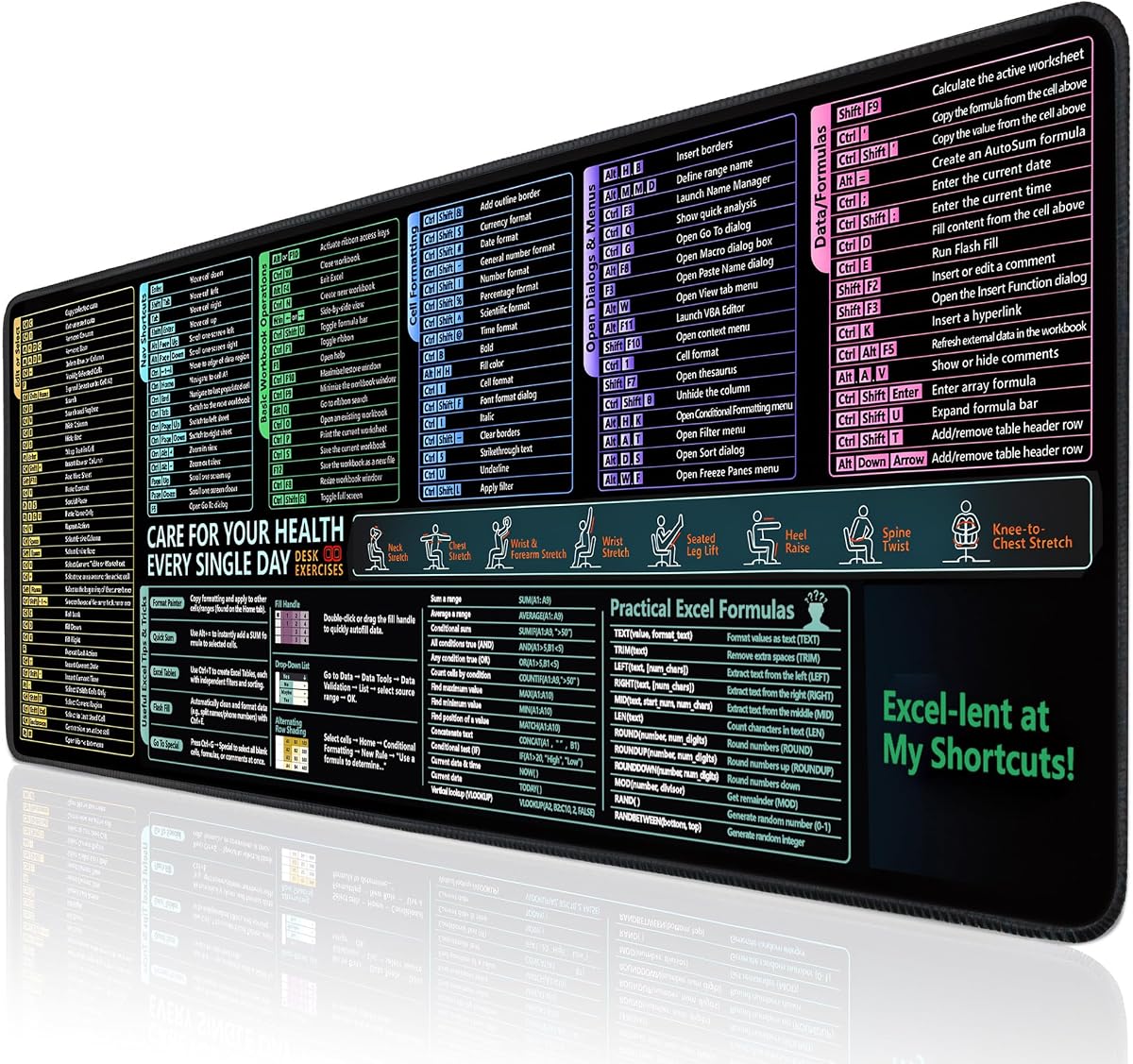


The Pixiecube Excel Cheat Sheet Desk Pad stands out with its thoughtful layout and helpful extras. Rated highly by users, it combines a spacious surface with clear navigation and formatting references. This makes it ideal for professionals who need quick access to commands without interrupting their workflow.
We may earn a commission when you buy through this link, at no additional cost to you.
Its surface uses densely woven micro-weave fabric for precise mouse tracking while remaining comfortable for long hours. The non-slip rubber base keeps the mat steady even during intense typing sessions. Additionally, the built-in desk-exercise diagrams provide a unique wellness touch that most competitors lack.
While it focuses primarily on Excel, the depth of information covers most common needs including formulas and tricks. The water-resistant surface handles spills well, though it is not fully waterproof like some gaming mats. Stitched edges ensure longevity by preventing the fabric from peeling over time.
This pad is best suited for office workers and students who prioritize organization and durability. Its unique blend of productivity tools and wellness features sets it apart in a crowded market. If you value a clean workspace with added health benefits, this is a top choice.
The inclusion of desk exercise diagrams encourages users to stretch and recharge, reducing strain during long work sessions.
Densely woven fabric supports fast and accurate mouse movement, making it suitable for both spreadsheet work and casual gaming.
We may earn a commission when you buy through this link, at no additional cost to you.
This mouse pad offers exceptional value by including shortcuts for multiple Microsoft Office applications. Users appreciate the broad coverage that helps switch between programs seamlessly. It provides a practical solution for general office tasks without breaking the budget.
We may earn a commission when you buy through this link, at no additional cost to you.
The waterproof surface layer is a standout feature for protecting against accidental spills. Cleaning is simple with a cloth, ensuring the pad stays fresh even in busy environments. The smooth fabric allows for accurate mouse movements essential for detailed data entry work.
While the size is standard rather than extra large, it still accommodates a keyboard and mouse comfortably. The reinforced edges help maintain shape over time, though the print clarity may not be as vibrant as premium models. It serves well as a basic reference tool.
Ideal for students or casual users who need general shortcuts without high cost. The multi-software approach makes it versatile for various daily tasks. If you need a durable and affordable option for mixed application use, this mat fits the bill.
Includes key shortcuts for Word PowerPoint and Windows expanding utility beyond just spreadsheets for broader office efficiency.
The waterproof top layer allows for easy cleaning and long-term durability against common desk spills and stains.
We may earn a commission when you buy through this link, at no additional cost to you.
This desk pad organizes Excel tips into nine distinct functional modules for quick reference. It is designed to help users handle spreadsheets more efficiently without memorizing every command. The layout is straightforward and focuses on core functionalities needed daily.
We may earn a commission when you buy through this link, at no additional cost to you.
Advanced inkjet technology ensures graphics remain bright and clear without any odor. The waterproof cloth surface provides a silky smooth feel for mouse control and is easy to wipe clean. Double seam technology enhances durability ensuring the edges stay intact longer.
While it covers essential categories, it may lack depth for advanced users seeking complex formulas. The compact XL size fits most desks well but offers less surface than larger premium pads. It serves as a reliable tool for standard data entry tasks.
Best for individuals who need a no-fuss reference sheet at an accessible price. The clarity of print and waterproof nature make it suitable for varied environments. If you need functional basics without extra bells and whistles this is a strong contender.
Groups common Excel tips and functions into nine categories making navigation intuitive for beginners and intermediate users.
Uses advanced inkjet technology to ensure graphics are clear without unpleasant smells often found in cheaper mats.
We may earn a commission when you buy through this link, at no additional cost to you.
This Excel pad offers exceptional workspace coverage with a massive 35.5 by 15.7-inch surface. It is perfect for professionals who use large mechanical keyboards or dual mouse setups. The leather-like texture adds a touch of elegance to any office desk.
We may earn a commission when you buy through this link, at no additional cost to you.
Crafted with a natural rubber base and sleek water-resistant surface it protects against scratches and spills. Cleaning is effortless with a simple wipe ensuring it maintains a professional look over time. The design doubles as a desk blotter for added versatility.
While the size is ideal for large desks it may overwhelm smaller home office setups. The premium materials justify the cost but require more careful placement to maximize utility. It supports high productivity by reducing the need to scroll constantly.
Suited for executives or power users with spacious desks who value aesthetics and function. The spill-repellent feature ensures longevity in busy environments. If you need a premium giant mat to command your workspace this is an excellent investment.
The leather surface and natural rubber base safeguard your desk from scratches, stains, and wear while looking stylish.
A simple wipe clears daily spills easily extending the service life and maintaining appearance through regular use.
We may earn a commission when you buy through this link, at no additional cost to you.
This pad expands utility by compiling Excel and Word tips into twelve distinct skill categories. It includes computer FN keys to help users handle spreadsheets and documents more efficiently. The focus on two major apps makes it versatile for mixed workflows.
We may earn a commission when you buy through this link, at no additional cost to you.
Advanced inkjet technology produces bright and clear graphics without any odor. The waterproof cloth surface provides a smooth feel for mouse control and is easy to maintain. Double seam technology ensures long service life for daily office use.
While the content is useful it may not cover deep Excel functions compared to specialized guides. The waterproof nature and non-slip base provide practical benefits for everyday tasks. It serves as a solid reference for multi-tasking professionals.
Ideal for users who work heavily with both documents and spreadsheets. The combination of features offers good value for those needing cross-application shortcuts. If you want a balanced guide for Word and Excel this is a practical option.
Compiles tips for both Excel and Word helping users manage mixed document and data tasks efficiently.
Includes meaning of computer FN keys to aid in handling spreadsheets and device-specific shortcuts effectively.
We may earn a commission when you buy through this link, at no additional cost to you.
This desk pad combines Excel shortcuts with gaming performance features for versatile use. It organizes shortcuts into seven key zones like navigation and data for quick access. The high-contrast design ensures legibility even in varied lighting conditions.
We may earn a commission when you buy through this link, at no additional cost to you.
Thermal transfer printing delivers vivid colors and crisp details that last through daily use. Precision-stitched edges lock the shape preventing lifting or fraying common in cheaper mats. The rubber base ensures lag-free and accurate tracking for both work and play.
While it includes extensive Excel sections it is tailored for users who also game. The buttery-smooth base makes it a pleasure to use for mouse-intensive tasks. It offers a balanced blend of utility and performance without compromise.
Best suited for users who want a dual-purpose mat for spreadsheets and gaming. The clear printing and durable edges make it a reliable daily driver. If you need a workspace that handles both data and gaming this is a great fit.
Seven-zone layout covers specific Excel areas like navigation and data helping you find shortcuts instantly.
Designed to deliver lag-free tracking ensuring smooth cursor movement for both work and gaming needs.
We may earn a commission when you buy through this link, at no additional cost to you.
This Excel mouse pad features color-coded hotkeys and a detailed formula guide for complex tasks. It includes essential calculations like VLOOKUP and SUMIF to save time on reference searching. The design prioritizes clarity and durability for professional use.
We may earn a commission when you buy through this link, at no additional cost to you.
Advanced thermal-transfer printing ensures sharp text that remains legible after months of use. The soft-smooth surface cushions your wrists and shields your table from scratches effectively. Heavy-duty stitched edges prevent peeling even with frequent cleaning and wiping.
While it focuses deeply on Excel it may lack broader office software coverage. The premium build quality and thoughtful design justify the higher price point for serious users. It transforms a standard workspace into a functional productivity hub efficiently.
Ideal for data analysts and accountants who need precise formula access. The cushioned surface adds ergonomic value for long work sessions. If you want a robust reference that withstands heavy daily use this is a top pick.
Practical spreadsheet functions and formula guides covering complex calculation formulas at a glance.
Soft-smooth surface cushions your wrists and shields your table from scratches and everyday abrasion.
We may earn a commission when you buy through this link, at no additional cost to you.
This pad keeps shortcuts handy with a clean and practical design for office use. It focuses on frequently used spreadsheet shortcuts and function keys to reduce repeated searching. The layout is straightforward allowing for quick reference during data entry tasks.
We may earn a commission when you buy through this link, at no additional cost to you.
The smooth water-resistant surface protects against spills and ensures precise mouse movement. Reinforced stitched edges help prevent fraying and maintain a neat appearance over time. The rubber backing keeps the pad stable during active daily work sessions.
While the surface is functional it lacks the vibrant graphics of premium models. The standard size fits most desks well but may not cover enough area for large setups. It serves as a reliable tool for those prioritizing simplicity.
Best for users who want a no-nonsense reference without extra complexity. The water-resistant nature makes it practical for shared workspaces. If you value straightforward utility and budget-friendly pricing this is a solid choice.
Keep frequently used spreadsheet shortcuts directly on your desk to reduce repeated searching and work efficiently.
Reinforced stitched edges help prevent fraying ensuring the surface stays intact and clean during daily use.
We may earn a commission when you buy through this link, at no additional cost to you.
This large desk mat offers an expansive surface that accommodates keyboards and desks comfortably. The lycra material provides a smooth glide that optimizes speed for mouse control during work. It is designed to keep your desktop clean while protecting it from scratches.
We may earn a commission when you buy through this link, at no additional cost to you.
High-quality stitched edges ensure the pad maintains its shape without deformation over time. The flexible rubber base allows it to be rolled up easily for transport or storage. A wet cloth can clean it effectively maintaining its appearance for long periods.
While the size is great for large setups it may require space planning for smaller desks. The fabric surface feels luxurious but may absorb stains more easily than waterproof options. It serves as both an organizer and a protector efficiently.
Ideal for users with large desks who prioritize surface quality and space. The easy cleaning and portable design make it versatile for different offices. If you want a stylish and functional pad this fits well with modern setups.
Comfortable lycra surface makes your mice glide effortlessly providing optimum speed and accurate control.
Flexible enough to be rolled up for easy transport making it easy to move around offices easily.
We may earn a commission when you buy through this link, at no additional cost to you.
This small mouse pad is designed for portability and frequent travel between locations. It features essential shortcuts for Excel Word and PowerPoint to support workflow efficiency anywhere. The compact size fits easily in bags or laptop cases for professionals.
We may earn a commission when you buy through this link, at no additional cost to you.
The finely-textured surface ensures precise mouse control allowing smooth and accurate movement. The non-slip rubber base keeps it securely in place while stitched edges reduce fraying over time. Clear print quality remains legible through regular cleaning and use.
While compact it is not suitable for full desktop setups with large keyboards. The multi-software approach adds value for general office users who move around frequently. It serves as an essential tool for travelers and students.
Best for commuters and students who need a quick reference on the go. The durable and non-slip design ensures reliability wherever you use it. If you need a portable guide that supports workflow efficiency this is perfect.
Compact size fits in bags or laptop cases suitable for professionals students or travelers on the go.
Features essential shortcut keys for Excel Word PowerPoint and Windows for quick reference support.
We may earn a commission when you buy through this link, at no additional cost to you.
Choosing the right pad requires balancing size, layout, and material quality to fit your daily workflow needs.
Measure your desk before buying to ensure the pad fits comfortably with your keyboard and mouse. XL sizes like 35.5 inches provide ample space for multiple devices while standard sizes save room in small offices.
Always check the product dimensions against your available workspace to avoid a cluttered or cramped setup.
Look for clear organization of formulas and hotkeys to avoid searching for the right command during work. Some mats include Excel only while others cover Word and PowerPoint for broader utility in document-heavy tasks.
Prioritize pads with high-contrast text and logical grouping to ensure quick and accurate referencing at a glance.
Opt for mats with stitched edges to prevent fraying and maintain a professional appearance over time. Waterproof surfaces are crucial for spills in office environments while soft fabric enhances comfort for long typing sessions.
Consider the surface texture for mouse tracking speed as some gamers prefer faster movement while others need precision.
A strong natural rubber base is essential to keep the pad in place during active typing or gaming movements. If the base is too light the pad may shift causing frustration and disrupting your workflow during critical tasks.
Test the grip by pressing down firmly to ensure the mat stays flat and stable even under heavy use.
High-resolution printing ensures that formulas remain legible after months of cleaning and daily use. Thermal transfer or UV-resistant inks resist fading better than standard prints that blur over time with wear.
Check reviews regarding print durability to ensure the shortcuts stay sharp even with regular wiping and cleaning.
If you travel frequently consider a compact design that fits in a laptop bag for on-the-go reference. Larger mats offer more workspace but may be bulky and difficult to transport between home and office environments.
Decide if you need a desktop anchor or a portable tool to guide your purchase based on your work habits.
Compare features like extra wellness diagrams or multi-software support against the price to find the best value. Some cheaper mats may lack durability or clarity so invest in quality if you use it daily for work.
Look for sales or bundles that offer added value without compromising on essential features like stitching or grip.
Some pads include soft surfaces or built-in diagrams to help stretch and relieve wrist strain during long shifts. Ergonomic designs can improve comfort significantly for users who spend hours typing and navigating spreadsheets daily.
Evaluate the thickness and material to ensure it provides adequate cushioning for your wrists and hands.
Place the mat on a flat surface to ensure even alignment with your keyboard and mouse. Align the printed sections so that the most frequently used shortcuts are within easy reach of your right hand.
To clean spills, simply wipe the surface with a damp cloth and let it air dry naturally. Avoid using harsh chemicals or abrasive scrubbers as these may damage the printed graphics and protective coating.
Store the mat flat or rolled with the print facing out to prevent creases and permanent folds. Avoid exposing the pad to direct sunlight for extended periods as UV rays may cause colors to fade over time.
Yes, these pads are compatible with most optical and wireless mice. The textured surface helps track movement accurately without needing a separate mouse pad. Just ensure your mouse sensor is clean for optimal performance on the fabric surface.
Absolutely, many users choose these mats specifically for dual-purpose use. The smooth surface allows for quick movement while the layout helps during data entry breaks. It is a versatile option for those who mix productivity with leisure.
It is recommended to wipe the surface weekly to remove dust and oils from hands. If spills occur, clean them immediately to prevent stains from setting into the fabric. Regular maintenance ensures the print stays clear for longer.
Yes, the layout is generally centered or symmetrical enough for left-handed use. However, you might find more comfort by rotating the mat to position shortcuts closer to your left hand. Most designs accommodate flexible positioning without issues.
Most of these mats are flat without a raised wrist rest to allow full keyboard use. However, the soft surface provides cushioning similar to a standard pad. If you need a dedicated rest, you may need to buy a separate ergonomic accessory.
Flexible models with rubber bases can be rolled temporarily but should not be stored rolled for long periods. Prolonged rolling may cause the rubber to crack or the print to crease. It is best to flatten it out before use to maintain shape.
High-quality thermal transfer inks resist fading even with regular wiping. However, aggressive scrubbing or harsh chemicals may degrade the print over time. Gentle cleaning with a damp cloth ensures the text remains legible for years.
A desk pad offers a larger surface area that covers both your mouse and keyboard area. This extra space allows for better ergonomics and organization compared to a standard mouse-only pad. It protects the entire desk surface from scratches and spills.
The Pixiecube and Excel Cheat Sheet options with Formulas stand out for their detailed layouts and premium materials. These choices offer the best blend of utility, clarity, and comfort for dedicated spreadsheet professionals.
When selecting a mat, prioritize size and surface quality to match your specific workflow needs. A larger pad can improve efficiency while a durable base ensures stability during intense work sessions.
Prices and availability change often so check current listings before finalizing your purchase. Use this guide to find a product that enhances your productivity and desk setup effectively.