
TP-Link AV600 Powerline Ethernet Adapter Kit with 100 Mbps Port
4.2Editor score
Compact nano size design
Plug and play setup
Energy saving power mode
This guide compares the top 10 Ethernet Line Extender options for 2026, analyzing speed, range, and reliability to help you choose the perfect networking
Finding the right Ethernet Line Extender can transform your home or office network by overcoming physical barriers and distance limitations. These devices allow you to extend wired connectivity without running new cables through walls or ceilings. Whether you need to reach a basement, attic, or remote office, choosing the correct extender ensures stable and secure data transmission for all your connected devices.
We evaluated ten leading Ethernet Line Extender models based on their performance metrics, installation ease, and compatibility with existing infrastructure. Our analysis considers powerline adapters that use electrical wiring, VDSL extenders that leverage phone lines, and specialized kits designed for long-range industrial applications. Each product was reviewed for speed capabilities, distance limits, and real-world reliability under various conditions.
Each pick in this guide highlights specific strengths and ideal use cases to help you match a device to your unique networking needs. While we focus on technical performance and user experience, please note that availability and pricing can fluctuate over time. Always verify current stock and costs directly with the retailer before making your final purchase decision.
4.2Editor score

4.2Editor score

4.8Editor score
This table provides a side-by-side comparison of the top ten Ethernet Line Extender models available today. We highlight key specifications such as maximum range, connection types, and unique features to help you quickly identify which device aligns with your specific networking requirements and environment.



This TP-Link kit ranks as our top choice for general home networking needs due to its balanced performance and ease of use. It leverages existing electrical wiring to deliver AV1000 speeds, making it ideal for streaming and gaming without new cabling. The nano size ensures it does not block adjacent outlets, a common pain point with older powerline adapters.
We may earn a commission when you buy through this link, at no additional cost to you.
Performance is consistent across multi-story homes where Wi-Fi signals often fade. The HomePlug AV2 technology allows for better handling of interference and higher throughput compared to legacy standards. Users appreciate the included Ethernet cables which save time on initial setup. The device also meets rigorous security standards ensuring your data remains protected across the powerline network.
While it performs well, it requires adapters to be on the same electrical circuit for optimal connectivity. Using surge protectors or extension cords will block the signal entirely, so direct wall outlet placement is mandatory. Additionally, homes with AFCI breakers might see reduced performance or complete blockage depending on the specific breaker brand and age.
We recommend this kit for anyone needing a reliable wired connection in hard-to-reach areas like basements or attics. It is particularly useful for connecting smart TVs or game consoles where stability is paramount. If you prioritize speed and simplicity without breaking the budget, this model offers the best combination of features and value available today.
This technology uses advanced modulation to push data faster over electrical wires while reducing noise impact on the signal quality.
The nano form factor allows you to plug the adapter directly into the wall without blocking the second outlet, saving valuable power space.
We may earn a commission when you buy through this link, at no additional cost to you.
The NETGEAR PLP2000 kit stands out for users demanding maximum throughput from their powerline network. With support for up to 2000 Mbps, it handles heavy data loads such as 4K streaming and lag-free gaming effectively. This model uses MIMO technology to direct signals more efficiently, ensuring better coverage even in larger homes with complex electrical wiring layouts.
We may earn a commission when you buy through this link, at no additional cost to you.
One of its most notable features is the built-in noise filtered power outlet. This allows you to plug another device directly into the adapter without losing an outlet, maintaining convenience while extending your network. The beamforming technology further optimizes signal strength, which is crucial for maintaining stability in environments with high electrical noise from appliances.
Despite its high speeds, it remains a purely wired solution without built-in Wi-Fi, which might limit flexibility for some users. The price is also higher than many competitors, reflecting its premium positioning in the market. It is designed for US use only which may affect international buyers looking for global compatibility in their home setups.
For power users who need robust wired connections for workstations or media servers, this adapter delivers the reliability and speed required. It is best suited for those who have verified their home wiring supports high-speed powerline data and want the fastest possible performance without running physical Ethernet cables across rooms.
Multiple Input Multiple Output technology sends multiple data streams simultaneously to improve coverage and signal strength in difficult environments.
The extra outlet is designed to reduce electrical noise that could interfere with the powerline signal, ensuring consistent performance for connected devices.
We may earn a commission when you buy through this link, at no additional cost to you.
This TP-Link kit offers an entry-level solution for extending your network at a fraction of the cost of higher-end models. It delivers AV600 speeds which are sufficient for basic browsing, email, and standard definition streaming. While it lacks the gigabit ports found in premium kits, it remains a practical choice for devices that do not require ultra-fast data transfer rates.
We may earn a commission when you buy through this link, at no additional cost to you.
The setup process is incredibly simple requiring no technical knowledge to get running. Like other TP-Link models, it includes a power saving mode that reduces consumption when the device is idle. The nano size design ensures it fits neatly into tight spaces without blocking neighboring outlets. This makes it ideal for older homes where outlet access might be limited.
The main limitation is the 100 Mbps port cap which may bottleneck faster internet plans. Users with gigabit fiber connections will not be able to utilize the full bandwidth of their service with this adapter. Additionally, it shares the same electrical circuit requirements as other powerline devices so testing your specific wiring is recommended before committing to a purchase.
We recommend this unit for budget-conscious users who need a secondary connection for low-bandwidth tasks like smart home hubs or basic office PCs. It provides a cost-effective way to extend wired connectivity without the expense of professional cabling or high-end powerline equipment. If you prioritize value and simplicity over raw speed, this is an excellent choice.
This feature automatically reduces energy consumption by up to 85 percent when the device is not in use helping lower electricity bills.
This adapter works best for devices that do not require high speed such as printers sensors or older computers in home offices.
We may earn a commission when you buy through this link, at no additional cost to you.
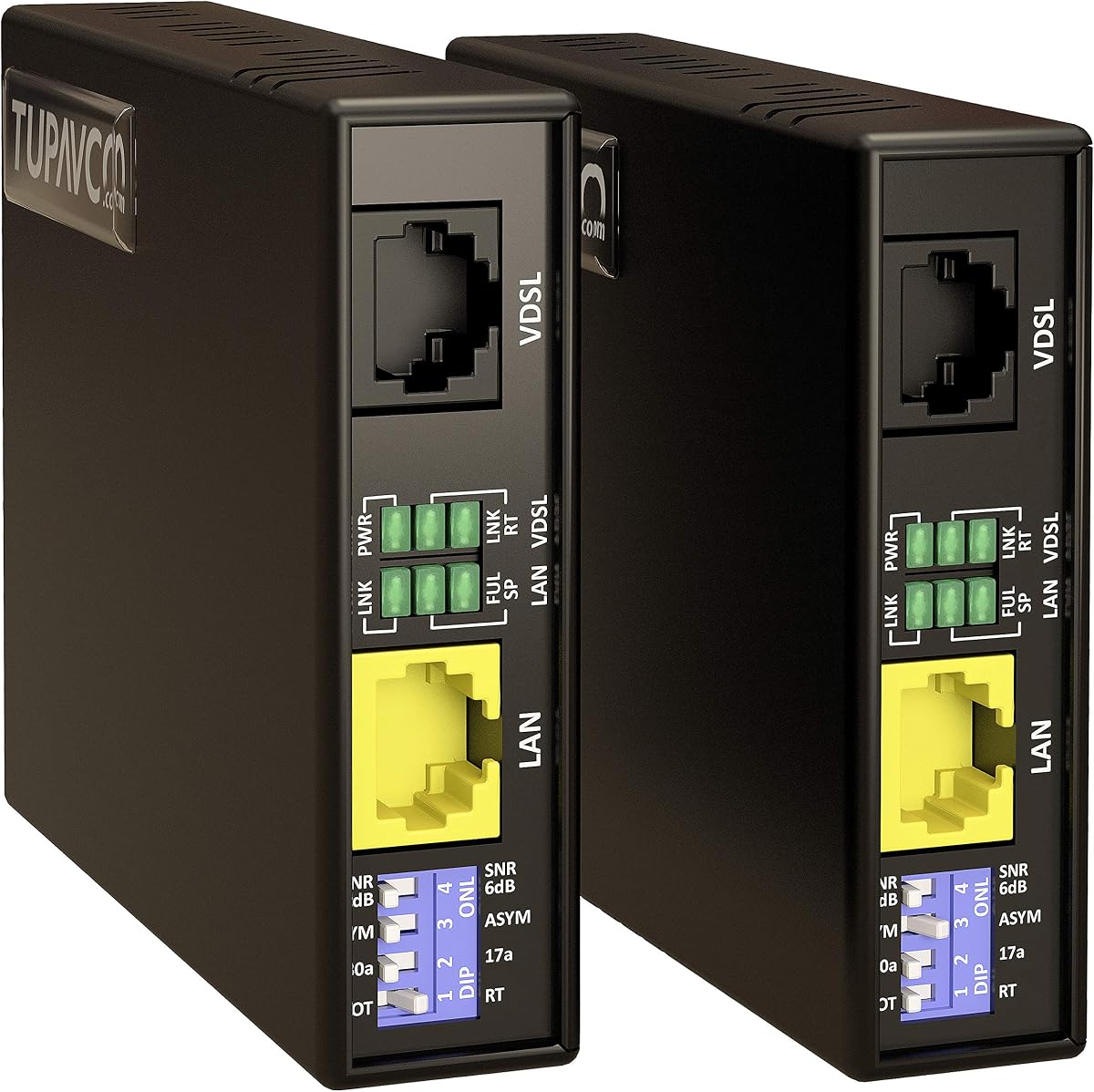
This VDSL kit is designed for situations where distance is the primary challenge rather than electrical circuit compatibility. It can extend network signals up to 7000 feet using existing telephone or network cabling which is invaluable for large properties or remote buildings. The ability to use phone lines means you can leverage wiring already in place for voice services without rewiring.
We may earn a commission when you buy through this link, at no additional cost to you.
Setup is straightforward with the kit coming as a pair preconfigured for central and remote locations. No software or driver installation is needed which simplifies the deployment process significantly. The use of RJ45 and RJ11 ports allows for flexible connection options depending on the cabling available at the remote site. This makes it a versatile option for various infrastructure types.
While it offers impressive range, the cost is significantly higher than standard powerline adapters. The need for power at both ends of the extension also requires access to power sources at the remote location which might not always be available. Additionally, performance can vary based on the quality of the existing phone wiring and environmental interference factors.
We recommend this kit for rural homes, large estates, or small businesses that need to connect distant buildings without digging trenches for new cable. It is an excellent alternative to wireless bridges when you need a stable wired link over distances that exceed the capabilities of standard Ethernet or powerline solutions. Reliability is key here and this unit delivers.
The system is optimized to send signals over twisted copper wires which reduces noise and ensures data integrity over long distances.
You can connect various devices such as computers cameras and VoIP phones to the remote end of the extension easily.
We may earn a commission when you buy through this link, at no additional cost to you.
StarTech offers a robust extender designed for professional environments where distance and compliance are critical. This model reaches up to 0.5 miles using standard copper cabling which is far beyond the typical 328-foot limit for Ethernet. It is ideal for connecting security cameras or remote sensors where long cable runs are necessary but standard switches cannot reach.
We may earn a commission when you buy through this link, at no additional cost to you.
The device maintains network integrity by passing VLAN tags and other protocols transparently. This ensures that your network segmentation and policies remain intact across the extended link. LED indicators allow IT administrators to monitor power and network status easily which simplifies troubleshooting in complex setups. The TAA compliance makes it suitable for government and federal procurement requirements.
One limitation is the speed cap at 100Mbps which may not suit high-bandwidth applications like large file transfers. However, for monitoring and control tasks this speed is often sufficient. The specialized nature of the product means it is generally more expensive than consumer-grade options. You should only choose this if you specifically need the TAA compliance or extreme range capabilities.
This extender is best for enterprise applications such as factory automation or campus networks. It provides a reliable way to extend your infrastructure without compromising on network protocols. If you need to reach a distant building or a remote sensor point with a stable wired connection this is a top-tier professional choice for your network team.
This means the product meets the Trade Agreements Act requirements making it eligible for US government procurement and federal contracts.
Visual indicators help you quickly assess power remote master mode and network status without needing complex software tools.
We may earn a commission when you buy through this link, at no additional cost to you.
This TP-Link AV600 kit provides a compact and efficient way to extend your wired network into rooms with weak Wi-Fi signals. It is particularly useful for small devices or older gadgets that do not require gigabit speeds. The plug and pair play feature ensures that you can get connected in minutes without dealing with complex configuration settings or software installation.
We may earn a commission when you buy through this link, at no additional cost to you.
The energy saving mode automatically switches to a low power state when the device is idle which helps reduce electricity usage over time. This feature is valuable for users who want to minimize their environmental footprint while maintaining a robust network. It works well with other TP-Link adapters allowing you to expand your network gradually as your needs grow.
The main trade-off is the lack of gigabit support which limits the maximum data transfer rate. For users with modern high-speed internet plans this might result in slower speeds than your service provider offers. However, for basic connectivity needs it remains a reliable and cost-effective solution that performs consistently in most home environments without dropping connections.
We suggest this model for those who need to extend their network to a spare room or home office. It is a solid choice for streaming standard HD content or accessing shared printers and files. If you prioritize a small footprint and low energy usage over maximum speed this adapter offers a practical balance for everyday networking tasks.
This system allows you to set up the adapters instantly without any configuration by simply pairing them through the physical buttons.
By reducing power consumption during idle times the device helps lower energy costs and supports greener technology initiatives.
We may earn a commission when you buy through this link, at no additional cost to you.
This kit combines a powerline adapter with a Wi-Fi 6 extender to provide both wired and wireless coverage in one package. It is ideal for users who want to extend their network to areas that have poor signal strength due to thick walls or distance. The AX1500 speeds ensure that connected devices can enjoy fast wireless connectivity alongside stable wired links.
We may earn a commission when you buy through this link, at no additional cost to you.
The EasyMesh feature allows you to integrate this device with other compatible routers to create a seamless whole-home mesh network. This is a significant advantage over standalone extenders that create separate networks with different names. The WiFi Clone button simplifies the process by copying your existing network name and password so devices can roam without reconnection.
The setup process involves plugging the powerline adapter into the wall and configuring the Wi-Fi extender which is slightly more involved than simple powerline kits. You need to ensure both units are on the same electrical circuit for the powerline portion to work effectively. While the price is higher it offers a comprehensive solution for modern homes needing flexible connectivity.
We recommend this kit for smart homes with many devices that require high throughput and seamless roaming. It is a great choice for users upgrading to Wi-Fi 6 who also struggle with dead zones in specific rooms. If you want a unified network experience without replacing your main router this kit provides a robust and scalable solution.
Wi-Fi 6 technology supports more devices simultaneously and offers faster speeds with lower latency for improved performance in busy networks.
The WiFi Clone button instantly copies your router settings to the extender making setup faster and more user-friendly.
We may earn a commission when you buy through this link, at no additional cost to you.
This adapter provides a straightforward way to extend your wired and wireless network without sacrificing outlet access. The passthrough design allows you to plug another device directly into the adapter ensuring you do not lose a power socket. It is compatible with the OneMesh ecosystem which helps maintain a unified network across your home with compatible routers and extenders.
We may earn a commission when you buy through this link, at no additional cost to you.
The AC1200 Wi-Fi 5 speeds are sufficient for most streaming and browsing tasks. While it does not support the latest Wi-Fi 6 standard it offers reliable performance for a wide range of devices. The setup is quick thanks to the plug and pair play feature which requires no configuration. Security is also a priority with advanced protocols integrated into the design.
Users should note that it requires the adapters to be on the same electrical circuit to function properly. This can be a limitation in older homes where circuits may be distributed differently across rooms. Additionally, the Wi-Fi 5 standard might limit performance in highly congested environments where many devices compete for bandwidth and spectrum space.
We suggest this kit for users who need a simple reliable extension for a specific room without changing their main network structure. It is a good fit for homes that already use TP-Link devices and want to maintain ecosystem compatibility. If you need to cover a dead zone with both wired and wireless options this is a solid choice.
This feature lets you plug your device directly into the adapter so you do not waste an electrical outlet.
Being part of the OneMesh ecosystem means your extender works seamlessly with compatible TP-Link routers for whole-home coverage.
We may earn a commission when you buy through this link, at no additional cost to you.
This coupler is designed to join two Ethernet cables together to extend the length of your cable run without signal loss. It supports speeds up to 10Gbps which ensures that your high-speed internet connection remains intact even with longer cable lengths. The PoE support is a key feature allowing devices like cameras to receive power through the same cable which reduces clutter.
We may earn a commission when you buy through this link, at no additional cost to you.
The design is robust with arch pins that ensure a secure connection preventing accidental disconnections. It works universally with various cable types from Cat5 to Cat8 making it versatile for different network setups. Users appreciate the simplicity as it requires no configuration or power supply to function. It is a passive device that simply bridges the gap between two cables.
While it supports high speeds it is important to note that it is not an active extender like VDSL kits. This means it does not regenerate the signal so it cannot extend beyond the standard 328-foot limit significantly. It is best for joining shorter cables or fixing a break in a line rather than connecting two distant rooms directly.
We recommend this coupler for anyone who needs to extend their cable run slightly to reach a router or switch. It is a cost-effective way to utilize existing cables without needing to replace them with a single longer one. If you need to connect devices that require PoE this coupler provides the necessary pass-through functionality seamlessly.
Power over Ethernet support means you can power devices like cameras without needing separate power supplies near the device.
The coupler works with Cat5 Cat6 and Cat8 cables ensuring you can use it with almost any Ethernet cable you have at home.
We may earn a commission when you buy through this link, at no additional cost to you.
This active extender kit is designed to regenerate and re-transmit the signal at each unit allowing for connections up to 600 meters. Unlike passive couplers it actively boosts the signal which makes it suitable for longer runs where data quality might otherwise degrade. It can work over various wire types including spare pairs in existing cables or coaxial lines.
We may earn a commission when you buy through this link, at no additional cost to you.
The transparent Layer 1 nature ensures that all network protocols pass through unaltered which is vital for cameras and specific applications. You do not need to worry about IP conflicts or VLAN issues as the device simply extends the physical layer. The units are built with a durable PC alloy shell which protects them from environmental factors in indoor or enclosed spaces.
A key requirement is that both units need power meaning you must have access to an outlet at both ends of the run. This might limit usability in some remote locations where power is scarce. The speed is also limited to roughly 92 Mbit/s which is slower than modern gigabit switches but sufficient for most surveillance or control tasks.
We recommend this kit for industrial or commercial settings where existing wiring needs to be repurposed for network data. It is a reliable solution for extending network reach where running new cables is not feasible. If you need a robust and active connection over a long distance with minimal configuration this is a strong professional option.
The device actively boosts the signal at each end ensuring data integrity over longer distances without signal loss.
It can use spare wires in existing runs or coaxial cables which makes it adaptable to various existing building infrastructures.
We may earn a commission when you buy through this link, at no additional cost to you.
This VDSL kit offers a high-speed option for extending network cables up to 5000 feet using existing phone or network cabling. The 300Mbps speed makes it suitable for modern streaming and gaming applications where bandwidth is essential. It utilizes G.INP technology to reduce noise and interference which ensures a cleaner signal and more consistent performance in noisy environments.
We may earn a commission when you buy through this link, at no additional cost to you.
The flexibility of the DIP switches allows you to adjust the profile settings to match your specific distance and cable quality requirements. This customization helps optimize performance for different wiring types without needing complex software tools. Setup is straightforward with LED indicators showing the status so you can confirm the connection is stable instantly.
While the speed is impressive it comes at a higher price point than basic extenders. Additionally you need power access at both ends of the run which might be a hurdle in older buildings or outdoor locations. The device is designed to use existing cabling which saves on infrastructure costs but may still require some effort to verify the wiring quality.
We suggest this kit for users who need higher speeds over longer distances than standard powerline adapters can offer. It is a good choice for connecting home offices or media centers in distant rooms. If you prioritize speed and reliability over cost this VDSL solution provides a powerful way to extend your network infrastructure.
This feature makes the signal less sensitive to noise and interference which maximizes speed and stability in challenging conditions.
Eight different settings allow you to customize the device to work optimally with various distances and wire qualities.
We may earn a commission when you buy through this link, at no additional cost to you.
Selecting the right Ethernet Line Extender depends on your specific environment and performance needs. Understanding the differences between powerline, VDSL, and active extenders will help you make an informed decision.
You should first decide whether you want to use your electrical wiring or existing telephone cables. Powerline adapters are easier to install in modern homes where outlets are accessible while VDSL kits are better for long distances over phone lines.
Choose powerline for convenience and VDSL for range to ensure you select the right technology for your home layout.
Check the maximum distance the extender can support based on your layout. Powerline devices typically work up to a few hundred feet on the same circuit whereas VDSL kits can reach several thousand feet across buildings.
Verify the range limit of the device to ensure it covers the distance between your router and the remote location effectively.
Consider the internet speeds you need for your activities. Some extenders support up to 2000 Mbps while others are limited to 100 Mbps. Higher speeds are necessary for 4K streaming or large file transfers.
Match the extender speed to your internet plan to avoid bottlenecks that slow down your connection.
If using a VDSL kit check if it supports the type of wires you already have. Some work with phone lines or coaxial cables while others need Cat5 or Cat6 twisted pairs.
Ensure the extender is compatible with your existing wiring to save money on new infrastructure upgrades.
Active extenders usually require power adapters at both ends of the connection. This means you need an outlet at the remote location which might not always be convenient.
Confirm that you have access to power at both ends before buying an active extender to avoid installation issues.
Look for features like VLAN pass-through or PoE support if you have specific needs like network segmentation or IP cameras. These features ensure your advanced network settings remain intact.
Prioritize devices that offer features you need to maintain your network configuration without extra setup.
Most modern extenders are plug and play requiring no software or drivers. However some industrial models may need DIP switches or configuration to work properly.
Choose a device with easy setup options if you want to minimize the time spent on installation.
Check the materials used for the casing especially if the device will be in a dusty or high-traffic area. Metal shells often provide better durability than plastic ones.
Look for sturdy build quality to ensure the device lasts long and withstands everyday use.
First plug the primary adapter into a wall outlet near your router and connect your router via an Ethernet cable. Then plug the secondary adapter into a wall outlet in the room where you need the connection and connect your device.
Avoid using surge protectors or extension cords as these can block the signal. Always plug the adapters directly into the wall outlet for the best performance.
Regularly check that the devices are cool and free from dust to prevent overheating. If performance drops try moving the adapters to different outlets on the same electrical circuit to improve connectivity.
Yes powerline adapters can work through walls because they use the electrical wiring inside your home. However thick walls can reduce the strength of the signal. For best results ensure the adapters are on the same electrical circuit.
Absolutely you can connect an extender to a router to extend the network to other rooms. Just plug the adapter into the router with an Ethernet cable and the secondary adapter into a wall outlet.
The maximum speed depends on the model you choose. Some support up to 2000 Mbps while others are limited to 100 Mbps. Check the specifications before buying to match your internet speed.
Most models are plug and play and do not require any software installation. You simply plug them in and they start working. Some advanced units have apps for monitoring but basic function is automatic.
It might slightly depending on the quality of your electrical wiring and the model you use. However a good extender should maintain high speeds. Avoid using it on a circuit with many high-power appliances.
Some extenders have only one Ethernet port but you can connect an Ethernet switch to it. This allows you to connect multiple devices like consoles and PCs to a single extender.
We have reviewed ten top models ranging from budget powerline kits to industrial VDSL extenders. The NETGEAR PLP2000 and TP-Link AV1000 offer excellent performance for most users.
Prioritize speed and range based on your specific needs. If you have modern high-speed internet choose a gigabit model. For long distances consider VDSL solutions.
Remember to check current availability and prices as they can change over time. Selecting the right extender will significantly improve your home or office network stability.