
Integral 4GB Crypto-197
4.1Editor score
FIPS 197 Certified
Auto-Lock on Removal
Zero Footprint Software
This guide compares the top encrypted USB flash drives for security, speed, and durability. Find the best hardware-encrypted USB drive for your needs.
In an era where data breaches are increasingly common, securing your digital assets is more critical than ever. An encrypted USB flash drive offers a robust solution by protecting your files with hardware-based encryption standards that keep unauthorized users out. These devices ensure that even if the drive is lost or stolen, your sensitive information remains inaccessible without the correct credentials.
We have evaluated the leading options on the market today based on encryption standards, build quality, compatibility, and user experience. Our analysis covers drives ranging from budget-friendly models to enterprise-grade solutions certified for government use. Each product was scrutinized for its security features, transfer speeds, and overall reliability to help you make an informed decision.
Every pick in this list highlights key specifications and real-world performance traits to guide your selection process effectively. Keep in mind that availability and pricing can fluctuate over time, so verify the latest details before purchasing. Our goal is to provide you with a comprehensive overview of the most secure portable storage options available right now.
4.1Editor score
4.6Editor score

4.5Editor score
This side-by-side comparison outlines the critical specifications and security features of the top ten encrypted USB flash drives available today. From hardware encryption standards to physical durability ratings, each entry is detailed to help you quickly identify the model that best fits your specific security and performance requirements.


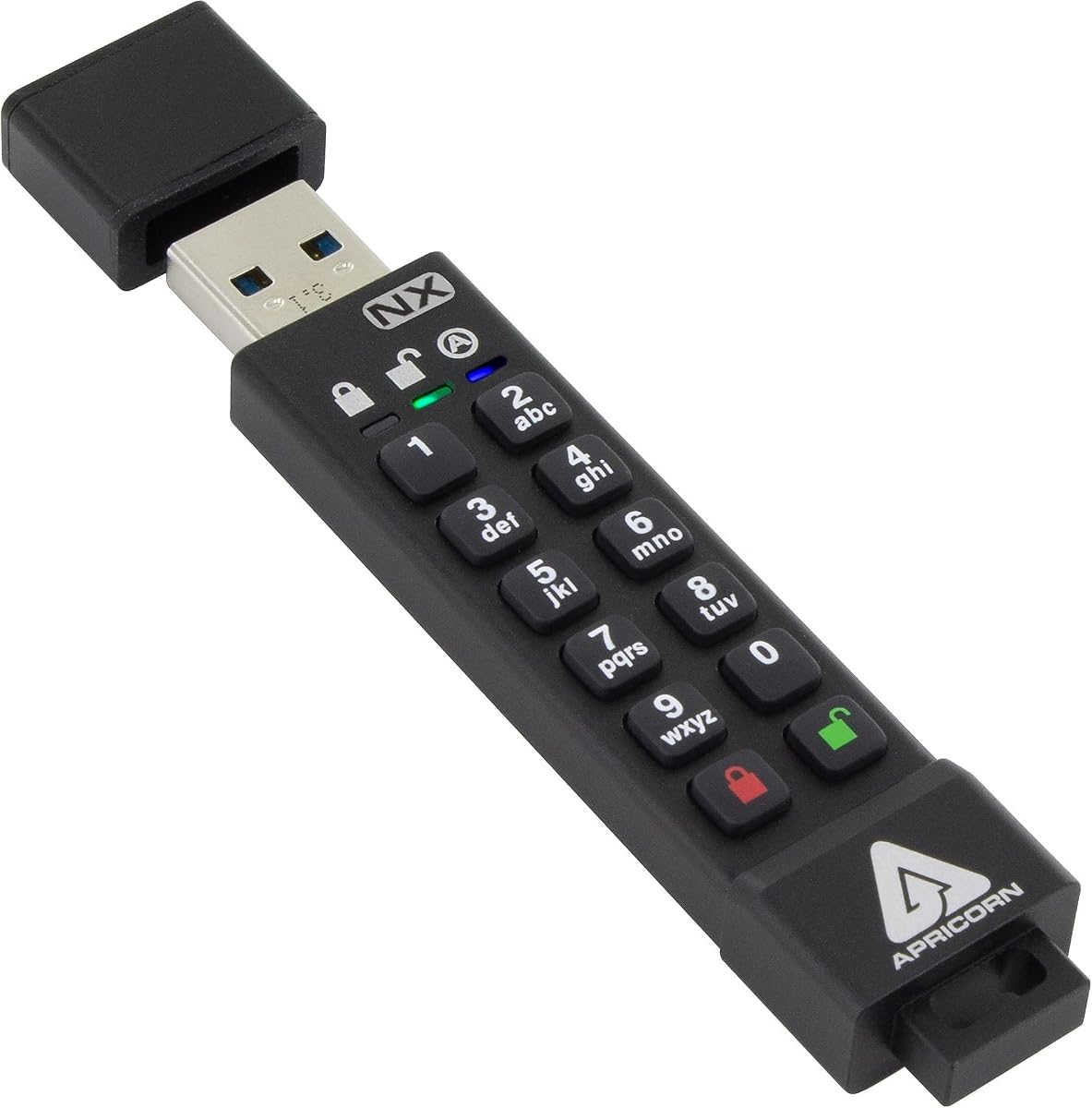
The Apricorn Aegis Secure Key 3 NX stands out as the top choice for users prioritizing absolute data security. With FIPS 140-2 Level 3 validation, this drive offers enterprise-grade protection that meets rigorous government and corporate standards. Its hardware-based encryption ensures that data is safe from software vulnerabilities and unauthorized access attempts.
We may earn a commission when you buy through this link, at no additional cost to you.
Security is paramount with this model as it features separate admin and user modes to control access levels effectively. The Aegis Configurator allows for flexible password policies while the two read-only modes provide additional layers of safety. Data recovery PINs offer a safety net if credentials are lost without compromising the encryption integrity.
While the drive is robust it may come at a higher price point compared to standard flash drives. The storage capacity is also limited to 8GB which might not suit users needing large file transfers. However these trade-offs are acceptable given the unparalleled security features and reliable hardware encryption it provides.
This drive is ideal for government employees corporate IT professionals and anyone handling sensitive personal data. Its rugged design and high security make it a perfect choice for those who cannot afford data breaches. We recommend it as the definitive solution for secure portable storage needs.
The FIPS 140-2 Level 3 certification ensures that the drive meets strict federal information processing standards for cryptographic modules. This makes it suitable for use in government agencies and regulated industries where data protection is legally mandated.
Users can customize security settings using the Aegis Configurator software without needing to install drivers on the target machine. This flexibility allows organizations to enforce complex password policies while maintaining ease of use for end users.
We may earn a commission when you buy through this link, at no additional cost to you.
The Kingston IronKey Vault Privacy 50 combines top-tier security with substantial storage capacity making it a favorite for power users. It uses FIPS 197 with XTS-AES 256-bit encryption to protect data against advanced threats. The drive is designed to resist both brute force attacks and malicious USB attacks like BadUSB.
We may earn a commission when you buy through this link, at no additional cost to you.
Features like the new passphrase mode allow for longer more memorable passwords without compromising security. Dual read-only settings ensure data integrity by preventing accidental overwrites. TAA compliance makes this drive eligible for government procurement contracts ensuring it meets trade agreement requirements.
While the drive offers excellent security features it comes at a premium price which may be steep for casual users. The metal casing adds durability but also weight making it slightly less portable than plastic alternatives. These factors are minor given the high level of protection and large capacity.
This drive is perfect for businesses needing to transfer large datasets securely or government contractors with TAA requirements. Its robust security features ensure that sensitive corporate data remains safe during transit. We recommend it for those who need both capacity and enterprise-level encryption.
The drive protects against Brute Force and BadUSB attacks through digitally-signed firmware that prevents unauthorized code execution. This ensures that even if someone tries to tamper with the drive hardware the security remains intact.
Users can choose between complex password modes or a new passphrase mode that supports longer and more memorable phrases. This flexibility helps users maintain strong security practices without sacrificing ease of access.
We may earn a commission when you buy through this link, at no additional cost to you.
The Apricorn Aegis Secure Key 3 NXC is designed for modern devices with its USB 3.2 Type C connector. It brings the same high security standards as its USB-A counterparts but with faster transfer speeds and broader compatibility. This makes it ideal for users with laptops and phones that rely on USB-C ports.
We may earn a commission when you buy through this link, at no additional cost to you.
With 128GB of storage it offers plenty of space for large files while maintaining hardware encryption. The separate admin and user modes allow for controlled access without needing additional software. This software-free operation ensures compatibility across various operating systems without setup headaches.
The drive is priced higher than standard USB-C drives which might be a barrier for some users. While it supports USB-C it may require adapters for older USB-A ports which could be inconvenient. These limitations are offset by the robust security and modern interface it provides.
This drive is best suited for professionals using modern laptops and tablets who need secure storage. Its high capacity and fast speeds make it suitable for media files and large documents. We recommend it for anyone looking to upgrade to USB-C without sacrificing security.
The USB 3.2 Type C interface ensures compatibility with the latest laptops and mobile devices offering faster data transfer rates. This future-proofs the investment for users moving away from legacy ports.
No drivers or software installation is required to use the drive making it easy to use across different operating systems instantly. This reduces the risk of software vulnerabilities and simplifies the user experience.
We may earn a commission when you buy through this link, at no additional cost to you.
The Integral Crypto-197 offers a surprisingly affordable entry point into hardware-encrypted storage without sacrificing core security features. It is certified to FIPS 197 ensuring it meets government-approved security standards for information protection. The drive is designed to be simple to use with no software installation required.
We may earn a commission when you buy through this link, at no additional cost to you.
Security features like auto-lock and brute force protection ensure that data remains safe even if the drive is left unattended. The waterproof double layer design adds physical durability protecting the electronics from environmental hazards. These features make it a reliable choice for everyday use.
The limited 4GB capacity is a significant drawback for users needing to store large files or multiple documents. While it is budget-friendly the storage limits its utility for anything beyond small text files or critical keys. This is acceptable for specific low-volume use cases.
This drive is ideal for students or small businesses with budget constraints needing basic document protection. Its small size and low cost make it easy to deploy across multiple devices. We recommend it as a cost-effective solution for securing essential personal data.
Despite its low price the drive maintains high security standards with FIPS 197 certification and hardware-based encryption. This makes advanced protection accessible to a wider audience without breaking the bank.
The dual-layer waterproof design protects the internal electronics from water and physical shocks ensuring longevity even in rough conditions. This physical protection complements the digital security effectively.
We may earn a commission when you buy through this link, at no additional cost to you.
The iStorage datAshur PRO is designed for durability and ease of use with a PIN-authenticated interface that requires no software. It offers FIPS 140-2 Level 3 certification ensuring robust hardware encryption. The IP57 rating provides protection against dust and water making it suitable for tough environments.
We may earn a commission when you buy through this link, at no additional cost to you.
Users can authenticate using a 7-15 digit PIN making access quick and straightforward. The drive supports multiple operating systems including Windows macOS and Linux without requiring drivers. Transfer speeds are fast with up to 169MB/s read speeds allowing efficient file transfers.
The small 4GB capacity limits its use for larger files but it is perfect for critical data and keys. Entering a PIN every time may be slightly inconvenient for frequent users but enhances security. These factors are trade-offs for the high security and durability offered.
This drive is best for field workers or anyone needing a rugged secure storage solution. Its durability and compatibility make it versatile for various environments. We recommend it for those prioritizing physical robustness and secure PIN access.
The IP57 rating ensures the drive can withstand immersion in water and exposure to dust making it highly durable in harsh conditions. This physical protection is essential for users working in industrial or outdoor settings.
The drive works with any device with a USB port including various operating systems and embedded systems. This flexibility ensures it can be used across diverse technical environments without compatibility issues.
We may earn a commission when you buy through this link, at no additional cost to you.
This Generic Encrypted USB Drive offers a large 64GB capacity at an affordable price point making it accessible for many users. It uses AES 256-bit encryption to protect data and includes features like auto-reset on failed attempts. The aluminum shell provides a sleek durable design for everyday use.
We may earn a commission when you buy through this link, at no additional cost to you.
The drive supports USB 3.0 speeds ensuring fast file transfers for large documents. It is compatible with various operating systems and does not require special software for operation. This ease of use makes it a practical choice for general storage needs.
The lack of official FIPS certification may be a concern for users in regulated industries requiring strict compliance. The generic branding means less support compared to established brands which might affect long-term reliability. These limitations are acceptable for personal use or non-regulated business needs.
This drive is ideal for personal users or small businesses needing secure storage for larger files. Its balance of capacity and security features makes it a strong value option. We recommend it for those seeking secure storage without breaking the bank.
With 64GB of space users can store a significant amount of data securely without paying premium prices. This makes it suitable for multimedia files and multiple large documents.
The drive automatically resets and wipes data after ten incorrect password attempts preventing unauthorized access. This brute force protection adds a strong layer of security to the hardware.
We may earn a commission when you buy through this link, at no additional cost to you.
The Lexar JumpDrive F35 PRO stands out with its fingerprint authentication feature offering a convenient biometric approach to security. It allows users to save up to ten different fingerprints for quick access to files. The drive supports 256-bit AES encryption ensuring that data is protected even when accessed via fingerprint.
We may earn a commission when you buy through this link, at no additional cost to you.
With read speeds of up to 400MB/s it offers rapid file transfer capabilities making it efficient for large datasets. The 128GB capacity provides ample space for storing high-resolution media and complex documents. This combination of speed and security makes it attractive for professionals.
Biometric recognition can occasionally fail due to environmental factors like moisture or dirt on the sensor. This might require a fallback password which adds a step if the fingerprint scanner does not work. These minor inconveniences are outweighed by the convenience of fingerprint access.
This drive is perfect for users who value convenience and speed alongside security. It is ideal for professionals needing quick access to sensitive files without typing passwords. We recommend it for those who want modern security features and fast performance.
Fingerprint authentication offers a user-friendly way to secure files without needing to memorize complex passwords. This reduces friction in daily access while maintaining strong encryption standards.
The USB 3.2 Gen 1 interface enables fast data transfers reducing wait times when moving large files. This efficiency is crucial for professionals working with time-sensitive data.
We may earn a commission when you buy through this link, at no additional cost to you.
The iStorage datAshur PRO2 is built for extreme durability with an IP68 rating offering superior protection against dust and water. It maintains FIPS 140-2 Level 3 certification ensuring high security standards. The drive uses a PIN-authenticated interface that does not require any software installation.
We may earn a commission when you buy through this link, at no additional cost to you.
Compatibility is broad across various operating systems and embedded systems making it versatile for different environments. Transfer speeds are fast with up to 168MB/s read speeds facilitating efficient data management. This combination of ruggedness and speed makes it reliable for field use.
The cost is relatively high for the 32GB capacity which may be a drawback for budget-conscious buyers. Entering a PIN manually can be slightly slower than software authentication but adds a layer of control. These trade-offs are worth it for the high level of physical and digital protection.
This drive is ideal for military personnel or industrial workers needing secure storage in harsh conditions. Its durability and security features ensure data safety even in the toughest environments. We recommend it for those who prioritize extreme ruggedness and high security.
The IP68 rating ensures the drive can withstand complete submersion and dust exposure making it the most durable option available. This physical protection is unmatched by most other encrypted drives.
Authentication happens on the device itself without needing drivers or software on the host computer. This ensures compatibility and reduces the risk of software vulnerabilities affecting security.
We may earn a commission when you buy through this link, at no additional cost to you.
The Kingston IronKey D500S is engineered for enterprise security with FIPS 140-3 Level 3 pending certification. It features industry-first dual hidden partitions allowing users to separate personal and work data securely. The drive uses XTS-AES 256-bit encryption and protects against BadUSB and brute force attacks.
We may earn a commission when you buy through this link, at no additional cost to you.
A rugged zinc casing provides physical protection against penetration attacks adding another layer of security. The drive supports multi-pin options and customizable features to meet specific organizational policies. This makes it a versatile tool for IT administrators requiring strict access control.
The 16GB storage limit may restrict its use for large files but is sufficient for documents and keys. The premium price reflects the high security standards and durability but may not be cost-effective for personal users. These factors are acceptable for corporate or government deployments.
This drive is perfect for enterprise environments needing advanced security features and customization. Its rugged design and hidden partitions offer flexibility and protection for sensitive data. We recommend it for organizations prioritizing maximum security and compliance.
Users can create two separate hidden partitions allowing for distinct access levels and data segregation. This feature helps users keep personal files separate from sensitive work data easily.
The drive protects against BadUSB attacks which are designed to compromise computers when connected. This ensures that the drive cannot be used as an attack vector against host systems.
We may earn a commission when you buy through this link, at no additional cost to you.
The Kingston D300S is a reliable option from a trusted brand offering secure storage for essential files. It uses AES 256 XTS encryption to protect data and requires a password for access. The compact design makes it easy to carry in a pocket or bag.
We may earn a commission when you buy through this link, at no additional cost to you.
Users benefit from no software requirements ensuring compatibility with various operating systems. The 8GB capacity is suitable for documents and small files but not large media. This makes it a practical tool for everyday secure storage needs.
The limited storage and basic feature set may not satisfy power users needing more space or advanced options. However the reliability and security make it a solid choice for general use. These limitations are acceptable for those needing simple and secure storage.
This drive is ideal for students or professionals needing secure storage for critical documents. Its compact size and trusted security make it a reliable companion. We recommend it for those seeking straightforward and secure portable storage.
Kingston is a well-established brand known for producing high-quality memory and storage devices. This reputation ensures that the drive meets reliable standards for performance and security.
The drive uses industry-standard AES 256 XTS encryption to secure data against unauthorized access. This level of encryption ensures that files are protected even if the device is lost.
We may earn a commission when you buy through this link, at no additional cost to you.
Choosing the right encrypted USB flash drive involves considering several critical factors to ensure security and performance. This guide outlines the key elements you should evaluate before making a purchase.
Look for drives that support FIPS 140-2 or 197 certifications which ensure government-approved security levels. These standards verify that the encryption algorithms are robust and meet industry requirements. Without these certifications the drive may not provide adequate protection for sensitive data.
Prioritize drives with FIPS certification for maximum security assurance in regulated industries.
Decide between password-based and biometric authentication based on your convenience needs. Passwords offer strong security but require management while biometrics like fingerprints provide quick access. Some drives support both methods giving you flexibility in how you secure your files.
Choose a method that balances ease of use with the level of security you need.
Assess your storage needs based on the type of files you plan to store. Documents may require less space while media files will need higher capacity options. Ensure the drive offers enough space to avoid running out of room quickly.
Select a capacity that meets your typical file sizes without overpaying for unused space.
Consider the physical build quality of the drive especially if you travel frequently. Look for water and dust resistance ratings like IP67 or IP68 to protect against environmental hazards. A rugged casing prevents damage from drops and impacts.
Opt for a durable drive if you work in harsh or mobile environments.
Ensure the drive works with your current operating system such as Windows macOS or Linux. Some drives require specific software which may not be supported on all platforms. Software-free authentication is preferable for broad compatibility.
Check compatibility requirements before buying to avoid setup issues later.
Look for USB 3.0 or newer interfaces to ensure fast data transfer speeds. Slow speeds can hinder productivity when moving large files. High-speed protocols make the drive more efficient for everyday use.
Choose a drive with high read and write speeds to save time.
Check if the drive includes features like automatic data erasure after failed attempts. This protects against unauthorized access attempts and enhances overall security. Such features ensure that repeated wrong guesses do not compromise your data.
Select a drive with built-in protection against brute force attacks.
Balance the features you need with your budget constraints. High-end drives offer more security and durability but cost more. Determine how much you are willing to spend based on the value of your data.
Invest in a quality drive if your data is critical to your work or personal life.
To begin using your encrypted drive plug it into a USB port on your computer. Follow the setup instructions to create your admin or user password. Ensure you store your password safely as losing it may result in data loss.
Always unlock the drive before accessing files and lock it after you are done. Some drives lock automatically when disconnected but manually locking ensures extra security. This habit prevents unauthorized access if the drive is left unattended.
Store your drive in a safe dry place away from extreme temperatures and liquids. Avoid bending or dropping the drive to prevent physical damage. Regular backups of your data ensure you do not lose important files if the drive fails.
Yes encrypted USB flash drives are worth the cost if you handle sensitive data regularly. They provide hardware-based security that software encryption cannot match. The investment ensures your data remains safe from unauthorized access and theft.
FIPS 140-2 focuses on hardware security module standards while FIPS 197 specifies the AES algorithm for data encryption. Both are government-approved standards but cover different aspects of cryptographic security. Understanding the distinction helps you choose the right compliance level for your needs.
Most encrypted USB drives support Windows macOS and Linux without requiring drivers. Software-free models are compatible across platforms making them versatile. Always verify OS compatibility before purchasing to ensure seamless operation.
If you forget your password most drives will lock access to your data permanently. Some models offer recovery PINs but this feature is not universal. It is crucial to remember your password or store it securely to avoid data loss.
High-quality encrypted drives do not significantly impact transfer speeds thanks to dedicated encryption chips. Look for USB 3.0 or newer interfaces to maintain fast performance. Speed differences are usually negligible with modern hardware encryption.
Password-protected encrypted drives use strong encryption algorithms to protect data offline. Without the correct password the data remains unreadable. For added security choose drives with features like brute force protection and complex password policies.
Many encrypted USB drives work with Android devices that support USB OTG connectivity. However some models may require specific apps or interfaces for access. Check product specifications to ensure compatibility with your mobile device before buying.
We have reviewed the top ten encrypted USB flash drives ranging from budget-friendly options to high-end enterprise solutions. The Apricorn Aegis Secure Key 3 NX stands out as the best overall with its robust security features. For those needing large capacity the Kingston IronKey Vault Privacy 50 offers an excellent balance of storage and protection.
When choosing an encrypted drive consider your specific needs such as storage capacity, physical durability and operating system compatibility. Security standards like FIPS certification are essential for those in regulated environments. Investing in a quality drive ensures your data remains safe regardless of where you go.
Prices and availability may change so always check current listings before purchasing. We recommend verifying the latest specifications and user reviews to confirm your choice. Secure your digital assets today with a reliable encrypted USB flash drive that meets your standards.