
GE BigEZ OneTouch Big Button Universal TV Remote for Seniors, Easy to Use
4.3Editor score
Backlit vision-friendly buttons
One-touch setup process
Controls up to two devices
This guide compares the top 10 easy to use TV remote for seniors options to help you find the best simplified device for elderly family members.
Finding the right television control can be a significant challenge for older adults who struggle with small buttons and complex menus. A well-designed remote simplifies daily entertainment by offering clear labels and tactile feedback that reduce frustration during use.
We evaluated ten top-rated universal remotes based on button size, setup complexity, compatibility with major TV brands, and overall usability for those with vision or dexterity limitations. Each model was selected for its ability to provide independence and ease of access for elderly users.
Every pick below highlights specific strengths such as backlit keys, color-coded layouts, or minimalist designs tailored to common senior needs. Please note that pricing and availability change frequently, so checking the current listing is recommended before making a purchase decision.
4.3Editor score
4.2Editor score

4.4Editor score
The following table provides a side-by-side comparison of all ten remotes to help you quickly identify key specifications and features that match your specific needs.


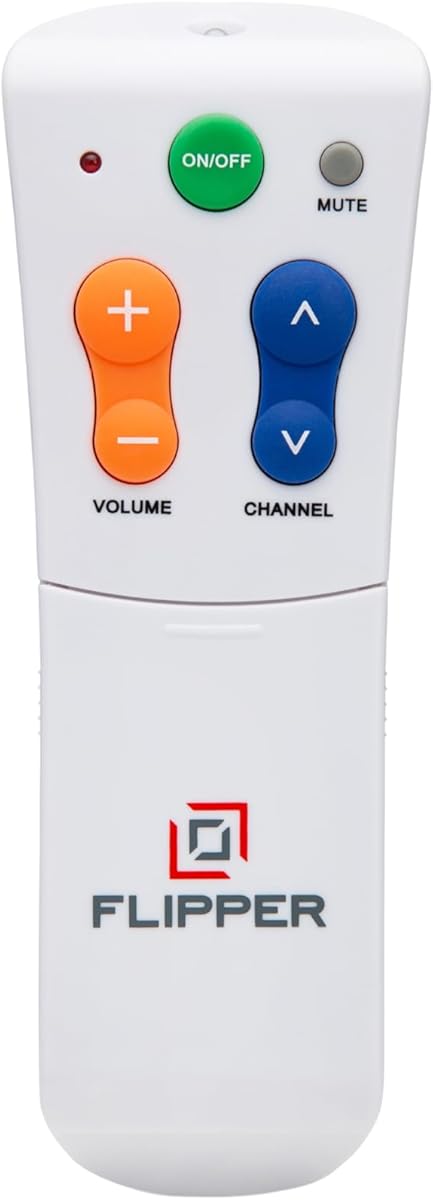
The Flipper remote stands out as a top choice for seniors who need a straightforward way to enjoy television without getting lost in complex menus. With a rating of 4.2 stars, users praise its ability to restore independence to those with vision or memory challenges.
We may earn a commission when you buy through this link, at no additional cost to you.
Its defining feature is the simplified four-button design on the front face, using color coding to distinguish power, volume, channel, and mute functions. This reduces cognitive load and makes navigation intuitive even for those with dementia or Alzheimer's.
While it excels at basic control, it does not support navigating streaming apps like Netflix or Hulu, which limits its utility for households relying heavily on smart TV features. However, for traditional broadcast or cable setups, this limitation is often acceptable.
This remote is best suited for caregivers seeking a reliable tool to give elderly loved ones control over their viewing without frustration. If your setup uses standard cable or satellite rather than apps, Flipper offers a peace of mind that few other remotes can match.
The main face features only four large buttons color-coded for easy identification, reducing confusion and accidental presses for users with cognitive or visual impairments.
Caregivers can pre-program up to twenty-five favorite channels allowing seniors to cycle through preferred content without memorizing numbers or navigating complex guides.
We may earn a commission when you buy through this link, at no additional cost to you.
The GE BigEZ OneTouch remote delivers excellent value for families seeking an affordable yet effective solution for senior TV control. Rated at 4.3 stars, it combines vision-friendly features like backlit buttons with a straightforward setup process that minimizes frustration.
We may earn a commission when you buy through this link, at no additional cost to you.
Its standout qualities include fully backlit keys that glow in low light making it easy to find and press buttons at night. The colorblind-friendly design uses distinct blue and orange buttons for volume and channels to further aid visibility.
Users should note that it works best with five major brands like Samsung, LG, Vizio, Sony and Roku which may limit compatibility for less common TVs. Additionally it does not support advanced navigation for streaming apps beyond basic power and channel control.
This remote is ideal for households on a budget who need a reliable replacement for standard remotes that have become too complicated for elderly users. If your TV brand matches the supported list and streaming is not a priority GE BigEZ offers a practical solution.
Every button is fully backlit ensuring clear visibility in dark rooms which is crucial for seniors with poor vision who struggle to find controls during evening viewing.
Programming is simplified to pressing one button for your TV brand and powering on reducing the steps needed to get the remote working immediately.
We may earn a commission when you buy through this link, at no additional cost to you.
This remote offers a premium experience specifically tailored for Samsung TV owners who want a no-fuss, high-quality replacement. With a 4.4 rating, it stands out for its backlit buttons that stay on for thirty seconds and the included protective cover that prevents damage.
We may earn a commission when you buy through this link, at no additional cost to you.
The remote shines in its ability to work immediately without any programming which is a huge benefit for seniors who may find setup instructions confusing. The backlit feature ensures that buttons are visible even in dimly lit living rooms during night time viewing.
While it does not support other TV brands which limits its flexibility the package includes a silicone cover and wall hook that add significant convenience and protection. These accessories make it a complete solution for keeping the remote safe and within reach.
This choice is perfect for households with Samsung TVs seeking a durable and highly visible control device. If you value immediate usability and extra protection against spills or drops this remote provides a thoughtful premium package.
Buttons light up for thirty seconds after pressing allowing seniors with poor vision to see controls clearly even in complete darkness without needing a lamp.
The included soft silicone cover and mount hook protect the remote from damage and loss while keeping it organized and easy to find on the furniture.
We may earn a commission when you buy through this link, at no additional cost to you.
The EZclicker remote is a solid choice for seniors who need a lightweight yet accessible control device. Its 4.2 rating reflects satisfaction with its big button design and tactile feedback that helps users confirm presses without looking.
We may earn a commission when you buy through this link, at no additional cost to you.
Its key strength lies in the extra-large enter button and simplified controls tailored for those with limited dexterity. The remote measures only seven inches by two inches making it easy to hold for small hands or place on a side table.
Users should be aware that it works only with TVs and not with cable boxes or streaming devices like Firestick which may require a separate controller for those services. This makes it best suited for households that prioritize basic TV control.
If you are looking for a compact and affordable tool to simplify television access for an elderly family member this model offers a reliable balance of ease of use and portability.
Each button provides a distinct click feel that confirms input without needing visual confirmation which is helpful for users with low vision or tremors.
Setup requires holding two buttons for up to sixty seconds until the remote pairs with your TV making it straightforward for most users.
We may earn a commission when you buy through this link, at no additional cost to you.
This remote earns a 4.4 rating for its broad compatibility with major brands like Samsung LG Vizio and Sony without requiring any initial programming. It is an excellent solution for users who want a working remote right out of the box.
We may earn a commission when you buy through this link, at no additional cost to you.
The design focuses on clarity with an extra-large enter button and tactile feedback that helps users navigate with confidence. This simplicity makes it a strong option for elderly users who may find standard remotes too confusing or cluttered.
Keep in mind that it does not support cable boxes or streaming sticks which may mean your senior still needs to manage multiple remotes if they use those services. For pure TV control however it is straightforward and effective.
If your priority is finding a device that works instantly with a wide range of TVs and avoids setup hassles this model offers a dependable and accessible experience.
The remote works immediately after inserting batteries which removes the need for pairing or coding steps that often confuse seniors.
It supports most popular TV brands including Samsung LG Vizio Sony Hisense Philips and Panasonic making it versatile for many household setups.
We may earn a commission when you buy through this link, at no additional cost to you.
Rated at 4.4 stars this remote is praised for its clear layout and extra-large buttons that reduce misclicks for elderly users. Its ergonomic and lightweight build makes it comfortable to hold and use for extended periods without strain.
We may earn a commission when you buy through this link, at no additional cost to you.
The design prioritizes visibility with large labeled keys that are easy to see and press even for those with low vision. It works with most major TV brands ensuring broad compatibility for standard television setups.
While it lacks support for streaming apps or cable boxes which limits it to basic TV functions this trade-off is acceptable for seniors who only need essential controls. The focus remains on simplicity and reliability.
This remote is a great option for families looking for a straightforward replacement that emphasizes comfort and clear visibility. If your primary need is basic TV control without complex features this model delivers solid value.
The lightweight body and comfortable grip reduce hand fatigue making it easier for seniors with arthritis or weakness to hold the remote securely.
Every button is clearly marked and spaced to prevent accidental presses which helps users navigate confidently without constant reminders.
We may earn a commission when you buy through this link, at no additional cost to you.
This Philips remote features a OneTouch setup process designed to simplify programming for seniors. While its rating is 3.8 stars, it includes useful vision-friendly features like a fully backlit keypad and colorblind-friendly button colors for volume and channels.
We may earn a commission when you buy through this link, at no additional cost to you.
Its main strength is the ability to control multiple device types beyond just TVs including set-top boxes or soundbars via an AUX button. This can reduce the number of remotes a senior needs to manage.
However some users report that compatibility may be limited to specific brands which could be a drawback if the TV model is not listed. Additionally, the lower rating suggests that setup or range issues may occur for some households.
If you value a backlit design and multi-device control for a basic setup, this model could be a workable option. It is best suited for those who prioritize visual clarity over broader brand support.
An AUX button allows control of additional devices like soundbars or set-top boxes which reduces clutter from multiple remotes.
The fully backlit keypad ensures buttons are visible in dim lighting which helps users with low vision find controls quickly.
We may earn a commission when you buy through this link, at no additional cost to you.
This remote is designed with a simple layout and extra-large buttons to help seniors navigate with confidence. Its 3.0 rating indicates mixed experiences, but it offers a budget-friendly entry point for those seeking basic accessible controls.
We may earn a commission when you buy through this link, at no additional cost to you.
The design emphasizes clear visibility with big buttons that reduce misclicks for elderly users. It is compatible with most major TV brands which makes it a versatile option for standard TV setups.
Users should be aware that it does not support streaming devices like Firestick or Roku which may require additional equipment for those services. This limits its utility for modern smart TV households.
If your priority is a low-cost, straightforward remote for traditional TV use, this model may meet your needs. It is best suited for users who do not require advanced features.
Every button is clearly marked and spaced to prevent accidental presses which helps users navigate confidently without constant reminders.
The layout avoids complex menus so users can focus on essential functions like volume and channel selection.
We may earn a commission when you buy through this link, at no additional cost to you.
The EZclicker remote offers a simple and accessible control solution for seniors needing a basic TV replacement. With a 4.2 rating, users appreciate its tactile feedback and compact design that makes it easy to handle.
We may earn a commission when you buy through this link, at no additional cost to you.
Its standout features include big button controls and an extra simple layout that reduces confusion for elderly users. The remote is lightweight and measures six inches which helps with storage and portability.
Keep in mind that this model is designed only for TVs and not for cable boxes or streaming devices which may require a separate remote for those services. This makes it best for standard television setups.
If you are looking for a portable and budget-friendly option to simplify TV access for a senior family member, this model provides reliable basic functionality without extra complexity.
Each button provides a distinct click feel that confirms input without needing visual confirmation which is helpful for users with low vision or tremors.
Setup requires holding two buttons for up to sixty seconds until the remote pairs with your TV making it straightforward for most users.
We may earn a commission when you buy through this link, at no additional cost to you.
The Anderic RR1004 stands out for its glow-in-the-dark keys that help users locate buttons in dark rooms. Rated at 4.0 stars, it offers a minimalist layout with essential controls that reduce confusion for seniors.
We may earn a commission when you buy through this link, at no additional cost to you.
Its main strength is the learning function that allows it to copy signals from an existing IR remote which can be useful for adding specific functions. This gives caregivers some flexibility in setup.
However it does not work with Bluetooth or RF systems such as Roku or Fire TV which limits compatibility for modern streaming setups. Additionally initial programming may require assistance for users unfamiliar with technical steps.
If your senior primarily watches traditional TV in low-light conditions and needs a simple device with visual aids this remote provides a practical and affordable option.
The keys glow in low light making them visible at night so users do not have to search for buttons when the room is dark.
The remote can learn signals from existing remotes allowing customization of specific buttons for essential functions like input selection.
We may earn a commission when you buy through this link, at no additional cost to you.
Choosing the right remote involves evaluating several key factors to ensure it matches the user's specific needs and technical setup.
Large buttons with clear spacing are essential for seniors with vision or dexterity challenges. Look for models that offer extra-large keys and minimal clutter to prevent accidental presses.
Prioritize remotes with a simple layout that focuses on essential functions like power volume and channels to avoid overwhelming the user.
Backlit or glow-in-the-dark buttons help users find controls in low-light environments. Color-coded keys can also assist those with color blindness or low contrast sensitivity.
Choose remotes that highlight high-contrast designs and illuminated keys to ensure visibility at any time of day.
Look for one-touch programming or setup-free remotes that work immediately. Complex coding steps can frustrate elderly users and caregivers alike.
Select models with intuitive setup processes that minimize the need for technical assistance during initial installation.
Verify that the remote supports your TV brand and type. Some models work only with specific manufacturers which may limit flexibility.
Ensure the remote matches your TV brand and supports your desired functionality such as cable box or streaming compatibility.
Some remotes come with protective covers or wall hooks that prevent loss and damage. These accessories can add convenience for users with mobility issues.
Look for bundles that include protective cases or mounting options to keep the remote organized and safe.
Check the battery type required and whether the model uses common sizes like AA or AAA. Longer battery life can reduce maintenance for caregivers.
Choose remotes that use standard battery types to make replacements easy and affordable.
For users with dementia or memory loss, consider remotes with customizable channel lists that reduce the need for complex navigation.
Select models designed specifically for cognitive challenges to simplify the viewing experience.
Review feedback from other buyers to understand real-world performance and reliability. Ratings can highlight strengths and weaknesses not mentioned in descriptions.
Prioritize models with consistently positive feedback regarding ease of use and durability.
Insert the batteries correctly according to the polarity markings inside the compartment to ensure immediate power. Some models require pressing a combination of buttons to activate pairing so follow the quick start guide.
Store the remote in a consistent location like on a side table or mounted to a hook so it is easy to find. Using the included cover or case can prevent accidental button presses or damage.
Keep the infrared sensors clean with a soft cloth and check battery levels periodically to maintain reliable signal transmission. Replacing batteries every few months can prevent unexpected failures.
Most basic senior remotes do not support navigation through streaming apps or smart TV interfaces. If your household relies on apps like Netflix or Hulu you may need a separate controller or a remote that specifically lists streaming support.
First check that the batteries are inserted correctly and not depleted. If the batteries are fresh try resetting the remote by removing them and reinserting them according to the setup guide. Ensure there is a clear line of sight between the remote and the TV sensor.
Most remotes use a simple code entry or one-touch setup process described in the manual. Press and hold the setup button until the light blinks then follow the steps to select your TV brand or enter the code provided.
Yes some remotes come preprogrammed to work instantly with specific brands like Samsung or LG. These models allow immediate use after inserting batteries which reduces setup time for users.
Many basic models control only the TV set and not separate cable or satellite boxes. Check the product description to confirm if it supports multi-device control if you need to manage both from one remote.
Choose a remote with a simple layout and customizable favorite channels to reduce confusion. Labeling buttons with large stickers or color codes can also help reinforce memory and navigation.
We hope this guide has provided a clear overview of the most accessible and reliable remotes for elderly users. Each pick was selected based on its ability to reduce complexity and enhance daily viewing experiences.
When making a decision prioritize features like button size backlit keys and setup simplicity to match the specific needs of the user. Consider whether your household relies on streaming services as this may influence which model fits best.
Remember to check current pricing and availability before purchasing as these details may change over time. If you have specific concerns about compatibility reach out to customer support to confirm before ordering.