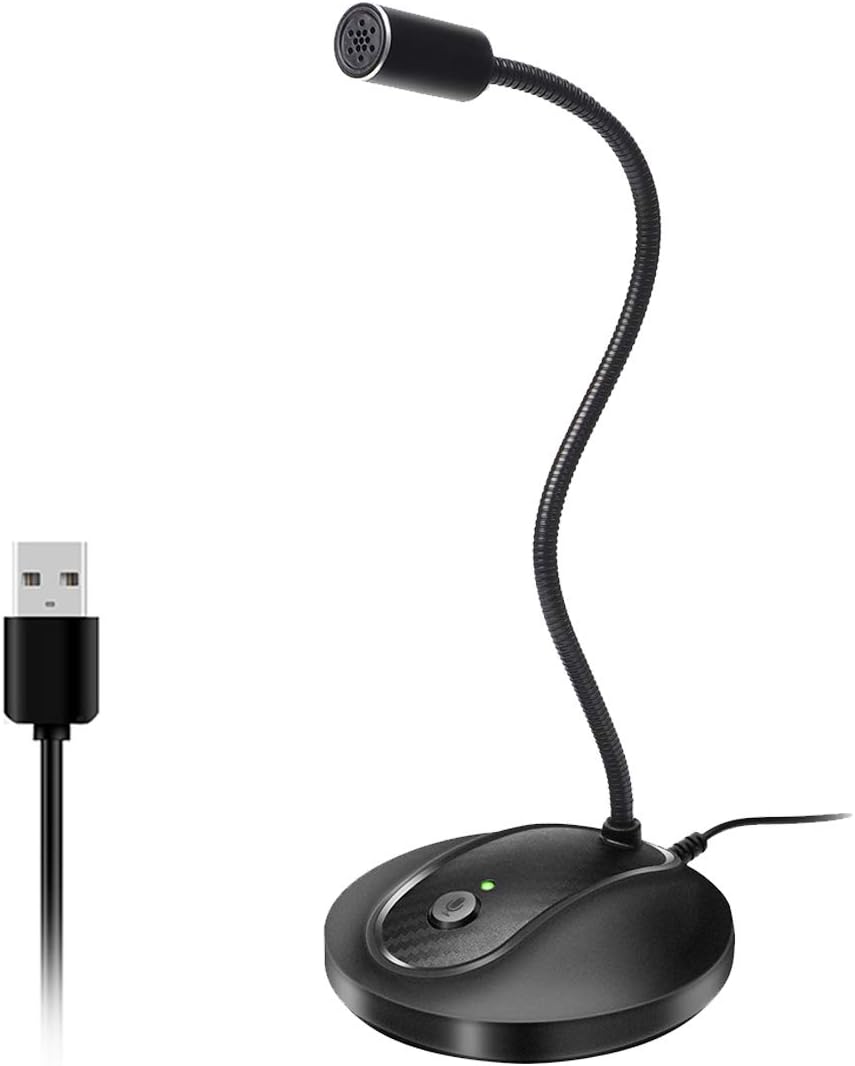
USB Microphone, 360 Degree Adjustable Gooseneck Design
4.4Editor score
360 Degree Adjustable Gooseneck
Noise-Canceling Technology
Mute Button & LED Indicator
This guide compares the top 10 dictation microphones for computer users including professional and budget options for transcription.
Finding the right dictation microphone for computer use is essential for professionals who rely on accurate speech-to-text software for daily tasks.
We compared ten top models based on sound quality, ease of setup, noise cancellation, and compatibility with major dictation software.
Each pick highlights key strengths and trade-offs to help you choose quickly noting that prices and availability may change over time.
4.4Editor score

4.6Editor score

4.2Editor score
This table provides a quick side-by-side overview of the top ten dictation microphones evaluated for accuracy and comfort in this guide.




This USB microphone offers a highly affordable entry point for users needing reliable voice capture for dictation tasks on desktop systems.
We may earn a commission when you buy through this link, at no additional cost to you.
Its 360 degree adjustable gooseneck allows precise positioning to capture your voice accurately without disturbing your workspace layout or comfort level.
The noise canceling technology helps reduce background interference which is critical for maintaining high accuracy in speech to text conversion software.
Ideal for students or light users this mic delivers clear audio quality at a price that fits easily within tight budgets without sacrificing essential features.
The adjustable neck lets you position the mic exactly where you need it for optimal voice capture during long dictation sessions.
Intelligent tech reduces ambient noise ensuring your words are transcribed accurately even in moderately noisy home office environments.
We may earn a commission when you buy through this link, at no additional cost to you.
The Philips LFH3500 SpeechMike is designed for professional environments where accuracy and workflow efficiency are paramount for daily transcription tasks.
We may earn a commission when you buy through this link, at no additional cost to you.
Its free floating decoupled microphone minimizes handling noise ensuring that every word is recorded with maximum clarity and minimal external interference.
Built-in motion sensors and programmable function keys allow users to control devices and applications without touching the keyboard or mouse constantly.
This premium solution is best suited for legal or medical professionals who need a dedicated high performance tool specifically for voice command and dictation.
By isolating the mic from the housing this design prevents vibrations from affecting the audio signal during active use.
The motion sensor allows you to trigger actions by moving the mic which streamlines your workflow while recording audio content.
We may earn a commission when you buy through this link, at no additional cost to you.
The FIFINE Mini Gooseneck is an excellent choice for users with limited desk space who still require a reliable microphone for voice input tasks.
We may earn a commission when you buy through this link, at no additional cost to you.
Its tiny form factor minimizes desk clutter while the flexible gooseneck ensures you can angle the capsule perfectly for clear voice capture.
A sturdy metal base keeps the mic stable during use and the included windscreen helps reduce plosive sounds during spoken word recording.
This unit is ideal for general purpose dictation and communication offering a balance of functionality and build quality at a very competitive price point.
The small design ensures the mic does not obstruct your keyboard or workspace while you type during dictation sessions.
This accessory helps smooth out harsh breath sounds making your recorded voice sound more natural and professional.
We may earn a commission when you buy through this link, at no additional cost to you.
The Blue Yeti is widely recognized for its studio quality audio making it a versatile choice for professionals who demand high fidelity dictation.
We may earn a commission when you buy through this link, at no additional cost to you.
Its four distinct pickup patterns allow you to switch between cardioid omni and stereo modes to adapt to different recording environments easily.
Onboard controls for gain and mute give you immediate tactile feedback and control over your audio levels without needing to open software menus.
This microphone is perfect for users who want a single device that excels at both dictation and other content creation tasks like streaming.
This advanced internal design captures sound from multiple points to deliver rich and detailed vocal output every time.
Use software effects to refine your voice further ensuring clear broadcast quality sound for professional presentations.
We may earn a commission when you buy through this link, at no additional cost to you.
The TONOR Conference Mic is designed for group settings where multiple speakers may need to use the dictation software in the same room.
We may earn a commission when you buy through this link, at no additional cost to you.
Its omnidirectional pickup pattern captures audio from all directions ensuring that no matter where you sit the voice is picked up clearly.
The sturdy metal construction and anti slip mat keep the mic stable on any table surface even during active collaborative work sessions.
This is a practical choice for offices or small teams where a shared dictation device needs to handle multiple voices without constant adjustment.
Capturing sound from 360 degrees makes this mic ideal for meeting rooms or shared desks where users move around.
Quickly silence the mic during breaks to prevent background noise from being recorded or transmitted to others.
We may earn a commission when you buy through this link, at no additional cost to you.
The ZealSound Podcast Microphone brings studio features to a budget friendly package making it highly effective for dictation and voice notes.
We may earn a commission when you buy through this link, at no additional cost to you.
Its intelligent noise reduction mode helps filter out ambient sounds like fans or traffic ensuring that your dictation software gets a clean signal.
Real time zero latency monitoring allows you to hear exactly what you are saying as you record which helps correct errors immediately.
This mic is a strong contender for creators and professionals who need detailed audio control and versatility across multiple devices and platforms.
Pressing the mute button activates noise canceling to remove background hum and clicks from your recording automatically.
Hear your voice instantly through headphones to ensure consistent volume and clarity throughout your session.
We may earn a commission when you buy through this link, at no additional cost to you.
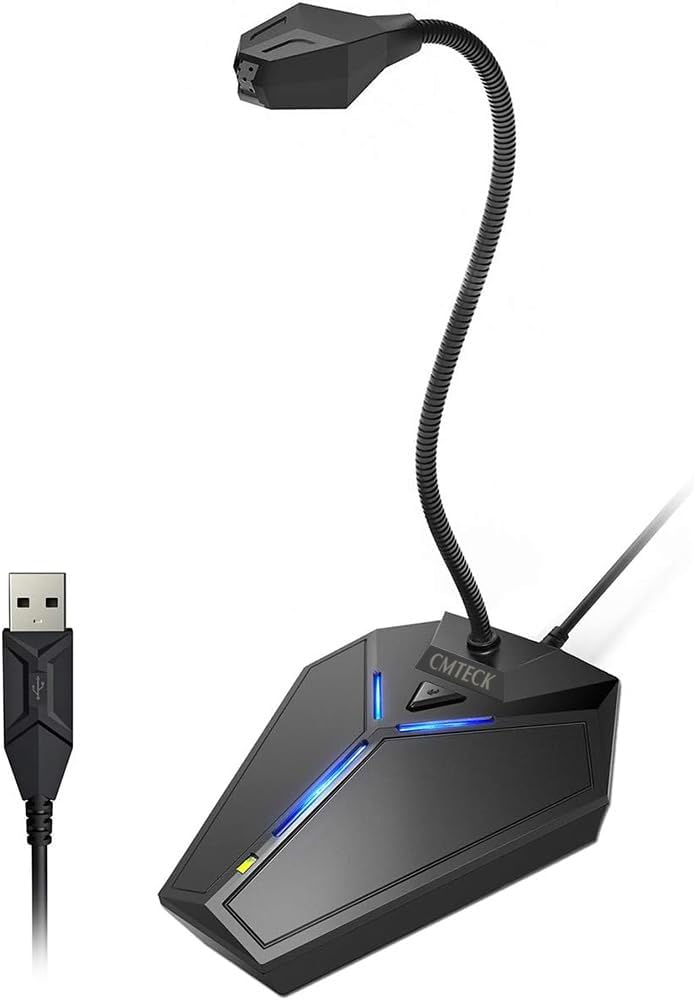
The CMTECK USB Computer Microphone offers a straightforward solution for users seeking a reliable plug and play device for daily dictation.
We may earn a commission when you buy through this link, at no additional cost to you.
Equipped with a smart chip it effectively suppresses background noise ensuring your voice is recorded clearly even in busy environments.
The flexible gooseneck design allows you to position the mic close to your mouth for optimal signal strength without moving your head.
This is an ideal choice for home office workers who want a no fuss microphone that delivers consistent performance without complex setup.
This internal technology actively reduces background noise to keep your dictation text accurate and clean.
The red LED light clearly shows when the mic is muted to prevent accidental recording or silence during calls.
We may earn a commission when you buy through this link, at no additional cost to you.
The Nuance PowerMic III is a specialized tool designed to work seamlessly with Dragon speech recognition software for maximum productivity.
We may earn a commission when you buy through this link, at no additional cost to you.
It combines a high quality microphone with mouse capabilities allowing you to navigate your PC without using your hands or keyboard.
The unidirectional microphone with noise cancellation ensures that only your voice is picked up which improves accuracy in noisy office settings.
This device is best for professionals who rely heavily on voice commands and want to streamline their workflow with advanced integrated control.
Use the mic to control your cursor and clicks allowing you to dictate and edit text simultaneously.
Focuses on your voice to ensure accurate dictation results even in noisier work environments.
We may earn a commission when you buy through this link, at no additional cost to you.
The PHILIPS LFH3200 SpeechMike is engineered for professional dictation workflows that prioritize accuracy and ease of use for power users.
We may earn a commission when you buy through this link, at no additional cost to you.
Its noise canceling technology is fine tuned to deliver precise speech recognition results even in environments with moderate background noise.
Designed specifically for Dragon Naturally Speaking software this mic ensures smooth operation and reliable command execution for daily transcription.
This is a solid choice for those who need a professional tool that integrates perfectly with industry standard dictation software platforms.
This mic is tuned to work best with Dragon software ensuring you get the best possible transcription accuracy.
Simple push buttons allow you to control recording start and stop easily without interrupting your workflow.
We may earn a commission when you buy through this link, at no additional cost to you.
The OLYMPUS RecMic II offers a traditional approach to computer dictation with a focus on durability and precise control for professionals.
We may earn a commission when you buy through this link, at no additional cost to you.
Its built in trackball allows you to control your PC mouse using your hand without ever leaving the microphone in your other hand.
The silent keys and smooth UV coating ensure that pressing buttons does not create extra noise that could interfere with recording quality.
This microphone is a reliable option for users who prefer physical controls and a robust device that works well with Dragon dictation software.
Navigate your computer effortlessly with the trackball allowing for precise cursor control while dictating.
Keys designed to be silent prevent mechanical clicking sounds from being picked up during your dictation.
We may earn a commission when you buy through this link, at no additional cost to you.
Choosing the right microphone requires balancing audio quality, features, and budget to ensure compatibility with your workflow.
The pickup pattern determines how the mic captures sound. Cardioid patterns are best for single user dictation as they focus on your voice from the front. Omni patterns are better for group meetings where sound comes from multiple directions.
For most individual dictation users a cardioid pattern will yield better results by reducing background noise effectively.
Built-in noise cancellation technology helps filter out ambient sounds like keyboard clicks or air conditioning hum. This is critical for dictation software to interpret your voice accurately without errors.
Look for microphones that specifically advertise active noise cancellation or digital filtering to maintain text accuracy.
Ease of setup is a major factor for productivity. A true plug and play device connects via USB and works immediately without needing drivers or complex configuration.
Select a model that works with your operating system out of the box to save time on installation.
Durability matters if you use the microphone frequently. Look for metal bases and sturdy goosenecks that can withstand daily handling and remain stable on your desk.
A heavy and solid base prevents the mic from tipping over during active use which ensures consistent audio capture.
Ensure the microphone is certified or tested with your specific dictation software like Dragon NaturallySpeaking. Some mics come with presets or drivers optimized for these platforms.
Check the product description to confirm it lists your software explicitly for the best performance.
A physical mute button with a clear LED indicator allows you to silence the mic quickly without interrupting your session. This prevents accidental background noise from being recorded.
Prioritize models with tactile mute buttons over software switches for faster and more reliable control.
A longer cable gives you the flexibility to position the mic exactly where you need it regardless of your USB port location. Aim for at least 6 feet of cable for comfort.
A cable that is too short can force awkward positioning which negatively impacts audio quality and ergonomics.
Dictation microphones range from under 20 to over 400. While high-end models offer better features budget options often provide sufficient quality for basic text to speech tasks.
Determine how much you rely on dictation daily to decide if investing in a premium model is necessary.
To ensure the best sound quality position the microphone 6 to 12 inches away from your mouth and slightly below your chin to avoid plosive sounds.
Regularly clean the microphone grille with a soft cloth to remove dust and skin oils that could affect audio capture over time.
Always unplug the microphone by the connector rather than pulling the cable to prevent damage to the USB port or internal wiring.
Most modern USB microphones work with built-in Windows or macOS dictation tools. However for professional accuracy you may want dedicated software like Dragon NaturallySpeaking. Check compatibility before purchasing to ensure seamless integration with your workflow.
A cardioid pattern is generally best for dictation because it captures sound primarily from the front. This helps to reduce background noise from other directions such as the keyboard or office chatter ensuring clearer audio input.
Many models like the Philips LFH3200 and Nuance PowerMic III are specifically optimized for Dragon software. However most standard USB microphones will also work provided they are properly configured in your system audio settings.
This often happens if the microphone is too close to noise sources or lacks noise cancellation. Move the mic closer to your mouth and further from your keyboard or use a cardioid pattern to focus on your voice.
Check the product specifications for mentions of Windows or macOS compatibility. Most USB microphones are plug and play on both systems but some may require drivers for advanced features like gain control.
Budget models can work for general tasks but for high volume professional transcription a higher quality mic with better noise cancellation is recommended. The right tool can save you time editing errors in the final text.
A cable length of at least 6 feet is ideal. This gives you enough slack to position the microphone optimally without being restricted by the distance to your computer's USB port.
Wireless microphones are available but wired USB models usually provide lower latency and more stable connections which are crucial for accurate speech recognition. We recommend wired options for strict dictation tasks to ensure reliability.
We reviewed ten excellent microphones ranging from budget friendly options to high-end professional tools to help you find the perfect fit for your needs.
Prioritize noise cancellation and microphone pattern if accuracy is your main goal otherwise focus on ergonomics and build quality for daily comfort.
Prices and availability can change quickly so verify current stock and specifications on the retailer site before making your final purchase decision.