
Thames & Kosmos My Robotic Pet
4.1Editor score
Screen-free coding cards
Color and infrared sensors
Three unique play modes
Discover the top rated coding toys for kids in October 2026. Our expert guide compares screen-free and app-based robotics to help you choose the perfect
Finding the right coding toy can transform how children learn logic and problem solving skills. These interactive tools bring abstract programming concepts to life through hands on play and engaging challenges.
We compared ten leading robotics kits based on age appropriateness, build quality, and educational depth. Each product offers unique features ranging from screen-free coding to app-based challenges for diverse learners.
Every pick highlights specific strengths like assembly difficulty, sensor capabilities, and curriculum support. Remember that prices fluctuate regularly so check current availability before making your final purchase decision today.
4.1Editor score
4.6Editor score

4.6Editor score
This side by side comparison outlines key specifications for all ten selected robotics kits to help families make informed decisions based on age and learning goals.




The Thames & Kosmos My Robotic Pet stands out as an affordable entry point for kids interested in robotics without needing a tablet. Its rating of four point one reflects solid construction and educational value for young builders.
We may earn a commission when you buy through this link, at no additional cost to you.
Kids construct a fifteen inch robotic reptile that responds to physical action cards rather than digital interfaces. The color sensor allows the chameleon to camouflage its surroundings while infrared detection triggers tongue retraction and movement sequences.
The main trade off is the lack of digital app integration which limits advanced programming options compared to screen based robots. However this keeps the focus on fundamental logic and engineering concepts for children ages eight and up.
This kit is ideal for families wanting to introduce coding principles without increasing screen time. The comprehensive guide supports independent play after initial assembly making it a strong choice for budding engineers.
Physical colored action cards replace digital code blocks allowing kids to program movements through tangible interaction.
Three distinct modes including coding wild and pet offer varied engagement levels for different learning stages.
We may earn a commission when you buy through this link, at no additional cost to you.
The Makeblock mBot offers a robust platform for transitioning from block based coding to real world electronics and programming. Its four point six rating highlights reliability and educational depth for kids ages eight to twelve.
We may earn a commission when you buy through this link, at no additional cost to you.
Building the mBot involves assembling metal components and learning about robotics structures. Once built it supports Scratch and Arduino coding providing a pathway to professional development environments while remaining accessible for beginners.
The need to purchase batteries separately and the assembly time are minor drawbacks compared to pre-built robots. However the open-source nature allows extensive customization through add-on packs and compatibility with other systems.
This robot suits learners ready to explore electronics beyond basic movements. The rich tutorial ecosystem ensures kids can progress from simple commands to complex projects independently.
Supports both visual Scratch blocks and text-based Arduino code for seamless skill progression.
Compatible with hundreds of electronic modules and LEGO parts for unlimited expansion possibilities.
We may earn a commission when you buy through this link, at no additional cost to you.
Sphero Mini packs advanced robotics into a tiny ball making it perfect for kids with limited space or on-the-go learning. Its four point six rating speaks to its durability and interactive fun factor.
We may earn a commission when you buy through this link, at no additional cost to you.
Powered by the free Sphero Edu app kids can draw paths use drag and drop blocks or write JavaScript. The Play app turns it into a game controller for arcade style challenges like bowling or racing.
The small size means it can be easily lost and battery life is one hour requiring frequent charging. Despite this its versatility as a coding tool and game controller offers great value for beginners.
Ideal for tech savvy kids who want a robot that fits in a pocket. The blend of gaming and coding keeps motivation high without feeling like a chore.
From drawing paths to writing JavaScript the app scales with your child's growing skills.
Joystick slingshot and tilt controls provide multiple ways to interact with the robot physically.
We may earn a commission when you buy through this link, at no additional cost to you.
The Code & Go Robot Mouse is designed specifically for emerging coders ages four and up. With a four point five rating it excels at teaching foundational sequencing and directional skills without any digital distractions.
We may earn a commission when you buy through this link, at no additional cost to you.
Kids use buttons on Colby the mouse to program paths through maze grids made of walls and tunnels. The visual feedback of the mouse reaching the cheese wedge reinforces cause and effect learning effectively.
The limitations are intentional to suit younger ages but might feel restrictive for older kids seeking more complex challenges. However it serves as an excellent first step before moving to advanced robots.
Perfect for preschool and kindergarten settings where hands-on logic is key. Teachers can reuse the grids for various activities making it a cost-effective educational resource.
Physical buttons teach directional sequencing and planning before digital interfaces complicate the process.
Interchangeable walls and tunnels let kids create custom challenges to test their code.
We may earn a commission when you buy through this link, at no additional cost to you.
Mech-5 targets future engineers ages ten and up with a focus on mechanical engineering rather than pure software. Its four point five rating reflects a rewarding build experience that challenges older kids effectively.
We may earn a commission when you buy through this link, at no additional cost to you.
The robot can throw lift kick and draw by snapping coding buttons onto a wheel. This mission-based approach encourages understanding how mechanical parts interact to perform specific tasks rather than just moving.
The build process takes multiple hours which requires patience and adult help. While rewarding it may not suit children looking for instant play. However the depth of learning is substantial for older students.
Best for households with older kids ready to spend time on a project. The result is a sophisticated toy that demonstrates real engineering concepts through interactive play.
Mechanical actions like kicking and lifting connect coding inputs to physical outputs visually.
Step by step instructions ensure proper assembly building patience and precision in kids.
We may earn a commission when you buy through this link, at no additional cost to you.
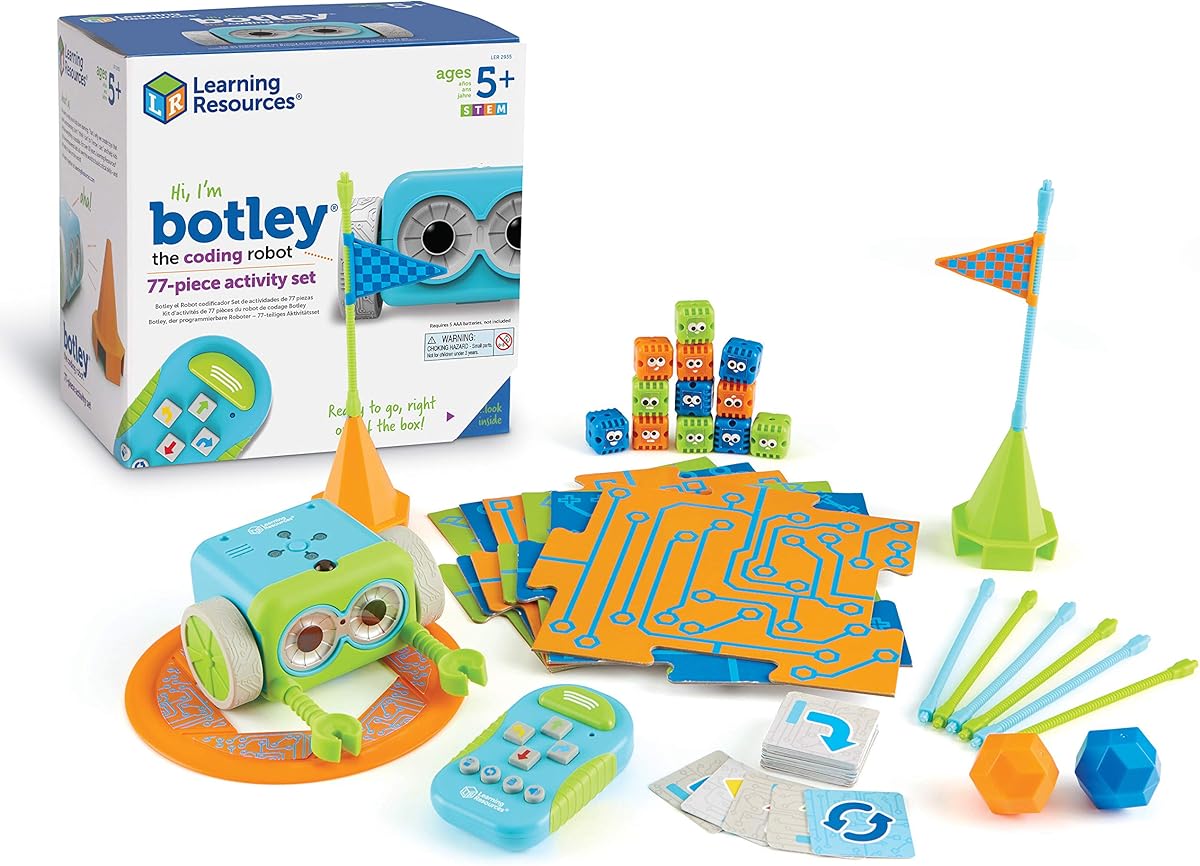
Botley remains a gold standard for screen-free coding with a four point six rating for reliability and educational quality. It introduces kids to logic and sequencing without requiring any tablets or phones.
We may earn a commission when you buy through this link, at no additional cost to you.
The remote programmer sends commands to the robot allowing users to code paths loops and black-line following. Its object detection sensors help it avoid collisions adding complexity to obstacle courses and navigation tasks.
The need for multiple batteries and the remote's range can be limiting in large spaces. However the versatility of the seventy seven piece set ensures hours of creative play and learning.
Ideal for parents wanting to introduce coding logic without increasing screen time. The combination of physical play and logical programming makes it a top choice for families.
Looping commands and object avoidance teach complex concepts without digital interfaces.
Obstacle pieces and tiles allow endless customization of mazes and challenges.
We may earn a commission when you buy through this link, at no additional cost to you.
The Ozobot Evo Kit is designed for both home and school use with a four point six rating. It bridges screen-free coding with markers and online coding with Blockly for flexible learning.
We may earn a commission when you buy through this link, at no additional cost to you.
Kids use color codes on paper to steer the robot or switch to digital coding for more complex tasks. Access to over seven hundred lessons makes it a long-term resource for growing skills.
The higher price point and need to manage markers are minor trade-offs. However the educational depth and adaptability make it a premium option for serious learners.
Best for families committed to long-term STEM education. The robust curriculum support ensures the robot remains useful as skills progress.
Five skill levels grow with the child from beginner to master coding proficiency.
Extensive lesson plans make it easy for teachers to integrate coding into daily activities.
We may earn a commission when you buy through this link, at no additional cost to you.
Botley 2.0 builds on the original success with enhanced sensors and new challenges. A four point five rating highlights the improved interaction and play value for kids ages five and up.
We may earn a commission when you buy through this link, at no additional cost to you.
The robot now supports forty five degree turns and object-sensing reactions allowing for more precise navigation. Lights and sounds provide multisensory feedback making coding sequences more engaging than before.
The increased complexity might overwhelm very young users but suits those ready for a step up. Accessories are stackable creating custom mazes that keep kids returning to the toy.
Great for kids familiar with basic coding who want more advanced tasks. The improvements keep the classic appeal while adding modern features for a better experience.
New turning angles and object detection refine navigation and path planning skills.
Lights and sounds provide immediate feedback to reinforce successful coding actions.
We may earn a commission when you buy through this link, at no additional cost to you.
Dash is a premium robot known for its robust app ecosystem and ease of use. With a four point six rating it stands out as a versatile tool for learning coding concepts.
We may earn a commission when you buy through this link, at no additional cost to you.
Users can choose from five apps including Blockly and Wonder to program movement singing and dancing. Voice commands and obstacle navigation are handled seamlessly making it feel like a true companion.
The high price and lack of camera limit some use cases but the software support is unmatched. With five hours of battery life it supports extended play sessions without interruptions.
Best for families seeking a polished and comprehensive learning experience. The app variety ensures kids never run out of new challenges.
Five dedicated apps provide varied challenges from simple moves to complex algorithms.
No assembly needed means immediate play and learning start as soon as unboxing.
We may earn a commission when you buy through this link, at no additional cost to you.
TaleBot Pro targets the youngest learners ages three to five with a four point seven rating. Its screen-free design focuses on language creativity and basic sequencing in a safe environment.
We may earn a commission when you buy through this link, at no additional cost to you.
Kids record voice commands and use an interactive map to direct the robot. The toy supports ten languages and can be combined with Lego blocks for creative building and play.
While limited in advanced coding it is perfect for introducing logic to toddlers. The storytelling function adds a unique dimension that keeps children engaged and creative.
Ideal for households with young children ready to start STEM learning. The simplicity ensures frustration-free play while building foundational skills.
Recording features encourage speech and narrative skills alongside coding basics.
Compatibility with Lego allows kids to extend play with physical building blocks.
We may earn a commission when you buy through this link, at no additional cost to you.
Selecting the right coding toy requires considering age appropriateness screen usage and educational goals for your child.
Coding toys vary significantly in complexity and assembly requirements. Younger children benefit from simple screen-free options while older kids may enjoy app-based platforms.
Always check the recommended age range to ensure the toy matches your child's current skills.
Screen-free robots use physical cards or buttons to teach logic without digital distractions. App-based robots offer more programming options but require a tablet or smartphone.
Choose based on your family's screen time policies and desired learning style.
Some toys focus on basic sequencing while others cover loops variables and algorithms. Look for products that grow with your child to maximize value.
Curriculum support and lessons can enhance the educational impact significantly.
Building kits provide mechanical engineering value but take time. Pre-assembled robots are ready to use immediately for instant play.
Consider if your child enjoys the building process or prefers immediate interaction.
Most robots require AA or AAA batteries that are often not included. Rechargeable options save money over time.
Check power requirements before buying to avoid delays in setting up the toy.
Open-source systems allow connecting add-ons to expand capabilities. LEGO compatibility offers creative flexibility for future projects.
High expandability keeps interest high as skills develop over time.
Advanced sensors like light sound and distance detection add complexity to challenges. Basic robots focus on simple movement and logic.
Sensors provide real-world feedback that makes coding feel more interactive.
Prices range from budget friendly to premium depending on features and durability. Consider how long the toy will remain useful.
Higher initial cost may be justified by long-term educational benefits and quality.
Start by reading the instruction manual carefully to understand assembly steps and battery placement. Proper setup ensures the robot functions correctly during play.
Charge rechargeable batteries or replace disposable ones regularly to maintain performance. Keep robots away from water and dust to prevent mechanical damage.
Encourage kids to document their programs or draw maps before coding. This helps develop planning skills and reduces frustration during challenges.
The Learning Resources Code & Go Robot Mouse is ideal for beginners ages four and up due to its simple interface. It teaches basic sequencing without requiring any screens or apps.
Screen-free toys promote physical interaction and reduce digital dependency but apps offer more advanced programming options. The best choice depends on your child's learning style and home screen rules.
App-based robots like Sphero and Dash require Bluetooth connectivity to tablets. Screen-free options work independently without needing any mobile devices for control.
Yes many coding toys have advanced features that challenge older children. For example Ozobot and mBot scale from simple commands to complex professional-level coding.
Battery life varies widely from one hour to five hours depending on usage. Rechargeable models reduce long-term costs but may require initial investment.
Coding toys develop logic problem solving sequencing and creativity. They also build patience and fine motor skills through building and interacting with the robot.
Whether you choose a budget friendly screen-free kit or a premium app-based robot all ten options offer strong educational value for different age groups and interests.
Prioritize toys that match your child's current skill level and allow room to grow. Look for durability and expandability to ensure the toy remains relevant.
Prices and availability change frequently so verify current details before buying. These robots provide a fun gateway to technology skills that will serve kids well in the future.