
Bluetooth 1D&2D Barcode Scanner, 3-in-1 Bluetooth & USB Wired & 2.4G Wireless QR Barcode Reader
4.3Editor score
Supports 1D and 2D codes
Multiple connection modes available
Affordable price point
Compare the top 10 barcode scanners for iPad based on compatibility, battery life, scanning speed, and connectivity options to find the perfect match for your
Finding the right barcode scanner for iPad is essential for efficient inventory management and retail operations. A good device should offer seamless Bluetooth connectivity, long battery life, and reliable scanning performance for both 1D and 2D codes to ensure smooth daily tasks.
We evaluated ten top-rated models based on real-world usability, connection stability, and feature sets tailored for tablet users. Each product was assessed for compatibility with iOS, build quality, and versatility across different environments like warehouses, stores, and libraries.
This guide highlights the strengths and trade-offs of each scanner to help you make an informed decision. Each pick shows detailed specifications and pros and cons, but remember that pricing and availability can change frequently on retailer platforms.
4.3Editor score
4.9Editor score

4.5Editor score
The following table provides a side-by-side comparison of all ten featured scanners to help you quickly identify key differences in connectivity, battery capacity, and barcode type support for your specific needs.


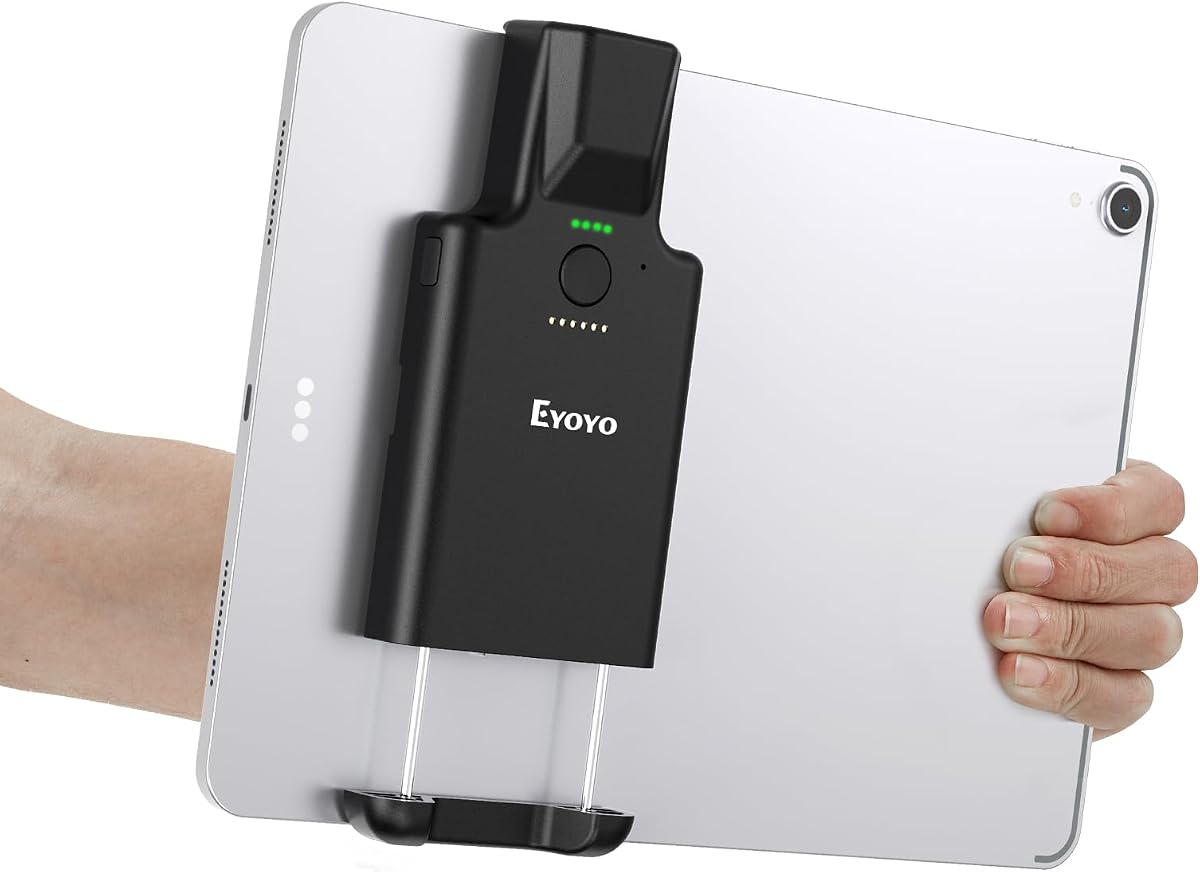
This Eyoyo model stands out as the top choice for iPad users due to its specialized clip design and advanced 2D imaging capabilities. With a 4.9 rating, it offers a secure way to hold your tablet while scanning, making it ideal for retail and inventory tasks.
We may earn a commission when you buy through this link, at no additional cost to you.
The scanner features a robust 3000mAh battery that supports up to 30 hours of continuous use or up to 30 days of lighter operation. Its CMOS technology reads codes from paper, screens, and even curved surfaces with high accuracy. The LED indicators keep you informed of battery levels at all times.
While it lacks 2.4G wireless connectivity, the Bluetooth and USB options provide sufficient flexibility for most mobile workflows. The clip mechanism is adjustable but may not fit every single tablet size perfectly, so checking dimensions is advised before purchase.
This device is highly recommended for professionals who need a reliable handheld scanner that integrates directly with their iPad setup. Its combination of durability, battery life, and specific iPad compatibility makes it the best overall option on this list.
Business owners managing retail floors or libraries will appreciate the ease of use and reduced cable clutter. The ergonomic design ensures comfort during long scanning sessions without causing hand fatigue.
The vertical retractable clip fits devices between 5.7 and 7.1 inches, ensuring your iPad stays steady during operation.
Capable of reading 2D QR and PDF417 codes from digital screens and damaged labels with high precision.
We may earn a commission when you buy through this link, at no additional cost to you.
This scanner offers an impressive balance of features for its price, making it the best budget choice for iPad users needing both 1D and 2D scanning. The 3-in-1 connection ensures you can use Bluetooth, 2.4G wireless, or USB depending on your immediate needs.
We may earn a commission when you buy through this link, at no additional cost to you.
With a 2600mAh battery, it provides over 9 hours of continuous scanning and can stand by for two months. The ability to store up to 130,000 barcodes offline allows you to work away from your device and sync later when back in range.
While it lacks some premium build features found in more expensive models, the performance is reliable for everyday tasks. The limitation regarding Square POS compatibility means it is best suited for generic inventory or data entry applications.
Small business owners and students looking for a cost-effective solution will find this model highly suitable. It handles most common barcode types efficiently without breaking the bank.
The versatility of connection modes ensures compatibility with a wide range of operating systems beyond just iOS, making it a flexible tool for mixed device environments.
Switch between Bluetooth, 2.4G, and USB wired modes to match your specific setup requirements easily.
Store thousands of barcodes locally when out of range and upload them once connectivity is restored.
We may earn a commission when you buy through this link, at no additional cost to you.
The Inateck BCST-70 is designed for professionals who prioritize range and durability. Its 115ft connection distance allows you to move freely around large warehouses or stores while keeping your iPad connected without signal dropouts.
We may earn a commission when you buy through this link, at no additional cost to you.
Built to last with a thick TPU protective case and triple consolidation treatment inside, this scanner can withstand drops from 6 feet. The battery offers a massive 180 days standby time, reducing the frequency of charging significantly.
While it is limited to 1D barcodes, the specialized features like editable prefixes and suffixes offer advanced data formatting options. The setup is quick, and it supports multiple languages for international use cases.
This premium option is ideal for industrial environments where equipment durability and long-range connectivity are critical success factors. The investment pays off through reduced replacement costs and higher operational efficiency.
Users who require specific data formatting or need a scanner that can take a beating will find this model superior to standard consumer-grade devices.
Work up to 115 feet away from your device without losing connection for better mobility.
Edit prefixes and suffixes up to 32 digits to tailor data output to your specific software requirements.
We may earn a commission when you buy through this link, at no additional cost to you.
The NETUM Bluetooth scanner is a powerful tool for inventory management, particularly due to its ability to store up to 100,000 barcodes offline. This feature ensures that you never lose data even when you are out of range of your iPad or network.
We may earn a commission when you buy through this link, at no additional cost to you.
Equipped with a 2500 pixels CCD sensor, it can scan codes through plastic shrink wrap and glass, which is useful for handling packaged goods. The 2600mAh battery supports long shifts, and the device offers manual, continuous, and auto-sensing modes.
While it does not support Square POS, its compatibility with a wide range of systems makes it versatile for general data entry. Setting up storage mode requires scanning specific setting barcodes from the manual, which adds a small learning curve.
Warehouse managers and library staff who need to collect large amounts of data on the go will benefit from the storage capabilities and long battery life of this scanner.
It is a robust solution for those who need to verify barcodes quickly without disrupting the flow of work at checkout counters or storage areas.
Read barcodes through glass or plastic wrapping without needing to open packages for efficiency.
Store up to 100,000 codes to ensure no data is lost during mobile operations.
We may earn a commission when you buy through this link, at no additional cost to you.
If portability is your top priority, the Eyoyo Mini 1D scanner is the ideal choice. Weighing only 35 grams, it fits easily in a pocket and causes minimal fatigue during all-day use, making it perfect for mobile retail staff.
We may earn a commission when you buy through this link, at no additional cost to you.
Its battery life is impressive for its size, offering up to 8 hours of continuous scanning or up to 10 days with typical daily use. The vibration mode allows for silent operation in environments like libraries or quiet stores.
While it is limited to 1D printed barcodes and cannot scan screens, it excels at its specific task. The 2.4G and Bluetooth connections ensure reliable communication with your iPad, and the auto-off feature conserves energy effectively.
Staff who need to carry a scanner around the store for quick checks will appreciate the convenience of this lightweight device. It simplifies the workflow by reducing the weight you need to carry.
This scanner is a great addition for businesses that need to add scanning capability to mobile devices without bulk or distraction from loud beeps.
Weighing just 35 grams, this scanner reduces hand fatigue significantly compared to standard models.
Switch to vibration mode to scan discreetly in noise-sensitive environments like libraries.
We may earn a commission when you buy through this link, at no additional cost to you.
This desktop scanner offers a hands-free solution that is perfect for checkout counters or packing stations where keeping both hands free is necessary. The omnidirectional sensor can read codes from any angle without needing to position the item precisely.
We may earn a commission when you buy through this link, at no additional cost to you.
It features smart auto-sensing technology that wakes up when an item moves in front of it and goes to sleep when not in use. The anti-slip base and anti-shock design ensure it stays stable on your desk even if it falls.
While not suitable for mobile tasks around the warehouse, its efficiency at a fixed workstation is unmatched. The IP54 rating protects it from dust which is common in shipping or receiving environments.
Checkout staff and packing teams will benefit from the reduced effort and increased speed this device provides compared to manual handheld scanning.
It is an excellent upgrade for stationary points of sale where speed and convenience are more important than portability.
The scanner automatically detects movement and activates to save power and improve efficiency.
Reads codes from any angle without requiring specific orientation or alignment.
We may earn a commission when you buy through this link, at no additional cost to you.
This model simplifies your setup by using the charging base as a data receiver, which reduces the number of cables you need to manage. The integrated dock ensures your scanner is always charged and ready for use when you grab it.
We may earn a commission when you buy through this link, at no additional cost to you.
It supports silent vibration mode which is helpful in quiet workspaces. The pocket-sized design fits comfortably in your hand, and the advanced CMOS sensor captures codes from paper and screens accurately.
While the battery capacity is moderate, the charging dock ensures you are not left without power during shifts. It is optimized specifically for iPhone and iPad users, providing a seamless integration experience.
Retail workers and book staff who need a compact device that charges easily will find this system very convenient for daily operations.
The combination of a docking base and Bluetooth connectivity offers a tidy solution for small to medium retail environments.
The base serves as both a charger and a receiver to reduce cable clutter on your desk.
Designed specifically for iPhone and iPad to ensure stable and reliable connection.
We may earn a commission when you buy through this link, at no additional cost to you.
Durability is a key feature of this NetumScan model which is built to withstand 2-meter drops onto concrete. This rugged construction makes it ideal for warehouse environments where equipment might take a hit during daily operations.
We may earn a commission when you buy through this link, at no additional cost to you.
The dual-button control prevents accidental shutdowns during use which is a common frustration with single-button scanners. The global shutter CMOS sensor ensures quick and accurate reads of both 1D and 2D codes even if they are smudged.
It charges fully in 4 hours and offers long performance for frequent scanning tasks. The wireless chip ensures stable Bluetooth pairing without dropouts so your data is always transmitted reliably.
Warehouse managers looking for a reliable tool that can handle tough conditions will find this scanner a great investment for operational reliability.
The design prioritizes function and endurance which is exactly what field workers need to keep operations running smoothly without interruption.
Built to survive falls from up to 2 meters onto concrete for enhanced durability.
Dual-button controls prevent the device from turning off accidentally during use.
We may earn a commission when you buy through this link, at no additional cost to you.
This scanner offers a substantial 16MB offline storage capacity which allows for storing up to 50,000 QR codes. This is beneficial when you need to collect large amounts of data without immediate network access.
We may earn a commission when you buy through this link, at no additional cost to you.
The ergonomic design ensures a comfortable grip even after prolonged use which reduces hand strain. It supports both 2.4G wireless and Bluetooth modes for flexible connection options with your iPad.
While the rating is slightly lower than top picks it still provides functional capabilities for general inventory tasks. You need to ensure the side switch is pushed to ON before scanning which is a simple but important step.
Teams that need to move data in batches rather than in real time will appreciate the offline storage feature on this device.
It is a solid choice for those who need a reliable scanner with a base and decent storage at a reasonable price point.
Store up to 50,000 QR codes locally to ensure data is saved without connection.
Designed to reduce fatigue during long scanning sessions with a comfortable shape.
We may earn a commission when you buy through this link, at no additional cost to you.
The KUIIYER scanner is a versatile option especially for international use since it supports 32 languages in its settings. This makes it suitable for diverse work environments where language preferences may vary among staff.
We may earn a commission when you buy through this link, at no additional cost to you.
It includes a built-in auxiliary light which helps read codes in dark or poorly lit areas like storage rooms. The IP54 waterproof rating ensures it is protected against dust and splashes adding to its reliability.
The 2000mAh battery supports long usage periods which helps minimize interruptions during shifts. It is built to withstand drops from up to 1.5 meters which adds a layer of durability for daily use.
Global logistics and retail teams will find the language support particularly useful for cross-border operations and diverse workforces.
This scanner combines practical features like light and waterproofing with flexibility for different users making it a well-rounded choice.
Supports 32 languages to accommodate international staff and diverse operational environments.
Auxiliary light assists in reading codes in dimly lit areas without extra gear.
We may earn a commission when you buy through this link, at no additional cost to you.
Selecting the right barcode scanner for your iPad requires considering connectivity, battery life, and scanning capabilities to ensure it fits your workflow.
Ensure the scanner supports Bluetooth for seamless connection with your iPad. Some models offer 2.4G wireless or USB as alternatives which can be useful if you need stability or want to avoid pairing steps. Check if it supports both modes to give yourself flexibility during use.
Look for models that offer multiple connection modes to suit different scenarios and reduce dependency on a single method.
For mobile work, battery capacity is crucial. Look for scanners with at least 2000mAh to last through a full shift. Consider standby time if you only use the scanner intermittently as this reduces how often you need to charge.
Aim for a battery that provides continuous use for several hours without needing a recharge to minimize downtime.
Decide if you need 1D or 2D QR scanning. Most modern needs require 2D for codes found on packaging and screens. Verify the product supports the specific code types you use such as QR, PDF417, or standard UPC codes.
Select a scanner that reads both 1D and 2D codes to cover all potential barcode formats you will encounter.
If you work in a warehouse or industrial setting durability is key. Look for models with drop protection ratings and rugged housings. Water and dust resistance features like IP54 ratings can protect your device from environmental hazards.
Choose a scanner built to withstand drops and dust to ensure longevity in tough environments.
Ensure the scanner is compatible with your iPad inventory management software. Some scanners work best with specific apps or systems while others are universal. Check if the scanner is supported by the platforms you plan to use.
Verify compatibility with your specific inventory or retail apps to prevent integration issues.
If you work in areas without reliable connectivity offline storage is valuable. This feature allows you to store scanned codes locally and sync them later. It is especially useful for inventory rounds in large warehouses.
Look for models with offline storage to ensure data is saved even without network access.
Comfort is important if you scan frequently. Consider the weight and shape of the scanner to avoid hand fatigue. Some models feature clips or handles that make them easier to hold during long sessions.
Prioritize ergonomic design features that reduce strain during prolonged usage.
Determine how much you are willing to spend. Higher priced models often offer better durability or features but basic scanners can still perform well for simple tasks. Balance cost with necessary features to get the best value.
Set a budget based on required features to find a model that offers the best value for your needs.
First, pair your scanner with the iPad by enabling Bluetooth in settings and scanning the pairing code if required. Ensure both devices are close during the initial setup to establish a strong connection quickly.
After pairing, test the scanner by pointing it at a standard barcode to verify it reads correctly. Adjust the angle and distance until you find the optimal position for your specific scanning needs.
To care for the scanner keep it clean and charged. Store it in a safe place when not in use to prevent damage. If it has a charging dock, use it regularly to maintain battery health and ensure readiness.
Most Bluetooth scanners are compatible with iPads running recent iOS versions but check specific compatibility in product details. Ensure your iPad has Bluetooth enabled and that the scanner supports Bluetooth 4.0 or higher for best results.
Not all scanners can read codes from screens. Look for models specifically noted to support screen scanning such as those with CCD or CMOS sensors. Some laser scanners only read printed barcodes so verify this feature before buying.
Battery life varies by usage but most models offer several hours of continuous scanning. Typical devices provide between 8 to 30 hours depending on capacity and how often you use the scanner during the day.
Many scanners are compatible with common POS systems but some specific platforms like Square may not work. Always check the product's compatibility notes regarding specific POS software before making a purchase decision.
Yes many models can connect directly to an iPad or tablet via Bluetooth. Offline storage features allow you to scan and save data directly to the device without needing a computer for immediate upload.
Most scanners are plug and play or require simple Bluetooth pairing steps. If your scanner uses Bluetooth it should connect quickly. Some models may need setting scans from the manual to configure specific functions.
Many modern scanners have advanced sensors that can read damaged or partially obscured codes. Look for models described as supporting damaged or low-contrast barcodes to ensure reliable scanning in various conditions.
Bluetooth scanners typically have a range of up to 30 meters while 2.4G models may reach up to 100 meters depending on conditions. Check specifications to ensure the range meets the size of your workspace.
This guide has highlighted top choices like the Eyoyo for iPad compatibility and the NETUM for storage options. Each model offers unique strengths depending on your needs for portability or battery life.
Prioritize battery life and barcode type support to ensure the device meets your daily demands. Consider durability features if you work in environments with high physical stress.
Remember to check current availability and specific compatibility before purchasing to ensure the scanner fits your exact requirements.