
MAYFLASH F300 Arcade Fight Stick
4.5Editor score
Wide platform compatibility
Sanwa component support
Affordable price point
Explore our expert comparison of the top 10 arcade fight sticks for Switch 2, analyzing compatibility, build quality, features, and value to help you choose.
Finding the right arcade fight stick for your Switch 2 can transform your gaming experience significantly. A quality stick offers precise inputs, durable components, and versatile connectivity options that enhance competitive play and casual sessions alike.
We compared ten top-rated models based on platform support, connection methods, modding potential, and user feedback. Each product was evaluated for its ability to deliver responsive controls and seamless integration with modern fighting games on the Switch 2.
This guide highlights the standout features of each pick to help you find the best fit for your needs. Remember that product availability and pricing may fluctuate, so verify details before purchasing to ensure you get the best value.
4.5Editor score
4.7Editor score

4.6Editor score
This comparison table outlines the key specifications of all ten reviewed arcade fight sticks to help you quickly identify the model that best suits your gaming setup and budget requirements.




This model stands out as the top choice for Switch 2 users seeking a high-quality arcade stick. With a rating of 4.7, it offers a blend of modern features and reliable performance that appeals to both casual and competitive players.
We may earn a commission when you buy through this link, at no additional cost to you.
The dynamic button layout feature allows the stick to visually adjust its labels when switching between Switch and PC modes, reducing confusion during gameplay. Additionally, the tempered glass faceplate provides a sleek, durable surface that feels premium under touch.
While the price is higher than some budget options, the included Ultimate Software allows deep customization of button mapping and macros, which enhances competitive play. The hidden compartment for the 2.4G receiver also adds a thoughtful touch to the design.
Ideal for gamers who want a future-proof stick that integrates seamlessly with the Switch 2 ecosystem, this model delivers on both aesthetics and functionality. Its combination of wireless options and wired stability ensures you can play comfortably in any setup.
The dynamic layout instantly changes to match your connected platform, making it easier to identify buttons without looking away from the screen.
The tempered glass faceplate not only looks stylish but also resists scratches and wear from intense gaming sessions over time.
We may earn a commission when you buy through this link, at no additional cost to you.
The MAYFLASH F300 is an excellent entry point for those looking to try arcade sticks without a large investment. Its 4.5 rating reflects solid performance and broad compatibility across many consoles and PC platforms.
We may earn a commission when you buy through this link, at no additional cost to you.
It supports Sanwa Denshi buttons and joysticks, allowing users to upgrade components later if they desire a more customized feel. The stick also supports XINPUT and DINPUT modes on PC, ensuring it works well with various game titles and emulators.
While it may not have the premium finish of higher-end models, the F300 delivers reliable inputs and essential features like turbo functions with speed settings. This makes it a versatile tool for both learning fighting games and casual play.
If you are new to fighting games or want a secondary stick for travel, this model offers great value. Its broad compatibility means it can be used with multiple systems in your collection, making it a flexible choice for mixed setups.
Because it uses standard Sanwa mounting holes, you can easily swap buttons or joysticks to match your personal preferences or replace worn parts.
Works with Switch, PS, Xbox, and PC, ensuring you can use it across different devices without needing multiple controllers.
We may earn a commission when you buy through this link, at no additional cost to you.
The MAYFLASH F700 Elite is designed for serious players who demand the highest level of performance. With a 4.6 rating, it incorporates premium Sanwa components that are renowned for their durability and precise actuation in competitive environments.
We may earn a commission when you buy through this link, at no additional cost to you.
The included full-size anti-slip rubber mat ensures the stick stays firmly in place during intense combos, preventing unwanted movement. Additionally, it supports wired headset output on PS5 and PC, allowing you to hear game audio and chat simultaneously.
While it is optimized for fighting games like Street Fighter 6 and Tekken 8, its build quality is unmatched in this class. The silent button action reduces noise pollution, which is beneficial for shared living spaces or late-night gaming sessions.
For enthusiasts who prioritize tactile feedback and stability, this model justifies its price with exceptional engineering. It provides a tournament-grade experience at home, making it a worthy investment for those committed to mastering fighting game mechanics.
The premium Sanwa buttons and joystick deliver consistent registration and minimal friction, ensuring your inputs are registered exactly when intended.
The anti-slip rubber mat keeps the unit stable on any surface, preventing sliding during rapid movements or complex inputs.
We may earn a commission when you buy through this link, at no additional cost to you.
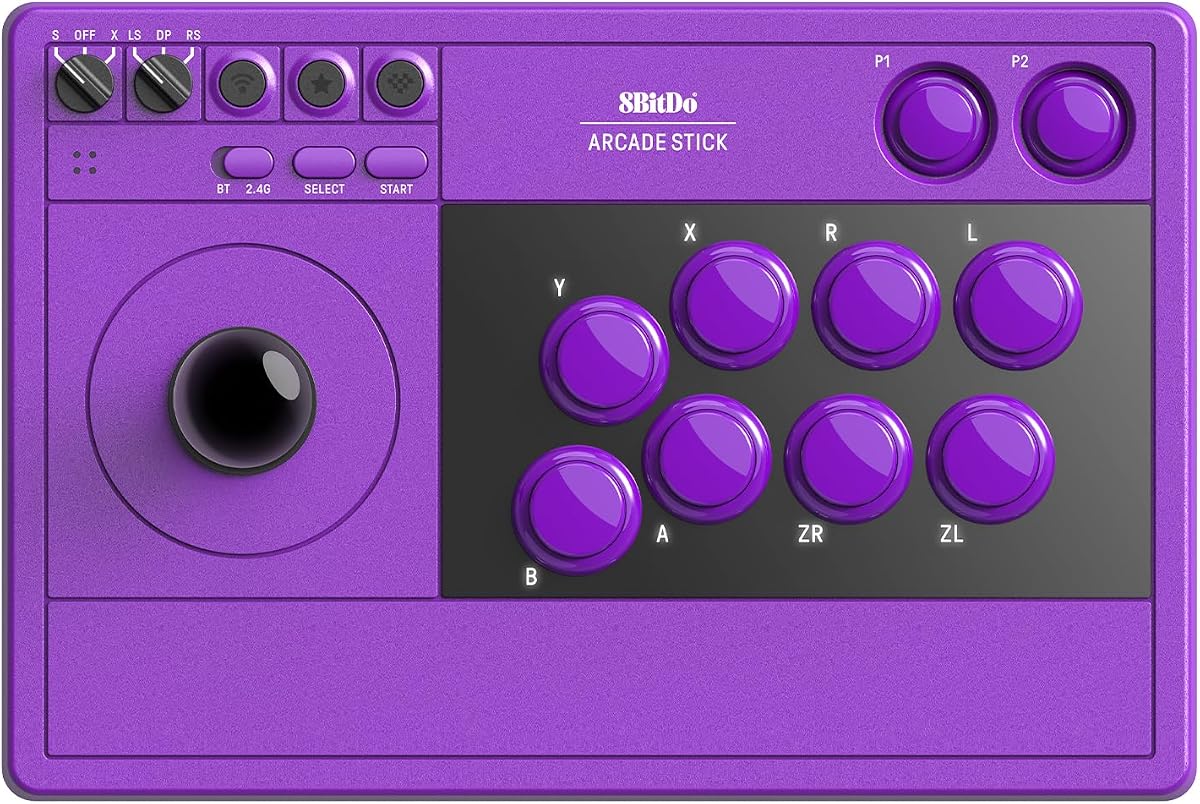
This 8Bitdo model is a versatile choice for gamers who switch between Switch and Windows PCs regularly. With a 4.6 rating, it offers robust connectivity options that ensure you can play wirelessly or via a stable wired connection as needed.
We may earn a commission when you buy through this link, at no additional cost to you.
The Ultimate Software allows for deep customization, including macro creation and button mapping, which is essential for competitive play. Its universal mounting plate supports Sanwa arcade sticks, giving you the flexibility to modify the hardware later if desired.
The included 2.4G receiver fits neatly into a hidden compartment on the back, keeping your accessories organized and reducing clutter on your desk. This thoughtful design detail shows attention to usability and convenience for daily use.
If you need a reliable stick that bridges console and PC gaming effectively, this model is a strong candidate. Its balance of features, modding potential, and connection options makes it a practical choice for versatile gaming setups.
Use the Ultimate Software to create macros and adjust mappings dynamically based on the game you are playing for optimized performance.
The mounting plate is designed to accept standard Sanwa parts, allowing you to upgrade the feel of the joystick or buttons easily.
We may earn a commission when you buy through this link, at no additional cost to you.
The 8Bitdo Retro Stick combines modern features with a nostalgic look, appealing to fans of classic gaming aesthetics. It boasts a 4.5 rating and offers impressive battery life that supports extended wireless play sessions without frequent charging.
We may earn a commission when you buy through this link, at no additional cost to you.
Its dynamic button layout feature automatically adjusts visual labels when you switch between Switch and PC modes, streamlining your workflow. The two dedicated macro buttons allow quick access to complex commands, enhancing your efficiency during matches.
With support for 2.4G, Bluetooth, and wired connections, this stick offers flexibility in how you play. The 2.4G receiver includes a hidden compartment for safe storage, ensuring you don't lose it when not in use.
This model is ideal for those who value wireless convenience without sacrificing performance. Its long battery life and smart design features make it a reliable companion for both casual play and more serious competitive sessions on Switch 2.
The battery supports up to 40 hours of play time on 2.4G connection, minimizing downtime and ensuring you are ready to play when you want.
Dedicated P1 and P2 macro buttons let you execute complex combos instantly, giving you an edge in fast-paced fighting games.
We may earn a commission when you buy through this link, at no additional cost to you.
The Saitake Wireless Stick stands out for its unique features like a built-in display and audio jack, making it versatile for various devices. Its 4.6 rating highlights strong performance across multiple platforms including Switch 2, PC, and mobile OS.
We may earn a commission when you buy through this link, at no additional cost to you.
You can customize settings, brightness, and language directly via the display screen, offering a user-friendly interface for adjustments on the fly. The 3.5mm headphone jack allows you to plug in headphones for private audio or online chat support.
Its macro recording feature supports up to 18 keystrokes, giving you precise control over complex input sequences. The turbo burst mode with different speed settings ensures you can execute rapid inputs effortlessly during gameplay.
For gamers who value customization and audio integration, this stick offers a compelling package. The combination of visual feedback on the screen and robust connectivity options makes it a strong contender for versatile gaming needs across platforms.
The built-in display lets you adjust settings like brightness and language without needing a computer, making it easy to tailor to your preferences.
The 3.5mm audio jack supports wired headsets, enabling private audio output or voice chat during online multiplayer sessions.
We may earn a commission when you buy through this link, at no additional cost to you.
The MAYFLASH F700 is built to support a wide array of platforms, including Switch 2 and PS5, making it a great all-around option. Its 4.5 rating reflects solid performance for fighting games, with features designed to enhance competitive play.
We may earn a commission when you buy through this link, at no additional cost to you.
It supports wired headset output, allowing you to hear background music and online chat on PS5 and PC. The compatibility with Sanwa components means you can easily upgrade buttons or the joystick to suit your preferred feel over time.
While it is optimized for fighting titles like Tekken 8 and Street Fighter 6, it lacks support for other game types on PS5. However, for dedicated fighting game enthusiasts, this focus ensures optimized input handling and reliable performance.
This model is a practical choice if you have a multi-console setup and want one stick that works well across them. Its connectivity options and customization potential make it a versatile tool for serious gamers.
Wired headset support allows for better audio management during online matches on PS5 and PC, keeping you connected and focused.
Compatible with Sanwa Denshi parts, so you can maintain the stick's performance by replacing worn components as needed.
We may earn a commission when you buy through this link, at no additional cost to you.
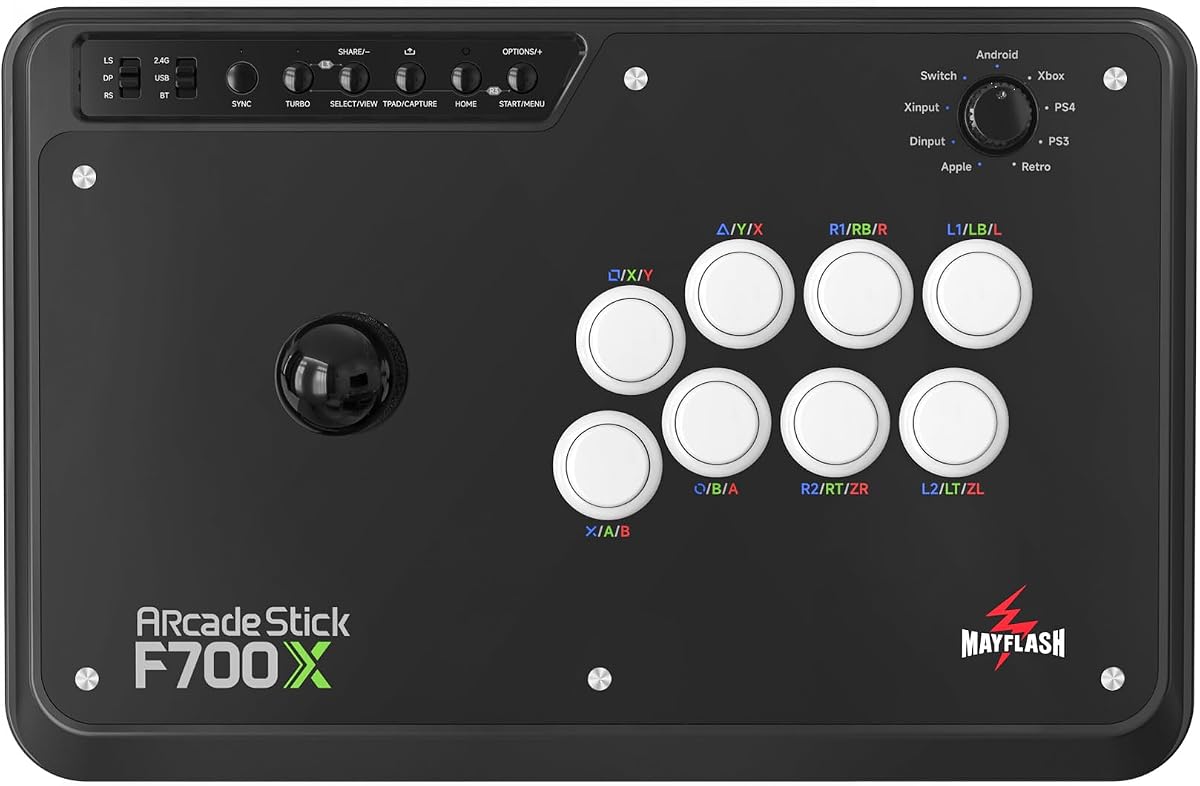
Designed specifically for Xbox Series X/S owners, the F700X provides robust support for fighting games on Microsoft consoles. Its 4.2 rating indicates it meets the needs of Xbox players looking for a specialized input device.
We may earn a commission when you buy through this link, at no additional cost to you.
It supports Sanwa components, offering a path for customization similar to other MAYFLASH models. Wired headset output is available for Xbox, PS4, and PC, ensuring you can stay connected during online gaming sessions.
While it does not support PS5, it covers Xbox Series, Switch 2, and PC with multiple connection modes. This focus ensures that Xbox users get a stick tailored to their console's specific input protocols and wireless standards.
If your primary gaming platform is Xbox Series, this model offers the right compatibility and features. It is a strong choice for those who want to play fighting games comfortably on Xbox without compromising on build quality.
The stick is optimized for Xbox Series X/S wireless protocols, ensuring a seamless connection experience without extra adapters.
Wired headset support allows you to listen to game audio and chat on Xbox and PC, enhancing your online gaming experience.
We may earn a commission when you buy through this link, at no additional cost to you.
The POWER A Fusion Stick is officially licensed by Nintendo, ensuring full compatibility with Switch and Switch 2 systems. Its 4.1 rating highlights a balance of cost and features suitable for casual and competitive players alike.
We may earn a commission when you buy through this link, at no additional cost to you.
It includes a customizable face card template, letting you print your own design to personalize your controller. The metal base and rubber footing provide stable gameplay, ensuring the stick stays in place during intense matches.
Using AA batteries allows for extended wireless play without needing to recharge, though this adds ongoing cost. The 9.8ft USB-C cable is conveniently stored on the front, ready for wired tournament play when needed.
This model is a great choice if you prioritize official Nintendo compatibility and personalization. Its sturdy build and flexible battery options make it a reliable tool for Switch owners seeking an arcade experience at home.
Design your own face card using downloadable templates, adding a personal touch to your gaming setup and making it unique.
The metal base and rubber feet ensure stability during gameplay, preventing the stick from sliding across your desk or table.
We may earn a commission when you buy through this link, at no additional cost to you.
The 8Bitdo V3 Edition brings an updated design with a tempered glass faceplate to the popular 8Bitdo lineup. As a newer model, it aims to improve on previous versions with enhanced build quality and battery performance.
We may earn a commission when you buy through this link, at no additional cost to you.
It supports Switch, Switch 2, and Windows PC with dynamic button labels that refresh in real time. The high-capacity 1000mAh battery ensures you can play for hours wirelessly before needing to recharge, supporting 30 to 40 hours of use.
Firmware updates help keep the stick compatible with new games and features, ensuring longevity. The hidden compartment for the 2.4G receiver keeps your setup clean and protects the adapter from damage during transport.
This stick is a solid upgrade for existing 8Bitdo fans or those seeking a modern aesthetic. Its combination of wireless convenience and durable materials makes it a worthy consideration for Switch 2 and PC gamers.
The tempered glass faceplate adds a premium look and protects against scratches, ensuring the stick looks new longer.
With up to 40 hours of play time on 2.4G connection, the battery life supports long gaming sessions without frequent recharges.
We may earn a commission when you buy through this link, at no additional cost to you.
Choosing the right arcade stick involves evaluating compatibility, build quality, and features to ensure it meets your gaming needs and budget.
Ensure the stick supports Switch 2 and other consoles you use. Some models are specialized for specific platforms, while others offer broader cross-platform support.
Verify compatibility with Switch 2 and any other consoles you own to avoid connection issues.
Look for sticks that offer wired and wireless options. Bluetooth and 2.4G provide flexibility, while wired connections ensure low latency for competitive play.
Choose a stick that supports both wired and wireless to adapt to different play scenarios and environments.
High-quality components like Sanwa parts offer better durability and feel. Metal bases and tempered glass faceplates also enhance longevity and aesthetics.
Prioritize models with robust materials to ensure the stick withstands regular use over time.
Some sticks allow you to swap buttons or joysticks easily. Check if the mounting plate is universal to support upgrades as your preferences change.
Consider sticks with modding support to personalize the feel and appearance over time.
Dedicated macro buttons and software support simplify complex inputs. Look for software that lets you save profiles for different games.
Choose models with software support and dedicated buttons to manage macros efficiently.
Wireless sticks require reliable battery life. Models with rechargeable batteries or AA battery options ensure you can play for extended sessions.
Check battery specs to ensure they match your usage patterns and reduce recharging downtime.
Some sticks include audio jacks for wired headsets. This can be useful for online gaming to hear game audio or chat separately.
If you need audio output for chat, select a model that supports wired headset connections.
Balance your budget with the features you need. Higher-priced sticks often offer better components and software support.
Select a model that offers the best value for your specific gaming requirements and budget constraints.
Connect your stick to the Switch 2 via USB-C for wired play or use Bluetooth or the 2.4G receiver for wireless. Follow the on-screen prompts to pair the device and ensure the mode matches your console.
Install any required software like 8Bitdo Ultimate Software to customize button mappings and create macros. This step optimizes performance and makes playing specific games more comfortable and efficient.
Clean the faceplate regularly with a soft cloth to remove dust and oils. Avoid exposing the stick to liquids or extreme temperatures to maintain its performance and appearance over time.
Most modern arcade sticks support Switch 2 through native compatibility or firmware updates. Always check the product specifications to ensure it lists Switch 2 as a supported platform for full functionality.
Use the manufacturer's software or the stick's built-in programming features to record button sequences. Assign these macros to dedicated buttons for quick access during gameplay to execute complex combos easily.
Many sticks feature universal mounting plates that allow you to swap buttons or joysticks easily. Verify the dimensions of the components to ensure they fit the stick's mounting holes correctly.
Wired USB-C connections generally provide the lowest latency and most stable performance. However, modern 2.4G wireless adapters are optimized to minimize lag for competitive gaming.
While some sticks are optimized for fighting games, most can be used with other genres on Switch 2. Check compatibility notes to confirm support for your specific game library.
Visit the manufacturer's website or use their dedicated software to download and install firmware updates. This process ensures compatibility with new consoles and fixes potential bugs.
Sanwa components are widely recognized for their durability and precision. Upgrading to them can improve the feel and response of your stick, making them a valuable investment for serious players.
Regularly wipe the surface with a dry cloth and avoid placing it in humid environments. Store the receiver in its dedicated compartment to prevent loss and keep the stick in good condition.
The models reviewed above offer a range of features to suit different player needs and budgets. Whether you prioritize build quality, connectivity, or customization, there is a stick that fits your setup.
Consider your primary use case and preferred platform when making a decision. Features like macro support and wireless options can enhance your experience significantly.
Remember to check current pricing and availability before purchasing to ensure you get the best value. Gaming accessories evolve quickly, so verifying details helps you make an informed choice.