
Logitech G203 Wired Gaming Mouse – Black
4.6Editor score
8000 DPI optical sensor
RGB lighting customization
Six-button design
We compare the top analog gaming mice for precision and speed. Find the best wired mouse for FPS, MMO, and competitive play with expert insights.
Finding the right analog gaming mouse can transform your gameplay experience. These devices offer precise tracking and customizable buttons to suit any play style. Whether you prefer FPS or MMO titles, the right hardware ensures your inputs register instantly without lag or delay.
To create this guide, we evaluated performance metrics, sensor accuracy, and build quality across ten leading models. Each product was analyzed for its unique features, ergonomic design, and suitability for different gaming genres. Our goal is to help you make an informed decision based on technical specifications.
Each pick below highlights key strengths and potential trade-offs to consider before buying. We include detailed reviews, comparison tables, and buying advice to streamline your search. Please note that product availability and pricing can change rapidly on major online retailers.
4.6Editor score

4.6Editor score
4.5Editor score
This side-by-side comparison highlights the key specifications and features of each analog gaming mouse on our list. Review the sensor types, button counts, and weight systems to determine which model aligns best with your specific gaming requirements and budget constraints.



The Logitech G502 Hero stands out as a premier choice for gamers seeking precision and versatility. With a rating of 4.6 stars, this wired mouse delivers reliable performance across various gaming genres. Its HERO sensor ensures pinpoint accuracy without smoothing or acceleration, making it ideal for competitive play.
We may earn a commission when you buy through this link, at no additional cost to you.
Key strengths include the advanced HERO gaming sensor which tracks movements at sub-micron levels. The mouse features 11 programmable buttons allowing for complex macros and quick access to commands. Adjustable weights let you customize the balance to match your preferred hand feel and play style.
Trade-offs involve the overall weight which may feel heavy for those preferring minimalist setups. While the mechanical switches are durable, some users might prefer optical switches for faster actuation. However, the build quality remains robust for extended gaming sessions.
Gamers who value customization and precision will find this mouse an excellent investment. It suits FPS and MMO players alike due to its versatile button layout and reliable sensor. We recommend it for those seeking a feature-rich analog gaming experience without breaking the bank.
The HERO sensor provides zero smoothing ensuring your cursor moves exactly as your hand does.
Adjustable weights allow you to fine-tune the balance for comfortable long-term use.
We may earn a commission when you buy through this link, at no additional cost to you.
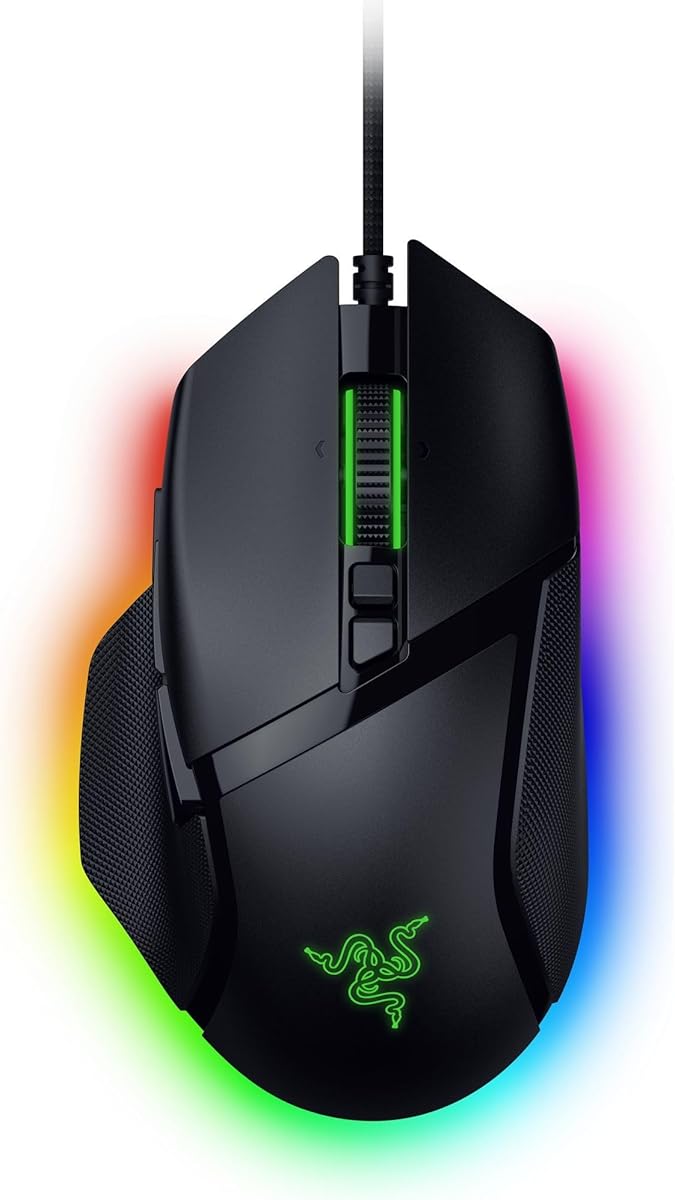
The Razer Basilisk V3 offers exceptional value with a 4.6 rating and robust feature set. It combines ergonomic comfort with high-speed optical switches for rapid execution. This model is particularly strong for users needing customizable inputs without a premium price tag.
We may earn a commission when you buy through this link, at no additional cost to you.
Its optical switches operate at 0.2ms actuation speed reducing mis-clicks significantly. The HyperScroll Tilt Wheel allows smooth scrolling or tactile cycling for skill selection. With 11 programmable buttons and Chroma RGB, it supports detailed personalization for any setup.
However, the weight and software requirements may be drawbacks for minimalists. The ergonomic shape favors right-handed users specifically limiting versatility for others. Despite this, the durability and performance justify the cost for most gamers.
We recommend this mouse for budget-conscious players wanting high-end features. It fits well for general gaming and competitive titles alike. The balance of cost and functionality makes it a top contender in the analog category.
Optical switches eliminate physical contact delay for instant command registration.
The scroll wheel adapts between free-spin and tactile modes on demand.
We may earn a commission when you buy through this link, at no additional cost to you.
The Razer Basilisk V3 35K elevates the standard with a top-tier FOCUS PRO 35K sensor. Rated at 4.5 stars, it excels in tracking on glass and diverse surfaces. This premium option targets enthusiasts demanding the highest precision available today.
We may earn a commission when you buy through this link, at no additional cost to you.
Features include intelligent functions like Smart-Reel mode that switches scrolling modes automatically. The Gen-3 optical switches offer a 90-million click lifespan ensuring long-term reliability. The Speedflex cable minimizes drag for smoother swipes during intense gameplay.
The premium price might deter casual users looking for basic functionality. The software customization requires time to master fully. Nevertheless, the technological advantages provide unmatched control for serious competitive players.
Buyers seeking the absolute best in tracking and build quality will appreciate this model. It is ideal for professionals or hobbyists who need every advantage. We endorse it as the best premium analog gaming mouse available now.
Advanced tracking works flawlessly even on glass surfaces without a mousepad.
Scroll speed automatically triggers tactile or free-spin modes for efficiency.
We may earn a commission when you buy through this link, at no additional cost to you.
The Logitech G403 Hero is designed with comfort in mind for long gaming sessions. Its ergonomic shape and rubber grips provide secure control. The Hero 16K sensor ensures reliable performance with up to 16000 DPI sensitivity.
We may earn a commission when you buy through this link, at no additional cost to you.
Key features include on-board memory to save profiles without needing software. The adjustable weight system helps tailor the feel to your preference. RGB lighting syncs with other Logitech accessories for a cohesive visual setup.
Some users might find the six-button layout limiting for MMO games. The thumb rest design is specific and might not suit every hand size. Despite this, the build quality and sensor performance remain solid.
This mouse is best for those prioritizing comfort and simplicity. It works well for FPS and MOBA genres. We recommend it for Logitech fans seeking a reliable ergonomic option.
Rubber grips and ergonomic contours prevent fatigue during extended use.
On-board memory lets you take settings to any PC easily.
We may earn a commission when you buy through this link, at no additional cost to you.
The Logitech G203 serves as a strong entry point into analog gaming. With 4.6 stars, it offers 8000 DPI precision suitable for most gamers. The six-button design provides essential controls without overwhelming complexity.
We may earn a commission when you buy through this link, at no additional cost to you.
Mechanical primary buttons use metal springs for a crisp click feel. RGB lighting can be customized via G HUB software for immersion. The compact form factor fits well in smaller hands or tight desk spaces.
Advanced users may need more DPI range or buttons than offered. The weight is fixed which limits customization. Still, the value proposition is high for beginners or casual players.
We recommend this model for budget builds or secondary setups. It delivers consistent performance for the price. It remains a top choice for affordable reliability.
Small form factor ensures easy handling for quick movements.
LightSYNC adds visual flair without draining system resources.
We may earn a commission when you buy through this link, at no additional cost to you.
The Logitech G MX518 revives a legendary design with modern sensor technology. It features the HERO 25K sensor ensuring top-tier tracking. The 32-bit arm processor delivers fast report rates for responsive gameplay.
We may earn a commission when you buy through this link, at no additional cost to you.
On-board memory supports up to five profiles for portability. Eight programmable buttons allow for rich customization. The shape supports various grips comfortably for extended periods.
The lack of advanced RGB might disappoint those seeking flashy lighting. The weight distribution is heavy for some users. Yet, the sensor quality and button layout are excellent.
Fans of classic ergonomic shapes will love this update. It is suitable for general gaming and productivity tasks. We suggest it for those valuing performance over aesthetics.
Modern sensor technology ensures the classic shape performs today.
Store settings onboard for seamless switching between computers.
We may earn a commission when you buy through this link, at no additional cost to you.
The Corsair Scimitar RGB Elite targets MMO players with 17 programmable buttons. It features a patented Key Slider System to adjust side buttons. The 18000 DPI sensor ensures precision during complex raids.
We may earn a commission when you buy through this link, at no additional cost to you.
Omron switches offer 50 million clicks for reliability. The contoured shape with finger rest aids support for long sessions. A braided cable ensures durability against daily wear.
Non-MMO players may find the shape awkward. The weight might cause fatigue for some users. However, it is unmatched for keybind requirements in massive multiplayer games.
MMO enthusiasts will find this tool essential for gameplay. It simplifies complex macros and rotations. We recommend it specifically for serious MMO or MOBA players.
Slide the button block to match your grip perfectly.
Omron switches withstand millions of clicks for longevity.
We may earn a commission when you buy through this link, at no additional cost to you.
The Razer Basilisk V3 Custom offers 4.6 star performance with extensive RGB zones. It uses the Focus Plus 26K DPI sensor for pixel-precise accuracy. The design supports millions of users with a comfortable ergonomic thumb rest.
We may earn a commission when you buy through this link, at no additional cost to you.
Eleven programmable buttons allow complex macro setup via Synapse. Optical switches ensure zero unintended misclicks during fast play. The HyperScroll Tilt Wheel offers smooth or tactile options.
Software setup might be tedious for those who dislike downloads. The right-hand design limits lefty users. Nevertheless, the lighting and control options are superior.
We suggest this for users prioritizing visual flair and customization. It balances performance with style effectively. It is a strong choice for Razer ecosystem users.
Eleven lighting zones react dynamically with your games.
Focus Plus sensor eliminates smoothing for true input tracking.
We may earn a commission when you buy through this link, at no additional cost to you.
The Corsair NIGHTSWORD RGB features unique weight tuning technology. It detects center of gravity to balance the mouse perfectly. With 18000 DPI and ten buttons, it suits FPS and MOBA players well.
We may earn a commission when you buy through this link, at no additional cost to you.
High-performance rubber grips mimic sports equipment for comfort. The contoured shape fits hands naturally for better accuracy. The optical sensor ensures reliable tracking across surfaces.
Setting up weights requires software interaction. The heavy base might limit portability. Still, the customization allows for a truly personalized feel.
We recommend this for gamers who obsess over weight balance. It offers a unique value proposition. It is ideal for those seeking a tailored grip.
Adjust weight to match your exact center of gravity.
Rubber textures provide a secure hold during action.
We may earn a commission when you buy through this link, at no additional cost to you.
The Corsair M65 RGB Ultra delivers 4.2 star precision for FPS enthusiasts. It uses AXON Hyper-Processing for an 8000Hz polling rate. The aluminum frame adds durability and a unique aesthetic.
We may earn a commission when you buy through this link, at no additional cost to you.
Sensor fusion control combines gyro and accelerometer data for accuracy. The optical switches ensure rapid click response. It supports 26000 DPI for extreme sensitivity needs.
Aluminum frames might scratch or dent with heavy use. The FPS shape limits general utility. But for aiming, it offers distinct advantages.
We suggest this for competitive FPS players needing raw speed. It is a strong choice for precision gamers. It prioritizes performance over general versatility.
8000Hz polling ensures rapid click registration during fights.
Aluminum build withstands rigorous daily use.
We may earn a commission when you buy through this link, at no additional cost to you.
Selecting the right analog gaming mouse requires understanding sensor accuracy, ergonomics, and connectivity options. This guide helps you identify the features that matter most for your specific gaming needs.
The sensor is the most critical component of any gaming mouse. High-quality sensors like HERO or FOCUS PRO ensure your cursor moves exactly as you intend without smoothing or acceleration. DPI settings allow you to adjust sensitivity to match your play style and screen resolution.
Look for sensors with high DPI ranges and zero smoothing to ensure pixel-perfect tracking.
Your hand size and grip style determine the ideal mouse shape. Ergonomic mice with thumb rests support long sessions while reducing fatigue. A proper fit ensures your fingers reach buttons comfortably without strain.
Choose a mouse that matches your hand size and preferred grip style.
Different genres require different button counts. FPS players may prefer fewer buttons while MMO players need many side buttons for macros. Ensure the layout allows quick access to essential commands.
Prioritize the number of programmable buttons based on your game genre.
Weight impacts control and speed. Adjustable weight systems let you fine-tune balance to suit your preference. Lightweight mice offer quick swipes while heavier ones provide stability.
Check if the mouse offers adjustable weights to customize its feel.
Mechanical switches provide a tactile click but may wear out over time. Optical switches offer faster actuation and longevity. Look for switches rated for tens of millions of clicks.
Select optical switches for reliability or mechanical switches for tactile feedback.
RGB lighting enhances aesthetics and immersion. Some mice sync with in-game actions for dynamic effects. While not essential for performance, it adds visual flair to your setup.
Decide if customizable lighting zones are a priority for your build.
Companion software is needed to program buttons and adjust settings. Ensure the software is intuitive and offers on-board memory for saving profiles. This allows settings to follow your mouse to different computers.
Verify that the software supports on-board memory for easy profile storage.
Wired mice offer stable connections with zero latency which is crucial for competitive gaming. Wireless mice provide freedom of movement but require battery management. For analog precision, a wired connection ensures maximum responsiveness.
Opt for wired connections if you require absolute stability.
Start by cleaning the sensor lens with a soft cloth to remove dust that may cause tracking issues. Ensure the surface you play on provides consistent friction for accurate movement.
Install the manufacturer software to set up macros and adjust sensitivity. Use onboard memory to save your preferred profiles for quick access anywhere.
Keep cables organized to prevent tangles and drag during gameplay. Periodically check buttons and wheels for dust buildup to maintain smooth operation.
An analog gaming mouse uses a high-performance sensor to track movement precisely. These mice allow for adjustable sensitivity and customizable buttons for better gameplay control.
Most gaming mice require software to unlock full features like macros and RGB settings. However, onboard memory often saves profiles so you can use settings without software.
Optical switches eliminate physical contact to reduce wear and delay. They offer faster actuation and longer lifespans compared to traditional mechanical switches.
Lighter mice offer quick movement while heavier ones provide stability. Use adjustable weights to experiment and find a balance that suits your grip style.
Some modern sensors like the FOCUS PRO can track on glass surfaces. Check specifications to confirm compatibility with smooth surfaces like glass desks.
High DPI allows for faster movement but higher resolution is key for accuracy. Most gamers find 16000 DPI sufficient for precise control in competitive titles.
Quality gaming mice can last years with proper care. Optical switches and durable materials often support tens of millions of clicks before failure.
Tracking issues often arise from dust on the sensor or poor surface quality. Clean the lens and try a different mousepad to resolve movement problems.
We reviewed ten top models ranging from budget entry options to high-end premium tools. The Logitech G502 Hero and Razer Basilisk V3 series stood out for versatility and performance.
Prioritize sensor quality and ergonomics over flashy features for consistent results. Ensure the mouse supports your specific game genre whether FPS or MMO.
Prices and availability fluctuate so check current listings before purchasing. Our guide helps you find the right tool for your setup and budget.