
Canon PIXMA TR4720
3.9Editor score
Affordable entry price
Compact home design
Easy ink setup
This guide compares the top 10 all in one printer with fax models for home and office use based on speed, features, and reliability.
Finding the right all in one printer with fax can streamline your workflow by combining printing, scanning, copying, and faxing into one device. Whether you run a small business or manage a busy home office, having these functions integrated saves space and reduces clutter on your desk. Modern models offer wireless connectivity and mobile apps to make document handling even more convenient for daily tasks.
We evaluated ten leading options available this month to help you make an informed decision without wading through endless specs. Our analysis focuses on print quality, fax reliability, connectivity options, and overall value for money across different price points. Each product was selected based on user feedback and manufacturer specifications to ensure you get a reliable machine that meets your specific needs.
Each pick below highlights key strengths and potential trade-offs so you can quickly identify which model fits your budget and workflow. Keep in mind that prices and availability can change frequently so checking the current listing before purchasing is always a good idea. We aim to provide clear, honest insights to help you find a printer that works hard for you every day.
3.9Editor score

3.9Editor score

4.3Editor score
This side-by-side comparison shows the key specifications and features of all ten models to help you decide quickly based on your specific workflow requirements.






The HP OfficeJet Pro 9125 stands out as a robust solution for offices needing reliable fax and printing capabilities. With a strong user rating and advanced features like AI print formatting, it delivers professional results consistently. Its design prioritizes efficiency with fast speeds and a large input tray for uninterrupted workflow.
We may earn a commission when you buy through this link, at no additional cost to you.
Key strengths include its ability to handle color documents quickly while maintaining sharp text quality. The built-in fax function works seamlessly with the auto document feeder allowing you to send multi page faxes without manual intervention. The touchscreen interface makes navigation intuitive reducing the learning curve for new users.
Trade-offs involve the reliance on HP chips for cartridges which can limit third party options. The price point is higher than budget models but justified by the speed and security features included. For businesses where time and data security matter this investment pays off over time.
This printer is ideal for small to mid sized offices requiring high volume output and fax support. It balances performance with user friendly features making it a top choice for daily business needs. We recommend it for those who prioritize speed and reliability in a multifunction device.
HP AI removes unwanted web content automatically saving ink and improving layout precision for your prints.
HP Wolf Pro Security helps protect your network from cyber threats ensuring your data remains safe during operations.
We may earn a commission when you buy through this link, at no additional cost to you.
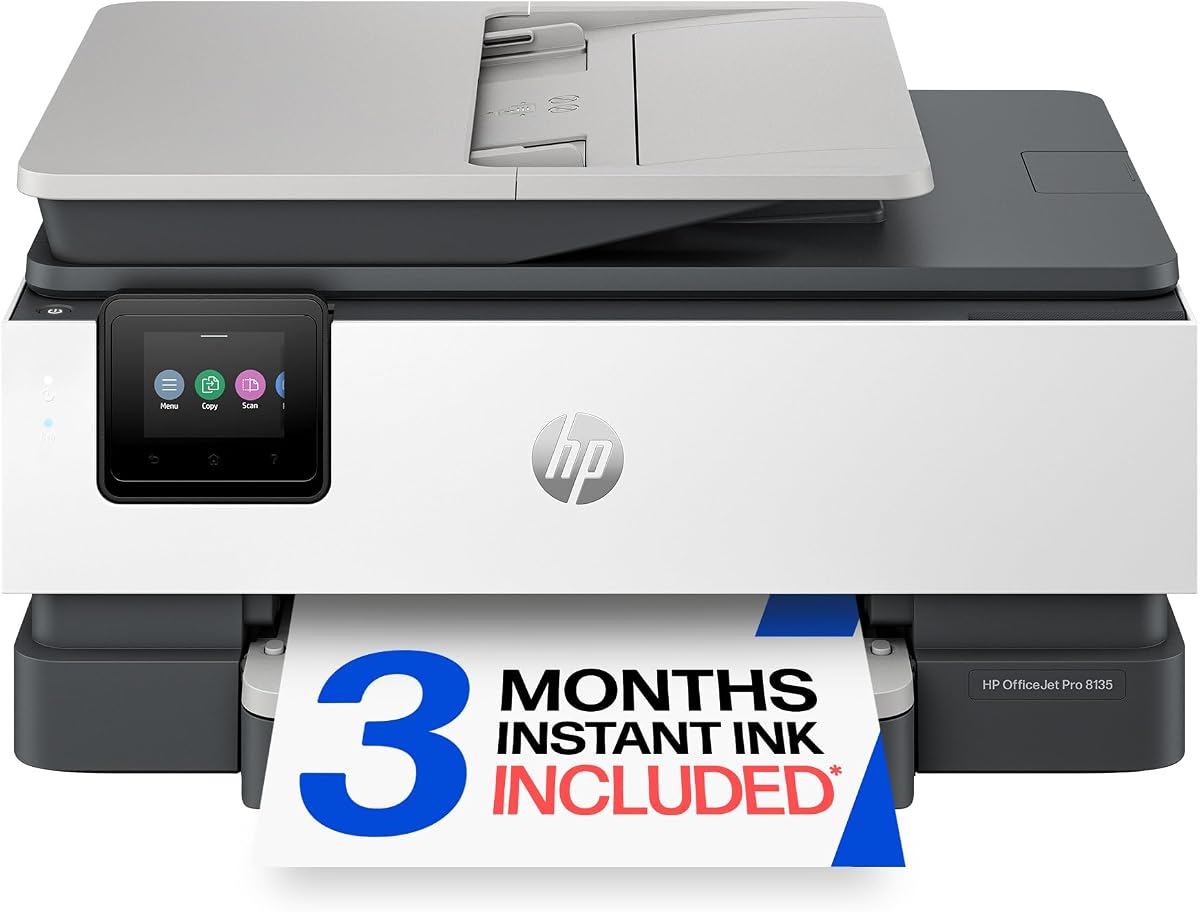
The HP OfficeJet Pro 8135 is tailored for home offices needing professional quality without enterprise bulk. It includes faxing and scanning in a sleek package that fits well in residential spaces. Users appreciate the ease of wireless setup and the included instant ink trial.
We may earn a commission when you buy through this link, at no additional cost to you.
Strengths lie in its balanced performance for everyday tasks like reports and presentations. The duplex printing saves paper automatically which is great for eco conscious users. The app allows remote management so you can check status from anywhere.
It may be slightly slower than higher end models but sufficient for most home needs. The requirement for specific cartridges can add ongoing costs but the trial helps offset initial expenses. Overall it offers solid value for remote workers.
Ideal for home users who need reliable fax and printing without sacrificing space. It combines essential functions with smart features to keep your home office running smoothly. We suggest this for those balancing cost and capability.
Designed for residential spaces with a compact footprint that doesn't overwhelm your desk or room.
Includes three months of delivery service so ink arrives before you run out saving you time.
We may earn a commission when you buy through this link, at no additional cost to you.
The Epson EcoTank ET-4800 offers a unique approach with refillable tanks instead of disposable cartridges. This model is designed for users who print frequently and want to reduce long term ink costs. The fax and scan functions are integrated for complete document handling.
We may earn a commission when you buy through this link, at no additional cost to you.
Its main advantage is the elimination of tiny cartridges reducing waste and cost. The ink bottles make refilling straightforward without mess. Print quality remains high for both text and graphics making it versatile.
The initial investment is higher but pays off over time with frequent use. Speed is moderate compared to laser printers but adequate for most users. The design focus on sustainability appeals to eco friendly buyers.
Choose this if you print high volumes and want to avoid cartridge hassles. It is perfect for busy home offices or small businesses with color needs. We recommend it for cost conscious users seeking reliability.
Eliminates cartridge waste by using high capacity tanks that last much longer than standard cartridges.
Exclusive bottles allow for easy filling without spills or complicated steps saving you frustration.
We may earn a commission when you buy through this link, at no additional cost to you.
The HP OfficeJet Pro 8125 provides essential home office functions at a competitive price. It supports printing scanning copying and faxing to cover most document needs. Users value the included instant ink trial and easy setup process.
We may earn a commission when you buy through this link, at no additional cost to you.
Strengths include reliable wireless connectivity and good print quality for everyday documents. The auto document feeder helps streamline multi page tasks efficiently. It fits well in smaller spaces without sacrificing core capabilities.
While it lacks some premium features it delivers solid performance for the cost. The requirement for specific cartridges remains a consideration for long term budgets. It is a practical choice for average home use.
Recommended for users seeking a complete multifunction device without high costs. It balances essential features with affordability well for remote workers. We suggest it for those needing fax and print on a budget.
Offers core office functions like fax and scan at a price point accessible to most home users.
Three month trial included to help you start printing without immediate ink purchases or worry.
We may earn a commission when you buy through this link, at no additional cost to you.
The HP Smart Tank 7603 comes with up to three years of ink included making it a standout for long term savings. It includes fax scanning and printing capabilities suitable for home offices. The tank system ensures you rarely need to buy ink soon.
We may earn a commission when you buy through this link, at no additional cost to you.
Its key benefit is the included supply which reduces initial running costs significantly. The refill system is designed to be clean and simple for users. Print quality is sharp for documents and photos alike.
The initial price is higher but the ink savings quickly offset it over time. Speed is moderate but sufficient for most non-urgent tasks. The durability and ease of use make it a strong contender.
Choose this if you want to avoid frequent ink purchases for years. It is ideal for busy households with steady printing demands. We recommend it for those prioritizing convenience and savings.
Up to three years of ink included with the box so you print confidently without immediate refills.
Easy access system lets you refill tanks without squeezing or spilling ink onto your hands.
We may earn a commission when you buy through this link, at no additional cost to you.
The HP OfficeJet Pro 9135 offers faster speeds than many competitors making it ideal for busy offices. It includes fax and scanning with high resolution output for professional documents. The large touchscreen simplifies navigation for multiple users.
We may earn a commission when you buy through this link, at no additional cost to you.
Strengths include dual input trays reducing the need to reload paper frequently. The single-pass scanning speeds up workflow for multi-page documents. Security features protect your data during network operations effectively.
The cost is higher but justified for environments where speed and capacity matter. It requires specific cartridges which can add to ongoing expenses. For high volume users this model delivers the best performance.
Ideal for offices needing fast reliable fax and printing with high capacity. It reduces downtime with its efficient design and robust features. We suggest this for professional settings with heavy use.
Prints up to 25 ppm black keeping your workflow moving quickly without waiting for documents.
HP Wolf Pro Security helps keep your network protected from threats while you print.
We may earn a commission when you buy through this link, at no additional cost to you.
The Canon PIXMA TR4720 is a budget friendly choice that still includes fax capabilities. It is designed for home use with a small footprint and simple setup. Users appreciate the ability to get notifications via Alexa for low ink levels.
We may earn a commission when you buy through this link, at no additional cost to you.
It handles basic printing scanning and faxing adequately for occasional use. The borderless photo print option is a nice bonus for casual photographers. Setup is straightforward and fits well on a desk.
Slower speeds and smaller trays are trade-offs for the low price point. It may not suit high volume needs but works well for light tasks. The wireless features make it convenient for modern homes.
Perfect for budget conscious users who need fax and print without overspending. It covers essentials efficiently for students or remote workers. We recommend it for those starting a home office.
Connects to Alexa to notify you when ink is low so you never get caught short unexpectedly.
Small design saves space while still providing all key office functions you need daily.
We may earn a commission when you buy through this link, at no additional cost to you.
The Canon PIXMA TR8620a offers strong multimedia capabilities including an SD card slot for direct printing. It supports fax scanning and copying making it versatile for home offices. Voice commands through Alexa make it user friendly.
We may earn a commission when you buy through this link, at no additional cost to you.
It excels at photo printing with borderless options that look professional. The paper capacity is decent for home needs reducing reload frequency. Wireless connectivity ensures easy access from multiple devices.
Ink usage is typical for printers in this range so expect regular refills. Speed is adequate for general documents but not for bulk jobs. It balances photo quality with standard office functions well.
Ideal for users who print photos and documents regularly at home. The extra slots and voice features add convenience to daily tasks. We suggest it for those wanting multimedia versatility.
Direct slot for memory cards lets you print photos without connecting a computer first.
Works with Alexa to accept voice commands so you can manage tasks hands free easily.
We may earn a commission when you buy through this link, at no additional cost to you.
The HP OfficeJet Pro 8139 stands out with a one year instant ink trial included with purchase. It is designed for home offices needing consistent fax and print output. The performance is reliable with good speed for documents.
We may earn a commission when you buy through this link, at no additional cost to you.
Strengths include the extended trial which reduces cost for the first year. Fax and scan work smoothly for sending and receiving documents. The app provides easy control and status checks.
You must manage the subscription after the trial ends to keep costs low. Regular cartridge use applies but the trial helps you adjust. Overall it is a solid long term choice for users.
Choose this if you want extended ink support to get started. It is perfect for home offices needing fax without high initial costs. We recommend it for value focused buyers.
One year of instant ink included gives you plenty of time to print without extra ink costs.
Consistent print quality ensures your documents look professional for clients and colleagues.
We may earn a commission when you buy through this link, at no additional cost to you.
The Brother MFC-L2820DW offers laser speed and quality for monochrome fax and printing. It is compact yet powerful enough for small offices needing efficient document handling. The refresh trial provides toner management assistance.
We may earn a commission when you buy through this link, at no additional cost to you.
Speed is a major advantage with up to 36 ppm output for fast jobs. The secure print options help protect sensitive data effectively. It connects well with networks and mobile devices.
It prints only in black and white which may limit some color needs. Toner cartridges can be heavy but last a long time. For text heavy workflows this model is unbeatable in value.
Ideal for offices needing fast reliable fax and print without color. It balances speed and compact design for tight spaces. We suggest this for text focused business environments.
Laser technology delivers sharp text fast so you spend less time waiting and more time working.
Compact design fits easily into tight spaces while still handling heavy duty tasks efficiently.
We may earn a commission when you buy through this link, at no additional cost to you.
Selecting the right multifunction printer requires considering several factors to ensure it meets your specific fax and printing needs efficiently.
Print speed significantly impacts how quickly you can complete tasks especially when faxing multiple pages. Look for models offering at least 20 pages per minute for black text to keep your workflow moving smoothly. Text quality should be sharp for business documents while photos may require color inkjet capabilities.
Prioritize speed ratings that match your daily volume needs to avoid bottlenecks during busy periods.
Ensure the printer has a built-in fax modem and supports features like fax forwarding to email or scheduling. An auto document feeder is essential for sending multi-page faxes without manual feeding which saves time and effort. Check compatibility with digital fax services if you need cloud-based options.
Verify fax reliability through reviews since this feature can be the main reason for purchase.
Higher input tray capacity reduces the frequency of refills during long print or fax jobs. Models with 250 sheets or more are better for offices while 100 sheets may suffice for home use. Dual trays allow loading different paper sizes or types simultaneously for flexibility.
Select a tray size that prevents interruptions during high volume printing sessions.
Modern printers should offer dual-band Wi-Fi to ensure stable connections across different network environments. Ethernet ports provide reliability for shared office networks while USB allows direct computer connections. Mobile app support enables printing and faxing from smartphones for on the go control.
Choose connectivity that fits your network setup to avoid connection issues daily.
Evaluate the cost per page by checking cartridge or toner prices rather than just the printer price. Supertank models offer lower long term costs but require higher upfront investment. Subscription services like Instant Ink can simplify management but add monthly fees.
Calculate total ownership costs including supplies to understand the true expense over time.
Business printers should include features like HP Wolf Security to protect against cyber threats during network printing. Secure print options require authentication before releasing jobs which protects sensitive documents from unauthorized access. Ensure the model supports network encryption protocols.
Prioritize security features if your documents contain private or confidential information regularly.
Consider the available desk space before buying since larger models may have multiple trays or bigger footprints. Compact designs are ideal for home offices while larger ones suit dedicated print rooms. Check dimensions to ensure the printer fits comfortably without blocking vents.
Measure your workspace carefully to avoid ordering a unit that is too large for the area.
Standard warranties often cover one year but extended plans can offer peace of mind for expensive models. Check the manufacturer's reputation for technical support and availability of online resources. Some brands provide phone support or chat for immediate help.
Look for comprehensive support options to minimize downtime if technical issues arise unexpectedly.
Begin by setting up the machine on a stable surface away from direct sunlight or heat sources to ensure optimal performance. Connect the power cable and turn it on before loading paper and installing ink or toner cartridges securely. Follow the on-screen prompts to complete the wireless network connection using your Wi-Fi credentials.
Regular maintenance includes cleaning the scanner glass and print heads to maintain high quality output. Use the printer's built-in cleaning utility periodically to prevent clogs especially if you print infrequently. Check for firmware updates regularly through the device menu to ensure compatibility and security improvements.
For faxing send documents by placing them in the auto document feeder or scanning from the flatbed. Ensure your phone line is connected securely to the designated port for fax transmission. To receive faxes enable the auto receive mode if you want the machine to answer calls automatically.
Yes, traditional faxing requires a phone line connection to send or receive documents reliably. Some modern printers offer email fax services which allow sending documents via email without a physical line. However, if you use the standard fax feature a landline connection is necessary for transmission.
Most modern all in one printers support mobile printing through apps like HP Smart or Canon PRINT. You can send print jobs directly from your phone or tablet to the connected printer wirelessly. Ensure your mobile device is on the same network as the printer for best results.
Inkjet printers are generally better for color documents and photos while laser printers excel at fast text output. For faxing text documents laser models provide sharper text and lower cost per page. Inkjet models are more versatile if you need color printing alongside fax capabilities.
Paper jams often occur due to misaligned paper or worn rollers so ensure paper is loaded correctly in the tray. Use high quality paper recommended for your model to avoid curling or tearing during feeding. Regularly clean the feed rollers with a damp cloth to maintain grip and prevent jams.
Most of the printers listed support macOS through AirPrint or dedicated software drivers available on the manufacturer site. You can print or scan directly from your Mac once the device is added to your network settings. Always check the product page for specific OS compatibility before purchasing.
If ink runs critically low during a fax the document may print faintly or fail to send if the fax requires scan. Some models offer low ink warnings to alert you before this happens so you can prepare refills. Consider ink subscription services to ensure you never run out unexpectedly.
We have explored ten top models that balance fax capability with printing and scanning features for different needs. The HP OfficeJet Pro 9125 stands out for offices needing speed and security while the Canon PIXMA TR4720 offers budget accessibility. For high volume needs the Epson EcoTank or Brother laser options provide long term value.
When choosing prioritize the features that matter most to your workflow such as speed or ink costs. Consider whether you need color output or if black and white suffices for your fax and printing tasks. Matching the model to your usage habits ensures you get the best return on investment.
Prices and availability can change so check current listings for the latest deals before making a purchase. We hope this guide simplifies your decision and helps you find a reliable printer that works well for you.