
ARCTIC P12 Pro A-RGB
4.7Editor score
High static pressure design
Wide speed range PWM
Smooth fluid dynamic bearing
This guide compares the top addressable RGB fans for PC builds, evaluating cooling performance, lighting quality, and noise levels to help you choose the right
Addressable RGB fans transform your PC case into a vibrant display while delivering essential cooling performance. Selecting the right model requires balancing airflow, noise, and lighting control to match your build needs.
We evaluated ten leading addressable RGB fans based on airflow capacity, bearing quality, and lighting customization. Each product was assessed for compatibility with standard motherboards and ease of installation in various chassis types.
Each pick below highlights key strengths and ideal use cases for different builders. Please note that availability and pricing fluctuate frequently, so verify current details before making your final purchasing decision online.
4.7Editor score

4.7Editor score
4.8Editor score
The following table provides a side-by-side comparison of all ten addressable RGB fans included in this guide. Review key specifications like airflow, noise levels, and bearing types to find the best fit for your system.




The Thermalright TL-C12C-S X5 stands out as a top choice for builders seeking reliable cooling and vibrant lighting. With a solid rating and proven performance, this five-pack delivers consistent results across various case configurations.
We may earn a commission when you buy through this link, at no additional cost to you.
Its high-performance cooling capabilities are driven by precise PWM control that adjusts speed based on motherboard temperature readings. The S-FDB bearings ensure minimal noise while maximizing airflow efficiency to keep your components cool under load.
While the lighting is soft and well integrated, users looking for complex software control might find the options somewhat basic. However, the trade-off is a more reliable and hassle-free setup that works seamlessly with standard headers.
This pack is ideal for anyone building a new system or upgrading an existing one without breaking the bank. It balances performance and aesthetics effectively, making it a strong recommendation for most PC enthusiasts today.
The fan blade design optimizes airflow to penetrate radiators and dense meshes effectively. This ensures that your CPU and GPU stay within safe thermal limits even during intensive gaming sessions.
Noise levels remain impressively low thanks to advanced bearing technology and balanced blades. You can enjoy high speeds without the distracting hum often associated with standard cooling fans.
We may earn a commission when you buy through this link, at no additional cost to you.
The CORSAIR RS120 ARGB offers a premium experience with its daisy-chain design that simplifies cable management significantly. It is rated highly for its ability to deliver strong airflow while maintaining a quiet operating environment.
We may earn a commission when you buy through this link, at no additional cost to you.
These fans utilize Magnetic Dome bearings to reduce friction and extend lifespan. The precise PWM speeds allow for detailed control over cooling performance, making them suitable for demanding systems that need aggressive thermal management.
While the cost is higher than average, the integration with CORSAIR ecosystem software provides extensive customization options. This comes at the expense of needing a compatible motherboard and software environment to function fully.
Enthusiasts who already use CORSAIR components will find these fans integrate seamlessly into their existing setup. They are a solid investment for those prioritizing brand consistency and advanced lighting control features.
Daisy-chain connections mean you only need one PWM and one ARGB connector for multiple fans. This reduces clutter inside your case and makes installation faster for complex builds.
The design pushes significant air volume which is crucial for radiators and high-performance heatsinks. This ensures that heat is expelled efficiently from your system during peak loads.
We may earn a commission when you buy through this link, at no additional cost to you.
The ARCTIC P12 Pro A-RGB is a standout budget option that does not compromise on cooling performance. It delivers high static pressure and efficient airflow at a fraction of the cost of premium brands.
We may earn a commission when you buy through this link, at no additional cost to you.
Precision manufacturing ensures smooth running with minimal vibration. The fluid dynamic bearing minimizes noise during operation, making it ideal for those who need silent cooling without paying extra for branding.
Lighting is present but less customizable than higher-end options. While it supports RGB, the focus remains on cooling efficiency rather than visual spectacle, which is acceptable for practical builds.
This fan is perfect for budget-conscious builders or those needing replacements without sacrificing quality. It offers a reliable solution for cooling high-temperature components like radiators and heatsinks.
Designed to penetrate dense radiators and narrow panels effectively. This makes it an excellent choice for liquid cooling setups where resistance is high.
Provides premium performance metrics at a very competitive price point. You get a reliable fan that cools well without straining your overall build budget.
We may earn a commission when you buy through this link, at no additional cost to you.
The Thermaltake CT120 EX ARGB introduces a magnetic connection design that simplifies daisy-chaining without screws. This approach offers a fresh take on installation that appeals to modders looking for cleaner aesthetics.
We may earn a commission when you buy through this link, at no additional cost to you.
With nine addressable LEDs per fan, the lighting is vivid and supports a wide range of colors. The hydraulic bearing ensures reliable silent operation, maintaining stability even at higher speeds.
While the magnetic system is convenient, it may require careful handling during installation to ensure proper alignment. The airflow is good but not the highest in its class, favoring looks over raw power.
This pack is recommended for those who prioritize aesthetic appeal in their custom builds. It provides a unique look that stands out while still delivering adequate cooling for standard gaming cases.
Optimized fan daisy-chaining reduces cable clutter significantly. This innovative design makes it easier to manage wires in compact cases.
Supports 16.8 million colors for extensive customization. You can create stunning visual effects that sync with your system software.
We may earn a commission when you buy through this link, at no additional cost to you.
This 6-pack offers a unique solution by including reverse blade fans specifically designed for front or bottom intakes. It allows for consistent lighting visibility even when blades are facing outward for better airflow.
We may earn a commission when you buy through this link, at no additional cost to you.
Each fan features twenty-eight high-brightness ARGB LEDs that provide superior brilliance compared to typical models. The included 2-in-1 hub simplifies control for both lighting and speed management.
The kit is comprehensive for those building a complete system from scratch. While the average rating is lower, the versatility of having both forward and reverse options addresses a common pain point in modern builds.
If you need a full set of fans with a unified lighting look, this pack is a strong contender. It balances performance with visual consistency, ensuring your build looks polished from every angle.
Purpose-built for three-dimensional chassis cooling. Reverse blades keep lighting fully visible when installed as bottom or side intake.
The combined ARGB and PWM controller reduces cable clutter. It offers multiple lighting modes and centralized speed management easily.
We may earn a commission when you buy through this link, at no additional cost to you.
The Thermalright TL-C12C-S X3 provides the same reliable performance as its five-pack counterpart in a smaller package. It is rated highly for its balance of cooling efficiency and noise control.
We may earn a commission when you buy through this link, at no additional cost to you.
With automatic speed control based on temperature, it ensures optimal cooling without manual intervention. The S-FDB bearings maintain a quiet environment even when the fan spins up to full speed.
It is a straightforward option for those needing three fans without extra bells and whistles. The design matches coolers and cases perfectly, ensuring visual consistency across your build.
This pack suits users looking for essential cooling with a touch of style. It is a dependable choice for standard cases where high-end features are not necessary.
The 4PIN PWM interface adjusts speed according to motherboard temperature. This ensures efficient cooling while minimizing noise during idle times.
S-FDB bearings solve blade shaking issues and reduce noise. They extend the life of the fan significantly under normal use.
We may earn a commission when you buy through this link, at no additional cost to you.
This variant of the TL-C12C-S emphasizes silent operation with intelligent PWM speed adjustment. It delivers high airflow for its size while keeping noise levels extremely low during daily use.
We may earn a commission when you buy through this link, at no additional cost to you.
The LED blades reflect light effectively for a softer effect that matches cooler and case aesthetics. Up to seventeen modes of light effects allow for customization through motherboard software sync.
The fan stops completely at low PWM signals to reduce noise when cooling is not critical. This makes it ideal for office builds or quiet gaming setups where silence is a priority.
If you need a full set of fans for a mid-tower case, this five-pack is a practical solution. It offers consistent quality and reliable cooling performance across all units in the box.
Noise levels stay under 25.6 dBA during operation. This ensures the system remains quiet even under load without distraction.
High-brightness LED atomizing fan blades reflect light softly. The result is a uniform effect that looks professional and consistent.
We may earn a commission when you buy through this link, at no additional cost to you.
Thermaltake CT120 ARGB offers a compact two-pack solution for smaller cases or limited needs. It supports speeds up to 2000 RPM for increased cooling when required by your system.
We may earn a commission when you buy through this link, at no additional cost to you.
The hydraulic bearing ensures reliable operation with minimal wear over time. An anti-vibration mounting system with a solid structure frame reduces rattling and mechanical noise effectively.
While the pack size is smaller than others, the build quality is solid for the price. It provides 16.8 million colors for versatile lighting schemes that can sync with your motherboard easily.
This option is great for adding a touch of RGB to a specific part of your build. It delivers reliable cooling and bright lighting without demanding a large investment.
Redefined 7-blade fan design optimizes CFM and air pressure. This ensures efficient airflow through radiators and case vents.
Daisy-Chain design requires fewer ports and cables. This makes installation simpler and keeps your case interior tidy.
We may earn a commission when you buy through this link, at no additional cost to you.
The Thermaltake LE120 ARGB holds the highest rating in this review for its simplicity and reliability. It comes with a 3-way PWM splitter for quick installation without additional adapter purchases.
We may earn a commission when you buy through this link, at no additional cost to you.
With nine LEDs powered by a 3-Pin 5V ARGB connector, setup is straightforward. The airflow of 66.1 CFM provides balanced cooling for most standard cases without being overly aggressive.
It avoids complex proprietary software dependencies, working well with standard motherboard controls. The daisy chain cables make wiring easy and leave room for other devices inside the case.
This pack is ideal for users who want a no-nonsense solution that works immediately. It offers a high probability of satisfaction for those prioritizing ease of use over extreme performance.
Daisy chain ARGB cables make wiring easy and leave room for other devices. This reduces clutter and simplifies your build process.
The 3-pack includes a 3-way PWM splitter for quick and easy installation. You do not need to buy extra adapters separately.
We may earn a commission when you buy through this link, at no additional cost to you.
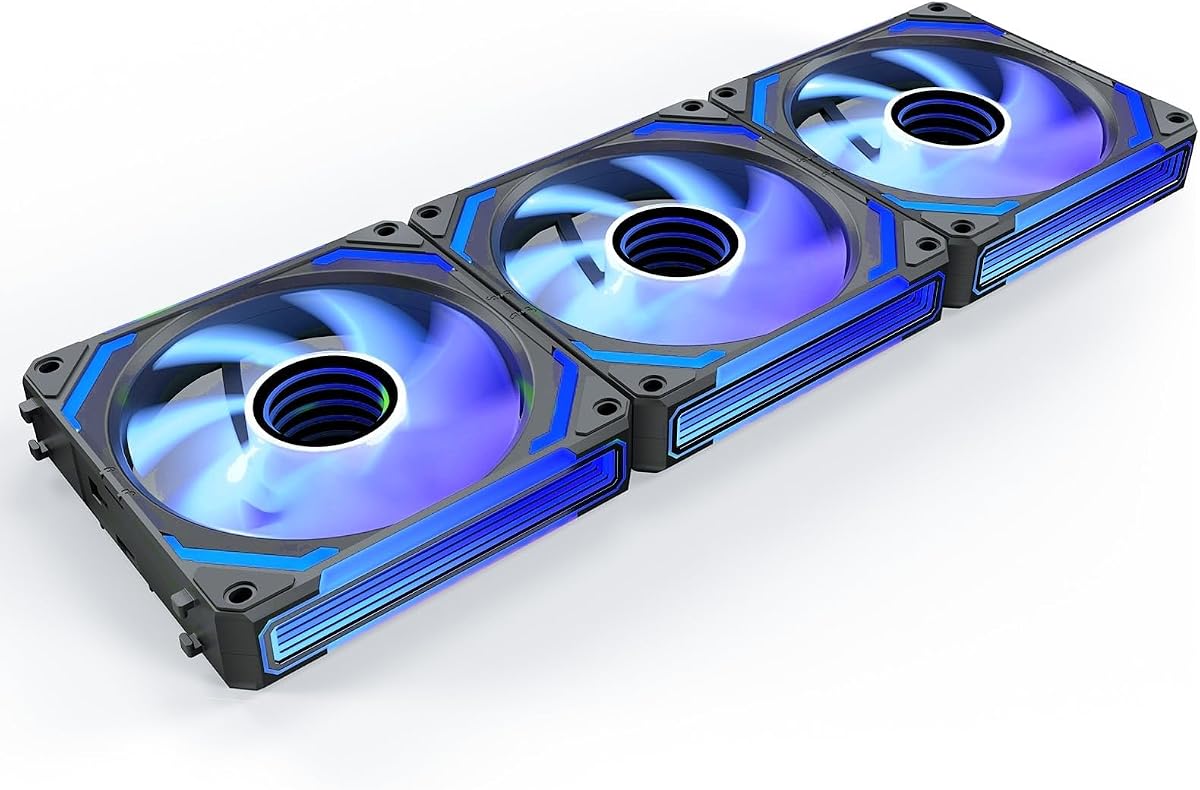
The AsiaHorse COSMIQ features a stunning infinity mirror luminous design that creates a layered visual atmosphere. It is rated highly for combining this premium look with efficient cooling performance.
We may earn a commission when you buy through this link, at no additional cost to you.
It supports music sync and full case light sync through a dedicated controller. The reverse fan design ensures lighting is visible even when positioned as an intake or bottom fan.
Noise is well controlled even at maximum speeds thanks to the hydrodynamic bearing structure. The airflow of 68.5 CFM balances mute performance and heat dissipation capacity perfectly for daily loads.
For modders and enthusiasts who want a unique look, this pack is worth the investment. It transforms your desktop into a beautiful landscape while maintaining efficient cooling for high-end hardware.
Features stunning infinity mirror luminous design and rich RGB effects. This creates layered visual atmosphere for your chassis.
Built-in sound pickup module supports eight kinds of music rhythm modes. Lighting changes automatically with game sounds and ambient audio.
We may earn a commission when you buy through this link, at no additional cost to you.
Selecting the right addressable RGB fan involves evaluating several technical factors to ensure your build looks good and runs cool.
Airflow (CFM) measures how much air the fan moves, while static pressure measures force against resistance. For case ventilation prioritize high airflow but for radiators choose high static pressure to push air through dense fins.
Check the specific use case for your build. High airflow fans are best for open space intake and exhaust positions whereas high static pressure fans excel in tight spaces like liquid cooling radiators.
PWM (Pulse Width Modulation) control allows for precise speed adjustments via a four pin connector, offering better performance at various temperatures. DC control is simpler but less precise for managing speed variations.
Ensure your motherboard has the correct headers for your chosen fans. Most modern boards support PWM, but checking compatibility prevents installation issues and ensures silent speed tuning.
The bearing type affects noise levels and fan longevity. S-FDB and Fluid Dynamic bearings are generally quieter and more durable than standard sleeve bearings, making them ideal for long-term use.
Look for bearings that offer smooth operation and minimal vibration. A high quality bearing ensures your fans run quietly even at high speeds over several years.
Addressable RGB fans use three pin 5V connectors to allow for individual LED control and complex effects. Some fans include dedicated controllers while others rely on motherboard software for synchronization.
Verify that your motherboard supports ARGB or RGB headers properly. Using the wrong connector can damage components, so match the voltage and pin layout exactly before purchasing.
Daisy-chaining allows multiple fans to connect via a single cable reducing clutter and saving motherboard header slots. This feature is especially useful for large multi-fan setups in full tower cases.
Opt for models with daisy-chain connections if you plan to install many fans. It simplifies cable management and makes the interior of your case look cleaner and more organized.
Standard 120mm and 140mm fans are widely used, but always check your case dimensions. Some compact cases require specific low profile fans or unique mounting holes that may not fit larger models.
Measure the available space before buying to avoid fitment issues. Ensure the fan thickness does not obstruct other components like RAM or GPU slots.
Decibel ratings indicate how loud a fan is during operation. For silent builds aim for models with noise ratings below 25 dBA to ensure a quiet working environment without sacrificing cooling.
Balance noise with performance based on your needs. High performance fans may be louder under load, so consider your tolerance for sound when selecting a model.
Fans often come in packs of two three or five which can affect the overall cost and versatility. Buying in packs usually provides better value than purchasing single units separately.
Assess how many fans you need for your specific case. A larger pack may be more economical and convenient for complete system upgrades compared to smaller sets.
Start by connecting the PWM cable to the correct CPU or system fan header on your motherboard. This ensures the fan speed adjusts automatically based on temperature for efficient cooling.
Connect the ARGB cable to the 5V 3-pin RGB header on your motherboard. Use the appropriate software like BIOS settings or manufacturer utilities to customize colors and lighting modes.
Regularly clean dust from the fan blades and bearings to maintain optimal performance. Use compressed air to prevent buildup that can cause noise or imbalance over time.
Most addressable RGB fans work with standard motherboard RGB software such as iCUE, MSI Center, or ASUS Aura. Some models may come with a dedicated controller for simpler setup without additional software installation.
Standard RGB uses a 12V four pin connector and controls groups of LEDs as a single color. Addressable RGB uses a 5V three pin connector allowing each LED to display different colors independently for complex effects.
You can physically mix different brands but they may not synchronize visually without compatible software. Most boards support standard RGB protocols but proprietary features may not work across different brands.
Most ARGB headers support up to 300mA meaning you can connect several daisy-chained fans. Always check your motherboard manual for current limits to avoid damaging the header with too many devices.
Reverse fans allow for consistent lighting when installed as intake while still moving air effectively. They do not necessarily cool better than standard fans but ensure visual consistency across all case sides.
Generally no, noise levels depend more on the bearing and fan design than the LEDs themselves. High quality ARGB fans often include silent bearing tech for quiet operation similar to non RGB models.
Choosing the right addressable RGB fan involves balancing performance and aesthetics to meet your specific needs. The top picks offer a range of solutions from budget friendly to premium visual options.
Prioritize airflow and noise levels based on your system requirements before worrying about lighting effects. Ensure compatibility with your motherboard to avoid connection issues during setup.
Prices and availability change frequently so check current listings before making your final decision. The market offers excellent choices for every build style and cooling requirement.