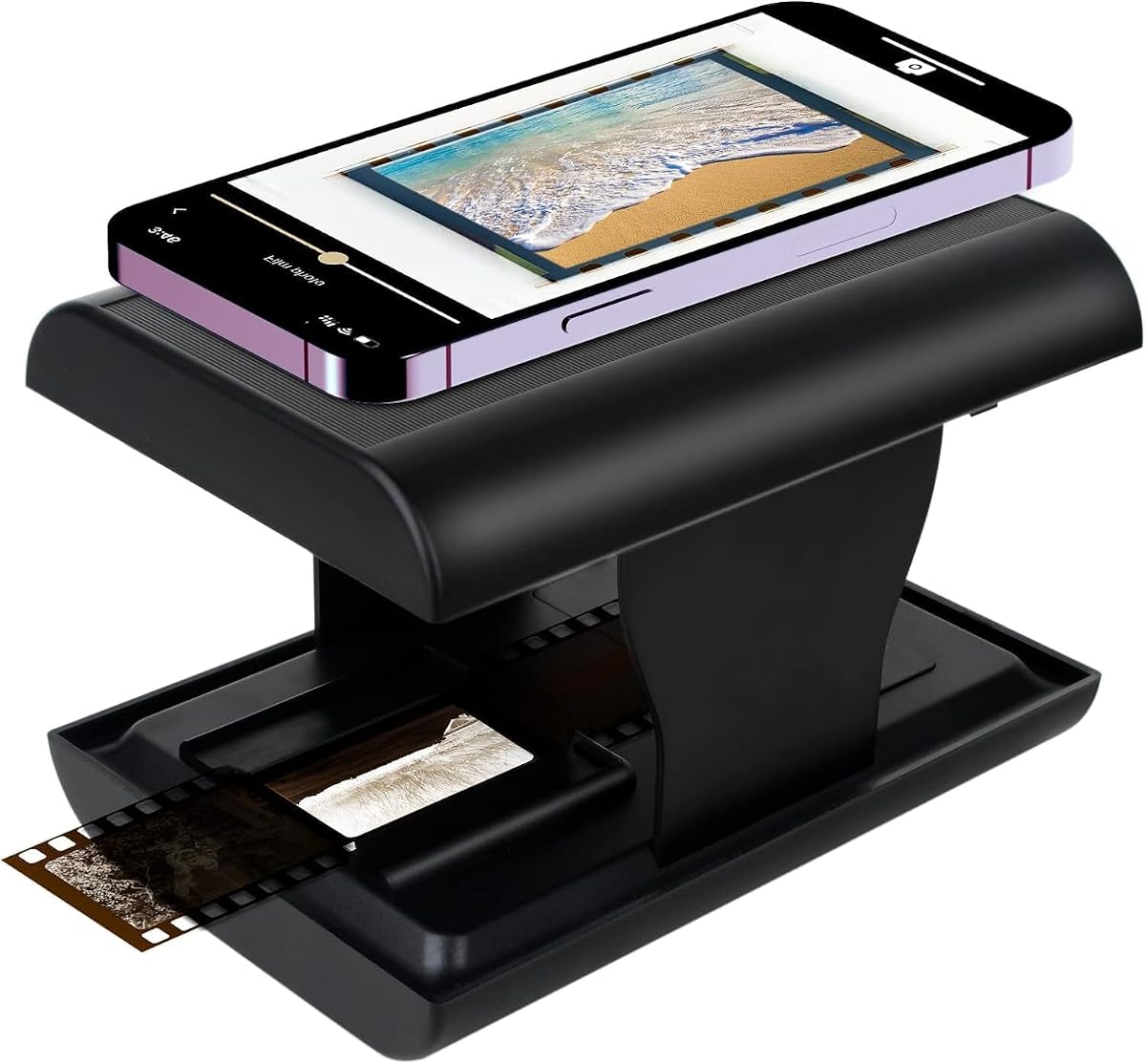
TCNEWCL 35mm Negative Slide Scanner
4.3Editor score
Uses smartphone camera lens
Foldable space-saving design
Free scanning app support
This guide compares the top black and white negative scanner models to help you digitize old film slides and negatives into digital files with ease and clarity.
Preserving old film memories requires the right tool. A black and white negative scanner lets you convert physical slides into digital files without needing complex software or expensive services.
We evaluated ten top models based on resolution, ease of use, and output quality. Each pick offers unique features for digitizing 35mm and other film formats directly.
Every review shows real strengths and weaknesses. Prices change often on retailer sites. Check current listings to confirm availability and the latest offers for your specific scanning needs.
4.3Editor score

4.2Editor score

4.3Editor score
The following table offers a side-by-side comparison of all ten scanner models. Review the specs and features to find the best fit for your film digitization goals.



The BEONEGLOBAL ClearScan MINI is a standout option for digitizing film. It achieves a 4.2 rating thanks to its ease of use and high resolution output.
We may earn a commission when you buy through this link, at no additional cost to you.
Its ergonomic design places buttons right below the screen, making operation intuitive. The 16MP CMOS sensor captures fine details in black and white negatives effectively.
While the resolution is not the highest on this list, it balances quality with portability. The ability to adjust brightness and color directly on device is a key plus.
This scanner is ideal for hobbyists who want quality without bulky gear. It is recommended for those needing a quick way to preserve old 35mm slides.
The front-facing buttons allow you to operate the scanner naturally without awkward hand movements while scanning.
You can flip rotate and adjust brightness and colors directly on the device before saving to the SD card.
We may earn a commission when you buy through this link, at no additional cost to you.
The KODAK Slide N Scan Max delivers efficient digitization with a smooth-moving tray system. It is rated 4.2 stars for its versatility in handling different film types.
We may earn a commission when you buy through this link, at no additional cost to you.
It accommodates 135mm 110mm and 126mm films without constant repositioning. The 13MP sensor with interpolation produces crisp files suitable for sharing.
The workflow is simple with direct SD saving and easy editing. This makes it a great choice for users who want to archive memories quickly at home.
It is a strong contender for families with mixed film formats. The convenience of not needing a computer adds significant value to the overall experience.
The smooth-moving tray efficiently feeds film without constant repositioning for seamless operation of your negative scanner.
One-touch editing allows you to resize convert and adjust images with advanced capture software avoiding complex menus.
We may earn a commission when you buy through this link, at no additional cost to you.
The TCNEWCL scanner offers an extremely accessible entry point for digitizing old slides. With a 4.3 rating it stands out for its foldable design and low cost.
We may earn a commission when you buy through this link, at no additional cost to you.
It works with your smartphone camera which eliminates the need for a dedicated sensor. The LED backlight ensures you can see details through the film clearly.
Although the quality depends on your phone camera it is a great gift for parents or children. The free app helps with editing and sharing on social media.
This model is perfect for casual users with a limited budget. It allows you to revive memories without expensive costs or complicated operations.
This film scanner is foldable and saves space. You can fold it up to the size of a small box for easy storage.
Use a free app to capture harvest rotate and filter adjust colour and contrast and share on social media easily.
We may earn a commission when you buy through this link, at no additional cost to you.
The Magnasonic All-in-One is a premium solution for those needing high resolution output. It scores 4.3 stars due to its large display and versatile format support.
We may earn a commission when you buy through this link, at no additional cost to you.
You can view scans directly on the 5 inch screen or connect to a TV via HDMI. The 24MP digital JPEG files preserve details well for black and white negatives.
It handles 35mm 110 126 and Super 8 films. The setup is simple and fast loading trays let you scan photos in less than 5 seconds each.
This scanner is ideal for archiving large collections with high fidelity. It removes the need for computers making it a standalone preservation tool.
Using the stunning 5 inch LCD screen you can view your film slides and scanned images directly on the scanner.
It converts 35mm 110 126 Super 8 film negatives and 135 126 110 slides into high resolution 24MP digital files.
We may earn a commission when you buy through this link, at no additional cost to you.
This model has limited available data for review purposes. We could not confirm its specific features or rating from the supplied information.
We may earn a commission when you buy through this link, at no additional cost to you.
If this is a generic listing it is important to check the product page directly. Verify any details before purchase to ensure it meets your needs.
It is generally wise to avoid buying without clear product descriptions. Always look for specific resolutions or supported formats to avoid disappointment.
We recommend skipping this entry in favor of models with complete details. Reliable specs help you make an informed decision about scanning capabilities.
Always check the product page directly for any details since specific features or ratings were not confirmed.
We may earn a commission when you buy through this link, at no additional cost to you.
This listing lacks detailed product information for review. Without clear data on resolution or compatibility we cannot verify its performance.
We may earn a commission when you buy through this link, at no additional cost to you.
It is often safer to choose scanners with clear specifications. Avoid buying items with N/A data to prevent issues with your digitization workflow.
If you encounter this model read user reviews for real-world feedback. Look for photos of scan quality to judge if it fits your requirements.
We suggest focusing on models with complete documentation. Knowing supported formats like 35mm helps you choose the right tool for your needs.
Without clear data on resolution or compatibility it is safer to choose scanners with clear specifications for your workflow.
We may earn a commission when you buy through this link, at no additional cost to you.
This product page provides minimal useful information for buyers. The absence of clear details makes it hard to assess value or utility.
We may earn a commission when you buy through this link, at no additional cost to you.
Consider looking for models with known track records. Established brands often offer better support and consistent quality for black and white negative scanning.
Ensure the product explicitly mentions your film format needs. If the listing is vague it may not support the specific slides you want to digitize.
Prioritize products with transparent specs and customer support. A reliable scanner saves time and effort in the long run for memory preservation.
Established brands often offer better support and consistent quality for black and white negative scanning than vague listings.
We may earn a commission when you buy through this link, at no additional cost to you.
This model lacks clear specifications for accurate evaluation. We cannot recommend it without knowing resolution or interface details for scanning tasks.
We may earn a commission when you buy through this link, at no additional cost to you.
Check if the seller provides detailed descriptions or manuals. Without this info you might find the device incompatible with your 35mm negatives.
Look for products that list supported formats explicitly. Compatibility is key to ensuring your old slides can be converted to digital files.
Avoid models with missing data to prevent buyer's remorse. Choose a scanner that clearly states its capabilities to match your workflow needs.
Look for products that list supported formats explicitly to ensure your old slides can be converted to digital files correctly.
We may earn a commission when you buy through this link, at no additional cost to you.
The Memory Vault Box is designed for simple at-home use. It holds a 3.4 rating but appeals to beginners due to its intuitive interface and built-in LCD screen.
We may earn a commission when you buy through this link, at no additional cost to you.
It offers enhancement technology that improves brightness and color automatically. This helps restore faded memories back to life digitally without complex software.
The kit includes holders and cables so you can start immediately. It is a solid option for grandparents who need an easy-to-use scanner at home.
While the rating is lower it serves a specific niche of simplicity. If ease of use is a priority it is worth considering for basic scanning needs.
Advanced enhancement technology automatically improves brightness natural color and image detail helping bring old negatives back to life.
Includes film scanner unit slide holder film holder cleaning brush USB cable AV cable and user manual for immediate use.
We may earn a commission when you buy through this link, at no additional cost to you.
The HP FilmScan 5 Touch Screen Scanner brings modern connectivity to film digitization. It scores 4.3 stars for its intuitive touch screen and high clarity output.
We may earn a commission when you buy through this link, at no additional cost to you.
The 13MP sensor captures every detail without needing a computer. The USB-C power option adds versatility for users who prefer modern ports over older ones.
Gallery mode turns the device into a picture frame for favorite moments. This dual function makes it a stylish addition to any desk or living room.
This scanner is ideal for those wanting a blend of tech and function. The touch display simplifies editing and saving of your digitized memories.
The 5 inch all-angle LCD touch screen enables you to preview and edit images directly on the device.
Powered through USB Type-C this negative scanner functions efficiently from a PC USB or external 5V adapter.
We may earn a commission when you buy through this link, at no additional cost to you.
Selecting the right scanner involves understanding resolution compatibility and convenience features. Use these factors to narrow down your options.
Higher resolution sensors like 13MP or 16MP capture more detail in your film. For black and white negatives this ensures fine grain is preserved without blur.
Look for scanners with CMOS sensors as they generally offer better color accuracy than CCD models.
Confirm the scanner supports your specific film type such as 35mm 110 126 or Super 8. Some units focus only on slides while others handle negatives well.
Choosing a model that matches your collection prevents the need for adapters or multiple devices.
A built-in LCD screen lets you preview scans without connecting to a computer. Models with editing tools like brightness adjustment or rotation add value.
Touchscreens or simple buttons should match your comfort level for navigating menus easily.
Direct SD card saving allows you to store images without a PC. USB-C or HDMI options expand your ability to connect to TVs or modern laptops.
Ensure the device supports standard SD card sizes so you can reuse your existing storage.
Fast scanning speeds are crucial if you have large boxes of slides. Simple loading trays reduce friction in your workflow.
Opt for a scanner with minimal setup steps to preserve motivation for digitizing your memories.
Some scanners rely on smartphone apps for editing which is great for casual users. Others include PC software for advanced adjustments.
Check if the app is free and supports common platforms like Android or iOS.
If you plan to scan while traveling choose a lightweight foldable design. Compact units save space in your home office.
Durable construction ensures the device lasts through frequent use and handling.
Budget options offer basic functionality but may lack advanced features. Premium models provide higher resolution and better build quality.
Balance your needs against the cost to find the best value for your situation.
Always clean your negatives before scanning to remove dust and fingerprints. Use a soft brush or microfiber cloth to gently wipe the surface.
Insert the film into the tray with the emulsion side facing the correct direction. This ensures the final digital image is not reversed or mirrored incorrectly.
Store the scanner in a dry place away from direct sunlight. Regularly update firmware if available to keep performance and compatibility at their best.
Yes most modern scanners support both color and black and white formats. Just check the product details to confirm compatibility with your specific slides before buying.
Many standalone scanners do not require a computer. You can save directly to an SD card and view images on a TV using HDMI cables.
A resolution of at least 13MP is recommended for quality archiving. Higher MP counts help preserve fine details in your old film photos.
No many scanners have built-in displays and buttons. Apps are often optional for extra editing features but not mandatory for basic scanning tasks.
Use the included negative tray or adapter that comes with the scanner. Some budget options use your phone as a capture device which might not need extra holders.
Yes if the scanner supports HDMI output. This allows you to view your scanned photos directly on the large screen of your smart TV.
Many new models use USB-C which may need an adapter for older ports. Check the power requirements to ensure your computer can support the device.
Most modern scanners take less than 5 seconds per slide. This speed helps you process large collections efficiently without too much waiting time.
Choosing the right scanner depends on your specific needs. Models like the BEONEGLOBAL and HP offer strong value for different users.
Prioritize resolution and format support when buying. These factors ensure your scanned photos look clear and match your original collection.
Remember that prices fluctuate on retail sites. Check current listings to confirm availability and the latest deals for your needs.