
ASRock Intel Arc B570 Challenger
4.7Editor score
10GB GDDR6 Memory
Dual Fan Cooling
1440p Gaming
This comprehensive guide compares the top Intel Arc GPU models for gaming, AI, and professional workloads to help you choose the right graphics card.
The landscape of independent graphics processing units has evolved significantly with the introduction of modern Arc GPUs. These cards offer competitive performance in gaming and creative tasks while supporting the latest display technologies and AI accelerators for enthusiasts.
We evaluated ten distinct models ranging from entry-level options to high-end workstation solutions. Each product was assessed based on its architecture, memory capacity, cooling design, and specific use cases to provide a clear and useful comparison for potential buyers.
Each pick highlights key strengths and ideal scenarios for deployment. Keep in mind that product availability and specifications can change frequently so always verify the latest details and compatibility with your existing system before making a final purchase decision.
4.7Editor score

3.9Editor score

The following table provides a side-by-side overview of the most notable Intel Arc GPU models currently available to help you compare critical specifications at a glance.



This workstation-focused card stands out with 24GB of GDDR6 memory and Intel Xe2-HPG architecture designed for heavy professional tasks like rendering and AI inference.
We may earn a commission when you buy through this link, at no additional cost to you.
Its massive memory capacity paired with high bandwidth ensures smooth handling of large models and complex datasets without requiring multi-card setups.
While the blower cooling design may be louder under load the robust construction and certified drivers offer reliable performance for critical workflows.
Professional users needing local compute power for AI or design will find this card an excellent fit for their high-end workstation needs.
The 456 GB/s bandwidth and dedicated XMX engines accelerate large language models and generative AI tasks efficiently on a single card.
Four DisplayPort 2.1 outputs allow connections to up to four high-resolution displays for expansive command center setups.
We may earn a commission when you buy through this link, at no additional cost to you.
The B570 Challenger delivers impressive gaming performance at 1440p with 10GB memory and modern connectivity features for enthusiasts on a budget.
We may earn a commission when you buy through this link, at no additional cost to you.
Its dual fan cooling with 0dB technology ensures silent operation during lighter tasks while maintaining thermals during extended gaming sessions.
The Xe2-HPG architecture enables efficient AI upscaling and media transcoding making it versatile for both gaming and content creation.
Gamers looking for high frame rates without breaking the bank should consider this card for its strong balance of speed and features.
Xe Super Sampling 2 technology uses AI to boost frame rates while maintaining visual fidelity in supported titles.
The fans stop completely at low loads ensuring zero noise when browsing or watching videos on your desktop.
We may earn a commission when you buy through this link, at no additional cost to you.
This model offers a reliable foundation for 1440p gaming with factory overclocking and efficient dual-fan cooling for stable performance.
We may earn a commission when you buy through this link, at no additional cost to you.
The robust metal backplate enhances structural rigidity preventing sag while the silent cooling technology ensures a quiet desktop experience.
Though it requires two power connectors its efficient architecture delivers good value for creators and gamers needing solid 1440p performance.
Users prioritizing build quality and silent operation will appreciate the attention to detail in its thermal and mechanical design choices.
The 2000 MHz clock speed is pre-tuned for better performance right out of the box without needing manual adjustments.
Three DisplayPorts and HDMI 2.0b allow multi-monitor setups with high resolution support for immersive displays.
We may earn a commission when you buy through this link, at no additional cost to you.
The Titan OC variant pushes the B580 with a higher boost clock and specialized cooling for gamers seeking maximum frame rates.
We may earn a commission when you buy through this link, at no additional cost to you.
Torn Cooling 2.0 paired with axial fans helps maintain temperatures during intensive gaming sessions preventing thermal throttling effectively.
Aesthetic touches like the breathing light and metal backplate add style and durability to this competitive mid-tier graphics solution.
Players looking for a balance of speed and style will find this card offers strong performance in modern AAA game titles.
The 2760MHz clock ensures responsive gameplay and quick loading times in demanding titles.
Advanced cooling design keeps the GPU stable during long sessions without excessive noise.
We may earn a commission when you buy through this link, at no additional cost to you.
This unique dual-GPU card combines two Pro B60 chips to deliver 48GB of memory and significant compute power for local AI work.
We may earn a commission when you buy through this link, at no additional cost to you.
The massive memory pool allows users to run 70B-class models locally without needing expensive multi-card server configurations.
While expensive the design offers significant savings compared to enterprise setups and supports major open-source AI frameworks out of box.
Advanced users and AI researchers who need local inference capabilities will find this card an unmatched solution for its capacity.
The 48GB buffer supports quantized large language models entirely on the card for private and fast processing.
Two separate chips in one card provide parallel processing power while being recognized as single PCIe device.
We may earn a commission when you buy through this link, at no additional cost to you.
Another dual-GPU option offering massive memory for rendering and AI tasks with a form factor designed to fit standard chassis.
We may earn a commission when you buy through this link, at no additional cost to you.
The turbo cooling system ensures heat is exhausted efficiently allowing sustained loads without thermal throttling issues.
This card is engineered specifically for parallel workloads making it a powerful tool for creative professionals.
Professionals needing high memory capacity in a single card will find this design meets demanding visual computing requirements.
Despite its power the card fits into standard dual-slot expansions without needing custom racks.
Large fan diameter exhausts heat effectively keeping temperatures stable during long compute jobs.
We may earn a commission when you buy through this link, at no additional cost to you.
This bundle pairs the popular B570 Challenger with a reliable 650W Gold certified power supply for a hassle-free upgrade path.
We may earn a commission when you buy through this link, at no additional cost to you.
The Gold PSU ensures stable clean power delivery which is crucial for maintaining performance and extending hardware life.
With silent cooling on the card efficient power on the PSU this kit covers all bases for new system builds.
Gamers building a new rig will appreciate the convenience and savings of buying power and graphics in one package.
Combining GPU and PSU saves time and ensures compatibility between power and graphics demands.
The 80+ Gold PSU minimizes wasted energy reducing electricity costs and system heat.
We may earn a commission when you buy through this link, at no additional cost to you.
Designed for small form factor PCs this low-profile card packs 16GB of memory into a slim single-slot profile.
We may earn a commission when you buy through this link, at no additional cost to you.
It runs entirely on PCIe power eliminating the need for extra cables making it ideal for mini-tower and edge workstations.
The Xe2 architecture delivers strong AI and compute performance despite the small chassis footprint and low power budget.
Users with limited case space needing high memory will find this the only viable option for professional use.
The slim dimensions fit into cases where standard cards would not physically install.
Drawing only 70W removes the complexity of adding extra power connectors to small builds.
We may earn a commission when you buy through this link, at no additional cost to you.
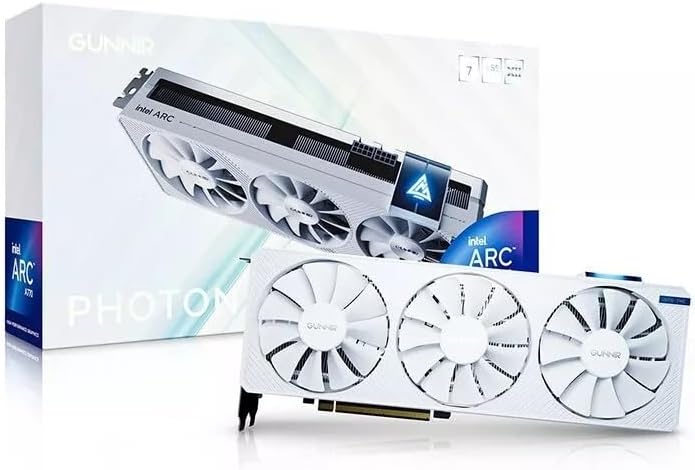
The Photon model brings a stylish white look and triple fan cooling to the A770 for users prioritizing visuals and thermals.
We may earn a commission when you buy through this link, at no additional cost to you.
Its overclocked clock speed ensures responsive performance in gaming and creative tasks across supported modern titles.
With 4K support and reliable thermal management this card is a solid choice for home theater or mixed-use systems.
Users who value aesthetics alongside performance will appreciate the clean design and strong cooling capabilities.
The white finish offers a distinct look for transparent cases and custom themed builds.
Three fans provide ample airflow to keep temperatures low even under sustained loads.
We may earn a commission when you buy through this link, at no additional cost to you.
This card focuses on connectivity with four HDMI outputs making it perfect for trading desks or digital signage networks.
We may earn a commission when you buy through this link, at no additional cost to you.
With a low 50W power draw it runs cool and requires minimal system resources for extended stable operation.
While not intended for heavy gaming it handles multi-monitor workflows efficiently and is very budget friendly.
Professionals needing multiple screen outputs without high graphics demands will find this card offers practical functionality.
Four HDMI connections allow four monitors to be connected without extra adapters.
The 50W budget keeps power consumption low reducing electricity usage and heat.
We may earn a commission when you buy through this link, at no additional cost to you.
Selecting the right Intel Arc GPU depends on your specific use cases such as gaming or AI workloads and system compatibility.
Intel Arc GPUs come in different generations including Xe HPG and Xe2-HPG. Newer generations typically offer better AI acceleration support for newer codecs like AV1 and improved power efficiency. Always check if the card uses the latest architecture for future proofing.
Choose newer Xe2-HPG models if you need advanced AI features and better media encoding capabilities.
VRAM is critical for 3D rendering AI inference and high resolution gaming. Cards with 10GB or more handle complex scenes better than 4GB or 8GB variants. Higher bandwidth also ensures faster data transfer between GPU and memory.
Prioritize cards with at least 10GB of VRAM for gaming and more for AI or professional workloads.
Some cards require multiple 8-pin connectors and substantial wattage which may necessitate a larger power supply. Others are low power and fit into small cases without extra cables. Verify your PSU has enough capacity and available power connectors before buying.
Ensure your power supply can meet the TDP requirements and has the necessary PCIe power cables.
Physical size determines whether the card fits in your case. Standard cards may need multiple slots while low-profile options fit in small form factor builds. Check your chassis clearance dimensions carefully to avoid incompatibility issues.
Measure your case available space and match it with the card dimensions and slot count.
Modern cards support HDMI 2.1a and DisplayPort 2.1 which enable 8K displays and higher refresh rates. Some models offer more ports for multi-monitor setups while others focus on single high resolution outputs. Verify the outputs match your monitors.
Choose a card with enough HDMI and DisplayPort connections to support your intended number of monitors.
Cooling types vary from dual fans to blower style or triple fan configurations. Fans usually run quieter while blowers exhaust heat outside the case. Some models include 0dB silent cooling which stops fans at low loads for complete silence.
Look for cooling designs that balance thermal performance with acceptable noise levels for your environment.
For workstation tasks ISV certified drivers ensure software compatibility with professional tools. Consumer models might lack specific optimizations for engineering or design software. Professional models are tested and supported for stability in critical workflows.
If using for professional design choose a model with ISV certified drivers and workstation support.
Determine if you are gaming creating content or running AI models. Gaming needs strong rasterization and VRAM while AI requires memory capacity and compute. Professional tasks need stability and certification. Align the card features with your primary goal.
Match the card strengths to your main use case whether gaming AI inference or professional design.
After installation ensure your system is running the latest Intel Arc drivers from the official website to enable full features and performance optimizations.
Keep the case clean from dust and ensure proper airflow to prevent overheating which can degrade performance and hardware lifespan.
Use monitoring tools to track temperatures and fan speeds so you can adjust cooling settings or clean fans if temperatures rise.
Yes you should install the latest Intel Arc drivers from the official support page. These drivers enable full feature support including AV1 encoding and XeSS upscaling. Out of box support is available but updated drivers improve stability and performance.
Many modern Intel Arc models feature XMX engines designed specifically to accelerate AI inference tasks. Models with higher memory capacity are better for running large language models locally. Check the compute power and VRAM before choosing for AI work.
Xe2-HPG offers improved AI acceleration and better media codec support compared to earlier generations. It enhances efficiency for both gaming and professional workloads. This architecture supports advanced features like AV1 encoding for modern video streaming.
Many models offer multiple DisplayPort and HDMI outputs for multi-monitor use. Some professional models support up to four displays simultaneously. Check the output ports on the specific card to match your monitor count requirements.
Yes several mid-tier models are optimized for smooth performance at 1440p resolutions. With 10GB of memory and modern upscaling they deliver excellent visual fidelity. Always check benchmarks for your target games to confirm performance.
Most modern Arc GPUs include hardware-accelerated ray tracing for realistic lighting effects. Performance varies by model so higher-end cards offer better ray traced frame rates. Enabling DLSS equivalent XeSS can also improve ray traced performance.
Recommendations depend on the model with many requiring 650W or higher for stable operation. Some low power models work with less but always check the specific TDP and connector requirements. A quality 80+ rated PSU is advised for reliability.
The Arc lineup offers diverse options from budget gaming cards to professional workstation GPUs with massive memory for AI tasks.
Focus on your primary needs whether that is memory capacity for local AI or clock speeds for high frame rates.
Always verify your system compatibility and check current specifications before purchasing to ensure the best value for your setup.