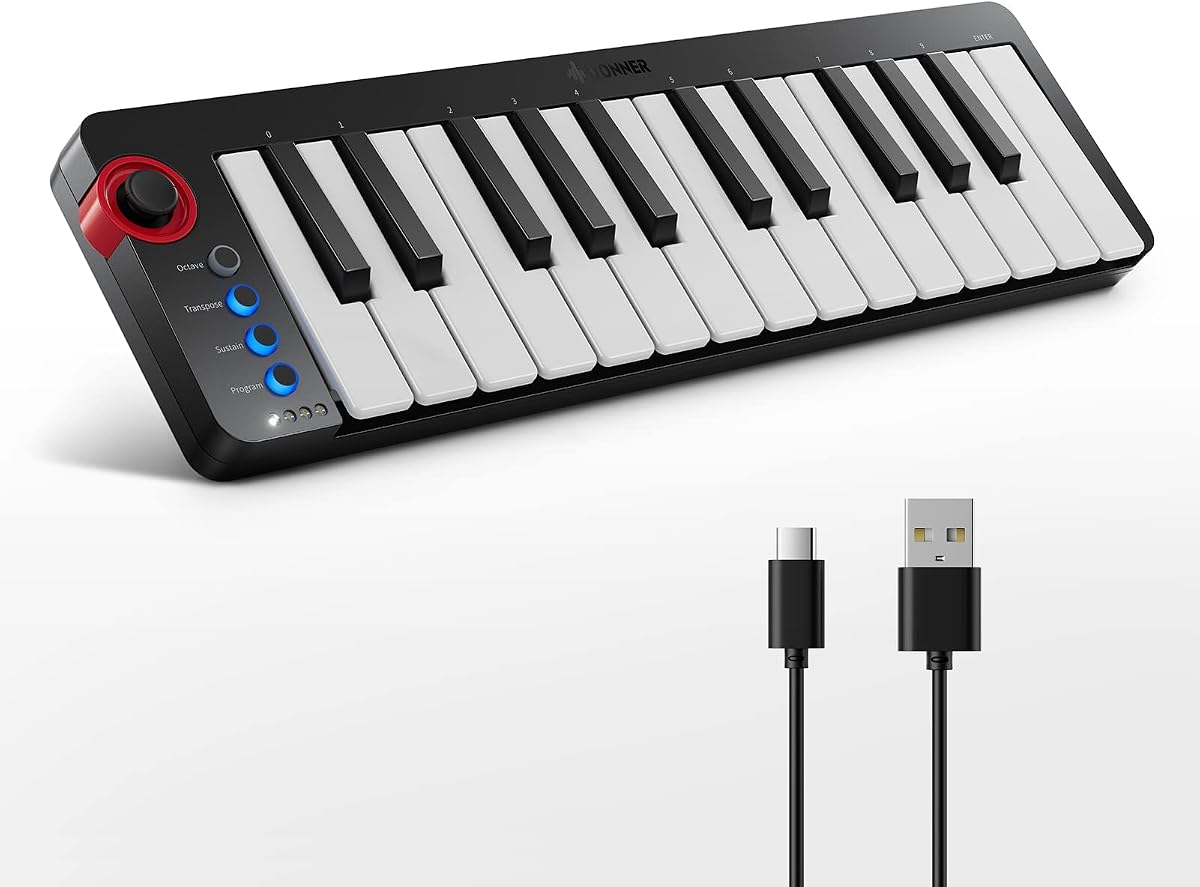
Donner Mini MIDI Keyboard N-25
4.1Editor score
40 teaching courses included
Light-up rocker buttons
Plug and play setup
This guide compares the top 25 key MIDI controllers for producers and musicians, evaluating features, portability, and DAW integration to help you find the
Finding the right MIDI controller is essential for modern music production. A good 25 key model offers portability without sacrificing essential controls like pads, knobs, and velocity sensitivity. These controllers serve as the bridge between your ideas and your digital audio workstation.
We evaluated ten popular models based on build quality, key response, and software integration. Each controller was analyzed for its unique strengths in studio setups or mobile performance. Our goal is to highlight options that cater to beginners and professionals alike.
Each pick in this list showcases specific strengths such as DAW mapping or battery power. Note that availability and pricing fluctuate frequently on retail sites. Always verify current details before purchasing to ensure you get the best value for your setup.
4.1Editor score

4.6Editor score

4.6Editor score
This comparison table provides a side-by-side look at the key specifications and features of each controller. It helps you quickly identify which model offers the specific controls you need for your workflow.


The Akai Professional MPK Mini MK3 stands out as a top choice for producers needing reliable performance. It holds a high rating for its balance of features and portability. The design focuses on giving you hands-on control without taking up too much desk space.
We may earn a commission when you buy through this link, at no additional cost to you.
Its 8 backlit pads are highly responsive and perfect for finger drumming. The innovative 4-way thumbstick allows dynamic pitch and modulation control which is rare in this size. Native Kontrol Standard integration means you can control Native Instruments software directly with ease.
While the keys are mini and not weighted, they are velocity sensitive for expression. Some users might miss a pitch bend wheel but the stick offers a different experience. The software bundle adds significant value for those starting their production journey.
This controller is ideal for beat makers and electronic producers who need MIDI pad and knob control. If you want a standard that works well across many software setups, this is a strong recommendation. It remains a consistent best-seller for good reason.
The 360-degree knobs allow precise tweaking of synths and effects in real time.
Includes MPC Beats and sound libraries to help you start making music immediately.
We may earn a commission when you buy through this link, at no additional cost to you.
The Akai Professional LPK25 is designed for those who prioritize portability above all else. It is a sleek controller that fits easily into any backpack or gig bag. Despite its size it offers expressive controls for playing melodies and bass lines.
We may earn a commission when you buy through this link, at no additional cost to you.
Its built-in arpeggiator allows you to create complex patterns with a simple press. The dedicated octave buttons make it easy to play higher or lower ranges without changing software settings. The setup is effortless as it requires no drivers for Mac or PC.
The lack of drum pads means it focuses purely on keyboard performance. This makes it less versatile for beat making but perfect for keyboardists on the go. The USB power ensures you never need to worry about batteries or extra cables.
If you need a simple tool for writing songs or composing melodies, this is a great option. It is particularly suitable for beginners or professionals who need a secondary keyboard for their setup. Its reliability makes it a solid long-term investment.
The minimal layout ensures you focus on playing music rather than managing complex settings.
Works seamlessly with major applications like GarageBand and Logic without configuration.
We may earn a commission when you buy through this link, at no additional cost to you.
The Arturia MiniLab 3 adapts to your needs with a focus on fluid workflow. It is a modern controller that offers a distinct look and feel compared to standard plastic options. The velocity sensitive keys are noted for their premium touch.
We may earn a commission when you buy through this link, at no additional cost to you.
You can control instruments and tracks with four dedicated faders which helps mixing and automation. The 8 pad drums are punchy and perfect for triggering samples during performance. The software suite allows you to customize mappings to fit your specific habits.
The price is a step up from entry-level models but the build quality reflects this. Some users might find the software integration overwhelming at first but it offers powerful flexibility once set up. The design is sleek and fits well in any studio.
This controller is best for producers who value software integration and tactile faders. It offers a unique experience that goes beyond standard knobs and pads. If you want a controller that feels like a professional tool, this is an excellent choice.
The four motorized faders provide precise control over volume and automation in your DAW.
The compact white design looks great and fits easily into standard gig bags.
We may earn a commission when you buy through this link, at no additional cost to you.
The Novation Launchkey Mini 25 MK4 offers premium keybeds and 16 responsive pads for serious creators. It is designed to work seamlessly with major DAWs ensuring an intuitive workflow for your sessions. The pad quality is excellent for precise drum triggering.
We may earn a commission when you buy through this link, at no additional cost to you.
Scale mode helps you never hit a wrong note by triggering lush chords from a single key. This feature is great for those who want to focus on harmony without worrying about music theory. The polyphonic aftertouch adds expressive depth to your performances.
The footprint is larger than mini controllers but it justifies it with more controls. It is not battery powered but the USB power ensures reliable connectivity. The included software bundle adds value by providing tools to start creating right away.
This controller is ideal for Ableton users and those who want advanced creative features. The integration with DAWs is among the best in its class. If you are willing to invest in a high quality tool, this delivers a professional experience.
Scale Mode allows you to trigger complex harmonies with simple finger placement.
Controls for mixer and plugin parameters are pre-mapped for immediate use.
We may earn a commission when you buy through this link, at no additional cost to you.
The Donner N-25 is a compact controller designed with beginners in mind. It includes 40 keyboard teaching courses which makes it a great gift for learning music. The light-up buttons provide a fun visual display that helps you track your playing.
We may earn a commission when you buy through this link, at no additional cost to you.
It features essential tools like an arpeggiator and sustain button which are vital for creating sound. The layout is user-friendly ensuring that you can start making music without a steep learning curve. It connects via USB-MIDI to Mac or PC without extra drivers.
The build quality is not as robust as premium models but it works well for home use. Some advanced users might find the lack of deep mapping limiting but it covers the basics effectively. The price point makes it accessible for anyone curious about production.
If you are looking for an entry point to music production without a huge investment, this is a strong candidate. The included lessons add significant value by helping you learn while you create. It is a practical tool for learning and experimentation.
The included 40 courses help beginners learn arrangement essentials effectively.
Light-up buttons provide engaging visual cues during your creative sessions.
We may earn a commission when you buy through this link, at no additional cost to you.
The Rhymo 25-key portable MIDI keyboard is slim and compact for on-the-go creation. It is powered directly via USB-C which makes it easy to connect to modern computers. The Bluetooth MIDI compatibility ensures you can work wirelessly with iOS devices.
We may earn a commission when you buy through this link, at no additional cost to you.
It features an X-Y joystick for pitch bend and modulation which offers a unique playing experience. The arpeggiator with multiple modes helps you create dynamic patterns quickly. The loop function allows you to capture ideas instantly without complex setup.
The controls are straightforward making it easy to use without extensive manuals. The velocity-sensitive keyboard ensures your playing feels dynamic and expressive. While it lacks extensive pad control it focuses on the core function of note input.
This controller is ideal for producers who need a lightweight option for travel or casual use. The USB-C connectivity is a future-proof feature that matches modern devices. If you value portability and wireless connectivity this is a solid choice.
USB-C and Bluetooth MIDI allow you to work with tablets and laptops easily.
Loop and latch modes help you build compositions faster during jamming sessions.
We may earn a commission when you buy through this link, at no additional cost to you.
The M-VAVE controller stands out for its wireless connectivity and portable design. It includes a built-in battery that can work for about 16 hours allowing you to compose anywhere. The 8 RGB backlit pads provide visual feedback when triggering samples.
We may earn a commission when you buy through this link, at no additional cost to you.
Touch stripes for pitch bend offer a modern way to manipulate sound without wheels. It connects via Bluetooth to devices which is convenient for mobile music apps. The included software provides essential tools for immediate music production.
While wireless convenience is great you must remember to charge the battery periodically. The build feels sturdy enough for light travel but is not intended for heavy duty touring. The price point is competitive for what it offers in terms of features.
If you want to make music on a couch or at a coffee shop without cables this is perfect. The visual feedback from the pads adds a professional touch to your performance. It is a versatile tool for those valuing freedom from wires.
Bluetooth connectivity allows you to connect to smartphones and tablets wirelessly.
RGB backlit pads light up to confirm your actions during live performance.
We may earn a commission when you buy through this link, at no additional cost to you.
The Akai Professional MPK Mini Play MK3 is a compact keyboard with built-in speaker capabilities. It allows you to play sounds without needing a computer which is great for quick idea capture. The OLED display shows presets and settings clearly for easy access.
We may earn a commission when you buy through this link, at no additional cost to you.
You can power it with batteries or USB to take it anywhere you like. The internal sound library includes over 100 drum and instrument sounds for instant creativity. This makes it a self-contained tool for learning and basic composition on its own.
The weight is higher due to the internal components and battery support. The built-in speaker is convenient but external speakers are better for critical listening. It serves a unique niche as both a MIDI controller and a standalone instrument.
This is a unique choice for travelers or students who want a standalone practice instrument. It works seamlessly as a USB controller when you do connect to your DAW. If you value versatility and standalone playability this model is highly recommended.
Play and compose without a computer using the internal sounds and speaker.
Includes Melodics software download to help improve your MIDI skills quickly.
We may earn a commission when you buy through this link, at no additional cost to you.
This version of the MPK Mini MK3 maintains the robust control layout for modern producers. It is optimized for DAW control with dedicated buttons for transport and playback. The velocity sensitive pads respond well to dynamic input for expressive drumming.
We may earn a commission when you buy through this link, at no additional cost to you.
The NKS integration means you can browse presets for Native Instruments directly from the unit. The arpeggiator includes adjustable resolution which allows for rhythmic flexibility in your tracks. This makes it a solid companion for electronic music production.
It is powered by USB which means it relies on your computer for power. The build quality is durable and fits well on most desk setups. The sound bundle included adds value for those needing quality samples to start.
If you need a dependable controller for daily studio work this is a strong option. It balances portability with essential controls for mixing and composing. The integration with modern software makes it a practical choice for professionals.
Dedicated transport buttons streamline the recording and editing process in your DAW.
8 preset slots let you save different knob configurations for different projects.
We may earn a commission when you buy through this link, at no additional cost to you.
The APC Key 25 MK2 is designed specifically for Ableton Live users who need clip launching. It features a bright 5×8 RGB pad matrix that gives visual feedback during performances. This layout prioritizes loop management over traditional keyboard performance.
We may earn a commission when you buy through this link, at no additional cost to you.
You can control tracks and clips instantly which is essential for live electronic performances. The 8 rotary knobs allow you to dial in effects and volume levels easily. It includes Ableton Live Lite which is a full-featured DAW to start creating.
The keys are useful but the focus is clearly on the grid of pads. If you do not use Ableton Live this controller may not be the best fit. For Ableton users it offers a seamless bridge between hardware and software.
This controller is ideal for live performers and those who build tracks using clips and loops. The visual feedback helps you stay oriented during complex setups. If you want a dedicated tool for Ableton Live this is the clear choice.
The 40 RGB pads allow you to launch clips and trigger samples visually.
Designed to support real-time adjustments during live electronic music sets.
We may earn a commission when you buy through this link, at no additional cost to you.
Selecting the right controller depends on your workflow and needs. This guide breaks down the key factors to consider before making your decision.
Velocity sensitivity ensures that your dynamics translate into the software. Look for keys that feel responsive to touch. While mini keys are compact they should still offer decent travel for comfortable playing.
Prioritize controllers with velocity sensitive keys for expressive music production.
Drum pads are essential for beat makers who need to trigger samples physically. Knobs and faders allow you to mix and tweak sounds without using a mouse. Check the number and type of controls that suit your style.
Choose a controller with enough pads and knobs for your mixing needs.
Deep integration allows you to control transport and mixing functions directly from the hardware. Some models are optimized for specific software like Ableton Live or Logic. Pre-mapped controls save time during setup and use.
Ensure the controller maps well to your primary digital audio workstation.
USB-C and Bluetooth options enhance mobility for producers on the go. Battery power allows you to work away from a computer. Consider how often you need to move the device with you.
Look for USB-C or battery options if you plan to travel with your gear.
Many controllers come with trial versions of DAWs or virtual instruments. These can add significant value especially for beginners. Check what software is included to ensure it meets your needs.
Value controllers that include relevant software to help you start creating immediately.
A sturdy build ensures the device lasts through tours and daily use. Materials should be robust enough to withstand regular handling. Heavier units might be less portable but often feel more premium.
Select a model with durable materials to withstand regular use over time.
Controllers need a way to bend pitch or add vibrato to notes. Some use wheels while others use touch strips or sticks. The choice depends on your playing preference and style.
Verify that the pitch and modulation tools match your playing habits.
Prices vary significantly across different brands and models. Determine what features are essential versus nice to have. Often entry-level models offer enough for beginners without unnecessary cost.
Balance your budget with the features you truly need for your workflow.
Connect the controller to your computer using a high-quality USB cable. Ensure your DAW software is open and ready to receive MIDI signals. Most modern controllers are plug and play requiring no extra drivers.
Calibrate your sensitivity settings within your DAW to match your playing style. Use the software editor provided by the manufacturer to assign controls to specific functions. This personalizes your workflow for faster production.
Keep the controller clean by dusting it regularly with a soft cloth. Store it in a padded case when traveling to prevent physical damage. Avoid exposing it to extreme temperatures or moisture to ensure longevity.
Most 25 key MIDI controllers are class compliant which means they work without installing specific drivers. You can simply plug them in and start playing. However some advanced features may require additional software from the manufacturer.
Mini keys are smaller and more compact which saves space on your desk. They are great for portability but lack the full feel of standard piano keys. Mini keys are sufficient for composition and production tasks.
Yes many controllers support iOS devices via a USB camera adapter or Bluetooth. Check the specifications to ensure compatibility with your phone model. Using them with iOS opens up mobile music production options.
Yes many 25 key models are designed with live performance in mind. Features like clip launching and velocity sensitive pads make them suitable for stage use. Ensure they are durable enough to withstand travel and setup.
Most controllers include a trial version of Ableton Live Lite or similar DAW software. They also often come with virtual instrument libraries and effects plugins. This helps you start making music right out of the box.
You can connect multiple controllers to a computer simultaneously using USB hubs. Each will appear as a separate device in your DAW settings. This allows you to expand your control surface for complex workflows.
Beginners should look for a controller with simple controls and good software support. Features like light-up buttons or teaching courses can be very helpful for learning. A moderate price point ensures you do not overspend initially.
Visit the manufacturer website and download the specific firmware tool for your model. Connect the controller via USB and follow the on-screen instructions to update. Keeping firmware current ensures stability and access to new features.
The top picks offer a range of options from budget-friendly models to advanced tools. The MPK Mini MK3 leads with its versatile control layout and software integration. The LPK25 and Donner offer affordable entry points for focused keyboard work.
Prioritize controls that match your workflow such as pads for beat makers or faders for mixers. DAW integration plays a critical role in how smoothly your production process runs. Choose a controller that supports the software you use daily.
Prices and availability can change quickly so verify current details before purchasing. Check for current software bundles as they add significant value to the hardware. Investing in the right controller will help you focus on creativity.