
Seagate BarraCuda Internal Hard Drive
4.7Editor score
Cost Effective Pricing
Proven Reliability
SATA 6 Gb/s Interface
Finding the right hard drive for RAID 0 is crucial for performance enthusiasts and professionals who need fast data access. This setup stripes data across multiple drives to boost speed, making drive reliability and throughput essential factors for your system.
We have carefully selected ten top-rated internal hard drives that excel in high-throughput environments. Our selection includes models from leading manufacturers known for consistency, speed, and robust performance under continuous workload conditions.
Each pick below highlights specific strengths like cache size, RPM, and workload ratings. Prices can change frequently, so check the current listings before purchasing to ensure you get the best value for your specific storage needs.
4.7Editor score

4.7Editor score

4.6Editor score
As an Amazon Associate we earn from qualifying purchases.
This table provides a side-by-side comparison of all ten drives selected for this guide. It highlights key specifications like capacity, cache, and workload ratings to help you choose the best fit for your RAID 0 configuration.





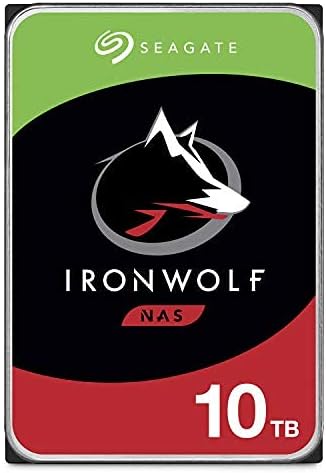

This Seagate IronWolf drive is a standout choice for RAID 0 setups due to its optimized performance and reliability. With a strong user rating and proven track record, it delivers consistent speeds essential for striped storage configurations.
We may earn a commission when you buy through this link, at no additional cost to you.
The drive features a robust 256MB cache and 7200 RPM speed which helps manage data flow efficiently. Its AgileArray technology ensures minimal vibration and optimal performance in multi-bay environments which is vital for RAID arrays.
While the price point is higher than standard desktop drives, the reliability and included data recovery service justify the investment. These factors reduce the risk of data loss which is critical when using RAID 0 striping.
Anyone needing high capacity and speed for media editing or server use should consider this drive. It strikes an ideal balance between cost and performance for professional or enthusiast RAID 0 builds.
Designed specifically for NAS systems, it ensures stability in striped storage arrays.
Includes three years of Rescue Data Recovery Services for added peace of mind.
We may earn a commission when you buy through this link, at no additional cost to you.
The Seagate BarraCuda offers exceptional value for budget-conscious builders looking to start a RAID 0 array. With a high user rating and solid performance specs, it serves well as a cost-effective storage solution.
We may earn a commission when you buy through this link, at no additional cost to you.
It provides ample space with 8TB capacity and a transfer rate that meets standard SATA requirements. This makes it suitable for general computing and light server tasks without breaking the bank.
While it lacks some enterprise features found in higher-end models, it remains reliable for home or light office use. The packaging ensures safety during shipping which adds to user convenience.
This drive is perfect for those prioritizing cost efficiency without sacrificing basic performance. It is an excellent entry point for RAID 0 experimentation or non-critical data storage.
Delivers high capacity at a competitive price point for entry-level builds.
Backed by decades of innovation ensuring reliable performance for everyday tasks.
We may earn a commission when you buy through this link, at no additional cost to you.
This Ultrastar drive is designed for hyperscale environments and demanding workloads making it ideal for premium RAID 0 setups. Its massive capacity and high MTBF rating ensure it can handle intense data processing needs.
We may earn a commission when you buy through this link, at no additional cost to you.
The 24TB space combined with enterprise-grade construction means it can store vast amounts of data reliably. With a high-speed interface and large cache, it delivers the speed necessary for complex RAID configurations.
While the price is higher, the performance and longevity justify the investment for professional use. Renewed units offer a cost-effective way to access enterprise quality without the full retail expense.
Professionals needing extreme capacity and endurance should look to this model first. It is a top choice for high-density data centers or heavy-duty local storage arrays.
Perfect for storing large datasets or media libraries without frequent expansion.
Engineered for continuous operation with a high mean time between failures rating.
We may earn a commission when you buy through this link, at no additional cost to you.
The WD Red Plus is engineered for small to medium business NAS systems which often use RAID configurations. It provides reliable performance and capacity making it a solid option for mixed workloads.
We may earn a commission when you buy through this link, at no additional cost to you.
With a high workload rate and NASware firmware, it handles continuous data transfer well. This ensures stability in multi-bay setups which is critical for maintaining RAID 0 integrity during heavy use.
While there are some compatibility notes, the drive remains a robust choice for dedicated storage. The CMR technology ensures that data performance does not degrade over time like SMR drives.
Users prioritizing reliability in a business environment should consider this model. It offers a good balance of capacity and performance for consistent daily operations.
CMR technology ensures consistent speeds suitable for RAID environments.
Built to handle the demands of small business networks and storage needs.
We may earn a commission when you buy through this link, at no additional cost to you.
The WD Red Pro is built for high-intensity multi-user NAS environments requiring large storage pools. Its capacity and speed make it well suited for RAID 0 configurations where performance and space are key.
We may earn a commission when you buy through this link, at no additional cost to you.
It features a massive 16TB capacity and is rated for a high annual workload. This ensures it can handle constant data access without slowing down which is essential for active RAID setups.
Although the price is higher, the reliability and capacity justify it for demanding scenarios. Compatibility with various enclosures ensures you can integrate it into many existing systems.
If you need a large, fast drive for professional storage this is a strong candidate. It balances speed and capacity effectively for users with significant data demands.
Ideal for users needing large space without multiple smaller drives.
Designed specifically for high-intensity workloads and continuous access.
We may earn a commission when you buy through this link, at no additional cost to you.
This IronWolf Pro drive is a premium enterprise solution designed for demanding NAS environments. It offers massive capacity and reliability making it suitable for high-performance RAID 0 systems.
We may earn a commission when you buy through this link, at no additional cost to you.
With a very high workload rating and long MTBF, it is built to run constantly without issues. The AgileArray technology ensures balanced performance across multiple bays which aids RAID stability.
The included data recovery services provide an extra safety net for valuable data. This makes it a prudent choice for businesses where downtime can be costly.
Those needing enterprise-level performance and capacity will find this drive valuable. It is a robust choice for mission-critical storage arrays requiring consistent throughput.
Delivers consistent speeds and reliability for demanding professional workloads.
Complimentary data recovery services protect against unexpected drive failures.
We may earn a commission when you buy through this link, at no additional cost to you.
This IronWolf drive is an ideal solution for multi-user NAS environments requiring solid performance. It combines capacity and speed to support efficient data sharing and RAID operations.
We may earn a commission when you buy through this link, at no additional cost to you.
Built specifically for NAS enclosures, it minimizes noise and wear which extends its lifespan. The integrated health management system allows for proactive monitoring of drive status.
While it lacks some premium services, it delivers reliable performance at a competitive price. It is a strong contender for home labs or small office setups.
Users looking for a balanced drive for shared storage should consider this option. It offers the necessary reliability and speed for effective RAID 0 use.
Tailored for 24×7 operation in network attached storage environments.
Integrated system helps predict and prevent potential drive issues.
We may earn a commission when you buy through this link, at no additional cost to you.
This IronWolf model is designed for NAS enclosures offering less wear and high performance. It is ideal for RAID setups where consistent throughput is necessary for smooth operation.
We may earn a commission when you buy through this link, at no additional cost to you.
The drive includes 10TB of space and a large cache for efficient data handling. Its design focuses on reducing lags and downtime which supports reliable daily use.
With a solid warranty and reliable track record, it is a safe choice for storage arrays. The CMR technology ensures consistent performance over time without speed drops.
Those needing a dependable NAS drive for 24×7 use will appreciate this model. It offers a great mix of capacity and speed for most home and office setups.
Optimized design ensures quiet operation even under heavy workload conditions.
CMR technology maintains high speeds without performance degradation over time.
We may earn a commission when you buy through this link, at no additional cost to you.
This IronWolf model is designed for NAS enclosures offering less wear and high performance. It is ideal for RAID setups where consistent throughput is necessary for smooth operation.
We may earn a commission when you buy through this link, at no additional cost to you.
The drive includes 10TB of space and a large cache for efficient data handling. Its design focuses on reducing lags and downtime which supports reliable daily use.
With a solid warranty and reliable track record, it is a safe choice for storage arrays. The CMR technology ensures consistent performance over time without speed drops.
Those needing a dependable NAS drive for 24×7 use will appreciate this model. It offers a great mix of capacity and speed for most home and office setups.
Optimized design ensures quiet operation even under heavy workload conditions.
CMR technology maintains high speeds without performance degradation over time.
We may earn a commission when you buy through this link, at no additional cost to you.
This WD Red Plus drive is built for small or medium business NAS systems needing large space. With CMR technology, it ensures reliability and consistent performance for general storage tasks.
We may earn a commission when you buy through this link, at no additional cost to you.
It supports a high workload rate and is optimized for NAS use. This makes it suitable for RAID configurations where data stability is more important than extreme speed.
While the RPM is lower than Pro models, it offers energy efficiency and quiet operation. The large capacity allows for extensive data storage without multiple drives.
Users needing large capacity with reliable performance should consider this option. It is a great choice for archival storage or non-intensive RAID setups.
CMR technology ensures consistent performance for critical data storage.
Lower RPM design reduces power consumption and operational noise.
We may earn a commission when you buy through this link, at no additional cost to you.
Selecting the right hard drive for RAID 0 requires understanding several technical factors. Here are key elements to consider before making your purchase decision.
Capacity determines how much data you can store across your striped array. RAID 0 combines the capacities of multiple drives so choose sizes that fit your storage needs. Larger capacities usually cost more but reduce the number of drives needed.
Always verify that the drive size meets your current and future storage goals.
The interface speed controls how fast data moves between the drive and system. SATA 6 Gb/s is standard and supports high-speed operations. Ensure your motherboard supports this speed for best results.
Look for drives that support the fastest interface available for your system.
Spindle speed affects how quickly the drive can access data. Drives with 7200 RPM generally offer faster performance than 5400 RPM models. Higher RPM is beneficial for RAID 0 where speed is paramount.
Choose a higher RPM for better speed if budget allows.
Cache acts as temporary memory to buffer data transfers. Larger caches like 256MB or 512MB help improve throughput and responsiveness. This is especially helpful in RAID setups with many reads.
Opt for a drive with a larger cache for smoother performance.
MTBF indicates expected drive longevity. Enterprise and NAS drives have higher MTBF ratings than desktop models. For RAID 0 which has no redundancy reliability is critical to prevent total data loss.
Prioritize drives with higher MTBF ratings for safety.
This metric shows how much data a drive can handle annually. Higher workload ratings are essential for continuous or heavy usage. Ensure your selected drive matches your daily data transfer needs.
Select a drive with a workload rating exceeding your expected usage.
Drives optimized for NAS or RAID include technologies to manage vibration and errors. This ensures stable performance in multi-drive environments. Look for features like AgileArray or TLER for better compatibility.
Choose drives explicitly optimized for multi-bay NAS use.
A solid warranty provides peace of mind against drive failures. Some models include data recovery services which add value. Check warranty length and support options before buying.
Verify warranty terms and included services to protect your investment.
Install your drives in a compatible enclosure or motherboard RAID controller. Ensure all connections are secure and cables are routed properly to prevent vibration or heat buildup.
Configure your RAID 0 array using your system BIOS or software utility. Select all installed drives and initialize the striped array. Backup critical data before starting configuration.
Regularly monitor drive health using tools like IronWolf Health Management or SMART monitors. Keep firmware updated to maintain performance and reliability. Check temperatures regularly to prevent overheating.
RAID 0 improves read and write speeds by splitting data across multiple drives. This stripe configuration enhances performance for large files and active applications making it ideal for high-speed storage.
No, RAID 0 does not provide redundancy. If one drive fails all data in the array is lost. Always backup your data separately when using this RAID configuration.
Yes, NAS drives are often better suited for RAID 0 than desktop drives. They are built to handle higher workloads and vibration levels common in multi-drive arrays.
SATA 6 Gb/s is standard for modern high-speed drives and RAID 0 setups. Ensure your controller supports this speed to avoid performance bottlenecks during data transfers.
A cache of 256MB or larger is recommended for RAID 0. It helps buffer data and improves overall throughput especially during heavy read-write operations.
Enterprise drives are often more durable and have higher workload ratings. They are excellent for RAID 0 arrays requiring constant operation and maximum reliability.
We reviewed ten top drives for RAID 0 including the Seagate IronWolf and Western Digital Red series. Each offers unique benefits for speed capacity or budget depending on your needs.
Prioritize reliability and speed when choosing a drive for striped storage. Enterprise and NAS drives often provide better performance and durability than desktop models.
Always check current prices and compatibility before buying to ensure the best fit. Verify warranty terms and support services to protect your storage investment.