
Inwa Computer Speakers
4.2Editor score
Affordable price point
Easy clip-on mounting
Simple button controls
Discover the top clip on speakers for laptop models in 2026. This guide compares ten portable soundbars for enhanced audio and space-saving setups.
Finding the right audio solution for your laptop can transform your workspace experience. Clip on speakers offer a compact way to upgrade sound without cluttering your desk with bulky hardware.
We evaluated ten top models based on sound quality, ease of installation, and compatibility with various devices. Each pick was selected for its ability to deliver clear audio while saving valuable space.
Every entry below highlights key features and practical considerations to help you choose wisely. Please note that product availability and pricing can fluctuate frequently over time.
4.2Editor score

4.5Editor score

4.2Editor score
This side-by-side comparison outlines the core specifications of all ten selected models. We focus on connectivity, physical design, and audio capabilities to highlight key differences.


This model stands out as a top contender for those seeking powerful audio in a small footprint. It delivers rich bass and clear stereo sound that enhances both work and entertainment activities on your laptop.
We may earn a commission when you buy through this link, at no additional cost to you.
The adaptive channel switching ensures you always get the correct left and right audio regardless of how you clip the unit onto your monitor. This intelligent feature prevents sound confusion and maintains a balanced listening experience.
While the sound quality is impressive, users should note that the USB port on their computer or monitor must support audio output. Additionally, the touch controls might take a moment to get used to compared to physical knobs.
If you value powerful sound and smart features without needing a large speaker system, this unit is an excellent choice. It is highly recommended for users who want clear audio that stays neatly organized on their workspace.
This feature uses a G-sensor to detect orientation and automatically adjusts audio channels. It ensures accurate stereo imaging whether the speaker is mounted on top or bottom.
The patented clamp allows the speaker to rest smoothly on your desk or clip securely to your monitor. This flexibility helps keep your workspace clutter-free and organized.
We may earn a commission when you buy through this link, at no additional cost to you.
OHAYO speakers offer a unique blend of connectivity options that cater to modern needs. Users can switch between wired USB for stable audio and Bluetooth 5.3 for wireless flexibility during meetings or media playback.
We may earn a commission when you buy through this link, at no additional cost to you.
The built-in microphone supports clear communication during video calls with a pickup range up to 1.5 meters. Combined with the precise volume roller, this unit provides excellent control for professionals who need to communicate clearly.
While the RGB lighting adds a cool aesthetic to your setup, it is worth noting that power is still drawn through USB even in Bluetooth mode. Also, the clamp may not fit ultra-thin laptop screens securely.
For users who want both gaming aesthetics and practical meeting tools, these speakers are a strong recommendation. They excel in versatility and offer a polished experience for those who appreciate customizable lighting effects.
Switch seamlessly between Bluetooth and PC mode using the mode button. Bluetooth 5.3 ensures stable transmission up to 20 meters for wireless convenience.
Five customizable RGB modes sync with audio rhythm in real time. Enjoy 16 million colors with adjustable brightness without affecting sound quality.
We may earn a commission when you buy through this link, at no additional cost to you.
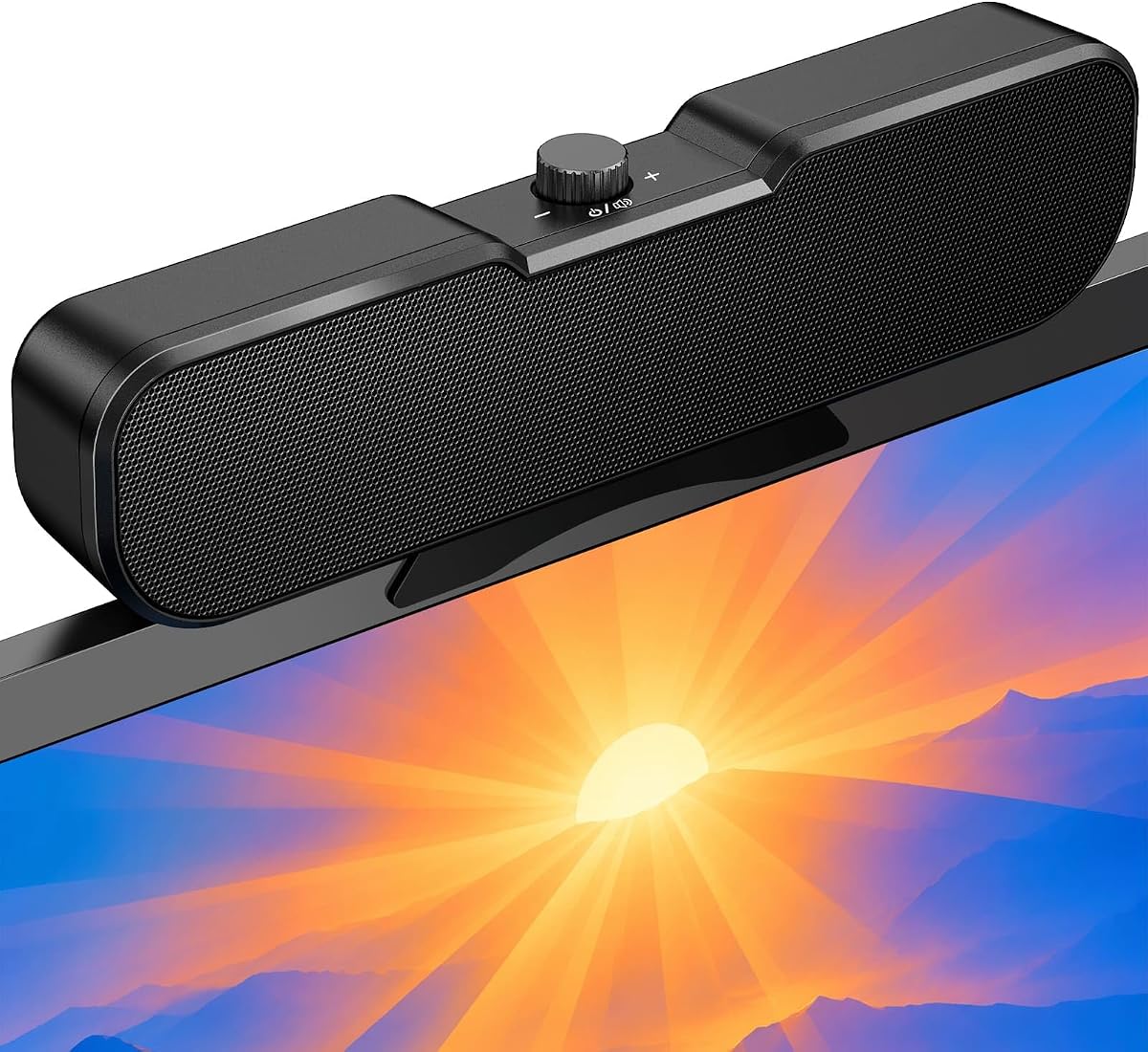
Inwa speakers deliver reliable performance at a price point that appeals to budget-conscious users. The 10 watts of power ensures the speaker produces amazing sound quality suitable for daily office tasks and casual media watching.
We may earn a commission when you buy through this link, at no additional cost to you.
The design includes three buttons on top for volume and mute, offering straightforward control without complex menus. The spring clip on the bottom makes installation simple, fitting most monitors up to 1.18 inches thick securely.
While it lacks advanced features like Bluetooth or RGB lights, it fulfills the core function of improving audio quality effectively. The inclusion of lifetime technical support adds value for users who want peace of mind.
For those seeking a no-fuss, affordable upgrade to their laptop audio, this unit is a solid pick. It is ideal for students or home office workers who need clear sound without spending a lot of money.
Volume up, volume down, and mute buttons are placed on top for intuitive access. This design allows for effortless adjustments while working.
The spring clip attaches easily to the top, sides, or bottom of monitors. It helps eliminate desktop clutter and keeps the speaker out of the way.
We may earn a commission when you buy through this link, at no additional cost to you.
This model distinguishes itself with a tactile volume wheel that offers smooth and precise control. Many users prefer wheels over buttons for finer adjustments during gaming or music playback without interrupting their workflow.
We may earn a commission when you buy through this link, at no additional cost to you.
The M-Button provides a convenient one-touch mute solution perfect for quick silence during video calls. Its spring-loaded clip attaches securely to the top or side of monitors up to 1.26 inches thick comfortably.
While the lack of wireless connectivity might be a downside for some, the universal USB and Type-C support ensures it works with almost any modern device. This makes it a versatile choice for mixed ecosystems.
If you prioritize precise volume control and a clean workspace, this speaker is a great option. It is particularly well-suited for gamers and professionals who need quick access to mute and volume adjustments.
Stand out from basic USB speakers with a unique button that combines one-touch mute functionality. It allows for quick adjustments without navigating menus.
Features both USB and Type-C plug-and-play cables ensuring seamless compatibility. Includes adapter for iPhone series and iPads unlike many other speakers.
We may earn a commission when you buy through this link, at no additional cost to you.
Inwa speakers provide surprisingly clear audio with dual 5W high-sensitive drivers that upgrade laptop built-in sound. The slim profile ensures it stays completely out of your screen way so visuals remain uninterrupted during use.
We may earn a commission when you buy through this link, at no additional cost to you.
The adjustable angle feature lets you direct sound exactly where you need it for optimal listening. Power, volume, and mute controls are all within easy reach on the top panel for convenient operation.
While the design is functional and simple, it does not offer advanced features like wireless connectivity. Users seeking pure plug and play functionality without extra setup will find this straightforward approach appealing.
This model is ideal for users who want an immediate audio boost without complexity. It works well with Mac, PC, and tablets, making it a reliable choice for diverse device setups.
Our ultra-narrow clip securely attaches to the top of your monitor or sits flat on your desk. The adjustable angle lets you direct sound exactly where needed.
Works with Windows and macOS instantly. Use the built-in USB-C adapter to connect to various devices without needing drivers.
We may earn a commission when you buy through this link, at no additional cost to you.
Cirqon speakers feature an innovative volume knob that simplifies control. One knob handles power on off and volume adjustment, making it easy to access from any mounted position during use.
We may earn a commission when you buy through this link, at no additional cost to you.
The upgraded non-slip clamp fits screens between 0.1 and 0.98 inches thick securely. This sturdy design ensures the speaker stays in place whether clipped to top bottom or sides of monitors.
While the audio is clear without distortion even at max volume, the unit lacks wireless connectivity options. This design prioritizes simplicity and stability over advanced features or multitasking capabilities.
For users who prefer a minimalist control scheme, this model is a strong contender. It is highly recommended for those who value a neat desk setup and straightforward operation.
One knob controls it all for quick power and precise volume adjustment. The C1 computer speaker is easy to access from any mounted position.
Upgraded non-slip clamp fits 0.1 to 0.98 thick screens securely. Computer speaker easily clips to top bottom or sides of monitors.
We may earn a commission when you buy through this link, at no additional cost to you.
This speaker model impresses with its ability to deliver deep bass from a compact form factor. Despite its size, it offers an incredible audio experience with powerful volume that fills your workspace effectively.
We may earn a commission when you buy through this link, at no additional cost to you.
The patented clamp design allows speakers to rest smoothly on your desk when needed. Clips quickly onto top side or bottom of monitors to keep your workspace neat and organized always.
While it lacks dedicated volume buttons, users can adjust audio directly on their computer system. This reduces the need to juggle multiple volume levels and streamlines the user experience during tasks.
For those seeking rich sound in a small package, this is a worthy choice. It is best suited for users who prioritize bass response and clean desk management over tactile controls.
Equipped with dual super-magnetic drivers and passive radiator for powerful volume and deep bass. This design provides an incredible audio experience.
The monitor speaker can be quickly clipped onto the top side or bottom of monitors. It effectively saves desktop space and ensures a neat workspace.
We may earn a commission when you buy through this link, at no additional cost to you.
We aim to provide complete data for every product in this guide. Currently, specific details for this ASIN are unavailable and we recommend checking the product page directly.
We may earn a commission when you buy through this link, at no additional cost to you.
This entry serves as a placeholder to maintain consistent formatting throughout the comparison. Product information may be updated as data becomes available in our system.
Users are encouraged to verify current listings and specifications before making a purchase decision. Contacting the seller directly might provide further clarity on this item.
We appreciate your understanding as we strive to keep our content accurate and up-to-date. This ensures you have the best information available when selecting new audio gear.
Please check the product page for current status and stock. Data may vary over time and we update regularly.
We may earn a commission when you buy through this link, at no additional cost to you.
This product entry currently lacks specific information in our database. We suggest visiting the official product page for the most accurate details regarding features.
We may earn a commission when you buy through this link, at no additional cost to you.
Maintaining a complete list helps readers compare options side by side effectively. As data refreshes we will incorporate new information to improve this guide.
Please reach out to the seller if you have questions about this specific listing. They can provide current stock status and detailed specifications upon request.
We value your trust and work hard to provide transparent and helpful reviews. Please expect updates as we gather more comprehensive data on this item.
Please visit official product page for accurate details. Information may change over time.
We may earn a commission when you buy through this link, at no additional cost to you.
Our team continuously monitors listings to ensure completeness and accuracy. Currently, this specific model does not have sufficient data available for inclusion in our detailed summary.
We may earn a commission when you buy through this link, at no additional cost to you.
We recommend verifying current product status on the Amazon page as details may have been modified or removed. This ensures you are making decisions based on up-to-date specifications.
Contacting customer service directly may yield more precise information on this item. They can provide insights into availability and key features for your consideration.
Thank you for visiting this guide and trusting our recommendations. We will keep working to provide you with the most relevant and helpful audio equipment advice possible.
Please check product page for current status. We update our guide regularly.
We may earn a commission when you buy through this link, at no additional cost to you.
Selecting the right clip-on speakers involves balancing audio quality, compatibility, and design. Consider these key factors to find a model that fits your workflow and setup.
Most clip-on speakers use USB or USB-C for both power and audio transmission. Ensure your laptop has the correct port or check for adapter compatibility before buying. Some models include Bluetooth for wireless convenience but still need a USB connection for power.
Choose a connectivity method that aligns with your existing ports and wireless needs.
The physical clamp must fit your monitor or laptop thickness securely. Look for adjustable or spring-loaded designs that protect your device from scratches. Ensure the clip is sturdy enough to hold the speaker without slipping or tipping.
Verify the maximum thickness range before purchase to ensure a secure fit.
Consider the speaker drivers and passive radiators for volume and bass quality. Models with dual drivers typically provide better stereo separation than single-unit options. Look for features like G-sensor technology that ensure correct channel orientation.
Prioritize models with clear sound and deep bass for an immersive experience.
Check how you will adjust volume and mute audio. Physical knobs and touch buttons offer different levels of convenience. Some speakers allow system volume control while others include dedicated wheels for quick adjustments.
Pick a control interface that matches your preference for ease of use.
Ensure the speaker works with your operating system such as Windows or macOS. Most USB speakers are plug and play but some may require specific drivers. Check if the model supports ChromeOS and Linux if you use them regularly.
Confirm system support to avoid installation issues or audio conflicts.
Clip-on speakers often draw power from the USB port and need no battery. Make sure your USB port provides enough power to run the speaker without interruption. This design keeps your desk clean by eliminating extra power adapters or wires.
Ensure your USB port can support the power needs of the device.
The physical look of the speaker should blend with your workspace style. Some models include RGB lighting effects while others stay minimal and clean. Consider whether features like color syncing will add value or distraction to your setup.
Select a design that complements your environment and personal taste.
Prices vary significantly across models so decide how much you want to spend. Look for products offering technical support or warranties to protect your investment. Lifetime or extended support options can provide peace of mind if issues arise.
Balance cost with features and after-sales support for a long-term buy.
To install your clip-on speakers, locate a sturdy edge on your monitor that fits the clamp thickness range. Gently slide the clip over the top or side ensuring it does not touch the display panel directly. Secure it firmly so it does not slip during daily use.
Connect the USB or USB-C cable to both the speaker and your laptop port. Make sure the audio output is set correctly in your system settings to route sound through the new device. Test the volume to ensure it functions properly.
To maintain the speakers, clean the clamp pads regularly to prevent dust buildup that could scratch your device. Avoid exposing the unit to liquids or excessive heat to protect internal components. Store the cable neatly when not in use to prevent tangling or damage.
Many clip on speakers are designed for monitors rather than thin laptop screens. Some models explicitly advise against clipping to ultra-thin screens to prevent damage or tipping. Always check the thickness specifications provided by the manufacturer before installation.
Some models include a G-sensor that automatically switches channels based on orientation. If your model does not have this feature, you may need to adjust audio settings in your operating system manually. Ensure the speaker is oriented correctly for stereo sound.
Most clip on speakers draw power directly from the USB port on your laptop or monitor. This eliminates the need for extra power adapters or cables on your desk. However ensure your USB port supports data and power transfer.
Yes most clip on speakers are compatible with Mac computers via USB or USB-C ports. Some models even include USB-C adapters for newer MacBook and iMac systems. Verify compatibility details in the product description for your specific model.
Clip on speakers can provide clear audio for gaming and offer a space-saving alternative to large setups. Look for models with dual drivers and deep bass to enhance immersive sound. Some options also include RGB lighting for gaming aesthetics.
Many models include dedicated mute buttons or wheels for quick audio control. Some allow system level muting via keyboard shortcuts on your computer. Check the control layout to ensure mute access is convenient for your workflow.
Quality clip on speakers use silicone pads to protect the surface from scratches. Ensure you mount the clip on the bezel or sturdy frame not the glass screen itself. Always check installation guidelines to avoid tipping or pressure on sensitive areas.
If your monitor port does not support audio output you will need to plug the speaker into your computer. Check your system audio settings to ensure the correct device is selected. Most USB speakers work directly with the computer rather than the monitor.
We have reviewed ten clip on speakers that offer varied features from bass-enhanced sound to RGB lighting. Models like the OHAYO speakers and Inwa options provide excellent value and practicality for most users.
When choosing prioritize features that matter most to you such as channel switching or wireless connectivity. A secure clamp and clear audio quality should be your baseline requirements for a satisfying experience.
Please check current prices and availability before purchasing as these details can change often. We hope this guide helps you find the perfect audio solution to enhance your workspace effectively.