
Dell Precision 3581 Workstation
4.0Editor score
Intel i7-13800H CPU
32GB DDR5 RAM
15.6-inch FHD Screen
NVIDIA RTX A500 GPU
Finding the right laptop for CAD work requires balancing raw power with portability. Professionals need machines that handle complex 3D modeling, rendering, and simulations without lagging during critical design phases.
We evaluated ten top models based on processor speed, graphics capability, memory capacity, and display accuracy. Our analysis focuses on real-world performance in applications like AutoCAD, SolidWorks, and Revit.
Each pick highlights specific strengths for different workflows and budget levels. Note that prices and availability fluctuate frequently, so verify current deals before making your final purchase decision today.
4.0Editor score

4.4Editor score

5.0Editor score
As an Amazon Associate we earn from qualifying purchases.
The following table provides a side-by-side comparison of all ten laptops selected for this guide, highlighting their core specifications to help you quickly identify the right match for your specific engineering or design requirements.




This flagship workstation delivers top-tier performance for complex CAD tasks. Rated 4.4 stars, it handles demanding software with ease thanks to its high-end processor and graphics capabilities.
We may earn a commission when you buy through this link, at no additional cost to you.
The system is built for professionals who need reliability. ISV certifications ensure smooth operation with industry-standard applications like AutoCAD and SolidWorks. The display provides sharp visuals critical for detailed design work.
While the weight might be a consideration for frequent travelers, the power it offers outweighs the portability trade-off for many. The extensive port selection allows for easy connection to multiple monitors and peripherals.
If you prioritize raw power and stability above all else, this machine is the ideal choice. It supports intensive workflows without bottlenecks, making it a strong recommendation for professional engineers.
The Intel i9 processor ensures that even the most complex assemblies render quickly without lag.
The anti-glare screen reduces eye strain during long hours of detailed modeling and drafting.
We may earn a commission when you buy through this link, at no additional cost to you.
This model offers a solid balance between performance and cost for CAD users. It maintains the high standards of the Precision series with reliable hardware suited for daily professional tasks.
We may earn a commission when you buy through this link, at no additional cost to you.
The RTX 1000 Ada GPU provides dedicated graphics power necessary for 3D rendering. Combined with the strong processor, it ensures smooth navigation through large design files and assemblies.
The laptop is designed to withstand professional use with durable construction. ISV certifications mean you can trust it to run specific engineering applications without unexpected crashes or errors.
It is a great choice for users who need workstation reliability without the absolute top-tier price. It handles most CAD workflows efficiently and supports multiple monitor setups effectively.
The dedicated GPU handles complex 3D visuals smoothly for better modeling experience.
Built to meet MIL-STD standards ensuring longevity in office or field environments.
We may earn a commission when you buy through this link, at no additional cost to you.
This HP mobile workstation brings advanced AI capabilities and massive memory to the table. It stands out with 64GB of RAM, which is excellent for multitasking and handling large datasets.
We may earn a commission when you buy through this link, at no additional cost to you.
The touchscreen adds versatility to how you interact with your CAD software. It allows for intuitive navigation and quick annotations directly on the screen while working on designs.
With 2TB of storage, you have ample space for large project files and software. The fast SSD ensures that loading times remain minimal even with extensive archives and resources.
Ideal for designers who need extra flexibility and power in one mobile unit. The ISV certifications provide confidence in running complex engineering and creative applications smoothly.
64GB RAM and 2TB SSD allow simultaneous operation of heavy applications.
Direct touch input simplifies navigation and sketching in compatible design tools.
We may earn a commission when you buy through this link, at no additional cost to you.
This laptop offers a cost-effective entry into the workstation category with powerful specs. The Intel i7 processor provides strong performance for typical CAD needs without the flagship price.
We may earn a commission when you buy through this link, at no additional cost to you.
The RTX A500 GPU is designed for professional graphics tasks. It supports hardware acceleration for rendering and visualization, which is crucial for efficient workflow in design software.
As a renewed product, it comes with warranty coverage but may show signs of use. This option is suitable for users looking to maximize performance per dollar for office work.
It delivers a solid balance of power and price for students or independent consultants. The 32GB RAM ensures you can keep multiple applications open without slowdowns.
Get professional-grade components at a fraction of the cost of new models.
The RTX A500 ensures stable performance in certified CAD applications.
We may earn a commission when you buy through this link, at no additional cost to you.
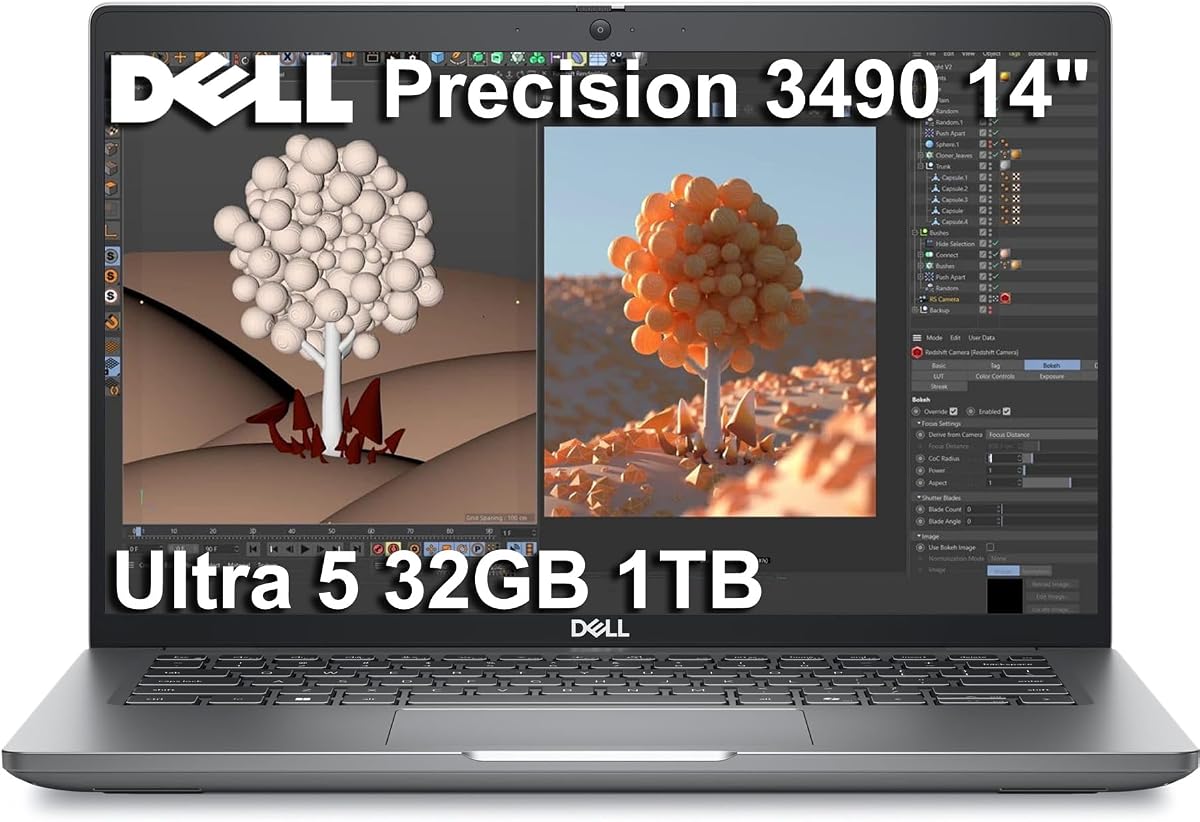
This laptop combines professional performance with a lighter form factor for easy transport. It is highly rated for its ability to maintain productivity even when working away from the office.
We may earn a commission when you buy through this link, at no additional cost to you.
The Intel Ultra 5 processor offers efficient power usage alongside strong performance. This allows for extended work sessions on battery without sacrificing significant speed during tasks.
The 14-inch screen is compact but provides clear visuals for CAD work. It is perfect for those who need to carry their machine to client sites or different workspaces daily.
If portability is a major priority for you, this model stands out. It handles moderate CAD tasks well and includes necessary certifications for professional application compatibility.
Light weight design makes daily commuting easier without heavy strain on shoulders.
Modern processor technology helps extend usable time away from power outlets.
We may earn a commission when you buy through this link, at no additional cost to you.
This 17-inch model is designed for users who need maximum screen real estate and performance. It acts as a true desktop replacement for heavy engineering and rendering workloads.
We may earn a commission when you buy through this link, at no additional cost to you.
The RTX 4000 Ada GPU provides massive graphics power for complex simulations. The large display offers clear visibility for detailed layouts and multi-window workflows.
The cooling system is robust enough to sustain high performance levels for long periods. This prevents thermal throttling during extended rendering sessions in demanding applications.
Best suited for professionals who primarily work from a fixed location. The size and weight make it less ideal for travel but perfect for stationary high-end work.
High-end GPU supports professional rendering and complex 3D modeling tasks.
17.3-inch screen provides ample space for tool palettes and project views.
We may earn a commission when you buy through this link, at no additional cost to you.
This model offers a solid middle ground with strong CPU and GPU capabilities. It is built to handle demanding CAD projects while maintaining the reliability expected from the Precision line.
We may earn a commission when you buy through this link, at no additional cost to you.
The RTX 2000 Ada provides sufficient power for detailed 3D work. It ensures that graphics rendering remains smooth even when dealing with intricate designs and textures.
While some feedback varies, the hardware specifications are well-suited for professional use. The build quality is robust and capable of withstanding daily professional demands effectively.
It is a good choice for those who need performance without the highest tier features. It supports efficient workflows and connects easily to external displays for expanded workspaces.
Mid-range dedicated GPU handles rendering tasks with solid performance levels.
Professional chassis design ensures stability during intensive computing sessions.
We may earn a commission when you buy through this link, at no additional cost to you.
This is a powerhouse machine designed for the most demanding engineering tasks available. With 128GB of RAM it can handle massive datasets and complex simulations without slowdowns.
We may earn a commission when you buy through this link, at no additional cost to you.
The RTX 4000 Ada ensures that even the most graphically intensive work runs smoothly. Combined with the i9 processor this laptop acts as a full desktop replacement for power users.
The display is bright and high contrast which aids in precision work and detail checks. It supports multiple external monitors allowing for a multi-screen workstation setup if needed.
Ideal for professionals who need the absolute best hardware available now. It is built for speed and capacity ensuring that future software updates will run efficiently too.
128GB RAM allows for heavy multitasking and large project files.
RTX 4000 Ada delivers top-tier rendering speeds for complex designs.
We may earn a commission when you buy through this link, at no additional cost to you.
This version of the 7680 increases RAM capacity significantly for better multitasking. The 64GB memory allows you to run multiple design tools and browsers simultaneously without slowdown.
We may earn a commission when you buy through this link, at no additional cost to you.
The Intel i7 processor ensures that computation tasks like simulations remain efficient. It balances power and thermal management well for sustained performance during long work sessions.
The RTX 2000 Ada provides dedicated graphics support for visualization. It helps accelerate rendering processes which is vital for maintaining productivity in professional settings.
Great for users who need extra memory for data-heavy workflows. It is a solid workstation that handles complex software requirements reliably over the long term.
64GB RAM supports running multiple heavy applications without performance loss.
Strong CPU handles complex calculations smoothly for better output.
We may earn a commission when you buy through this link, at no additional cost to you.
This Lenovo model offers a slim yet powerful option for CAD professionals who travel. It balances portability with enough power for daily design and engineering tasks.
We may earn a commission when you buy through this link, at no additional cost to you.
The Intel Ultra 7 processor provides strong performance with energy efficiency. This is ideal for users who need to work on battery for extended periods outside the office.
The display is bright enough for most environments and supports multi-monitor setups. It provides a clear view of your work without being overly heavy for commuting.
A strong choice for professionals needing a reliable daily driver. It supports essential professional applications and delivers consistent performance for typical CAD workflows.
Newer processor tech offers good speed with better battery efficiency.
Slim design makes it easier to carry for on-site work.
We may earn a commission when you buy through this link, at no additional cost to you.
Selecting the right laptop for CAD work involves understanding your specific software needs and budget constraints. This guide covers the essential factors to consider for optimal performance and value.
The CPU is the engine of your CAD workstation. Look for high-core counts and multi-threaded performance to handle simulations and complex calculations. Processors like the Intel i7 or i9 series ensure smooth multitasking.
Prioritize a processor with high clock speeds and thermal efficiency for sustained workloads.
Dedicated graphics cards are essential for rendering 3D models and real-time visualization. NVIDIA RTX or professional-grade GPUs provide the acceleration needed for software like Revit. Without these you may face lag and slower render times.
Choose a GPU with sufficient VRAM to handle larger textures and assemblies without crashing.
Memory affects how many applications you can run at once. 32GB of RAM is a solid baseline for professional work to prevent bottlenecks. Storage speed impacts boot times and file access significantly.
Aim for at least 1TB of NVMe SSD storage to keep your workspace efficient and fast.
Your screen is where you spend most of your time. Look for high resolution and accurate color reproduction for detailed design work. Anti-glare coatings help reduce eye strain during long sessions.
Consider screen size based on your portability needs. A larger display aids productivity when not using external monitors.
A good laptop should support multiple monitors and external peripherals. Thunderbolt and USB-C ports offer high-speed data transfer and docking flexibility. Ensure you have the right inputs for your mouse and stylus.
Check for Ethernet ports if you need reliable network connections for large file transfers.
For mobile professionals battery endurance is crucial. CAD work consumes significant power so look for models with efficient processors and large battery capacity. Planning for four to six hours is realistic for heavy usage.
Consider carrying a charger if you anticipate working away from an outlet for extended periods.
Professional laptops should withstand daily wear and tear. MIL-STD testing standards indicate resistance to drops and harsh environments. A sturdy chassis protects your investment during travel.
Prioritize build quality to ensure the device lasts through years of demanding use and reliability.
ISV certifications ensure that your laptop is tested with professional software. This means fewer crashes and optimized performance for tools like AutoCAD. Always check if your software vendor supports your hardware choice.
Certified systems offer peace of mind and stability for critical professional deliverables and deadlines.
Keep your workspace clean and well-ventilated to prevent overheating. Regularly clean the air vents with compressed air to maintain airflow and protect internal components from dust accumulation.
Use a high-quality surge protector to shield your device from power fluctuations. Sudden spikes can damage the motherboard and storage so consistent stable power is key for hardware longevity.
Update your drivers and software regularly to ensure optimal compatibility. Manufacturer updates often include performance patches and security fixes that keep your system running efficiently and safely.
For AutoCAD you should look for a multi-core processor like an Intel i7 or i9 and at least 16GB of RAM. A dedicated GPU helps with 3D rendering and complex views. Ensure your storage is an SSD for faster file loading and saving.
Yes workstation laptops are built to handle the sustained loads of engineering software. They typically have ISV certifications which means they are tested for stability with apps like SolidWorks and Revit. This reduces the risk of crashes.
32GB of RAM is generally sufficient for most professional CAD tasks and multitasking. If you work with massive assemblies or run virtual machines simultaneously consider upgrading to 64GB. For standard daily workloads this amount offers smooth performance.
Higher resolution screens provide sharper details which is vital for precision drafting. Aim for at least 1920×1200 pixels to see fine lines clearly. Accurate color calibration is also important for clients who rely on visual fidelity.
Gaming laptops often have powerful components suitable for CAD but may lack professional certifications. They can work well for rendering but might face driver stability issues in specific enterprise applications. Workstations are preferred for long-term professional stability.
Lowering screen brightness and closing unused background applications helps save power. Using a power saver mode in your OS reduces CPU strain when full speed is not needed. Keeping your battery healthy also involves avoiding constant full discharges.
The top picks offer a range of options from portable machines to powerful desktop replacements. Your choice depends on how much computing power you need versus how often you travel to job sites.
Prioritize the features that directly impact your workflow such as RAM capacity and GPU strength. Balancing performance with build quality ensures you get reliable support for your daily projects.
Always verify current prices and availability before buying. Technology evolves quickly and deals change frequently so checking the latest offers helps you secure the best value today.