
Guermok Video Capture Card
4.4Editor score
USB 3.0 High Speed
1080p 60fps Output
Plug and Play Setup
Finding the right HDMI recorder can transform how you capture and preserve your favorite content. Whether you are streaming gameplay or archiving old tapes, a reliable device ensures high quality results without constant monitoring.
We compared ten leading models based on resolution support, latency, compatibility, and ease of use. Our analysis focuses on standalone recorders and capture cards to cover various workflows and budgets effectively.
Each pick highlights key strengths and ideal use cases to help you decide quickly. Please note that product availability and pricing can change frequently, so always check the latest details before purchasing.
4.4Editor score
4.0Editor score

4.1Editor score
As an Amazon Associate we earn from qualifying purchases.
Below is a side-by-side comparison of all ten models to help you evaluate their core specifications and features at a glance before making your final decision.





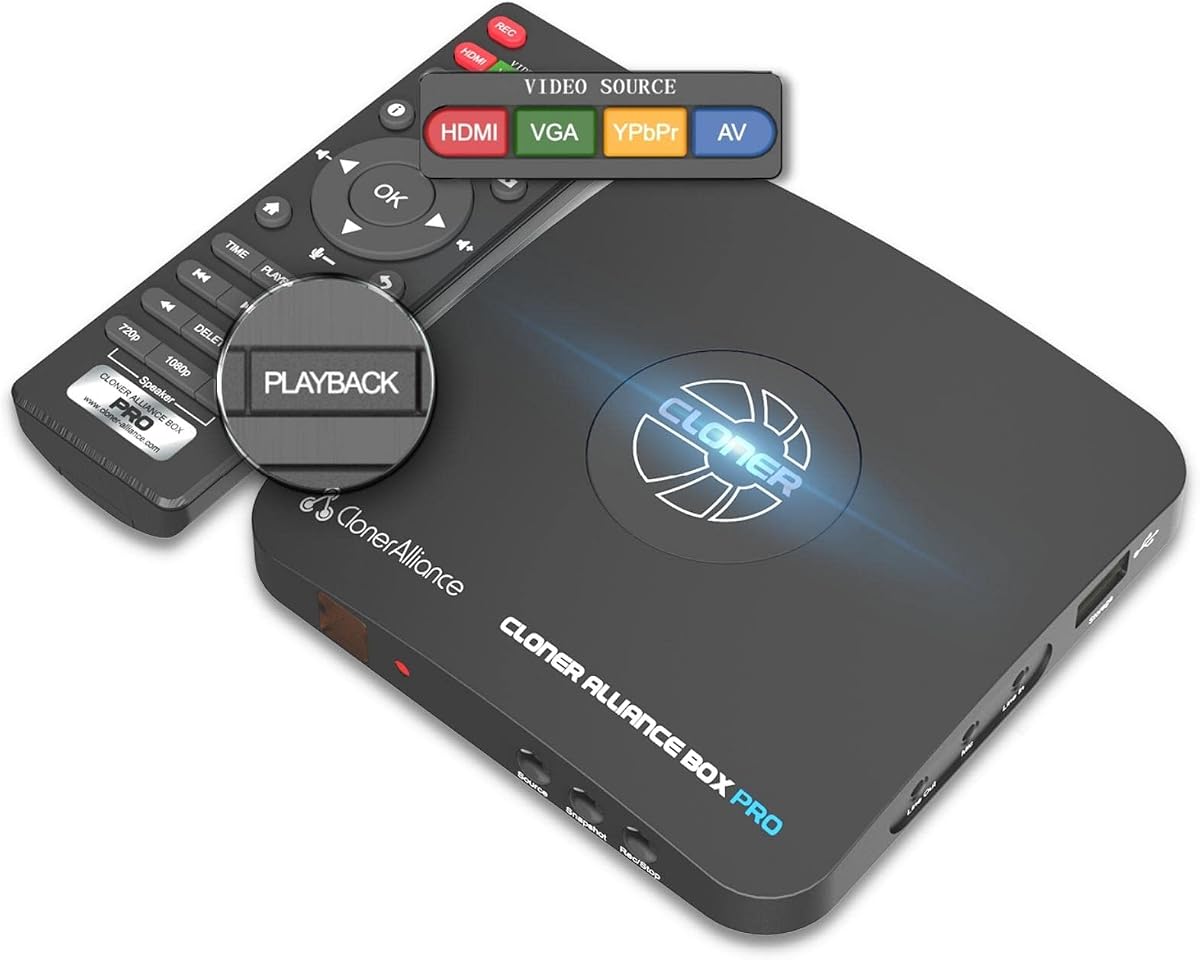
The ClonerAlliance Box Pro stands out as a dedicated standalone HDMI recorder that simplifies capturing video without a computer. It supports 1080p at 60fps and handles both HDMI and legacy analog inputs like RCA and VGA.
We may earn a commission when you buy through this link, at no additional cost to you.
Its ability to record directly to USB storage makes it ideal for archiving games or older VHS tapes. The ultra-low latency ensures smooth playback and real-time recording with no lag during use.
While it lacks 4K support and HDCP compliance, these limitations are acceptable for analog or unprotected content. The included remote and schedule features add convenience for automated recording tasks.
This device is best for users needing a simple plug-and-play solution for gaming or media archiving. It offers reliable performance without the complexity of PC-based capture software.
You can record and playback directly on your TV using the remote without needing a computer setup or drivers.
Analog inputs allow you to digitize older camcorders or VHS tapes effortlessly for modern storage solutions.
We may earn a commission when you buy through this link, at no additional cost to you.
The Guermok Video Capture Card offers excellent value for budget-conscious users looking to stream or record gameplay. It supports 1080p at 60fps output and accepts up to 4K input via USB 3.0.
We may earn a commission when you buy through this link, at no additional cost to you.
Its aluminum construction aids heat dissipation during long sessions while maintaining low latency for responsive gaming. It works with most major streaming software including OBS and VLC.
However it requires a computer connection and capture software to function meaning it is not a standalone solution. You also need to ensure you use the correct USB port for 3.0 speeds.
This capture card is ideal for gamers and streamers who want a portable and affordable way to capture video. It delivers solid performance for the price without demanding system resources.
The aluminum alloy body helps dissipate heat effectively ensuring stable performance during extended streaming or recording sessions.
Compatible with major platforms like Twitch and YouTube it integrates seamlessly into your existing streaming workflow setup.
We may earn a commission when you buy through this link, at no additional cost to you.
The ClonerAlliance UHD Pro delivers high-fidelity 4K recording capabilities in a standalone unit. It supports H.265 and H.264 codecs for efficient file sizes while capturing up to 30fps cinematic videos.
We may earn a commission when you buy through this link, at no additional cost to you.
Its ability to pass through 4K signals ensures you can watch without interruption while recording content from consoles or media players. The pause and resume features help keep clips continuous without file splitting.
Although it lacks HDR support and costs more than 1080p models the image quality is superior for archiving high-resolution media. It remains user-friendly with simple menus and remote control.
This recorder is perfect for enthusiasts who want to preserve 4K content without relying on a PC. It balances premium features with standalone convenience effectively.
Using H.265 codec reduces file sizes significantly without compromising visual quality for easier storage management.
Support for 24fps and 30fps allows you to capture videos with a movie-like aesthetic for better visual storytelling.
We may earn a commission when you buy through this link, at no additional cost to you.
This capture card provides a reliable entry point for streamers needing HDMI capture capabilities. It supports 1080p at 60fps output and accepts 4K inputs ensuring compatibility with modern consoles.
We may earn a commission when you buy through this link, at no additional cost to you.
The built-in microphone input allows you to add commentary without extra audio interfaces making it convenient for solo creators. It works with popular streaming software like OBS and Twitch.
While the output caps at 1080p the device handles 4K input smoothly for high-quality source capture. Its loop-out feature ensures you can play games with minimal lag.
Ideal for new streamers or casual recorders this card offers solid functionality at a competitive price. It meets most needs for standard HD content creation effectively.
The microphone port enables you to add voiceovers directly during recording without needing external sound hardware.
As a true plug-and-play device it requires no driver installation to work with Windows and Mac systems instantly.
We may earn a commission when you buy through this link, at no additional cost to you.
The Audio Express AXHDCAP is a compact capture card suitable for light streaming and video conferencing. It supports 4K input but outputs at 1080p 30fps via USB 2.0 which is sufficient for meetings.
We may earn a commission when you buy through this link, at no additional cost to you.
Its small form factor makes it highly portable for creators who travel frequently. It works with various operating systems and streaming platforms including Zoom and OBS without extra setup.
While not ideal for high-speed gaming due to the 30fps limit it handles static content well. The thermal dissipation design ensures it stays cool during use.
This device is best for educators or occasional streamers on a tight budget. It offers reliable performance for presentations and meetings without breaking the bank.
Its lightweight and compact design allows you to carry it anywhere for quick setup at events or classes.
Plug-and-play functionality means you can start capturing video instantly without installing any drivers or software.
We may earn a commission when you buy through this link, at no additional cost to you.
This capture card is engineered for gamers who need smooth streaming performance. It delivers 1080p at 60fps with minimal delay ensuring your audience sees gameplay in real time.
We may earn a commission when you buy through this link, at no additional cost to you.
Its compatibility with next-gen consoles and cameras makes it a versatile tool for various content types. The compact design fits easily in any bag for travel.
While it does not support 4K output the high-speed USB 3.0 ensures stable data transfer for HD content. It integrates seamlessly with Streamlabs and OBS software.
Streamers looking for a reliable and portable setup will find this card useful. It balances cost and performance well for standard HD broadcasting needs.
Works with PS5 Xbox Series X and Switch without additional adapters for immediate gameplay capture.
The lightweight build ensures you can take your streaming gear anywhere without adding bulk to your bag.
We may earn a commission when you buy through this link, at no additional cost to you.
This capture box stands out for its dual HDMI inputs allowing you to switch or mix sources. It includes a 7-inch screen for previewing video without needing a separate monitor.
We may earn a commission when you buy through this link, at no additional cost to you.
Features like Picture-in-Picture make it great for presentations or multi-camera setups. It can run on batteries enabling field use for events or outdoor filming.
While it is pricier than single-port cards the versatility justifies the cost for pro users. The 4K support ensures future-proofing even if recording is limited to 1080p.
It is ideal for professionals or event organizers needing flexible video switching. This recorder offers robust features that standard capture cards cannot match.
Connect two HDMI sources simultaneously to switch between cameras or consoles without unplugging cables constantly.
Optional battery power allows you to record away from power outlets for mobile events or outdoor filming.
We may earn a commission when you buy through this link, at no additional cost to you.
The ZowieREC offers a sleek design with premium materials that look great in any setup. It allows standalone 4K recording without a PC making it convenient for gaming or conferencing.
We may earn a commission when you buy through this link, at no additional cost to you.
Schedule recording ensures you never miss content by automatically capturing at set times. It includes pause and resume functions for better control over file organization.
Although it is more expensive than standard options the build quality and ease of use are impressive. It lacks a built-in screen so playback relies on your TV or monitor.
This recorder suits users who value design and reliability in a standalone unit. It delivers high-quality capture with minimal setup for home or studio use.
Set automatic recording times to capture shows or gameplay without needing to be present at the device.
The premium aluminum casing ensures durability and helps dissipate heat during extended recording sessions.
We may earn a commission when you buy through this link, at no additional cost to you.
The ViewPro combines a recorder and monitor into one portable unit. It captures 1080p at 60fps and includes a built-in screen so you can preview and play videos directly.
We may earn a commission when you buy through this link, at no additional cost to you.
Supporting both HDMI and analog inputs it is versatile for various devices. It uses SD cards or USB drives for storage and comes with a remote for easy navigation.
While it lacks 4K support the included display makes it self-contained for on-the-go recording. The built-in speaker allows immediate audio checking without headphones.
This recorder is perfect for fieldwork or locations where a TV is not available. Its all-in-one design simplifies video capture significantly for users.
The 7-inch LCD and speaker let you review recordings anywhere without needing an external monitor setup.
Inputs for AV VGA and YPbPr ensure you can still record older devices alongside modern HDMI sources.
We may earn a commission when you buy through this link, at no additional cost to you.
The UltraStudio Express is a professional tool designed for broadcast quality video capture. It uses SDI connections which are more stable than HDMI for long distance or professional environments.
We may earn a commission when you buy through this link, at no additional cost to you.
Supporting multiple SDI speeds from 3G to 12G it handles high-resolution content with ease. It includes loop output for monitoring without signal loss during recording.
While it is not a direct HDMI solution it fits specific workflows in studios or broadcast settings. It is best for users who need professional grade reliability.
This recorder is ideal for professional production teams needing robust video capture. It ensures high-quality output suitable for broadcasting and archival.
SDI connections ensure stable long-distance signal transmission essential for high-end production environments.
Support for various SDI speeds allows you to adapt to different content resolutions and requirements easily.
We may earn a commission when you buy through this link, at no additional cost to you.
Choosing the right HDMI recorder depends on your specific needs such as resolution, portability, and standalone requirements. Here are key factors to consider.
Resolution determines the quality of your recorded video. Look for 1080p at 60fps for standard HD content or 4K support if you need future-proof archival. Ensure the device supports your source resolution.
Prioritize 1080p 60fps for gaming or 4K if you plan to record high-fidelity content. Always check both input and output limits.
Standalone recorders allow you to capture without a computer using USB or SD card storage. PC-based capture cards need software and a system connection. Decide if you want mobility or advanced editing.
Choose standalone for simplicity and PC cards if you need live streaming or advanced processing during capture.
Low latency is critical for gaming and live streaming to keep action in sync. Devices with under 90ms latency are ideal. High latency can cause delay between screen and recording.
Opt for models explicitly stating ultra-low latency if you game or stream. Check product data for latency claims.
Check if your device needs HDMI only or legacy inputs like VGA and RCA. Some recorders offer multiple ports for archiving old tapes or camcorders. Ensure it matches your source.
Select models with mixed inputs if you plan to digitize analog sources alongside modern HDMI devices.
Internal storage limits or external drives like USB and SD cards. Some devices support both. Ensure the device works with your preferred file systems like NTFS or exFAT.
Look for expandable storage options to handle large video files without constant transfers.
Verify audio capture capabilities. Some devices include mic inputs for commentary. Others pass through embedded audio. Ensure the output matches your streaming or recording needs.
Pick devices with mic inputs if you need to add voiceovers without extra hardware.
Aluminum or premium builds help with heat dissipation during long sessions. Plastic cases may be less durable. Consider the design for portability or stationary use.
Choose metal cases for better cooling if you record frequently or for extended periods.
Prices vary from budget to premium. Warranty terms like 2-year coverage add value. Read reviews to ensure reliability. Balance cost with features you actually need.
Prioritize models with solid warranties to protect your investment over time.
Connect your source device to the HDMI input port on the recorder. Ensure the output is connected to a TV or monitor for preview if supported. Turn on both devices to check signal.
Insert a USB drive or SD card formatted correctly for the recorder. Select your recording resolution and start the session. Use the remote or software controls to pause or stop.
Keep the device in a cool place to prevent overheating. Clean the ports gently with a soft cloth. Avoid dropping or exposing to moisture to ensure longevity.
Most HDMI recorders work with consoles like PS5 and Xbox. However protected content may not display due to HDCP. Check compatibility notes before purchasing.
Yes capture cards work with OBS and other software for live streaming. Standalone recorders are better for offline archiving. Ensure you have a PC for streaming.
Most use USB drives or SD cards. Some support both. Ensure the storage has enough space and correct formatting like NTFS.
Plug-and-play models do not need drivers. PC-based cards may need setup. Check product details for driver requirements before purchase.
Standalone recorders with RCA or composite inputs work. You need an analog to digital converter. PC cards usually require extra adapters.
Standalone recorders often include built-in screens. Others rely on your TV or monitor for preview. Check if the model has a screen for independence.
No only specific models like ClonerAlliance UHD Pro support 4K. Most budget options cap at 1080p. Verify specs for resolution before buying.
Capture cards connect to computers for editing. Standalone recorders save directly to drives. Choose based on whether you need a PC or not.
We reviewed ten top HDMI recorders covering various budgets and needs. From standalone units to capture cards there is a fit for everyone.
Prioritize features like resolution and standalone use based on your main goal. Reliable options include ClonerAlliance for standalone and Guermok for budget.
Prices and stock change frequently so check the latest details before buying. Ensure your choice matches your workflow for best results.